# Frequently Asked Questions ## General ### What is the Nuvibit Terraform Collection (NTC)? NTC is a modular collection of enterprise-grade Terraform and OpenTofu [building blocks](https://docs.nuvibit.com/ntc-building-blocks/) for setting up and operating a secure, scalable and compliant AWS Landing Zone. It covers network architecture, security hardening, compliance automation, and more. ### Who is NTC designed for? NTC is built for teams managing multi-account AWS environments: Platform Engineering, Cloud and DevOps, Security, and Enterprise Architecture. It is especially suited for regulated industries and the public sector. ### What outcomes can I expect after adopting NTC? A reproducible, version-controlled platform setup with defined standards, guardrails, and centralized security and audit log structures, consistently deployable across all accounts and environments. ### Is NTC an all-or-nothing solution? No. NTC is modular by design: building blocks can be adopted incrementally, combined freely, and extended as needed. You can start with a limited scope and expand over time. ## Getting Started ### What are the prerequisites for using NTC? You need a valid NTC subscription, an AWS Management Account, and a CI/CD pipeline (e.g. Spacelift, GitHub Actions). After a one-time bootstrap of the Terraform state, [NTC Organizations](https://docs.nuvibit.com/ntc-building-blocks/management/ntc-organizations/) and [NTC Parameters](https://docs.nuvibit.com/ntc-building-blocks/management/ntc-parameters/) are typically the first building blocks you deploy, creating your AWS Organization, the OU structure and the central parameters bucket. From there, you incrementally add building blocks for identity, audit logging, security, and networking based on your target architecture. See the [Quickstart Guide](https://docs.nuvibit.com/getting-started/quickstart) for step-by-step instructions. ### How is NTC deployed? Through versioned repositories and a structured pipeline workflow (Plan, Review, Apply). The goal is controlled, traceable rollouts instead of manual changes, with clear separation between environments. See our [CI/CD Pipelines for IaC Delivery](https://docs.nuvibit.com/whitepapers/cicd-pipelines-iac-delivery/) whitepaper for best practices. ### Can NTC be introduced into an existing AWS environment? Yes. Adoption typically happens incrementally: define the target architecture, establish baselines, then roll out building blocks in a controlled manner. No big-bang migration required. Existing resources can be gradually brought under IaC management. ### Does NTC support both Terraform and OpenTofu? Yes. NTC is fully compatible with both Terraform and OpenTofu workflows and is typically operated through CI/CD pipelines such as Spacelift, GitHub Actions, or similar tools. ## Architecture & Design ### What does the account model look like? NTC follows the [Nuvibit AWS Reference Architecture (NARA)](https://docs.nuvibit.com/whitepapers/nuvibit-aws-reference-architecture/), a proven multi-account approach with core accounts for Management, Security Tooling, Log Archive, and Connectivity. Optional dedicated accounts for Monitoring and Backup can be added based on your needs. Workload accounts are separated by stage (production, development, sandbox) with tailored guardrails. The organizational unit structure groups accounts by security and operational requirements rather than by org chart. ### How does NTC handle network architecture? NTC provides a complete network architecture including [AWS Transit Gateway](https://docs.nuvibit.com/ntc-building-blocks/connectivity/ntc-core-network/) for interconnecting VPCs and regions, [AWS Network Firewall](https://docs.nuvibit.com/ntc-building-blocks/connectivity/ntc-network-firewall/) for centralized traffic inspection, [Amazon Route 53](https://docs.nuvibit.com/ntc-building-blocks/connectivity/ntc-route53/) for DNS management, [IPAM](https://docs.nuvibit.com/ntc-building-blocks/connectivity/ntc-ipam/) for IP address management, and support for AWS Direct Connect and VPN for hybrid connectivity. These are areas that AWS Control Tower does not address. ### What governance capabilities does NTC provide? NTC covers account standards and baselines, guardrails via [SCPs and RCPs](https://docs.nuvibit.com/ntc-building-blocks/management/ntc-organizations/organizational-policies/), tagging and naming standards, repeatable [templates](https://docs.nuvibit.com/ntc-building-blocks/templates/) for new accounts and environments, and centralized audit log archiving for compliance. ### How are workload accounts structured? Each workload and stage (e.g. production, development, sandbox) gets its own dedicated AWS account. This isolation ensures that incidents or misconfigurations in one account do not affect others. Guardrails can be tailored per account type: stricter for production, more flexible for development, and unrestricted for sandboxes. Each account receives a consistent baseline with pre-configured security, connectivity, and audit log forwarding. ### How is configuration drift managed? Since all changes flow through the code workflow, drift is structurally minimized. Any deviations between actual and desired state are made visible and can be corrected cleanly through the standard pipeline process. ### How does account provisioning and baselining work? The [NTC Account Factory](https://docs.nuvibit.com/ntc-building-blocks/management/ntc-account-factory/) automates AWS account creation via AWS Organizations. Each new account automatically receives a [baseline](https://docs.nuvibit.com/ntc-building-blocks/management/ntc-account-factory/account-baseline/) applied through CodePipeline and CodeBuild, including security settings, connectivity configuration, and log forwarding. [Account lifecycle](https://docs.nuvibit.com/ntc-building-blocks/management/ntc-account-factory/account-lifecycle/) events (e.g. creation, closure) trigger event-driven automation via Step Functions and Lambda for tasks like removing default VPCs, enabling opt-in regions, or increasing service quotas. ### How does NTC share configuration across accounts? [NTC Parameters](https://docs.nuvibit.com/ntc-building-blocks/management/ntc-parameters/) provides an S3-based cross-account parameter sharing mechanism. A central bucket stores configuration data with organization-wide read access and per-account write access. This replaces the complexity of SSM Parameter Store in multi-account setups and supports structured data without the 8KB size limit of SSM parameters. ## Security & Compliance ### Is Nuvibit itself ISO/IEC 27001 certified? Yes. Nuvibit AG has been ISO/IEC 27001:2022 certified since April 2026, audited by Proks Certification GmbH, and the certificate is valid until April 2029. It covers the development, sales, maintenance, and support of NTC, and confirms that Nuvibit runs its own information security management system (ISMS) under independent audit, separate from the security controls NTC deploys inside your AWS environment. ### What security controls does NTC implement? NTC implements preventive controls (SCPs, RCPs, and custom policies that actively block unwanted actions), detective controls (centralized Security Hub, GuardDuty, Inspector, IAM Access Analyzer, and AWS Config with standardized baselines), and network controls (AWS Network Firewall inspection, segmented routing, and centralized traffic management). ### How does NTC support auditability? Through version-controlled configuration, fully traceable changes via Git and pipeline, and a dedicated [Log Archive](https://docs.nuvibit.com/ntc-building-blocks/security/ntc-log-archive/) account with KMS-encrypted S3 buckets for compliance-relevant infrastructure audit logs such as CloudTrail, VPC Flow Logs, GuardDuty findings, and AWS Config data. This is not for application logs, but specifically for platform and infrastructure audit trails required for regulatory compliance. Optional compliance-mode Object Lock ensures audit logs cannot be deleted before the retention period expires. Combined with centralized [Security Hub](https://docs.nuvibit.com/ntc-building-blocks/security/ntc-security-tooling/) and consistent standards across all accounts, this simplifies both internal audits and external certifications. ### Is NTC relevant for ISO 27001 or similar certifications? Yes, in addition to Nuvibit's own ISO/IEC 27001 certification as a company, NTC also supports documentable, reproducible infrastructure processes, which is a key requirement for ISMS certifications. The code-based change history replaces manual evidence documentation and significantly simplifies control verification. ### Does NTC integrate central AWS security services? Yes. Central AWS security services such as Security Hub, GuardDuty, Inspector, CloudTrail, Config, and IAM Access Analyzer are operated in a dedicated [Security Tooling](https://docs.nuvibit.com/ntc-building-blocks/security/ntc-security-tooling/) account. They provide a centralized view and consistent standards across all workload accounts. These services are not just activated, but properly configured and centrally aggregated. ### Can I bring my own policies and standards? Absolutely. NTC is adapted to your specific requirements: naming conventions, tagging strategies, audit log retention, access controls, and network standards. The building blocks are configurable, not rigid. You can also define custom SCPs and RCPs alongside NTC's pre-built [guardrail templates](https://docs.nuvibit.com/ntc-building-blocks/templates/ntc-guardrail-templates/). ## Integration ### Can NTC work alongside AWS Control Tower? Yes. NTC can complement and extend existing [Control Tower](https://docs.nuvibit.com/ntc-building-blocks/management/ntc-control-tower-integration/) setups. Where Control Tower provides basic account-vending capabilities, NTC goes much further: complete network architecture, security hardening, compliance automation, and consistent account baselines, all as versioned code. ### Does NTC require Spacelift? No. NTC is pipeline-agnostic and works with any Terraform-capable CI/CD system. Spacelift is recommended because it offers drift detection, policy-as-code, and role-based execution out of the box, but it is not a requirement. ### What CI/CD tools are supported? NTC works with any CI/CD platform that supports Terraform or OpenTofu execution, including Spacelift, GitHub Actions, GitLab CI, Azure DevOps, Jenkins, and others. ### How does pipeline authentication to AWS work? OpenID Connect (OIDC) is the recommended authentication method. It provides short-lived tokens for pipeline authentication, eliminating the need for static credentials such as IAM access keys. AWS natively supports OIDC integration with CI/CD tools like Spacelift, GitHub Actions, and GitLab. ### Does NTC support the AWS European Sovereign Cloud? Yes. NTC v2 building blocks fully support the [AWS European Sovereign Cloud (ESC)](https://docs.nuvibit.com/whitepapers/aws-multi-partition-strategies/), which operates as an independent partition from commercial AWS. This is particularly relevant for organizations in regulated industries that require data sovereignty within the EU. ### Can NTC manage multiple AWS partitions (e.g. ESC and commercial)? Yes. NTC natively supports multi-partition deployments through Terraform/OpenTofu provider aliasing. Shared building block configurations can target both commercial AWS and ESC simultaneously from a single codebase, ensuring consistent governance, security controls, and account structures across partitions. This unified approach prevents configuration drift and reduces operational overhead compared to managing each partition independently. See the [Multi-Partition Strategies](https://docs.nuvibit.com/whitepapers/aws-multi-partition-strategies/) whitepaper for detailed architecture patterns. ## Licensing & Support ### How is NTC licensed? NTC is available as a subscription, either directly through Nuvibit, through AWS Marketplace, or through authorized reseller partners. Optional professional services for implementation, architecture consulting, and ongoing support are also available. ### How are updates and new versions handled? Updates are versioned and plannable. Each building block is independently versioned, so changes can be adopted per module at your own pace without affecting other parts of your setup. Migration guides are provided for major version upgrades. See the [NTC Releases](https://docs.nuvibit.com/ntc-releases/) for the latest changes. ### What support options are available? Standard Support is included with every subscription and covers best-effort SLA and guidance from AWS-certified engineers. Enterprise Support adds custom SLAs, a dedicated engineer, priority handling, and on-demand workshops. Professional Services are available on an hourly basis for implementation, customization, and operational assistance. ### Are reference architectures or example setups available? Yes. The [Nuvibit AWS Reference Architecture (NARA)](https://docs.nuvibit.com/whitepapers/nuvibit-aws-reference-architecture/) is a battle-tested framework covering core accounts (Management, Security Tooling, Log Archive, Connectivity), workload account structures, and optional accounts for monitoring and backup. Implementation blueprints and examples are available to accelerate your setup. ### What if I want to stop using NTC? There is no proprietary lock-in. NTC consists of standard Terraform/OpenTofu code. You receive the complete source code and can manage it in your own Git repositories. There is no call-home dependency, no license server, and no runtime checks. Your infrastructure runs independently. Source: https://docs.nuvibit.com/faq --- # Getting Started Welcome to Nuvibit! Our mission is to simplify and accelerate cloud adoption by providing enterprise-grade tools and expertise. At the core of this mission is the **Nuvibit Terraform Collection (NTC)**: a suite of **modular Terraform / OpenTofu building blocks** for building a secure, scalable and compliant **AWS foundation**. --- ## Why Nuvibit? Whether you’re an enterprise with complex multi-account requirements or a startup looking for a reliable cloud foundation, **NTC** offers powerful solutions to help you succeed. ### **Who Benefits from NTC:** - **Enterprises**: Gain a scalable, secure AWS Landing Zone tailored to your needs, reducing time-to-value for cloud migration and management. - **Startups and SMBs**: Quickly establish reliable infrastructure without the steep learning curve of creating it from scratch. - **DevOps Teams**: Simplify infrastructure deployment and management with reusable, tested modules that reduce operational overhead. - **Cloud Architects**: Build compliant and enterprise-grade AWS environments with confidence, leveraging NTC’s pre-integrated security and governance features. ### **Key Features:** - **Infrastructure as Code (IaC)**: Manage 100% of your AWS foundation as code, ensuring resilience, traceability, and repeatability. - **Accelerated Deployment**: Save time and focus on innovation while NTC simplifies the complex tasks of building and managing your AWS foundation. - **Built-In Compliance**: Designed with security and governance in mind, leveraging best practices to meet regulatory and organizational standards. - **Modular Flexibility**: Adapt and scale your AWS environment effortlessly with modular building blocks tailored to your specific needs. --- ## Professional Services & Expertise Nuvibit goes beyond just offering modules—we provide **end-to-end professional services** to ensure your success. With extensive experience in highly regulated industries, including **finance, healthcare, and government sectors**, we specialize in navigating complex compliance and security challenges. ### **Key Services We Provide:** - **Consultation**: Tailored infrastructure designs for complex, multi-account AWS environments. - **Implementation Support**: Hands-on assistance in deploying and customizing NTC for your unique needs. - **Compliance Advisory**: Ensure adherence to industry standards such as ISO 27001, GDPR, HIPAA, and more. - **Operational Training**: Equip your teams with the knowledge and skills to effectively manage infrastructure. - **Ongoing Support**: Access expert guidance and troubleshooting to keep your environment optimized. Our proven track record includes delivering AWS solutions for enterprises and governments, helping them establish secure, scalable, and compliant cloud environments. --- ## Nuvibit's Platform Engineering Approach At Nuvibit, we understand that building an AWS Landing Zone is just the starting point. To unlock the full potential of an AWS environment, we focus on delivering a **comprehensive platform solution** that maximizes efficiency and productivity through end-to-end automation. ### **Internal Developer Platforms (IDPs)** Our platform engineering approach includes creating **Internal Developer Platforms (IDPs)** tailored to your organization’s needs. A well-designed IDP enables your teams to focus on building and deploying applications without unnecessary complexity. ### **Key Features of an IDP:** - **Identity Management**: Centralized identity and access management (IAM) for consistent, secure user provisioning across accounts and services. - **Secrets Management**: Automated, secure handling of sensitive data using tools like AWS Secrets Manager or HashiCorp Vault. - **CI/CD Tooling**: Streamlined pipelines with tools like [Spacelift](https://spacelift.io/), [GitHub Actions](https://github.com/features/actions), and [GitLab CI/CD](https://about.gitlab.com/solutions/continuous-integration/) for consistent, efficient deployments. - **Observability & Monitoring**: Real-time insights into system performance using tools like CloudWatch, Prometheus, and Grafana. - **End-to-End Automation**: Infrastructure provisioning, application deployment, and monitoring workflows with minimal manual intervention. - **Governance & Compliance**: Built-in guardrails to meet regulatory requirements and simplify audits. By combining Landing Zones with an enterprise-grade platform, we ensure your teams have the tools they need to innovate, accelerate delivery, and maintain compliance with ease. --- ## Your Journey to AWS Excellence: Timeline and Milestones Nuvibit ensures a smooth and efficient onboarding process, getting you up and running with a secure AWS foundation in no time. By combining our ready-to-use NTC building blocks with expert professional services, we minimize effort while maximizing results. ### **Step 0: Get in Contact and Request a Demo** - [Reach out](https://nuvibit.com/contact/) to our team and [request a demo](https://nuvibit.com/meeting/) to experience the magic of platforms with NTC. ### **Step 1: Subscription Contract Signing (Day 0)** - Initiate onboarding and receive access to the Nuvibit Terraform Collection. ### **Step 2: Kickoff Workshop (Week 1)** - Define requirements, goals, and deliverables through a collaborative workshop. ### **Step 3: Initial Setup & Integration (Week 2-3)** - Configure prerequisites, integrate NTC building blocks, and prepare your AWS environment. ### **Step 4: Deployment Assistance (Week 3-4)** - Deploy the AWS foundation, validate configurations, and ensure best practice alignment. ### **Step 5: Knowledge Transfer & Handover (Week 4-5)** - Provide training, documentation, and guidance for ongoing operations. ### **Step 6: Go Live & Support (Week 5+)** - Launch production workloads with access to ongoing support from Nuvibit experts.
:::note NTC can also be used in an existing AWS environment. Extra effort may be required based on the implementation strategy. ::: --- ## Ready to Get Started? Dive into the [Quickstart Guide](https://docs.nuvibit.com/getting-started/quickstart/) to begin building your AWS foundation with the Nuvibit Terraform Collection. Whether you’re a seasoned DevOps professional or just starting your cloud journey, NTC has everything you need to succeed. [Go to the Quickstart Guide →](https://docs.nuvibit.com/getting-started/quickstart/) Source: https://docs.nuvibit.com/getting-started/ --- # Machine-readable docs The documentation is published in two forms: the site you are reading, and plain-text files meant for tools. Use the second form when you work with an AI assistant or a coding agent, or when a script needs module and release data. ## For AI assistants and coding agents The site follows the [llms.txt](https://llmstxt.org/) convention. | File | Content | Use it when | | --- | --- | --- | | [`/llms.txt`](pathname:///llms.txt) | Index of all pages with a one-line description each | The tool should pick the pages it needs | | [`/llms-full.txt`](pathname:///llms-full.txt) | All pages in one file | The tool can take the whole documentation as context | | `.md` | One page as clean Markdown | You want to hand over a single page | Every page has a Markdown copy at its own address with `.md` in place of the trailing slash. The copy of this page is [`/getting-started/machine-readable-docs.md`](pathname:///getting-started/machine-readable-docs.md). ```bash # the page as the browser shows it https://docs.nuvibit.com/ntc-building-blocks/management/ntc-account-factory/ # the same page as Markdown https://docs.nuvibit.com/ntc-building-blocks/management/ntc-account-factory.md ``` The Markdown copies contain what the pages contain: descriptions, usage examples taken from the implementation blueprints, and the input and output reference of each module. Module source code is not part of the documentation and stays behind the NTC subscription. :::tip When you ask an assistant to write an NTC module call, give it the Markdown copy of that module page. The inputs it then uses are the ones of the current release. ::: ## For scripts Two static JSON files are regenerated with every build of the site. | Endpoint | Content | | --- | --- | | [`/api/modules.json`](pathname:///api/modules.json) | Every module with name, provider, current version, description, domain tag and documentation link | | [`/api/releases.json`](pathname:///api/releases.json) | Every release with version, date, release notes and the module it belongs to | ```bash # current version of every module curl -s https://docs.nuvibit.com/api/modules.json \ | jq -r '.modules[] | "\(.name) \(.provider) \(.version)"' # the five most recent releases curl -s https://docs.nuvibit.com/api/releases.json \ | jq -r '.releases | sort_by(.date) | reverse | .[:5][] | "\(.date[:10]) \(.tag) \(.version)"' ``` A typical use is a scheduled job that compares the versions pinned in your repositories with `modules.json` and opens a pull request when a module has moved. [Versions, releases and upgrades](https://docs.nuvibit.com/getting-started/versioning/) describes how to judge such an update. Source: https://docs.nuvibit.com/getting-started/machine-readable-docs --- # Module map NTC is modular. Each module covers one capability of an AWS Landing Zone and is versioned on its own. This page shows what exists and in which order the pieces are usually rolled out. ## Modules by domain The collection is organized in five domains. The version next to each module is its latest release. **Management** - [ntc-account-factory](https://docs.nuvibit.com/ntc-building-blocks/management/ntc-account-factory/) 2.8.3: Terraform module to manage NTC Account Factory - [ntc-identity-center](https://docs.nuvibit.com/ntc-building-blocks/management/ntc-identity-center/) 2.2.1: Terraform module to manage AWS IAM Identity Center (successor to AWS SSO) - [ntc-organizations](https://docs.nuvibit.com/ntc-building-blocks/management/ntc-organizations/) 2.4.0: Terraform module to manage AWS Organizations - [ntc-parameters](https://docs.nuvibit.com/ntc-building-blocks/management/ntc-parameters/) 2.0.3: Terraform module to store and read JSON parameters and share across organization **Security** - [ntc-log-archive](https://docs.nuvibit.com/ntc-building-blocks/security/ntc-log-archive/) 2.1.1: Terraform module to manage core foundation log archive - [ntc-security-tooling](https://docs.nuvibit.com/ntc-building-blocks/security/ntc-security-tooling/) 2.1.2: Terraform module to manage core security tooling **Connectivity** - [ntc-core-network](https://docs.nuvibit.com/ntc-building-blocks/connectivity/ntc-core-network/) 2.1.0: Terraform module to manage Core Network (Transit Gateway, VPN & Direct Connect) - [ntc-ipam](https://docs.nuvibit.com/ntc-building-blocks/connectivity/ntc-ipam/) 2.0.1: Terraform module to manage Amazon VPC IP Address Manager (IPAM) - [ntc-network-firewall](https://docs.nuvibit.com/ntc-building-blocks/connectivity/ntc-network-firewall/) 2.0.1: Terraform module to manage AWS Network Firewall - [ntc-route53](https://docs.nuvibit.com/ntc-building-blocks/connectivity/ntc-route53/) 2.1.0: Terraform module to manage Route53 (DNS) - [ntc-vpc](https://docs.nuvibit.com/ntc-building-blocks/connectivity/ntc-vpc/) 2.0.4: Terraform module to manage Amazon Virtual Private Cloud (VPC) **Operations** - [ntc-administration-github](https://docs.nuvibit.com/ntc-building-blocks/operations/ntc-administration-github/) 1.4.3: Terraform module to manage Github (Organization, Users, Repositories) - [ntc-administration-spacelift](https://docs.nuvibit.com/ntc-building-blocks/operations/ntc-administration-spacelift/) 1.5.0: Terraform module to manage Spacelift (Spaces, Stacks, Context) - [ntc-backup](https://docs.nuvibit.com/ntc-building-blocks/operations/ntc-backup/) 1.0.1: Terraform module to manage centralized AWS Backup **Templates** - [ntc-account-baseline-templates](https://docs.nuvibit.com/ntc-building-blocks/templates/ntc-account-baseline-templates/) 4.6.2: Terraform module to consume Account Baseline templates for NTC Account Factory - [ntc-account-lifecycle-templates](https://docs.nuvibit.com/ntc-building-blocks/templates/ntc-account-lifecycle-templates/) 2.0.0: Terraform module to consume Account Lifecycle Customization templates - [ntc-guardrail-templates](https://docs.nuvibit.com/ntc-building-blocks/templates/ntc-guardrail-templates/) 2.5.0: Terraform module to consume organizational guardrail templates Three of the domains hold the modules that create infrastructure: **Cloud Management**, **Security** and **Connectivity**. **Operations** covers the tooling around it: administration of the CI/CD platform and centrally managed backup. **Templates** are different in kind. They ship predefined content that other modules consume: | Template module | Consumed by | Provides | | --- | --- | --- | | [NTC Guardrail Templates](https://docs.nuvibit.com/ntc-building-blocks/templates/ntc-guardrail-templates/) | [NTC Organizations](https://docs.nuvibit.com/ntc-building-blocks/management/ntc-organizations/) | Predefined organizational policies such as service control policies | | [NTC Account Baseline Templates](https://docs.nuvibit.com/ntc-building-blocks/templates/ntc-account-baseline-templates/) | [NTC Account Factory](https://docs.nuvibit.com/ntc-building-blocks/management/ntc-account-factory/) | Account baseline definitions, applied via `account_baseline_scopes` | | [NTC Account Lifecycle Templates](https://docs.nuvibit.com/ntc-building-blocks/templates/ntc-account-lifecycle-templates/) | [NTC Account Factory](https://docs.nuvibit.com/ntc-building-blocks/management/ntc-account-factory/) | Account lifecycle automation steps, applied via `account_lifecycle_customization_steps` | ## Deployment order A new Landing Zone starts in the organization management account and works outwards. The order below follows the [Nuvibit AWS Reference Architecture](https://docs.nuvibit.com/whitepapers/nuvibit-aws-reference-architecture/). Every step links to the module documentation, and each module page links to a public implementation blueprint you can copy from. 0. **NTC Bootstrap** is a one-time local apply that provisions the state bucket, its KMS key and the OIDC provider with the IAM role for CI/CD. See the [implementation blueprint](https://github.com/nuvibit-c2/aws-c2-mgmt-ntc-bootstrap). 1. **[NTC Organizations](https://docs.nuvibit.com/ntc-building-blocks/management/ntc-organizations/)** sets up AWS Organizations, the OU structure and the first guardrails. The [Quickstart](https://docs.nuvibit.com/getting-started/quickstart/) walks through this step. 2. **[NTC Parameters](https://docs.nuvibit.com/ntc-building-blocks/management/ntc-parameters/)** creates the central parameters bucket in the management account, so every later module can share what it creates across accounts and pipelines. 3. **[NTC Account Factory](https://docs.nuvibit.com/ntc-building-blocks/management/ntc-account-factory/)** creates the core accounts (Log Archive, Security, Connectivity) and every account after them. 4. **[NTC Identity Center](https://docs.nuvibit.com/ntc-building-blocks/management/ntc-identity-center/)** provides single sign-on access with permission sets for users and groups. 5. **[NTC Log Archive](https://docs.nuvibit.com/ntc-building-blocks/security/ntc-log-archive/)** provisions the central buckets for audit logs. Once the CloudTrail archive exists, CloudTrail is enabled in NTC Organizations. 6. **[NTC Security Tooling](https://docs.nuvibit.com/ntc-building-blocks/security/ntc-security-tooling/)** configures the central security services in the security account, after the admin delegations are set in NTC Organizations. 7. **[Connectivity modules](https://docs.nuvibit.com/ntc-building-blocks/connectivity/)** build the network: IPAM, core network, VPCs, DNS and network firewalling, combined to fit your architecture. :::note The order is a default, not a constraint. NTC can also be introduced into an existing AWS environment, one module at a time. ::: ## Where to go next - The [module catalog](https://docs.nuvibit.com/ntc-library/) lists every module with a filter by name and domain. - [Versions, releases and upgrades](https://docs.nuvibit.com/getting-started/versioning/) explains how to pin and upgrade modules. - The [reference architecture](https://docs.nuvibit.com/whitepapers/nuvibit-aws-reference-architecture/) explains the account structure these modules build. Source: https://docs.nuvibit.com/getting-started/module-map --- # Quickstart Guide Welcome to the **Nuvibit Terraform Collection (NTC)** Quickstart Guide! This guide will help you deploy your first NTC building block: **NTC Organizations**. This building block is designed to create and manage your AWS Organization, define the Organizational Unit (OU) structure, and apply guardrails such as Service Control Policies (SCPs). --- ## Why NTC Organizations? The NTC Organizations building block manages [AWS Organizations](https://docs.aws.amazon.com/organizations/latest/userguide/orgs_introduction.html) which is the first thing you need to configure when setting up an AWS multi-account environment. Key goals include: - **Creating an AWS Organization** Set up a central management layer for governing multiple AWS accounts. - **Defining OU Structures** Organize accounts by workloads, environments, or business units. - **Applying Guardrails** Enforce policies and ensure compliance using SCPs. --- ## Prerequisites Before deploying the NTC Organizations building block, ensure the following requirements are met: 1. **Valid NTC Subscription** Ensure you have a valid NTC subscription and access to the NTC library. Otherwise, [contact us](https://nuvibit.com/contact/). 2. **AWS Management Account** A central AWS account to manage your AWS Organization. See [Step 1](#step-1-create-aws-management-account). 3. **Terraform / OpenTofu Installed** Install the latest version of [Terraform](https://developer.hashicorp.com/terraform/downloads) or [OpenTofu](https://opentofu.org/docs/intro/install/). We recommend using a version manager such as [tenv](https://github.com/tofuutils/tenv) to easily switch between versions. 4. **CI/CD Pipeline** Set up a CI/CD pipeline with tools like [Spacelift](https://spacelift.io), GitHub Actions, or GitLab. See [Step 2](#step-2-set-up-a-cicd-pipeline) for guidance.
:::info While a CI/CD pipeline is not strictly required for deployment, it is **strongly recommended**. Using a CI/CD pipeline ensures **quality, reliability**, and consistency throughout your infrastructure provisioning and updates. ::: --- ## Step-by-Step Deployment ### **Step 1: Create [AWS Management Account](https://docs.aws.amazon.com/organizations/latest/userguide/orgs_getting-started_concepts.html#management-account)** 1. **Access the AWS Management Console** Open the AWS Management Console at [https://console.aws.amazon.com/](https://console.aws.amazon.com/) or for the AWS European Sovereign Cloud (ESC) at [https://console.amazonaws-eusc.eu/](https://console.amazonaws-eusc.eu/). 2. **Create a New AWS Account** - Click **Create a new AWS account** and follow the instructions. - Provide account details, including a valid email address, payment information, and phone verification. - For detailed instructions, refer to the [AWS Account Creation Guide](https://docs.aws.amazon.com/accounts/latest/reference/manage-acct-creating.html), or the [ESC Sign-up Guide](https://docs.aws.eu/esc/latest/userguide/signup.html). 3. **Enable Multi-Factor Authentication (MFA)** - Configure MFA for the root user to enhance account security. - For detailed instructions, refer to the [AWS MFA Setup Guide](https://docs.aws.amazon.com/IAM/latest/UserGuide/enable-mfa-for-root.html).
:::info Define a consistent naming convention for AWS accounts and email addresses that reflect their purpose. For example: - **Account Name**: `aws-org-management` - **Email Address**: `aws-org-management@company.com` ::: :::warning - Use a **non-personal email address** for the AWS Management Account to prevent losing access to the mailbox. - Regularly review and track who has access to the account and mailbox. - Maintain a valid and active phone number for recovery purposes, capable of receiving text messages or calls. For additional best practices, refer to the [AWS Organizations Guide](https://docs.aws.amazon.com/organizations/latest/userguide/orgs_best-practices_mgmt-acct.html). ::: --- ### **Step 2: Set up a CI/CD Pipeline** :::tip Check out our **[CI/CD Pipelines for Infrastructure-as-Code Delivery](https://docs.nuvibit.com/whitepapers/cicd-pipelines-iac-delivery/)** whitepaper for detailed guidance and best practices. ::: 1. **Choose a CI/CD Tool** Use a CI/CD pipeline tool like [Spacelift](https://spacelift.io), [GitHub Actions](https://github.com/features/actions), or [GitLab CI/CD](https://about.gitlab.com/solutions/continuous-integration/) to automate and streamline deployments. 2. **Set Up a Terraform / OpenTofu State Backend** - Some CI/CD tools natively support Terraform / OpenTofu state management (e.g. [Spacelift](https://docs.spacelift.io/vendors/terraform/state-management)). - Otherwise, you can use [Amazon S3](https://developer.hashicorp.com/terraform/language/backend/s3) as state backend with native [S3 state locking](https://developer.hashicorp.com/terraform/language/backend/s3#state-locking) (Terraform >= 1.9.0, OpenTofu >= 1.10.0). :::tip Use the **[NTC Bootstrap](https://github.com/nuvibit-c2/aws-c2-mgmt-ntc-bootstrap)** implementation blueprint to automate the creation of the S3 state bucket, KMS encryption key, and OIDC provider with IAM role in a single local apply. ::: 3. **Create a Code Repository** - Set up a Git repository to store your Terraform / OpenTofu configuration. - Keep consistent naming between AWS accounts, Git repositories and CI/CD pipelines for easier maintenance. - We recommend enabling branch protection on the `main` branch and push updates via pull request. 4. **Create a CI/CD Pipeline** - Associate the code repository with the pipeline and define pipeline triggers (e.g. pull request triggers a `plan` run) - Define pipeline stages for `checks`, `plan`, `apply`, and `testing` operations. - Define pipeline triggers (when to trigger a `plan` run and when to trigger an `apply` run). - Define environment variables or integrate a secrets manager for sensitive data such as credentials or secrets. 5. **Set Up OpenID Connect (OIDC)** - Configure OIDC for secure, short-lived authentication to AWS. - Follow the [AWS OIDC Setup Documentation](https://docs.aws.amazon.com/IAM/latest/UserGuide/id_roles_providers_create_oidc.html) to integrate your chosen CI/CD tool. 6. **Grant Necessary Permissions** - Assign pipeline permissions via the IAM role in the AWS Management Account. - Start with `AdministratorAccess` for simplicity and move towards [least-privilege permissions](https://docs.aws.amazon.com/IAM/latest/UserGuide/best-practices.html#grant-least-privilege) as your setup matures. - Limit access to the pipeline to trusted users and maintain strict controls. 7. **Configure NTC Access** - Your pipeline requires access to NTC. There are various options: **Spacelift** ![Spacelift CI/CD Pipeline](https://docs.nuvibit.com/illustrations/ntc-pipeline-spacelift.png "Spacelift CI/CD Pipeline") For a Spacelift pipeline, no credentials are required. Reference NTC directly from the Spacelift registry: ```hcl module "ntc_organizations" { source = "spacelift.io/nuvibit/ntc-organizations/aws" version = "1.3.1" # additional parameters } ``` **Github Token** ![CI/CD Pipeline with HTTPS](https://docs.nuvibit.com/illustrations/ntc-pipeline-https.png "CI/CD Pipeline with NTC Access via HTTPS") To access NTC via HTTPS you need to add a Github Token to the Git config inside your pipeline: ```bash git config --global url."https://x-access-token:${GITHUB_TOKEN_NTC}@github.com/nuvibit-terraform-collection".insteadOf "https://github.com/nuvibit-terraform-collection" ``` :::note Pass the token as the password (`:`). The username is ignored by GitHub, so any value such as `x-access-token` works. Passing the token only as the username (`https://@github.com`) can cause intermittent `could not read Username` errors during `terraform init` / `tofu init`. ::: Reference NTC via HTTPS: ```hcl module "ntc_organizations" { source = "github.com/nuvibit-terraform-collection/terraform-aws-ntc-organizations?ref=1.3.1" # additional parameters } ``` **SSH Key** ![CI/CD Pipeline with SSH](https://docs.nuvibit.com/illustrations/ntc-pipeline-ssh.png "CI/CD Pipeline with NTC Access via SSH") To access NTC via SSH you need to import your SSH Key into your pipeline: ```bash # copy SSH Key to '~/.ssh/id_rsa' chmod 400 ~/.ssh/id_rsa ``` Reference NTC via SSH: ```hcl module "ntc_organizations" { source = "git@github.com:nuvibit-terraform-collection/terraform-aws-ntc-organizations.git?ref=1.3.1" # additional parameters } ```
:::warning We strongly recommend using **OpenID Connect (OIDC)** for pipeline authentication to AWS. Limit access to the CI/CD pipeline and audit its usage to prevent unauthorized changes. If OIDC is not feasible, an IAM user with an access key and secret access key can also be used. **Make sure to regularly [rotate access keys](https://aws.amazon.com/blogs/security/how-to-rotate-access-keys-for-iam-users/) to minimize security risks.** ::: --- ### **Step 3: Deploy NTC Organizations** 1. **Initialize Terraform / OpenTofu Configuration** Configure requirements, backend and providers: **main.tf** ```hcl # ----------------------------------------------------------------------------------------------- # REQUIREMENTS # ----------------------------------------------------------------------------------------------- terraform { # pin versions to only increment the patch to minimize the chance of breaking changes required_version = ">= 1.10.0" required_providers { aws = { source = "hashicorp/aws" version = "~> 6.0" configuration_aliases = [] } } } # ----------------------------------------------------------------------------------------------- # PROVIDERS # ----------------------------------------------------------------------------------------------- /* use environment variables for authentication via OpenID Connect: AWS_ROLE_ARN, AWS_WEB_IDENTITY_TOKEN_FILE, AWS_ROLE_SESSION_NAME use environment variables for authentication via IAM user: AWS_ACCESS_KEY_ID, AWS_SECRET_ACCESS_KEY */ provider "aws" { region = "eu-central-1" # add default tags to all resources that the provider creates default_tags { tags = local.default_tags } } # add additional providers for other regions in use provider "aws" { alias = "use1" region = "us-east-1" default_tags { tags = local.default_tags } } # ----------------------------------------------------------------------------------------------- # DATA # ----------------------------------------------------------------------------------------------- data "aws_region" "default" {} data "aws_caller_identity" "current" {} # ----------------------------------------------------------------------------------------------- # LOCALS # ----------------------------------------------------------------------------------------------- locals { default_tags = { ManagedBy = "opentofu" ProvisionedBy = "ntc-organizations" } } ``` **backend.tf** ```hcl # ----------------------------------------------------------------------------------------------- # BACKEND # ----------------------------------------------------------------------------------------------- # If you're using Spacelift, do not specify any Terraform backend whatsoever terraform { backend "s3" { bucket = "example-bucket" key = "path/to/state" region = "eu-central-1" use_lockfile = true # native S3 state locking (Terraform >= 1.9.0, OpenTofu >= 1.10.0) } } ``` **outputs.tf** ```hcl # ----------------------------------------------------------------------------------------------- # OUTPUTS # ----------------------------------------------------------------------------------------------- output "default_region" { description = "The default region name" value = data.aws_region.default.region } output "account_id" { description = "The current account id" value = data.aws_caller_identity.current.account_id } ``` 2. **Test Pipeline Access to AWS** If you configured OpenID Connect correctly, you should now be able to test your pipeline. You can either create a pull request or run a local `plan` with Terraform / OpenTofu (requires local credentials). **Terraform** ```bash # download and initialize providers and modules terraform init --upgrade # preview the changes that Terraform plans to make terraform plan ``` **Opentofu** ```bash # download and initialize providers and modules tofu init --upgrade # preview the changes that OpenTofu plans to make tofu plan ``` If Terraform / OpenTofu outputs the “account_id” and “default_region”, you have successfully connected your pipeline to AWS. ```bash data.aws_caller_identity.current: Reading... data.aws_region.default: Reading... data.aws_region.default: Read complete after 0s [id=eu-central-1] data.aws_caller_identity.current: Read complete after 0s [id=012345678901] Changes to Outputs: + account_id = "012345678901" + default_region = "eu-central-1" You can apply this plan to save these new output values to the OpenTofu state, without changing any real infrastructure. ``` 3. **Explore Configuration Options** Check the NTC Organizations [documentation page](https://docs.nuvibit.com/ntc-building-blocks/management/ntc-organizations/) to explore the full range of configuration options. The page includes: - A comprehensive list of parameters to tailor your setup. - A practical usage example for implementation guidance. - A detailed implementation blueprint to ensure alignment with best practices. 4. **Define your Organization Structure** An organizational unit (OU) provides a means to group accounts. OUs are not meant to mirror your own organization’s reporting structure. Instead, OUs are intended to group accounts that have common overarching security policies and operational needs. The primary question to ask yourself is: How likely will the group need a set of similar policies? Use the following organizational structure as a blueprint and adapt it as needed: ![Organization Structure](https://docs.nuvibit.com/illustrations/ntc-organizations.png "AWS Organization Structure") 5. **Apply Configuration** Open a pull request with your customized configuration: **ntc-organizations.tf** ```hcl # ----------------------------------------------------------------------------------------------- # NTC ORGANIZATIONS # ----------------------------------------------------------------------------------------------- module "ntc_organizations" { source = "github.com/nuvibit-terraform-collection/terraform-aws-ntc-organizations?ref=1.3.1" # list of services which should be enabled in Organizations service_access_principals = [ "account.amazonaws.com", "cloudtrail.amazonaws.com", "securityhub.amazonaws.com", "config.amazonaws.com", "config-multiaccountsetup.amazonaws.com", "guardduty.amazonaws.com", "inspector2.amazonaws.com", "malware-protection.guardduty.amazonaws.com", "sso.amazonaws.com", "ipam.amazonaws.com", "servicequotas.amazonaws.com", ] # list of nested (up to 5 levels) organizational units organizational_unit_paths = [ "/root/core", "/root/sandbox", "/root/exceptions", "/root/suspended", "/root/workloads", "/root/workloads/prod", "/root/workloads/dev", ] # guardrails which should be attached to multiple organizational units and/or accounts # NTC offers guardrail templates which can be directly referenced here service_control_policies = [ # { # policy_name = "scp_deny_all_outside_eu_regions", # target_ou_paths = ["/root/workloads"] # target_account_ids = [] # policy_json = "INSERT_SCP_JSON" # } module.ntc_guardrail_templates.service_control_policies["scp_root_ou"], module.ntc_guardrail_templates.service_control_policies["scp_suspended_ou"], module.ntc_guardrail_templates.service_control_policies["scp_workloads_ou"], ] } ``` **ntc_organizations_guardrails.tf** ```hcl # ----------------------------------------------------------------------------------------------- # NTC ORGANIZATIONS - GUARDRAIL TEMPLATES # ----------------------------------------------------------------------------------------------- module "ntc_guardrail_templates" { source = "github.com/nuvibit-terraform-collection/terraform-aws-ntc-guardrail-templates?ref=1.0.3" # service control policies (SCPs) can apply permission guardrails at the organization, organizational unit, or account level # https://docs.aws.amazon.com/organizations/latest/userguide/orgs_manage_policies_scps.html service_control_policy_templates = [ { policy_name = "scp_root_ou" target_ou_paths = ["/root"] template_names = ["deny_leaving_organizations", "deny_actions_as_root"] }, { policy_name = "scp_suspended_ou" target_ou_paths = ["/root/suspended"] template_names = ["deny_all"] exclude_principal_arns = ["arn:aws:iam::*:role/OrganizationAccountAccessRole"] }, { policy_name = "scp_workloads_ou" target_ou_paths = ["/root/workloads"] template_names = ["deny_outside_allowed_regions"] allowed_regions = ["eu-central-1", "eu-central-2"] exclude_principal_arns = ["arn:aws:iam::*:role/OrganizationAccountAccessRole"] # exclude bedrock inference profiles in denied regions to avoid issues with cross region inference # https://docs.aws.amazon.com/bedrock/latest/userguide/global-cross-region-inference.html exclude_bedrock_inference_profile_arns = ["arn:aws:bedrock:*:*:inference-profile/eu.*"] } ] } ``` Wait for pull request checks to complete and merge to start deployment ![Pull Request](https://docs.nuvibit.com/screenshots/pull-request.png "Pull Request") 6. **Verify Deployment** - Check the AWS Management Console to ensure the organization, OUs, and SCPs have been created. ![AWS Organizations](https://docs.nuvibit.com/screenshots/aws-console-organization.png "AWS Organizations Overview") ![AWS Guardrails](https://docs.nuvibit.com/screenshots/aws-guardrails.png "AWS Guardrails") --- ## Conclusion **Congratulations** 🎉 You have successfully deployed the NTC Organizations building block. This essential step sets up a structured AWS Organization with initial guardrails, providing a solid starting point to scale your AWS environment. --- ## Next Steps The **Nuvibit Terraform Collection (NTC)** is designed with a modular approach, offering flexibility to adapt to your specific needs and requirements. Explore [NTC building blocks by topic](https://docs.nuvibit.com/ntc-building-blocks/) or the [NTC library page](https://docs.nuvibit.com/ntc-library/) for detailed information about NTC building blocks. :::tip Use the **[Nuvibit AWS Reference Architecture](https://docs.nuvibit.com/whitepapers/nuvibit-aws-reference-architecture)** as a starting point and customize it to your specific requirements. ::: ![Nuvibit AWS Reference Architecture](https://docs.nuvibit.com/illustrations/ntc-reference-architecture.png "Nuvibit AWS Reference Architecture") ### Implementing the Nuvibit AWS Reference Architecture 0. **NTC Bootstrap** ([implementation blueprint](https://github.com/nuvibit-c2/aws-c2-mgmt-ntc-bootstrap)) - One-time local apply to provision the S3 state bucket, KMS encryption key, and OIDC provider with IAM role for CI/CD. 1. **NTC Organizations** ([documentation](https://docs.nuvibit.com/ntc-building-blocks/management/ntc-organizations/)) ([implementation blueprint](https://github.com/nuvibit-c2/aws-c2-mgmt-organizations)) - Sets up the AWS Organization, OU structure and initial guardrails, as covered in this guide. 2. **NTC Parameters** ([documentation](https://docs.nuvibit.com/ntc-building-blocks/management/ntc-parameters/)) ([implementation blueprint](https://github.com/nuvibit-c2/aws-c2-mgmt-organizations/blob/main/ntc_parameters.tf)) - Creates the central parameters bucket in the management account, so every later building block can share its outputs across AWS accounts and pipelines. 3. **NTC Account Factory** ([documentation](https://docs.nuvibit.com/ntc-building-blocks/management/ntc-account-factory/)) ([implementation blueprint](https://github.com/nuvibit-c2/aws-c2-mgmt-account-factory)) - Serves as the cornerstone of your AWS foundation and Landing Zone. - Create the **Log Archive**, **Security**, and **Connectivity** core accounts. 4. **NTC Identity Center** ([documentation](https://docs.nuvibit.com/ntc-building-blocks/management/ntc-identity-center/)) ([implementation blueprint](https://github.com/nuvibit-c2/aws-c2-mgmt-identity-center)) - Enables single sign-on (SSO) access to your AWS environment with fine-grained controls for users and groups. - When combined with the NTC Account Factory, SSO access management can be fully automated and orchestrated. 5. **NTC Log Archive** ([documentation](https://docs.nuvibit.com/ntc-building-blocks/security/ntc-log-archive/)) ([implementation blueprint](https://github.com/nuvibit-c2/aws-c2-log-archive)) - Provisions centralized S3 buckets to archive audit logs for regulatory compliance (e.g., CloudTrail, VPC FLow Logs). - After creating the CloudTrail S3 Log Archive, enable CloudTrail in NTC Organizations. 6. **NTC Security Tooling** ([documentation](https://docs.nuvibit.com/ntc-building-blocks/security/ntc-security-tooling/)) ([implementation blueprint](https://github.com/nuvibit-c2/aws-c2-security)) - Configure necessary admin delegations via NTC Organizations for the security account. - Configure the central Security Hub and additional security services of your choice (e.g., GuardDuty, Inspector, Macie). 7. **NTC Connectivity Building Blocks** ([implementation blueprint](https://github.com/nuvibit-c2/aws-c2-connectivity)) - Implement your custom AWS network architecture with a combination of [connectivity building blocks](https://docs.nuvibit.com/ntc-building-blocks/connectivity/). ---
:::note Check the [latest NTC releases](https://docs.nuvibit.com/ntc-releases/) for new features and updates. ::: Source: https://docs.nuvibit.com/getting-started/quickstart --- # Need Assistance? At Nuvibit, we are committed to providing excellent support to ensure that your experience with the **Nuvibit Terraform Collection (NTC)** is seamless and efficient. Whether you're a startup or an enterprise, our goal is to help you get the most out of our tools. ## Support Tiers We offer a flexible support model designed to meet your specific needs: ### **1. Standard Support (Included with Subscription)** For organizations with an active subscription, we provide **Standard Support**, which includes: - **Best Effort SLA**: We aim to resolve issues as quickly as possible, but there is no guaranteed response time. - **GitHub Discussions**: Ask questions, share feedback, and interact with other NTC users. - **Expert Engineers**: Our team of AWS experts provides guidance. ### **2. Enterprise Support (Custom Pricing)** Tailored for large organizations or those requiring advanced assistance, **Enterprise Support** offers: - **Custom SLAs**: Guaranteed response times and issue resolution based on service-level agreements. - **Dedicated Engineer**: A direct line of communication with a dedicated engineer for complex troubleshooting and advice. - **Priority Support**: Faster response times with priority for critical issues, ensuring that your business can stay operational. - **On-Demand Workshops**: Get personalized workshop sessions and consultations with AWS subject matter experts. - **Implementation Guidance**: Assistance with setup, configuration, and optimization of NTC within your AWS environment. :::info Please [reach out](https://nuvibit.com/contact) to our sales team to discuss **Enterprise Support** details. ::: ### **3. Professional Services (Hourly Billing)** For organizations who need additional assistance beyond what is offered in the support tiers, we also offer **Professional Services**. This offering provides: - **Implementation Support**: Help with setting up, configuring, and optimizing NTC building blocks in your AWS environment. - **Operational Assistance**: Receive support for ongoing maintenance, troubleshooting, and operational activities related to NTC. - **Customizations**: Work with our experts to develop and implement custom configurations based on your specific business needs. :::info **Professional Services are billed hourly**, and you can scale the support as needed. To learn more, please [reach out](https://nuvibit.com/contact) to our sales team. ::: --- ## How to Contact Us If you need assistance or have any questions, we’re here to help. Below are the best ways to reach out based on your support needs: ### **1. Contact Form** - **General Inquiries**: [Contact our Team](https://nuvibit.com/contact/) ### **2. Dedicated Contact (Enterprise Support)** With Enterprise Support you get assigned a dedicated engineer and a single point of contact. ### **3. GitHub Discussions** For bugs or issues with the Nuvibit Terraform Collection, please use the [NTC Github Discussions](https://github.com/orgs/nuvibit-terraform-collection/discussions) page. Provide detailed information on the issue, including steps to reproduce, and we will track the current status. ### **Knowledge Base** Before reaching out, check the documentation, which includes: - **FAQs**: Find answers to the most common questions. - **How-to Guides**: Step-by-step instructions for implementing NTC. - **Troubleshooting Guides**: Known issues and common errors. --- ## Response Time & Expectations - **Standard Support**: Response within 1 - 3 business days, depending on availability. - **Enterprise Support**: Personalized response times based on SLA agreements. - **Professional Services**: Scheduled based on your needs and agreement. :::info We prioritize all support requests based on severity and impact. Critical issues related to production environments will always be addressed first. ::: --- ## Contact Us Today At Nuvibit, we are dedicated to ensuring your success with the Nuvibit Terraform Collection. Whether you're just getting started or managing a large-scale AWS environment, we're here to assist you every step of the way. **Ready to get in touch?** Reach out through one of the channels above, and let's work together to achieve your cloud goals! Source: https://docs.nuvibit.com/getting-started/support --- # Versions, releases and upgrades Every NTC module has its own version and its own release cadence. You decide when each module in your Landing Zone moves forward. This page explains what a version number tells you, how to pin it and how to upgrade. ## What a version number means Module versions follow semantic versioning (`MAJOR.MINOR.PATCH`). Releases are generated from the commit history, so the sections of a release note map directly to the kind of change: | Change | Section in the release notes | Version bump | What to expect | | --- | --- | --- | --- | | Fix | Bug Fixes | Patch | No change to inputs or outputs | | New capability | Features | Minor | New optional inputs, outputs or resources | | Incompatible change | BREAKING CHANGES | Major | Changed inputs, moved resources or a new provider requirement | A major version is the only kind of release that asks for more than a version bump. The breaking change is described in the release notes, and larger ones come with an [upgrade guide](https://docs.nuvibit.com/migration-guides/). ## Pin every module Always reference a module with an exact version. An unpinned module changes underneath you on the next `init`. **Git source** ```hcl module "ntc_organizations" { source = "github.com/nuvibit-terraform-collection/terraform-aws-ntc-organizations?ref=X.Y.Z" # module inputs } ``` **Spacelift registry** ```hcl module "ntc_organizations" { source = "spacelift.io/nuvibit/ntc-organizations/aws" version = "X.Y.Z" # module inputs } ``` Replace `X.Y.Z` with a released version. The current version of each module is shown at the top of its documentation page and in the [module map](https://docs.nuvibit.com/getting-started/module-map/). The [Quickstart](https://docs.nuvibit.com/getting-started/quickstart/) describes how a pipeline authenticates to the NTC repositories. ## Follow releases - **[Release notes](https://docs.nuvibit.com/ntc-releases/)** list every release of every module, newest first, with a filter per module. Major versions are marked. - **Module pages** show the latest release in their title block and link to the filtered release notes. - **`/api/releases.json` and `/api/modules.json`** carry the same data for scripts, for example to open a pull request when a module you use has a new release. See [machine-readable docs](https://docs.nuvibit.com/getting-started/machine-readable-docs/). ## Upgrade a module ### Patch and minor versions 1. Read the release notes between your version and the target version. 2. Change the pinned version in the module call. 3. Run a plan and review it. A patch or minor release should not replace existing resources. If the plan shows replacements you did not expect, stop and check the release notes again. 4. Apply through your pipeline, lower environments first where you have them. ### Major versions 1. Read the breaking changes in the release notes and the matching [upgrade guide](https://docs.nuvibit.com/migration-guides/) if one exists. 2. Create a backup of the Terraform state before you start. 3. Upgrade one module at a time. Modules are released independently, so a Landing Zone can run different major versions side by side during a migration. 4. Follow the guide for input changes and state moves, then plan and review before you apply. 5. If a plan or apply fails, the [troubleshooting page](https://docs.nuvibit.com/migration-guides/troubleshooting/) covers the common causes. :::info Moving from v1 to v2 The v2 generation of the modules adds support for the AWS provider v6 and for the AWS European Sovereign Cloud. Each module has its own guide under [Upgrade NTC to v2](https://docs.nuvibit.com/migration-guides/v1-to-v2/). ::: ## Getting help Upgrade questions are covered by [NTC support](https://docs.nuvibit.com/getting-started/support/). Include the module name, your current version, the target version and the relevant part of the plan output. Source: https://docs.nuvibit.com/getting-started/versioning --- # Migration Guides This section provides detailed migration guides for upgrading between major versions of NTC modules. Each guide includes step-by-step instructions, breaking changes, and best practices to ensure a smooth transition. ## Available Migration Guides ### [TFState Backend Template v4](https://docs.nuvibit.com/migration-guides/account-baseline/tfstate-backend-template-v4) **Target Release**: NTC Account Baseline Templates v4.0.0 Major changes in v4: - ✅ **Regional TFState Backend Buckets** - Opt-in support for S3 state buckets per baseline region - ⚠️ **Breaking Change** - All tfstate backend resources re-keyed from index/unkeyed to `for_each` with region keys — state migration required ### [v1.x → v2.x Migration](https://docs.nuvibit.com/migration-guides/v1-to-v2) **Target Release**: NTC Modules v2.0.0 (Gradual rollout starting Q4 2025) Major changes in v2: - ✅ **AWS Provider v6 Support** - New region attribute architecture (1 provider, N regions) - ✅ **AWS European Sovereign Cloud (ESC) Compatibility** - Full support for sovereign cloud environments - ✅ **Simplified Module Architecture** - Consolidated module calls (e.g. 1 module call instead of 3) - ✅ **Breaking Changes** - Provider upgrades and module refactoring :::info When to Migrate You **must** migrate to v2.x if you: - Want to use AWS Terraform Provider v6.x - Need to deploy to AWS European Sovereign Cloud (ESC) - Want simplified module configurations You **can continue** using v1.x if: - You're satisfied with AWS Terraform Provider v5.x - You only use AWS Commercial or GovCloud partitions - You prefer to migrate at your own pace ::: :::tip Migration Timeline NTC modules v2 are being released gradually over the coming weeks. Each module can be upgraded independently, allowing you to plan your migration strategy based on your organization's needs. ::: ## Migration Support If you need assistance with your migration: - 📚 Review the module-specific migration guides - 🐛 Check the [troubleshooting section](https://docs.nuvibit.com/migration-guides/troubleshooting) - 💬 Contact NTC Support via your usual channels ## Best Practices 1. **Test First**: Always test the migration in a non-production environment 2. **Gradual Rollout**: Migrate one module/project at a time 3. **State Backups**: Create Terraform state backups before migrating 4. **Review Breaking Changes**: Read the module-specific migration guides thoroughly 5. **Plan Downtime**: Some migrations may require brief service interruptions --- *Last Updated: December 2024* Source: https://docs.nuvibit.com/migration-guides/ --- # NTC Account Baseline Templates Migration (v3 → v4) This guide covers the migration of the **tfstate backend template** in `terraform-aws-ntc-account-baseline-templates` from v3.x to v4.x. :::danger Critical Migration — Affects All Accounts Using tfstate Backend The tfstate backend template manages **Terraform state storage** (S3 buckets, KMS keys) in every member account. A failed migration can break state access across multiple accounts simultaneously. - Always test in a **non-production baseline scope** first - Use `baseline_maintenance_plan_only = true` to validate the plan before applying ::: ## Overview of Changes v4.0.0 changes the tfstate backend template to use `for_each` with region keys on all resources. Previously, resources were created only in the main region using index-based or unkeyed addresses. Now, all resources are keyed by region — even when deploying to a single region (default behavior). Optionally, you can enable `s3_regional_buckets = true` to create a separate S3 state bucket (with dedicated KMS key) in each baseline region. :::info State Migration Always Required The resource addressing change from unkeyed/index-based to region-keyed is a **breaking change** that requires `baseline_moved_resources` for every baseline scope using the tfstate backend template — regardless of whether you enable regional buckets or not. ::: ### Key Changes | Feature | v3.x | v4.x | |---------|------|------| | **S3 Bucket addressing** | Unkeyed: `aws_s3_bucket.ntc_tfstate` | Region-keyed: `aws_s3_bucket.ntc_tfstate["eu-central-1"]` | | **KMS Key addressing** | Index-based: `aws_kms_key.ntc_state_encryption[0]` | Region-keyed: `aws_kms_key.ntc_state_encryption["eu-central-1"]` | | **DynamoDB addressing** | Index-based: `aws_dynamodb_table.ntc_tfstate[0]` | Region-keyed: `aws_dynamodb_table.ntc_tfstate["eu-central-1"]` | | **Default behavior** | Single bucket in main region | Single bucket in main region (same, but region-keyed) | | **Regional buckets (new)** | Not supported | Opt-in via `s3_regional_buckets = true` (requires `s3_regional_namespace = true`) | | **Resource iteration** | `count` or single resource | `for_each = toset(regions)` | | **`state_locking_mechanism`** | `"s3"` or `"dynamodb"` | **Deprecated** — only S3 native locking is supported. DynamoDB table resources will be destroyed | | **`existing_kms_key_arn`** | Supported — bring your own KMS key | **Deprecated** — removed. Use a custom baseline template if you need custom encryption | | **`unified_multi_region_baseline`** | Required: `true` | **Deprecated** — unified is now the only mode and the default. The flag is accepted but ignored | | **Template file names** | Prefixed: `unified_tfstate_backend` | Unprefixed: `tfstate_backend` (the `unified_` prefix has been removed from all template files) | ### Before & After Comparison **v3.x (Index/Unkeyed)** ``` Terraform State Addresses: ├── aws_s3_bucket.ntc_tfstate ← unkeyed ├── aws_s3_bucket_acl.ntc_tfstate ← unkeyed ├── aws_s3_bucket_ownership_controls.ntc_tfstate ← unkeyed ├── aws_s3_bucket_policy.ntc_tfstate ← unkeyed ├── aws_s3_bucket_public_access_block.ntc_tfstate ← unkeyed ├── aws_s3_bucket_server_side_encryption_configuration.ntc_tfstate ← unkeyed ├── aws_s3_bucket_versioning.ntc_tfstate ← unkeyed ├── aws_kms_key.ntc_state_encryption[0] ← index [0] ├── aws_kms_key_policy.ntc_state_bucket_encryption[0] ← index [0] ├── aws_kms_alias.ntc_state_encryption[0] ← index [0] ├── aws_dynamodb_table.ntc_tfstate[0] ← only if state_locking_mechanism = "dynamodb" └── aws_dynamodb_resource_policy.ntc_tfstate[0] ← only if state_locking_mechanism = "dynamodb" ``` **v4.x Default (Region-Keyed, Main Region Only)** ``` Terraform State Addresses (main_region = eu-central-1): ├── aws_s3_bucket.ntc_tfstate["eu-central-1"] ← region key ├── aws_s3_bucket_acl.ntc_tfstate["eu-central-1"] ← region key ├── aws_s3_bucket_ownership_controls.ntc_tfstate["eu-central-1"] ← region key ├── aws_s3_bucket_policy.ntc_tfstate["eu-central-1"] ← region key ├── aws_s3_bucket_public_access_block.ntc_tfstate["eu-central-1"]← region key ├── aws_s3_bucket_server_side_encryption_configuration.ntc_tfstate["eu-central-1"] ← region key ├── aws_s3_bucket_versioning.ntc_tfstate["eu-central-1"] ← region key ├── aws_kms_key.ntc_state_encryption["eu-central-1"] ← region key ├── aws_kms_key_policy.ntc_state_bucket_encryption["eu-central-1"] ← region key └── aws_kms_alias.ntc_state_encryption["eu-central-1"] ← region key ``` **v4.x with Regional Buckets (Optional)** ``` Terraform State Addresses (baseline_regions = ["eu-central-1", "us-east-1"]): ├── aws_s3_bucket.ntc_tfstate["eu-central-1"] ← main region (migrated) ├── aws_s3_bucket.ntc_tfstate["us-east-1"] ← additional region (new) ├── aws_s3_bucket_acl.ntc_tfstate["eu-central-1"] ├── aws_s3_bucket_acl.ntc_tfstate["us-east-1"] ├── ... (all S3 resources duplicated per region) ├── aws_kms_key.ntc_state_encryption["eu-central-1"] ├── aws_kms_key.ntc_state_encryption["us-east-1"] └── ... (all KMS resources duplicated per region) ``` ### Optional: Enable Regional TFState Buckets After completing the state migration, you can optionally enable regional buckets to create a separate S3 state bucket (with dedicated KMS key) in each baseline region. This requires two input flags: ```hcl title="tfstate_backend_inputs" tfstate_backend_inputs = { s3_regional_namespace = true # Required — enables unique bucket naming: ---an s3_regional_buckets = true # Creates a state bucket in each baseline region # ... } ``` :::warning `s3_regional_buckets` requires `s3_regional_namespace = true`. Changing `s3_regional_namespace` or `s3_regional_buckets` on an existing deployment will **recreate buckets** and can lead to state loss. Only enable these on new deployments or after careful planning. ::: When `s3_regional_buckets = false` (default), resources are created only in `baseline_main_region` — the same behavior as v3.x, but with region-keyed addressing. ## Migration Steps :::warning Migration Order Always migrate **non-production baseline scopes first** and validate thoroughly before migrating production scopes. Perform the migration **per baseline scope**. ::: ### Step 1: Enable Maintenance Mode Before making any changes, enable `baseline_maintenance_plan_only` on the baseline scope to prevent automatic applies: ```hcl title="Account Factory baseline scope" { scope_name = "core-accounts" # ... // highlight-next-line baseline_maintenance_plan_only = true } ``` Apply this change to Account Factory so the baseline pipeline switches to plan-only mode. ### Step 2: Update ntc-account-baseline-templates Module Source Update the module source to v4.x: **Before (v3.x)** ```hcl title="ntc_account_factory_baseline_template.tf" module "ntc_account_baseline_templates" { source = "github.com/nuvibit-terraform-collection/terraform-aws-ntc-account-baseline-templates?ref=3.1.0" account_baseline_templates = [ { unified_multi_region_baseline = true file_name = "unified_tfstate_backend" template_name = "tfstate_backend" tfstate_backend_inputs = { s3_bucket_name = "my-org-tfstate" # ... } }, ] } ``` **After (v4.x)** ```hcl title="ntc_account_factory_baseline_template.tf" module "ntc_account_baseline_templates" { source = "github.com/nuvibit-terraform-collection/terraform-aws-ntc-account-baseline-templates?ref=4.0.0" account_baseline_templates = [ { file_name = "tfstate_backend" template_name = "tfstate_backend" tfstate_backend_inputs = { s3_bucket_name = "my-org-tfstate" # ... } }, ] } ``` ### Step 3: Add Baseline State Migration (Moved Blocks) :::danger Critical Step — Read Carefully The `baseline_moved_resources` are injected into the baseline Terraform code deployed to each account via the baseline pipeline. If the moved blocks are incorrect, Terraform will **destroy existing resources and recreate them**, potentially breaking state access across all accounts in the scope. ::: Add `baseline_moved_resources` to each Account Factory baseline scope that uses the tfstate backend template. Replace `eu-central-1` with your actual `baseline_main_region` value: ```hcl title="Account Factory baseline scope" { scope_name = "core-accounts" # ... baseline_moved_resources = [ # ...existing moved resources (if any)... # ------------------------------------------------- # TFState Backend: KMS resources # v3.x: index [0] → v4.x: region key # ------------------------------------------------- { moved_from = "module.baseline_unified[0].aws_kms_alias.ntc_state_encryption[0]" moved_to = "module.baseline_unified[0].aws_kms_alias.ntc_state_encryption[\"eu-central-1\"]" }, { moved_from = "module.baseline_unified[0].aws_kms_key.ntc_state_encryption[0]" moved_to = "module.baseline_unified[0].aws_kms_key.ntc_state_encryption[\"eu-central-1\"]" }, { moved_from = "module.baseline_unified[0].aws_kms_key_policy.ntc_state_bucket_encryption[0]" moved_to = "module.baseline_unified[0].aws_kms_key_policy.ntc_state_bucket_encryption[\"eu-central-1\"]" }, # ------------------------------------------------- # TFState Backend: S3 bucket resources # v3.x: unkeyed → v4.x: region key # ------------------------------------------------- { moved_from = "module.baseline_unified[0].aws_s3_bucket.ntc_tfstate" moved_to = "module.baseline_unified[0].aws_s3_bucket.ntc_tfstate[\"eu-central-1\"]" }, { moved_from = "module.baseline_unified[0].aws_s3_bucket_acl.ntc_tfstate" moved_to = "module.baseline_unified[0].aws_s3_bucket_acl.ntc_tfstate[\"eu-central-1\"]" }, { moved_from = "module.baseline_unified[0].aws_s3_bucket_ownership_controls.ntc_tfstate" moved_to = "module.baseline_unified[0].aws_s3_bucket_ownership_controls.ntc_tfstate[\"eu-central-1\"]" }, { moved_from = "module.baseline_unified[0].aws_s3_bucket_policy.ntc_tfstate" moved_to = "module.baseline_unified[0].aws_s3_bucket_policy.ntc_tfstate[\"eu-central-1\"]" }, { moved_from = "module.baseline_unified[0].aws_s3_bucket_public_access_block.ntc_tfstate" moved_to = "module.baseline_unified[0].aws_s3_bucket_public_access_block.ntc_tfstate[\"eu-central-1\"]" }, { moved_from = "module.baseline_unified[0].aws_s3_bucket_server_side_encryption_configuration.ntc_tfstate" moved_to = "module.baseline_unified[0].aws_s3_bucket_server_side_encryption_configuration.ntc_tfstate[\"eu-central-1\"]" }, { moved_from = "module.baseline_unified[0].aws_s3_bucket_versioning.ntc_tfstate" moved_to = "module.baseline_unified[0].aws_s3_bucket_versioning.ntc_tfstate[\"eu-central-1\"]" }, ] } ``` :::warning Deprecated: DynamoDB State Locking The `state_locking_mechanism` input has been **deprecated** in v4.x — only S3 native locking (`use_lockfile = true`) is supported. If you were using `state_locking_mechanism = "dynamodb"`, the DynamoDB table and its resource policy will be **destroyed** during the migration. Before upgrading: 1. Remove `state_locking_mechanism` from your `tfstate_backend_inputs` (or keep it — it will be ignored) 2. Ensure your `terraform_version` in the baseline scope is `>= 1.10.0` (required for S3 native locking) 3. The plan output will show the DynamoDB table as destroyed — this is expected No moved blocks are needed for DynamoDB resources since they are being removed, not migrated. ::: :::warning Deprecated: existing_kms_key_arn The `existing_kms_key_arn` input has been **removed** in v4.x. The template always creates a dedicated KMS CMK per region for state encryption. If you need custom encryption (e.g., bring your own key), create a [custom baseline template](https://docs.nuvibit.com/ntc-building-blocks/management/ntc-account-factory/account-baseline#custom-baseline-templates) instead of using the tfstate backend template. ::: :::info Adjusting the Region Key Replace `eu-central-1` in all moved blocks with the value of your `baseline_main_region`. For example, if your main region is `us-east-1`: ```hcl { moved_from = "module.baseline_unified[0].aws_s3_bucket.ntc_tfstate" moved_to = "module.baseline_unified[0].aws_s3_bucket.ntc_tfstate[\"us-east-1\"]" }, ``` ::: ### Step 4: Apply Account Factory and Validate Plan Output Apply the Account Factory changes (module source update + moved blocks): ```bash terraform init -upgrade terraform plan terraform apply ``` This will update the baseline pipeline configuration. Because `baseline_maintenance_plan_only = true`, the baseline pipeline will only run `terraform plan` in each account. **Review the baseline pipeline output for each account.** The plan should show: ``` # module.baseline_unified[0].aws_s3_bucket.ntc_tfstate["eu-central-1"] will be moved # from module.baseline_unified[0].aws_s3_bucket.ntc_tfstate # module.baseline_unified[0].aws_kms_key.ntc_state_encryption["eu-central-1"] will be moved # from module.baseline_unified[0].aws_kms_key.ntc_state_encryption[0] # ... Plan: 0 to add, X to change, 0 to destroy. ``` :::danger Verify No Destroy Actions If the plan shows **any destroy actions** for S3 buckets, KMS keys, or DynamoDB tables, **do not proceed**. Review the moved blocks for incorrect addresses. ::: ### Step 5: Disable Maintenance Mode and Apply After confirming the plan output is correct across all accounts in the scope: ```hcl title="Account Factory baseline scope" { scope_name = "core-accounts" # ... // highlight-next-line baseline_maintenance_plan_only = false } ``` Apply Account Factory again to switch the baseline pipeline back to `terraform apply` mode. The pipeline will execute the state migration in each account. ### Step 6: Clean Up Moved Blocks After the migration has been successfully applied to **all accounts** in the baseline scope, remove the tfstate backend moved blocks from `baseline_moved_resources`: ```hcl title="Account Factory baseline scope" { scope_name = "core-accounts" # ... baseline_moved_resources = [ # ...keep other moved resources if any... # Remove the tfstate backend moved blocks added in Step 3 ] } ``` ### Step 7: Repeat for Remaining Baseline Scopes Repeat Steps 1–6 for each additional baseline scope (e.g., `workload-accounts-prod`, `workload-accounts-non-prod`). ## Troubleshooting ### Plan Shows Destroy for S3 Bucket **Symptom:** ``` # module.baseline_unified[0].aws_s3_bucket.ntc_tfstate will be destroyed ``` **Cause:** The `moved_from` address does not match the actual state address. This can happen if: - The resource was previously migrated from a legacy (non-unified) baseline - The region key in `moved_to` does not match `baseline_main_region` **Solution:** Check the actual state address using the baseline pipeline logs or by running `terraform state list` in the account. Adjust the `moved_from` address accordingly. --- ### Plan Shows Create for New Regional Bucket **Symptom:** ``` # module.baseline_unified[0].aws_s3_bucket.ntc_tfstate["us-east-1"] will be created ``` **Cause:** This is expected if you enabled `s3_regional_buckets = true` and have multiple baseline regions. The moved blocks only migrate the existing main-region resources. Additional region buckets are created as new resources. **Solution:** No action needed — this is the expected behavior when enabling regional buckets. --- ### Error: s3_regional_buckets Requires s3_regional_namespace **Symptom:** Bucket naming conflict or validation error when enabling `s3_regional_buckets = true`. **Cause:** Regional buckets require unique bucket names per region. The `s3_regional_namespace` flag adds account ID and region to the bucket name to ensure uniqueness. **Solution:** Set `s3_regional_namespace = true` alongside `s3_regional_buckets = true`. Note that enabling `s3_regional_namespace` on an existing bucket will recreate it — only enable both flags together on new deployments or after migrating existing state to a new bucket. --- ### Error: Moved Block Does Not Match **Symptom:** ``` Error: Moved object no longer exists The source of the moved block does not match any resource in the state. ``` **Cause:** The resource at the `moved_from` address does not exist in the state. This can happen if: - The moved block was already applied in a previous run - The resource was never created (e.g., DynamoDB table when using S3 native locking) **Solution:** Remove the moved block that references the non-existent resource. --- ### Plan Shows Destroy for DynamoDB Table **Symptom:** ``` # module.baseline_unified[0].aws_dynamodb_table.ntc_tfstate[0] will be destroyed # module.baseline_unified[0].aws_dynamodb_resource_policy.ntc_tfstate[0] will be destroyed ``` **Cause:** The `state_locking_mechanism` input has been deprecated in v4.x. DynamoDB-based state locking is no longer supported — only S3 native locking is used. The DynamoDB table and its resource policy are removed from the template. **Solution:** This is expected behavior. The DynamoDB table is safe to destroy because S3 native locking (`use_lockfile = true`) replaces it. Ensure your `terraform_version` in the baseline scope is `>= 1.10.0` before proceeding. Source: https://docs.nuvibit.com/migration-guides/account-baseline/tfstate-backend-template-v4/ --- # Migration Troubleshooting This page covers common issues encountered during NTC module migrations and their solutions. :::tip Module-Specific Issues For version-specific migration issues, refer to the individual module migration guides (e.g., [v1→v2 NTC Organizations](https://docs.nuvibit.com/migration-guides/v1-to-v2/ntc-organizations#troubleshooting)). ::: ## Provider Issues ### Error: Unsupported AWS Provider Version **Symptom:** ``` Error: Unsupported Terraform Core version This configuration does not support Terraform version X.X.X ``` **Solution:** Update your Terraform CLI to minimum requirements: ```bash # Check current version terraform version # Update via package manager (example for macOS) brew upgrade terraform # Or download from terraform.io ``` --- ### Error: Provider Configuration Not Present **Symptom:** ``` Error: Provider configuration not present provider "registry.terraform.io/hashicorp/aws" ``` **Solution:** Run `terraform init -upgrade` to fetch the new provider version: ```bash terraform init -upgrade ``` --- ### Error: Invalid Provider Configuration **Symptom:** ``` Error: Unsupported argument on main.tf line X: region attribute is not expected ``` **Solution:** This occurs when using v2 module configuration with AWS Provider v5. Ensure you've updated to provider v6: ```hcl required_providers { aws = { source = "hashicorp/aws" version = "~> 6.0" # Must be v6 } } ``` ## State Migration Issues ### Resources Being Recreated Instead of Moved **Symptom:** ``` terraform plan shows: # module.ntc_organizations... will be destroyed # module.ntc_organizations... will be created ``` **Solution:** 1. **Verify state addresses** - List current resources: ```bash terraform state list | grep ntc_delegated_admins ``` 2. **Check moved block accuracy** - Ensure `from` address matches exactly: ```hcl # If your state shows: # module.ntc_delegated_admins_euc1.aws_organizations_delegated_administrator.admin["config.amazonaws.com"] # Your moved block should be: moved { from = module.ntc_delegated_admins_euc1.aws_organizations_delegated_administrator.admin["config.amazonaws.com"] to = module.ntc_organizations.module.admin_delegations.aws_organizations_delegated_administrator.ntc_delegated_admin["config.amazonaws.com"] } ``` 3. **Apply in stages** - Comment out unrelated moved blocks and migrate incrementally --- ### Error: Moved Block Conflicts **Symptom:** ``` Error: Moved object to conflicting destination ``` **Solution:** Two moved blocks may target the same destination. Check for duplicates: ```bash grep -n "to =" state_migrations.tf | sort -k2 ``` Remove or correct duplicate moved blocks. --- ### Error: Resource Not Found in State **Symptom:** ``` Error: Invalid move operation The source object does not exist in current state ``` **Solution:** This means the `from` address doesn't exist. Possible causes: 1. **Already migrated** - Resource may have been migrated in a previous run 2. **Typo in address** - Verify with `terraform state list` 3. **Resource never existed** - Remove the moved block ```bash # Check if resource exists terraform state show 'module.ntc_delegated_admins_euc1.aws_organizations_delegated_administrator.ntc_delegated_admin["config.amazonaws.com"]' ``` ## Configuration Issues ### Missing Required Argument **Symptom:** ``` Error: Missing required argument The argument "X" is required, but no definition was found. ``` **Solution:** Check the module documentation for the target version to identify new required arguments. Add the missing argument to your configuration: ```hcl module "example" { source = "github.com/nuvibit-terraform-collection/terraform-aws-ntc-module?ref=X.X.X" new_required_argument = "value" # Add missing argument # ... rest of configuration } ``` --- ### Invalid Variable Type or Structure **Symptom:** ``` Error: Invalid value for "variable_name" variable ``` **Solution:** Variable structures may change between versions. Review the migration guide for the specific module to understand the new structure. Common patterns: - Flat list → nested map - String → object with multiple attributes - Single value → list of values Check the module's migration documentation for before/after examples. --- ### Provider Alias Configuration Errors **Symptom:** ``` Error: provider.aws.alias: no suitable version installed ``` **Solution:** Ensure all required provider aliases are configured: ```hcl provider "aws" { alias = "alias_name" region = "region-name" } ``` Review the module documentation to understand which provider aliases are required. ## AWS Sovereign Cloud Issues ### Region Not Available in Sovereign Cloud **Symptom:** ``` Error: Invalid AWS Region The specified region is not available in this partition ``` **Solution:** AWS European Sovereign Cloud has different region codes: | Commercial Region | ESC Region | |------------------|-----------| | eu-central-1 | Not available (use eusc-de-east-1) | | us-east-1 | Not available | Update your region configuration for ESC: ```hcl region = "eusc-de-east-1" # ESC region ``` --- ### Service Not Available in Sovereign Cloud **Symptom:** ``` Error: Service X is not available in this region ``` **Solution:** Some AWS services aren't available in sovereign clouds. Check service availability: 1. Review AWS documentation for service availability in your partition 2. disable unsupported features ```hcl locals { is_sovereign_cloud = data.aws_partition.current.partition != "aws" } module "ntc_organizations" { source = "..." # NOTE: service quota templates are currently not supported in the ESC service_quota_templates = [] } ``` ## Performance Issues ### Terraform Plan Takes Very Long **Symptom:** Plan operation takes 5+ minutes **Solution:** 1. **Use targeted plans during migration**: ```bash terraform plan -target=module.ntc_organizations ``` 2. **Break migration into steps**: - First migrate state (with moved blocks) - Then update configuration - Finally clean up 3. **Reduce parallelism** if API throttling occurs: ```bash terraform plan -parallelism=5 ``` --- ### API Rate Limiting **Symptom:** ``` Error: ThrottlingException: Rate exceeded ``` **Solution:** AWS Organizations API has rate limits. Options: 1. **Retry with exponential backoff** (automatic in most cases) 2. **Reduce parallelism**: ```bash terraform apply -parallelism=3 ``` 3. **Request limit increase** from AWS Support (if frequent issue) ## Validation Issues ### Resources Exist But Not in Expected State **Symptom:** After migration, resources look different in AWS Console **Solution:** 1. **Check resource attributes**: ```bash terraform state show 'module.ntc_organizations.aws_organizations_organization.ntc_org' ``` 2. **Refresh state**: ```bash terraform refresh terraform plan ``` 3. **Compare with AWS Console** to identify drift ## Rollback Procedures ### Rolling Back a Failed Migration If migration fails and you need to rollback: 1. **Restore Terraform state backup**: ```bash # Local state cp terraform.tfstate.backup terraform.tfstate # S3 state aws s3 cp ./terraform.tfstate.backup s3://your-bucket/path/to/terraform.tfstate ``` 2. **Revert configuration changes**: ```bash git revert ``` 3. **Revert provider version** (if changed): ```hcl required_providers { aws = { source = "hashicorp/aws" version = "~> 5.0" # Revert to previous version } } ``` 4. **Re-initialize**: ```bash terraform init -upgrade terraform plan # Should show no changes ``` ## Getting More Help If you're still stuck: ### 1. Enable Debug Logging ```bash export TF_LOG=DEBUG export TF_LOG_PATH=./terraform-debug.log terraform plan ``` Review the log for detailed error information. ### 2. Contact Support Provide this information when contacting support: - Module name and versions (e.g., v1.x → v2.x) - Terraform version (`terraform version`) - Provider versions (e.g., AWS Provider version) - Redacted error messages - Relevant configuration snippets - Debug logs (if applicable) Source: https://docs.nuvibit.com/migration-guides/troubleshooting --- # Migrating from v1.x to v2.x This guide will help you migrate your NTC modules from version 1.x to 2.x. The v2 release includes significant improvements and breaking changes that require careful planning. ## What's New in v2 ### 🚀 Major Features 1. **AWS Terraform Provider v6 Support** - Optional `region` attribute on the root module (falls back to provider default) - Single provider configuration for multiple regions - Simplified provider aliasing 2. **AWS European Sovereign Cloud (ESC) Compatibility** - Full support for sovereign cloud partitions - Region-aware resource deployment - Partition-specific configurations 3. **Simplified Module Architecture** - Consolidated module calls (fewer separate modules) - Reduced complexity in multi-region deployments - Easier maintenance ### 💥 Breaking Changes :::danger Important v2.x includes **breaking changes** that require updates to your Terraform configurations. You cannot simply change the version number - migration steps are required. ::: | Change | Impact | Action Required | |--------|--------|-----------------| | AWS Provider v6 | Provider configuration changes | Update `required_providers` block | | New `region` attribute | Module configuration | Add `region` parameter to modules (optional but recommended) | | Consolidated modules | Module structure changes | Refactor module calls (see module-specific guides) | | State resource paths | Terraform state | Apply state migrations using `moved` blocks | ## Migration Strategy ### Option 1: All at Once (Recommended for Small Deployments) Upgrade all NTC modules in a single migration window. **Pros**: - ✅ Single migration effort - ✅ Consistent versioning across all modules **Cons**: - ⚠️ Requires more testing upfront - ⚠️ Larger blast radius if issues occur ### Option 2: Gradual Migration (Recommended for Large Deployments) Upgrade modules one by one over time. **Pros**: - ✅ Lower risk per migration - ✅ Easier rollback if needed - ✅ Flexible timeline **Cons**: - ⚠️ Mixed v1/v2 environment during transition - ⚠️ May require multiple AWS Provider versions across repositories ### Migration Order Recommendation For gradual migration, follow this order to minimize dependencies: 1. **NTC Parameters** 2. **NTC Organizations** + NTC Guardrail Templates 3. **NTC Account Factory** + NTC Account Baseline Templates, NTC Account Lifecycle Templates 4. **NTC Identity Center** 5. **Security modules** (NTC Log Archive, NTC Security Tooling) 6. **Connectivity modules** (NTC VPC, NTC Core Network, NTC IPAM, NTC Route53) ## Prerequisites Before starting the migration: ### 1. Terraform Version Requirements ```hcl terraform { required_version = "1.11.1" # replace with your Terraform/OpenTofu version required_providers { aws = { source = "hashicorp/aws" version = "~> 6.0" } } } ``` ### 2. Backup Your Terraform State ```bash # For remote state (S3) aws s3 cp s3://your-bucket/path/to/terraform.tfstate ./terraform.tfstate.backup # For remote state (Spacelift etc.) # Create a state version snapshot via UI or API ``` ### 3. Test Environment :::warning Test First **Never** migrate production directly. Always test in a non-production environment first. \ **Always** read the plan stage carefully and check if any unexpected changes appear. ::: Recommended testing approach: 1. Perform the migration in a test environment or on non-productive accounts. 2. Document any issues 3. Apply learnings to production migration ## Migration Steps :::danger Critical: Upgrade AWS Provider to v6 Before Upgrading NTC Modules The recommended migration approach is a **two-phase process**: 1. **Phase 1** — Upgrade the AWS provider from v5 to v6 **while keeping NTC modules at v1.x**, then apply. 2. **Phase 2** — Upgrade NTC modules from v1.x to v2.x, then apply. **Why this matters:** AWS provider v6 introduces a `region` attribute on resources. When you apply with the v6 provider while still on NTC v1.x, Terraform writes the `region` attribute into the state for all existing resources. This is especially important for resources managed through non-default (aliased) providers — without this intermediate step, those resources may show as needing recreation during the NTC v2 upgrade because their state lacks the `region` attribute. **Do NOT skip Phase 1.** Upgrading the provider and NTC modules simultaneously increases the risk of unnecessary resource recreation. ::: ### Step 1: Upgrade AWS Provider to v6 (Keep NTC at v1.x) Update **only** the provider version constraint. Do **not** change NTC module versions yet. **v1.x (Before)** ```hcl terraform { required_version = "1.11.1" # replace with your Terraform/OpenTofu version required_providers { aws = { source = "hashicorp/aws" version = "~> 5.0" } } } provider "aws" { region = "eu-central-1" } provider "aws" { alias = "euc2" region = "eu-central-2" } provider "aws" { alias = "euc2" region = "eu-west-1" } provider "aws" { alias = "use1" region = "us-east-1" } ``` **After Phase 1 (Provider v6, NTC v1.x)** ```hcl terraform { required_version = "1.11.1" # replace with your Terraform/OpenTofu version required_providers { aws = { source = "hashicorp/aws" version = "~> 6.0" # ← Updated to v6 } } } # Keep all existing provider aliases — do NOT remove them yet provider "aws" { region = "eu-central-1" } provider "aws" { alias = "euc2" region = "eu-central-2" } provider "aws" { alias = "euw1" region = "eu-west-1" } provider "aws" { alias = "use1" region = "us-east-1" } ``` ### Step 2: Apply the Provider Upgrade Initialize and apply with the new provider version. This writes the `region` attribute into the Terraform state for all existing resources. ```bash terraform init -upgrade terraform plan ``` **Expected plan output:** - ✅ In-place updates adding the `region` attribute to existing resources - ❌ **NO** resource recreations — if you see any, investigate before applying ```bash terraform apply ``` After this step, your state contains the `region` attribute for all resources, making the subsequent NTC v2 upgrade safe. ### Step 3: Update Module Versions Now upgrade NTC module source references from v1.x to v2.x: ```hcl # Before module "ntc_organizations" { source = "github.com/nuvibit-terraform-collection/terraform-aws-ntc-organizations?ref=1.6.0" # ... } # After module "ntc_organizations" { source = "github.com/nuvibit-terraform-collection/terraform-aws-ntc-organizations?ref=2.0.0" # ... } ``` ### Step 4: Simplify Provider Configuration With NTC v2 modules handling regions internally, you can now remove unnecessary provider aliases: ```hcl terraform { required_version = "1.11.1" # replace with your Terraform/OpenTofu version required_providers { aws = { source = "hashicorp/aws" version = "~> 6.0" } } } # Default provider region is used as fall back if region input is omitted provider "aws" { region = "eu-central-1" } # Regional providers still needed for some exceptions # but modules now handle regions internally provider "aws" { alias = "use1" region = "us-east-1" } ``` ### Step 5: Add Region Parameter (Optional) Most v2 modules accept an optional `region` parameter. If omitted, the module falls back to the provider's default region: ```hcl module "ntc_organizations" { source = "github.com/nuvibit-terraform-collection/terraform-aws-ntc-organizations?ref=2.0.0" region = "eu-central-1" # Optional: Explicitly set region (recommended for clarity) # Existing configuration... service_access_principals = [...] organizational_unit_paths = [...] } ``` ### Step 6: Refactor Module Calls (Module-Specific) Some modules have structural changes. See module-specific guides: - [NTC Organizations Migration](https://docs.nuvibit.com/migration-guides/v1-to-v2/ntc-organizations) - **Significant changes** - More module guides coming soon... ### Step 7: Apply State Migrations Use Terraform's `moved` blocks to migrate state without recreating resources: ```hcl # Example: ntc-organizations state migration moved { from = module.ntc_delegated_admins_euc1.aws_organizations_delegated_administrator.example["config.amazonaws.com"] to = module.ntc_organizations.module.admin_delegations.aws_organizations_delegated_administrator.example["config.amazonaws.com"] } ``` See module-specific guides for complete state migration blocks. ### Step 8: Plan and Review ```bash terraform init -upgrade terraform plan ``` Review the plan carefully: - ✅ **Expected**: Resource moves, in-place updates - ⚠️ **Partially Expected**: For some refactoring cases resources will get recreated (investigate before applying) - ❌ **Unexpected**: Resource deletions (investigate before applying) ### Step 9: Apply Changes ```bash terraform apply ``` Monitor the apply output for any errors. ### Step 10: Validate After migration: 1. ✅ Verify resources are functioning 2. ✅ Check AWS Console for resource state 3. ✅ Run integration tests (if available) 4. ✅ Verify logging and monitoring ## Module-Specific Migration Guides Each module may have unique migration requirements. Select your module: - [**NTC Organizations**](https://docs.nuvibit.com/migration-guides/v1-to-v2/ntc-organizations) - Consolidated admin delegations & service quotas - More modules coming soon... ## Need Help? If you encounter issues during migration: 1. 📚 Check the [Troubleshooting Guide](https://docs.nuvibit.com/migration-guides/troubleshooting) 2. 📖 Review module-specific migration guides 3. 💬 Contact NTC Support via your usual channels 4. 🔍 Search existing issues in module repositories --- **Next Steps**: - Review [Prerequisites](https://docs.nuvibit.com/migration-guides/v1-to-v2#prerequisites) in detail - Start with the [NTC Organizations migration guide](https://docs.nuvibit.com/migration-guides/v1-to-v2/ntc-organizations) Source: https://docs.nuvibit.com/migration-guides/v1-to-v2/ --- # NTC Account Factory Migration (v1 → v2) This guide covers the migration of `terraform-aws-ntc-account-factory` from v1.x to v2.x. :::danger Critical Migration — High Blast Radius Account Factory manages the **account baseline** for all AWS member accounts in your organization. The baseline is deployed via CodePipeline/CodeBuild and its Terraform state is stored in S3. **A failed migration can break the account baseline across multiple accounts simultaneously.** - Always test in a **non-production environment** first (e.g., a sandbox baseline scope or a dedicated test organization) - Never apply changes to production baseline scopes without prior successful validation - Ensure you have **backup access** to member accounts (e.g., root credentials or break-glass roles) before migrating ::: ## Overview of Changes v2.0.0 introduces a **unified multi-region baseline deployment mode** leveraging the AWS Provider v6 `region` attribute, eliminating the need for separate per-region Terraform workspaces. ### Key Changes | Feature | v1.x | v2.x | |---------|------|------| | **Provider Architecture** | AWS Provider v5 with `providers` block on module | AWS Provider v6 with `region` attribute | | **Baseline Deployment** | Separate Terraform workspace per region | Single unified workspace | | **Baseline State** | Per-region module instances (`module.baseline_eu_central_1[0]`, `module.baseline_us_east_1[0]`) | Single module instance (`module.baseline_unified[0]`) | | **Global Resources (IAM)** | Custom condition: `count = var.is_current_region_main_region ? 1 : 0` | no condition needed | | **Regional Resources** | Created per workspace execution | `for_each = toset(var.baseline_regions)` with `region = each.key` | | **Cross-Region References** | Via data source | Direct references between regions | | **Baseline Templates** | Legacy baseline templates via `ntc-account-baseline-templates` v2.x | Unified baseline templates via `ntc-account-baseline-templates` v3.x | | **Injected Variables** | `var.main_region`, `var.current_region`, `var.is_current_region_main_region` | `var.main_region`, `var.baseline_regions` | | **Module `providers` Block** | `providers = { aws = aws.euc1, aws.us_east_1 = aws.use1 }` | Not needed — uses `region` variable | | **Terraform Version** | `>= 1.3.1` | `>= 1.6.0` | | **`baseline_moved_resources`** | Not available | New option for account baseline state migration | ### Before & After Comparison **v1.x Structure (Legacy)** **Legacy baseline: separate Terraform workspace per region, per-region module instances:** ``` Account Factory └── baseline-scope/ └── account-name/ ├── baseline-module-eu-central-1/ ← Separate Terraform workspace └── baseline-module-us-east-1/ ← Separate Terraform workspace └── terraform.tfstate (module.baseline_eu_central_1[0].*, module.baseline_us_east_1[0].*) ``` **State address examples:** ``` # IAM role (global) — only created in main region via count module.baseline_eu_central_1[0].aws_iam_role.ntc_iam__cloudwatch_crossaccountsharingrole[0] module.baseline_eu_central_1[0].aws_iam_role_policy_attachment.ntc_iam__cloudwatch_crossaccountsharingrole[0] # AWS Config (regional) — created in each region workspace module.baseline_eu_central_1[0].aws_config_configuration_recorder.ntc_config_recorder module.baseline_us_east_1[0].aws_config_configuration_recorder.ntc_config_recorder ``` **v2.x Structure (Unified)** **Unified baseline: single Terraform workspace, one module instance:** ``` Account Factory └── baseline-scope/ └── account-name/ └── baseline-module-unified/ ← Single Terraform workspace └── terraform.tfstate (module.baseline_unified[0].*) ``` **State address examples:** ``` # IAM role (global) — created once, no count guard needed module.baseline_unified[0].aws_iam_role.ntc_iam__cloudwatch_crossaccountsharingrole module.baseline_unified[0].aws_iam_role_policy_attachment.ntc_iam__cloudwatch_crossaccountsharingrole # AWS Config (regional) — uses for_each with region key module.baseline_unified[0].aws_config_configuration_recorder.ntc_config_recorder["eu-central-1"] module.baseline_unified[0].aws_config_configuration_recorder.ntc_config_recorder["us-east-1"] ``` ### Baseline Template Changes (ntc-account-baseline-templates) The unified baseline requires **new template versions** that use the `region` attribute instead of per-region count guards: **Legacy Template (IAM)** ```hcl title="iam_role.tftpl (legacy)" # Global resource — only create in main region resource "aws_iam_role" "ntc_iam__example" { count = var.is_current_region_main_region ? 1 : 0 # ← Count guard name = "example-role" # ... } resource "aws_iam_role_policy_attachment" "ntc_iam__example" { count = var.is_current_region_main_region ? 1 : 0 # ← Count guard role = aws_iam_role.ntc_iam__example[0].name # ← [0] index policy_arn = "arn:aws:iam::aws:policy/ReadOnlyAccess" } ``` **Unified Template (IAM)** ```hcl title="unified_iam_role.tftpl (unified)" # Global resource — created once (no count guard needed) resource "aws_iam_role" "ntc_iam__example" { name = "example-role" # ← No count, no [0] index # ... } resource "aws_iam_role_policy_attachment" "ntc_iam__example" { role = aws_iam_role.ntc_iam__example.name # ← Direct reference policy_arn = "arn:aws:iam::aws:policy/ReadOnlyAccess" } ``` **Legacy Template (AWS Config)** ```hcl title="aws_config.tftpl (legacy)" # IAM — only in main region resource "aws_iam_role" "ntc_config_role" { count = var.is_current_region_main_region ? 1 : 0 name = "ntc-config-role" # ... } # Data source fallback for non-main regions data "aws_iam_role" "ntc_config_role" { count = var.is_current_region_main_region ? 0 : 1 name = "ntc-config-role" } # Config recorder — created once per region workspace resource "aws_config_configuration_recorder" "ntc_config_recorder" { name = "ntc-config-recorder" role_arn = try(aws_iam_role.ntc_config_role[0].arn, data.aws_iam_role.ntc_config_role[0].arn) } ``` **Unified Template (AWS Config)** ```hcl title="unified_aws_config.tftpl (unified)" # IAM — created once (no count guard) resource "aws_iam_role" "ntc_config_role" { name = "ntc-config-role" # ... } # Config recorder — for_each over all baseline regions resource "aws_config_configuration_recorder" "ntc_config_recorder" { for_each = toset(var.baseline_regions) region = each.key # ← AWS Provider v6 region attribute name = "ntc-config-recorder" role_arn = aws_iam_role.ntc_config_role.arn # ← Direct reference } ``` ## Migration Steps :::warning Migration Order Always migrate **non-production baseline scopes first** (e.g., `workload-accounts-non-prod`) and validate thoroughly before migrating production scopes. The migration must be performed **per baseline scope**. DO NOT attempt to migrate all scopes simultaneously. ::: ### Step 1: Upgrade AWS Provider to v6 (Keep NTC at v1.x) :::tip Why Upgrade the Provider First? Upgrade the AWS provider to v6 **before** upgrading NTC modules. This writes the new `region` attribute into the Terraform state for all existing resources. Without this intermediate step, resources managed through non-default (aliased) providers may be flagged for recreation during the NTC v2 upgrade. ::: Update **only** the provider version constraint. Keep all existing provider aliases and NTC module versions unchanged. ```hcl title="main.tf" terraform { required_version = ">= 1.3.0" required_providers { aws = { source = "hashicorp/aws" version = "~> 6.0" # ← Updated from ~> 5.0 } } } # Keep all existing provider aliases unchanged provider "aws" { region = "eu-central-1" } provider "aws" { alias = "euc1" region = "eu-central-1" } provider "aws" { alias = "use1" region = "us-east-1" } ``` Initialize and apply: ```bash terraform init -upgrade terraform plan # Expected: in-place updates adding the region attribute — NO recreations terraform apply ``` ### Step 2: Simplify Provider Configuration and Update Account Factory Module Source After the provider upgrade is applied, update the provider configuration and module source for NTC v2: ```hcl title="main.tf" terraform { required_version = ">= 1.6.0" required_providers { aws = { source = "hashicorp/aws" version = "~> 6.0" } } } provider "aws" { region = "eu-central-1" } # Provider aliases may still be needed for provider-level operations # but are no longer passed to the account factory module provider "aws" { alias = "euc1" region = "eu-central-1" } provider "aws" { alias = "use1" region = "us-east-1" } ``` Update the module source to v2.x and add the `region` parameter (see next step). ### Step 3: Update Account Factory Module Source Update the module source to v2.x and add the `region` parameter: **Before (v1.x)** ```hcl title="ntc_account_factory.tf" module "ntc_account_factory" { source = "github.com/nuvibit-terraform-collection/terraform-aws-ntc-account-factory?ref=1.11.0" account_factory_baseline_bucket_name = "my-org-ntc-af-baseline" account_factory_cloudtrail_bucket_name = "my-org-ntc-af-cloudtrail" # ... configuration ... providers = { aws = aws.euc1 # Main provider aws.us_east_1 = aws.use1 # Required for CloudTrail } } ``` **After (v2.x)** ```hcl title="ntc_account_factory.tf" module "ntc_account_factory" { source = "github.com/nuvibit-terraform-collection/terraform-aws-ntc-account-factory?ref=2.0.0" region = "eu-central-1" # NEW: replaces provider aliases account_factory_baseline_bucket_name = "my-org-ntc-af-baseline" account_factory_cloudtrail_bucket_name = "my-org-ntc-af-cloudtrail" # ... configuration ... # NOTE: providers block removed — module uses region parameter instead } ``` :::warning Breaking Change: `providers` Block Removed The `providers = { aws = aws.euc1, aws.us_east_1 = aws.use1 }` block is **removed** in v2.x. The module now uses the `region` parameter and the AWS Provider v6 `region` attribute internally. Remove the `providers` block from your module call. ::: ### Step 4: Remove Deprecated Variables Remove references to variables that no longer exist in v2.x: ```hcl # REMOVED in v2.x — delete these lines: account_factory_forward_crossregion_events_via_lambda = true # ← Remove ``` ### Step 5: Add Unified Baseline Templates (ntc-account-baseline-templates) :::info ntc-account-baseline-templates Versioning The `ntc-account-baseline-templates` module has its own version lifecycle, independent from `ntc-account-factory`: | Version | Templates | AWS Provider | Notes | |---------|-----------|--------------|-------| | **v2.x** | Legacy baseline templates | AWS Provider v5 | Breaking change: new injected inputs require `ntc-account-factory` >= 1.11.0 | | **v3.x** | Unified + Legacy baseline templates | AWS Provider v6 | **Backwards compatible** — v3.x still supports legacy templates via `unified_multi_region_baseline = false` (default). Set to `true` to generate unified templates. Requires AWS Provider v6. | Because v3.x is backwards compatible, you can upgrade to v3.x and continue using legacy templates while incrementally enabling unified templates per baseline scope. ::: This is the most critical step. The migration to unified templates must be done **incrementally** to avoid breaking existing baselines. :::danger Do Not Remove Legacy Templates Yet During migration, you must keep **both legacy and unified templates** in your configuration. Removing legacy templates before completing the state migration will cause Terraform to **destroy all existing baseline resources** across all accounts in the scope. ::: #### 4a. Update ntc-account-baseline-templates Module ```hcl title="ntc_account_factory_baseline_template.tf" module "ntc_account_baseline_templates" { # Update from v2.x to v3.x (adds unified template support, backwards compatible) # v3.x requires AWS Provider v6 — ensure provider is upgraded first (Step 1) source = "github.com/nuvibit-terraform-collection/terraform-aws-ntc-account-baseline-templates?ref=3.0.0" account_baseline_templates = [ # Keep ALL existing legacy templates (do NOT remove yet) { file_name = "iam_monitoring_reader" template_name = "iam_role" iam_role_inputs = { /* ... existing configuration ... */ } }, { file_name = "aws_config" template_name = "aws_config" aws_config_inputs = { /* ... existing configuration ... */ } }, # ADD unified versions alongside legacy templates (same configuration) { unified_multi_region_baseline = true # ← NEW: generates unified template file_name = "unified_iam_monitoring_reader" template_name = "iam_role" iam_role_inputs = { /* ... same configuration as legacy ... */ } }, { unified_multi_region_baseline = true # ← NEW: generates unified template file_name = "unified_aws_config" template_name = "aws_config" aws_config_inputs = { /* ... same configuration as legacy ... */ } }, ] } ``` #### 4b. Reference Unified Templates in Baseline Scope Update the baseline scope you want to migrate to reference the unified templates and enable the unified mode: **Before (v1.x)** ```hcl title="Baseline Scope (Legacy)" { scope_name = "workloads" # Legacy template references baseline_terraform_files = [ module.ntc_account_baseline_templates.account_baseline_terraform_files["iam_monitoring_reader"], module.ntc_account_baseline_templates.account_baseline_terraform_files["iam_instance_profile"], module.ntc_account_baseline_templates.account_baseline_terraform_files["oidc_spacelift"], module.ntc_account_baseline_templates.account_baseline_terraform_files["aws_config"], ] baseline_regions = ["us-east-1", "eu-central-1"] baseline_main_region = "eu-central-1" } ``` **After (v2.x)** ```hcl title="Baseline Scope (Unified)" { scope_name = "workloads" # NEW: Enable unified multi-region baseline unified_multi_region_baseline = true # Unified template references baseline_terraform_files = [ module.ntc_account_baseline_templates.account_baseline_terraform_files["unified_iam_monitoring_reader"], module.ntc_account_baseline_templates.account_baseline_terraform_files["unified_iam_instance_profile"], module.ntc_account_baseline_templates.account_baseline_terraform_files["unified_oidc_spacelift"], module.ntc_account_baseline_templates.account_baseline_terraform_files["unified_aws_config"], ] baseline_regions = ["us-east-1", "eu-central-1"] baseline_main_region = "eu-central-1" } ``` ### Step 6: Add Baseline State Migration (Moved Blocks) :::danger Critical Step — Read Carefully This step migrates the Terraform state of existing baseline resources from legacy per-region module instances to the unified module instance. The `baseline_moved_resources` are injected into the baseline Terraform code deployed to each account via CodePipeline/CodeBuild. **If the moved blocks are incorrect, Terraform will destroy existing resources and recreate them**, potentially breaking all accounts in the baseline scope simultaneously. Validate every moved block address against the actual state. ::: Add `baseline_moved_resources` to the baseline scope configuration. The moved blocks translate legacy state addresses to unified state addresses: ```hcl title="Baseline Scope with Moved Resources" { scope_name = "workloads" unified_multi_region_baseline = true baseline_terraform_files = [ module.ntc_account_baseline_templates.account_baseline_terraform_files["unified_iam_monitoring_reader"], module.ntc_account_baseline_templates.account_baseline_terraform_files["unified_iam_instance_profile"], module.ntc_account_baseline_templates.account_baseline_terraform_files["unified_aws_config"], ] # STATE MIGRATION: Move resources from legacy to unified state addresses baseline_moved_resources = [ # ----------------------------------------------- # IAM Role: Monitoring Reader (global resource) # Legacy: module.baseline_eu_central_1[0] → Unified: module.baseline_unified[0] # Note: [0] index removed (no more count guard) # ----------------------------------------------- { moved_from = "module.baseline_eu_central_1[0].aws_iam_role.ntc_iam__cloudwatch_crossaccountsharingrole[0]" moved_to = "module.baseline_unified[0].aws_iam_role.ntc_iam__cloudwatch_crossaccountsharingrole" }, { moved_from = "module.baseline_eu_central_1[0].aws_iam_role_policy_attachment.ntc_iam__cloudwatch_crossaccountsharingrole[0]" moved_to = "module.baseline_unified[0].aws_iam_role_policy_attachment.ntc_iam__cloudwatch_crossaccountsharingrole" }, # ----------------------------------------------- # IAM Role: Instance Profile (global resource) # ----------------------------------------------- { moved_from = "module.baseline_eu_central_1[0].aws_iam_role.ntc_iam__ntc_ssm_instance_profile[0]" moved_to = "module.baseline_unified[0].aws_iam_role.ntc_iam__ntc_ssm_instance_profile" }, { moved_from = "module.baseline_eu_central_1[0].aws_iam_instance_profile.ntc_iam__ntc_ssm_instance_profile[0]" moved_to = "module.baseline_unified[0].aws_iam_instance_profile.ntc_iam__ntc_ssm_instance_profile" }, # ----------------------------------------------- # AWS Config: IAM Role (global resource) # ----------------------------------------------- { moved_from = "module.baseline_eu_central_1[0].aws_iam_role.ntc_config_role[0]" moved_to = "module.baseline_unified[0].aws_iam_role.ntc_config_role" }, # ----------------------------------------------- # AWS Config: Regional Resources # Legacy: per-region module instance, no for_each key # Unified: single module, for_each with region key # ----------------------------------------------- { moved_from = "module.baseline_eu_central_1[0].aws_config_configuration_recorder.ntc_config_recorder" moved_to = "module.baseline_unified[0].aws_config_configuration_recorder.ntc_config_recorder[\"eu-central-1\"]" }, { moved_from = "module.baseline_us_east_1[0].aws_config_configuration_recorder.ntc_config_recorder" moved_to = "module.baseline_unified[0].aws_config_configuration_recorder.ntc_config_recorder[\"us-east-1\"]" }, { moved_from = "module.baseline_eu_central_1[0].aws_config_delivery_channel.ntc_config_delivery" moved_to = "module.baseline_unified[0].aws_config_delivery_channel.ntc_config_delivery[\"eu-central-1\"]" }, { moved_from = "module.baseline_us_east_1[0].aws_config_delivery_channel.ntc_config_delivery" moved_to = "module.baseline_unified[0].aws_config_delivery_channel.ntc_config_delivery[\"us-east-1\"]" }, { moved_from = "module.baseline_eu_central_1[0].aws_config_configuration_recorder_status.ntc_config_recorder" moved_to = "module.baseline_unified[0].aws_config_configuration_recorder_status.ntc_config_recorder[\"eu-central-1\"]" }, { moved_from = "module.baseline_us_east_1[0].aws_config_configuration_recorder_status.ntc_config_recorder" moved_to = "module.baseline_unified[0].aws_config_configuration_recorder_status.ntc_config_recorder[\"us-east-1\"]" }, ] baseline_regions = ["us-east-1", "eu-central-1"] baseline_main_region = "eu-central-1" # ... remaining scope configuration ... } ``` #### State Address Translation Reference Use this table as a reference when building your `baseline_moved_resources`: | Resource Type | Legacy Address | Unified Address | |---|---|---| | **Global (IAM)** | `module.baseline_[0].[0]` | `module.baseline_unified[0].` | | **Regional** | `module.baseline_[0].` | `module.baseline_unified[0].[""]` | | **Regional (Config)** | `module.baseline_eu_central_1[0].aws_config_configuration_recorder.ntc_config_recorder` | `module.baseline_unified[0].aws_config_configuration_recorder.ntc_config_recorder["eu-central-1"]` | Key differences: - **Module name**: `module.baseline_[0]` → `module.baseline_unified[0]` - **Global resources**: `[0]` index removed (no more `count` guard) - **Regional resources**: No `[0]` index, but gains `[""]` key (from `for_each`) :::tip Identifying State Addresses To find the exact resource addresses in your current state, check the CodeBuild/CodePipeline output. At the end of a baseline execution the state is listed. ::: #### Optional: Conditional Moved Blocks If you need to apply moved blocks only to specific accounts (e.g., accounts that had previously imported resources), use `moved_condition_account_names`: ```hcl { moved_from = "module.baseline_eu_central_1[0].aws_iam_openid_connect_provider.ntc_oidc__example[0]" moved_to = "module.baseline_unified[0].aws_iam_openid_connect_provider.ntc_oidc__example" moved_condition_account_names = ["my-org-management"] # Only for this account } ``` ### Step 7: Update Baseline Import Resources (if used) If you have `baseline_import_resources`, update the import addresses from legacy to unified format: **Before (v1.x)** ```hcl baseline_import_resources = [ { import_to = "module.baseline_eu_central_1[0].aws_iam_openid_connect_provider.ntc_oidc__example[0]" import_id = "arn:aws:iam::123456789012:oidc-provider/example.com" import_condition_account_names = ["my-org-management"] }, ] ``` **After (v2.x)** ```hcl baseline_import_resources = [ { import_to = "module.baseline_unified[0].aws_iam_openid_connect_provider.ntc_oidc__example" import_id = "arn:aws:iam::123456789012:oidc-provider/example.com" import_condition_account_names = ["my-org-management"] }, ] ``` ### Step 8: Initialize, Plan, and Validate ```bash # Upgrade providers terraform init -upgrade # Review the plan carefully terraform plan ``` **Expected plan output for the Account Factory module itself:** - Some in-place updates (configuration drift from module changes) - Resource additions for new unified baseline infrastructure - **NO** resource deletions or recreations of critical resources :::warning The Account Factory `terraform plan` only shows changes to the Account Factory **infrastructure** (CodePipeline, CodeBuild, S3 objects, etc.) and not the baseline resources deployed to member accounts. The actual baseline migration (moved blocks) executes when the baseline pipeline runs in each member account. ::: ### Step 9: Apply and Monitor Baseline Execution ```bash # Apply the Account Factory changes terraform apply ``` After applying: 1. **Monitor CodePipeline execution** in the AWS Console (CodePipeline service) 2. The baseline pipeline will deploy the unified baseline to each account 3. Watch for **failed pipeline executions** — these indicate problems with moved blocks 4. Check **CodeBuild logs** for individual account baseline deployments :::danger Monitor Every Pipeline Run After applying, the baseline pipeline will execute across **all accounts in the migrated scope**. Monitor every single execution: 1. Open the **AWS CodePipeline Console** 2. Find the pipeline for the migrated baseline scope 3. Check **each CodeBuild execution** for errors 4. If any execution fails, **stop the pipeline immediately** and investigate A failed baseline execution typically means a moved block is incorrect, causing Terraform to attempt resource recreation. Fix the moved blocks before retrying. ::: **Expected CodeBuild output per account:** - Multiple `has moved to` messages (state migrations) - In-place updates for tag changes or configuration drift - **NO** resource deletions or recreations ### Step 10: Clean Up After **all baseline pipelines have executed successfully** across all accounts: 1. **Remove legacy templates** from `account_baseline_templates` (the ones without `unified_multi_region_baseline = true`) 2. **Remove `baseline_moved_resources`** from the baseline scope (moved blocks are only needed for the first run) 3. **Apply again** to clean up the Account Factory configuration ```hcl title="Final clean configuration" module "ntc_account_baseline_templates" { source = "github.com/nuvibit-terraform-collection/terraform-aws-ntc-account-baseline-templates?ref=3.0.0" account_baseline_templates = [ # Only unified templates remain { unified_multi_region_baseline = true file_name = "unified_iam_monitoring_reader" template_name = "iam_role" iam_role_inputs = { /* ... */ } }, { unified_multi_region_baseline = true file_name = "unified_aws_config" template_name = "aws_config" aws_config_inputs = { /* ... */ } }, ] } ``` :::tip Migration Strategy: Scope by Scope You can migrate baseline scopes **independently**. A recommended approach: 1. **Create a test scope** with a single sandbox account → migrate → validate 2. **Migrate non-production scope** (e.g., `workload-accounts-non-prod`) → validate across all accounts 3. **Migrate production scope** (e.g., `workload-accounts-prod`) → validate 4. **Migrate core-accounts scope** (if desired) → validate You can also keep some scopes in legacy mode while others use unified mode. The `unified_multi_region_baseline` flag is per-scope. ::: ## Complete Migration Checklist Use this checklist to track your progress per baseline scope: - [ ] Update AWS Provider to v6 (`~> 6.0`) - [ ] Update Terraform version requirement (`>= 1.6.0`) - [ ] Update `terraform-aws-ntc-account-factory` source to v2.x - [ ] Add `region` parameter to Account Factory module - [ ] Remove `providers` block from Account Factory module - [ ] Remove `account_factory_forward_crossregion_events_via_lambda` (if used) - [ ] Update `terraform-aws-ntc-account-baseline-templates` source from v2.x to v3.x (requires AWS Provider v6) - [ ] Add unified templates alongside legacy templates (keep both) - [ ] Set `unified_multi_region_baseline = true` on target baseline scope - [ ] Reference unified templates in `baseline_terraform_files` - [ ] Add `baseline_moved_resources` with correct state address mappings - [ ] Update `baseline_import_resources` addresses (if applicable) - [ ] Run `terraform init -upgrade` - [ ] Run `terraform plan` and validate (no unexpected destructions) - [ ] Apply Account Factory changes - [ ] Monitor all baseline pipeline executions - [ ] Verify baseline state in all accounts - [ ] Remove legacy templates (after successful migration) - [ ] Remove `baseline_moved_resources` (after successful migration) - [ ] Apply final cleanup ## Troubleshooting ### Issue: Baseline Pipeline Fails with "Resource Not Found" **Symptom**: CodeBuild fails with errors about resources that should exist but are not found in state. **Solution**: 1. Download the legacy state file from S3 and compare resource addresses with your `baseline_moved_resources` 2. Ensure the `moved_from` addresses exactly match the state file entries 3. Check for `[0]` indices — legacy global resources always have `[0]`, unified global resources do not 4. Verify region underscores vs. hyphens: state uses `module.baseline_eu_central_1` (underscores in module name, hyphens in region keys) ### Issue: Resources Being Recreated Instead of Moved **Symptom**: Plan shows `destroy` and `create` instead of `moved` operations. **Solution**: 1. The `moved_from` address doesn't match the existing state — check exact resource names 2. For regional resources, ensure the `moved_to` includes the region key: `["eu-central-1"]` 3. For global resources, ensure you **removed** the `[0]` index in the `moved_to` address 4. Download the state file and run `terraform state list` to see exact addresses ### Issue: "Provider configuration not present" Errors **Symptom**: Terraform fails with provider-related errors during baseline execution. **Solution**: 1. Ensure `aws_provider_version` in the baseline scope is set to a v6.x version (e.g., `6.25.0`) 2. Verify `unified_multi_region_baseline = true` is set on the baseline scope 3. Check that unified templates use `region = each.key` instead of provider aliases ### Issue: IAM Resources Created Twice **Symptom**: Plan shows IAM resources being created when they already exist. **Solution**: 1. The IAM `moved` blocks are missing — IAM resources are global and need explicit state migration 2. Legacy IAM resources live in `module.baseline_[0]` with `[0]` count index 3. Unified IAM resources live in `module.baseline_unified[0]` without `[0]` count index 4. Add the missing IAM moved blocks (role, policy attachment, instance profile, OIDC provider) ### Issue: Unified State File Not Created **Symptom**: The unified state file path (`unified/terraform.tfstate`) doesn't appear in S3. **Solution**: 1. Verify `unified_multi_region_baseline = true` is set on the baseline scope 2. Check that the Account Factory module source is updated to v2.x 3. The unified state path is managed by Account Factory — ensure the module changes were applied successfully ### Issue: Legacy State Files Still Exist After Migration **Symptom**: Old per-region state files remain in S3 after migration. **Solution**: - This is expected. Legacy state files are not automatically cleaned up - After validating the migration is successful, you can manually remove old state files from S3 - Old state paths: `s3://////terraform.tfstate` ## Need Help? - Review the [main migration guide](https://docs.nuvibit.com/migration-guides/v1-to-v2) - Check [NTC Account Factory documentation](https://docs.nuvibit.com/ntc-building-blocks/management/ntc-account-factory/) - Check [NTC Account Baseline Templates documentation](https://docs.nuvibit.com/ntc-building-blocks/templates/ntc-account-baseline-templates/) - Contact NTC Support Source: https://docs.nuvibit.com/migration-guides/v1-to-v2/ntc-account-factory --- # NTC Core Network Migration (v1 → v2) This guide covers the migration of `terraform-aws-ntc-core-network` from v1.x to v2.x. ## Overview of Changes v2.0.0 introduces **major architectural improvements** to simplify multi-region network configurations: ### Key Changes | Feature | v1.x | v2.x | |---------|------|------| | **Provider Architecture** | AWS Provider v5 with multiple aliases | AWS Provider v6 with `region` attribute | | **Regional Configuration** | Separate module per region + provider alias | Single module with `transit_gateways` array | | **Multi-Region Support** | Multiple module calls + provider aliases | Single module with regional configuration arrays | | **Peering Management** | Separate `peering` submodule per connection | Integrated `peering_requests` in transit gateway config | | **Custom Routes** | Separate `custom-routes` submodule per region | Single `custom-routes` submodule with `region` attribute per route | | **Module Complexity** | Multiple module calls per region | Two module calls for all regions | | **Resource Keys** | Simple keys (e.g., `[0]`, `["tgw-core-rtb-hub"]`) | Composite keys (e.g., `["tgw-core-frankfurt"]`, `["tgw-core-frankfurt/tgw-core-rtb-hub"]`) | ### Before & After Comparison **v1.x (Multiple Modules)** ```hcl # Frankfurt region module module "ntc_core_network_frankfurt" { source = "github.com/...terraform-aws-ntc-core-network?ref=1.2.1" customer_managed_prefix_lists = local.customer_managed_prefix_lists transit_gateway = { name = "tgw-core-frankfurt" amazon_side_asn = 64512 route_table_names = ["tgw-core-rtb-hub", "tgw-core-rtb-spoke-prod"] ram_share_principals = [local.workloads_ou_id] } transit_gateway_flow_log_destinations = [ { destination_type = "s3" destination_arn = local.log_bucket_arn } ] providers = { aws = aws.euc1 } } # Zurich region module module "ntc_core_network_zurich" { source = "github.com/...terraform-aws-ntc-core-network?ref=1.2.1" customer_managed_prefix_lists = local.customer_managed_prefix_lists transit_gateway = { name = "tgw-core-zurich" amazon_side_asn = 64513 route_table_names = ["tgw-core-rtb-hub", "tgw-core-rtb-spoke-prod"] ram_share_principals = [local.workloads_ou_id] } transit_gateway_flow_log_destinations = [ { destination_type = "s3" destination_arn = local.log_bucket_arn } ] providers = { aws = aws.euc2 } } # Peering module (creator side) module "ntc_core_network_zurich_peering" { source = "github.com/...terraform-aws-ntc-core-network//modules/peering?ref=1.2.1" create_transit_gateway_peering_association = true transit_gateway_peering_association_with_route_table_id = module.ntc_core_network_zurich.transit_gateway_route_table_ids["tgw-core-rtb-hub"] transit_gateway_create_peerings = { requester_transit_gateway_name = module.ntc_core_network_zurich.transit_gateway_name requester_transit_gateway_id = module.ntc_core_network_zurich.transit_gateway_id accepter_transit_gateways = [ module.ntc_core_network_frankfurt.transit_gateway_peering_info_for_creator ] } providers = { aws = aws.euc2 } } # Peering module (accepter side) module "ntc_core_network_frankfurt_peering" { source = "github.com/...terraform-aws-ntc-core-network//modules/peering?ref=1.2.1" create_transit_gateway_peering_association = true transit_gateway_peering_association_with_route_table_id = module.ntc_core_network_frankfurt.transit_gateway_route_table_ids["tgw-core-rtb-hub"] transit_gateway_accept_peerings = [ module.ntc_core_network_zurich_peering.transit_gateway_peering_info_for_accepter["tgw-core-frankfurt"] ] providers = { aws = aws.euc1 } } # Custom routes module module "ntc_core_network_frankfurt_custom_routes" { source = "github.com/...terraform-aws-ntc-core-network//modules/custom-routes?ref=1.2.1" transit_gateway_custom_routes = [ { route_identifier = "spoke_prod_default_route_inspection_vpc" route_table_id = module.ntc_core_network_frankfurt.transit_gateway_route_table_ids["tgw-core-rtb-spoke-prod"] attachment_id = module.ntc_vpc_inspection.transit_gateway_vpc_attachement_id destination_type = "cidr_block" destination = "0.0.0.0/0" } ] providers = { aws = aws.euc1 } } ``` **v2.x (Single Module)** ```hcl # Single unified module module "ntc_core_network" { source = "github.com/...terraform-aws-ntc-core-network?ref=2.0.0" # Customer managed prefix lists with regions array customer_managed_prefix_lists = [ { regions = ["eu-central-1", "eu-central-2"] name = "cidrs-aws-global" entries = [{ cidr = "10.0.0.0/8" }] ram_share_principals = [local.workloads_ou_id] } ] # All transit gateways in a single array transit_gateways = [ { region = "eu-central-1" name = "tgw-core-frankfurt" amazon_side_asn = 64512 route_table_names = ["tgw-core-rtb-hub", "tgw-core-rtb-spoke-prod"] ram_share_principals = [local.workloads_ou_id] # Flow logs per transit gateway flow_log_destinations = [ { destination_type = "s3" destination_arn = local.log_bucket_arn } ] # Peering requests integrated into TGW config peering_requests = [ { peer_tgw_name = "tgw-core-zurich" peer_region = "eu-central-2" association_route_table_name = "tgw-core-rtb-hub" peer_association_route_table_name = "tgw-core-rtb-hub" } ] }, { region = "eu-central-2" name = "tgw-core-zurich" amazon_side_asn = 64513 route_table_names = ["tgw-core-rtb-hub", "tgw-core-rtb-spoke-prod"] ram_share_principals = [local.workloads_ou_id] flow_log_destinations = [ { destination_type = "s3" destination_arn = local.log_bucket_arn } ] } ] # Direct Connect with region specified direct_connect = { dx_gateways = [ { name = "dx-gateway", amazon_side_asn = 65500 } ] transit_gateway_associations = [ { region = "eu-central-1" dx_gateway_name = "dx-gateway" transit_gateway_name = "tgw-core-frankfurt" transit_gateway_association_with_route_table_name = "tgw-core-rtb-onprem" transit_gateway_propagation_to_route_table_names = ["tgw-core-rtb-hub"] allowed_prefixes = ["10.100.0.0/16"] } ] dx_dedicated_connections = [ { region = "eu-central-1" name = "dx-con-frankfurt" bandwidth_in_gpbs = 1 location_name = "Equinix FR5, Frankfurt, DEU" # ... virtual_interfaces configuration } ] } # VPN with region specified virtual_private_network = { customer_gateways = [ { region = "eu-central-1" name = "i7_frankfurt" customer_side_asn = 65000 ip_address = "1.2.3.4" } ] vpn_connections = [ { region = "eu-central-1" name = "i7_frankfurt_vpn1" customer_gateway_name = "i7_frankfurt" transit_gateway_name = "tgw-core-frankfurt" transit_gateway_association_with_route_table_name = "tgw-core-rtb-onprem" transit_gateway_propagation_to_route_table_names = ["tgw-core-rtb-hub"] } ] } } # Custom routes module (optional, if used) - consolidated for all regions module "ntc_core_network_custom_routes" { source = "github.com/...terraform-aws-ntc-core-network//modules/custom-routes?ref=2.0.0" transit_gateway_custom_routes = [ { region = "eu-central-1" route_identifier = "spoke_prod_default_route_inspection_vpc_frankfurt" # Updated reference to new output structure route_table_id = module.ntc_core_network.transit_gateway_route_table_ids["tgw-core-frankfurt"]["tgw-core-rtb-spoke-prod"] attachment_id = module.ntc_vpc_inspection_frankfurt.transit_gateway_vpc_attachement_id destination_type = "cidr_block" destination = "0.0.0.0/0" }, { region = "eu-central-2" route_identifier = "spoke_prod_default_route_inspection_vpc_zurich" route_table_id = module.ntc_core_network.transit_gateway_route_table_ids["tgw-core-zurich"]["tgw-core-rtb-spoke-prod"] attachment_id = module.ntc_vpc_inspection_zurich.transit_gateway_vpc_attachement_id destination_type = "cidr_block" destination = "0.0.0.0/0" } ] } ``` ## Breaking Changes :::danger Breaking Changes The following changes **require** a migration to avoid resource recreation: 1. **Module Structure**: Regional modules consolidated into single module with arrays 2. **Resource Paths**: All resources now use composite keys with region/TGW name prefixes 3. **Peering Management**: Separate peering modules removed, integrated into transit gateway config 4. **Provider Architecture**: Multi-provider aliases replaced with single provider and `region` attributes 5. **Prefix Lists**: Now require `regions` array instead of being region-specific ::: ## Migration Steps ### Step 1: Upgrade AWS Provider to v6 (Keep NTC at v1.x) :::tip Why Upgrade the Provider First? Upgrade the AWS provider to v6 **before** upgrading NTC modules. This writes the new `region` attribute into the Terraform state for all existing resources. Without this intermediate step, resources managed through non-default (aliased) providers may be flagged for recreation during the NTC v2 upgrade. ::: Update **only** the provider version constraint. Keep all existing provider aliases and NTC module versions unchanged. ```hcl terraform { required_version = "~> 1.5" required_providers { aws = { source = "hashicorp/aws" version = "~> 6.0" # ← Updated from ~> 5.0 } } } # Keep all existing provider aliases unchanged provider "aws" { region = "eu-central-1" alias = "euc1" } provider "aws" { region = "eu-central-2" alias = "euc2" } ``` Initialize and apply: ```bash terraform init -upgrade terraform plan # Expected: in-place updates adding the region attribute — NO recreations terraform apply ``` ### Step 2: Simplify Provider Configuration After the provider upgrade is applied, simplify the provider configuration for NTC v2: ```hcl terraform { required_version = "~> 1.5" required_providers { aws = { source = "hashicorp/aws" version = "~> 6.0" } } } # Single provider - regions specified in module configuration provider "aws" { region = "eu-central-1" } ``` ### Step 3: Consolidate Module Configuration Extract configurations from regional modules and consolidate into single module: **v1.x Configuration** ```hcl # Separate module per region module "ntc_core_network_frankfurt" { source = "github.com/...?ref=1.2.1" customer_managed_prefix_lists = local.customer_managed_prefix_lists transit_gateway = { name = "tgw-core-frankfurt" amazon_side_asn = 64512 route_table_names = ["tgw-core-rtb-hub", "tgw-core-rtb-spoke-prod"] } providers = { aws = aws.euc1 } } module "ntc_core_network_zurich" { source = "github.com/...?ref=1.2.1" customer_managed_prefix_lists = local.customer_managed_prefix_lists transit_gateway = { name = "tgw-core-zurich" amazon_side_asn = 64513 route_table_names = ["tgw-core-rtb-hub", "tgw-core-rtb-spoke-prod"] } providers = { aws = aws.euc2 } } # Peering modules module "ntc_core_network_zurich_peering" { ... } module "ntc_core_network_frankfurt_peering" { ... } # Custom routes modules (one per region) module "ntc_core_network_frankfurt_custom_routes" { ... } module "ntc_core_network_zurich_custom_routes" { ... } ``` **v2.x Configuration** ```hcl # Single consolidated module module "ntc_core_network" { source = "github.com/...?ref=2.0.0" # Prefix lists with regions array customer_managed_prefix_lists = [ { regions = ["eu-central-1", "eu-central-2"] name = "cidrs-aws-global" entries = local.cidr_entries ram_share_principals = [local.workloads_ou_id] } ] # All transit gateways in array transit_gateways = [ { region = "eu-central-1" name = "tgw-core-frankfurt" amazon_side_asn = 64512 route_table_names = ["tgw-core-rtb-hub", "tgw-core-rtb-spoke-prod"] flow_log_destinations = [ { destination_type = "s3", destination_arn = "..." } ] # Peering integrated here peering_requests = [ { peer_tgw_name = "tgw-core-zurich" peer_region = "eu-central-2" association_route_table_name = "tgw-core-rtb-hub" peer_association_route_table_name = "tgw-core-rtb-hub" } ] }, { region = "eu-central-2" name = "tgw-core-zurich" amazon_side_asn = 64513 route_table_names = ["tgw-core-rtb-hub", "tgw-core-rtb-spoke-prod"] flow_log_destinations = [ { destination_type = "s3", destination_arn = "..." } ] } ] # Direct Connect with regions direct_connect = { dx_gateways = [...] transit_gateway_associations = [ { region = "eu-central-1", ... }, { region = "eu-central-2", ... } ] dx_dedicated_connections = [ { region = "eu-central-1", ... } ] } # VPN with regions virtual_private_network = { customer_gateways = [ { region = "eu-central-1", ... }, { region = "eu-central-2", ... } ] vpn_connections = [ { region = "eu-central-1", transit_gateway_name = "tgw-core-frankfurt", ... }, { region = "eu-central-2", transit_gateway_name = "tgw-core-zurich", ... } ] } } # Custom routes module (if used) - consolidated for all regions module "ntc_core_network_custom_routes" { source = "github.com/...terraform-aws-ntc-core-network//modules/custom-routes?ref=2.0.0" transit_gateway_custom_routes = [ { region = "eu-central-1" route_identifier = "spoke_prod_default_route_inspection_vpc_frankfurt" # Updated output reference to use new composite key structure route_table_id = module.ntc_core_network.transit_gateway_route_table_ids["tgw-core-frankfurt"]["tgw-core-rtb-spoke-prod"] attachment_id = module.ntc_vpc_inspection_frankfurt.transit_gateway_vpc_attachement_id destination_type = "cidr_block" destination = "0.0.0.0/0" }, { region = "eu-central-2" route_identifier = "spoke_prod_default_route_inspection_vpc_zurich" route_table_id = module.ntc_core_network.transit_gateway_route_table_ids["tgw-core-zurich"]["tgw-core-rtb-spoke-prod"] attachment_id = module.ntc_vpc_inspection_zurich.transit_gateway_vpc_attachement_id destination_type = "cidr_block" destination = "0.0.0.0/0" } ] } ``` ### Step 4: Add State Migration Blocks Create a `state_migrations.tf` file to migrate resources without recreating them. :::tip Multi-Region State Migrations You'll need `moved` blocks for **each region** and **each transit gateway**. The examples below show Frankfurt and Zurich. Adjust the module names, region identifiers, and resource names to match your configuration. ::: ```hcl title="state_migrations.tf" # ===================================================================================================================== # STATE MIGRATIONS - v1.x to v2.x # ===================================================================================================================== # These moved blocks ensure Terraform state is updated without recreating resources # Run: terraform plan - should show only "moved" operations (no creates/destroys) # After successful migration, this file can be deleted # ------------------------------------------------------------------------------------------------------------------- # CORE NETWORK - FRANKFURT (eu-central-1) # ------------------------------------------------------------------------------------------------------------------- # Transit Gateway moved { from = module.ntc_core_network_frankfurt.aws_ec2_transit_gateway.ntc_core[0] to = module.ntc_core_network.aws_ec2_transit_gateway.ntc_core["tgw-core-frankfurt"] } # Transit Gateway Route Tables moved { from = module.ntc_core_network_frankfurt.aws_ec2_transit_gateway_route_table.ntc_core["tgw-core-rtb-hub"] to = module.ntc_core_network.aws_ec2_transit_gateway_route_table.ntc_core["tgw-core-frankfurt/tgw-core-rtb-hub"] } moved { from = module.ntc_core_network_frankfurt.aws_ec2_transit_gateway_route_table.ntc_core["tgw-core-rtb-spoke-prod"] to = module.ntc_core_network.aws_ec2_transit_gateway_route_table.ntc_core["tgw-core-frankfurt/tgw-core-rtb-spoke-prod"] } # Add moved blocks for all other route tables: spoke-dev, spoke-int, onprem, etc. # RAM Resource Sharing moved { from = module.ntc_core_network_frankfurt.aws_ram_resource_share.ntc_tgw_share[0] to = module.ntc_core_network.aws_ram_resource_share.ntc_tgw_share["tgw-core-frankfurt"] } moved { from = module.ntc_core_network_frankfurt.aws_ram_resource_association.ntc_tgw_share[0] to = module.ntc_core_network.aws_ram_resource_association.ntc_tgw_share["tgw-core-frankfurt"] } moved { from = module.ntc_core_network_frankfurt.aws_ram_principal_association.ntc_tgw_share["ou-xxxxx-yyyyyyyy"] to = module.ntc_core_network.aws_ram_principal_association.ntc_tgw_share["tgw-core-frankfurt/ou-xxxxx-yyyyyyyy"] } # Flow Logs moved { from = module.ntc_core_network_frankfurt.module.flow_logs["s3"].aws_flow_log.ntc_flow_logs to = module.ntc_core_network.module.flow_logs["tgw-core-frankfurt/s3"].aws_flow_log.ntc_flow_logs } # Direct Connect (if configured) moved { from = module.ntc_core_network_frankfurt.aws_dx_gateway.ntc_dx["dx-gateway"] to = module.ntc_core_network.aws_dx_gateway.ntc_dx["dx-gateway"] } moved { from = module.ntc_core_network_frankfurt.aws_dx_lag.ntc_dx["dx-con-frankfurt"] to = module.ntc_core_network.aws_dx_lag.ntc_dx["eu-central-1/dx-con-frankfurt"] } moved { from = module.ntc_core_network_frankfurt.aws_dx_connection.ntc_dx["dx-con-frankfurt/1"] to = module.ntc_core_network.aws_dx_connection.ntc_dx["eu-central-1/dx-con-frankfurt/1"] } moved { from = module.ntc_core_network_frankfurt.aws_dx_gateway_association.ntc_dx["tgw-core-frankfurt/dx-gateway"] to = module.ntc_core_network.aws_dx_gateway_association.ntc_dx["eu-central-1/tgw-core-frankfurt/dx-gateway"] } moved { from = module.ntc_core_network_frankfurt.aws_ec2_transit_gateway_route_table_association.ntc_dx["tgw-core-frankfurt/dx-gateway"] to = module.ntc_core_network.aws_ec2_transit_gateway_route_table_association.ntc_dx["eu-central-1/tgw-core-frankfurt/dx-gateway"] } # VPN (if configured) moved { from = module.ntc_core_network_frankfurt.aws_customer_gateway.ntc_vpn["i7_frankfurt"] to = module.ntc_core_network.aws_customer_gateway.ntc_vpn["eu-central-1/i7_frankfurt"] } moved { from = module.ntc_core_network_frankfurt.aws_vpn_connection.ntc_vpn["i7_frankfurt_vpn1"] to = module.ntc_core_network.aws_vpn_connection.ntc_vpn["eu-central-1/i7_frankfurt_vpn1"] } moved { from = module.ntc_core_network_frankfurt.aws_ec2_transit_gateway_route_table_propagation.ntc_vpn["i7_frankfurt_vpn1/tgw-core-rtb-hub"] to = module.ntc_core_network.aws_ec2_transit_gateway_route_table_propagation.ntc_vpn["eu-central-1/i7_frankfurt_vpn1/tgw-core-rtb-hub"] } # Add moved blocks for all VPN route table propagations # ------------------------------------------------------------------------------------------------------------------- # CORE NETWORK - ZURICH (eu-central-2) # ------------------------------------------------------------------------------------------------------------------- # Transit Gateway moved { from = module.ntc_core_network_zurich.aws_ec2_transit_gateway.ntc_core[0] to = module.ntc_core_network.aws_ec2_transit_gateway.ntc_core["tgw-core-zurich"] } # Transit Gateway Route Tables moved { from = module.ntc_core_network_zurich.aws_ec2_transit_gateway_route_table.ntc_core["tgw-core-rtb-hub"] to = module.ntc_core_network.aws_ec2_transit_gateway_route_table.ntc_core["tgw-core-zurich/tgw-core-rtb-hub"] } moved { from = module.ntc_core_network_zurich.aws_ec2_transit_gateway_route_table.ntc_core["tgw-core-rtb-spoke-prod"] to = module.ntc_core_network.aws_ec2_transit_gateway_route_table.ntc_core["tgw-core-zurich/tgw-core-rtb-spoke-prod"] } # Add moved blocks for all other route tables # RAM Resource Sharing moved { from = module.ntc_core_network_zurich.aws_ram_resource_share.ntc_tgw_share[0] to = module.ntc_core_network.aws_ram_resource_share.ntc_tgw_share["tgw-core-zurich"] } moved { from = module.ntc_core_network_zurich.aws_ram_resource_association.ntc_tgw_share[0] to = module.ntc_core_network.aws_ram_resource_association.ntc_tgw_share["tgw-core-zurich"] } moved { from = module.ntc_core_network_zurich.aws_ram_principal_association.ntc_tgw_share["ou-xxxxx-yyyyyyyy"] to = module.ntc_core_network.aws_ram_principal_association.ntc_tgw_share["tgw-core-zurich/ou-xxxxx-yyyyyyyy"] } # Flow Logs moved { from = module.ntc_core_network_zurich.module.flow_logs["s3"].aws_flow_log.ntc_flow_logs to = module.ntc_core_network.module.flow_logs["tgw-core-zurich/s3"].aws_flow_log.ntc_flow_logs } # ------------------------------------------------------------------------------------------------------------------- # CORE NETWORK - PEERING (FRANKFURT <-> ZURICH) # ------------------------------------------------------------------------------------------------------------------- # Peering Attachment (creator side) moved { from = module.ntc_core_network_zurich_peering.aws_ec2_transit_gateway_peering_attachment.ntc_peering["tgw-core-frankfurt"] to = module.ntc_core_network.aws_ec2_transit_gateway_peering_attachment.ntc_peering["tgw-core-frankfurt:tgw-core-zurich"] } moved { from = module.ntc_core_network_zurich_peering.aws_ec2_transit_gateway_route_table_association.ntc_peering_creator["tgw-core-frankfurt"] to = module.ntc_core_network.aws_ec2_transit_gateway_route_table_association.ntc_peering_creator["tgw-core-frankfurt:tgw-core-zurich"] } # Peering Attachment (accepter side) moved { from = module.ntc_core_network_frankfurt_peering.aws_ec2_transit_gateway_peering_attachment_accepter.ntc_peering["tgw-core-zurich"] to = module.ntc_core_network.aws_ec2_transit_gateway_peering_attachment_accepter.ntc_peering["tgw-core-frankfurt:tgw-core-zurich"] } moved { from = module.ntc_core_network_frankfurt_peering.aws_ec2_transit_gateway_route_table_association.ntc_peering_acceptor["tgw-core-zurich"] to = module.ntc_core_network.aws_ec2_transit_gateway_route_table_association.ntc_peering_acceptor["tgw-core-frankfurt:tgw-core-zurich"] } ``` ### Step 5: Remove Old Module Definitions After consolidating the configuration, remove the old module calls: ```hcl # DELETE THESE: # module "ntc_core_network_frankfurt" { ... } # module "ntc_core_network_zurich" { ... } # module "ntc_core_network_frankfurt_peering" { ... } # module "ntc_core_network_zurich_peering" { ... } # CONSOLIDATE CUSTOM ROUTES (if used): # Merge multiple regional custom routes modules into a single module call # module "ntc_core_network_frankfurt_custom_routes" { ... } <- DELETE # module "ntc_core_network_zurich_custom_routes" { ... } <- DELETE # Create single consolidated module "ntc_core_network_custom_routes" with: # - Add 'region' attribute to each route # - Update output references to use new composite keys # - Example: module.ntc_core_network.transit_gateway_route_table_ids["tgw-core-frankfurt"]["rtb-name"] ``` ### Step 6: Update Output References Update any references to old module outputs: **v1.x Output References** ```hcl # Old references transit_gateway_id = module.ntc_core_network_frankfurt.transit_gateway_id route_table_id = module.ntc_core_network_frankfurt.transit_gateway_route_table_ids["tgw-core-rtb-hub"] dx_gateway_id = module.ntc_core_network_frankfurt.dx_gateway_ids_by_name["dx-gateway"] ``` **v2.x Output References** ```hcl # New references transit_gateway_id = module.ntc_core_network.transit_gateway_ids_by_name["tgw-core-frankfurt"] route_table_id = module.ntc_core_network.transit_gateway_route_table_ids["tgw-core-frankfurt"]["tgw-core-rtb-hub"] dx_gateway_id = module.ntc_core_network.dx_gateway_ids_by_name["dx-gateway"] ``` ### Step 7: Initialize and Plan ```bash # Upgrade to AWS Provider v6 terraform init -upgrade # Review the plan terraform plan ``` **Expected plan output:** - ✅ Many `moved` operations (state migrations) - ✅ Some in-place updates (configuration changes) - ✅ Possible additions for prefix lists in new regions - ✅ In-place updates for custom routes module output references (if used) - ❌ **NO** deletions or recreations of TGWs, route tables, flow logs, DX, VPN, RAM shares, or custom routes **If you see unexpected deletions or recreations**, do NOT apply! Review your configuration and state migration blocks carefully. ### Step 8: Apply Migration ```bash terraform apply ``` Monitor the output. The migration should complete with only moved operations and minor updates. ### Step 9: Clean Up After successful migration: ```bash # Remove the state migration file (optional, but recommended after verification) rm state_migrations.tf # Remove old provider aliases if no longer needed # (Only remove if other modules don't use them) # Delete old .tf.old backup files rm ntc_core_network_frankfurt.tf.old ntc_core_network_zurich.tf.old # Commit your changes git add . git commit -m "Migrate ntc-core-network from v1.x to v2.x" ``` ## Configuration Changes Summary ### Parameter Structure Changes | v1.x Parameter | v2.x Parameter | Notes | |----------------|----------------|-------| | `transit_gateway = { }` | `transit_gateways = [ ]` | Now an array of objects with `region` parameter | | `transit_gateway_flow_log_destinations` | `flow_log_destinations` (in each TGW) | Now nested within each transit gateway config | | (separate peering modules) | `peering_requests = [ ]` (in each TGW) | Peering integrated into TGW config | | `transit_gateway_custom_routes` (per region module) | `transit_gateway_custom_routes` (with `region` per route) | Consolidated with `region` attribute, updated output references | | `customer_managed_prefix_lists` (per module) | `customer_managed_prefix_lists` (with `regions` array) | Now specify target regions explicitly | | `direct_connect = { }` (per module) | `direct_connect = { }` (with `region` in each item) | Consolidated with region parameters | | `virtual_private_network = { }` (per module) | `virtual_private_network = { }` (with `region` in each item) | Consolidated with region parameters | ### New Features in v2.x - **Multi-Region in Single Module**: Define all regions in one module call - **Integrated Peering**: Peering requests configured directly in transit gateway definitions - **Explicit Region Parameters**: All resources specify their target region - **Composite Resource Keys**: Better organization with hierarchical keys - **Cleaner Output Structure**: Nested maps for regional resources ## Troubleshooting ### Issue: Resources Being Recreated **Symptom**: `terraform plan` shows deletions and recreations of transit gateways, route tables, or other core resources **Solution**: 1. Check your `moved` blocks match your v1.x module names exactly 2. Use `terraform state list | grep ntc_core_network` to see current resource addresses 3. Verify composite keys format: `["tgw-name/resource-name"]` for route tables, `["region/resource-name"]` for DX/VPN 4. Ensure you've created `moved` blocks for **all regions** and **all resources** ### Issue: Provider Configuration Errors **Symptom**: "provider configuration not present" errors or "No configuration found for provider" **Solution**: 1. Ensure AWS Provider v6 is installed (`terraform init -upgrade`) 2. Verify your `required_providers` block has `version = "~> 6.0"` 3. Remove old provider aliases from v1.x (unless other modules still need them) 4. Confirm the module no longer has `providers = { aws = aws.alias }` blocks ### Issue: Peering Connection Shows as To Be Destroyed **Symptom**: Peering attachments show as destroy/create instead of moved **Solution**: 1. Check the peering key format: `["requester-tgw:accepter-tgw"]` (e.g., `["tgw-core-frankfurt:tgw-core-zurich"]`) 2. Verify which module was the "creator" (requester) vs "accepter" in v1.x 3. The creator module's peering attachment should map to `aws_ec2_transit_gateway_peering_attachment` 4. The accepter module's peering attachment should map to `aws_ec2_transit_gateway_peering_attachment_accepter` ### Issue: Custom Routes Module Configuration **Symptom**: Custom routes module fails with "Invalid index" or similar errors, or multiple regional custom routes modules exist **Solution**: The custom-routes submodule is still available in v2, but has two key changes: 1. **Add `region` attribute**: Each route now requires a `region` parameter (e.g., `region = "eu-central-1"`) 2. **Update module output references**: Change from regional to consolidated module outputs - Old: `module.ntc_core_network_frankfurt.transit_gateway_route_table_ids["tgw-core-rtb-spoke-prod"]` - New: `module.ntc_core_network.transit_gateway_route_table_ids["tgw-core-frankfurt"]["tgw-core-rtb-spoke-prod"]` 3. **Consolidate regional modules**: Merge multiple regional custom routes modules (e.g., `ntc_core_network_frankfurt_custom_routes`, `ntc_core_network_zurich_custom_routes`) into a single module call 4. No state migration needed for custom routes - only configuration updates ### Issue: Direct Connect/VPN Resources Not Found **Symptom**: Error about DX or VPN resources not being found after migration **Solution**: 1. Verify the region prefix in resource keys: `["eu-central-1/resource-name"]` 2. Check that connection names match between v1.x and v2.x 3. For DX gateway associations, ensure the key format is: `["region/tgw-name/dx-gateway-name"]` 4. Review the new configuration structure with explicit `region` parameters ### Issue: Prefix Lists Recreated Across Regions **Symptom**: Prefix lists being destroyed in some regions and created in others **Solution**: 1. Prefix lists now use a `regions` array - ensure all target regions are specified 2. The key format changed from region-specific to name-based with regional deployment 3. If you had different prefix lists per region in v1.x, you may need multiple prefix list definitions in v2.x with different `regions` arrays ### Issue: Flow Logs Resource Path Changed **Symptom**: Flow logs show as moved but to incorrect path **Solution**: The flow logs path includes the TGW name and destination type now: - v1.x: `module.ntc_core_network_frankfurt.module.flow_logs["s3"]` - v2.x: `module.ntc_core_network.module.flow_logs["tgw-core-frankfurt/s3"]` Ensure your moved blocks use the correct composite key format. ## Need Help? - 📚 Review the [main migration guide](https://docs.nuvibit.com/migration-guides/v1-to-v2) - 🐛 Check [common issues](https://docs.nuvibit.com/migration-guides/troubleshooting) - 📖 See the [module README](https://github.com/nuvibit-terraform-collection/terraform-aws-ntc-core-network) for v2.x documentation Source: https://docs.nuvibit.com/migration-guides/v1-to-v2/ntc-core-network --- # NTC Organizations Migration (v1 → v2) This guide covers the migration of `terraform-aws-ntc-organizations` from v1.x to v2.x. ## Overview of Changes v2.0.0 introduces **significant architectural improvements** to simplify multi-region configurations: ### Key Changes | Feature | v1.x | v2.x | |---------|------|------| | **Provider Architecture** | AWS Provider v5 | AWS Provider v6 with `region` attribute | | **Admin Delegations** | Separate module calls per region | Integrated into root module | | **Service Quota Templates** | Separate module | Integrated into root module | | **Multi-Region Support** | Multiple provider aliases + module calls | Single module with `regions` configuration | | **Module Complexity** | 3+ module calls needed | Single module call | ### Before & After Comparison **v1.x Structure** **Previous approach required 3 separate module configurations:** ```hcl # 1. Main organizations module module "ntc_organizations" { source = "github.com/nuvibit-terraform-collection/terraform-aws-ntc-organizations?ref=1.6.0" # Configuration... } # 2. Admin delegations for eu-central-1 module "ntc_delegated_admins_euc1" { source = "github.com/nuvibit-terraform-collection/terraform-aws-ntc-organizations//modules/regional-admin-delegations?ref=1.6.0" delegated_administrators = [...] providers = { aws = aws.euc1 } } # 3. Admin delegations for eu-central-2 module "ntc_delegated_admins_euc2" { source = "github.com/nuvibit-terraform-collection/terraform-aws-ntc-organizations//modules/regional-admin-delegations?ref=1.6.0" delegated_administrators = [...] providers = { aws = aws.euc2 } } # 4. Admin delegations for us-east-1 module "ntc_delegated_admins_use1" { source = "github.com/nuvibit-terraform-collection/terraform-aws-ntc-organizations//modules/regional-admin-delegations?ref=1.6.0" delegated_administrators = [...] providers = { aws = aws.use1 } } ``` **v2.x Structure** **New consolidated approach with a single module:** ```hcl module "ntc_organizations" { source = "github.com/nuvibit-terraform-collection/terraform-aws-ntc-organizations?ref=2.0.0" region = "eu-central-1" # Primary region (optional) # All delegations configured in one place delegated_administrators = [ { service_principal = "securityhub.amazonaws.com" admin_account_id = "123456789012" regions = ["eu-central-1", "eu-central-2", "us-east-1"] }, { service_principal = "guardduty.amazonaws.com" admin_account_id = "123456789012" regions = ["eu-central-1", "eu-central-2", "us-east-1"] }, { service_principal = "inspector2.amazonaws.com" admin_account_id = "123456789012" regions = ["eu-central-1", "eu-central-2", "us-east-1"] }, { service_principal = "config.amazonaws.com" admin_account_id = "123456789012" regions = ["eu-central-1"] # Global service - delegate in primary region only }, { service_principal = "backup.amazonaws.com" admin_account_id = "234567890123" regions = ["eu-central-1"] # Global service - delegate in primary region only }, ] # Service quotas also integrated service_quota_templates = [...] } ``` ## Migration Steps ### Step 1: Upgrade AWS Provider to v6 (Keep NTC at v1.x) :::tip Why Upgrade the Provider First? Upgrade the AWS provider to v6 **before** upgrading NTC modules. This writes the new `region` attribute into the Terraform state for all existing resources. Without this intermediate step, resources managed through non-default (aliased) providers may be flagged for recreation during the NTC v2 upgrade. ::: Update **only** the provider version constraint. Keep all existing provider aliases and NTC module versions unchanged. ```hcl title="main.tf" terraform { required_version = ">= 1.3.0" required_providers { aws = { source = "hashicorp/aws" version = "~> 6.0" # ← Updated from ~> 5.0 } } } # Keep all existing provider aliases unchanged provider "aws" { region = "eu-central-1" } provider "aws" { alias = "euc1" region = "eu-central-1" } provider "aws" { alias = "euc2" region = "eu-central-2" } provider "aws" { alias = "use1" region = "us-east-1" } ``` Initialize and apply: ```bash terraform init -upgrade terraform plan # Expected: in-place updates adding the region attribute — NO recreations terraform apply ``` ### Step 2: Simplify Provider Configuration After the provider upgrade is applied, simplify the provider configuration for NTC v2: ```hcl title="main.tf" terraform { required_version = ">= 1.5.7" required_providers { aws = { source = "hashicorp/aws" version = "~> 6.0" } } } provider "aws" { region = "eu-central-1" } # Regional providers still needed for some exceptions (where region attribute isn't supported) provider "aws" { alias = "use1" region = "us-east-1" } ``` ### Step 3: Consolidate Module Configuration #### 2a. Extract Admin Delegations Configuration If you have separate admin delegation modules, consolidate them: **Old Configuration** ```hcl # In ntc_organizations_admin_delegations.tf locals { global_delegated_administrators = [ { service_principal = "config.amazonaws.com" admin_account_id = local.security_account_id }, { service_principal = "access-analyzer.amazonaws.com" admin_account_id = local.security_account_id }, { service_principal = "backup.amazonaws.com" admin_account_id = local.backup_account_id }, ] regional_delegated_administrators = [ { service_principal = "securityhub.amazonaws.com" admin_account_id = local.security_account_id }, { service_principal = "guardduty.amazonaws.com" admin_account_id = local.security_account_id }, { service_principal = "inspector2.amazonaws.com" admin_account_id = local.security_account_id } ] } module "ntc_delegated_admins_euc1" { source = "github.com/nuvibit-terraform-collection/terraform-aws-ntc-organizations//modules/regional-admin-delegations?ref=1.5.0" delegated_administrators = concat(local.global_delegated_administrators, local.regional_delegated_administrators) providers = { aws = aws.euc1 } } module "ntc_delegated_admins_euc2" { source = "github.com/nuvibit-terraform-collection/terraform-aws-ntc-organizations//modules/regional-admin-delegations?ref=1.5.0" delegated_administrators = local.regional_delegated_administrators providers = { aws = aws.euc2 } } module "ntc_delegated_admins_use1" { source = "github.com/nuvibit-terraform-collection/terraform-aws-ntc-organizations//modules/regional-admin-delegations?ref=1.5.0" delegated_administrators = local.regional_delegated_administrators providers = { aws = aws.use1 } } ``` **New Configuration** ```hcl # In ntc_organizations.tf - add to main module block module "ntc_organizations" { source = "github.com/nuvibit-terraform-collection/terraform-aws-ntc-organizations?ref=2.0.0" region = "eu-central-1" # Optional: falls back to provider default # ... existing configuration ... # NEW: Consolidated delegated administrators delegated_administrators = [ { service_principal = "securityhub.amazonaws.com" admin_account_id = local.security_account_id regions = [ "eu-central-1", "eu-central-2", "us-east-1", ] }, { service_principal = "guardduty.amazonaws.com" admin_account_id = local.security_account_id regions = [ "eu-central-1", "eu-central-2", "us-east-1", ] }, { service_principal = "inspector2.amazonaws.com" admin_account_id = local.security_account_id regions = [ "eu-central-1", "eu-central-2", "us-east-1", ] }, { service_principal = "config.amazonaws.com" admin_account_id = local.security_account_id regions = [ "eu-central-1", # Global service - delegate in primary region only ] }, { service_principal = "access-analyzer.amazonaws.com" admin_account_id = local.security_account_id regions = [ "eu-central-1", # Global service - delegate in primary region only ] }, { service_principal = "backup.amazonaws.com" admin_account_id = local.backup_account_id regions = [ "eu-central-1", # Global service - delegate in primary region only ] }, ] } ``` #### 2b. Update Service Quota Templates (if used) If you were using service quota templates, they're now part of the main module: ```hcl module "ntc_organizations" { source = "github.com/nuvibit-terraform-collection/terraform-aws-ntc-organizations?ref=2.0.0" region = "eu-central-1" # ... other configuration ... # Service quota templates integrated into main module service_quota_templates = [ { regions = ["us-east-1"] quota_name = "Managed policies per role" service_code = "iam" new_value = 20 # Default: 10, Increased for complex permission models } ] } ``` ### Step 4: Add State Migration Blocks Create a `state_migrations.tf` file to migrate resources without recreating them: ```hcl title="state_migrations.tf" # --------------------------------------------------------------------------------------------------------------------- # ¦ STATE MIGRATIONS - v1.x to v2.x # --------------------------------------------------------------------------------------------------------------------- # These moved blocks ensure Terraform state is updated without recreating resources # Run: terraform plan - should show only "moved" operations (no creates/destroys) # After successful migration, this file can be deleted # ------------------------------------------------------------------------------------------------------------------- # Global Admin Delegations # ------------------------------------------------------------------------------------------------------------------- moved { from = module.ntc_delegated_admins_euc1.aws_organizations_delegated_administrator.ntc_delegated_admin["access-analyzer.amazonaws.com"] to = module.ntc_organizations.module.admin_delegations.aws_organizations_delegated_administrator.ntc_delegated_admin["access-analyzer.amazonaws.com"] } moved { from = module.ntc_delegated_admins_euc1.aws_organizations_delegated_administrator.ntc_delegated_admin["backup.amazonaws.com"] to = module.ntc_organizations.module.admin_delegations.aws_organizations_delegated_administrator.ntc_delegated_admin["backup.amazonaws.com"] } moved { from = module.ntc_delegated_admins_euc1.aws_organizations_delegated_administrator.ntc_delegated_admin["config.amazonaws.com"] to = module.ntc_organizations.module.admin_delegations.aws_organizations_delegated_administrator.ntc_delegated_admin["config.amazonaws.com"] } # ------------------------------------------------------------------------------------------------------------------- # Regional Admin Delegations - eu-central-1 # ------------------------------------------------------------------------------------------------------------------- moved { from = module.ntc_delegated_admins_euc1.aws_guardduty_detector.ntc_guardduty[0] to = module.ntc_organizations.module.admin_delegations.aws_guardduty_detector.ntc_guardduty["eu-central-1"] } moved { from = module.ntc_delegated_admins_euc1.aws_guardduty_organization_admin_account.ntc_guardduty[0] to = module.ntc_organizations.module.admin_delegations.aws_guardduty_organization_admin_account.ntc_guardduty["eu-central-1"] } moved { from = module.ntc_delegated_admins_euc1.aws_inspector2_delegated_admin_account.ntc_inspector[0] to = module.ntc_organizations.module.admin_delegations.aws_inspector2_delegated_admin_account.ntc_inspector["eu-central-1"] } moved { from = module.ntc_delegated_admins_euc1.aws_securityhub_account.ntc_security_hub[0] to = module.ntc_organizations.module.admin_delegations.aws_securityhub_account.ntc_security_hub["eu-central-1"] } moved { from = module.ntc_delegated_admins_euc1.aws_securityhub_organization_admin_account.ntc_security_hub[0] to = module.ntc_organizations.module.admin_delegations.aws_securityhub_organization_admin_account.ntc_security_hub["eu-central-1"] } # ------------------------------------------------------------------------------------------------------------------- # Regional Admin Delegations - eu-central-2 # ------------------------------------------------------------------------------------------------------------------- moved { from = module.ntc_delegated_admins_euc2.aws_guardduty_detector.ntc_guardduty[0] to = module.ntc_organizations.module.admin_delegations.aws_guardduty_detector.ntc_guardduty["eu-central-2"] } moved { from = module.ntc_delegated_admins_euc2.aws_guardduty_organization_admin_account.ntc_guardduty[0] to = module.ntc_organizations.module.admin_delegations.aws_guardduty_organization_admin_account.ntc_guardduty["eu-central-2"] } moved { from = module.ntc_delegated_admins_euc2.aws_inspector2_delegated_admin_account.ntc_inspector[0] to = module.ntc_organizations.module.admin_delegations.aws_inspector2_delegated_admin_account.ntc_inspector["eu-central-2"] } moved { from = module.ntc_delegated_admins_euc2.aws_securityhub_account.ntc_security_hub[0] to = module.ntc_organizations.module.admin_delegations.aws_securityhub_account.ntc_security_hub["eu-central-2"] } moved { from = module.ntc_delegated_admins_euc2.aws_securityhub_organization_admin_account.ntc_security_hub[0] to = module.ntc_organizations.module.admin_delegations.aws_securityhub_organization_admin_account.ntc_security_hub["eu-central-2"] } # ------------------------------------------------------------------------------------------------------------------- # Regional Admin Delegations - us-east-1 # ------------------------------------------------------------------------------------------------------------------- moved { from = module.ntc_delegated_admins_use1.aws_guardduty_detector.ntc_guardduty[0] to = module.ntc_organizations.module.admin_delegations.aws_guardduty_detector.ntc_guardduty["us-east-1"] } moved { from = module.ntc_delegated_admins_use1.aws_guardduty_organization_admin_account.ntc_guardduty[0] to = module.ntc_organizations.module.admin_delegations.aws_guardduty_organization_admin_account.ntc_guardduty["us-east-1"] } moved { from = module.ntc_delegated_admins_use1.aws_inspector2_delegated_admin_account.ntc_inspector[0] to = module.ntc_organizations.module.admin_delegations.aws_inspector2_delegated_admin_account.ntc_inspector["us-east-1"] } moved { from = module.ntc_delegated_admins_use1.aws_securityhub_account.ntc_security_hub[0] to = module.ntc_organizations.module.admin_delegations.aws_securityhub_account.ntc_security_hub["us-east-1"] } moved { from = module.ntc_delegated_admins_use1.aws_securityhub_organization_admin_account.ntc_security_hub[0] to = module.ntc_organizations.module.admin_delegations.aws_securityhub_organization_admin_account.ntc_security_hub["us-east-1"] } ``` :::tip State Migration Notes - These `moved` blocks tell Terraform to update its state without recreating resources - After successful migration (successful apply), you can delete `state_migrations.tf` - If you have different regions, adjust the region names accordingly ::: ### Step 5: Remove Old Definitions After consolidating the configuration, remove the **Admin Delegation** and **Service Quota Template** module calls. ### Step 6: Initialize and Plan ```bash # Upgrade to AWS Provider v6 terraform init -upgrade # Review the plan terraform plan ``` **Expected plan output:** - ✅ Many `moved` operations (state migrations) - ✅ Some in-place updates (configuration changes) - ❌ **NO** resource deletions or recreations **If you see deletions or recreations**, do NOT apply! Review your configuration and state migration blocks carefully. ### Step 7: Apply Migration ```bash terraform apply ``` Monitor the output. The migration should complete without errors. ### Step 8: Clean Up After successful migration: ```bash # Remove the state migration file (optional, but recommended) rm state_migrations.tf # Commit your changes git add . git commit -m "Migrate ntc-organizations from v1.x to v2.x" ``` ## Complete Example See a complete before/after example in the GitHub repository: - [v1.x Example](https://github.com/nuvibit-c2/aws-c2-mgmt-organizations/tree/4b535064caf7a85d754ecd2f4eaa548acf410b2e) - [v2.x Example](https://github.com/nuvibit-c2/aws-c2-mgmt-organizations/tree/61abe7719cd2e2dd4b0328ae9ff63446aec76f25) ## Troubleshooting ### Issue: Resources Being Recreated **Symptom**: `terraform plan` shows deletions and recreations **Solution**: 1. Check your `moved` blocks match your existing state exactly 2. Verify resource names haven't changed 3. Use `terraform state list` to see current resource addresses ### Issue: Provider Configuration Errors **Symptom**: "provider configuration not present" errors **Solution**: 1. Ensure AWS Provider v6 is installed (`terraform init -upgrade`) 2. Verify your `required_providers` block has `version = "~> 6.0"` ### Issue: Region Not Supported **Symptom**: "region not available" errors in ESC **Solution**: 1. For ESC, ensure you're using supported regions 2. Check region codes match your partition (e.g., `eu-central-1` vs `eusc-de-east-1`) ## Need Help? - 📚 Review the [main migration guide](https://docs.nuvibit.com/migration-guides/v1-to-v2) - 🐛 Check [common issues](https://docs.nuvibit.com/migration-guides/troubleshooting) - 💬 Contact NTC Support Source: https://docs.nuvibit.com/migration-guides/v1-to-v2/ntc-organizations --- # NTC Route53 Migration (v1 → v2) This guide covers the migration of `terraform-aws-ntc-route53` from v1.x to v2.x. ## Overview of Changes v2.0.0 introduces **significant architectural improvements** to simplify multi-region configurations: ### Key Changes | Feature | v1.x | v2.x | |---------|------|------| | **Provider Architecture** | AWS Provider v5 | AWS Provider v6 with `region` attribute | | **DNSSEC Configuration** | Separate module | Integrated into root module | | **Query Logs Configuration** | Separate module | Integrated into root module | | **Multi-Region Support** | Multiple provider aliases + module calls | Single module with `regions` configuration | | **Module Complexity** | 3+ module calls needed | Single module call | ### Before & After Comparison **v1.x Structure** **Previous approach required 3 separate module configurations:** ```hcl # Main hosted zone module module "ntc_route53" { source = "github.com/nuvibit-terraform-collection/terraform-aws-ntc-route53?ref=1.3.0" # ... configuration } # Separate DNSSEC module module "ntc_route53_dnssec" { source = "github.com/nuvibit-terraform-collection/terraform-aws-ntc-route53//modules/dnssec?ref=1.3.0" zone_id = module.ntc_route53.zone_id # ... configuration providers = { aws.us_east_1 = aws.use1 } } # Separate Query Logs module module "ntc_route53_query_logging" { source = "github.com/nuvibit-terraform-collection/terraform-aws-ntc-route53//modules/query-logs?ref=1.3.0" zone_id = module.ntc_route53.zone_id # ... configuration providers = { aws.us_east_1 = aws.use1 } } ``` **v2.x Structure** **New consolidated approach with a single module:** ```hcl # All-in-one configuration module "ntc_route53" { source = "github.com/nuvibit-terraform-collection/terraform-aws-ntc-route53?ref=2.0.0" # ... configuration # DNSSEC integrated dnssec_config = { enabled = true key_signing_keys = [ { ksk_name = "ksk-1" ksk_status = "active" } ] } # Query Logs integrated query_logs_config = { enabled = true } } ``` ## Migration Steps ### Step 1: Upgrade AWS Provider to v6 (Keep NTC at v1.x) :::tip Why Upgrade the Provider First? Upgrade the AWS provider to v6 **before** upgrading NTC modules. This writes the new `region` attribute into the Terraform state for all existing resources. Without this intermediate step, resources managed through non-default (aliased) providers may be flagged for recreation during the NTC v2 upgrade. ::: Update **only** the provider version constraint. Keep all existing provider aliases and NTC module versions unchanged. ```hcl title="main.tf" terraform { required_version = ">= 1.3.0" required_providers { aws = { source = "hashicorp/aws" version = "~> 6.0" # ← Updated from ~> 5.0 } } } # Keep all existing provider aliases unchanged provider "aws" { region = "eu-central-1" } provider "aws" { alias = "euc1" region = "eu-central-1" } provider "aws" { alias = "euc2" region = "eu-central-2" } provider "aws" { alias = "use1" region = "us-east-1" } ``` Initialize and apply: ```bash terraform init -upgrade terraform plan # Expected: in-place updates adding the region attribute — NO recreations terraform apply ``` ### Step 2: Simplify Provider Configuration After the provider upgrade is applied, simplify the provider configuration for NTC v2: ```hcl title="main.tf" terraform { required_version = ">= 1.5.7" required_providers { aws = { source = "hashicorp/aws" version = "~> 6.0" } } provider "aws" { region = "eu-central-1" } # Regional providers still needed for some exceptions (where region attribute isn't supported) provider "aws" { alias = "use1" region = "us-east-1" } ``` ### Step 3: Consolidate Module Configuration #### Extract DNSSEC and Query Log Configuration If you have separate DNSSEC and Query Log modules, consolidate them: **Old Configuration** ```hcl # --------------------------------------------------------------------------------------------------------------------- # ¦ NTC ROUTE53 - PUBLIC HOSTED ZONE # --------------------------------------------------------------------------------------------------------------------- module "ntc_route53" { source = "github.com/nuvibit-terraform-collection/terraform-aws-ntc-route53?ref=1.3.0" zone_name = "mydomain.com" zone_description = "Managed by Terraform" zone_type = "public" } # --------------------------------------------------------------------------------------------------------------------- # ¦ NTC ROUTE53 - DNSSEC (Separate Module) # --------------------------------------------------------------------------------------------------------------------- module "ntc_route53_dnssec" { source = "github.com/nuvibit-terraform-collection/terraform-aws-ntc-route53//modules/dnssec?ref=1.3.0" zone_id = module.ntc_route53.zone_id key_signing_keys = [ { ksk_name = "ksk-1" ksk_status = "active" } ] providers = { aws.us_east_1 = aws.use1 } } # --------------------------------------------------------------------------------------------------------------------- # ¦ NTC ROUTE53 - QUERY LOGGING (Separate Module) # --------------------------------------------------------------------------------------------------------------------- module "ntc_route53_query_logging" { source = "github.com/nuvibit-terraform-collection/terraform-aws-ntc-route53//modules/query-logs?ref=1.3.0" zone_id = module.ntc_route53.zone_id providers = { aws.us_east_1 = aws.use1 } } ``` **New Configuration** ```hcl # --------------------------------------------------------------------------------------------------------------------- # ¦ NTC ROUTE53 - PUBLIC HOSTED ZONE (All-in-One) # --------------------------------------------------------------------------------------------------------------------- module "ntc_route53" { source = "github.com/nuvibit-terraform-collection/terraform-aws-ntc-route53?ref=2.0.0" zone_name = "mydomain.com" zone_description = "Managed by Terraform" zone_type = "public" # DNSSEC Configuration (integrated) dnssec_config = { enabled = true key_signing_keys = [ { ksk_name = "ksk-1" ksk_status = "active" } ] } # Query Logs Configuration (integrated) query_logs_config = { enabled = true } } ``` ### Step 4: Add State Migration Blocks Create a `state_migrations.tf` file to migrate resources without recreating them: ```hcl title="state_migrations.tf" # --------------------------------------------------------------------------------------------------------------------- # ¦ STATE MIGRATIONS - v1.x to v2.x # --------------------------------------------------------------------------------------------------------------------- # These moved blocks ensure Terraform state is updated without recreating resources # Run: terraform plan - should show only "moved" operations (no creates/destroys) # After successful migration, this file can be deleted # ------------------------------------------------------------------------------------------------------------------- # DNSSEC # ------------------------------------------------------------------------------------------------------------------- moved { from = module.ntc_route53_dnssec.aws_kms_alias.ntc_dnssec["ksk-1"] to = module.ntc_route53.module.dnssec[0].aws_kms_alias.ntc_dnssec["ksk-1"] } moved { from = module.ntc_route53_dnssec.aws_kms_key.ntc_dnssec["ksk-1"] to = module.ntc_route53.module.dnssec[0].aws_kms_key.ntc_dnssec["ksk-1"] } moved { from = module.ntc_route53_dnssec.aws_route53_hosted_zone_dnssec.ntc_dnssec["ksk-1"] to = module.ntc_route53.module.dnssec[0].aws_route53_hosted_zone_dnssec.ntc_dnssec["ksk-1"] } moved { from = module.ntc_route53_dnssec.aws_route53_key_signing_key.ntc_dnssec["ksk-1"] to = module.ntc_route53.module.dnssec[0].aws_route53_key_signing_key.ntc_dnssec["ksk-1"] } # ------------------------------------------------------------------------------------------------------------------- # QUERY LOGS # ------------------------------------------------------------------------------------------------------------------- moved { from = module.ntc_route53_query_logging.aws_route53_query_log.ntc_query_log to = module.ntc_route53.module.query_logs[0].aws_route53_query_log.ntc_query_log } moved { from = module.ntc_route53_query_logging.aws_kms_key.ntc_query_log_encryption[0] to = module.ntc_route53.module.query_logs[0].aws_kms_key.ntc_query_log_encryption[0] } moved { from = module.ntc_route53_query_logging.aws_kms_alias.ntc_query_log_encryption[0] to = module.ntc_route53.module.query_logs[0].aws_kms_alias.ntc_query_log_encryption[0] } moved { from = module.ntc_route53_query_logging.aws_cloudwatch_log_resource_policy.ntc_query_log to = module.ntc_route53.module.query_logs[0].aws_cloudwatch_log_resource_policy.ntc_query_log } moved { from = module.ntc_route53_query_logging.aws_cloudwatch_log_group.ntc_query_log to = module.ntc_route53.module.query_logs[0].aws_cloudwatch_log_group.ntc_query_log } ``` :::tip State Migration Notes - These `moved` blocks tell Terraform to update its state without recreating resources - After successful migration (successful apply), you can delete `state_migrations.tf` - If you have different regions, adjust the region names accordingly ::: ### Step 5: Remove Old Definitions After consolidating the configuration, remove the **DNSSEC** and **Query Logs** module calls. ### Step 6: Initialize and Plan ```bash # Upgrade to AWS Provider v6 terraform init -upgrade # Review the plan terraform plan ``` **Expected plan output:** - ✅ Many `moved` operations (state migrations) - ✅ Some in-place updates (configuration changes) - ❌ **NO** resource deletions or recreations **If you see deletions or recreations**, do NOT apply! Review your configuration and state migration blocks carefully. ### Step 7: Apply Migration ```bash terraform apply ``` Monitor the output. The migration should complete without errors. ### Step 8: Clean Up After successful migration: ```bash # Remove the state migration file (optional, but recommended) rm state_migrations.tf # Commit your changes git add . git commit -m "Migrate ntc-route53 from v1.x to v2.x" ``` ## Complete Example See a complete before/after example in the GitHub repository: - [v1.x Example](https://github.com/nuvibit-c2/aws-c2-connectivity/tree/197064cddf2a4769bdfb82b6e7ae0e3430737a20) - [v2.x Example](https://github.com/nuvibit-c2/aws-c2-connectivity/tree/8025938ca39f225ad79b103b2455887dcb78958f) ## Troubleshooting ### Issue: Resources Being Recreated **Symptom**: `terraform plan` shows deletions and recreations **Solution**: 1. Check your `moved` blocks match your existing state exactly 2. Verify resource names haven't changed 3. Use `terraform state list` to see current resource addresses ### Issue: Provider Configuration Errors **Symptom**: "provider configuration not present" errors **Solution**: 1. Ensure AWS Provider v6 is installed (`terraform init -upgrade`) 2. Verify your `required_providers` block has `version = "~> 6.0"` ### Issue: Region Not Supported **Symptom**: "region not available" errors in ESC **Solution**: 1. For ESC, ensure you're using supported regions 2. Check region codes match your partition (e.g., `eu-central-1` vs `eusc-de-east-1`) ## Need Help? - 📚 Review the [main migration guide](https://docs.nuvibit.com/migration-guides/v1-to-v2) - 🐛 Check [common issues](https://docs.nuvibit.com/migration-guides/troubleshooting) - 💬 Contact NTC Support Source: https://docs.nuvibit.com/migration-guides/v1-to-v2/ntc-route53 --- # NTC Security Tooling Migration (v1 → v2) This guide covers the migration of `terraform-aws-ntc-security-tooling` from v1.x to v2.x. ## Overview of Changes v2.0.0 introduces **significant architectural improvements** to simplify multi-region security service configurations: ### Key Changes | Feature | v1.x | v2.x | |---------|------|------| | **Provider Architecture** | AWS Provider v5 with multiple aliases | AWS Provider v6 with `region` attribute | | **Regional Configuration** | Separate `regional-security-config` submodule per region | Integrated into root module with `regions` arrays | | **Multi-Region Support** | Multiple submodule calls + provider aliases | Single module with regional configuration arrays | | **Module Complexity** | 1 root + N regional modules | Single root module | | **Home Region** | Implicit (default provider) | Explicit `region` parameter | ### Before & After Comparison **v1.x Structure** **Previous approach required separate module configurations per region:** ```hcl # Main Security Hub module (home region) module "ntc_security_tooling" { source = "github.com/nuvibit-terraform-collection/terraform-aws-ntc-security-tooling?ref=1.8.0" # Security Hub, enrichment, notifications, etc. # ... } # Separate regional module for Frankfurt (eu-central-1) module "ntc_regional_security_config_euc1" { source = "github.com/nuvibit-terraform-collection/terraform-aws-ntc-security-tooling//modules/regional-security-config?ref=1.8.0" guardduty_config = { enabled = true # ... configuration } inspector_config = { enabled = true # ... configuration } iam_access_analyzer_config = [ # ... configuration ] providers = { aws = aws.euc1 } } # Separate regional module for Virginia (us-east-1) module "ntc_regional_security_config_use1" { source = "github.com/nuvibit-terraform-collection/terraform-aws-ntc-security-tooling//modules/regional-security-config?ref=1.8.0" guardduty_config = { enabled = true # ... configuration } inspector_config = { enabled = true # ... configuration } iam_access_analyzer_config = [ # ... configuration ] providers = { aws = aws.use1 } } ``` **v2.x Structure** **New consolidated approach with a single module:** ```hcl # All-in-one configuration module "ntc_security_tooling" { source = "github.com/nuvibit-terraform-collection/terraform-aws-ntc-security-tooling?ref=2.0.0" # Explicit home region (required) region = "eu-central-1" # GuardDuty configuration with multi-region support guardduty_configuration = { regions = ["eu-central-1", "us-east-1"] # ... configuration } # Inspector configuration with multi-region support inspector_configuration = { regions = ["eu-central-1", "us-east-1"] # ... configuration } # IAM Access Analyzer with multi-region support iam_access_analyzers_configuration = [ { regions = ["eu-central-1", "us-east-1"] # ... configuration } ] } ``` ## Breaking Changes :::danger Breaking Changes The following changes **require** a migration to avoid resource recreation: 1. **Module Structure**: Regional security services moved from submodules to root module 2. **Resource Paths**: All regional resources now under `module.ntc_security_tooling.module.regional_security_config[region].*` 3. **Configuration Format**: `guardduty_config`, `inspector_config`, `iam_access_analyzer_config` renamed to `guardduty_configuration`, `inspector_configuration`, `iam_access_analyzers_configuration` 4. **Home Region**: Now explicitly set via `region` parameter (must be a standard AWS region, not opt-in) ::: ## Migration Steps ### Step 1: Upgrade AWS Provider to v6 (Keep NTC at v1.x) :::tip Why Upgrade the Provider First? Upgrade the AWS provider to v6 **before** upgrading NTC modules. This writes the new `region` attribute into the Terraform state for all existing resources. Without this intermediate step, resources managed through non-default (aliased) providers may be flagged for recreation during the NTC v2 upgrade. ::: Update **only** the provider version constraint. Keep all existing provider aliases and NTC module versions unchanged. ```hcl title="main.tf" terraform { required_version = ">= 1.3.0" required_providers { aws = { source = "hashicorp/aws" version = "~> 6.0" # ← Updated from ~> 5.0 } } } # Keep all existing provider aliases unchanged provider "aws" { region = "eu-central-1" } provider "aws" { alias = "euc1" region = "eu-central-1" } provider "aws" { alias = "use1" region = "us-east-1" } ``` Initialize and apply: ```bash terraform init -upgrade terraform plan # Expected: in-place updates adding the region attribute — NO recreations terraform apply ``` ### Step 2: Simplify Provider Configuration After the provider upgrade is applied, simplify the provider configuration for NTC v2: ```hcl title="main.tf" terraform { required_version = ">= 1.5.7" required_providers { aws = { source = "hashicorp/aws" version = "~> 6.0" } } } provider "aws" { region = "eu-central-1" } # Regional provider aliases no longer needed for ntc-security-tooling # The module handles multi-region internally using the 'region' attribute ``` ### Step 3: Consolidate Module Configuration Extract regional security configurations from submodules and consolidate into the root module: **Old Configuration** ```hcl # --------------------------------------------------------------------------------------------------------------------- # ¦ NTC SECURITY TOOLING - MAIN MODULE # --------------------------------------------------------------------------------------------------------------------- module "ntc_security_tooling" { source = "github.com/nuvibit-terraform-collection/terraform-aws-ntc-security-tooling?ref=1.8.0" # Security Hub, enrichment, notifications # (no region specification - uses default provider) # ... } # --------------------------------------------------------------------------------------------------------------------- # ¦ NTC SECURITY TOOLING - REGIONAL CONFIGURATION - FRANKFURT # --------------------------------------------------------------------------------------------------------------------- module "ntc_regional_security_config_euc1" { source = "github.com/nuvibit-terraform-collection/terraform-aws-ntc-security-tooling//modules/regional-security-config?ref=1.8.0" guardduty_config = { enabled = true finding_publishing_frequency = "SIX_HOURS" organization_config = { auto_enable = "ALL" features = [ { auto_enable = "ALL" name = "S3_DATA_EVENTS" }, # ... more features ] } export_findings = true log_archive_bucket_arn = "arn:aws:s3:::log-bucket" log_archive_kms_key_arn = "arn:aws:kms:..." } inspector_config = { enabled = true organization_config = { auto_enable = true features = [ { auto_enable = "NEW" name = "EC2" }, # ... more features ] } } iam_access_analyzer_config = [ { analyzer_name = "ntc-external-access-analysis" findings_type = "external_access_analysis" findings_scope = "organization" rules = [ # ... rules ] }, { analyzer_name = "ntc-unused-access-analysis" findings_type = "unused_access_analysis" findings_scope = "organization" unused_access_age = 90 rules = [ # ... rules ] } ] providers = { aws = aws.euc1 } } # --------------------------------------------------------------------------------------------------------------------- # ¦ NTC SECURITY TOOLING - REGIONAL CONFIGURATION - VIRGINIA # --------------------------------------------------------------------------------------------------------------------- module "ntc_regional_security_config_use1" { source = "github.com/nuvibit-terraform-collection/terraform-aws-ntc-security-tooling//modules/regional-security-config?ref=1.8.0" guardduty_config = { enabled = true finding_publishing_frequency = "ONE_HOUR" # Regional override # ... same configuration } inspector_config = { enabled = true # ... same configuration } iam_access_analyzer_config = [ { analyzer_name = "ntc-external-access-analysis-use1" # Regional override findings_type = "external_access_analysis" findings_scope = "organization" rules = [ # ... rules ] } # Note: unused access analyzer only in one region ] providers = { aws = aws.use1 } } ``` **New Configuration** ```hcl # --------------------------------------------------------------------------------------------------------------------- # ¦ NTC SECURITY TOOLING - ALL-IN-ONE CONFIGURATION # --------------------------------------------------------------------------------------------------------------------- module "ntc_security_tooling" { source = "github.com/nuvibit-terraform-collection/terraform-aws-ntc-security-tooling?ref=2.0.0" # Explicit home region (required) region = "eu-central-1" # Security Hub, enrichment, notifications # ... (unchanged from v1.x) # GuardDuty configuration (consolidated) guardduty_configuration = { regions = ["eu-central-1", "us-east-1"] finding_publishing_frequency = "SIX_HOURS" organization_config = { auto_enable = "ALL" features = [ { auto_enable = "ALL" name = "S3_DATA_EVENTS" }, # ... more features ] } export_findings = true log_archive_bucket_arn = "arn:aws:s3:::log-bucket" log_archive_kms_key_arn = "arn:aws:kms:..." # Regional overrides region_overrides = { "us-east-1" = { finding_publishing_frequency = "ONE_HOUR" } } } # Inspector configuration (consolidated) inspector_configuration = { regions = ["eu-central-1", "us-east-1"] organization_config = { auto_enable = true features = [ { auto_enable = "NEW" name = "EC2" }, # ... more features ] } # Regional overrides (if needed) region_overrides = {} } # IAM Access Analyzer configuration (consolidated) iam_access_analyzers_configuration = [ { regions = ["eu-central-1", "us-east-1"] analyzer_name = "ntc-external-access-analysis" findings_type = "external_access_analysis" findings_scope = "organization" rules = [ # ... rules ] # Regional overrides region_overrides = { "us-east-1" = { analyzer_name = "ntc-external-access-analysis-use1" } } }, { regions = ["eu-central-1"] # Single region only analyzer_name = "ntc-unused-access-analysis" findings_type = "unused_access_analysis" findings_scope = "organization" unused_access_age = 90 rules = [ # ... rules ] region_overrides = {} } ] } ``` ### Step 4: Add State Migration Blocks Create a `state_migrations.tf` file to migrate resources without recreating them. :::tip Region-Specific State Migrations You'll need to create `moved` blocks for **each region** you're migrating. The example below shows Frankfurt (eu-central-1). Repeat these blocks for each of your regions (e.g., us-east-1, eu-central-2). ::: ```hcl title="state_migrations.tf" # ===================================================================================================================== # STATE MIGRATIONS - v1.x to v2.x # ===================================================================================================================== # These moved blocks ensure Terraform state is updated without recreating resources # Run: terraform plan - should show only "moved" operations (no creates/destroys) # After successful migration, this file can be deleted # ------------------------------------------------------------------------------------------------------------------- # GUARDDUTY - FRANKFURT (eu-central-1) # ------------------------------------------------------------------------------------------------------------------- moved { from = module.ntc_regional_security_config_euc1.aws_guardduty_detector.ntc_guardduty[0] to = module.ntc_security_tooling.module.regional_security_config["eu-central-1"].aws_guardduty_detector.ntc_guardduty[0] } moved { from = module.ntc_regional_security_config_euc1.aws_guardduty_detector_feature.ntc_guardduty["S3_DATA_EVENTS"] to = module.ntc_security_tooling.module.regional_security_config["eu-central-1"].aws_guardduty_detector_feature.ntc_guardduty["S3_DATA_EVENTS"] } moved { from = module.ntc_regional_security_config_euc1.aws_guardduty_detector_feature.ntc_guardduty["EBS_MALWARE_PROTECTION"] to = module.ntc_security_tooling.module.regional_security_config["eu-central-1"].aws_guardduty_detector_feature.ntc_guardduty["EBS_MALWARE_PROTECTION"] } moved { from = module.ntc_regional_security_config_euc1.aws_guardduty_detector_feature.ntc_guardduty["RDS_LOGIN_EVENTS"] to = module.ntc_security_tooling.module.regional_security_config["eu-central-1"].aws_guardduty_detector_feature.ntc_guardduty["RDS_LOGIN_EVENTS"] } moved { from = module.ntc_regional_security_config_euc1.aws_guardduty_detector_feature.ntc_guardduty["LAMBDA_NETWORK_LOGS"] to = module.ntc_security_tooling.module.regional_security_config["eu-central-1"].aws_guardduty_detector_feature.ntc_guardduty["LAMBDA_NETWORK_LOGS"] } moved { from = module.ntc_regional_security_config_euc1.aws_guardduty_detector_feature.ntc_guardduty["EKS_AUDIT_LOGS"] to = module.ntc_security_tooling.module.regional_security_config["eu-central-1"].aws_guardduty_detector_feature.ntc_guardduty["EKS_AUDIT_LOGS"] } moved { from = module.ntc_regional_security_config_euc1.aws_guardduty_detector_feature.ntc_guardduty["RUNTIME_MONITORING"] to = module.ntc_security_tooling.module.regional_security_config["eu-central-1"].aws_guardduty_detector_feature.ntc_guardduty["RUNTIME_MONITORING"] } moved { from = module.ntc_regional_security_config_euc1.aws_guardduty_organization_configuration.ntc_guardduty[0] to = module.ntc_security_tooling.module.regional_security_config["eu-central-1"].aws_guardduty_organization_configuration.ntc_guardduty[0] } moved { from = module.ntc_regional_security_config_euc1.aws_guardduty_organization_configuration_feature.ntc_guardduty["S3_DATA_EVENTS"] to = module.ntc_security_tooling.module.regional_security_config["eu-central-1"].aws_guardduty_organization_configuration_feature.ntc_guardduty["S3_DATA_EVENTS"] } moved { from = module.ntc_regional_security_config_euc1.aws_guardduty_organization_configuration_feature.ntc_guardduty["EBS_MALWARE_PROTECTION"] to = module.ntc_security_tooling.module.regional_security_config["eu-central-1"].aws_guardduty_organization_configuration_feature.ntc_guardduty["EBS_MALWARE_PROTECTION"] } moved { from = module.ntc_regional_security_config_euc1.aws_guardduty_organization_configuration_feature.ntc_guardduty["RDS_LOGIN_EVENTS"] to = module.ntc_security_tooling.module.regional_security_config["eu-central-1"].aws_guardduty_organization_configuration_feature.ntc_guardduty["RDS_LOGIN_EVENTS"] } moved { from = module.ntc_regional_security_config_euc1.aws_guardduty_organization_configuration_feature.ntc_guardduty["LAMBDA_NETWORK_LOGS"] to = module.ntc_security_tooling.module.regional_security_config["eu-central-1"].aws_guardduty_organization_configuration_feature.ntc_guardduty["LAMBDA_NETWORK_LOGS"] } moved { from = module.ntc_regional_security_config_euc1.aws_guardduty_organization_configuration_feature.ntc_guardduty["EKS_AUDIT_LOGS"] to = module.ntc_security_tooling.module.regional_security_config["eu-central-1"].aws_guardduty_organization_configuration_feature.ntc_guardduty["EKS_AUDIT_LOGS"] } moved { from = module.ntc_regional_security_config_euc1.aws_guardduty_organization_configuration_feature.ntc_guardduty["RUNTIME_MONITORING"] to = module.ntc_security_tooling.module.regional_security_config["eu-central-1"].aws_guardduty_organization_configuration_feature.ntc_guardduty["RUNTIME_MONITORING"] } moved { from = module.ntc_regional_security_config_euc1.aws_guardduty_publishing_destination.ntc_guardduty[0] to = module.ntc_security_tooling.module.regional_security_config["eu-central-1"].aws_guardduty_publishing_destination.ntc_guardduty[0] } # ------------------------------------------------------------------------------------------------------------------- # INSPECTOR - FRANKFURT (eu-central-1) # ------------------------------------------------------------------------------------------------------------------- moved { from = module.ntc_regional_security_config_euc1.aws_inspector2_enabler.ntc_inspector[0] to = module.ntc_security_tooling.module.regional_security_config["eu-central-1"].aws_inspector2_enabler.ntc_inspector[0] } moved { from = module.ntc_regional_security_config_euc1.aws_inspector2_organization_configuration.ntc_inspector[0] to = module.ntc_security_tooling.module.regional_security_config["eu-central-1"].aws_inspector2_organization_configuration.ntc_inspector[0] } # ------------------------------------------------------------------------------------------------------------------- # IAM ACCESS ANALYZER - FRANKFURT (eu-central-1) # ------------------------------------------------------------------------------------------------------------------- moved { from = module.ntc_regional_security_config_euc1.aws_accessanalyzer_analyzer.ntc_analyzer["ntc-external-access-analysis"] to = module.ntc_security_tooling.module.regional_security_config["eu-central-1"].aws_accessanalyzer_analyzer.ntc_analyzer["ntc-external-access-analysis"] } moved { from = module.ntc_regional_security_config_euc1.aws_accessanalyzer_analyzer.ntc_analyzer["ntc-unused-access-analysis"] to = module.ntc_security_tooling.module.regional_security_config["eu-central-1"].aws_accessanalyzer_analyzer.ntc_analyzer["ntc-unused-access-analysis"] } moved { from = module.ntc_regional_security_config_euc1.aws_accessanalyzer_archive_rule.ntc_analyzer["ntc-external-access-analysis/archive-all-not-public"] to = module.ntc_security_tooling.module.regional_security_config["eu-central-1"].aws_accessanalyzer_archive_rule.ntc_analyzer["ntc-external-access-analysis/archive-all-not-public"] } moved { from = module.ntc_regional_security_config_euc1.aws_accessanalyzer_archive_rule.ntc_analyzer["ntc-external-access-analysis/archive-all-ntc-userids"] to = module.ntc_security_tooling.module.regional_security_config["eu-central-1"].aws_accessanalyzer_archive_rule.ntc_analyzer["ntc-external-access-analysis/archive-all-ntc-userids"] } moved { from = module.ntc_regional_security_config_euc1.aws_accessanalyzer_archive_rule.ntc_analyzer["ntc-unused-access-analysis/archive-all-aws-sso-roles"] to = module.ntc_security_tooling.module.regional_security_config["eu-central-1"].aws_accessanalyzer_archive_rule.ntc_analyzer["ntc-unused-access-analysis/archive-all-aws-sso-roles"] } # ------------------------------------------------------------------------------------------------------------------- # REPEAT FOR ADDITIONAL REGIONS (us-east-1, eu-central-2, etc.) # ------------------------------------------------------------------------------------------------------------------- # Copy the blocks above and replace: # - module.ntc_regional_security_config_euc1 → module.ntc_regional_security_config_use1 # - ["eu-central-1"] → ["us-east-1"] # - Adjust analyzer names if using regional overrides (e.g., "ntc-external-access-analysis-use1") ``` :::warning Multiple Regions If you have multiple regional modules (e.g., `ntc_regional_security_config_use1` for us-east-1), you'll need to create similar `moved` blocks for each region. Simply duplicate the blocks and update: - The `from` module name (e.g., `module.ntc_regional_security_config_use1`) - The region in the `to` path (e.g., `["us-east-1"]`) - Any regional-specific resource names (e.g., analyzer names with regional suffixes) ::: ### Step 5: Remove Old Regional Module Definitions After consolidating the configuration, remove the **regional-security-config** module calls: ```hcl # DELETE THESE: # module "ntc_regional_security_config_euc1" { ... } # module "ntc_regional_security_config_use1" { ... } # module "ntc_regional_security_config_euc2" { ... } ``` ### Step 6: Handle GuardDuty Import (if needed) If you see errors about GuardDuty detectors already existing, you may need to import them: **v1.x Import (Old)** ```hcl data "aws_guardduty_detector" "euc1" { provider = aws.euc1 } import { to = module.ntc_regional_security_config_euc1.aws_guardduty_detector.ntc_guardduty[0] id = data.aws_guardduty_detector.euc1.id } ``` **v2.x Import (New)** ```hcl data "aws_guardduty_detector" "existing" { for_each = toset(["eu-central-1", "us-east-1"]) # replace with regions where guardduty will be configured region = each.key } import { for_each = toset(["eu-central-1", "us-east-1"]) # replace with regions where guardduty will be configured to = module.ntc_security_tooling.module.regional_security_config[each.key].aws_guardduty_detector.ntc_guardduty[0] id = "${data.aws_guardduty_detector.existing[each.key].id}@${each.key}" } ``` ### Step 7: Initialize and Plan ```bash # Upgrade to AWS Provider v6 terraform init -upgrade # Review the plan terraform plan ``` **Expected plan output:** - ✅ Many `moved` operations (state migrations) - ✅ Some in-place updates (configuration changes) - ✅ Possible additions for new `region` parameter metadata - ❌ **NO** resource deletions or recreations of security services **If you see deletions or recreations**, do NOT apply! Review your configuration and state migration blocks carefully. ### Step 8: Apply Migration ```bash terraform apply ``` Monitor the output. The migration should complete without errors. ### Step 9: Clean Up After successful migration: ```bash # Remove the state migration file (optional, but recommended) rm state_migrations.tf # Remove old provider aliases if no longer needed # (Only remove if other modules don't use them) # Commit your changes git add . git commit -m "Migrate ntc-security-tooling from v1.x to v2.x" ``` ## Configuration Changes Summary ### Parameter Renames | v1.x Parameter | v2.x Parameter | Notes | |----------------|----------------|-------| | `guardduty_config` | `guardduty_configuration` | Now includes `regions` array | | `inspector_config` | `inspector_configuration` | Now includes `regions` array | | `iam_access_analyzer_config` | `iam_access_analyzers_configuration` | Now includes `regions` array | | (implicit) | `region` | **New**: Explicit home region parameter | ### New Features in v2.x - **Explicit Home Region**: Set via `region` parameter (must be standard AWS region) - **Regional Overrides**: Override specific settings per region using `region_overrides` maps - **Simplified Configuration**: Single module instead of multiple submodules - **Better Documentation**: Comprehensive inline comments in module source ## Complete Example See a complete before/after example in customer repositories: - **v1.x Example**: [v1.8.0](https://github.com/nuvibit-c2/aws-c2-security/tree/eab0e24ffa3db3f034c62589e60c5bab803f35cc) - **v2.x Example**: [v2.0.0](https://github.com/nuvibit-c2/aws-c2-security/tree/4f03a833bd8d3d4b9bcb937d707647ef877f2f57) ## Troubleshooting ### Issue: Resources Being Recreated **Symptom**: `terraform plan` shows deletions and recreations of GuardDuty detectors, Inspector enablers, or Access Analyzers **Solution**: 1. Check your `moved` blocks match your existing state exactly 2. Use `terraform state list` to see current resource addresses 3. Verify you've created `moved` blocks for **all regions** (not just one) 4. Ensure module names in `from` match your actual v1.x module names ### Issue: Provider Configuration Errors **Symptom**: "provider configuration not present" errors or "region not supported" errors **Solution**: 1. Ensure AWS Provider v6 is installed (`terraform init -upgrade`) 2. Verify your `required_providers` block has `version = "~> 6.0"` 3. Check that your `region` parameter uses a **standard AWS region** (not opt-in like eu-central-2) ### Issue: GuardDuty Already Exists Error **Symptom**: Error creating GuardDuty detector because it already exists **Solution**: 1. Use the import blocks shown in Step 5 2. Import the existing GuardDuty detector before applying 3. Alternatively, add `moved` blocks to migrate from v1.x state ### Issue: Missing Archive Rules for IAM Access Analyzer **Symptom**: Archive rules not showing up or being deleted/recreated **Solution**: 1. Check the archive rule key format in `moved` blocks: `"analyzer-name/rule-name"` 2. Use `terraform state list` to find the exact resource addresses 3. Ensure rule names match exactly between v1.x and v2.x configurations ### Issue: Regional Overrides Not Working **Symptom**: Regional-specific settings (like analyzer names or finding frequencies) not applying **Solution**: 1. Verify `region_overrides` map keys match the regions in your `regions` array 2. Check that override values match the expected data type (string, number, map) 3. Review the module documentation for supported override fields ## Need Help? - 📚 Review the [main migration guide](https://docs.nuvibit.com/migration-guides/v1-to-v2) - 🐛 Check [common issues](https://docs.nuvibit.com/migration-guides/troubleshooting) - 📖 Read the [NTC Security Tooling documentation](https://github.com/nuvibit-terraform-collection/terraform-aws-ntc-security-tooling) - 💬 Contact NTC Support Source: https://docs.nuvibit.com/migration-guides/v1-to-v2/ntc-security-tooling --- # NTC Building Blocks The **Nuvibit Terraform Collection (NTC)** is a suite of modular Terraform/OpenTofu building blocks designed to help you establish a solid AWS foundation and accelerate your cloud adoption journey. Each building block delivers foundational capabilities, ensuring your AWS environment is secure, scalable, and aligned with industry best practices. ### Key Benefits: - **Everything in Code**: Manage your entire AWS foundation as code for maximum resilience, traceability, and repeatability. - **Enterprise-Grade**: Reliable and tailored for complex, multi-account AWS environments. - **Time Efficiency**: Reduce deployment time with modular, pre-built templates. - **Compliance-Ready**: Built-in features for meeting regulatory and organizational standards. - **Scalability**: Designed to evolve with your growing needs. --- ## Modules by domain The collection is organized in five domains. Open a domain for its overview, or go straight to a module. The version next to each module is its latest release. **Management** - [ntc-account-factory](https://docs.nuvibit.com/ntc-building-blocks/management/ntc-account-factory/) 2.8.3: Terraform module to manage NTC Account Factory - [ntc-identity-center](https://docs.nuvibit.com/ntc-building-blocks/management/ntc-identity-center/) 2.2.1: Terraform module to manage AWS IAM Identity Center (successor to AWS SSO) - [ntc-organizations](https://docs.nuvibit.com/ntc-building-blocks/management/ntc-organizations/) 2.4.0: Terraform module to manage AWS Organizations - [ntc-parameters](https://docs.nuvibit.com/ntc-building-blocks/management/ntc-parameters/) 2.0.3: Terraform module to store and read JSON parameters and share across organization **Security** - [ntc-log-archive](https://docs.nuvibit.com/ntc-building-blocks/security/ntc-log-archive/) 2.1.1: Terraform module to manage core foundation log archive - [ntc-security-tooling](https://docs.nuvibit.com/ntc-building-blocks/security/ntc-security-tooling/) 2.1.2: Terraform module to manage core security tooling **Connectivity** - [ntc-core-network](https://docs.nuvibit.com/ntc-building-blocks/connectivity/ntc-core-network/) 2.1.0: Terraform module to manage Core Network (Transit Gateway, VPN & Direct Connect) - [ntc-ipam](https://docs.nuvibit.com/ntc-building-blocks/connectivity/ntc-ipam/) 2.0.1: Terraform module to manage Amazon VPC IP Address Manager (IPAM) - [ntc-network-firewall](https://docs.nuvibit.com/ntc-building-blocks/connectivity/ntc-network-firewall/) 2.0.1: Terraform module to manage AWS Network Firewall - [ntc-route53](https://docs.nuvibit.com/ntc-building-blocks/connectivity/ntc-route53/) 2.1.0: Terraform module to manage Route53 (DNS) - [ntc-vpc](https://docs.nuvibit.com/ntc-building-blocks/connectivity/ntc-vpc/) 2.0.4: Terraform module to manage Amazon Virtual Private Cloud (VPC) **Operations** - [ntc-administration-github](https://docs.nuvibit.com/ntc-building-blocks/operations/ntc-administration-github/) 1.4.3: Terraform module to manage Github (Organization, Users, Repositories) - [ntc-administration-spacelift](https://docs.nuvibit.com/ntc-building-blocks/operations/ntc-administration-spacelift/) 1.5.0: Terraform module to manage Spacelift (Spaces, Stacks, Context) - [ntc-backup](https://docs.nuvibit.com/ntc-building-blocks/operations/ntc-backup/) 1.0.1: Terraform module to manage centralized AWS Backup **Templates** - [ntc-account-baseline-templates](https://docs.nuvibit.com/ntc-building-blocks/templates/ntc-account-baseline-templates/) 4.6.2: Terraform module to consume Account Baseline templates for NTC Account Factory - [ntc-account-lifecycle-templates](https://docs.nuvibit.com/ntc-building-blocks/templates/ntc-account-lifecycle-templates/) 2.0.0: Terraform module to consume Account Lifecycle Customization templates - [ntc-guardrail-templates](https://docs.nuvibit.com/ntc-building-blocks/templates/ntc-guardrail-templates/) 2.5.0: Terraform module to consume organizational guardrail templates Not sure where to begin? The [module map](https://docs.nuvibit.com/getting-started/module-map/) in the Get started section describes the order in which a Landing Zone is usually rolled out. --- ## The Nuvibit AWS Reference Architecture :::tip The **[Nuvibit AWS Reference Architecture](https://docs.nuvibit.com/whitepapers/nuvibit-aws-reference-architecture)** is built on years of experience working with enterprise customers. ::: ![Nuvibit AWS Reference Architecture](https://docs.nuvibit.com/illustrations/ntc-reference-architecture.png "Nuvibit AWS Reference Architecture") The Nuvibit AWS Reference Architecture aligns with key AWS methodologies and best practices: - [AWS Security Reference Architecture](https://docs.aws.amazon.com/prescriptive-guidance/latest/security-reference-architecture/architecture.html) - [AWS Cloud Adoption Framework (CAF)](https://aws.amazon.com/cloud-adoption-framework/) - [AWS Well-Architected Framework](https://docs.aws.amazon.com/wellarchitected/latest/framework/welcome.html) - [AWS Shared Responsibility Model](https://aws.amazon.com/compliance/shared-responsibility-model/) --- ## Module catalog The [module catalog](https://docs.nuvibit.com/ntc-library/) lists every module in one table with a filter by name and domain. The [release notes](https://docs.nuvibit.com/ntc-releases/) show what changed in each version. Source: https://docs.nuvibit.com/ntc-building-blocks/ --- # Connectivity ## Introduction In modern cloud architectures, reliable connectivity is essential for linking services across AWS accounts, regions, and on-premises environments. NTC’s Connectivity building blocks offer robust solutions to establish secure and scalable networking. By automating networking configurations with Infrastructure as Code (IaC), NTC ensures consistency, reduces manual effort, and enhances operational reliability. --- ## Key Features ### **VPC & Core Networking** Automatically configure networking essentials to interconnect workloads seamlessly. - **VPC Automation**: Set up VPCs, subnets, and routing with minimal effort. - **Core Networking**: Leverage Transit Gateway and advanced routing for scalable architectures. --- ### **VPN and Direct Connect** Enable secure connections between your AWS environment and on-premises infrastructure. - **Secure VPN**: Establish encrypted tunnels to protect data in transit. - **Direct Connect**: Use dedicated connections for high-speed, low-latency networking. --- ### **Inter-Region Connectivity** Ensure reliable communication between AWS resources in different regions. - **Cross-Region Peering**: Connect workloads across regions with minimal latency. - **Scalable Architectures**: Build robust, multi-region applications with automated networking setups. --- ## Connectivity Building Blocks Dive into the full documentation for each building block and learn how NTC can optimize your AWS networking setup: - [ntc-core-network](https://docs.nuvibit.com/ntc-building-blocks/connectivity/ntc-core-network/) 2.1.0: Terraform module to manage Core Network (Transit Gateway, VPN & Direct Connect) - [ntc-ipam](https://docs.nuvibit.com/ntc-building-blocks/connectivity/ntc-ipam/) 2.0.1: Terraform module to manage Amazon VPC IP Address Manager (IPAM) - [ntc-network-firewall](https://docs.nuvibit.com/ntc-building-blocks/connectivity/ntc-network-firewall/) 2.0.1: Terraform module to manage AWS Network Firewall - [ntc-route53](https://docs.nuvibit.com/ntc-building-blocks/connectivity/ntc-route53/) 2.1.0: Terraform module to manage Route53 (DNS) - [ntc-vpc](https://docs.nuvibit.com/ntc-building-blocks/connectivity/ntc-vpc/) 2.0.4: Terraform module to manage Amazon Virtual Private Cloud (VPC) Source: https://docs.nuvibit.com/ntc-building-blocks/connectivity/ --- # NTC Core Network - Latest release: 2.1.0 - [Release Notes](https://docs.nuvibit.com/ntc-releases?search=ntc-core-network) - [Implementation Blueprint](https://github.com/nuvibit-c2/aws-c2-connectivity/blob/main/ntc_core_network.tf) - [Source Code (requires NTC subscription)](https://github.com/nuvibit-terraform-collection/terraform-aws-ntc-core-network) :::tip Migrating to v2? **NTC Core Network v2** introduces major improvements including AWS Provider v6 support, AWS European Sovereign Cloud compatibility, and simplified multi-region configuration. 📖 **[Read the Migration Guide](https://docs.nuvibit.com/migration-guides/v1-to-v2/ntc-core-network)** for step-by-step instructions. ::: ## Description NTC Core Network simplifies the management of your AWS core networking infrastructure, including Transit Gateway, VPN, and Direct Connect. This building block automates the setup of secure and scalable connectivity across AWS accounts and on-premises environments, supporting both single-region and multi-region network deployments. With NTC Core Network, you can streamline hybrid network configurations, enforce consistent routing policies, and ensure reliable, high-performance connections. Designed for flexibility, this module provides a robust foundation for your AWS and hybrid network architecture. :::info To share Transit Gateways across Organizational Units (OUs), RAM sharing must first be enabled for the organization. This can be configured using [NTC Organizations](https://docs.nuvibit.com/ntc-building-blocks/management/ntc-organizations/) by setting `enable_ram_sharing_in_organization` to true. ::: ## Usage **NTC Core Network** (from the [implementation blueprint](https://github.com/nuvibit-c2/aws-c2-connectivity/blob/main/ntc_core_network.tf)) ```hcl module "ntc_core_network" { source = "github.com/nuvibit-terraform-collection/terraform-aws-ntc-core-network?ref=2.1.0" # define customer managed prefix lists e.g. for all on-premises ip ranges customer_managed_prefix_lists = [ { regions = ["eu-central-1", "eu-central-2"] name = "cidrs-aws-global" entries = [for cidr in module.ntc_ipam.nested_pools_cidrs["/toplevel"] : { cidr = cidr }] # share customer_managed_prefix_lists with Organizations, OUs or Accounts ram_share_principals = [ local.ntc_parameters["mgmt-organizations"]["ou_ids"]["/root/workloads"], ] }, { regions = ["eu-central-1", "eu-central-2"] name = "cidrs-aws-frankfurt" entries = [for cidr in module.ntc_ipam.nested_pools_cidrs["/toplevel/frankfurt"] : { cidr = cidr }] # share customer_managed_prefix_lists with Organizations, OUs or Accounts ram_share_principals = [ local.ntc_parameters["mgmt-organizations"]["ou_ids"]["/root/workloads"], ] }, { regions = ["eu-central-1", "eu-central-2"] name = "cidrs-aws-zurich" entries = [for cidr in module.ntc_ipam.nested_pools_cidrs["/toplevel/zurich"] : { cidr = cidr }] # share customer_managed_prefix_lists with Organizations, OUs or Accounts ram_share_principals = [ local.ntc_parameters["mgmt-organizations"]["ou_ids"]["/root/workloads"], ] }, { regions = ["eu-central-1", "eu-central-2"] name = "cidrs-onprem" entries = [for cidr in ["10.0.0.0/8", "192.168.0.0/16"] : { cidr = cidr }] # share customer_managed_prefix_lists with Organizations, OUs or Accounts ram_share_principals = [ local.ntc_parameters["mgmt-organizations"]["ou_ids"]["/root/workloads"], ] }, { regions = ["eu-central-1", "eu-central-2"] name = "cidrs-onprem-dns" entries = [for cidr in ["10.8.8.8/32", "10.8.4.4/32"] : { cidr = cidr }] } ] transit_gateways = [ { region = "eu-central-1" name = "tgw-core-frankfurt" description = "core network in frankfurt" amazon_side_asn = 64512 default_route_table_association = false default_route_table_propagation = false dns_support = true multicast_support = false vpn_ecmp_support = true security_group_referencing_support = true cidr_blocks = [] route_table_names = [ "tgw-core-rtb-hub", "tgw-core-rtb-spoke-prod", "tgw-core-rtb-spoke-dev", "tgw-core-rtb-spoke-int", "tgw-core-rtb-onprem", ] # (optional) share subnet with Organizations, OUs or Accounts - requires RAM to be enabled for Organizations auto_accept_shared_attachments = true ram_share_principals = [ local.ntc_parameters["mgmt-organizations"]["ou_ids"]["/root/workloads"] ] ram_share_allow_external_principals = false # transit gateway flow logs can be delivered to s3, cloudwatch and kinesis-data-firehose. # it is possible to send flow logs from a single transit gateway to multiple targets in parallel e.g. s3 + cloudwatch flow_log_destinations = [ { destination_type = "s3" destination_arn = try(local.ntc_parameters["log-archive"]["log_bucket_arns"]["transit_gateway_flow_logs"], "") # decide wether to capture ALL, only ACCEPT or only REJECT traffic traffic_type = "ALL" # interval must be 60 seconds (1min) max_aggregation_interval = 60 # log format fields can be customized # https://docs.aws.amazon.com/vpc/latest/userguide/flow-logs.html#flow-logs-default # log_format = "$${account-id} $${action} $${bytes} $${dstaddr} $${dstport} $${end} $${instance-id} $${interface-id} $${log-status} $${packets} $${pkt-dstaddr} $${pkt-srcaddr} $${protocol} $${srcaddr} $${srcport} $${start} $${subnet-id} $${tcp-flags} $${type} $${version} $${vpc-id}" }, # { # destination_type = "cloud-watch-logs" # # cloudwatch log group will be created if 'destination_arn' is omitted # destination_arn = "" # cloudwatch_options = { # use_existing_kms_key = false # kms_key_arn = "" # # iam role is required when an existing log group is defined in 'destination_arn' # iam_role_arn = "" # } # }, # { # destination_type = "kinesis-data-firehose" # destination_arn = "KINESIS_DATA_FIREHOSE_ARN" # } ] peering_requests = [ # { # peer_transit_gateway_name = "tgw-core-zurich" # association_with_route_table_name = { # peering_requester = "tgw-core-rtb-hub" # peering_accepter = "tgw-core-rtb-hub" # } # } ] }, { region = "eu-central-2" name = "tgw-core-zurich" description = "core network in zurich" amazon_side_asn = 64513 default_route_table_association = false default_route_table_propagation = false dns_support = true multicast_support = false vpn_ecmp_support = true security_group_referencing_support = true cidr_blocks = [] route_table_names = [ "tgw-core-rtb-hub", "tgw-core-rtb-spoke-prod", "tgw-core-rtb-spoke-dev", "tgw-core-rtb-spoke-int", "tgw-core-rtb-onprem", ] # (optional) share subnet with Organizations, OUs or Accounts - requires RAM to be enabled for Organizations auto_accept_shared_attachments = true ram_share_principals = [ local.ntc_parameters["mgmt-organizations"]["ou_ids"]["/root/workloads"] ] ram_share_allow_external_principals = false # transit gateway flow logs can be delivered to s3, cloudwatch and kinesis-data-firehose. # it is possible to send flow logs from a single transit gateway to multiple targets in parallel e.g. s3 + cloudwatch flow_log_destinations = [ { destination_type = "s3" destination_arn = try(local.ntc_parameters["log-archive"]["log_bucket_arns"]["transit_gateway_flow_logs"], "") # decide wether to capture ALL, only ACCEPT or only REJECT traffic traffic_type = "ALL" # interval must be 60 seconds (1min) max_aggregation_interval = 60 # log format fields can be customized # https://docs.aws.amazon.com/vpc/latest/userguide/flow-logs.html#flow-logs-default # log_format = "$${account-id} $${action} $${bytes} $${dstaddr} $${dstport} $${end} $${instance-id} $${interface-id} $${log-status} $${packets} $${pkt-dstaddr} $${pkt-srcaddr} $${protocol} $${srcaddr} $${srcport} $${start} $${subnet-id} $${tcp-flags} $${type} $${version} $${vpc-id}" }, # { # destination_type = "cloud-watch-logs" # # cloudwatch log group will be created if 'destination_arn' is omitted # destination_arn = "" # cloudwatch_options = { # use_existing_kms_key = false # kms_key_arn = "" # # iam role is required when an existing log group is defined in 'destination_arn' # iam_role_arn = "" # } # }, # { # destination_type = "kinesis-data-firehose" # destination_arn = "KINESIS_DATA_FIREHOSE_ARN" # } ] } ] direct_connect = { # # direct connect gateway is a globally available resource to connect to the VPCs or VPNs that are attached to a transit gateway # # you can connect up to 6 transit gateways in one or more regions with a single direct connect gateway # dx_gateways = [ # { # name = "dx-gateway" # amazon_side_asn = 65500 # } # ] # # associate direct connect gateway with transit gateway defined in 'transit_gateway' # transit_gateway_associations = [ # { # region = "eu-central-1" # # either reference the direct connect gateway defined in 'direct_connect.dx_gateways' # dx_gateway_name = "dx-gateway" # # or reference the id of an existing direct connect gateway # dx_gateway_id = "" # # reference transit gateway route table defined in 'transit_gateway' # transit_gateway_name = "tgw-core-frankfurt" # transit_gateway_association_with_route_table_name = "tgw-core-rtb-onprem" # transit_gateway_propagation_to_route_table_names = [ # "tgw-core-rtb-hub", # "tgw-core-rtb-spoke-prod", # "tgw-core-rtb-spoke-dev", # "tgw-core-rtb-spoke-int", # ] # # only the allowed prefixes entered will be advertised to on-premises and cannot be overlapping across transit gateways # allowed_prefixes = ["10.200.10.0/24", "10.200.20.0/24", "10.200.30.0/24"] # }, # { # region = "eu-central-2" # # either reference the direct connect gateway defined in 'direct_connect.dx_gateways' # dx_gateway_name = "dx-gateway" # # or reference the id of an existing direct connect gateway # dx_gateway_id = "" # # reference transit gateway route table defined in 'transit_gateway' # transit_gateway_name = "tgw-core-zurich" # transit_gateway_association_with_route_table_name = "tgw-core-rtb-onprem" # transit_gateway_propagation_to_route_table_names = [ # "tgw-core-rtb-hub", # "tgw-core-rtb-spoke-prod", # "tgw-core-rtb-spoke-dev", # "tgw-core-rtb-spoke-int", # ] # # only the allowed prefixes entered will be advertised to on-premises and cannot be overlapping across transit gateways # allowed_prefixes = ["10.200.40.0/24", "10.200.50.0/24", "10.200.60.0/24"] # } # ] # # dedicated network connections between on-premises and aws direct connect locations # dx_dedicated_connections = [ # { # region = "eu-central-1" # name = "dx-con-frankfurt" # # bandwidth can be one of 1, 2, 3, 4, 10, 20, 30, 40, 100, 200, 300, 400 Gpbs # # upgrading bandwidth without downtime in ranges 1-4, 10-40 or 100-400 # # upgrading bandwidth from 1 Gpbs to 10 Gpbs will recreate connections # # WARNING: recreating connections will cause downtime if no failover is availble (e.g. secondary direct connect or vpn) # bandwidth_in_gpbs = 1 # # associated region of direct connect location must match with provider region # # https://aws.amazon.com/directconnect/locations/ # location_name = "Equinix FR5, Frankfurt, DEU" # provider_name = "Equinix, Inc." # macsec_support = false # # avoid deleting connection when destroyed and instead remove from the Terraform state # skip_destroy = false # # private virtual interfaces can be used to access a VPC using private IP addresses # # public virtual interfaces can access all aws public services using public IP addresses # # transit virtual interfaces should be used to access one or more transit gateways associated with direct connect gateways (recommended) # virtual_interfaces = [ # { # name = "dx-vif-transit-frankfurt" # type = "transit" # # either reference the direct connect gateway defined in 'direct_connect.dx_gateways' # dx_gateway_name = "dx-gateway" # # or reference the id of an existing direct connect gateway # dx_gateway_id = "" # vlan = 100 # address_family = "ipv4" # customer_side_asn = 65352 # bgp_auth_key = null # mtu = 1500 # sitelink_enabled = false # # the destination IPv4 CIDR address to which AWS should send traffic (default is a /29 from 169.254.0.0/16) # customer_peer_ip = "10.0.0.1/30" # # the IPv4 CIDR address to use to send traffic to AWS (default is a /29 from 169.254.0.0/16) # amazon_peer_ip = "10.0.0.2/30" # } # ] # }, # { # region = "eu-central-2" # name = "dx-con-zurich" # # bandwidth can be one of 1, 2, 3, 4, 10, 20, 30, 40, 100, 200, 300, 400 Gpbs # # upgrading bandwidth without downtime in ranges 1-4, 10-40 or 100-400 # # upgrading bandwidth from 1 Gpbs to 10 Gpbs will recreate connections # # WARNING: recreating connections will cause downtime if no failover is availble (e.g. secondary direct connect or vpn) # bandwidth_in_gpbs = 1 # # associated region of direct connect location must match with provider region # # https://aws.amazon.com/directconnect/locations/ # location_name = "Equinix ZH5, Zurich, CHE" # provider_name = "Equinix, Inc" # macsec_support = false # # avoid deleting connection when destroyed and instead remove from the Terraform state # skip_destroy = false # # private virtual interfaces can be used to access a VPC using private IP addresses # # public virtual interfaces can access all aws public services using public IP addresses # # transit virtual interfaces should be used to access one or more transit gateways associated with direct connect gateways (recommended) # virtual_interfaces = [ # { # name = "dx-vif-transit-zurich" # type = "transit" # # either reference the direct connect gateway defined in 'direct_connect.dx_gateways' # dx_gateway_name = "dx-gateway" # # or reference the id of an existing direct connect gateway # dx_gateway_id = "" # vlan = 100 # address_family = "ipv4" # customer_side_asn = 65352 # bgp_auth_key = null # mtu = 1500 # sitelink_enabled = false # # the destination IPv4 CIDR address to which AWS should send traffic (default is a /29 from 169.254.0.0/16) # customer_peer_ip = "10.0.0.1/30" # # the IPv4 CIDR address to use to send traffic to AWS (default is a /29 from 169.254.0.0/16) # amazon_peer_ip = "10.0.0.2/30" # } # ] # } # ] } virtual_private_network = { # # a customer gateway device is a physical or software appliance that you own or manage in your on-premises network # customer_gateways = [ # { # region = "eu-central-1" # name = "i7_frankfurt" # device_name = "i7frankfurt1" # customer_side_asn = 65000 # ip_address = "77.109.180.4" # certificate_arn = null # }, # { # region = "eu-central-2" # name = "i7_zurich" # device_name = "i7zurich1" # customer_side_asn = 65000 # ip_address = "77.109.180.5" # certificate_arn = null # } # ] # # VPN connections will be automatically attached to core network transit gateway defined in 'transit_gateway' # # a VPN connection offers two VPN tunnels between a virtual private gateway or transit gateway on the AWS side, and a customer gateway on the on-premises side # # maximum bandwidth per VPN tunnel is 1.25 Gbps but you can add additional vpn connections to increase bandwith when ECMP is enabled on transit gateway # vpn_connections = [ # { # region = "eu-central-1" # name = "i7_frankfurt_vpn1" # # reference customer gateway defined in 'virtual_private_network.customer_gateways' # customer_gateway_name = "i7_frankfurt" # # reference transit gateway route table defined in 'transit_gateway' # transit_gateway_name = "tgw-core-frankfurt" # transit_gateway_association_with_route_table_name = "tgw-core-rtb-onprem" # transit_gateway_propagation_to_route_table_names = [ # "tgw-core-rtb-hub", # "tgw-core-rtb-spoke-prod", # "tgw-core-rtb-spoke-dev", # "tgw-core-rtb-spoke-int", # ] # # store tunnel pre-shared keys in aws secrets manager instead of the site-to-site vpn service # preshared_key_storage = "SecretsManager" # # by default dynamic routing with bgp is enabled # # static routes need to be added to transit gateway route table # static_routes_only = false # enable_acceleration = false # address_family = "ipv4" # local_network_cidr = "0.0.0.0/0" # remote_network_cidr = "0.0.0.0/0" # outside_ip_address_type = "PublicIpv4" # # attachment_id required when 'outside_ip_address_type' is 'PrivateIpv4' # transport_transit_gateway_attachment_id = "" # # (optional) ipsec tunnel1 configuration # tunnel1_options = { # inside_cidr = null # preshared_key = null # dpd_timeout_action = "clear" # dpd_timeout_seconds = 30 # enable_tunnel_lifecycle_control = false # ike_versions = ["ikev1", "ikev2"] # phase1_dh_group_numbers = [2, 14, 15, 16, 17, 18, 19, 20, 21, 22, 23, 24] # phase1_encryption_algorithms = ["AES128", "AES256", "AES128-GCM-16", "AES256-GCM-16"] # phase1_integrity_algorithms = ["SHA1", "SHA2-256", "SHA2-384", "SHA2-512"] # phase1_lifetime_seconds = 28800 # phase2_dh_group_numbers = [2, 5, 14, 15, 16, 17, 18, 19, 20, 21, 22, 23, 24] # phase2_encryption_algorithms = ["AES128", "AES256", "AES128-GCM-16", "AES256-GCM-16"] # phase2_integrity_algorithms = ["SHA1", "SHA2-256", "SHA2-384", "SHA2-512"] # phase2_lifetime_seconds = 3600 # rekey_fuzz_percentage = 100 # rekey_margin_time_seconds = 540 # replay_window_size = 1024 # startup_action = "add" # cloudwatch_log_options = { # enabled = false # log_group_arn = "" # log_output_format = "json" # } # } # # (optional) ipsec tunnel2 configuration # tunnel2_options = { # inside_cidr = null # preshared_key = null # dpd_timeout_action = "clear" # dpd_timeout_seconds = 30 # enable_tunnel_lifecycle_control = false # ike_versions = ["ikev1", "ikev2"] # phase1_dh_group_numbers = [2, 14, 15, 16, 17, 18, 19, 20, 21, 22, 23, 24] # phase1_encryption_algorithms = ["AES128", "AES256", "AES128-GCM-16", "AES256-GCM-16"] # phase1_integrity_algorithms = ["SHA1", "SHA2-256", "SHA2-384", "SHA2-512"] # phase1_lifetime_seconds = 28800 # phase2_dh_group_numbers = [2, 5, 14, 15, 16, 17, 18, 19, 20, 21, 22, 23, 24] # phase2_encryption_algorithms = ["AES128", "AES256", "AES128-GCM-16", "AES256-GCM-16"] # phase2_integrity_algorithms = ["SHA1", "SHA2-256", "SHA2-384", "SHA2-512"] # phase2_lifetime_seconds = 3600 # rekey_fuzz_percentage = 100 # rekey_margin_time_seconds = 540 # replay_window_size = 1024 # startup_action = "add" # cloudwatch_log_options = { # enabled = false # log_group_arn = "" # log_output_format = "json" # } # } # }, # { # region = "eu-central-2" # name = "i7_zurich_vpn1" # # reference customer gateway defined in 'virtual_private_network.customer_gateways' # customer_gateway_name = "i7_zurich" # # reference transit gateway route table defined in 'transit_gateway' # transit_gateway_name = "tgw-core-zurich" # transit_gateway_association_with_route_table_name = "tgw-core-rtb-onprem" # transit_gateway_propagation_to_route_table_names = [ # "tgw-core-rtb-hub", # "tgw-core-rtb-spoke-prod", # "tgw-core-rtb-spoke-dev", # "tgw-core-rtb-spoke-int", # ] # # store tunnel pre-shared keys in aws secrets manager instead of the site-to-site vpn service # preshared_key_storage = "SecretsManager" # # by default dynamic routing with bgp is enabled # # static routes need to be added to transit gateway route table # static_routes_only = false # enable_acceleration = false # address_family = "ipv4" # local_network_cidr = "0.0.0.0/0" # remote_network_cidr = "0.0.0.0/0" # outside_ip_address_type = "PublicIpv4" # # attachment_id required when 'outside_ip_address_type' is 'PrivateIpv4' # transport_transit_gateway_attachment_id = "" # } # ] } } ``` ## Requirements The following requirements are needed by this module: - terraform (>= 1.5.0) - aws (>= 6.0) - time (>= 0.11) ## Providers The following providers are used by this module: - aws (>= 6.0) - time (>= 0.11) ## Modules The following Modules are called: ### flow\_logs Source: ./modules/flow-logs Version: ## Resources The following resources are used by this module: - [aws_customer_gateway.ntc_vpn](https://registry.terraform.io/providers/hashicorp/aws/latest/docs/resources/customer_gateway) (resource) - [aws_dx_connection.ntc_dx](https://registry.terraform.io/providers/hashicorp/aws/latest/docs/resources/dx_connection) (resource) - [aws_dx_connection_association.ntc_dx](https://registry.terraform.io/providers/hashicorp/aws/latest/docs/resources/dx_connection_association) (resource) - [aws_dx_gateway.ntc_dx](https://registry.terraform.io/providers/hashicorp/aws/latest/docs/resources/dx_gateway) (resource) - [aws_dx_gateway_association.ntc_dx](https://registry.terraform.io/providers/hashicorp/aws/latest/docs/resources/dx_gateway_association) (resource) - [aws_dx_lag.ntc_dx](https://registry.terraform.io/providers/hashicorp/aws/latest/docs/resources/dx_lag) (resource) - [aws_dx_transit_virtual_interface.ntc_dx](https://registry.terraform.io/providers/hashicorp/aws/latest/docs/resources/dx_transit_virtual_interface) (resource) - [aws_ec2_managed_prefix_list.ntc_dynamic](https://registry.terraform.io/providers/hashicorp/aws/latest/docs/resources/ec2_managed_prefix_list) (resource) - [aws_ec2_managed_prefix_list_entry.ntc_dynamic](https://registry.terraform.io/providers/hashicorp/aws/latest/docs/resources/ec2_managed_prefix_list_entry) (resource) - [aws_ec2_tag.ntc_dx](https://registry.terraform.io/providers/hashicorp/aws/latest/docs/resources/ec2_tag) (resource) - [aws_ec2_tag.ntc_vpn](https://registry.terraform.io/providers/hashicorp/aws/latest/docs/resources/ec2_tag) (resource) - [aws_ec2_transit_gateway.ntc_core](https://registry.terraform.io/providers/hashicorp/aws/latest/docs/resources/ec2_transit_gateway) (resource) - [aws_ec2_transit_gateway_peering_attachment.ntc_peering](https://registry.terraform.io/providers/hashicorp/aws/latest/docs/resources/ec2_transit_gateway_peering_attachment) (resource) - [aws_ec2_transit_gateway_peering_attachment_accepter.ntc_peering](https://registry.terraform.io/providers/hashicorp/aws/latest/docs/resources/ec2_transit_gateway_peering_attachment_accepter) (resource) - [aws_ec2_transit_gateway_route_table.ntc_core](https://registry.terraform.io/providers/hashicorp/aws/latest/docs/resources/ec2_transit_gateway_route_table) (resource) - [aws_ec2_transit_gateway_route_table_association.ntc_dx](https://registry.terraform.io/providers/hashicorp/aws/latest/docs/resources/ec2_transit_gateway_route_table_association) (resource) - [aws_ec2_transit_gateway_route_table_association.ntc_peering_acceptor](https://registry.terraform.io/providers/hashicorp/aws/latest/docs/resources/ec2_transit_gateway_route_table_association) (resource) - [aws_ec2_transit_gateway_route_table_association.ntc_peering_creator](https://registry.terraform.io/providers/hashicorp/aws/latest/docs/resources/ec2_transit_gateway_route_table_association) (resource) - [aws_ec2_transit_gateway_route_table_association.ntc_vpn](https://registry.terraform.io/providers/hashicorp/aws/latest/docs/resources/ec2_transit_gateway_route_table_association) (resource) - [aws_ec2_transit_gateway_route_table_propagation.ntc_dx](https://registry.terraform.io/providers/hashicorp/aws/latest/docs/resources/ec2_transit_gateway_route_table_propagation) (resource) - [aws_ec2_transit_gateway_route_table_propagation.ntc_vpn](https://registry.terraform.io/providers/hashicorp/aws/latest/docs/resources/ec2_transit_gateway_route_table_propagation) (resource) - [aws_ec2_transit_gateway_vpc_attachment_accepter.ntc_cross_account](https://registry.terraform.io/providers/hashicorp/aws/latest/docs/resources/ec2_transit_gateway_vpc_attachment_accepter) (resource) - [aws_ram_principal_association.ntc_prefix_list_share](https://registry.terraform.io/providers/hashicorp/aws/latest/docs/resources/ram_principal_association) (resource) - [aws_ram_principal_association.ntc_tgw_share](https://registry.terraform.io/providers/hashicorp/aws/latest/docs/resources/ram_principal_association) (resource) - [aws_ram_resource_association.ntc_prefix_list_share](https://registry.terraform.io/providers/hashicorp/aws/latest/docs/resources/ram_resource_association) (resource) - [aws_ram_resource_association.ntc_tgw_share](https://registry.terraform.io/providers/hashicorp/aws/latest/docs/resources/ram_resource_association) (resource) - [aws_ram_resource_share.ntc_prefix_list_share](https://registry.terraform.io/providers/hashicorp/aws/latest/docs/resources/ram_resource_share) (resource) - [aws_ram_resource_share.ntc_tgw_share](https://registry.terraform.io/providers/hashicorp/aws/latest/docs/resources/ram_resource_share) (resource) - [aws_vpn_connection.ntc_vpn](https://registry.terraform.io/providers/hashicorp/aws/latest/docs/resources/vpn_connection) (resource) - [time_sleep.ntc_dx](https://registry.terraform.io/providers/hashicorp/time/latest/docs/resources/sleep) (resource) - [aws_caller_identity.current](https://registry.terraform.io/providers/hashicorp/aws/latest/docs/data-sources/caller_identity) (data source) - [aws_dx_location.available](https://registry.terraform.io/providers/hashicorp/aws/latest/docs/data-sources/dx_location) (data source) - [aws_dx_locations.available](https://registry.terraform.io/providers/hashicorp/aws/latest/docs/data-sources/dx_locations) (data source) - [aws_ec2_managed_prefix_list.individual](https://registry.terraform.io/providers/hashicorp/aws/latest/docs/data-sources/ec2_managed_prefix_list) (data source) - [aws_ec2_managed_prefix_lists.all](https://registry.terraform.io/providers/hashicorp/aws/latest/docs/data-sources/ec2_managed_prefix_lists) (data source) - [aws_ec2_transit_gateway_dx_gateway_attachment.ntc_dx](https://registry.terraform.io/providers/hashicorp/aws/latest/docs/data-sources/ec2_transit_gateway_dx_gateway_attachment) (data source) - [aws_organizations_organization.org](https://registry.terraform.io/providers/hashicorp/aws/latest/docs/data-sources/organizations_organization) (data source) - [aws_partition.current](https://registry.terraform.io/providers/hashicorp/aws/latest/docs/data-sources/partition) (data source) ## Required Inputs No required inputs. ## Optional Inputs The following input variables are optional (have default values): ### customer\_managed\_prefix\_lists Description: Define customer managed prefix lists to be created in one or more regions and referenced in route tables. Type: ```hcl list(object({ regions = list(string) name = string address_family = optional(string, "IPv4") entries = optional(list(object({ cidr = string description = optional(string, null) })), []) max_entries = optional(number, null) ram_share_principals = optional(list(string), []) ram_share_allow_external_principals = optional(bool, false) })) ``` Default: `[]` ### direct\_connect Description: Configuration of core network direct connect. Type: ```hcl object({ dx_gateways = optional(list(object({ name = string amazon_side_asn = optional(number, 65500) })), []) transit_gateway_associations = optional(list(object({ region = string dx_gateway_name = optional(string, "") dx_gateway_id = optional(string, "") transit_gateway_name = string transit_gateway_association_with_route_table_name = string transit_gateway_propagation_to_route_table_names = optional(list(string), []) allowed_prefixes = list(string) })), []) dx_dedicated_connections = optional(list(object({ region = string name = string bandwidth_in_gpbs = number location_name = string provider_name = optional(string, null) macsec_support = optional(bool, false) encryption_mode = optional(string, null) skip_destroy = optional(bool, true) virtual_interfaces = optional(list(object( { name = string vlan = number type = optional(string, "transit") dx_gateway_name = optional(string, "") dx_gateway_id = optional(string, null) address_family = optional(string, "ipv4") customer_side_asn = optional(number, 65352) bgp_auth_key = optional(string, null) mtu = optional(number, 1500) sitelink_enabled = optional(bool, false) customer_peer_ip = optional(string, "10.0.0.1/30") amazon_peer_ip = optional(string, "10.0.0.2/30") } )), []) })), []) }) ``` Default: `{}` ### transit\_gateways Description: List of transit gateways to create across one or more regions. Type: ```hcl list(object({ region = string name = string description = optional(string, "core network") amazon_side_asn = optional(number, 64512) default_route_table_association = optional(bool, false) default_route_table_propagation = optional(bool, false) dns_support = optional(bool, true) multicast_support = optional(bool, false) vpn_ecmp_support = optional(bool, true) security_group_referencing_support = optional(bool, false) cidr_blocks = optional(list(string), []) route_table_names = optional(list(string), ["tgw-route-table-hub", "tgw-route-table-spoke"]) cross_account_vpc_attachment_ids = optional(list(string), []) auto_accept_shared_attachments = optional(bool, false) ram_share_principals = optional(list(string), []) ram_share_allow_external_principals = optional(bool, false) flow_log_destinations = optional(list(object({ destination_type = string destination_arn = optional(string, "") traffic_type = optional(string, "ALL") log_format = optional(string, null) max_aggregation_interval = optional(number, 60) s3_options = optional(object({ file_format = optional(string, "plain-text") hive_compatible_partitions = optional(bool, false) per_hour_partition = optional(bool, false) }), {}) cloudwatch_options = optional(object({ iam_role_arn = optional(string, "") iam_role_prefix = optional(string, "transit-gateway-flow-logs-role-") iam_policy_prefix = optional(string, "transit-gateway-flow-logs-to-cloudwatch-") use_existing_kms_key = optional(bool, false) kms_key_arn = optional(string, "") permissions_boundary_arn = optional(string, null) name_prefix = optional(string, "/aws/transit-gateway-flow-logs/") retention_in_days = optional(number, null) }), {}) })), []) peering_requests = optional(list(object({ peer_transit_gateway_name = string association_with_route_table_name = optional(object({ peering_requester = optional(string, "") peering_accepter = optional(string, "") }), {}) })), []) })) ``` Default: `[]` ### virtual\_private\_network Description: Configuration of core network site-2-site vpn. Type: ```hcl object({ customer_gateways = optional(list(object({ region = string name = string device_name = string customer_side_asn = number ip_address = string certificate_arn = optional(string, "") })), []) vpn_connections = optional(list(object({ region = string name = string transit_gateway_name = string customer_gateway_name = string transit_gateway_association_with_route_table_name = string transit_gateway_propagation_to_route_table_names = optional(list(string), []) static_routes_only = optional(bool, false) enable_acceleration = optional(bool, false) outside_ip_address_type = optional(string, "PublicIpv4") transport_transit_gateway_attachment_id = optional(string, "") preshared_key_storage = optional(string, "Standard") address_family = optional(string, "ipv4") local_network_cidr = optional(string, "0.0.0.0/0") remote_network_cidr = optional(string, "0.0.0.0/0") tunnel1_options = optional(object({ inside_cidr = optional(string, null) preshared_key = optional(string, null) dpd_timeout_action = optional(string, "clear") dpd_timeout_seconds = optional(number, 30) enable_tunnel_lifecycle_control = optional(bool, false) ike_versions = optional(list(string), ["ikev1", "ikev2"]) phase1_dh_group_numbers = optional(list(number), [2, 14, 15, 16, 17, 18, 19, 20, 21, 22, 23, 24]) phase1_encryption_algorithms = optional(list(string), ["AES128", "AES256", "AES128-GCM-16", "AES256-GCM-16"]) phase1_integrity_algorithms = optional(list(string), ["SHA1", "SHA2-256", "SHA2-384", "SHA2-512"]) phase1_lifetime_seconds = optional(number, 28800) phase2_dh_group_numbers = optional(list(number), [2, 5, 14, 15, 16, 17, 18, 19, 20, 21, 22, 23, 24]) phase2_encryption_algorithms = optional(list(string), ["AES128", "AES256", "AES128-GCM-16", "AES256-GCM-16"]) phase2_integrity_algorithms = optional(list(string), ["SHA1", "SHA2-256", "SHA2-384", "SHA2-512"]) phase2_lifetime_seconds = optional(number, 3600) rekey_fuzz_percentage = optional(number, 100) rekey_margin_time_seconds = optional(number, 540) replay_window_size = optional(number, 1024) startup_action = optional(string, "add") cloudwatch_log_options = optional(object({ enabled = optional(bool, false) log_group_arn = optional(string, "") log_output_format = optional(string, "json") }), {}) }), {}) tunnel2_options = optional(object({ inside_cidr = optional(string, null) preshared_key = optional(string, null) dpd_timeout_action = optional(string, "clear") dpd_timeout_seconds = optional(number, 30) enable_tunnel_lifecycle_control = optional(bool, false) ike_versions = optional(list(string), ["ikev1", "ikev2"]) phase1_dh_group_numbers = optional(list(number), [2, 14, 15, 16, 17, 18, 19, 20, 21, 22, 23, 24]) phase1_encryption_algorithms = optional(list(string), ["AES128", "AES256", "AES128-GCM-16", "AES256-GCM-16"]) phase1_integrity_algorithms = optional(list(string), ["SHA1", "SHA2-256", "SHA2-384", "SHA2-512"]) phase1_lifetime_seconds = optional(number, 28800) phase2_dh_group_numbers = optional(list(number), [2, 5, 14, 15, 16, 17, 18, 19, 20, 21, 22, 23, 24]) phase2_encryption_algorithms = optional(list(string), ["AES128", "AES256", "AES128-GCM-16", "AES256-GCM-16"]) phase2_integrity_algorithms = optional(list(string), ["SHA1", "SHA2-256", "SHA2-384", "SHA2-512"]) phase2_lifetime_seconds = optional(number, 3600) rekey_fuzz_percentage = optional(number, 100) rekey_margin_time_seconds = optional(number, 540) replay_window_size = optional(number, 1024) startup_action = optional(string, "add") cloudwatch_log_options = optional(object({ enabled = optional(bool, false) log_group_arn = optional(string, "") log_output_format = optional(string, "json") }), {}) }), {}) })), []) }) ``` Default: `{}` ## Outputs The following outputs are exported: ### customer\_managed\_prefix\_lists\_by\_name Description: Map of customer managed prefix lists indexed by name, containing info for all regions ### dx\_dedicated\_connections\_by\_name Description: Map of direct connect dedicated connections (LAGs) indexed by 'region/name' ### dx\_gateway\_associations Description: Map of direct connect gateway associations with transit gateways, indexed by 'region/tgw\_name/dx\_gw\_name' ### dx\_gateway\_ids\_by\_name Description: Map of direct connect gateway IDs indexed by DX gateway name ### dx\_virtual\_interfaces\_by\_name Description: Map of direct connect virtual interfaces indexed by 'region/dxcon\_name/vif\_name' ### prefix\_list\_ids\_by\_region\_and\_name Description: Map of all prefix list IDs indexed by region and name (includes AWS managed and customer managed) ### transit\_gateway\_arns\_by\_name Description: Map of transit gateway ARNs indexed by TGW name ### transit\_gateway\_ids\_by\_name Description: Map of transit gateway IDs indexed by TGW name ### transit\_gateway\_peering\_attachment\_ids Description: Map of transit gateway peering attachment ids indexed by requester-accepter pair ### transit\_gateway\_peering\_attachments Description: Map of transit gateway peering attachments indexed by requester-accepter pair ### transit\_gateway\_peering\_info\_by\_name Description: Information required for transit gateway peering, indexed by TGW name ### transit\_gateway\_route\_table\_ids Description: Nested map of transit gateway route table IDs indexed by TGW name and route table name ### transit\_gateways Description: Map of transit gateways indexed by name with all details ### vpn\_connections\_by\_name Description: Map of vpn connections indexed by 'region/name' ### vpn\_customer\_gateways\_by\_name Description: Map of vpn customer gateways indexed by 'region/name' ### vpn\_preshared\_keys\_by\_connection\_name Description: Map of tunnel preshared keys of vpn connections indexed by 'region/name' (values are redacted when 'preshared\_key\_storage' is 'SecretsManager') Source: https://docs.nuvibit.com/ntc-building-blocks/connectivity/ntc-core-network/ --- # NTC IP Address Management (IPAM) - Latest release: 2.0.1 - [Release Notes](https://docs.nuvibit.com/ntc-releases?search=ntc-ipam) - [Implementation Blueprint](https://github.com/nuvibit-c2/aws-c2-connectivity/blob/main/ntc_ipam.tf) - [Source Code (requires NTC subscription)](https://github.com/nuvibit-terraform-collection/terraform-aws-ntc-ipam) :::tip Migrating to v2? **NTC IPAM v2** introduces major improvements including AWS Provider v6 support and AWS European Sovereign Cloud compatibility. 📖 **[Read the Migration Guide](https://docs.nuvibit.com/migration-guides/v1-to-v2/)** for step-by-step instructions. ::: ## Description NTC IPAM simplifies the management of IP address allocations in your AWS environment by leveraging AWS VPC IP Address Manager (IPAM). This building block automates the setup and configuration of IPAM to centrally manage CIDR allocations across VPCs, accounts, and regions. With NTC IPAM, you can enforce IP address usage policies, prevent overlapping CIDR blocks, and ensure efficient utilization of IP space. Designed to integrate seamlessly with your AWS multi-account setup, this building block provides a scalable and consistent approach to managing network IPs across your organization. :::info To share IPAM Pools across Organizational Units (OUs), RAM sharing must first be enabled for the organization. This can be configured using [NTC Organizations](https://docs.nuvibit.com/ntc-building-blocks/management/ntc-organizations/) by setting `enable_ram_sharing_in_organization` to true. ::: ## Usage **NTC IPAM** (from the [implementation blueprint](https://github.com/nuvibit-c2/aws-c2-connectivity/blob/main/ntc_ipam.tf)) ```hcl module "ntc_ipam" { source = "github.com/nuvibit-terraform-collection/terraform-aws-ntc-ipam?ref=2.0.1" region = "eu-central-1" description = "Organizational IPAM" nested_pools = [ { pool_path = "/toplevel" pool_name = "Global (CGNAT) Pool" description = "top-level pool" cidrs = ["100.64.0.0/10"] }, { pool_path = "/toplevel/frankfurt" pool_name = "Europe (Frankfurt) Pool" pool_region = "eu-central-1" description = "regional pool" cidrs = [ "100.64.0.0/14", "100.68.0.0/14", "100.72.0.0/14", "100.76.0.0/14", ] }, { pool_path = "/toplevel/frankfurt/prod" pool_name = "Frankfurt Workloads Prod" pool_region = "eu-central-1" description = "prod workloads" cidrs = ["100.64.0.0/14"] # share IPAM with Organizations, OUs or Accounts ram_share_principals = [ local.ntc_parameters["mgmt-organizations"]["ou_ids"]["/root/workloads/prod"] ] allocation_default_netmask_length = 22 allocation_max_netmask_length = 22 allocation_min_netmask_length = 22 allocation_resource_tags = {} }, { pool_path = "/toplevel/frankfurt/dev" pool_name = "Frankfurt Workloads Dev" pool_region = "eu-central-1" description = "dev workloads" cidrs = ["100.68.0.0/14"] # share IPAM with Organizations, OUs or Accounts ram_share_principals = [ local.ntc_parameters["mgmt-organizations"]["ou_ids"]["/root/workloads/dev"] ] allocation_default_netmask_length = 22 allocation_max_netmask_length = 22 allocation_min_netmask_length = 22 allocation_resource_tags = {} }, { pool_path = "/toplevel/frankfurt/test" pool_name = "Frankfurt Workloads test" pool_region = "eu-central-1" description = "test workloads" cidrs = ["100.72.0.0/14"] # share IPAM with Organizations, OUs or Accounts ram_share_principals = [ local.ntc_parameters["mgmt-organizations"]["ou_ids"]["/root/workloads/test"] ] allocation_default_netmask_length = 22 allocation_max_netmask_length = 22 allocation_min_netmask_length = 22 allocation_resource_tags = {} }, { pool_path = "/toplevel/frankfurt/core-network" pool_name = "Frankfurt Core Network" pool_region = "eu-central-1" description = "core network" cidrs = ["100.76.0.0/14"] allocation_default_netmask_length = 22 allocation_max_netmask_length = 22 allocation_min_netmask_length = 22 allocation_resource_tags = {} }, { pool_path = "/toplevel/zurich" pool_name = "Europe (Zurich) Pool" pool_region = "eu-central-2" description = "regional pool" cidrs = [ "100.112.0.0/14", "100.116.0.0/14", "100.120.0.0/14", "100.124.0.0/14", ] }, { pool_path = "/toplevel/zurich/prod" pool_name = "Zurich Workloads Prod" pool_region = "eu-central-2" description = "prod workloads" cidrs = ["100.112.0.0/14"] # share IPAM with Organizations, OUs or Accounts ram_share_principals = [ local.ntc_parameters["mgmt-organizations"]["ou_ids"]["/root/workloads/prod"] ] allocation_default_netmask_length = 22 allocation_max_netmask_length = 22 allocation_min_netmask_length = 22 allocation_resource_tags = {} }, { pool_path = "/toplevel/zurich/dev" pool_name = "Zurich Workloads Dev" pool_region = "eu-central-2" description = "dev workloads" cidrs = ["100.116.0.0/14"] # share IPAM with Organizations, OUs or Accounts ram_share_principals = [ local.ntc_parameters["mgmt-organizations"]["ou_ids"]["/root/workloads/dev"] ] allocation_default_netmask_length = 22 allocation_max_netmask_length = 22 allocation_min_netmask_length = 22 allocation_resource_tags = {} }, { pool_path = "/toplevel/zurich/test" pool_name = "Zurich Workloads Test" pool_region = "eu-central-2" description = "test workloads" cidrs = ["100.120.0.0/14"] # share IPAM with Organizations, OUs or Accounts ram_share_principals = [ local.ntc_parameters["mgmt-organizations"]["ou_ids"]["/root/workloads/test"] ] allocation_default_netmask_length = 22 allocation_max_netmask_length = 22 allocation_min_netmask_length = 22 allocation_resource_tags = {} }, { pool_path = "/toplevel/zurich/core-network" pool_name = "Zurich Core Network" pool_region = "eu-central-2" description = "core network" cidrs = ["100.124.0.0/14"] allocation_default_netmask_length = 22 allocation_max_netmask_length = 22 allocation_min_netmask_length = 22 allocation_resource_tags = {} }, ] } ``` ## Requirements The following requirements are needed by this module: - terraform (>= 1.5.0) - aws (>= 6.0) ## Providers The following providers are used by this module: - aws (>= 6.0) ## Modules No modules. ## Resources The following resources are used by this module: - [aws_ram_principal_association.ntc_ipam_share](https://registry.terraform.io/providers/hashicorp/aws/latest/docs/resources/ram_principal_association) (resource) - [aws_ram_resource_association.ntc_ipam_share](https://registry.terraform.io/providers/hashicorp/aws/latest/docs/resources/ram_resource_association) (resource) - [aws_ram_resource_share.ntc_ipam_share](https://registry.terraform.io/providers/hashicorp/aws/latest/docs/resources/ram_resource_share) (resource) - [aws_vpc_ipam.ntc_ipam](https://registry.terraform.io/providers/hashicorp/aws/latest/docs/resources/vpc_ipam) (resource) - [aws_vpc_ipam_pool.ntc_nested_pool_level1](https://registry.terraform.io/providers/hashicorp/aws/latest/docs/resources/vpc_ipam_pool) (resource) - [aws_vpc_ipam_pool.ntc_nested_pool_level2](https://registry.terraform.io/providers/hashicorp/aws/latest/docs/resources/vpc_ipam_pool) (resource) - [aws_vpc_ipam_pool.ntc_nested_pool_level3](https://registry.terraform.io/providers/hashicorp/aws/latest/docs/resources/vpc_ipam_pool) (resource) - [aws_vpc_ipam_pool.ntc_nested_pool_level4](https://registry.terraform.io/providers/hashicorp/aws/latest/docs/resources/vpc_ipam_pool) (resource) - [aws_vpc_ipam_pool.ntc_nested_pool_level5](https://registry.terraform.io/providers/hashicorp/aws/latest/docs/resources/vpc_ipam_pool) (resource) - [aws_vpc_ipam_pool.ntc_top_level_pool](https://registry.terraform.io/providers/hashicorp/aws/latest/docs/resources/vpc_ipam_pool) (resource) - [aws_vpc_ipam_pool_cidr.ntc_nested_pools_cidrs_level1](https://registry.terraform.io/providers/hashicorp/aws/latest/docs/resources/vpc_ipam_pool_cidr) (resource) - [aws_vpc_ipam_pool_cidr.ntc_nested_pools_cidrs_level2](https://registry.terraform.io/providers/hashicorp/aws/latest/docs/resources/vpc_ipam_pool_cidr) (resource) - [aws_vpc_ipam_pool_cidr.ntc_nested_pools_cidrs_level3](https://registry.terraform.io/providers/hashicorp/aws/latest/docs/resources/vpc_ipam_pool_cidr) (resource) - [aws_vpc_ipam_pool_cidr.ntc_nested_pools_cidrs_level4](https://registry.terraform.io/providers/hashicorp/aws/latest/docs/resources/vpc_ipam_pool_cidr) (resource) - [aws_vpc_ipam_pool_cidr.ntc_nested_pools_cidrs_level5](https://registry.terraform.io/providers/hashicorp/aws/latest/docs/resources/vpc_ipam_pool_cidr) (resource) - [aws_vpc_ipam_pool_cidr.ntc_nested_pools_netmask_level1](https://registry.terraform.io/providers/hashicorp/aws/latest/docs/resources/vpc_ipam_pool_cidr) (resource) - [aws_vpc_ipam_pool_cidr.ntc_nested_pools_netmask_level2](https://registry.terraform.io/providers/hashicorp/aws/latest/docs/resources/vpc_ipam_pool_cidr) (resource) - [aws_vpc_ipam_pool_cidr.ntc_nested_pools_netmask_level3](https://registry.terraform.io/providers/hashicorp/aws/latest/docs/resources/vpc_ipam_pool_cidr) (resource) - [aws_vpc_ipam_pool_cidr.ntc_nested_pools_netmask_level4](https://registry.terraform.io/providers/hashicorp/aws/latest/docs/resources/vpc_ipam_pool_cidr) (resource) - [aws_vpc_ipam_pool_cidr.ntc_nested_pools_netmask_level5](https://registry.terraform.io/providers/hashicorp/aws/latest/docs/resources/vpc_ipam_pool_cidr) (resource) - [aws_vpc_ipam_pool_cidr.ntc_top_level_pool_cidrs](https://registry.terraform.io/providers/hashicorp/aws/latest/docs/resources/vpc_ipam_pool_cidr) (resource) - [aws_vpc_ipam_pool_cidr.ntc_top_level_pool_netmask](https://registry.terraform.io/providers/hashicorp/aws/latest/docs/resources/vpc_ipam_pool_cidr) (resource) - [aws_vpc_ipam_scope.ntc_custom_private_scope](https://registry.terraform.io/providers/hashicorp/aws/latest/docs/resources/vpc_ipam_scope) (resource) - [aws_organizations_organization.org](https://registry.terraform.io/providers/hashicorp/aws/latest/docs/data-sources/organizations_organization) (data source) - [aws_partition.current](https://registry.terraform.io/providers/hashicorp/aws/latest/docs/data-sources/partition) (data source) - [aws_region.current](https://registry.terraform.io/providers/hashicorp/aws/latest/docs/data-sources/region) (data source) ## Required Inputs No required inputs. ## Optional Inputs The following input variables are optional (have default values): ### address\_family Description: The IP protocol assigned to pools. Must be either IPv4 or IPv6. Type: `string` Default: `"ipv4"` ### cascade\_delete Description: Enable to quickly delete an IPAM, private scopes, pools in private scopes, and any allocations in the pools in private scopes. Type: `bool` Default: `false` ### create\_custom\_private\_scope Description: Set to true if custom private scope should be created instead of using default private scope. Type: `bool` Default: `false` ### custom\_private\_scope\_description Description: This is the description of a custom IPAM scope. Type: `string` Default: `"Private Custom Scope"` ### description Description: This is the description of the IPAM service. Type: `string` Default: `null` ### nested\_pools Description: List of pools that should be added under the top level pool. The top level pool with pool\_path "/toplevel" is mandatory. Type: ```hcl list(object({ pool_path = string # Hierarchical path (e.g., "/toplevel/eu-central-1/prod") pool_name = string # Display name for the pool description = optional(string, null) # Pool description pool_region = optional(string, null) # AWS region for pool locale (restricts pool to region) cidrs = optional(list(string), []) # Explicit CIDR blocks for the pool netmask_length = optional(number, 0) # Request CIDR allocation from parent (mutually exclusive with cidrs) auto_import_discovered_cidrs = optional(bool, false) # Automatically import CIDRs discovered in VPCs ram_share_principals = optional(list(string), []) # AWS account IDs, OU IDs, or org IDs to share pool with allocation_default_netmask_length = optional(number, 0) # Default netmask for child allocations allocation_max_netmask_length = optional(number, 0) # Maximum (largest CIDR, smallest netmask) for child allocations allocation_min_netmask_length = optional(number, 0) # Minimum (smallest CIDR, largest netmask) for child allocations allocation_resource_tags = optional(map(string), null) # Required tags for resources using this pool })) ``` Default: `[]` ### region Description: AWS region where the resources will be created. Omit to use the provider default region. Type: `string` Default: `null` ### scope\_type Description: The scope type used for IPAM pools. Must be either public or private Type: `string` Default: `"private"` ## Outputs The following outputs are exported: ### ipam\_arn Description: The ARN of the IPAM service. ### ipam\_id Description: The id of the IPAM service. ### nested\_pools\_allocation\_configs Description: Map of IPAM pool allocation configs by pool path. ### nested\_pools\_arns Description: Map of IPAM pool ARNs by pool path. ### nested\_pools\_cidrs Description: Map of IPAM pool CIDRs by pool path. ### nested\_pools\_ids Description: Map of IPAM pool identifiers by pool path. Source: https://docs.nuvibit.com/ntc-building-blocks/connectivity/ntc-ipam/ --- # NTC Network Firewall - Latest release: 2.0.1 - [Release Notes](https://docs.nuvibit.com/ntc-releases?search=ntc-network-firewall) - [Implementation Blueprint](https://github.com/nuvibit-c2/aws-c2-connectivity/blob/main/ntc_network_firewall.tf) - [Source Code (requires NTC subscription)](https://github.com/nuvibit-terraform-collection/terraform-aws-ntc-network-firewall) :::tip Migrating to v2? **NTC Network Firewall v2** introduces major improvements including AWS Provider v6 support and AWS European Sovereign Cloud compatibility. 📖 **[Read the Migration Guide](https://docs.nuvibit.com/migration-guides/v1-to-v2/)** for step-by-step instructions. ::: ## Description NTC Network Firewall provides comprehensive network security through AWS Network Firewall - a managed stateful firewall and intrusion detection/prevention system (IDS/IPS). This building block enables deep packet inspection, domain-based filtering, and Suricata-compatible threat detection to protect your AWS workloads from network-based attacks. Unlike traditional security controls (Security Groups, NACLs), AWS Network Firewall offers: - **Deep Packet Inspection**: Analyze packet contents beyond headers for application-aware filtering - **Domain Filtering**: Block or allow traffic by domain name (e.g., *.malicious-site.com) - **IDS/IPS Capabilities**: Detect and prevent threats using Suricata-compatible rules - **Centralized Control**: Deploy in hub-and-spoke architecture for organization-wide protection - **AWS Managed**: Automatic scaling and high availability without infrastructure management NTC Network Firewall simplifies deployment with support for stateless rules (wire-speed filtering), stateful rules (connection-aware inspection), domain lists, 5-tuple rules, Suricata IPS rules, and AWS-managed threat intelligence. Comprehensive logging to CloudWatch, S3, and Kinesis ensures full visibility into network traffic and security events. ## Usage **NTC Network Firewall** (from the [implementation blueprint](https://github.com/nuvibit-c2/aws-c2-connectivity/blob/main/ntc_network_firewall.tf)) ```hcl module "ntc_network_firewall" { source = "github.com/nuvibit-terraform-collection/terraform-aws-ntc-network-firewall?ref=2.0.1" # NOTE: firewall should only be enabled when testing. Otherwise disable to avoid costs. count = 0 region = "eu-central-1" firewall_name = "network-firewall" description = "Network Firewall for central inspection of egress and east-west traffic" vpc_id = module.ntc_vpc_inspection.vpc_id subnet_ids = module.ntc_vpc_inspection.active_subnet_ids["firewall"] delete_protection = false subnet_change_protection = false policy_change_protection = false firewall_policy = { # Stateless Default Actions (when no stateless rules match): # - aws:forward_to_sfe: Forward to stateful engine for deep inspection (recommended) # - aws:pass: Allow traffic to pass through # - aws:drop: Drop traffic silently stateless_default_actions = ["aws:forward_to_sfe"] stateless_fragment_default_actions = ["aws:forward_to_sfe"] # Stateful Default Actions (when no stateful rules match): # - aws:drop_strict: Drop all traffic that doesn't match any PASS rule # - aws:drop_established: Drop only established connections (allow new) # - aws:alert_strict: Alert but allow (useful for monitoring mode) stateful_default_actions = ["aws:drop_strict"] # Stateful Engine Rule Order: # - STRICT_ORDER: Rules evaluated in priority order (traditional firewall) # - DEFAULT_ACTION_ORDER: All PASS rules first, then DROP rules stateful_engine_options_rule_order = "STRICT_ORDER" } stateless_rule_groups = [ # ================================================================================================================= # Example: Block Common Attack Ports # ================================================================================================================= # Reduces attack surface by dropping SSH and RDP traffic at wire speed # These are common targets for brute force and exploitation attempts # ================================================================================================================= { name = "block-common-attacks" description = "Block common network attacks at wire speed" capacity = 100 # Capacity units consumed (max 30,000 per rule group) priority = 1 # Evaluation priority (lower number = higher priority) rules = [ { priority = 1 actions = ["aws:drop"] # Drop packet silently protocols = ["TCP"] # TCP protocol source_cidrs = ["0.0.0.0/0"] # From any source source_port = null # Any source port destination_cidrs = ["0.0.0.0/0"] # To any destination destination_port = { from_port = 22, to_port = 22 } # SSH (port 22) }, { priority = 2 actions = ["aws:drop"] protocols = ["TCP"] source_cidrs = ["0.0.0.0/0"] source_port = null destination_cidrs = ["0.0.0.0/0"] destination_port = { from_port = 3389, to_port = 3389 } # RDP (port 3389) } ] } # Additional stateless rule group examples: # # Rate Limiting: # { # name = "rate-limit-connections" # description = "Rate limit new connections per source IP" # capacity = 200 # priority = 2 # rules = [ ... with custom rate limit actions ... ] # } # # Block Specific IP Ranges: # { # name = "block-malicious-ips" # description = "Drop traffic from known malicious IP ranges" # capacity = 50 # priority = 3 # rules = [ ... with specific source_cidrs ... ] # } ] stateful_rule_groups = [ # ================================================================================================================= # Domain List - ALLOWLIST (Egress Filtering) # ================================================================================================================= # WHAT: Whitelist of allowed domains for internet egress # WHY: Prevent data exfiltration and restrict access to approved services only # # How it works: # • Only domains in this list are allowed # • All other domains are implicitly blocked # • Inspects HTTP Host header and TLS SNI # # Use Cases: # ✓ Restrict egress to AWS services and approved vendors only # ✓ Compliance requirement to control data flows # ✓ Prevent malware callback to C2 servers # ✓ Block unauthorized SaaS usage # # Maintenance: # • Add new domains as services are approved # • Use wildcard (*.example.com) for all subdomains # • Monitor ALERT logs for blocked legitimate traffic # • Review quarterly to remove unused domains # ================================================================================================================= { name = "allowed-domains" description = "Whitelist of allowed domains for egress" capacity = 100 priority = 10 # Lower priority than security blocks rule_group_type = "domain_list" domain_list_config = { type = "ALLOWLIST" # Only these domains are allowed targets = [ ".amazonaws.com", # AWS services ".amazon.com", # Amazon resources ".github.com", # Code repositories ".docker.io", # Container images ".ubuntu.com" # Package updates # Add your approved domains here: # ".your-company.com", # ".approved-vendor.com", # ".monitoring-tool.io" ] protocol_types = ["HTTP_HOST", "TLS_SNI"] # Inspect both HTTP and HTTPS } }, # ================================================================================================================= # Domain List - DENYLIST (Block Known Malicious Domains) # ================================================================================================================= # WHAT: Blocklist of malicious or restricted domains # WHY: Prevent access to known threats, phishing sites, or policy-restricted domains # # How it works: # • Domains in this list are blocked # • All other domains are allowed (if not using ALLOWLIST above) # • Can be used in combination with ALLOWLIST # # Use Cases: # ✓ Block known malware distribution sites # ✓ Block phishing domains # ✓ Block competitors or restricted content # ✓ Block specific social media or streaming services # # Maintenance: # • Update regularly with threat intelligence feeds # • Remove false positives if legitimate domains blocked # • Consider AWS Managed Rule Groups for automatic updates # ================================================================================================================= { name = "blocked-domains" description = "Blocklist of malicious or restricted domains" capacity = 50 priority = 5 # Higher priority than allowlist (block first) rule_group_type = "domain_list" domain_list_config = { type = "DENYLIST" # Block these domains targets = [ ".example-malicious.com", ".blocked-site.org" # Add known malicious domains: # ".phishing-site.xyz", # ".malware-host.tk", # ".c2-server.cc" ] protocol_types = ["HTTP_HOST", "TLS_SNI"] } }, # ================================================================================================================= # 5-Tuple Rules - Traditional Firewall (IP, Port, Protocol) # ================================================================================================================= # WHAT: Traditional firewall rules based on IP addresses, ports, and protocols # WHY: Precise control over network flows between specific sources and destinations # # Components: # • action: PASS (allow), DROP (block), ALERT (log but allow), REJECT (send reset) # • protocol: TCP, UDP, ICMP, or IP protocol number # • source_cidr: Source IP address or CIDR block # • source_port: Source port (usually "ANY" for clients) # • direction: FORWARD (outbound) or ANY (bidirectional) # • destination_cidr: Destination IP or CIDR # • destination_port: Specific port number or range # • sid: Signature ID (must be unique per rule) # # Use Cases: # ✓ Allow specific protocols to internet # ✓ Block traffic between VPCs (network segmentation) # ✓ Allow database access on specific ports # ✓ Implement zero-trust network segmentation # ================================================================================================================= { name = "allow-https-egress" description = "Allow HTTPS egress to internet" capacity = 50 priority = 20 rule_group_type = "5tuple" five_tuple_config = { rules = [ { action = "PASS" # Allow traffic protocol = "TCP" source_cidr = "172.16.0.0/12" # From any VPC CIDR source_port = "ANY" # Any client port direction = "FORWARD" # Outbound only destination_cidr = "0.0.0.0/0" # To anywhere on internet destination_port = "443" # HTTPS sid = 1 # Unique signature ID description = "Allow HTTPS egress" }, { action = "DROP" protocol = "TCP" source_cidr = "172.16.0.0/12" source_port = "ANY" direction = "FORWARD" destination_cidr = "0.0.0.0/0" destination_port = "80" # HTTP sid = 2 description = "Drop HTTP egress" } # Additional 5-tuple rule examples: # # Block inter-VPC traffic (network segmentation): # { # action = "DROP" # protocol = "TCP" # source_cidr = "10.1.0.0/16" # Production VPC # source_port = "ANY" # direction = "FORWARD" # destination_cidr = "10.2.0.0/16" # Development VPC # destination_port = "ANY" # sid = 100 # description = "Block prod to dev traffic" # } # # Allow database access: # { # action = "PASS" # protocol = "TCP" # source_cidr = "10.100.1.0/24" # App subnet # source_port = "ANY" # direction = "FORWARD" # destination_cidr = "10.100.2.0/24" # DB subnet # destination_port = "5432" # PostgreSQL # sid = 200 # description = "Allow app to database" # } ] } }, # ================================================================================================================= # Suricata IPS Rules - Advanced Threat Detection # ================================================================================================================= # WHAT: Custom Suricata rules for intrusion detection and prevention # WHY: Detect and block sophisticated attacks that bypass simple IP/port filtering # # Suricata Rule Format: # action protocol source_ip source_port -> dest_ip dest_port (options) # # Actions: # • alert: Log but allow (detection mode) # • drop: Block traffic (prevention mode) # • reject: Block and send TCP reset # • pass: Explicitly allow # # Common Use Cases: # ✓ Detect SQL injection attempts # ✓ Block command & control traffic # ✓ Identify malware beaconing # ✓ Detect data exfiltration # ✓ Block exploitation attempts # # Rule Variables: # • $HOME_NET: Your trusted network(s) # • $EXTERNAL_NET: Everything else # • Custom variables for IP sets and port sets # # Best Practices: # ✓ Start with alert mode, switch to drop after tuning # ✓ Use rule variables for maintainability # ✓ Test rules in non-production first # ✓ Monitor false positives # ✓ Document rule purpose and source # # Resources: # • Suricata Documentation: https://suricata.readthedocs.io/ # • Emerging Threats Rules: https://rules.emergingthreats.net/ # • OISF Rule Format: https://suricata.io/ # ================================================================================================================= { name = "emerging-threats" description = "Custom Suricata rules for threat detection" capacity = 200 priority = 30 rule_group_type = "suricata" suricata_config = { rules_string = <<-EOT # === CRITICAL: Active Blocking Rules === # Block RDP on non-standard ports (evasion attempt) drop rdp any any -> any !3389 (msg:"RDP on non-standard port blocked"; flow:to_server; sid:1000006; rev:1;) # Block SSH on non-standard ports (evasion attempt) drop ssh any any -> any !22 (msg:"SSH on non-standard port blocked"; flow:to_server; sid:1000005; rev:1;) # Block known malicious ports drop tcp any any -> any 1234 (msg:"Backdoor access attempt blocked"; flow:to_server; sid:1000007; rev:1;) drop tcp any any -> any 4444 (msg:"Metasploit payload port blocked"; flow:to_server; sid:1000008; rev:1;) # === HIGH: Detection & Alerting === # Detect SQL injection attempts (more specific pattern) alert http any any -> any any (msg:"SQL injection attempt - UNION SELECT"; content:"UNION"; nocase; content:"SELECT"; nocase; distance:0; http_uri; sid:1000004; rev:2;) # Detect SQL injection - OR 1=1 pattern alert http any any -> any any (msg:"SQL injection attempt - OR 1=1"; pcre:"/(\%27)|(\')|(\-\-)|(\%23)|(#)/i"; content:"OR"; nocase; content:"1=1"; nocase; distance:0; http_uri; sid:1000009; rev:1;) # Detect command injection attempts (shell metacharacters in URI) alert http any any -> any any (msg:"Command injection - semicolon"; content:"|3b|"; http_uri; sid:1000010; rev:1;) alert http any any -> any any (msg:"Command injection - pipe"; content:"|7c|"; http_uri; sid:1000013; rev:1;) alert http any any -> any any (msg:"Command injection - ampersand"; content:"|26|"; http_uri; sid:1000014; rev:1;) alert http any any -> any any (msg:"Command injection - backtick"; content:"|60|"; http_uri; sid:1000015; rev:1;) # Detect suspicious automation (non-browser user agents to web apps) alert http any any -> any any (msg:"Automated scanner detected"; content:"sqlmap"; http_user_agent; nocase; sid:1000011; rev:1;) alert http any any -> any any (msg:"Automated scanner detected"; content:"nikto"; http_user_agent; nocase; sid:1000012; rev:1;) # === MEDIUM: Anomaly Detection === # Detect SSH brute force attempts alert ssh $EXTERNAL_NET any -> $HOME_NET 22 (msg:"Potential SSH brute force"; flow:to_server; threshold:type threshold, track by_src, count 5, seconds 60; sid:1000021; rev:1;) # Detect RDP brute force attempts alert rdp $EXTERNAL_NET any -> $HOME_NET 3389 (msg:"Potential RDP brute force"; flow:to_server; threshold:type threshold, track by_src, count 5, seconds 60; sid:1000022; rev:1;) # === COMPLIANCE: Data Protection === # Detect unencrypted database traffic (common database ports) alert tcp $HOME_NET any -> any [3306,5432,1433] (msg:"Unencrypted database traffic detected"; flow:to_server; sid:1000016; rev:1;) # Detect cleartext credentials (basic auth) alert http any any -> any any (msg:"HTTP Basic Auth detected"; content:"Authorization: Basic"; http_header; sid:1000017; rev:1;) # Detect potential PII exfiltration patterns (email addresses in GET requests) alert http $HOME_NET any -> $EXTERNAL_NET any (msg:"Potential PII in URL"; content:"@"; http_uri; pcre:"/[a-zA-Z0-9._%+-]+@[a-zA-Z0-9.-]+\.[a-zA-Z]{2,}/"; sid:1000018; rev:1;) EOT # Rule variables for maintainability rule_variables = { HOME_NET = ["172.16.0.0/12"] # Your VPC CIDRs EXTERNAL_NET = ["!$HOME_NET"] # Everything else } } } ] aws_managed_rule_groups = [ { name = "ThreatSignaturesBotnetStrictOrder" # Block known botnet command & control servers priority = 100 # Evaluated after custom rules (priority 1-30) }, { name = "AbusedLegitMalwareDomainsStrictOrder" # Block compromised legitimate domains priority = 120 # 20 priority gap for future insertion } # Additional AWS Managed Rule Groups (add as needed): # # { # name = "ThreatSignaturesMalwareStrictOrder" # Malware distribution sites # priority = 140 # }, # { # name = "ThreatSignaturesWebAttacksStrictOrder" # ⚠️ May block legitimate traffic # priority = 160 # }, # { # name = "ThreatSignaturesEmergingEventsStrictOrder" # Latest emerging threats # priority = 180 # } ] # =================================================================================================================== # LOGGING CONFIGURATION - Traffic Visibility & Audit # =================================================================================================================== # Purpose: Capture firewall decisions for security monitoring, compliance, and troubleshooting # # Three Log Types: # # 1. ALERT Logs (Security Events) # • When: Rule matches traffic (block or allow) # • Contains: Rule ID, action taken, src/dst IP, ports, protocol # • Use cases: # ✓ Security incident investigation # ✓ Compliance auditing (what was blocked/allowed) # ✓ Rule effectiveness analysis # ✓ Threat hunting # • Volume: LOW (only rule matches) # • Recommendation: ALWAYS enable, send to CloudWatch for long-term retention # # 2. FLOW Logs (Session Metadata) # • When: Every network flow (allowed traffic only) # • Contains: Bytes, packets, duration, src/dst IP, ports, protocol # • Use cases: # ✓ Network troubleshooting (connection issues) # ✓ Bandwidth analysis # ✓ Application dependency mapping # ✓ Cost allocation # • Volume: MEDIUM (one log per flow, aggregated) # • Recommendation: Enable for production, disable for cost savings # # 3. TLS Logs (Encrypted Traffic Metadata) # • When: TLS/SSL connections established # • Contains: SNI hostname, certificates, cipher suites, TLS version # • Use cases: # ✓ Identify HTTPS destinations without decryption # ✓ Certificate validation issues # ✓ TLS protocol compliance (block old versions) # ✓ Shadow IT discovery # • Volume: MEDIUM-HIGH (every HTTPS connection) # • Recommendation: Enable for enhanced visibility # # Destination Options: # # CloudWatch Logs (log_group_name): # • Best for: Real-time monitoring, alerting, long-term retention # • Cost: Storage + ingestion (~$0.50/GB in us-east-1) # • Features: CloudWatch Insights queries, metric filters, alarms # • Use when: You need real-time alerting or query capabilities # # S3 Bucket (bucket_name): # • Best for: Cost-effective long-term storage, compliance archival # • Cost: Storage only (~$0.023/GB Standard, $0.004/GB IA) # • Features: Athena queries, Glacier archival, lifecycle policies # • Use when: You need cheap bulk storage or compliance retention # # Kinesis Data Firehose (delivery_stream_name): # • Best for: Streaming to SIEM, data lake, or custom processor # • Cost: Data ingested (~$0.029/GB) + destination costs # • Features: Transform data, send to Splunk/Datadog/Elasticsearch # • Use when: You have existing log aggregation infrastructure # # Security Best Practices: # ✓ Enable KMS encryption for CloudWatch Logs (compliance requirement) # ✓ Set appropriate retention (90+ days for security, 7 years for compliance) # ✓ Use separate log groups per firewall for isolation # ✓ Grant least privilege IAM permissions # ✓ Monitor for unexpected log volume spikes (DDoS indicator) # # Cost Optimization: # • Start with ALERT logs only (minimal cost) # • Add FLOW logs for production workloads # • Add TLS logs only if domain visibility is required # • Use S3 for long-term retention (cheaper than CloudWatch) # • Set CloudWatch retention to 30-90 days, archive to S3 after # • Use S3 Intelligent-Tiering or Lifecycle policies for old logs # # Example Log Queries (CloudWatch Insights): # • Top blocked destinations: # fields event.dest_ip, event.dest_port | filter event.action = "blocked" | stats count() by event.dest_ip | sort count desc # # • Top bandwidth consumers (FLOW logs): # fields event.src_ip, event.bytes | stats sum(event.bytes) as total_bytes by event.src_ip | sort total_bytes desc # # • Identify blocked domains (ALERT logs + domain list rules): # fields event.timestamp, event.domain, event.src_ip | filter event.action = "blocked" and event.rule_group like "domain" # =================================================================================================================== logging_configuration = { # Enables the detailed firewall monitoring dashboard in the AWS Console (additional charges apply). # Provides visual insights into firewall activity, traffic patterns, and rule matches. # Default: false enable_monitoring_dashboard = true # ALERT logs - Security events (blocks and allows from rule matches) # Enable: ALWAYS (critical for security monitoring) # Volume: LOW # Retention: 90+ days for security analysis, 1+ year for compliance alert = { log_destination_type = "CloudWatchLogs" # CloudWatch | S3 | KinesisDataFirehose create_log_group = true # Module creates log group automatically log_group_name = "/aws/network-firewall/alert" # Prefix recommended: /aws/network-firewall/ retention_days = 14 # 1, 3, 5, 7, 14, 30, 60, 90, 120, 150, 180, 365, 400, 545, 731, 1827, 3653 } # FLOW logs - Network flow metadata (allowed traffic only) # Enable: Production workloads (helpful for troubleshooting) # Volume: MEDIUM # Retention: 7-30 days (cost vs. troubleshooting value) flow = { log_destination_type = "CloudWatchLogs" create_log_group = true log_group_name = "/aws/network-firewall/flow" retention_days = 14 } # TLS logs - HTTPS connection metadata (SNI, certificates) # Enable: When domain visibility is required (optional) # Volume: MEDIUM-HIGH # Retention: 7-14 days (mostly for troubleshooting) tls = { log_destination_type = "CloudWatchLogs" create_log_group = true log_group_name = "/aws/network-firewall/tls" retention_days = 14 } } } ``` ## Requirements The following requirements are needed by this module: - terraform (>= 1.6.1) - aws (>= 6.15) ## Providers The following providers are used by this module: - aws (>= 6.15) ## Modules No modules. ## Resources The following resources are used by this module: - [aws_cloudwatch_log_group.ntc_logging](https://registry.terraform.io/providers/hashicorp/aws/latest/docs/resources/cloudwatch_log_group) (resource) - [aws_kms_alias.ntc_firewall](https://registry.terraform.io/providers/hashicorp/aws/latest/docs/resources/kms_alias) (resource) - [aws_kms_key.ntc_firewall](https://registry.terraform.io/providers/hashicorp/aws/latest/docs/resources/kms_key) (resource) - [aws_kms_key_policy.ntc_firewall](https://registry.terraform.io/providers/hashicorp/aws/latest/docs/resources/kms_key_policy) (resource) - [aws_networkfirewall_firewall.ntc_firewall](https://registry.terraform.io/providers/hashicorp/aws/latest/docs/resources/networkfirewall_firewall) (resource) - [aws_networkfirewall_firewall_policy.ntc_policy](https://registry.terraform.io/providers/hashicorp/aws/latest/docs/resources/networkfirewall_firewall_policy) (resource) - [aws_networkfirewall_logging_configuration.ntc_logging](https://registry.terraform.io/providers/hashicorp/aws/latest/docs/resources/networkfirewall_logging_configuration) (resource) - [aws_networkfirewall_rule_group.ntc_stateful](https://registry.terraform.io/providers/hashicorp/aws/latest/docs/resources/networkfirewall_rule_group) (resource) - [aws_networkfirewall_rule_group.ntc_stateless](https://registry.terraform.io/providers/hashicorp/aws/latest/docs/resources/networkfirewall_rule_group) (resource) - [aws_caller_identity.current](https://registry.terraform.io/providers/hashicorp/aws/latest/docs/data-sources/caller_identity) (data source) - [aws_iam_policy_document.ntc_firewall_kms](https://registry.terraform.io/providers/hashicorp/aws/latest/docs/data-sources/iam_policy_document) (data source) - [aws_partition.current](https://registry.terraform.io/providers/hashicorp/aws/latest/docs/data-sources/partition) (data source) - [aws_region.current](https://registry.terraform.io/providers/hashicorp/aws/latest/docs/data-sources/region) (data source) ## Required Inputs The following input variables are required: ### firewall\_name Description: Name of the Network Firewall. Type: `string` ### subnet\_ids Description: List of subnet IDs where Network Firewall endpoints will be created. Subnets must be in different Availability Zones for high availability. Type: `list(string)` ### vpc\_id Description: ID of the VPC where the Network Firewall will be deployed. VPC must already exist. Type: `string` ## Optional Inputs The following input variables are optional (have default values): ### aws\_managed\_rule\_groups Description: List of AWS managed rule groups to attach to the firewall policy. These provide pre-configured protection against common threats. Type: ```hcl list(object({ name = string priority = number # Override default actions for specific managed rules override_actions = optional(map(string), {}) })) ``` Default: `[]` ### delete\_protection Description: Enable deletion protection for the Network Firewall to prevent accidental deletion. Type: `bool` Default: `true` ### description Description: Description of the Network Firewall and its purpose. Type: `string` Default: `null` ### enabled\_traffic\_analysis\_types Description: List of traffic analysis types to be enabled for the Network Firewall. Supported types are 'TLS\_SNI' and 'HTTP\_HOST'. Set to an empty list to disable traffic analysis. Type: `list(string)` Default: ```json [ "TLS_SNI", "HTTP_HOST" ] ``` ### firewall\_policy Description: Configuration for the Network Firewall policy including stateless and stateful rule groups. Type: ```hcl object({ # Stateless rule groups (processed first, fast packet filtering) # 'aws:drop' - drop the packet # 'aws:forward_to_sfe' - forward to stateful engine for further inspection # 'aws:pass' - allow the packet to proceed without further inspection stateless_default_actions = optional(list(string), ["aws:forward_to_sfe"]) stateless_fragment_default_actions = optional(list(string), ["aws:forward_to_sfe"]) # Stateful rule groups (connection tracking, deep packet inspection) stateful_default_actions = optional(list(string), ["aws:drop_established"]) stateful_engine_options_rule_order = optional(string, "STRICT_ORDER") stateful_engine_options_stream_exception_policy = optional(string, null) # TLS inspection configuration tls_inspection_configuration_arn = optional(string, null) }) ``` Default: `{}` ### logging\_configuration Description: Network Firewall logging configuration with separate settings for ALERT, FLOW, and TLS log types. Each log type can be sent to CloudWatch Logs (with optional automatic log group creation), S3, or Kinesis Data Firehose. Type: ```hcl object({ enable_monitoring_dashboard = optional(bool, false) alert = optional(object({ log_destination_type = string # CloudWatchLogs, S3, or KinesisDataFirehose # CloudWatch Logs options (only for CloudWatchLogs destination) create_log_group = optional(bool, true) log_group_name = optional(string) retention_days = optional(number, 7) # S3 options (only for S3 destination) s3_bucket_name = optional(string) s3_prefix = optional(string) # Kinesis Firehose options (only for KinesisDataFirehose destination) kinesis_delivery_stream_name = optional(string) })) flow = optional(object({ log_destination_type = string # CloudWatchLogs, S3, or KinesisDataFirehose # CloudWatch Logs options (only for CloudWatchLogs destination) create_log_group = optional(bool, true) log_group_name = optional(string) retention_days = optional(number, 7) # S3 options (only for S3 destination) s3_bucket_name = optional(string) s3_prefix = optional(string) # Kinesis Firehose options (only for KinesisDataFirehose destination) kinesis_delivery_stream_name = optional(string) })) tls = optional(object({ log_destination_type = string # CloudWatchLogs, S3, or KinesisDataFirehose # CloudWatch Logs options (only for CloudWatchLogs destination) create_log_group = optional(bool, true) log_group_name = optional(string) retention_days = optional(number, 7) # S3 options (only for S3 destination) s3_bucket_name = optional(string) s3_prefix = optional(string) # Kinesis Firehose options (only for KinesisDataFirehose destination) kinesis_delivery_stream_name = optional(string) })) }) ``` Default: `{}` ### policy\_change\_protection Description: Enable firewall policy change protection to prevent accidental policy modifications. Type: `bool` Default: `false` ### region Description: AWS region where the resources will be created. Omit to use the provider default region. Type: `string` Default: `null` ### stateful\_rule\_groups Description: List of stateful rule groups with support for domain lists, Suricata IPS rules, and 5-tuple rules. Use rule\_group\_type to specify the type and configure type-specific settings accordingly. Type: ```hcl list(object({ name = string description = optional(string, null) capacity = number priority = number rule_group_type = string # "domain_list", "suricata", or "5tuple" # Domain list configuration (only used when rule_group_type = "domain_list") domain_list_config = optional(object({ type = string # ALLOWLIST or DENYLIST targets = list(string) # Domain names protocol_types = optional(list(string), ["HTTP_HOST", "TLS_SNI"]) }), null) # Suricata configuration (only used when rule_group_type = "suricata") suricata_config = optional(object({ rules_string = string rule_variables = optional(map(list(string)), {}) }), null) # 5-tuple configuration (only used when rule_group_type = "5tuple") five_tuple_config = optional(object({ rules = list(object({ action = string # PASS, DROP, ALERT, or REJECT protocol = string # IP protocol (TCP, UDP, ICMP, etc.) source_cidr = string source_port = string # Can be "ANY" or specific port/range like "80" or "1024:65535" direction = string # FORWARD or ANY destination_cidr = string destination_port = string # Can be "ANY" or specific port/range sid = number # Unique rule identifier description = optional(string, null) })) }), null) })) ``` Default: `[]` ### stateless\_rule\_groups Description: List of stateless rule groups for fast packet filtering based on header information. Rules are evaluated in priority order. Type: ```hcl list(object({ name = string description = optional(string, null) capacity = number priority = number rules = list(object({ priority = number actions = list(string) # Match criteria (all are optional, but at least one should be specified) protocols = optional(list(string), null) source_cidrs = optional(list(string), null) source_port = optional(object({ from_port = number to_port = number }), null) destination_cidrs = optional(list(string), null) destination_port = optional(object({ from_port = number to_port = number }), null) tcp_flags = optional(list(object({ flags = list(string) masks = list(string) })), null) })) })) ``` Default: `[]` ### subnet\_change\_protection Description: Enable subnet change protection to prevent accidental modification of firewall subnet associations. Type: `bool` Default: `true` ## Outputs The following outputs are exported: ### firewall\_arn Description: The ARN of the Network Firewall. ### firewall\_endpoint\_ids Description: Map of availability zone to firewall endpoint ID. ### firewall\_endpoint\_routing\_config Description: Routing configuration for each firewall endpoint. Use this to configure route tables for inspection traffic. ### firewall\_id Description: The unique identifier of the Network Firewall. ### firewall\_name Description: The name of the Network Firewall. ### firewall\_policy\_arn Description: The ARN of the Network Firewall policy. ### firewall\_policy\_id Description: The unique identifier of the Network Firewall policy. ### firewall\_status Description: The current status of the Network Firewall. ### firewall\_subnet\_mappings Description: Map of availability zone to subnet ID where firewall endpoints are deployed. ### stateful\_rule\_group\_arns Description: Map of stateful rule group names to their ARNs. ### stateful\_rule\_group\_ids Description: Map of stateful rule group names to their IDs. ### stateful\_rule\_groups\_by\_type Description: Map of stateful rule groups organized by type (domain\_list, suricata, 5tuple). ### stateless\_rule\_group\_arns Description: Map of stateless rule group names to their ARNs. ### stateless\_rule\_group\_ids Description: Map of stateless rule group names to their IDs. Source: https://docs.nuvibit.com/ntc-building-blocks/connectivity/ntc-network-firewall/ --- # Firewall Policies AWS Network Firewall policies define how traffic is inspected and filtered through your firewall. Understanding the different rule types, processing order, and policy configurations is essential for building effective network security controls. ## Overview A Network Firewall policy consists of multiple components that work together to inspect and control network traffic: - **Stateless Rule Groups**: Fast, wire-speed packet filtering based on headers - **Stateful Rule Groups**: Deep packet inspection with connection tracking - **AWS Managed Rule Groups**: Pre-configured threat intelligence from AWS - **Default Actions**: What to do with traffic that doesn't match any rules ## Rule Group Capacity Units Every rule group in AWS Network Firewall has a **capacity** setting that determines how many rules and how much complexity it can contain. Understanding capacity is critical for planning and scaling your firewall policies. ### What are Capacity Units? Capacity units represent the processing resources required for a rule group. Different rule types consume different amounts of capacity: | Rule Type | Capacity per Rule | Notes | |-----------|-------------------|-------| | **Stateless rules** | ~3-5 units | Simple header matching | | **5-tuple stateful rules** | ~1-3 units | Basic stateful filtering | | **Domain list rules** | ~1 unit per domain | HTTP/HTTPS domain filtering | | **Suricata IPS rules** | ~10-100+ units | Varies greatly by complexity | :::warning Capacity is Immutable Once a rule group is created, its capacity **cannot be changed**. You must delete and recreate the rule group with a new capacity value. Plan ahead with generous capacity headroom. ::: ### Capacity Considerations **1. Plan for Growth** - ✓ Always provision 20-30% extra capacity beyond current needs - ✓ Consider future rule additions and modifications - ✓ Account for rule complexity increases over time **2. Firewall-Level Capacity Limits** Each firewall has a **total capacity limit of 30,000 units** across all rule groups. This includes: - Stateless rule groups - Stateful rule groups (custom + AWS managed) ```hcl # Example: Calculating total capacity Stateless rule groups: 2,000 units Custom stateful rule groups: 5,000 units AWS managed rule groups: 18,000 units ──────────────────────────────────────────── Total: 25,000 units (within 30,000 limit) ``` **3. AWS Managed Rule Group Capacity** AWS managed rule groups have **fixed capacity values** that count toward your 30,000-unit limit: - `AttackInfrastructureStrictOrder`: 15,000 units (largest) - `ThreatSignaturesBotnetStrictOrder`: 4,200 units - `ThreatSignaturesPhishingStrictOrder`: 4,200 units - `ThreatSignaturesMalwareMobileStrictOrder`: 4,000 units - Most other managed groups: 200-3,500 units :::tip Managed Rule Group Strategy When using AWS managed rule groups, start with the most critical ones: 1. `AttackInfrastructureStrictOrder` (15,000 units) - comprehensive protection 2. High-value, low-capacity groups like domain lists (200 units each) 3. Add additional signature groups based on remaining capacity ::: **4. Suricata Rule Complexity** Suricata IPS rules vary significantly in capacity consumption: ```hcl # Simple signature: ~10-20 units alert tcp any any -> any 4444 (msg:"Metasploit"; sid:1;) # Complex signature with multiple content matches: ~50-100+ units alert http any any -> any any ( msg:"SQL Injection"; flow:established,to_server; content:"SELECT"; http_uri; nocase; content:"UNION"; http_uri; nocase; pcre:"/(\%27)|(\')|(\-\-)|(\%23)|(#)/i"; sid:2; ) ``` **Estimating Suricata capacity:** - Basic rules (protocol/port only): 10-20 units - Content matching (1-2 patterns): 30-50 units - Complex PCRE/multiple content: 80-150 units - Rules with many conditions: 150-300+ units **5. Best Practices** ✓ **Start conservatively:** - Stateless groups: 100-500 units per group - 5-tuple groups: 100-500 units per group - Domain lists: 100-200 units per group - Suricata groups: 500-2,000 units per group (depending on complexity) ✓ **Monitor capacity usage:** ```bash # Check current rule group capacity aws network-firewall describe-rule-group \ --rule-group-name my-rule-group \ --query 'RuleGroup.RulesSource.RulesString' \ --output text | wc -l ``` ✓ **Plan for the 30,000-unit limit:** - Reserve 15,000+ units for AWS managed rule groups if using comprehensive protection - Allocate remaining 15,000 units across custom rule groups - Leave buffer for future additions (3,000-5,000 units) ✓ **Capacity exhaustion strategy:** - Create multiple rule groups to distribute capacity - Use specific rule groups for different use cases - Prioritize critical rules in higher-priority groups :::danger Capacity Planning Failure If you reach capacity limits, you cannot add more rules without: 1. Removing existing rules 2. Creating new rule groups with higher capacity (and migrating rules) 3. Removing AWS managed rule groups **Plan capacity carefully from the beginning!** ::: ## Rule Processing Order Understanding how rules are processed is critical for designing effective firewall policies. ### Processing Flow ``` ┌─────────────────────────────────────────────────────────┐ │ 1. STATELESS RULES (Wire Speed) │ │ • Header-based filtering │ │ • No connection tracking │ │ • Actions: DROP, PASS, or FORWARD to stateful │ ├─────────────────────────────────────────────────────────┤ │ 2. STATEFUL RULES (Deep Inspection) │ │ • Connection tracking and state awareness │ │ • Application-layer inspection │ │ • Domain filtering, 5-tuple rules, Suricata IPS │ ├─────────────────────────────────────────────────────────┤ │ 3. DEFAULT ACTION │ │ • Applied when no rules match │ │ • Typically: DROP (deny all) or PASS (allow all) │ └─────────────────────────────────────────────────────────┘ ``` ### 1. Stateless Rules (First Pass) Stateless rules are evaluated **first** and provide wire-speed filtering with minimal latency: **Characteristics:** - No connection tracking or state awareness - Based only on packet headers (IP, port, protocol) - Highest throughput, lowest latency - Cannot inspect packet payload **Common Use Cases:** ```hcl stateless_rule_groups = [ { name = "block-obvious-threats" priority = 10 capacity = 100 rules = [ { priority = 1 actions = ["aws:drop"] # Block SSH from internet protocols = ["TCP"] source_cidrs = ["0.0.0.0/0"] destination_port = { from_port = 22, to_port = 22 } destination_cidrs = ["10.0.0.0/8"] }, { priority = 2 actions = ["aws:forward_to_sfe"] # Forward to stateful engine protocols = ["TCP"] } ] } ] ``` **Available Actions:** - `aws:drop` - Silently drop the packet - `aws:pass` - Allow the packet through - `aws:forward_to_sfe` - Send to stateful engine for deep inspection ### 2. Stateful Rules (Deep Inspection) Stateful rules provide deep packet inspection and application awareness: **Characteristics:** - Connection tracking (understands TCP sessions) - Application-layer protocol detection - Can inspect packet payload - Supports domain filtering and IPS signatures ## Stateful Rule Types ### Domain List Rules Filter traffic based on domain names - ideal for egress control: ```hcl stateful_rule_groups = [ { name = "allowed-domains" rule_group_type = "domain_list" capacity = 100 priority = 100 domain_list_config = { type = "ALLOWLIST" # or "DENYLIST" targets = [ "*.amazonaws.com", "*.github.com", "example.com" ] protocol_types = ["HTTP_HOST", "TLS_SNI"] } } ] ``` **List Types:** - **ALLOWLIST**: Only specified domains are allowed (deny all others) - **DENYLIST**: Only specified domains are blocked (allow all others) **Protocol Types:** - `HTTP_HOST` - Inspects HTTP Host header - `TLS_SNI` - Inspects TLS Server Name Indication (SNI) **Use Cases:** - ✓ Restrict egress to approved SaaS services - ✓ Block known malicious domains - ✓ Compliance requirements (only allow business-critical domains) - ✓ Prevent data exfiltration to unauthorized destinations ### 5-Tuple Rules Traditional firewall rules based on source/destination IP, port, and protocol: ```hcl stateful_rule_groups = [ { name = "application-access" rule_group_type = "5tuple" capacity = 100 priority = 200 five_tuple_config = { rules = [ { action = "PASS" protocol = "TCP" source_cidr = "10.1.0.0/16" source_port = "ANY" direction = "FORWARD" destination_cidr = "10.2.0.0/16" destination_port = "5432" # PostgreSQL sid = 1 description = "Allow database access from app tier" }, { action = "DROP" protocol = "TCP" source_cidr = "10.0.0.0/8" source_port = "ANY" direction = "ANY" destination_cidr = "10.100.0.0/16" # Production VPC destination_port = "ANY" sid = 2 description = "Block non-prod to prod traffic" } ] } } ] ``` **Components:** - **Protocol**: TCP, UDP, ICMP, or protocol number - **Source/Destination**: IP address or CIDR range - **Port**: Specific port, port range, or "ANY" - **Direction**: `FORWARD` (outbound) or `ANY` (bidirectional) - **Action**: `PASS`, `DROP`, `ALERT`, or `REJECT` **Use Cases:** - ✓ Control traffic between network tiers (web → app → database) - ✓ Enforce network segmentation (production ↔ development) - ✓ Allow specific protocols on custom ports - ✓ Block unauthorized east-west traffic ### Suricata IPS Rules Advanced threat detection using Suricata-compatible signatures: ```hcl stateful_rule_groups = [ { name = "custom-threat-detection" rule_group_type = "suricata" capacity = 500 priority = 300 suricata_config = { rule_variables = { HOME_NET = ["10.0.0.0/8", "172.16.0.0/12"] EXTERNAL_NET = ["0.0.0.0/0"] HTTP_PORTS = ["80", "443", "8080"] } rules_string = <<-EOT # Detect SQL injection attempts alert http any any -> $HOME_NET $HTTP_PORTS ( msg:"SQL Injection Attempt"; flow:to_server,established; content:"SELECT"; http_uri; sid:1000001; ) # Block Metasploit default payload drop tcp any any -> any 4444 ( msg:"Metasploit default payload port"; sid:1000002; ) # Detect cryptocurrency mining alert tcp any any -> any [3333,4444,5555,7777] ( msg:"Possible cryptocurrency mining"; sid:1000003; ) EOT } } ] ``` **Rule Variables:** Define reusable IP sets and port sets for cleaner rules: - `$HOME_NET` - Your trusted network ranges - `$EXTERNAL_NET` - External networks - Custom variables for specific services **Use Cases:** - ✓ Detect exploitation attempts (SQL injection, XSS) - ✓ Identify command & control traffic - ✓ Block known attack patterns - ✓ Custom threat detection based on your environment - ✓ Compliance-specific signature matching ### AWS Managed Rule Groups Pre-configured rule sets maintained and updated by AWS: ```hcl aws_managed_rule_groups = [ { name = "ThreatSignaturesBotnetStrictOrder" priority = 10 }, { name = "AbusedLegitMalwareDomainsStrictOrder" priority = 20 }, { name = "ThreatSignaturesMalwareStrictOrder" priority = 30 } ] ``` **Available Rule Groups:** :::info Rule Group Variants Each rule group is available in two variants: `StrictOrder` and `ActionOrder`, depending on your policy's `stateful_engine_options_rule_order` setting. ::: AWS provides three categories of managed rule groups: ### 1. Active Threat Defense Rule Groups Active threat defense protects against threats known to AWS through deep threat inspection: | Rule Group | Description | Capacity | False Positive Risk | |------------|-------------|----------|---------------------| | `AttackInfrastructureStrictOrder` | Real-time protection from active attack infrastructure | 15000 | Low | :::tip Active Threat Defense This rule group provides the most comprehensive protection with high capacity. It's automatically updated by AWS as new threats are identified. ::: ### 2. Domain and IP Rule Group Block HTTP/HTTPS traffic to domains and IPs associated with malware, botnets, or low-reputation sources: | Rule Group | Description | Capacity | False Positive Risk | |------------|-------------|----------|---------------------| | `MalwareDomainsStrictOrder` | Known malicious domains | 200 | Low | | `AbusedLegitMalwareDomainsStrictOrder` | Legitimate domains compromised for malware | 200 | Low | | `BotNetCommandAndControlDomainsStrictOrder` | Active botnet C2 infrastructure | 200 | Low | | `AbusedLegitBotNetCommandAndControlDomainsStrictOrder` | Legitimate domains used for botnet C2 | 200 | Low | ### 3. Threat Signature Rule Groups Comprehensive threat detection covering malware, exploits, web attacks, phishing, and more: **Botnet Detection:** | Rule Group | Description | Capacity | False Positive Risk | |------------|-------------|----------|---------------------| | `ThreatSignaturesBotnetStrictOrder` | General botnet command & control signatures | 4200 | Low | | `ThreatSignaturesBotnetWebStrictOrder` | Web-based botnet traffic | 3500 | Low | | `ThreatSignaturesBotnetWindowsStrictOrder` | Windows-specific botnet signatures | 3400 | Low | **Malware Detection:** | Rule Group | Description | Capacity | False Positive Risk | |------------|-------------|----------|---------------------| | `ThreatSignaturesMalwareStrictOrder` | General malware signatures | 1300 | Medium | | `ThreatSignaturesMalwareWebStrictOrder` | Web-delivered malware | 3300 | Medium | | `ThreatSignaturesMalwareMobileStrictOrder` | Mobile malware signatures | 4000 | Low | | `ThreatSignaturesMalwareCoinminingStrictOrder` | Cryptocurrency mining traffic | 2200 | Low | **Attack Detection:** | Rule Group | Description | Capacity | False Positive Risk | |------------|-------------|----------|---------------------| | `ThreatSignaturesWebAttacksStrictOrder` | Web application attacks (SQLi, XSS, etc.) | 1400 | High | | `ThreatSignaturesDoSStrictOrder` | Denial of Service attack patterns | 200 | Medium | | `ThreatSignaturesExploitsStrictOrder` | Known vulnerability exploits | 800 | Medium | **Threat Intelligence:** | Rule Group | Description | Capacity | False Positive Risk | |------------|-------------|----------|---------------------| | `ThreatSignaturesIOCStrictOrder` | Indicators of Compromise from threat feeds | 300 | Medium | | `ThreatSignaturesEmergingEventsStrictOrder` | Latest emerging threats | 200 | Medium-High | | `ThreatSignaturesSuspectStrictOrder` | Suspicious activity patterns | 300 | Medium | **Social Engineering & Reconnaissance:** | Rule Group | Description | Capacity | False Positive Risk | |------------|-------------|----------|---------------------| | `ThreatSignaturesPhishingStrictOrder` | Phishing attempt detection | 4200 | Medium | | `ThreatSignaturesScannersStrictOrder` | Network scanning and reconnaissance | 200 | Medium | | `ThreatSignaturesFUPStrictOrder` | Potentially Unwanted Programs | 1100 | Medium | **Best Practices:** **Getting Started - Essential Protection:** - ✓ Start with `AttackInfrastructureStrictOrder` for comprehensive real-time threat defense - ✓ Add domain-based protection: `MalwareDomainsStrictOrder`, `BotNetCommandAndControlDomainsStrictOrder` - ✓ Include low false-positive signature groups: `ThreatSignaturesBotnet`, `ThreatSignaturesMalwareCoinmining` **Enhanced Protection - Add Incrementally:** - ✓ Layer malware detection: `ThreatSignaturesMalware`, `ThreatSignaturesMalwareWeb` - ✓ Add attack detection: `ThreatSignaturesDoS`, `ThreatSignaturesExploits` - ✓ Include threat intelligence: `ThreatSignaturesIOC`, `ThreatSignaturesSuspect` - ✓ Deploy social engineering protection: `ThreatSignaturesPhishing` **Environment-Specific Rules:** - ✓ Web applications: Add `ThreatSignaturesMalwareWeb`, `ThreatSignaturesBotnetWeb` - ✓ Windows environments: Include `ThreatSignaturesBotnetWindows` - ✓ Mobile apps: Use `ThreatSignaturesMalwareMobile` - ✓ Sensitive networks: Add `ThreatSignaturesScanners` to detect reconnaissance **High-Risk Rules (Test Carefully):** - ⚠️ `ThreatSignaturesWebAttacksStrictOrder` - High false positive risk, test separately - ⚠️ `ThreatSignaturesEmergingEventsStrictOrder` - Latest threats but may be unstable - ⚠️ Start these in ALERT mode before switching to DROP **Operational Guidelines:** - ✓ Use override actions to tune specific rules causing false positives - ✓ Monitor CloudWatch ALERT logs regularly - ✓ Review rule group capacity to ensure sufficient headroom - ✓ Update priorities as new rule groups are added - ✓ Test new rule groups in non-production environments first ## Rule Order: STRICT_ORDER vs DEFAULT_ACTION_ORDER The `stateful_engine_options_rule_order` setting determines how stateful rules are processed. ### STRICT_ORDER **How it works:** - Rules are evaluated in priority order (lowest number first) - Processing stops when a matching rule is found - Similar to traditional firewall behavior ```hcl firewall_policy = { stateful_engine_options_rule_order = "STRICT_ORDER" } stateful_rule_groups = [ { name = "high-priority-rules" priority = 10 # Evaluated first }, { name = "medium-priority-rules" priority = 20 # Evaluated second }, { name = "low-priority-rules" priority = 30 # Evaluated last } ] ``` **When to use:** - ✓ Need predictable, sequential rule evaluation - ✓ Specific exceptions should override general rules - ✓ Complex policies with conditional logic - ✓ Compliance requirements for rule precedence **Example Scenario:** ```hcl # Priority 10: Allow specific IP to production # Priority 20: Block all development to production # Priority 30: General allow rules ``` With STRICT_ORDER, the specific IP allow (priority 10) is checked before the general block (priority 20). ### DEFAULT_ACTION_ORDER **How it works:** - All PASS rules are evaluated first (any priority) - Then all DROP/ALERT rules are evaluated - More efficient for simple allow/deny policies ```hcl firewall_policy = { stateful_engine_options_rule_order = "DEFAULT_ACTION_ORDER" } stateful_rule_groups = [ { name = "allow-rules" priority = 100 # All PASS actions evaluated first }, { name = "deny-rules" priority = 200 # All DROP actions evaluated after } ] ``` **Processing Logic:** 1. Check all PASS rules (regardless of priority) 2. If match found → PASS traffic 3. If no match → Check all DROP/ALERT rules 4. If match found → DROP/ALERT traffic 5. If no match → Apply default action **When to use:** - ✓ Simple allow/deny policies without exceptions - ✓ Performance optimization (faster processing) - ✓ Clear separation between allow and deny rules - ✓ Easier to understand for simple use cases **Example Scenario:** ```hcl # Allow Rules: *.amazonaws.com, *.github.com # Deny Rules: *.malicious.com, known bad IPs ``` With DEFAULT_ACTION_ORDER, all allow rules are checked first, then all deny rules. ## Default Actions Default actions define what happens to traffic that doesn't match any rules. ### Stateless Default Actions ```hcl firewall_policy = { stateless_default_actions = ["aws:forward_to_sfe"] stateless_fragment_default_actions = ["aws:forward_to_sfe"] } ``` **Options:** - `aws:forward_to_sfe` - Send to stateful engine (recommended) - `aws:pass` - Allow all unmatched traffic - `aws:drop` - Drop all unmatched traffic **Best Practice:** Use `aws:forward_to_sfe` to ensure all traffic gets stateful inspection. ### Stateful Default Actions ```hcl firewall_policy = { stateful_default_actions = ["aws:drop_established"] } ``` **Options:** - `aws:drop_established` - Drop traffic for established connections (recommended) - `aws:drop_strict` - Drop all traffic that doesn't match rules - `aws:alert_established` - Alert but allow established connections - `aws:alert_strict` - Alert but allow all traffic **Best Practice:** Use `aws:drop_established` for production environments (deny by default). ## Stream Exception Policy Handles packets that don't fit standard TCP flow patterns: ```hcl firewall_policy = { stateful_engine_options_stream_exception_policy = "DROP" } ``` **Options:** - `DROP` - Drop malformed or out-of-order packets (recommended for security) - `CONTINUE` - Allow and continue processing (for troubleshooting) - `REJECT` - Send TCP reset for malformed packets ## Policy Design Best Practices ### 1. Use Stateless Rules for Performance Block obvious threats at wire speed before stateful inspection: ```hcl stateless_rule_groups = [ { name = "block-common-attacks" rules = [ # Block SSH/RDP from internet # Drop packets from known bad IPs # Rate limit suspicious traffic ] } ] ``` ### 2. Layer Your Defense Combine multiple rule types for defense in depth: ```hcl # Layer 1: Stateless - Block obvious threats # Layer 2: Domain filtering - Control egress # Layer 3: AWS Managed - Threat intelligence # Layer 4: Custom Suricata - Application-specific threats # Layer 5: 5-Tuple - Network segmentation ``` ### 3. Start Restrictive, Then Open Up ```hcl firewall_policy = { stateful_default_actions = ["aws:drop_established"] # Deny by default } stateful_rule_groups = [ { # Explicitly allow only required traffic rule_group_type = "domain_list" domain_list_config = { type = "ALLOWLIST" targets = ["*.amazonaws.com"] # Start minimal } } ] ``` ### 4. Use Priorities Strategically ```hcl # 1-99: Stateless rules (wire speed) # 100-199: Critical exceptions # 200-299: AWS Managed Rule Groups # 300-399: Domain filtering # 400-499: 5-Tuple rules # 500-599: Custom Suricata rules ``` ### 5. Monitor and Iterate - Review ALERT logs regularly - Tune rules based on false positives - Use ALERT action before DROP for new rules - Implement gradual rollout for policy changes ## Common Patterns ### Egress Filtering (Allowlist) ```hcl firewall_policy = { stateful_default_actions = ["aws:drop_established"] } stateful_rule_groups = [ { name = "allowed-egress" rule_group_type = "domain_list" priority = 100 domain_list_config = { type = "ALLOWLIST" targets = [ "*.amazonaws.com", "*.docker.io", "*.github.com" ] } } ] ``` ### East-West Segmentation ```hcl stateful_rule_groups = [ { name = "network-segmentation" rule_group_type = "5tuple" priority = 200 five_tuple_config = { rules = [ { # Allow prod-to-prod action = "PASS" source_cidr = "10.1.0.0/16" destination_cidr = "10.2.0.0/16" }, { # Block dev-to-prod action = "DROP" source_cidr = "10.100.0.0/16" destination_cidr = "10.1.0.0/16" } ] } } ] ``` ### Comprehensive Threat Protection ```hcl aws_managed_rule_groups = [ { name = "ThreatSignaturesBotnetStrictOrder", priority = 10 }, { name = "AbusedLegitMalwareDomainsStrictOrder", priority = 20 }, { name = "ThreatSignaturesMalwareStrictOrder", priority = 30 } ] stateful_rule_groups = [ { name = "custom-threat-detection" rule_group_type = "suricata" priority = 300 suricata_config = { rules_string = <<-EOT alert http any any -> any any ( msg:"SQL Injection Attempt"; content:"UNION SELECT"; sid:1000001; ) EOT } } ] ``` ## Troubleshooting ### Rules Not Matching Traffic 1. Check rule priority and order 2. Verify CIDR ranges and ports are correct 3. Review CloudWatch FLOW logs for traffic patterns 4. Test with ALERT action before DROP ### Performance Issues 1. Move common blocks to stateless rules 2. Optimize Suricata rule complexity 3. Reduce number of domain list entries 4. Consider using AWS Managed Rule Groups ### False Positives 1. Review ALERT logs for specific rule triggers 2. Add exceptions using STRICT_ORDER with lower priority 3. Use Suricata rule tuning (threshold, suppress) 4. Consider switching Web Attacks to ALERT-only ## Conclusion AWS Network Firewall policies provide flexible, powerful network security controls through multiple rule types and processing models. By understanding stateless vs stateful rules, domain filtering, Suricata IPS, and the differences between STRICT_ORDER and DEFAULT_ACTION_ORDER, you can design effective policies that balance security, performance, and operational simplicity. Start with restrictive policies using AWS Managed Rule Groups, layer your defense with multiple rule types, and continuously monitor and tune based on your environment's needs. Source: https://docs.nuvibit.com/ntc-building-blocks/connectivity/ntc-network-firewall/firewall-policies --- # NTC Route53 (DNS) - Latest release: 2.1.0 - [Release Notes](https://docs.nuvibit.com/ntc-releases?search=ntc-route53) - [Implementation Blueprint](https://github.com/nuvibit-c2/aws-c2-connectivity/blob/main/ntc_route53_public_hosted_zone.tf) - [Source Code (requires NTC subscription)](https://github.com/nuvibit-terraform-collection/terraform-aws-ntc-route53) :::tip Migrating to v2? **NTC Route53 v2** introduces major improvements including AWS Provider v6 support, AWS European Sovereign Cloud compatibility, and simplified multi-region configuration. 📖 **[Read the Migration Guide](https://docs.nuvibit.com/migration-guides/v1-to-v2/ntc-route53)** for step-by-step instructions. ::: ## Description NTC Route53 automates the setup and management of DNS infrastructure using AWS Route 53. This building block provides a scalable and reliable solution for managing hosted zones, and cross-account DNS configurations. With support for hybrid environments, NTC Route53 simplifies DNS resolution between AWS and on-premises networks. Designed to integrate seamlessly with your existing infrastructure, this building block ensures efficient and secure DNS operations while maintaining alignment with best practices for availability and performance. :::info DNSSEC requires a chain of trust, which means a DS record must be configured in the parent domain (e.g. company.com → meeting.company.com), unless the current domain is the root domain. If the parent domain is also managed in AWS, you can use `zone_delegation_list` to configure both subdomain delegation and the DS record in the parent domain. Verify if DNSSEC is set up correctly by using a tool like [DNSSEC Debugger](https://dnssec-debugger.verisignlabs.com/) from VeriSign Labs. ::: ## Usage **Public Hosted Zone** (from the [implementation blueprint](https://github.com/nuvibit-c2/aws-c2-connectivity/blob/main/ntc_route53_public_hosted_zone.tf)) ```hcl module "ntc_route53_c2_nuvibit_dev" { source = "github.com/nuvibit-terraform-collection/terraform-aws-ntc-route53?ref=2.1.0" zone_force_destroy = false # name of the route53 hosted zone zone_name = "c2.nuvibit.dev" zone_description = "Managed by Terraform in github.com/nuvibit-c2/aws-c2-connectivity/" # private hosted zones require at least one vpc to be associated # public hosted zones cannot have any vpc associated zone_type = "public" # list of dns records which should be created in hosted zone. alias records are a special type of records # https://docs.aws.amazon.com/Route53/latest/DeveloperGuide/resource-record-sets-choosing-alias-non-alias.html dns_records = [ { name = "" type = "TXT" ttl = 300 values = [ "https://xkcd.com/1361/" ] } ] # (optional) List of subdomains with corresponding nameservers which should be delegated # https://docs.aws.amazon.com/Route53/latest/DeveloperGuide/dns-routing-traffic-for-subdomains.html zone_delegation_list = [ # { # subdomain_zone_name = "example" # subdomain_nameserver_list = [ # "ns-111.awsdns-11.com.", # "ns-2222.awsdns-22.org.", # "ns-333.awsdns-33.net.", # "ns-4444.awsdns-44.co.uk.", # ] # dnssec_enabled = false # dnssec_ds_record = "" # }, ] dnssec_config = { enabled = true key_signing_keys = [ { ksk_name = "ksk-1" ksk_status = "active" }, # { # ksk_name = "ksk-2" # ksk_status = "inactive" # } ] } query_logs_config = { enabled = true cloudwatch_name_prefix = "/aws/route53/nuvibit-c2" } } ``` **Private Hosted Zone** (from the [implementation blueprint](https://github.com/nuvibit-c2/aws-c2-connectivity/blob/main/ntc_route53_private_hosted_zone.tf)) ```hcl module "ntc_route53_mydomain_internal" { source = "github.com/nuvibit-terraform-collection/terraform-aws-ntc-route53?ref=2.1.0" zone_force_destroy = false # name of the route53 hosted zone zone_name = "mydomain.internal" zone_description = "Managed by Terraform" # private hosted zones require at least one vpc to be associated # public hosted zones cannot have any vpc associated zone_type = "private" zone_vpc_associations = [ { vpc_id = module.ntc_vpc_prod_stage.vpc_id # (optional) by default the provider region will be used vpc_region = null } ] # (optional) set to true if you need to create the vpc associations in another account # WARNING: the hosted zone will be recreated and the intial vpc associations cannot be updated anymore # this is a workaround required becuase of an aws api limitation zone_vpc_association_exception = false # list of dns records which should be created in hosted zone. alias records are a special type of records # https://docs.aws.amazon.com/Route53/latest/DeveloperGuide/resource-record-sets-choosing-alias-non-alias.html dns_records = [ { name = "" type = "A" ttl = 300 values = [ "192.168.1.1", "192.168.2.2" ] }, { name = "nuvibit" type = "CNAME" ttl = 300 values = [ "nuvibit.com" ] }, { name = "ssm-endpoint" type = "A" ttl = 300 alias = { enable_alias = true target_dns_name = module.ntc_vpc_central_endpoints.interface_endpoints.ssm.dns_names[0] target_hosted_zone_id = module.ntc_vpc_central_endpoints.interface_endpoints.ssm.hosted_zone_id evaluate_target_health = true } } ] # NOTE: DNSSEC and Query Logs are not supported for Private Hosted Zones dnssec_config = { enabled = false } query_logs_config = { enabled = false } } ``` **Resolver Endpoints** (from the [implementation blueprint](https://github.com/nuvibit-c2/aws-c2-connectivity/blob/main/ntc_route53_resolver.tf)) ```hcl module "ntc_route53_resolver" { source = "github.com/nuvibit-terraform-collection/terraform-aws-ntc-route53//modules/resolver?ref=2.1.0" region = "eu-central-1" # inbound resolver endpoints are required for conditional dns forwarding from on-premise dns servers to aws resolver_endpoint_inbound = { create_endpoint = local.enable_resolver_endpoints resolver_name = "route53-inbound-resolver-endpoint" # (optional) you can attach existing security groups instead of creating a new one security_group_ids = [] subnets = [for index, id in module.ntc_vpc_central_endpoints.subnet_ids["hybrid-private"] : { subnet_id = id # (optional but recommended) set a static ip for the resolver endpoint static_ip = cidrhost(module.ntc_vpc_central_endpoints.subnet_cidr_blocks["hybrid-private"][index], 4) } ] } # outbound resolver endpoints are required for dns forwarding rules from aws to on-premise dns servers resolver_endpoint_outbound = { create_endpoint = local.enable_resolver_endpoints resolver_name = "route53-outbound-resolver-endpoint" # (optional) you can attach existing security groups instead of creating a new one security_group_ids = [] subnets = [for index, id in module.ntc_vpc_central_endpoints.subnet_ids["hybrid-private"] : { subnet_id = id # (optional but recommended) set a static ip for the resolver endpoint static_ip = cidrhost(module.ntc_vpc_central_endpoints.subnet_cidr_blocks["hybrid-private"][index], 5) } ] } # only allow dns traffic for resolver endpoints (by default tcp/udp 53) resolver_endpoint_security_group = { create_security_group = local.enable_resolver_endpoints name = "route53-resolver-endpoint-sg" description = "DNS traffic inbound and outbound resolvers" vpc_id = module.ntc_vpc_central_endpoints.vpc_id ingress_rules = [ { protocol = "tcp" # add cidrs or prefix list of on-premises dns servers (if omitted default is 0.0.0.0/0) cidr_blocks = [ # "192.168.8.8/32", # "192.168.9.9/32" ] prefix_list_ids = [ module.ntc_core_network.prefix_list_ids_by_region_and_name["eu-central-1/cidrs-onprem-dns"].id ] # (optional) allow outbound resolver to forward to inbound resolver self = true }, { protocol = "udp" # add cidrs or prefix list of on-premises dns servers (if omitted default is 0.0.0.0/0) cidr_blocks = [] prefix_list_ids = [ module.ntc_core_network.prefix_list_ids_by_region_and_name["eu-central-1/cidrs-onprem-dns"].id ] # (optional) allow outbound resolver to forward to inbound resolver self = true } ] egress_rules = [ { protocol = "tcp" # add cidrs or prefix list of on-premises dns servers (if omitted default is 0.0.0.0/0) cidr_blocks = [] prefix_list_ids = [ module.ntc_core_network.prefix_list_ids_by_region_and_name["eu-central-1/cidrs-onprem-dns"].id ] # (optional) allow outbound resolver to forward to inbound resolver self = true }, { protocol = "udp" # add cidrs or prefix list of on-premises dns servers (if omitted default is 0.0.0.0/0) cidr_blocks = [] prefix_list_ids = [ module.ntc_core_network.prefix_list_ids_by_region_and_name["eu-central-1/cidrs-onprem-dns"].id ] # (optional) allow outbound resolver to forward to inbound resolver self = true } ] } resolver_rules = [for rule in [ { domain_name = "domain.onprem" rule_name = "forward onprem dns domain" rule_type = "FORWARD" vpc_associations = { "central-endpoints" = module.ntc_vpc_central_endpoints.vpc_id } target_ips = [ # add ips of on-premises dns servers (default port is 53) "192.168.8.8", "192.168.9.9" ] # (optional) share resolver rule with Organizations, OUs or Accounts - requires RAM to be enabled for Organizations # ram_share_principals = ["o-m29e8d9awz", "ou-6gf5-6ltp3mjf", "945766593056"] # ram_share_allow_external_principals = false }, { domain_name = "domain.cloud" rule_name = "do not forward cloud domain" rule_type = "SYSTEM" vpc_associations = { "central-endpoints" = module.ntc_vpc_central_endpoints.vpc_id } # (optional) share resolver rule with Organizations, OUs or Accounts - requires RAM to be enabled for Organizations # ram_share_principals = ["o-m29e8d9awz", "ou-6gf5-6ltp3mjf", "945766593056"] # ram_share_allow_external_principals = false } ] : rule if local.enable_resolver_endpoints] # resolver query logs capture dns queries originating in associated vpcs and can be delivered to s3, cloudwatch and kinesis-data-firehose. # query logging does not require resolver endpoints or rules # a vpc can be associated with multiple configurations to send query logs to multiple targets in parallel e.g. s3 + cloudwatch resolver_query_log_configs = [ { # central s3 bucket in log archive for audit and compliance (long-term retention) name = "dns-query-logs-archive" destination_type = "s3" destination_arn = local.ntc_parameters["log-archive"]["log_bucket_arns"]["dns_query_logs"] vpc_associations = { "central-endpoints" = module.ntc_vpc_central_endpoints.vpc_id "prod-stage" = module.ntc_vpc_prod_stage.vpc_id } # (optional) share query logging configuration with Organizations, OUs or Accounts - requires RAM to be enabled for Organizations # accounts can associate their own vpcs and logs are delivered to the destination of this configuration ram_share_principals = [ local.ntc_parameters["mgmt-organizations"]["ou_ids"]["/root/workloads/prod"] ] ram_share_allow_external_principals = false }, { # cloudwatch for troubleshooting and short-term analysis (e.g. logs insights) name = "dns-query-logs-troubleshooting" destination_type = "cloud-watch-logs" # cloudwatch log group, kms key and log group resource policy will be created if 'destination_arn' is omitted destination_arn = "" vpc_associations = { "central-endpoints" = module.ntc_vpc_central_endpoints.vpc_id } cloudwatch_options = { name_prefix = "/aws/route53resolver/" retention_in_days = 30 # (optional) use an existing kms key instead of creating a new one use_existing_kms_key = false kms_key_arn = "" } }, # { # name = "dns-query-logs-firehose" # destination_type = "kinesis-data-firehose" # destination_arn = "KINESIS_DATA_FIREHOSE_ARN" # } ] } ``` **Central Endpoints** (from the [implementation blueprint](https://github.com/nuvibit-c2/aws-c2-connectivity/blob/main/ntc_route53_central_endpoints.tf)) ```hcl module "ntc_route53_central_endpoints" { source = "github.com/nuvibit-terraform-collection/terraform-aws-ntc-route53?ref=2.1.0" for_each = local.route53_central_endpoints zone_name = each.value.zone_name zone_description = each.value.zone_description zone_type = each.value.zone_type zone_force_destroy = each.value.zone_force_destroy dns_records = each.value.dns_records zone_vpc_associations = each.value.zone_vpc_associations zone_vpc_association_exception = each.value.zone_vpc_association_exception # NOTE: DNSSEC and Query Logs are not supported for Private Hosted Zones dnssec_config = { enabled = false } query_logs_config = { enabled = false } } ``` ## Requirements The following requirements are needed by this module: - terraform (>= 1.6.1) - aws (>= 6.36) ## Providers The following providers are used by this module: - aws (>= 6.36) ## Modules The following Modules are called: ### dns\_records Source: ./modules/records Version: ### dnssec Source: ./modules/dnssec Version: ### query\_logs Source: ./modules/query-logs Version: ## Resources The following resources are used by this module: - [aws_route53_record.ntc_subdomain](https://registry.terraform.io/providers/hashicorp/aws/latest/docs/resources/route53_record) (resource) - [aws_route53_record.ntc_subdomain_dnssec](https://registry.terraform.io/providers/hashicorp/aws/latest/docs/resources/route53_record) (resource) - [aws_route53_zone.ntc_root](https://registry.terraform.io/providers/hashicorp/aws/latest/docs/resources/route53_zone) (resource) - [aws_route53_zone.ntc_root_exception](https://registry.terraform.io/providers/hashicorp/aws/latest/docs/resources/route53_zone) (resource) ## Required Inputs The following input variables are required: ### zone\_name Description: This is the name of the hosted zone (e.g. 'example.com' or 'subdomain.example.com'). Type: `string` ### zone\_type Description: The type (public or private) of hosted zone where the records will be created. Type: `string` ## Optional Inputs The following input variables are optional (have default values): ### dns\_records Description: List of Route53 DNS Records. Type: ```hcl list(object({ name = string type = string ttl = optional(number, 300) values = optional(list(string), []) alias = optional(object({ enable_alias = optional(bool, false) target_dns_name = optional(string, "") target_hosted_zone_id = optional(string, "") evaluate_target_health = optional(bool, false) }), {}) })) ``` Default: `[]` ### dnssec\_config Description: Configure DNSSEC signing for the hosted zone. Type: ```hcl object({ enabled = optional(bool, false) key_signing_keys = optional(list(object({ ksk_name = string ksk_status = optional(string, "active") })), []) }) ``` Default: `{}` ### query\_logs\_config Description: Configure Route53 query logging for the hosted zone. Type: ```hcl object({ enabled = optional(bool, false) cloudwatch_resource_policy_name = optional(string, "route53-query-logs") cloudwatch_name_prefix = optional(string, "/aws/route53/") cloudwatch_retention_in_days = optional(number, null) cloudwatch_use_existing_kms_key = optional(bool, false) cloudwatch_kms_key_arn = optional(string, "") }) ``` Default: `{}` ### zone\_delegation\_list Description: List of subdomains with corresponding nameservers which should be delegated. Type: ```hcl list(object({ subdomain_zone_name = string subdomain_nameserver_list = list(string) dnssec_enabled = optional(bool, false) dnssec_ds_record = optional(string, "") })) ``` Default: `[]` ### zone\_description Description: Description for the hosted zone. Defaults to 'Managed by Terraform'. Type: `string` Default: `"Managed by Terraform"` ### zone\_force\_destroy Description: Whether to destroy all records (possibly managed outside of Terraform) in the zone when destroying the zone. Type: `bool` Default: `false` ### zone\_vpc\_association\_exception Description: Set to true if you need to use vpc zone associations from another account. Warning: This will recreate the hosted zone and the initially set VPC associations cannot be updated anymore. Type: `bool` Default: `false` ### zone\_vpc\_associations Description: A list of VPCs to associate the private hosted zone with. Required if "zone\_type" is private. Type: ```hcl list(object({ vpc_id = optional(string, "") vpc_region = optional(string, null) })) ``` Default: `[]` ## Outputs The following outputs are exported: ### dnssec\_key\_signing\_keys\_by\_name Description: A map of DNSSEC Key Signing Keys by their names. ### query\_logs\_cloudwatch\_kms\_key\_arn Description: The ARN of the KMS Key for CloudWatch Log Group for Route53 Query Logs. ### query\_logs\_cloudwatch\_log\_group\_arn Description: The ARN of the CloudWatch Log Group for Route53 Query Logs. ### zone\_arn Description: The Amazon Resource Name (ARN) of the Hosted Zone. ### zone\_id Description: The Hosted Zone ID. This can be referenced by zone records. ### zone\_name Description: The name of the hosted zone. ### zone\_nameservers Description: A list of name servers in associated (or default) delegation set. ### zone\_records\_fqdn Description: A map of FQDN DNS records. ### zone\_subdomains Description: A list of delegated subdomains on the Hosted Zone. Source: https://docs.nuvibit.com/ntc-building-blocks/connectivity/ntc-route53/ --- # NTC VPC - Latest release: 2.0.4 - [Release Notes](https://docs.nuvibit.com/ntc-releases?search=ntc-vpc) - [Implementation Blueprint](https://github.com/nuvibit-c2/aws-c2-connectivity/blob/main/ntc_vpc_prod_stage.tf) - [Source Code (requires NTC subscription)](https://github.com/nuvibit-terraform-collection/terraform-aws-ntc-vpc) :::tip Migrating to v2? **NTC VPC v2** introduces major improvements including AWS Provider v6 support and AWS European Sovereign Cloud compatibility. 📖 **[Read the Migration Guide](https://docs.nuvibit.com/migration-guides/v1-to-v2/)** for step-by-step instructions. ::: ## Description NTC VPC simplifies the deployment and management of Virtual Private Clouds (VPCs) in AWS. This building block automates the creation of VPCs, subnets, route tables, and network configurations, ensuring a secure, scalable, and well-architected network foundation. With support for both single and multi-account environments, NTC VPC integrates seamlessly with other NTC building blocks, providing a modular approach to network design. Whether you are setting up isolated environments, connecting workloads, or implementing hybrid architectures, NTC VPC ensures consistent and reliable networking aligned with AWS best practices. :::info To share Prefix Lists and VPC Subnets across Organizational Units (OUs), RAM sharing must first be enabled for the organization. This can be configured using [NTC Organizations](https://docs.nuvibit.com/ntc-building-blocks/management/ntc-organizations/) by setting `enable_ram_sharing_in_organization` to true. ::: ## Usage **NTC VPC** (from the [implementation blueprint](https://github.com/nuvibit-c2/aws-c2-connectivity/blob/main/ntc_vpc_prod_stage.tf)) ```hcl module "ntc_vpc_prod_stage" { source = "github.com/nuvibit-terraform-collection/terraform-aws-ntc-vpc?ref=2.0.4" region = "eu-central-1" # a prefix which will be added to all vpc resources prefix_name = "prod-stage" # subnets will be generated for each reserved AZ. Resources like NAT Gateway, VPC Endpoints and RAM sharing only for active AZs # WARNING: changing the reserved count can lead to subnets beeing redeployed availability_zones = { reserved = 3 active = 1 # filter_zone_names = [] } # define customer managed prefix lists e.g. for all on-premises ip ranges customer_managed_prefix_lists = [] # define primary cidr block for the VPC vpc_ipv4_primary_cidr = "172.16.50.0/24" # define additional cidr blocks for the VPC vpc_ipv4_secondary_cidr_blocks = [ # { # cidr_identifier = "cgnat" # cidr_block = "100.64.108.0/22" # } ] # (optional) use IPAM to get cidr blocks dynamically vpc_ipam_settings = { # cidrs will be dynamically requested from IPAM # NOTE: enabling 'cidrs_requested_from_ipam' will overwrite any statically defined primary or secondary cidr blocks cidrs_requested_from_ipam = false # Terraform can allocate (reserve) cidrs (static or dynamic) in IPAM and assign to VPC cidrs_allocated_by_terraform = false reservation_description = "this cidr was allocated by terraform" ipv4_primary_pool_id = module.ntc_ipam.nested_pools_ids["/toplevel/frankfurt/prod"] ipv4_primary_pool_netmask_length = 22 ipv4_secondary_pools = [] } vpc_subnets = [ { # (optional) for VPCs with secondary cidr blocks the 'vpc_cidr_identifier' is required. Primary cidr block is always 'primary' vpc_cidr_identifier = "primary" # unique identifier for subnet - renaming will cause subnet to be recreated subnet_identifier = "public" # subnets can be of type 'private', 'public', 'firewall' or 'transit' subnet_type = "public" # setting netmask_length will dynamically calculate or allocate (with ipam) corresponding cidr ranges # when calculating cidrs the subnets will be sorted from largest to smallest to optimize cidr space # WARNING: changing the netmask_length can lead to subnets beeing redeployed netmask_length = 27 # instead of dynamically calculating subnet cidrs based on netmask length a list of static cidrs can be provided static_cidrs = [] # specific configuration for subnet type public_subnet_config = { default_route_to_internet_gateway = true map_public_ip_on_launch = true create_public_nat_gateway = false } # network access control list (ACL) allows or denies specific inbound or outbound traffic at the subnet level # additional layer of security but can lead to unexpected traffic patterns if configured wrong (stateful security group vs. stateless NACL rules) # https://docs.aws.amazon.com/vpc/latest/userguide/vpc-network-acls.html#custom-network-acl network_acl_inbound = [ { # allow inbound HTTPS traffic from any IPv4 address rule_number = 100 rule_action = "allow" protocol = "tcp" from_port = 443 to_port = 443 ipv4_cidr_block = "0.0.0.0/0" }, { # allow inbound return traffic from the internet (that is, for requests that originate in the subnet) rule_number = 105 rule_action = "allow" protocol = "tcp" from_port = 1024 to_port = 65535 ipv4_cidr_block = "0.0.0.0/0" } ] network_acl_outbound = [ { # allow outbound HTTPS traffic to any IPv4 address rule_number = 100 rule_action = "allow" protocol = "tcp" from_port = 443 to_port = 443 ipv4_cidr_block = "0.0.0.0/0" }, { # allow outbound responses to clients on the internet with ephemeral ports (for example, serving webpages to people visiting the web servers in the subnet) rule_number = 105 rule_action = "allow" protocol = "tcp" from_port = 1024 to_port = 65535 ipv4_cidr_block = "0.0.0.0/0" } ] # (optional) share subnet with Organizations, OUs or Accounts - requires RAM to be enabled for Organizations ram_share_principals = [ local.ntc_parameters["mgmt-organizations"]["ou_ids"]["/root/workloads/prod"] ] ram_share_allow_external_principals = false }, { # (optional) for VPCs with secondary cidr blocks the 'vpc_cidr_identifier' is required. Primary cidr block is always 'primary' vpc_cidr_identifier = "primary" # unique identifier for subnet - renaming will cause subnet to be recreated subnet_identifier = "private" # subnets can be of type 'private', 'public', 'firewall' or 'transit' subnet_type = "private" # setting netmask_length will dynamically calculate or allocate (with ipam) corresponding cidr ranges # when calculating cidrs the subnets will be sorted from largest to smallest to optimize cidr space # WARNING: changing the netmask_length can lead to subnets beeing redeployed netmask_length = 27 # instead of dynamically calculating subnet cidrs based on netmask length a list of static cidrs can be provided static_cidrs = [] # specific configuration for subnet type private_subnet_config = { default_route_to_public_nat_gateway = false default_route_to_transit_gateway = true } # gateway endpoints can be used for 's3' and 'dynamodb' and can only be accessed from inside the VPC # to access 's3' endpoint from on-premises an interface endpoint is required. Combine both endpoint types for cost optimization gateway_endpoints = [ { common_name = "s3" policy_json = null # by default gateway endpoint will be associated to current subnet associate_with_all_subnets = true }, # { # common_name = "dynamodb" # } ] # interface endpoints can be centralized and can also be accessed from on-premises # by default a security group will be created with https/443 ingress rule for the local VPC CIDR interface_endpoints = [ # { # common_name = "logs" # policy_json = null # # private dns should be disabled for centralized endpoints # private_dns_enabled = true # }, # { # common_name = "ec2" # policy_json = null # # private dns should be disabled for centralized endpoints # private_dns_enabled = true # } ] # (optional) share subnet with Organizations, OUs or Accounts - requires RAM to be enabled for Organizations ram_share_principals = [ local.ntc_parameters["mgmt-organizations"]["ou_ids"]["/root/workloads/prod"] ] ram_share_allow_external_principals = false }, { # (optional) for VPCs with secondary cidr blocks the 'vpc_cidr_identifier' is required. Primary cidr block is always 'primary' vpc_cidr_identifier = "primary" # unique identifier for subnet - renaming will cause subnet to be recreated subnet_identifier = "transit" # subnets can be of type 'private', 'public', 'firewall' or 'transit' subnet_type = "transit" # setting netmask_length will dynamically calculate or allocate (with ipam) corresponding cidr ranges # when calculating cidrs the subnets will be sorted from largest to smallest to optimize cidr space # WARNING: changing the netmask_length can lead to subnets beeing redeployed netmask_length = 28 # instead of dynamically calculating subnet cidrs based on netmask length a list of static cidrs can be provided static_cidrs = [] # specific configuration for subnet type transit_subnet_config = { transit_gateway_create_attachment = true transit_gateway_appliance_mode_support = false transit_gateway_ipv6_support = false transit_gateway_dns_support = true transit_gateway_security_group_referencing_support = true transit_gateway_default_route_table_association = false transit_gateway_default_route_table_propagation = false transit_gateway_id = module.ntc_core_network.transit_gateway_ids_by_name["tgw-core-frankfurt"] # vpc attachement can only be associated with a single transit gateway route table transit_gateway_association_with_route_table_id = module.ntc_core_network.transit_gateway_route_table_ids["tgw-core-frankfurt"]["tgw-core-rtb-spoke-prod"] # vpc attachement can propagate to multiple transit gateway route table for dynamic routing transit_gateway_propagation_to_route_table_ids = [ module.ntc_core_network.transit_gateway_route_table_ids["tgw-core-frankfurt"]["tgw-core-rtb-hub"], module.ntc_core_network.transit_gateway_route_table_ids["tgw-core-frankfurt"]["tgw-core-rtb-spoke-prod"], module.ntc_core_network.transit_gateway_route_table_ids["tgw-core-frankfurt"]["tgw-core-rtb-onprem"], ] } # (optional) share subnet with Organizations, OUs or Accounts - requires RAM to be enabled for Organizations # ram_share_principals = ["o-m29e8d9awz", "ou-6gf5-6ltp3mjf", "945766593056"] # ram_share_allow_external_principals = false }, # different types of subnets (e.g. subnet with secondary cidr or firewall subnet) # { # vpc_cidr_identifier = "primary" # subnet_identifier = "hybrid-private" # subnet_type = "private" # netmask_length = 26 # private_subnet_config = { # default_route_to_public_nat_gateway = false # default_route_to_transit_gateway = true # create_private_nat_gateway = true # secondary_private_ip_address_count = 0 # } # }, # { # vpc_cidr_identifier = "cloudonly" # subnet_identifier = "cloudonly-firewall" # subnet_type = "firewall" # netmask_length = 28 # firewall_subnet_config = { # default_route_to_public_nat_gateway = true # default_route_to_internet_gateway = false # default_route_to_transit_gateway = false # } # }, ] # vpc flow logs can be delivered to s3, cloudwatch and kinesis-data-firehose. # it is possible to send flow logs from a single vpc to multiple targets in parallel e.g. s3 + cloudwatch vpc_flow_log_destinations = [ { destination_type = "s3" destination_arn = local.ntc_parameters["log-archive"]["log_bucket_arns"]["vpc_flow_logs"] # decide wether to capture ALL, only ACCEPT or only REJECT traffic traffic_type = "ALL" # interval can be 60 seconds (1min) or 600 seconds (10min) max_aggregation_interval = 600 # log format fields can be customized # https://docs.aws.amazon.com/vpc/latest/userguide/flow-logs.html#flow-logs-default # log_format = "$${account-id} $${action} $${bytes} $${dstaddr} $${dstport} $${end} $${instance-id} $${interface-id} $${log-status} $${packets} $${pkt-dstaddr} $${pkt-srcaddr} $${protocol} $${srcaddr} $${srcport} $${start} $${subnet-id} $${tcp-flags} $${type} $${version} $${vpc-id}" }, # { # destination_type = "cloud-watch-logs" # # cloudwatch log group will be created if 'destination_arn' is omitted # destination_arn = "" # cloudwatch_options = { # use_existing_kms_key = false # kms_key_arn = "" # # iam role is required when an existing log group is defined in 'destination_arn' # iam_role_arn = "" # } # }, # { # destination_type = "kinesis-data-firehose" # destination_arn = "KINESIS_DATA_FIREHOSE_ARN" # } ] } ``` **Custom Routes** (from the [implementation blueprint](https://github.com/nuvibit-c2/aws-c2-connectivity/blob/main/ntc_vpc_prod_stage.tf)) ```hcl module "ntc_vpc_prod_stage_custom_routes" { source = "github.com/nuvibit-terraform-collection/terraform-aws-ntc-vpc//modules/custom-routes?ref=2.0.4" region = "eu-central-1" # add custom routes for more flexibility and full control (e.g. firewall deployment) custom_routes = [ # { # # unique name to identify the route # route_identifier = "route_traffic_to_tgw_az1" # # route table where custom route will be be added # route_table_id = module.ntc_vpc_prod_stage.route_table_ids["public"][0] # # what is the destination of the traffic that should be controlled by this route? # # a single destination type is required and cannot combine multiple destination types # destination = { # cidr_block = "" # ipv6_cidr_block = "" # prefix_list_id = module.ntc_vpc_prod_stage.customer_managed_prefix_lists["cloud-ipv4-ranges"].id # } # # what is the target of the traffic that should be controlled by this route? # # a single target type is required and cannot combine multiple target types # target = { # carrier_gateway_id = "" # core_network_arn = "" # ipv6_egress_only_gateway_id = "" # internet_gateway_id = "" # transit_gateway_id = module.ntc_core_network_frankfurt.transit_gateway_id # virtual_private_gateway_id = "" # vpc_peering_connection_id = "" # nat_gateway_id = "" # network_interface_id = "" # vpc_endpoint_id = "" # } # }, # { # route_identifier = "route_cloudonly_traffic_to_tgw_az2" # route_table_id = module.ntc_vpc_prod_stage.route_table_ids["public"][1] # destination = { # prefix_list_id = module.ntc_vpc_prod_stage.customer_managed_prefix_lists["cloud-ipv4-ranges"].id # } # target = { # transit_gateway_id = module.ntc_core_network_frankfurt.transit_gateway_id # } # }, # { # route_identifier = "route_cloudonly_traffic_to_tgw_az3" # route_table_id = module.ntc_vpc_prod_stage.route_table_ids["public"][2] # destination = { # prefix_list_id = module.ntc_vpc_prod_stage.customer_managed_prefix_lists["cloud-ipv4-ranges"].id # } # target = { # transit_gateway_id = module.ntc_core_network_frankfurt.transit_gateway_id # } # } ] } ``` ## Requirements The following requirements are needed by this module: - terraform (>= 1.5.0) - aws (>= 6.0) ## Providers The following providers are used by this module: - aws (>= 6.0) ## Modules The following Modules are called: ### flow\_logs Source: ./modules/flow-logs Version: ### subnet\_calculator Source: ./modules/subnet-calculator Version: ## Resources The following resources are used by this module: - [aws_default_security_group.ntc_default](https://registry.terraform.io/providers/hashicorp/aws/latest/docs/resources/default_security_group) (resource) - [aws_ec2_managed_prefix_list.ntc_dynamic](https://registry.terraform.io/providers/hashicorp/aws/latest/docs/resources/ec2_managed_prefix_list) (resource) - [aws_ec2_managed_prefix_list_entry.ntc_dynamic](https://registry.terraform.io/providers/hashicorp/aws/latest/docs/resources/ec2_managed_prefix_list_entry) (resource) - [aws_ec2_transit_gateway_route_table_association.ntc_tgw](https://registry.terraform.io/providers/hashicorp/aws/latest/docs/resources/ec2_transit_gateway_route_table_association) (resource) - [aws_ec2_transit_gateway_route_table_propagation.ntc_tgw](https://registry.terraform.io/providers/hashicorp/aws/latest/docs/resources/ec2_transit_gateway_route_table_propagation) (resource) - [aws_ec2_transit_gateway_vpc_attachment.ntc_tgw](https://registry.terraform.io/providers/hashicorp/aws/latest/docs/resources/ec2_transit_gateway_vpc_attachment) (resource) - [aws_eip.ntc_public_nat](https://registry.terraform.io/providers/hashicorp/aws/latest/docs/resources/eip) (resource) - [aws_internet_gateway.ntc_dynamic](https://registry.terraform.io/providers/hashicorp/aws/latest/docs/resources/internet_gateway) (resource) - [aws_internet_gateway_attachment.ntc_dynamic](https://registry.terraform.io/providers/hashicorp/aws/latest/docs/resources/internet_gateway_attachment) (resource) - [aws_nat_gateway.ntc_private](https://registry.terraform.io/providers/hashicorp/aws/latest/docs/resources/nat_gateway) (resource) - [aws_nat_gateway.ntc_public](https://registry.terraform.io/providers/hashicorp/aws/latest/docs/resources/nat_gateway) (resource) - [aws_network_acl.ntc_dynamic](https://registry.terraform.io/providers/hashicorp/aws/latest/docs/resources/network_acl) (resource) - [aws_network_acl_rule.ntc_dynamic_inbound](https://registry.terraform.io/providers/hashicorp/aws/latest/docs/resources/network_acl_rule) (resource) - [aws_network_acl_rule.ntc_dynamic_outbound](https://registry.terraform.io/providers/hashicorp/aws/latest/docs/resources/network_acl_rule) (resource) - [aws_ram_principal_association.ntc_prefix_list_share](https://registry.terraform.io/providers/hashicorp/aws/latest/docs/resources/ram_principal_association) (resource) - [aws_ram_principal_association.ntc_subnet_share](https://registry.terraform.io/providers/hashicorp/aws/latest/docs/resources/ram_principal_association) (resource) - [aws_ram_resource_association.ntc_prefix_list_share](https://registry.terraform.io/providers/hashicorp/aws/latest/docs/resources/ram_resource_association) (resource) - [aws_ram_resource_association.ntc_subnet_share](https://registry.terraform.io/providers/hashicorp/aws/latest/docs/resources/ram_resource_association) (resource) - [aws_ram_resource_share.ntc_prefix_list_share](https://registry.terraform.io/providers/hashicorp/aws/latest/docs/resources/ram_resource_share) (resource) - [aws_ram_resource_share.ntc_subnet_share](https://registry.terraform.io/providers/hashicorp/aws/latest/docs/resources/ram_resource_share) (resource) - [aws_route.ntc_to_internet_gateway_default](https://registry.terraform.io/providers/hashicorp/aws/latest/docs/resources/route) (resource) - [aws_route.ntc_to_public_nat_gateway_default](https://registry.terraform.io/providers/hashicorp/aws/latest/docs/resources/route) (resource) - [aws_route.ntc_to_transit_gateway_default](https://registry.terraform.io/providers/hashicorp/aws/latest/docs/resources/route) (resource) - [aws_route_table.ntc_dynamic](https://registry.terraform.io/providers/hashicorp/aws/latest/docs/resources/route_table) (resource) - [aws_route_table_association.ntc_dynamic](https://registry.terraform.io/providers/hashicorp/aws/latest/docs/resources/route_table_association) (resource) - [aws_security_group.ntc_vpce_interface](https://registry.terraform.io/providers/hashicorp/aws/latest/docs/resources/security_group) (resource) - [aws_subnet.ntc_dynamic](https://registry.terraform.io/providers/hashicorp/aws/latest/docs/resources/subnet) (resource) - [aws_vpc.ntc_dynamic](https://registry.terraform.io/providers/hashicorp/aws/latest/docs/resources/vpc) (resource) - [aws_vpc_dhcp_options.ntc_custom](https://registry.terraform.io/providers/hashicorp/aws/latest/docs/resources/vpc_dhcp_options) (resource) - [aws_vpc_dhcp_options_association.ntc_custom](https://registry.terraform.io/providers/hashicorp/aws/latest/docs/resources/vpc_dhcp_options_association) (resource) - [aws_vpc_endpoint.ntc_vpce_gateway](https://registry.terraform.io/providers/hashicorp/aws/latest/docs/resources/vpc_endpoint) (resource) - [aws_vpc_endpoint.ntc_vpce_interface](https://registry.terraform.io/providers/hashicorp/aws/latest/docs/resources/vpc_endpoint) (resource) - [aws_vpc_ipam_pool_cidr_allocation.ntc_primary_reservation](https://registry.terraform.io/providers/hashicorp/aws/latest/docs/resources/vpc_ipam_pool_cidr_allocation) (resource) - [aws_vpc_ipam_pool_cidr_allocation.ntc_secondary_reservation](https://registry.terraform.io/providers/hashicorp/aws/latest/docs/resources/vpc_ipam_pool_cidr_allocation) (resource) - [aws_vpc_ipv4_cidr_block_association.ntc_ipam](https://registry.terraform.io/providers/hashicorp/aws/latest/docs/resources/vpc_ipv4_cidr_block_association) (resource) - [aws_vpc_ipv4_cidr_block_association.ntc_manual](https://registry.terraform.io/providers/hashicorp/aws/latest/docs/resources/vpc_ipv4_cidr_block_association) (resource) - [aws_availability_zones.available](https://registry.terraform.io/providers/hashicorp/aws/latest/docs/data-sources/availability_zones) (data source) - [aws_ec2_managed_prefix_list.individual](https://registry.terraform.io/providers/hashicorp/aws/latest/docs/data-sources/ec2_managed_prefix_list) (data source) - [aws_ec2_managed_prefix_lists.all](https://registry.terraform.io/providers/hashicorp/aws/latest/docs/data-sources/ec2_managed_prefix_lists) (data source) - [aws_organizations_organization.org](https://registry.terraform.io/providers/hashicorp/aws/latest/docs/data-sources/organizations_organization) (data source) - [aws_partition.current](https://registry.terraform.io/providers/hashicorp/aws/latest/docs/data-sources/partition) (data source) - [aws_region.provider_region](https://registry.terraform.io/providers/hashicorp/aws/latest/docs/data-sources/region) (data source) - [aws_vpc_endpoint_service.vpce_gateway](https://registry.terraform.io/providers/hashicorp/aws/latest/docs/data-sources/vpc_endpoint_service) (data source) - [aws_vpc_endpoint_service.vpce_interface](https://registry.terraform.io/providers/hashicorp/aws/latest/docs/data-sources/vpc_endpoint_service) (data source) ## Required Inputs No required inputs. ## Optional Inputs The following input variables are optional (have default values): ### availability\_zones Description: Count of availability zones used in VPC. Subnets will be generated for each reserved availability zone. Some resources like NAT Gateway, VPC Endpoints or RAM sharing will only apply to active availability zones. Type: ```hcl object({ reserved = optional(number, 3) active = optional(number, 3) filter_zone_names = optional(list(string), []) }) ``` Default: `{}` ### custom\_dhcp\_options Description: Define a custom DHCP options set on the VPC. Type: ```hcl object({ enable = optional(bool, false) domain_name = optional(string, null) domain_name_servers = optional(list(string), ["AmazonProvidedDNS"]) ntp_servers = optional(list(string), []) netbios_name_servers = optional(list(string), []) netbios_node_type = optional(number, 2) }) ``` Default: `{}` ### customer\_managed\_prefix\_lists Description: Define customer managed prefix lists to be referenced in route tables. Type: ```hcl list(object({ name = optional(string, null) address_family = optional(string, "IPv4") entries = optional(list(object({ cidr = string description = optional(string, null) })), []) max_entries = optional(number, null) ram_share_principals = optional(list(string), []) ram_share_allow_external_principals = optional(bool, false) })) ``` Default: `[]` ### default\_security\_group\_egress\_rules Description: List of maps of egress rules to set on the default security group Type: ```hcl list(object({ self = optional(bool, false) ipv4_cidr_blocks = optional(list(string), []) ipv6_cidr_blocks = optional(list(string), []) prefix_list_names = optional(list(string), []) security_group_ids = optional(list(string), []) description = optional(string, null) from_port = optional(number, 0) to_port = optional(number, 0) protocol = optional(string, "all") })) ``` Default: `[]` ### default\_security\_group\_ingress\_rules Description: List of maps of ingress rules to set on the default security group Type: ```hcl list(object({ self = optional(bool, false) ipv4_cidr_blocks = optional(list(string), []) ipv6_cidr_blocks = optional(list(string), []) prefix_list_names = optional(list(string), []) security_group_ids = optional(list(string), []) description = optional(string, null) from_port = optional(number, 0) to_port = optional(number, 0) protocol = optional(string, "all") })) ``` Default: `[]` ### enable\_dns\_hostnames Description: Set to true to enable DNS hostnames on the VPC. Type: `bool` Default: `true` ### enable\_dns\_support Description: Set to true to enable DNS support on the VPC. Type: `bool` Default: `true` ### enable\_network\_address\_usage\_metrics Description: Set to true to enable Network Address Usage metrics on the VPC. Type: `bool` Default: `false` ### instance\_tenancy Description: A tenancy option for instances launched into the VPC. Type: `string` Default: `"default"` ### interface\_endpoints\_security\_group\_ingress Description: A dedicated security group for VPC interface endpoints. if 'allowed\_cidr\_blocks' is empty the local VPC CIDR will be added to the ingress rule. Type: ```hcl object({ create_security_group = optional(bool, true) allowed_cidr_blocks = optional(list(string), []) allowed_prefix_list_names = optional(list(string), []) allowed_security_group_ids = optional(list(string), []) inbound_ports = optional(list(string), ["443"]) }) ``` Default: `{}` ### manage\_default\_security\_group Description: Should be true to adopt and manage the default security group Type: `bool` Default: `true` ### prefix\_name Description: Prefix name to be used on all VPC resources as identifier. Type: `string` Default: `""` ### public\_natgw\_external\_eip\_ids Description: List of EIP IDs to be assigned to the public NAT Gateways (used in combination with reuse\_nat\_ips) Type: `list(string)` Default: `[]` ### public\_natgw\_use\_external\_ips Description: Set to true to indicate that existing EIP should be used for public NAT Gateway. Requires specifiying "public\_natgw\_external\_eip\_ids". Type: `bool` Default: `false` ### region Description: AWS region where the resources will be created. Omit to use the provider default region. Type: `string` Default: `null` ### vpc\_flow\_log\_destinations Description: List of VPC flow log destinations. VPC flow logs can be delivered to S3, CloudWatch or Kineses Data Firehose and multiple destinations can be configured in parallel. Type: ```hcl list(object({ destination_type = string destination_arn = optional(string, "") traffic_type = optional(string, "ALL") log_format = optional(string, null) max_aggregation_interval = optional(number, 600) s3_options = optional(object({ file_format = optional(string, "plain-text") hive_compatible_partitions = optional(bool, false) per_hour_partition = optional(bool, false) }), {}) cloudwatch_options = optional(object({ iam_role_arn = optional(string, "") iam_role_prefix = optional(string, "vpc-flow-log-role-") iam_policy_prefix = optional(string, "vpc-flow-log-to-cloudwatch-") use_existing_kms_key = optional(bool, false) kms_key_arn = optional(string, "") permissions_boundary_arn = optional(string, null) name_prefix = optional(string, "/aws/vpc-flow-log/") retention_in_days = optional(number, null) }), {}) })) ``` Default: `[]` ### vpc\_ipam\_settings Description: Configuration of VPC IPAM (optional). IPAM can be used to dynamically get a VPC CIDR allocated. Type: ```hcl object({ cidrs_requested_from_ipam = optional(bool, false) cidrs_allocated_by_terraform = optional(bool, false) reservation_description = optional(string, null) ipv4_primary_pool_id = optional(string, "") ipv4_primary_pool_netmask_length = optional(number, 0) ipv4_secondary_pools = optional(list(object({ cidr_identifier = string pool_id = string netmask_length = optional(number, 0) })), []) }) ``` Default: `{}` ### vpc\_ipv4\_primary\_cidr Description: The CIDR block for the VPC. Will be ignored if IPAM is used. Type: `string` Default: `"10.0.0.0/16"` ### vpc\_ipv4\_secondary\_cidr\_blocks Description: List of secondary IPv4 CIDR blocks to associate with the VPC to extend the IP Address pool. Will be ignored if IPAM is used. Type: ```hcl list(object({ cidr_identifier = string cidr_block = string })) ``` Default: `[]` ### vpc\_subnets Description: List of subnets with it's own set of arguments corresponding to subnet type. Subnets are duplicated for each zone in "availability\_zones". Type: ```hcl list(object({ vpc_cidr_identifier = optional(string, "primary") subnet_identifier = string subnet_type = string netmask_length = optional(number, 0) static_cidrs = optional(list(string), []) network_acl_inbound = optional(list(object({ rule_number = number rule_action = string protocol = string from_port = optional(number, null) to_port = optional(number, null) icmp_code = optional(number, 0) icmp_type = optional(number, 0) ipv4_cidr_block = optional(string, "") ipv6_cidr_block = optional(string, "") })), []) network_acl_outbound = optional(list(object({ rule_number = number rule_action = string protocol = string from_port = optional(number, null) to_port = optional(number, null) icmp_code = optional(number, 0) icmp_type = optional(number, 0) ipv4_cidr_block = optional(string, "") ipv6_cidr_block = optional(string, "") })), []) ram_share_principals = optional(list(string), []) ram_share_allow_external_principals = optional(bool, false) gateway_endpoints = optional(list(object({ common_name = string policy_json = optional(string, null) associate_with_all_subnets = optional(bool, false) })), []) interface_endpoints = optional(list(object({ common_name = string policy_json = optional(string, null) private_dns_enabled = optional(bool, true) })), []) private_subnet_config = optional(object({ default_route_to_public_nat_gateway = optional(bool, false) default_route_to_transit_gateway = optional(bool, false) create_private_nat_gateway = optional(bool, false) secondary_private_ip_address_count = optional(number, 0) }), {}) public_subnet_config = optional(object({ create_public_nat_gateway = optional(bool, false) map_public_ip_on_launch = optional(bool, true) default_route_to_internet_gateway = optional(bool, true) }), {}) firewall_subnet_config = optional(object({ default_route_to_internet_gateway = optional(bool, false) default_route_to_public_nat_gateway = optional(bool, false) default_route_to_transit_gateway = optional(bool, false) }), {}) transit_subnet_config = optional(object({ transit_gateway_create_attachment = optional(bool, false) transit_gateway_id = optional(string, "") transit_gateway_skip_route_table_association = optional(bool, false) transit_gateway_default_route_table_association = optional(bool, true) transit_gateway_default_route_table_propagation = optional(bool, true) transit_gateway_association_with_route_table_id = optional(string, "") transit_gateway_propagation_to_route_table_ids = optional(list(string), []) transit_gateway_appliance_mode_support = optional(bool, false) transit_gateway_ipv6_support = optional(bool, false) transit_gateway_dns_support = optional(bool, true) transit_gateway_security_group_referencing_support = optional(bool, false) }), {}) })) ``` Default: `[]` ## Outputs The following outputs are exported: ### active\_subnet\_arns Description: Map of subnet names with list of active subnet ARNs ### active\_subnet\_cidr\_blocks Description: Map of subnet names with list of active subnet cidr\_blocks ### active\_subnet\_ids Description: Map of subnet names with list of active subnet IDs ### all\_prefix\_list\_ids\_by\_name Description: List of all prefix lists ### custom\_dhcp\_options\_id Description: The ID of the DHCP options ### customer\_managed\_prefix\_lists Description: Map of customer managed prefix lists ### gateway\_endpoints Description: Map of VPC gateway endpoints ### interface\_endpoints Description: Map of VPC interface endpoints ### internet\_gateway\_arn Description: The ARN of the Internet Gateway ### internet\_gateway\_id Description: The ID of the Internet Gateway ### network\_acl\_ids Description: Map of Network ACL IDs ### private\_nat\_gateway\_ids\_by\_subnet Description: List of private NAT Gateway IDs by private subnet ### public\_nat\_gateway\_azs Description: List of Availability Zones where NAT Gateway is deployed ### public\_nat\_gateway\_eip\_ids Description: List of allocation ID of Elastic IPs created for public NAT Gateway ### public\_nat\_gateway\_eip\_public\_ips Description: List of public Elastic IPs created for public NAT Gateway ### public\_nat\_gateway\_ids Description: List of NAT Gateway IDs ### route\_table\_ids Description: Map of route table IDs ### subnet\_arns Description: Map of subnet names with list of ARNs ### subnet\_cidr\_blocks Description: Map of subnet names with list of cidr\_blocks ### subnet\_ids Description: Map of subnet names with list of IDs ### transit\_gateway\_vpc\_attachement\_id Description: The ID of the transit gateway VPC attachement ### vpc\_arn Description: The ARN of the VPC ### vpc\_availability\_zones Description: The availability zones of the VPC ### vpc\_cidr\_blocks Description: The CIDR blocks of the VPC ### vpc\_enable\_dns\_hostnames Description: Whether or not the VPC has DNS hostname support ### vpc\_enable\_dns\_support Description: Whether or not the VPC has DNS support ### vpc\_id Description: The ID of the VPC ### vpc\_instance\_tenancy Description: Tenancy of instances spin up within VPC ### vpc\_owner\_id Description: The ID of the AWS account that owns the VPC Source: https://docs.nuvibit.com/ntc-building-blocks/connectivity/ntc-vpc/ --- # Cloud Management ## Introduction Cloud management is the cornerstone of any successful AWS environment. NTC’s Cloud Management building blocks simplify and automate essential tasks, such as creating AWS accounts, managing organizational structures, and enforcing policies. These modules are designed to ensure your environment is scalable, cost-efficient, and compliant with industry standards. By leveraging Infrastructure as Code (IaC), NTC enables consistent, traceable, and resilient configurations, providing you with complete control over your cloud infrastructure. --- ## Key Features ### **Account Factory** Automate the creation and management of AWS accounts for seamless multi-account deployments. - **Customizable Templates**: Tailor account setups for specific business units or workloads. - **Efficient Onboarding**: Speed up the process of provisioning new accounts for development, testing, and production. --- ### **Guardrails** Implement organizational guardrails to enforce security and governance policies. - **Policy Automation**: Apply SCPs (Service Control Policies) across AWS Organizations. - **Compliance Enforcement**: Ensure regulatory and internal policy compliance at every level. --- ### **Identity Management & Access Control** Securely manage access to your AWS environment with fine-grained controls. - **Centralized IAM Management**: Simplify the management of permissions across multiple accounts. - **Role-Based Access**: Enforce least-privilege principles to reduce security risks. --- ## Cloud Management Building Blocks Dive into the full documentation for each building block and see how NTC can transform your AWS environment: - [ntc-account-factory](https://docs.nuvibit.com/ntc-building-blocks/management/ntc-account-factory/) 2.8.3: Terraform module to manage NTC Account Factory - [ntc-identity-center](https://docs.nuvibit.com/ntc-building-blocks/management/ntc-identity-center/) 2.2.1: Terraform module to manage AWS IAM Identity Center (successor to AWS SSO) - [ntc-organizations](https://docs.nuvibit.com/ntc-building-blocks/management/ntc-organizations/) 2.4.0: Terraform module to manage AWS Organizations - [ntc-parameters](https://docs.nuvibit.com/ntc-building-blocks/management/ntc-parameters/) 2.0.3: Terraform module to store and read JSON parameters and share across organization Source: https://docs.nuvibit.com/ntc-building-blocks/management/ --- # NTC Account Factory - Latest release: 2.8.3 - [Release Notes](https://docs.nuvibit.com/ntc-releases?search=ntc-account-factory) - [Implementation Blueprint](https://github.com/nuvibit-c2/aws-c2-mgmt-account-factory) - [Source Code (requires NTC subscription)](https://github.com/nuvibit-terraform-collection/terraform-aws-ntc-account-factory) :::tip Migrating to v2? **NTC Account Factory v2** introduces major improvements including AWS Provider v6 support, AWS European Sovereign Cloud compatibility, and simplified multi-region configuration. 📖 **[Read the Migration Guide](https://docs.nuvibit.com/migration-guides/v1-to-v2/ntc-account-factory)** for step-by-step instructions. ::: ## Description NTC Account Factory simplifies the creation and management of AWS accounts, providing a robust foundation for scalable, secure, and compliant multi-account environments. This building block automates account provisioning, integrates with your organizational structure, and applies a consistent account baseline to ensure governance at scale. The account baseline enforces guardrails, security configurations, and can be completely customized, ensuring every account aligns with organizational standards. With NTC Account Factory, you can rapidly deploy accounts tailored to specific workloads, environments, or business units, streamlining your AWS Landing Zone setup and accelerating cloud adoption. :::info [NTC Account Lifecycle Templates](https://docs.nuvibit.com/ntc-building-blocks/templates/ntc-account-lifecycle-templates/) provide a set of account lifecycle automation actions (e.g. delete default VPC, enable opt-in region) that can be easily customized and then applied via `account_lifecycle_customization_steps`. ::: :::info [NTC Account Baseline Templates](https://docs.nuvibit.com/ntc-building-blocks/templates/ntc-account-baseline-templates/) provide a set of account baseline definitions (e.g. create iam roles, configure openid connect, enable aws config) that can be easily customized and then applied via `account_baseline_scopes`. ::: ## Usage **NTC Account Factory** (from the [implementation blueprint](https://github.com/nuvibit-c2/aws-c2-mgmt-account-factory/blob/main/ntc_account_factory.tf)) ```hcl module "ntc_account_factory" { source = "github.com/nuvibit-terraform-collection/terraform-aws-ntc-account-factory?ref=2.8.3" region = "eu-central-1" account_factory_baseline_bucket_name = "aws-c2-ntc-af-baseline" # CLOUDTRAIL BUCKET: CloudTrail logs for lifecycle event triggers account_factory_cloudtrail_bucket_name = "aws-c2-ntc-af-cloudtrail" increase_aws_service_quotas = { organizations_maximum_number_of_accounts = 20 # By default, Organizations is limited to 10 accounts codebuild_concurrent_runs_arm_small = 20 # Increase for parallel baseline deployments codebuild_concurrent_runs_arm_large = 0 codebuild_concurrent_runs_linux_small = 0 # Linux instances if not using ARM codebuild_concurrent_runs_linux_medium = 0 codebuild_concurrent_runs_linux_large = 0 codebuild_concurrent_runs_linux_2xlarge = 0 codepipelines_max_count = 0 event_rules_max_count = 0 } account_factory_naming_conventions = { account_name_regex = "^aws-c2-[a-z0-9-]+$" # Example: aws-c2-prod-app-001 account_email_regex = "@nuvibit.com$" # Must use organization domain } account_factory_list = local.account_factory_list account_factory_notification_settings = { org_identifier = "c2" # Organization identifier for notification subjects subscriptions = [ { protocol = "email" endpoints = ["operations+aws-c2@nuvibit.com"] # Replace with team distribution list } ] } # =================================================================================================================== # ACCOUNT LIFECYCLE CUSTOMIZATION - Event-Driven Automation # =================================================================================================================== # Execute one-time Lambda-based automation triggered by AWS Organizations events # Templates defined in: 'ntc_account_factory_account_lifecycle_template.tf' # =================================================================================================================== account_lifecycle_customization_steps = [ { organizations_event_trigger = "CreateAccountResult" step_sequence = [ module.ntc_account_lifecycle_templates.account_lifecycle_customization_steps["enable_opt_in_regions"], # 1. Enable regions first module.ntc_account_lifecycle_templates.account_lifecycle_customization_steps["delete_default_vpc"], # 2. Remove default VPCs module.ntc_account_lifecycle_templates.account_lifecycle_customization_steps["increase_service_quota"], # 3. Raise quotas module.ntc_account_lifecycle_templates.account_lifecycle_customization_steps["tag_shared_resources"], # 4. Tag RAM resources module.ntc_account_lifecycle_templates.account_lifecycle_customization_steps["create_account_alias"] # 5. Set IAM alias # module.ntc_account_lifecycle_templates.account_lifecycle_customization_steps["enable_enterprise_support"], # Requires Enterprise Support Plan ] }, { organizations_event_trigger = "CloseAccountResult" step_sequence = [ module.ntc_account_lifecycle_templates.account_lifecycle_customization_steps["move_to_suspended_ou"] # Isolate closed account ] } ] account_lifecycle_customization_on_demand_triggers = { # user_defined_events = [ # jsonencode({ # "source" : "aws.organizations", # "detail" : { # "eventSource" : "organizations.amazonaws.com", # "eventName" : "CreateAccountResult", # "serviceEventDetails" : { # "createAccountStatus" : { # "state" : "SUCCEEDED", # "accountId" : "INSERT_ACCOUNT_ID" # } # } # } # }) # ] } # =================================================================================================================== # ACCOUNT BASELINE SCOPES - Continuous Governance Configuration # =================================================================================================================== # BASELINE DEPLOYMENT MODE account_baseline_deployment_mode = "codepipeline" account_baseline_git_ssh_key = var.account_baseline_git_ssh_key account_baseline_github_access_token = var.account_baseline_github_access_token account_baseline_terraform_registry_token = var.account_baseline_terraform_registry_token account_baseline_terraform_registry_host = "spacelift.io" account_baseline_state_migrations = [ # example: 'aws-c2-example-prod' was baselined in scope 'workload-accounts-prod' and is now in 'workload-accounts-non-prod' # { # from = "workload-accounts-prod/aws-c2-example-prod", # to = "workload-accounts-non-prod/aws-c2-example-prod" # }, # { # from = "workload-accounts-non-prod/aws-c2-example-old-test", # to = "workload-accounts-non-prod/aws-c2-example-new-test" # }, ] # fail a baseline run before terraform init when it would start with an empty state while a non-empty # state of the same AWS account exists under another instance key (guards against forgotten migrations) account_baseline_state_migration_guard_enabled = true # Define stateful Terraform-based configurations for different account groups # Templates defined in: 'ntc_account_factory_baseline_template.tf' # Each scope can have different baselines, regions, and targeting criteria # =================================================================================================================== account_baseline_scopes = [ # ================================================================================================================= # BASELINE SCOPE 1: CORE ACCOUNTS # ================================================================================================================= # Purpose: Governance for core infrastructure accounts (management, security, networking, etc.) # Targeting: Accounts tagged with AccountType=core # ================================================================================================================= { scope_name = "core-accounts" # NOTE: new unified baseline simplifies multi-region deployments using the new enhanced region support in AWS provider v6 # https://registry.terraform.io/providers/hashicorp/aws/latest/docs/guides/enhanced-region-support # ⚠️ WARNING: existing baseline resources need to be migrated or redeployed to use the unified baseline unified_multi_region_baseline = true terraform_binary = "opentofu" # Use opentofu or terraform terraform_parallelism = 10 # Reduce to avoid API rate limits terraform_version = "1.11.6" # https://github.com/opentofu/opentofu/releases aws_provider_version = "6.41.0" # https://github.com/hashicorp/terraform-provider-aws/releases provider_default_tags = { ManagedBy = "ntc-account-factory", BaselineScope = "core-accounts", BaselineVersion = "2.0.0" # you can define your own versioning scheme # aws product tag aws-apn-id = "pc:c1ztn0gbrzi3judwmfx1lrq1t" } schedule_rerun_every_x_hours = 0 # IAM role which exists in member accounts and can be assumed by baseline pipeline baseline_execution_role_name = "OrganizationAccountAccessRole" # session name used by baseline pipeline in member accounts baseline_execution_session_name = "ntc-account-factory" # (optional) additional providers which assume a specific account role for cross account orchestration # ⚠️ WARNING: removing an existing provider from 'baseline_assume_role_providers' can cause provider errors baseline_assume_role_providers = [ { configuration_alias = "connectivity" role_arn = local.ntc_parameters["connectivity"]["baseline_assume_role_arn"] session_name = "ntc-account-factory" } ] # add terraform code to baseline from static files or dynamic templates baseline_terraform_files = [ { file_name = "baseline_example" content = templatefile("${path.module}/files/account_baseline_example.tf", {}) }, module.ntc_account_baseline_templates.account_baseline_terraform_files["iam_monitoring_reader"], module.ntc_account_baseline_templates.account_baseline_terraform_files["iam_instance_profile"], module.ntc_account_baseline_templates.account_baseline_terraform_files["oidc_spacelift"], module.ntc_account_baseline_templates.account_baseline_terraform_files["aws_config"], module.ntc_account_baseline_templates.account_baseline_terraform_files["backup"], module.ntc_account_baseline_templates.account_baseline_terraform_files["account_hardening"], ] # add delay to pipeline to avoid errors on first run # in this case pipeline will wait for up to 10 minutes for dependencies to resolve pipeline_delay_options = { wait_for_seconds = 120 wait_retry_count = 5 wait_for_execution_role = true wait_for_regions = true } # baseline terraform code will be provisioned in each specified region baseline_regions = ["us-east-1", "eu-central-1"] # baseline terraform code which can be provisioned in a single region (e.g. IAM) baseline_main_region = "eu-central-1" baseline_parameters_json = jsonencode( { example_iam_role_name = "ntc-example-role" # Example custom parameter } ) baseline_maintenance_plan_only = false baseline_import_resources = [ { import_to = "module.baseline_unified[0].aws_iam_openid_connect_provider.ntc_oidc__nuvibit_app_spacelift_io" import_id = "arn:${local.current_partition}:iam::${data.aws_caller_identity.current.account_id}:oidc-provider/nuvibit.app.spacelift.io" import_condition_account_names = ["aws-c2-management"] # Only import in this account }, { import_to = "module.baseline_unified[0].aws_iam_role.ntc_oidc__nuvibit_app_spacelift_io" import_id = "ntc-oidc-spacelift-role" import_condition_account_names = ["aws-c2-management"] # Only import in this account }, ] baseline_moved_resources = [ # { # moved_from = "module.baseline_eu_central_1[0].aws_config_configuration_recorder.ntc_config" # moved_to = "module.baseline_unified[0].aws_config_configuration_recorder.ntc_config[\"eu-central-1\"]" # # by default moved statements are created for all accounts in the current baseline scope # # use 'moved_condition_account_names' to limit the moved statement to specific accounts # moved_condition_account_names = [] # }, ] baseline_removed_resources = [ # { # removed_from = "module.baseline_unified.aws_iam_role.legacy_role" # # by default removed statements are created for all accounts in the current baseline scope # # use 'removed_condition_account_names' to limit the removed statement to specific accounts # removed_condition_account_names = [] # } # temporary: hardening singletons moved from the account_hardening template to files/account_baseline_example.tf. # keeps the account settings in place while the example file takes ownership - remove after the baseline pipelines ran { removed_from = "module.baseline_unified.aws_iam_account_password_policy.ntc_hardening_password_policy" }, { removed_from = "module.baseline_unified.aws_s3_account_public_access_block.ntc_hardening_block_public_access" }, { removed_from = "module.baseline_unified.aws_ebs_encryption_by_default.ntc_hardening_default_encryption" }, { removed_from = "module.baseline_unified.aws_ec2_instance_metadata_defaults.ntc_hardening_imdsv2" }, ] include_accounts_all = false # Include all accounts (use with caution!) include_accounts_by_ou_paths = [] # Include by OU path: ["/root/production"] include_accounts_by_names = [] # Include by name: ["aws-c2-prod-app"] include_accounts_by_tags = [ # Include by tag { key = "AccountType" value = "core" } ] exclude_accounts_by_ou_paths = [] # Exclude by OU path exclude_accounts_by_names = [] # Exclude by name exclude_accounts_by_tags = [] # Exclude by tag decommission_accounts_all = false # Decommission all accounts in scope decommission_accounts_by_ou_paths = [] # Decommission by OU path decommission_accounts_by_names = [] # Decommission by name decommission_accounts_by_tags = [ # Decommission by tag (common pattern) { key = "AccountDecommission" value = true } ] }, # ================================================================================================================= # BASELINE SCOPE 2: WORKLOAD ACCOUNTS - PROD # ================================================================================================================= # Purpose: Governance for production application/workload accounts # Targeting: Accounts in workload prod OUs (/root/workloads/prod) # NOTE: update non-prod scope first to validate baseline configuration before applying to production accounts # ================================================================================================================= { scope_name = "workload-accounts-prod" # NOTE: new unified baseline simplifies multi-region deployments using the new enhanced region support in AWS provider v6 # https://registry.terraform.io/providers/hashicorp/aws/latest/docs/guides/enhanced-region-support # ⚠️ WARNING: existing baseline resources need to be migrated or redeployed to use the unified baseline unified_multi_region_baseline = true terraform_binary = "opentofu" # Terraform or OpenTofu terraform_parallelism = 10 # Reduce to avoid API rate limits terraform_version = "1.11.6" # https://github.com/opentofu/opentofu/releases aws_provider_version = "6.41.0" # https://github.com/hashicorp/terraform-provider-aws/releases provider_default_tags = { ManagedBy = "ntc-account-factory" BaselineScope = "workload-accounts-prod" BaselineVersion = "2.0.0" # you can define your own versioning scheme # aws product tag aws-apn-id = "pc:c1ztn0gbrzi3judwmfx1lrq1t" } schedule_rerun_every_x_hours = 0 # 0 = disabled, >0 = rerun every X hours # IAM role which exists in member accounts and can be assumed by baseline pipeline baseline_execution_role_name = "OrganizationAccountAccessRole" # session name used by baseline pipeline in member accounts baseline_execution_session_name = "ntc-account-factory" # (optional) additional providers which assume a specific account role for cross account orchestration # ⚠️ WARNING: removing an existing provider from 'baseline_assume_role_providers' can cause provider errors baseline_assume_role_providers = [ { configuration_alias = "connectivity" role_arn = local.ntc_parameters["connectivity"]["baseline_assume_role_arn"] session_name = "ntc-account-factory" } ] # add terraform code to baseline from static files or dynamic templates baseline_terraform_files = [ { file_name = "baseline_example" content = templatefile("${path.module}/files/account_baseline_example.tf", {}) }, module.ntc_account_baseline_templates.account_baseline_terraform_files["iam_monitoring_reader"], module.ntc_account_baseline_templates.account_baseline_terraform_files["iam_instance_profile"], module.ntc_account_baseline_templates.account_baseline_terraform_files["oidc_spacelift"], module.ntc_account_baseline_templates.account_baseline_terraform_files["oidc_github"], module.ntc_account_baseline_templates.account_baseline_terraform_files["aws_config"], module.ntc_account_baseline_templates.account_baseline_terraform_files["tfstate_backend"], module.ntc_account_baseline_templates.account_baseline_terraform_files["backup"], module.ntc_account_baseline_templates.account_baseline_terraform_files["account_hardening"], ] # add delay to pipeline to avoid errors on first run # in this case pipeline will wait for up to 10 minutes for dependencies to resolve pipeline_delay_options = { wait_for_seconds = 120 wait_retry_count = 5 wait_for_execution_role = true wait_for_regions = true } # baseline terraform code will be provisioned in each specified region baseline_regions = ["us-east-1", "eu-central-1"] # baseline terraform code which can be provisioned in a single region (e.g. IAM) baseline_main_region = "eu-central-1" baseline_parameters_json = jsonencode( { example_iam_role_name = "ntc-example-role" # Example custom parameter } ) baseline_maintenance_plan_only = false baseline_import_resources = [ # { # import_to = "" # import_id = "" # import_condition_account_names = [] # } ] baseline_moved_resources = [ # { # moved_from = "" # moved_to = "" # moved_condition_account_names = [] # } ] baseline_removed_resources = [ # { # removed_from = "module.baseline_unified.aws_iam_role.legacy_role" # # by default removed statements are created for all accounts in the current baseline scope # # use 'removed_condition_account_names' to limit the removed statement to specific accounts # removed_condition_account_names = [] # } # temporary: hardening singletons moved from the account_hardening template to files/account_baseline_example.tf. # keeps the account settings in place while the example file takes ownership - remove after the baseline pipelines ran { removed_from = "module.baseline_unified.aws_iam_account_password_policy.ntc_hardening_password_policy" }, { removed_from = "module.baseline_unified.aws_s3_account_public_access_block.ntc_hardening_block_public_access" }, { removed_from = "module.baseline_unified.aws_ebs_encryption_by_default.ntc_hardening_default_encryption" }, { removed_from = "module.baseline_unified.aws_ec2_instance_metadata_defaults.ntc_hardening_imdsv2" }, ] include_accounts_all = false # Don't include all accounts include_accounts_by_ou_paths = [ "/root/workloads/prod", # Production workload accounts ] include_accounts_by_names = [] # Optional: specific account names include_accounts_by_tags = [] # Optional: accounts with specific tags exclude_accounts_by_ou_paths = [] # No OU exclusions exclude_accounts_by_names = [] # Optional: exclude specific accounts exclude_accounts_by_tags = [] # No tag exclusions decommission_accounts_all = false # Don't decommission all decommission_accounts_by_ou_paths = [] # No OU-based decommissioning decommission_accounts_by_names = [] # Optional: specific accounts decommission_accounts_by_tags = [ # Decommission by tag (common pattern) { key = "AccountDecommission" value = true } ] }, # ================================================================================================================= # BASELINE SCOPE 3: WORKLOAD ACCOUNTS - NON-PROD # ================================================================================================================= # Purpose: Governance for non-production application/workload accounts # Targeting: Accounts in workload non-prod OUs (/root/workloads/dev, /root/workloads/test) # ================================================================================================================= { scope_name = "workload-accounts-non-prod" # NOTE: new unified baseline simplifies multi-region deployments using the new enhanced region support in AWS provider v6 # https://registry.terraform.io/providers/hashicorp/aws/latest/docs/guides/enhanced-region-support # ⚠️ WARNING: existing baseline resources need to be migrated or redeployed to use the unified baseline unified_multi_region_baseline = true terraform_binary = "opentofu" # Terraform or OpenTofu terraform_parallelism = 10 # Reduce to avoid API rate limits terraform_version = "1.11.6" # https://github.com/opentofu/opentofu/releases aws_provider_version = "6.41.0" # https://github.com/hashicorp/terraform-provider-aws/releases provider_default_tags = { ManagedBy = "ntc-account-factory" BaselineScope = "workload-accounts-non-prod" BaselineVersion = "2.0.0" # you can define your own versioning scheme # aws product tag aws-apn-id = "pc:c1ztn0gbrzi3judwmfx1lrq1t" } schedule_rerun_every_x_hours = 0 # 0 = disabled, >0 = rerun every X hours # IAM role which exists in member accounts and can be assumed by baseline pipeline baseline_execution_role_name = "OrganizationAccountAccessRole" # session name used by baseline pipeline in member accounts baseline_execution_session_name = "ntc-account-factory" # (optional) additional providers which assume a specific account role for cross account orchestration # ⚠️ WARNING: removing an existing provider from 'baseline_assume_role_providers' can cause provider errors baseline_assume_role_providers = [ { configuration_alias = "connectivity" role_arn = local.ntc_parameters["connectivity"]["baseline_assume_role_arn"] session_name = "ntc-account-factory" } ] # add terraform code to baseline from static files or dynamic templates baseline_terraform_files = [ { file_name = "baseline_example" content = templatefile("${path.module}/files/account_baseline_example.tf", {}) }, module.ntc_account_baseline_templates.account_baseline_terraform_files["iam_monitoring_reader"], module.ntc_account_baseline_templates.account_baseline_terraform_files["iam_instance_profile"], module.ntc_account_baseline_templates.account_baseline_terraform_files["oidc_spacelift"], module.ntc_account_baseline_templates.account_baseline_terraform_files["oidc_github"], module.ntc_account_baseline_templates.account_baseline_terraform_files["aws_config"], module.ntc_account_baseline_templates.account_baseline_terraform_files["tfstate_backend"], module.ntc_account_baseline_templates.account_baseline_terraform_files["account_hardening"], ] # add delay to pipeline to avoid errors on first run # in this case pipeline will wait for up to 10 minutes for dependencies to resolve pipeline_delay_options = { wait_for_seconds = 120 wait_retry_count = 5 wait_for_execution_role = true wait_for_regions = true } # baseline terraform code will be provisioned in each specified region baseline_regions = ["us-east-1", "eu-central-1"] # baseline terraform code which can be provisioned in a single region (e.g. IAM) baseline_main_region = "eu-central-1" baseline_parameters_json = jsonencode( { example_iam_role_name = "ntc-example-role" # Example custom parameter } ) baseline_maintenance_plan_only = false baseline_import_resources = [ # { # import_to = "" # import_id = "" # import_condition_account_names = [] # } ] baseline_moved_resources = [ # { # moved_from = "" # moved_to = "" # moved_condition_account_names = [] # } ] baseline_removed_resources = [ # { # removed_from = "module.baseline_unified.aws_iam_role.legacy_role" # # by default removed statements are created for all accounts in the current baseline scope # # use 'removed_condition_account_names' to limit the removed statement to specific accounts # removed_condition_account_names = [] # } # temporary: hardening singletons moved from the account_hardening template to files/account_baseline_example.tf. # keeps the account settings in place while the example file takes ownership - remove after the baseline pipelines ran { removed_from = "module.baseline_unified.aws_iam_account_password_policy.ntc_hardening_password_policy" }, { removed_from = "module.baseline_unified.aws_s3_account_public_access_block.ntc_hardening_block_public_access" }, { removed_from = "module.baseline_unified.aws_ebs_encryption_by_default.ntc_hardening_default_encryption" }, { removed_from = "module.baseline_unified.aws_ec2_instance_metadata_defaults.ntc_hardening_imdsv2" }, ] include_accounts_all = false # Don't include all accounts include_accounts_by_ou_paths = [ "/root/workloads/dev", # Development workload accounts "/root/workloads/test", # Test workload accounts ] include_accounts_by_names = [] # Optional: specific account names include_accounts_by_tags = [] # Optional: accounts with specific tags exclude_accounts_by_ou_paths = [] # No OU exclusions exclude_accounts_by_names = [] # Optional: exclude specific accounts exclude_accounts_by_tags = [] # No tag exclusions decommission_accounts_all = false # Don't decommission all decommission_accounts_by_ou_paths = [] # No OU-based decommissioning decommission_accounts_by_names = [] # Optional: specific accounts decommission_accounts_by_tags = [ # Decommission by tag (common pattern) { key = "AccountDecommission" value = true } ] }, ] } ``` ## Requirements The following requirements are needed by this module: - terraform (>= 1.10.0) - archive (>= 2.4.0) - aws (>= 6.54) - time (>= 0.9.0) ## Providers The following providers are used by this module: - archive (>= 2.4.0) - aws (>= 6.54) - time (>= 0.9.0) ## Modules The following Modules are called: ### account\_factory\_cloudtrail Source: ./modules/cloudtrail Version: ### baseline\_artifacts\_bucket Source: ./modules/bucket Version: ### baseline\_bucket Source: ./modules/bucket Version: ### baseline\_codepipeline Source: ./modules/baseline-codepipeline Version: ### baseline\_ecs Source: ./modules/baseline-ecs Version: ### lambda\_pretty\_notifications Source: ./modules/lambda Version: ### lambda\_step\_function Source: ./modules/lambda Version: ### lambda\_user\_defined\_event\_triggers Source: ./modules/lambda Version: ### ou\_path Source: ./modules/ou-path Version: ## Resources The following resources are used by this module: - [aws_account_alternate_contact.ntc_factory_account](https://registry.terraform.io/providers/hashicorp/aws/latest/docs/resources/account_alternate_contact) (resource) - [aws_cloudwatch_event_rule.ntc_baseline_ecs_notification](https://registry.terraform.io/providers/hashicorp/aws/latest/docs/resources/cloudwatch_event_rule) (resource) - [aws_cloudwatch_event_rule.ntc_pipeline_notification](https://registry.terraform.io/providers/hashicorp/aws/latest/docs/resources/cloudwatch_event_rule) (resource) - [aws_cloudwatch_event_rule.ntc_state_machine_notification](https://registry.terraform.io/providers/hashicorp/aws/latest/docs/resources/cloudwatch_event_rule) (resource) - [aws_cloudwatch_event_rule.ntc_state_machine_trigger](https://registry.terraform.io/providers/hashicorp/aws/latest/docs/resources/cloudwatch_event_rule) (resource) - [aws_cloudwatch_event_target.ntc_baseline_ecs_notification](https://registry.terraform.io/providers/hashicorp/aws/latest/docs/resources/cloudwatch_event_target) (resource) - [aws_cloudwatch_event_target.ntc_pipeline_notification](https://registry.terraform.io/providers/hashicorp/aws/latest/docs/resources/cloudwatch_event_target) (resource) - [aws_cloudwatch_event_target.ntc_state_machine_notification](https://registry.terraform.io/providers/hashicorp/aws/latest/docs/resources/cloudwatch_event_target) (resource) - [aws_cloudwatch_event_target.ntc_state_machine_trigger](https://registry.terraform.io/providers/hashicorp/aws/latest/docs/resources/cloudwatch_event_target) (resource) - [aws_cloudwatch_log_group.ntc_lifecycle_customization_state_machine](https://registry.terraform.io/providers/hashicorp/aws/latest/docs/resources/cloudwatch_log_group) (resource) - [aws_dynamodb_table.ntc_account_baseline_delete_protection](https://registry.terraform.io/providers/hashicorp/aws/latest/docs/resources/dynamodb_table) (resource) - [aws_iam_role.ntc_lambda_execution_role](https://registry.terraform.io/providers/hashicorp/aws/latest/docs/resources/iam_role) (resource) - [aws_iam_role.ntc_org_member_role](https://registry.terraform.io/providers/hashicorp/aws/latest/docs/resources/iam_role) (resource) - [aws_iam_role.ntc_state_machine_event_rule_role](https://registry.terraform.io/providers/hashicorp/aws/latest/docs/resources/iam_role) (resource) - [aws_iam_role_policy.ntc_lambda_policy](https://registry.terraform.io/providers/hashicorp/aws/latest/docs/resources/iam_role_policy) (resource) - [aws_iam_role_policy.ntc_state_machine_event_rule_policy](https://registry.terraform.io/providers/hashicorp/aws/latest/docs/resources/iam_role_policy) (resource) - [aws_iam_role_policy.ntc_state_machine_logs_policy](https://registry.terraform.io/providers/hashicorp/aws/latest/docs/resources/iam_role_policy) (resource) - [aws_iam_role_policy_attachment.ntc_org_member_role](https://registry.terraform.io/providers/hashicorp/aws/latest/docs/resources/iam_role_policy_attachment) (resource) - [aws_kms_alias.ntc_account_factory_encryption](https://registry.terraform.io/providers/hashicorp/aws/latest/docs/resources/kms_alias) (resource) - [aws_kms_key.ntc_account_factory_encryption](https://registry.terraform.io/providers/hashicorp/aws/latest/docs/resources/kms_key) (resource) - [aws_kms_key_policy.ntc_account_factory_encryption](https://registry.terraform.io/providers/hashicorp/aws/latest/docs/resources/kms_key_policy) (resource) - [aws_lambda_invocation.ntc_user_defined_trigger_events](https://registry.terraform.io/providers/hashicorp/aws/latest/docs/resources/lambda_invocation) (resource) - [aws_organizations_account.ntc_factory_account](https://registry.terraform.io/providers/hashicorp/aws/latest/docs/resources/organizations_account) (resource) - [aws_s3_object.ntc_account_baseline_zip](https://registry.terraform.io/providers/hashicorp/aws/latest/docs/resources/s3_object) (resource) - [aws_secretsmanager_secret.ntc_baseline_git_ssh_key](https://registry.terraform.io/providers/hashicorp/aws/latest/docs/resources/secretsmanager_secret) (resource) - [aws_secretsmanager_secret.ntc_baseline_github_access_token](https://registry.terraform.io/providers/hashicorp/aws/latest/docs/resources/secretsmanager_secret) (resource) - [aws_secretsmanager_secret.ntc_baseline_terraform_registry_token](https://registry.terraform.io/providers/hashicorp/aws/latest/docs/resources/secretsmanager_secret) (resource) - [aws_secretsmanager_secret_version.ntc_baseline_git_ssh_key](https://registry.terraform.io/providers/hashicorp/aws/latest/docs/resources/secretsmanager_secret_version) (resource) - [aws_secretsmanager_secret_version.ntc_baseline_github_access_token](https://registry.terraform.io/providers/hashicorp/aws/latest/docs/resources/secretsmanager_secret_version) (resource) - [aws_secretsmanager_secret_version.ntc_baseline_terraform_registry_token](https://registry.terraform.io/providers/hashicorp/aws/latest/docs/resources/secretsmanager_secret_version) (resource) - [aws_servicequotas_service_quota.ntc_servicequotas](https://registry.terraform.io/providers/hashicorp/aws/latest/docs/resources/servicequotas_service_quota) (resource) - [aws_sfn_state_machine.ntc_lifecycle_customization_state_machine](https://registry.terraform.io/providers/hashicorp/aws/latest/docs/resources/sfn_state_machine) (resource) - [aws_sns_topic.ntc_account_factory_notification](https://registry.terraform.io/providers/hashicorp/aws/latest/docs/resources/sns_topic) (resource) - [aws_sns_topic_policy.ntc_account_factory_notification](https://registry.terraform.io/providers/hashicorp/aws/latest/docs/resources/sns_topic_policy) (resource) - [aws_sns_topic_subscription.ntc_account_factory_notification](https://registry.terraform.io/providers/hashicorp/aws/latest/docs/resources/sns_topic_subscription) (resource) - [time_sleep.ntc_wait_for_iam_propagation](https://registry.terraform.io/providers/hashicorp/time/latest/docs/resources/sleep) (resource) - [time_sleep.ntc_wait_for_state_machine_logs_policy_propagation](https://registry.terraform.io/providers/hashicorp/time/latest/docs/resources/sleep) (resource) - [archive_file.ntc_account_baseline_zip](https://registry.terraform.io/providers/hashicorp/archive/latest/docs/data-sources/file) (data source) - [aws_caller_identity.current](https://registry.terraform.io/providers/hashicorp/aws/latest/docs/data-sources/caller_identity) (data source) - [aws_iam_policy_document.ntc_account_factory_encryption_policy](https://registry.terraform.io/providers/hashicorp/aws/latest/docs/data-sources/iam_policy_document) (data source) - [aws_iam_policy_document.ntc_account_factory_notification](https://registry.terraform.io/providers/hashicorp/aws/latest/docs/data-sources/iam_policy_document) (data source) - [aws_iam_policy_document.ntc_baseline_artifacts_bucket_policy](https://registry.terraform.io/providers/hashicorp/aws/latest/docs/data-sources/iam_policy_document) (data source) - [aws_iam_policy_document.ntc_baseline_bucket_policy](https://registry.terraform.io/providers/hashicorp/aws/latest/docs/data-sources/iam_policy_document) (data source) - [aws_iam_policy_document.ntc_lambda_assume_role](https://registry.terraform.io/providers/hashicorp/aws/latest/docs/data-sources/iam_policy_document) (data source) - [aws_iam_policy_document.ntc_lambda_policy](https://registry.terraform.io/providers/hashicorp/aws/latest/docs/data-sources/iam_policy_document) (data source) - [aws_iam_policy_document.ntc_org_member_role](https://registry.terraform.io/providers/hashicorp/aws/latest/docs/data-sources/iam_policy_document) (data source) - [aws_iam_policy_document.ntc_state_machine_event_rule_assume_role](https://registry.terraform.io/providers/hashicorp/aws/latest/docs/data-sources/iam_policy_document) (data source) - [aws_iam_policy_document.ntc_state_machine_event_rule_policy](https://registry.terraform.io/providers/hashicorp/aws/latest/docs/data-sources/iam_policy_document) (data source) - [aws_iam_policy_document.ntc_state_machine_logs_policy](https://registry.terraform.io/providers/hashicorp/aws/latest/docs/data-sources/iam_policy_document) (data source) - [aws_organizations_organization.org](https://registry.terraform.io/providers/hashicorp/aws/latest/docs/data-sources/organizations_organization) (data source) - [aws_partition.current](https://registry.terraform.io/providers/hashicorp/aws/latest/docs/data-sources/partition) (data source) - [aws_region.current](https://registry.terraform.io/providers/hashicorp/aws/latest/docs/data-sources/region) (data source) - [aws_regions.available](https://registry.terraform.io/providers/hashicorp/aws/latest/docs/data-sources/regions) (data source) - [aws_servicequotas_service_quota.ntc_servicequotas](https://registry.terraform.io/providers/hashicorp/aws/latest/docs/data-sources/servicequotas_service_quota) (data source) ## Required Inputs The following input variables are required: ### account\_factory\_baseline\_bucket\_name Description: The name for account factory S3 bucket which stores account baseline files. Type: `string` ### account\_factory\_cloudtrail\_bucket\_name Description: The name for NTC Account Factory cloudtrail logging bucket. Type: `string` ## Optional Inputs The following input variables are optional (have default values): ### account\_baseline\_deployment\_mode Description: Deployment mode for account baseline execution. Use 'codepipeline' (default) for CodeBuild/CodePipeline or 'ecs' for Step Functions/ECS Fargate. Type: `string` Default: `"codepipeline"` ### account\_baseline\_git\_ssh\_key Description: SSH key for Git. Required if you want to reference Terraform modules in your account baseline which are hosted in Git (via SSH). Git must be reachable via Internet. Type: `string` Default: `""` ### account\_baseline\_git\_ssh\_key\_secret\_name Description: Name of the secrets manager secret where the 'account\_baseline\_git\_ssh\_key' will be stored so that the baseline pipeline can access it. Type: `string` Default: `"git_ssh_key"` ### account\_baseline\_github\_access\_token Description: Personal Access Token for Github. Required if you want to reference Terraform modules in your account baseline which are hosted in Github. Github must be reachable via Internet. Type: `string` Default: `""` ### account\_baseline\_github\_access\_token\_secret\_name Description: Name of the secrets manager secret where the 'account\_baseline\_github\_access\_token' will be stored so that the baseline pipeline can access it. Type: `string` Default: `"github_access_token"` ### account\_baseline\_pipeline\_event\_rule\_iam\_role\_name Description: The name of the IAM role that will be created for baseline pipeline triggers via cloudwatch event rules. Type: `string` Default: `"ntc-af-pipeline-trigger-role"` ### account\_baseline\_pipeline\_iam\_role\_name Description: The name of the IAM role that will be created for baseline pipelines. Type: `string` Default: `"ntc-af-pipeline-role"` ### account\_baseline\_pipeline\_logs\_enabled Description: Set to false to disable cloudwatch logs for account baseline pipelines. Type: `bool` Default: `true` ### account\_baseline\_pipeline\_name\_prefix Description: The prefix name for baseline pipelines. Type: `string` Default: `"ntc-af"` ### account\_baseline\_pipeline\_policy\_name Description: The name for the baseline pipelines IAM policy. Type: `string` Default: `"ntc-af-pipeline-policy"` ### account\_baseline\_scopes Description: List of baseline scopes which define which member accounts will be baselined with a specific Terraform baseline configuration. Type: ```hcl list(object({ scope_name = string terraform_parallelism = optional(number, 10) terraform_binary = optional(string, "terraform") terraform_version = string aws_provider_version = string provider_default_tags = optional(map(string), { ManagedBy = "ntc-account-factory" }) pipeline_compute_type = optional(string, "BUILD_GENERAL1_SMALL") pipeline_host_kernel = optional(string, "LINUX_KERNEL_6") pipeline_delay_options = optional(object({ wait_for_seconds = optional(number, 120) wait_retry_count = optional(number, 5) wait_for_execution_role = optional(bool, true) wait_for_regions = optional(bool, true) wait_for_securityhub = optional(bool, false) wait_for_guardduty = optional(bool, false) }), {}) schedule_rerun_every_x_hours = optional(number, 0) baseline_execution_role_name = optional(string, "OrganizationAccountAccessRole") baseline_execution_session_name = optional(string, "ntc-account-factory") baseline_assume_role_providers = optional(list(object({ configuration_alias = string role_arn = string session_name = optional(string, "ntc-account-factory") })), []) baseline_terraform_files = list(object({ file_name = string content = string terraform_version_minimum = optional(string, "") aws_provider_version_minimum = optional(string, "") })) unified_multi_region_baseline = optional(bool, false) baseline_regions = list(string) baseline_main_region = string baseline_parameters_json = optional(string, "{}") baseline_import_resources = optional(list(object({ import_to = string import_id = string import_condition_account_names = optional(list(string), []) })), []) baseline_moved_resources = optional(list(object({ moved_from = string moved_to = string moved_condition_account_names = optional(list(string), []) })), []) baseline_removed_resources = optional(list(object({ removed_from = string removed_condition_account_names = optional(list(string), []) })), []) baseline_maintenance_plan_only = optional(bool, false) include_accounts_all = optional(bool, false) include_accounts_by_ou_paths = optional(list(string), []) include_accounts_by_names = optional(list(string), []) include_accounts_by_tags = optional(list(object({ key = string value = string })), []) exclude_accounts_by_ou_paths = optional(list(string), []) exclude_accounts_by_names = optional(list(string), []) exclude_accounts_by_tags = optional(list(object({ key = string value = string })), []) decommission_accounts_all = optional(bool, false) decommission_accounts_by_ou_paths = optional(list(string), []) decommission_accounts_by_names = optional(list(string), []) decommission_accounts_by_tags = optional(list(object({ key = string value = string })), []) })) ``` Default: `[]` ### account\_baseline\_state\_migration\_guard\_enabled Description: Fail a baseline run before terraform init when it would start with an empty state while a non-empty baseline state of the same AWS account exists under another instance key. The run output names the missing entry for "account\_baseline\_state\_migrations". Type: `bool` Default: `false` ### account\_baseline\_state\_migrations Description: List of baseline state migrations. Each entry moves the Terraform state of an account baseline from one instance key to another (format "/") when an account changes baseline scope or is renamed. Remove entries after the migration completed. Type: ```hcl list(object({ from = string to = string })) ``` Default: `[]` ### account\_baseline\_terraform\_registry\_host Description: Name of Terraform Cloud or Enterprise host. Required if you want to reference Terraform modules in your account baseline from a Terraform Cloud or Enterprise private registry. Registry must be reachable via Internet. Type: `string` Default: `"app.terraform.io"` ### account\_baseline\_terraform\_registry\_token Description: Team- or User-Token for Terraform Cloud or Enterprise. Required if you want to reference Terraform modules in your account baseline from a Terraform Cloud or Enterprise private registry. Registry must be reachable via Internet. Type: `string` Default: `""` ### account\_baseline\_terraform\_registry\_token\_secret\_name Description: Name of the secrets manager secret where the 'account\_baseline\_terraform\_registry\_token' will be stored so that the baseline pipeline can access it. Type: `string` Default: `"terraform_registry_token"` ### account\_factory\_baseline\_artifacts\_bucket\_suffix\_name Description: The name for account factory S3 bucket which stores codebuild artifacts. Type: `string` Default: `"-artifacts"` ### account\_factory\_bucket\_access\_logging\_target\_bucket\_name Description: Name of the bucket where S3 access logging should be stored. Requires "account\_factory\_bucket\_enable\_access\_logging" to be true. Type: `string` Default: `""` ### account\_factory\_bucket\_access\_logging\_target\_prefix Description: Prefix used for S3 access logging. Requires "account\_factory\_bucket\_enable\_access\_logging" to be true. Type: `string` Default: `"logs/"` ### account\_factory\_bucket\_enable\_access\_logging Description: Set to true to log S3 access logging. Type: `bool` Default: `false` ### account\_factory\_bucket\_force\_destroy Description: Set to true if you want to allow the account factory s3 bucket to be force destroyed. WARNING: This is intended for automated testing and should otherwise stay false. Type: `bool` Default: `false` ### account\_factory\_cloudtrail\_kms\_alias\_name Description: The alias name for account factory pipeline encryption kms key. Type: `string` Default: `"ntc-af-cloudtrail-encryption"` ### account\_factory\_forward\_events\_policy\_name Description: The name of IAM policy used to forward events. Type: `string` Default: `"ntc-af-event-forwarding-policy"` ### account\_factory\_forward\_events\_role\_name Description: The name of IAM role used to forward events. Type: `string` Default: `"ntc-af-event-forwarding-role"` ### account\_factory\_forward\_events\_rule\_prefix Description: The name of event rule used to forward events. Type: `string` Default: `"ntc-af-event-forwarding"` ### account\_factory\_lambda\_execution\_role\_name Description: The execution role name for account factory lambdas. Type: `string` Default: `"ntc-af-lambda-execution-role"` ### account\_factory\_lambda\_policy\_name Description: The policy name for account factory lambdas. Type: `string` Default: `"ntc-af-lambda-policy"` ### account\_factory\_list Description: List of member accounts that should be provisioned and managed in AWS Organizations. ```hcl account_factory_list = [ { account_name = string # required account_email = string # required ou_path = string # required close_on_deletion = bool # required ignore_naming_conventions = optional(bool, false) account_tags = optional(map(string), {}) alternate_contacts = optional(list(object({ type = string # SECURITY | OPERATIONS | BILLING name = string email_address = string title = optional(string, "Mx") phone_number = optional(string, "00000000000") })), []) customer_values = optional(any, {}) # free-form, may differ per account } ] ``` Type: `any` Default: `[]` ### account\_factory\_naming\_conventions Description: Regex patterns for optional naming conventions. Account name and email are critical values that cannot be easily modified after creation. Type: ```hcl object({ account_name_regex = optional(string, "") account_email_regex = optional(string, "") }) ``` Default: `{}` ### account\_factory\_notification\_settings Description: SNS topic settings to send account factory notifications. Type: ```hcl object({ enable_notifications = optional(bool, true) org_identifier = optional(string, "") sns_topic_name = optional(string, "ntc-af-notification-topic") event_rule_prefix = optional(string, "ntc-af-notification") notification_lambda_name = optional(string, "ntc-af-notification-lambda") subscriptions = optional(list(object({ protocol = optional(string, "email") endpoints = optional(list(string), []) subscription_role_arn = optional(string, null) })), []) }) ``` Default: `{}` ### account\_factory\_org\_events\_trail\_name Description: The name of NTC Account Factory cloudtrail which records Organizations account lifecycle events. Type: `string` Default: `"ntc-af-org-events-trail"` ### account\_factory\_pipeline\_kms\_alias\_name Description: The alias name for account factory pipeline encryption kms key. Type: `string` Default: `"ntc-af-encryption"` ### account\_factory\_secretsmanager\_prefix Description: Grant read access to account factory for existing secrets with a specific prefix name. Type: `string` Default: `"ntc-af-"` ### account\_lifecycle\_customization\_on\_demand\_triggers Description: Trigger the account lifecycle customization on demand with user-defined events. Type: ```hcl object({ lambda_name = optional(string, "ntc-af-on-demand-triggers-lambda") user_defined_events = optional(list(string), []) }) ``` Default: `{}` ### account\_lifecycle\_customization\_state\_machine\_name Description: The state machine name for account lifecycle step functions. Type: `string` Default: `"ntc-af-state-machine"` ### account\_lifecycle\_customization\_steps Description: List of lifecycle customization steps which define which lambda functions will be executed when a specific event occurs. Type: ```hcl list(object({ organizations_event_trigger = string step_sequence = list(object({ step_name = string description = optional(string, null) lambda_package_source_path = string lambda_handler = string lambda_execution_role_arn = optional(string, null) lambda_timeout_in_seconds = optional(number, 720) environment_variables = optional(map(string), {}) runtime = optional(string, "python3.13") })) })) ``` Default: `[]` ### arm\_based\_compute Description: Set to false to use x86\_64 instead of arm for pipelines and lambdas. Type: `bool` Default: `true` ### cloudwatch\_log\_group\_retention\_in\_days Description: Retention period in days for the account factory cloudwatch log groups (baseline pipelines in codepipeline and ecs deployment modes, and step functions state machines). Type: `number` Default: `30` ### create\_organizations\_member\_role\_in\_current\_account Description: The Organizations member role is required in current account for 'account lifecycle customzation' and 'account baseline'. Set to false if Organizations member role already exists in current account. Type: `bool` Default: `true` ### increase\_aws\_service\_quotas Description: Manage service quotas for services used in account factory. Type: ```hcl object({ organizations_maximum_number_of_accounts = optional(number, 0) codebuild_concurrent_runs_arm_small = optional(number, 0) codebuild_concurrent_runs_arm_large = optional(number, 0) codebuild_concurrent_runs_linux_small = optional(number, 0) codebuild_concurrent_runs_linux_medium = optional(number, 0) codebuild_concurrent_runs_linux_large = optional(number, 0) codebuild_concurrent_runs_linux_2xlarge = optional(number, 0) codepipelines_max_count = optional(number, 0) event_rules_max_count = optional(number, 0) }) ``` Default: `{}` ### lambda\_runtime Description: The runtime with which all the lambda function runs Type: `string` Default: `"python3.13"` ### organizational\_unit\_ids Description: Optional map of OU path to OU id. When provided, listed paths are used directly instead of being resolved via AWS Organizations data sources. Required for unified deployments where OUs are created in the same apply. Type: `map(string)` Default: `{}` ### organizations\_member\_role\_in\_current\_account\_policy\_arn Description: By default the Organizations member role in current account will get assigned AdministratorAccess. Type: `string` Default: `""` ### organizations\_member\_role\_name Description: The name of an IAM role that Organizations automatically preconfigures in the new member account. Type: `string` Default: `"OrganizationAccountAccessRole"` ### region Description: AWS region where the resources will be created. Omit to use the provider default region. Type: `string` Default: `null` ### secretsmanager\_recovery\_window\_in\_days Description: Number of days that AWS Secrets Manager waits before it can delete account factory secrets. Set to 0 to force deletion. Type: `number` Default: `7` ### state\_machine\_logging\_include\_execution\_data Description: Set to true to include execution input and output in the Step Functions execution logs (account lifecycle customization and ecs baseline state machines). Input and output can contain CloudTrail event details and step lambda outputs. Type: `bool` Default: `false` ### tracing\_mode\_lambdas Description: Whether to to sample and trace a subset of incoming requests with AWS X-Ray for all Account Factory Lambdas. Can be either PassThrough or Active and if omitted tracing is disabled. If PassThrough, Lambdas will only trace the request from an upstream service if it contains a tracing header with "sampled=1". If Active, Lambdas will respect any tracing header it receives from an upstream service. If no tracing header is received, Lambdas will call X-Ray for a tracing decision. Type: `string` Default: `null` ## Outputs The following outputs are exported: ### account\_factory\_account\_ids Description: Map of account factory account identifiers by account name. ### account\_factory\_baseline\_ecs\_cluster\_arn Description: ARN of the ECS cluster used to run account baselines. Only populated when baseline\_deployment\_mode is 'ecs'. ### account\_factory\_baseline\_ecs\_state\_machine\_arns Description: Map of Step Function state machine ARNs per baseline scope which orchestrate ECS baseline execution. Only populated when baseline\_deployment\_mode is 'ecs'. ### account\_factory\_baseline\_ecs\_task\_definition\_arns Description: Map of ECS task definition ARNs per baseline scope. Only populated when baseline\_deployment\_mode is 'ecs'. ### account\_factory\_baseline\_iam\_role\_arns Description: List of account factory baseline IAM role ARNs. ### account\_factory\_codebuild\_projects Description: Map of all account factory codebuild projects including Names and ARNs. Only populated when baseline\_deployment\_mode is 'codepipeline'. ### account\_factory\_notifications\_sns\_topic\_arn Description: ARN of SNS topic which notifies about Account Factory pipeline and step function errors. ### account\_lifecycle\_customization\_state\_machine\_arn Description: ARN of step function state machine wich is responsible for account lifecycle customization. ### account\_lifecycle\_customization\_state\_machine\_definition Description: Definition of step function state machine which is responsible for account lifecycle customization. ### organization\_account\_summary Description: Summary of accounts in the organization, including total active, suspended accounts and accounts not managed by account factory. Source: https://docs.nuvibit.com/ntc-building-blocks/management/ntc-account-factory/ --- # Account Baseline :::info Unified Multi-Region Baseline Starting with NTC Account Baseline Templates v4, the unified multi-region baseline is the **only supported mode**. The legacy per-region baseline templates have been removed. If you are still using legacy per-region templates, see the [Migration Guide](https://docs.nuvibit.com/migration-guides/v1-to-v2/ntc-account-factory) for step-by-step instructions. ::: The Account Baseline feature in NTC Account Factory allows you to establish and maintain consistent configurations, guardrails, and security controls across multiple AWS accounts through comprehensive infrastructure as code. ## Overview Account Baselines ensure that all AWS accounts in your organization follow a consistent set of standards and configurations. Unlike the event-driven Account Lifecycle Management, baselines provide ongoing governance through CI/CD pipelines that apply Terraform code to maintain the desired state of your accounts. ## How It Works 1. **Terraform code** defines the desired configuration for accounts 2. **S3 buckets** store the Terraform code and state files 3. An **execution engine** orchestrates the deployment process (see [Deployment Modes](#deployment-modes) below) 4. The execution engine runs Terraform to apply the configuration in each target account 5. **DynamoDB tables** protect against accidental deletion ![NTC Account Factory Account Baseline](https://docs.nuvibit.com/illustrations/ntc-account-factory-account-baseline.png "Account Baseline Architecture") ## Deployment Modes The execution engine that runs the baseline is selectable via the `account_baseline_deployment_mode` variable. Both modes provide the same baseline functionality (plan, apply, drift remediation, scheduling, scoping) and accept identical configuration. The only difference is the AWS services used to execute the Terraform runs. ![NTC Account Factory Baseline Deployment Modes](https://docs.nuvibit.com/illustrations/ntc-account-factory-account-baseline-deployment-modes.png "Account Baseline Deployment Modes") ```hcl module "ntc_account_factory" { source = "github.com/nuvibit-terraform-collection/terraform-aws-ntc-account-factory?ref=X.X.X" # "codepipeline" (default) for standard AWS partitions # "ecs" for AWS European Sovereign Cloud and other partitions where CodePipeline/CodeBuild are unavailable account_baseline_deployment_mode = "codepipeline" # ...other configuration } ``` | Aspect | `codepipeline` (default) | `ecs` | |---|---|---| | **Orchestration** | AWS CodePipeline | AWS Step Functions | | **Compute** | AWS CodeBuild | Amazon ECS on AWS Fargate | | **Trigger source** | S3 EventBridge → CodePipeline | S3 EventBridge → Step Functions (via dispatcher Lambda) | | **Logs** | CodeBuild logs + CloudWatch Logs | CloudWatch Logs (ECS task and Step Functions) | | **When to use** | Standard AWS commercial regions, GovCloud, and China where CodePipeline/CodeBuild are available | AWS European Sovereign Cloud (ESC) and any partition where CodePipeline/CodeBuild are not available | :::info AWS European Sovereign Cloud AWS European Sovereign Cloud (ESC) does not offer CodePipeline or CodeBuild. Set `account_baseline_deployment_mode = "ecs"` to deploy the Account Factory in ESC. No other configuration changes are required: scopes, templates, parameters, imports, moves, and cross-account orchestration all work identically. ::: :::tip Migrating between modes Switching `account_baseline_deployment_mode` on an existing deployment tears down the previous engine's resources and provisions the new engine. The baseline content, S3 buckets, and DynamoDB delete-protection tables are not affected. Existing CodeBuild/CodePipeline-based deployments stay on `codepipeline` by default and require no migration steps. ::: ## Key Features | Feature | Description | Benefits | |---------|-------------|----------| | **Scoped Deployment** | Apply different baselines to specific accounts based on OU paths, names, or tags | Target configurations to the right environments | | **Multi-Region Support** | Execute the same baseline content across multiple AWS regions with region-aware context | Maintain consistency across global infrastructure while respecting regional differences and main region concepts | | **Modular Design** | Build baselines from reusable templates or custom code | Reduce duplication and maintenance overhead | | **Cross-Account Orchestration** | Configure resources that require access to multiple accounts | Simplify complex cross-account dependencies | | **Scheduled Updates** | Automatically reapply baselines at scheduled intervals | Enforce compliance and correct drift | | **State Management** | Maintain Terraform state to detect and correct configuration drift | Ensure resources stay properly configured | ## NTC Account Baseline Templates The [NTC Account Baseline Templates](https://docs.nuvibit.com/ntc-building-blocks/templates/ntc-account-baseline-templates/) module provides a set of pre-built, reusable templates for common account configurations. These templates can be easily integrated into your Account Factory configuration to standardize governance across accounts. ### Available Templates The following templates are available in the [NTC Account Baseline Templates](https://docs.nuvibit.com/ntc-building-blocks/templates/ntc-account-baseline-templates/) module: | Template | Description | When to Use | |----------|-------------|-------------| | `iam_role` | Creates a standardized IAM role with configurable trust policy, principal access, and permission settings | When you need consistent IAM roles across accounts for cross-account access, service roles, or EC2 instance profiles | | `aws_config` | Sets up AWS Config recorders and rules | For continuous compliance monitoring | | `openid_connect` | Configures OIDC integration for identity providers | For setting up an OpenID Connect (OIDC) identity provider in IAM with assumable role and permissions for CI/CD systems like GitHub Actions, GitLab CI, or Spacelift | | `tfstate_backend` | Creates secure Terraform state management infrastructure with S3 backend, KMS encryption, and configurable locking | For establishing centralized state storage across accounts with automated CI/CD integration, cost-effective locking options, and fine-grained access control | | `backup` | Creates a per-region local AWS Backup vault and KMS key, plus separate operator and restorer IAM roles, in the account it's applied to | Required in every member account that [NTC Backup](https://docs.nuvibit.com/ntc-building-blocks/operations/ntc-backup/) should be able to copy backups from - the vault name and operator role name must match what the central backup account expects | | `account_hardening` | Remediates a set of common Security Hub / Foundational Security Best Practices findings once per account: SSM document sharing (SSM.7), SSM automation logging (SSM.6), IMDSv2 defaults (EC2.8), EBS default encryption (EC2.7), EBS snapshot public access (EC2.182), IAM password policy (IAM.7, IAM.16, IAM.17) and the S3 account public access block (S3.1) | When you want these account-level settings enforced centrally instead of leaving each spoke account to configure them, with per-account exemptions granted through the account map | :::info The `backup` template's local vault (`ntc-local-backup-vault-`) and `member_account_backup_role_name`-matching operator role are prerequisites for NTC Backup's cross-account copy. See [Backup Policies](https://docs.nuvibit.com/ntc-building-blocks/operations/ntc-backup/backup-policies) for how resource selection and the copy itself work once both sides are in place. ::: ### Implementation The [NTC Account Baseline Templates](https://docs.nuvibit.com/ntc-building-blocks/templates/ntc-account-baseline-templates/) can be implemented in your NTC Account Factory configuration through a few simple steps: 1. **Include the Templates Module** First, include the [NTC Account Baseline Templates](https://docs.nuvibit.com/ntc-building-blocks/templates/ntc-account-baseline-templates/) module in your Terraform configuration: **NTC Account Baseline Templates** (from the [implementation blueprint](https://github.com/nuvibit-c2/aws-c2-mgmt-account-factory/blob/main/ntc_account_factory_baseline_template.tf)) ```hcl module "ntc_account_baseline_templates" { source = "github.com/nuvibit-terraform-collection/terraform-aws-ntc-account-baseline-templates?ref=4.6.2" account_baseline_templates = [ { file_name = "iam_monitoring_reader" template_name = "iam_role" iam_role_inputs = { role_name = "CloudWatch-CrossAccountSharingRole" policy_arn = "arn:${local.current_partition}:iam::aws:policy/CloudWatchReadOnlyAccess" # alternative: custom policy JSON for more granular control policy_json = "" role_principal_type = "AWS" # grant permission to assume role in member account role_principal_identifiers = [ local.current_account_id # replace with your monitoring account ] } }, { file_name = "iam_instance_profile" template_name = "iam_role" iam_role_inputs = { role_name = "ntc-ssm-instance-profile" policy_arn = "arn:${local.current_partition}:iam::aws:policy/AmazonSSMManagedInstanceCore" role_principal_type = "Service" # grant permission to assume role in member account role_principal_identifiers = ["ec2.amazonaws.com"] # (optional) set to true to create an instance profile role_is_instance_profile = true } }, { file_name = "oidc_spacelift" template_name = "openid_connect" openid_connect_inputs = { provider = "nuvibit.app.spacelift.io" audience = "nuvibit.app.spacelift.io" role_name = "ntc-oidc-spacelift-role" role_path = "/" role_max_session_in_hours = 1 permission_boundary_arn = "" permission_policy_arn = "arn:${local.current_partition}:iam::aws:policy/AdministratorAccess" # make sure to define a subject which is limited to your scope (e.g. a generic subject could grant access to all terraform cloud users) # you can use dynamic values by referencing the injected baseline variables (e.g. var.current_account_name) - additional '$' escape is required # for additional flexibility use 'subject_list_encoded' which allows injecting more complex structures (e.g. grant permission to multiple pipelines in one account) # examples for common openid_connect subjects # terraform cloud = "organization:ORG_NAME:project:PROJECT_NAME:workspace:WORKSPACE_NAME:run_phase:RUN_PHASE" # spacelift = "space:SPACE_ID:stack:STACK_ID:run_type:RUN_TYPE:scope:RUN_PHASE" # gitlab = "project_path:GROUP_NAME/PROJECT_NAME:ref_type:branch:ref:main" # github = "repo:ORG_NAME/REPO_NAME:environment:prod" (legacy, repos created before 2026-07-15) # github = "repo:ORG_NAME@ORG_ID/REPO_NAME@REPO_ID:environment:prod" (immutable, repos created after 2026-07-15) # jenkins = "job:JOB_NAME/master" # subject_list = ["space:aws-c2-01HMSG08P7X6MD11FYV831WN2B:stack:$${var.current_account_name}:*"] subject_list_encoded = <@/@:' # keep the legacy subject for repositories created before that date # org id: gh api /orgs/nuvibit-c2 --jq .id # https://github.blog/changelog/2026-04-23-immutable-subject-claims-for-github-actions-oidc-tokens/ subject_list = [ "repo:nuvibit-c2/$${var.current_account_name}:*", "repo:nuvibit-c2@216485515/$${var.current_account_name}@*:*", ] } }, { file_name = "aws_config" template_name = "aws_config" aws_config_inputs = { config_log_archive_bucket_arn = local.ntc_parameters["log-archive"]["log_bucket_arns"]["aws_config"] config_log_archive_kms_key_arn = local.ntc_parameters["log-archive"]["log_bucket_kms_key_arns"]["aws_config"] # optional inputs config_recorder_name = "ntc-config-recorder" config_delivery_channel_name = "ntc-config-delivery" config_delivery_frequency = "One_Hour" # (optional) override account baseline main region with main region of security tooling # this is necessary when security tooling uses a different main region # omit to use the main region of the account baseline config_security_main_region = "" # (optional) advanced recording mode configuration - by default all supported resource types are recorded in continuous mode config_recording_mode = { frequency = "CONTINUOUS" } } }, { file_name = "tfstate_backend" template_name = "tfstate_backend" tfstate_backend_inputs = { s3_bucket_name = "tfstate" # ⚠️ Must be globally unique or set 's3_regional_namespace' to true s3_regional_namespace = true # bucket name with regional namespace enabled will be: ---an s3_regional_buckets = true # Set to true to create separate state buckets per baseline region # ⚠️ WARNING: Updating 's3_regional_namespace' or 's3_regional_buckets' after creation will recreate the bucket and can lead to state loss s3_bucket_force_destroy = true # NOTE: set to false for production! backup_support_enabled = true backup_tags = { "ntc:backup" = "true" "ntc:backup-scope" = "local-and-central" } backup_operator_iam_role_name = "ntc-local-backup-operator-role" backup_restorer_iam_role_name = "ntc-local-backup-restorer-role" access_rules = [ { name = "TFstate Backend Access" description = "Grant access to the tfstate backend S3 bucket and KMS key" role_arns = [ # Grant access to OIDC IAM role (CI/CD pipelines) "arn:$${var.aws_partition}:iam::$${var.current_account_id}:role/ntc-oidc-github-role", # Grant access to SSO Admin users (manual operations) "arn:$${var.aws_partition}:iam::$${var.current_account_id}:role/aws-reserved/sso.amazonaws.com/*/AWSReservedSSO_AdministratorAccess_*", ] # Grant access to all state files (use specific prefixes for isolation) allowed_prefixes = ["*"] # "read_write" (default) allows terraform plan and apply access_level = "read_write" }, { name = "TFstate Backend Plan Access" description = "Grant read-only access to the tfstate backend (terraform plan)" role_arns = [ # Grant plan access to SSO read-only users (review changes without being able to apply them) "arn:$${var.aws_partition}:iam::$${var.current_account_id}:role/aws-reserved/sso.amazonaws.com/*/AWSReservedSSO_SupportUser+ReadOnlyAccess_*", ] allowed_prefixes = ["*"] # "read_only" allows terraform plan (read state and manage '.tflock' lock files only) # it does not restrict IAM permissions: combine it with a read-only permission set access_level = "read_only" } ] } }, { file_name = "backup" template_name = "backup" backup_inputs = { vault_prefix_name = "ntc-local-backup-vault" backup_operator_iam_role_name = "ntc-local-backup-operator-role" backup_restorer_iam_role_name = "ntc-local-backup-restorer-role" malware_scan_scanner_iam_role_name = "ntc-local-backup-malware-scanner-role" kms_deletion_window_in_days = 30 kms_key_rotation_enabled = true kms_key_owners = ["arn:$${var.aws_partition}:iam::$${var.current_account_id}:role/aws-reserved/sso.amazonaws.com/*/AWSReservedSSO_AdministratorAccess_*"] central_backup_account_id = try(local.ntc_parameters["mgmt-account-factory"]["core_accounts"]["aws-c2-backup"], "") vault_lock_config = { enabled = false # only activate if you want the local vault to have a lock config min_retention_days = 7 max_retention_days = 30 changeable_for_days = 30 } # ⚠️ Each list must name EVERY resource type AWS Backup supports in that region, not just the ones # we care about. aws_backup_region_settings is a singleton: AWS always reports its full supported # set, and any type missing from the list here shows up as "-> null" on every plan and can never be # removed, because the API has no way to unset a type. Listing the complete set is what makes the # resource converge. A type AWS does NOT support in a region fails the apply outright, so the sets # differ per region (eu-central-2 has no DSQL, SAP HANA, Timestream or VirtualMachine). # Everything listed is opted IN - the module has no way to express an explicit opt-out. # Verify with: aws backup describe-region-settings --region # Re-check when AWS adds a resource type to a region, otherwise the diff returns for that type. region_overrides = { "eu-central-1" = { resource_types_opt_in_preference = [ "Aurora", "CloudFormation", "DocumentDB", "DSQL", "DynamoDB", "EBS", "EC2", "EFS", "EKS", "FSx", "Neptune", "RDS", "Redshift", "Redshift Serverless", "S3", "SAP HANA on Amazon EC2", "Storage Gateway", "Timestream", "VirtualMachine" ] } "eu-central-2" = { resource_types_opt_in_preference = [ "Aurora", "CloudFormation", "DocumentDB", "DynamoDB", "EBS", "EC2", "EFS", "EKS", "FSx", "Neptune", "RDS", "Redshift", "Redshift Serverless", "S3", "Storage Gateway" ] } "us-east-1" = { resource_types_opt_in_preference = [ "Aurora", "CloudFormation", "DocumentDB", "DSQL", "DynamoDB", "EBS", "EC2", "EFS", "EKS", "FSx", "Neptune", "RDS", "Redshift", "Redshift Serverless", "S3", "SAP HANA on Amazon EC2", "Storage Gateway", "Timestream", "VirtualMachine" ] } } } }, { file_name = "account_hardening" template_name = "account_hardening" # Every control is spelled out at its module default, so the values this organization applies are # visible here instead of hidden behind optional() defaults. Change a value to move the whole scope, # or set "enabled = false" to drop a control from this baseline entirely. account_hardening_inputs = { ssm_document_public_sharing = { enabled = true } ssm_automation_log_destination = { enabled = true } # ⚠️ DISABLED - owned by files/account_baseline_example.tf instead. Enabling either of the four # controls below while that file still declares its resource makes two resources write the same # AWS setting, and they overwrite each other on every run. The values are kept for reference and # have no effect while "enabled = false" (a disabled control is not rendered into the baseline). ec2_imdsv2 = { enabled = false http_tokens = "required" http_endpoint = "no-preference" http_put_response_hop_limit = 1 instance_metadata_tags = "no-preference" } ebs_encryption_by_default = { enabled = false } ebs_snapshot_block_public_access = { enabled = true state = "block-all-sharing" } iam_password_policy = { enabled = false minimum_password_length = 18 require_lowercase_characters = true require_numbers = true require_uppercase_characters = true require_symbols = true allow_users_to_change_password = true password_reuse_prevention = 24 max_password_age = 90 } s3_account_public_access_block = { enabled = false block_public_acls = true block_public_policy = true ignore_public_acls = true restrict_public_buckets = true } } }, ] } ``` 2. **Reference Templates in Account Factory Configuration** After defining the templates, reference them in your NTC Account Factory configuration: ```hcl module "ntc_account_factory" { source = "github.com/nuvibit-terraform-collection/terraform-aws-ntc-account-factory?ref=X.X.X" account_factory_baseline_bucket_name = "ntc-account-factory-baseline" # Other account factory configuration... account_baseline_scopes = [ { scope_name = "workloads" terraform_binary = "opentofu" terraform_version = "1.10.7" aws_provider_version = "6.25.0" provider_default_tags = { ManagedBy = "ntc-account-factory", BaselineScope = "workloads", BaselineVersion = "2.0" } baseline_execution_role_name = "OrganizationAccountAccessRole" # Reference pre-defined unified templates baseline_terraform_files = [ module.account_baseline_templates.account_baseline_terraform_files["iam_monitoring_reader"], module.account_baseline_templates.account_baseline_terraform_files["iam_instance_profile"], module.account_baseline_templates.account_baseline_terraform_files["aws_config"], module.account_baseline_templates.account_baseline_terraform_files["oidc_github"], module.account_baseline_templates.account_baseline_terraform_files["tfstate_backend"], module.account_baseline_templates.account_baseline_terraform_files["backup"], module.account_baseline_templates.account_baseline_terraform_files["account_hardening"], ] baseline_regions = ["us-east-1", "eu-central-1"] baseline_main_region = "eu-central-1" # Pass additional parameters to baseline templates (available as var.baseline_parameters) baseline_parameters_json = jsonencode({ org_id = "o-1234567890" connectivity_account = "123456789012" budget_limit = "1000" ipam_pool_ids = { us_east_1 = "ipam-121412512341234" eu_central_1 = "ipam-121412512341234" } }) # Import existing resources into baseline management baseline_import_resources = [ { import_to = "module.baseline_unified[0].aws_iam_role.legacy_role" import_id = "ExistingLegacyRole" import_condition_account_names = ["prod-account-001"] } ] # Target specific accounts include_accounts_all = false include_accounts_by_ou_paths = [ "/root/workloads/prod", "/root/workloads/dev" ] } ] } ``` 3. **Testing and Monitoring** Once your baseline configuration is deployed, you can monitor its status through: - AWS CodePipeline console (in `codepipeline` mode) or AWS Step Functions console (in `ecs` mode) to track deployment - CloudWatch Logs for detailed execution information: CodeBuild log streams in `codepipeline` mode, ECS task logs in `ecs` mode - Account-level resources to verify proper configuration ## Advanced Configuration ### Baseline Parameters The `baseline_parameters_json` feature allows you to pass custom configuration data to your baseline templates, making them more dynamic and environment-specific. Parameters are passed as a JSON-encoded string and become available in templates as `var.baseline_parameters`. #### Use Cases for Baseline Parameters - **Organization Configuration**: Pass organization ID, management account details, and organizational settings - **Networking Information**: Share IPAM pool IDs, VPC configurations, and connectivity details - **Environment-Specific Settings**: Configure different values for development, staging, and production environments - **Budget and Cost Controls**: Set account-specific budget limits and cost allocation tags - **Security and Compliance**: Pass security baselines, compliance requirements, and audit configurations #### Example Configuration ```hcl baseline_parameters_json = jsonencode({ # Organization details org_id = "o-1234567890" management_account_id = "123456789012" # Networking configuration connectivity_account = "123456789012" ipam_pool_ids = { us_east_1 = "ipam-121412512341234" eu_central_1 = "ipam-121412512341234" } transit_gateway_ids = { us_east_1 = "tgw-0a1b2c3d4e5f6g7h8" eu_central_1 = "tgw-1b2c3d4e5f6g7h8i9" } # Environment-specific settings environment = "production" budget_limit = "5000" backup_retention_days = 30 # Security configuration security_account = "234567890123" log_archive_account = "345678901234" audit_roles = [ "arn:aws:iam::234567890123:role/SecurityAuditRole", "arn:aws:iam::345678901234:role/ComplianceRole" ] }) ``` #### Using Parameters in Templates Templates can access these parameters through the injected `var.baseline_parameters` variable: ```hcl # Example: Create VPC with IPAM integration (unified baseline) resource "aws_vpc" "main" { for_each = toset(var.baseline_regions) region = each.value ipv4_ipam_pool_id = var.baseline_parameters["ipam_pool_ids"][each.value] ipv4_netmask_length = 24 } # Example: Environment-aware resource configuration locals { is_production = var.baseline_parameters["environment"] == "production" backup_config = { retention_days = local.is_production ? var.baseline_parameters["backup_retention_days"] : 7 frequency = local.is_production ? "daily" : "weekly" } } # Example: Cross-account role assumption data "aws_iam_policy_document" "cross_account_access" { statement { principals { type = "AWS" identifiers = var.baseline_parameters["audit_roles"] } actions = ["sts:AssumeRole"] } } ``` ### Per-Account Baseline Overrides Baseline templates are configured once per scope, which is what makes them consistent. Individual accounts sometimes need a different value or a documented exemption: an image builder account that cannot use EBS default encryption, a legacy workload that still needs IMDSv1, an account recording fewer AWS Config resource types to control cost. Those exemptions are granted per account through `customer_values.account_baseline_overrides` on the account's `account_factory_list` entry, not by changing the scope. Precedence is account map override first, scope value second, merged shallowly per control. ```json { "account_name": "aws-example-image-builder", "account_email": "accounts+aws-example-image-builder@example.com", "ou_path": "/root/workloads/prod", "close_on_deletion": true, "customer_values": { "account_baseline_overrides": { "account_hardening": { "ebs_encryption_by_default": { "enabled": false } } } } } ``` Overrides are validated inside the generated baseline, not in the Account Factory stack. A misspelled control or an invalid value therefore passes the management stack plan and fails later, when the baseline runs for that account. See [Account Factory List](https://docs.nuvibit.com/ntc-building-blocks/management/ntc-account-factory/account-factory-list#account_baseline_overrides) for every overridable value, its default, the governance model and the limitations. ### Maintenance Mode (Plan Only) The `baseline_maintenance_plan_only` feature enables you to run `terraform plan` instead of `terraform apply` in the baseline pipeline. This is useful for safely previewing baseline changes before applying them to member accounts. #### Configuration ```hcl baseline_maintenance_plan_only = true ``` #### Recommended Workflow 1. **Enable maintenance mode**: Set `baseline_maintenance_plan_only = true` 2. **Update baseline configuration**: Make your desired changes (templates, parameters, etc.) 3. **Apply Account Factory**: This switches the execution engine to run `plan` instead of `apply` (CodeBuild buildspec in `codepipeline` mode, ECS task entrypoint in `ecs` mode) 4. **Review plan output**: Check the CloudWatch logs for each account to verify expected changes 5. **Disable maintenance mode**: Set `baseline_maintenance_plan_only = false` 6. **Trigger pipeline**: Update baseline tags/parameters or trigger manually to apply the changes :::info Toggling `baseline_maintenance_plan_only` changes the execution command but does **not** change the baseline zip itself. After disabling maintenance mode, you need to trigger a new run (e.g., by updating baseline tags/parameters or triggering manually) to actually apply the changes. ::: #### Use Cases - **Change Validation**: Preview the impact of baseline template updates across all accounts before applying - **Compliance Auditing**: Run plan-only to detect drift without remediating it - **Risk Mitigation**: Safely test major baseline changes (e.g., new templates, provider upgrades) in a controlled manner - **Team Review**: Share plan output with stakeholders for approval before applying ### Resource Import Management The `baseline_import_resources` feature enables you to import existing AWS resources into baseline management without recreating them. This is particularly useful when migrating from manual configurations to baseline-managed infrastructure. #### Import Configuration ```hcl baseline_import_resources = [ { # Terraform resource address where the resource should be imported import_to = "module.baseline_unified[0].aws_iam_role.legacy_role" # AWS resource identifier (e.g., role name, instance ID, etc.) import_id = "ExistingLegacyRole" # Optional: limit import to specific accounts (default: all accounts in scope) import_condition_account_names = ["prod-account-001", "staging-account-002"] }, { import_to = "module.baseline_unified[0].aws_s3_bucket.existing_logs" import_id = "existing-log-bucket-12345" # Import only in production accounts import_condition_account_names = ["prod-account-001"] } ] ``` #### Import Use Cases - **Legacy Infrastructure**: Import manually created resources into baseline management - **Gradual Migration**: Incrementally move existing resources under baseline control - **Shared Resources**: Import resources that exist across multiple accounts with different identifiers - **Compliance Remediation**: Bring non-compliant resources under standardized management #### Best Practices for Resource Imports 1. **Plan Carefully**: Test imports in non-production environments first 2. **State Validation**: Verify that imported resources match your Terraform configuration exactly 3. **Gradual Rollout**: Import resources incrementally rather than all at once 4. **Backup State**: Always backup Terraform state before performing imports 5. **Account Targeting**: Use `import_condition_account_names` to control which accounts are affected #### Resource Address Format The Account Factory uses the **unified multi-region baseline** mode, which executes a single template that handles all regions internally. The baseline runs inside `module.baseline_unified[0]`, so all resource addresses use this module prefix. ```hcl # Configuration example baseline_regions = ["us-east-1", "eu-central-1", "eu-central-2"] baseline_main_region = "us-east-1" # This generates a SINGLE baseline execution # Your template uses var.baseline_regions to deploy resources across regions ``` **Key Architecture Concepts:** - **Single Execution**: One template execution handles all regions - **Region Iteration**: Use `for_each = toset(var.baseline_regions)` with `region = each.value` for regional resources - **Global Resources**: Deploy global resources without the `region` argument or `for_each` - **Global Service Region Provider**: Use `provider = aws.global_service_region` for resources that must be created in a global service region (e.g., `us-east-1`) but don't support the `region` attribute - **Simpler State**: All resources in a single state file under `module.baseline_unified[0]` **Example Unified Baseline Template:** ```hcl # Global resource (created once, no region argument needed) resource "aws_iam_account_password_policy" "strict" { minimum_password_length = 14 require_lowercase_characters = true require_uppercase_characters = true require_numbers = true require_symbols = true allow_users_to_change_password = true max_password_age = 90 password_reuse_prevention = 24 } # Global resource with explicit global service region resource "aws_s3_account_public_access_block" "block_public" { block_public_acls = true block_public_policy = true ignore_public_acls = true restrict_public_buckets = true } # Global resource that requires the global service region (e.g. us-east-1) # Use the aws.global_service_region provider alias for resources that don't support # the 'region' attribute but must be created in the global service region resource "aws_shield_subscription" "advanced" { # WARNING: This resource creates a subscription to AWS Shield Advanced, which requires a 1 year subscription commitment with a monthly fee # remove 'count = 0' to enable the resource and create the subscription count = 0 auto_renew = "ENABLED" provider = aws.global_service_region } # Regional resource (created in each baseline region) resource "aws_ebs_encryption_by_default" "enabled" { for_each = toset(var.baseline_regions) region = each.value enabled = true } # Regional resource with region-specific configuration resource "aws_ec2_instance_metadata_defaults" "imdsv2" { for_each = toset(var.baseline_regions) region = each.value http_tokens = "required" http_put_response_hop_limit = 2 instance_metadata_tags = "disabled" http_endpoint = "enabled" } ``` **Resource Address Patterns for Imports:** ```hcl # Global resources: module.baseline_unified[0].resource_type.resource_name baseline_import_resources = [ { import_to = "module.baseline_unified[0].aws_iam_account_password_policy.strict" import_id = "iam-account-password-policy" } ] # Regional resources: module.baseline_unified[0].resource_type.resource_name["region"] baseline_import_resources = [ { import_to = "module.baseline_unified[0].aws_ebs_encryption_by_default.enabled[\"eu-central-1\"]" import_id = "default@eu-central-1" } ] ``` ### Resource Move Management The `baseline_moved_resources` feature allows you to move resources within the account baseline Terraform state without destroying and recreating them. This is essential when migrating from the legacy per-region baseline to the unified baseline, or when refactoring baseline templates that change resource addresses. #### Move Configuration ```hcl baseline_moved_resources = [ # Global resource: IAM role moved from legacy per-region module to unified module # Note: [0] count index removed in unified baseline (no more count guard) { moved_from = "module.baseline_eu_central_1[0].aws_iam_role.ntc_config[0]" moved_to = "module.baseline_unified[0].aws_iam_role.ntc_config" }, # Regional resource: Config recorder moved with region key added { moved_from = "module.baseline_eu_central_1[0].aws_config_configuration_recorder.ntc_config" moved_to = "module.baseline_unified[0].aws_config_configuration_recorder.ntc_config[\"eu-central-1\"]" }, { moved_from = "module.baseline_us_east_1[0].aws_config_configuration_recorder.ntc_config" moved_to = "module.baseline_unified[0].aws_config_configuration_recorder.ntc_config[\"us-east-1\"]" }, # Optional: limit moved statement to specific accounts { moved_from = "module.baseline_eu_central_1[0].aws_iam_openid_connect_provider.ntc_oidc__example[0]" moved_to = "module.baseline_unified[0].aws_iam_openid_connect_provider.ntc_oidc__example" moved_condition_account_names = ["my-org-management"] }, ] ``` #### State Address Translation Reference When migrating from legacy to unified baseline, use this table to translate resource addresses: | Resource Type | Legacy Address | Unified Address | |---|---|---| | **Global (IAM)** | `module.baseline_[0].[0]` | `module.baseline_unified[0].` | | **Regional** | `module.baseline_[0].` | `module.baseline_unified[0].[""]` | Key differences: - **Module name**: `module.baseline_[0]` → `module.baseline_unified[0]` - **Global resources**: `[0]` count index removed (no more `count` guard in unified templates) - **Regional resources**: No `[0]` index, but gains `[""]` key (from `for_each`) #### Move Use Cases - **Unified Baseline Migration**: Migrate resource state from legacy per-region modules to the unified module (see [Migration Guide](https://docs.nuvibit.com/migration-guides/v1-to-v2/ntc-account-factory)) - **Template Refactoring**: Move resources when renaming or restructuring baseline templates - **Resource Reorganization**: Consolidate or split resources across different template files #### Best Practices for Resource Moves 1. **Validate addresses**: Check the exact resource addresses in your current state via the baseline execution logs (state is listed at the end of each baseline execution in both `codepipeline` and `ecs` modes) 2. **Test first**: Apply moved blocks to a non-production baseline scope before migrating production 3. **Clean up after migration**: Remove `baseline_moved_resources` entries after all baseline pipelines have executed successfully 4. **Account targeting**: Use `moved_condition_account_names` when moved blocks only apply to specific accounts (e.g., accounts with previously imported resources) :::danger Incorrect Moved Blocks If `moved_from` addresses don't match the actual state, Terraform will destroy existing resources and recreate them — potentially breaking all accounts in the baseline scope simultaneously. Always validate addresses against the actual state before applying. ::: ### Resource Removal Management The `baseline_removed_resources` feature allows you to remove resources from the baseline Terraform state **without destroying them** in the AWS account. This uses the Terraform/OpenTofu `removed` block with `lifecycle { destroy = false }` to safely detach resources from baseline management. :::info Requires Terraform >= 1.7 or OpenTofu >= 1.7 in the baseline pipeline. ::: #### Removal Configuration ```hcl baseline_removed_resources = [ { # Resource address to remove from state removed_from = "module.baseline_unified[0].aws_iam_role.legacy_role" # Optional: limit removal to specific accounts (default: all accounts in scope) removed_condition_account_names = [] }, { # Remove a regional resource from specific accounts only removed_from = "module.baseline_unified[0].aws_ebs_encryption_by_default.enabled[\"eu-central-1\"]" removed_condition_account_names = ["sandbox-account-001"] }, ] ``` #### Removal Use Cases - **Scope Reduction**: Remove an account from a baseline scope without deleting the resources the baseline previously provisioned - **Template Cleanup**: Stop managing a resource via baseline while keeping it in the account (e.g., handing ownership to the account team) - **Migration Between Scopes**: Hand over selected resources from one baseline scope to another (to move the complete baseline of an account, use [Baseline State Migration](#baseline-state-migration) instead) - **Decommission Transition**: Gradually remove baseline management before fully offboarding an account #### Best Practices for Resource Removals 1. **Verify scope**: Double-check the resource addresses and account targeting before applying 2. **Plan review**: Monitor the baseline execution logs to confirm resources show as `removed` (not `destroyed`) 3. **Clean up after**: Remove `baseline_removed_resources` entries after all baseline pipelines have executed successfully 4. **Document ownership**: When removing resources from baseline management, document who is now responsible for managing them ### Baseline State Migration The baseline state of an account is stored per instance key `/`. The key changes when an account moves into another baseline scope or is renamed, and the new baseline pipeline would start with an empty state. `account_baseline_state_migrations` copies the complete state to the new key before `terraform init`, so existing resources are kept: ```hcl account_baseline_state_migrations = [ { from = "workloads-dev/aws-example-workload" to = "workloads-prod/aws-example-workload" }, ] # optional: fail baseline runs which would start with an empty state while another state of the same account exists account_baseline_state_migration_guard_enabled = true ``` Unlike `baseline_moved_resources`, which moves resource addresses within one state, this moves the whole state to another instance key. Entries are temporary and are removed after the first run of the new pipeline. See [Moving and Renaming Accounts](https://docs.nuvibit.com/ntc-building-blocks/management/ntc-account-factory/account-moves-and-renames) for the complete workflow. ## Custom Baseline Templates ### Injected Variables The NTC Account Factory automatically injects several predefined variables into your baseline Terraform templates, providing essential account and deployment context information. These variables are injected by the active execution engine (CodeBuild in `codepipeline` mode, the ECS task in `ecs` mode) and are available in all baseline templates without any additional configuration. | Variable | Type | Description | |----------|------|-------------| | `var.aws_partition` | string | The AWS partition where the account resides (e.g., "aws", "aws-cn", "aws-us-gov") | | `var.aws_partition_dns_suffix` | string | The AWS partition DNS suffix (e.g., "amazonaws.com") | | `var.main_region` | string | The primary region designated for the account baseline | | `var.baseline_regions` | list(string) | List of all regions where the baseline should be deployed (unified multi-region baseline) | | `var.current_account_id` | string | The AWS account ID where the baseline is being applied | | `var.current_account_name` | string | The name of the AWS account | | `var.current_account_email` | string | The email address associated with the AWS account | | `var.current_account_ou_path` | string | The organizational unit path where the account is located | | `var.current_account_tags` | map | Key-value pairs of tags assigned to the account | | `var.current_account_alternate_contacts` | list | List of alternate contact information for the account | | `var.current_account_customer_values` | any | Custom values provided during account creation or configuration | | `var.baseline_scope_name` | string | Name of the baseline scope being executed | | `var.baseline_parameters` | any | Configuration parameters specific to the baseline scope | | `var.baseline_terraform_version` | string | Terraform/OpenTofu version used for the baseline | | `var.baseline_terraform_binary` | string | Binary used: `terraform` or `opentofu` | | `var.baseline_aws_provider_version` | string | AWS provider version used for the baseline | | `var.baseline_execution_role_name` | string | IAM role name used to execute the baseline in member accounts | The `var.aws_partition` variable is particularly useful when working with AWS partitions other than the standard AWS commercial partition. It allows your baseline templates to construct proper ARNs for different AWS environments: - **aws**: Standard AWS commercial partition - **aws-cn**: AWS China partition - **aws-us-gov**: AWS GovCloud partition While the pre-built templates cover many common scenarios, you may need to create custom baseline templates for unique requirements. The injected variables provide powerful capabilities for creating dynamic, account-aware configurations that adapt based on the deployment context. ### Leveraging Injected Variables in Custom Templates The injected variables enable you to create sophisticated baseline templates that automatically adapt to different accounts, regions, and organizational contexts. ```hcl # Example: Regional resource with account-aware naming resource "aws_s3_bucket" "logs" { for_each = toset(var.baseline_regions) region = each.value bucket = "${var.current_account_id}-${each.value}-audit-logs" } # Example: Global resource (no for_each/region needed) resource "aws_iam_role" "cross_account_role" { name = "${var.current_account_name}-CrossAccountRole" # IAM is global - deploy once per account, available in all regions assume_role_policy = jsonencode({ Version = "2012-10-17" Statement = [{ Effect = "Allow" Principal = { AWS = "arn:${var.aws_partition}:iam::123456789012:root" } Action = "sts:AssumeRole" }] }) } # Example: Partition-aware ARN construction locals { environment = can(regex("/prod", var.current_account_ou_path)) ? "production" : "non-production" # Different settings based on environment backup_retention_days = local.environment == "production" ? 30 : 7 monitoring_enabled = local.environment == "production" ? true : false # Use customer values for additional customization custom_budget_limit = try(var.current_account_customer_values.budget_limit, "100") # Partition-aware ARN construction for cross-partition compatibility admin_role_arn = "arn:${var.aws_partition}:iam::${var.current_account_id}:role/AdministratorRole" } ``` ### Simple Account Budget Template For straightforward budget management, here's a simple template that uses injected variables for basic account-aware budgeting: ```hcl # files/simple_account_budget.tf # Budgets is a global service — no for_each/region needed resource "aws_budgets_budget" "account_budget" { name = "${var.current_account_name}-monthly-budget" budget_type = "COST" limit_amount = var.baseline_parameters["budget_limit"] limit_unit = "USD" time_unit = "MONTHLY" time_period_start = "2024-01-01_00:00" # 80% threshold notification notification { comparison_operator = "GREATER_THAN" threshold = 80 threshold_type = "PERCENTAGE" notification_type = "ACTUAL" subscriber_email_addresses = [var.current_account_email] } # 100% threshold notification notification { comparison_operator = "GREATER_THAN" threshold = 100 threshold_type = "PERCENTAGE" notification_type = "ACTUAL" subscriber_email_addresses = [var.current_account_email] } } ``` This simple template: - Uses `var.current_account_name` for unique budget naming - Gets budget limit from `var.baseline_parameters["budget_limit"]` - Sends notifications to `var.current_account_email` - Deploys once per account (AWS Budgets is a global service) - Merges account tags using `var.current_account_tags` You can configure different budget limits per scope in your Account Factory configuration: ```hcl account_baseline_scopes = [ { scope_name = "production_accounts" baseline_parameters = { budget_limit = "1000" } baseline_terraform_files = [ { file_name = "simple_account_budget.tf" content = file("${path.module}/files/simple_account_budget.tf") } ] include_accounts_by_ou_paths = ["/root/workloads/prod"] }, { scope_name = "development_accounts" baseline_parameters = { budget_limit = "200" } baseline_terraform_files = [ { file_name = "simple_account_budget.tf" content = file("${path.module}/files/simple_account_budget.tf") } ] include_accounts_by_ou_paths = ["/root/workloads/dev"] } ] ``` ### Account Budget Template with Dynamic Configuration Here's an enhanced budget template that leverages injected variables for dynamic configuration based on account context: 1. **Create the Enhanced Terraform File** ```hcl # files/account_budget_dynamic.tf locals { # Determine environment from OU path environment = can(regex("/prod", var.current_account_ou_path)) ? "production" : ( can(regex("/dev", var.current_account_ou_path)) ? "development" : "sandbox" ) # Set budget limits based on environment and custom values default_budget_limits = { production = "1000" development = "200" sandbox = "50" } # Allow override via customer values, fallback to environment defaults budget_limit = try( var.current_account_customer_values.budget_limit, local.default_budget_limits[local.environment], "100" ) # Environment-specific notification settings notification_emails = { production = ["finance-prod@company.com", "team-lead@company.com"] development = ["finance-dev@company.com"] sandbox = ["admin@company.com"] } # Use account email as fallback if environment-specific emails not defined budget_emails = try( var.current_account_customer_values.budget_notification_emails, local.notification_emails[local.environment], [var.current_account_email] ) } resource "aws_budgets_budget" "account_budget" { # Budgets is a global service — no for_each/region needed name = "${var.current_account_name}-monthly-budget" budget_type = "COST" limit_amount = local.budget_limit limit_unit = "USD" time_unit = "MONTHLY" time_period_start = "2024-01-01_00:00" # 80% threshold notification notification { comparison_operator = "GREATER_THAN" threshold = 80 threshold_type = "PERCENTAGE" notification_type = "ACTUAL" subscriber_email_addresses = local.budget_emails } # 100% threshold notification notification { comparison_operator = "GREATER_THAN" threshold = 100 threshold_type = "PERCENTAGE" notification_type = "ACTUAL" subscriber_email_addresses = local.budget_emails } # Forecasted 100% threshold notification { comparison_operator = "GREATER_THAN" threshold = 100 threshold_type = "PERCENTAGE" notification_type = "FORECASTED" subscriber_email_addresses = local.budget_emails } } # Optional: Create CloudWatch alarm for budget exceeded # Billing metrics are only available in us-east-1 — use region argument resource "aws_cloudwatch_metric_alarm" "budget_alarm" { region = "us-east-1" alarm_name = "${var.current_account_name}-budget-exceeded" comparison_operator = "GreaterThanThreshold" evaluation_periods = "1" metric_name = "ActualSpend" namespace = "AWS/Billing" period = "86400" statistic = "Maximum" threshold = local.budget_limit alarm_description = "Budget exceeded for account ${var.current_account_name}" dimensions = { Currency = "USD" } } ``` 2. **Use in Account Factory Configuration** ```hcl account_baseline_scopes = [ { scope_name = "all_workloads" baseline_terraform_files = [ { file_name = "account_budget_dynamic.tf" content = file("${path.module}/files/account_budget_dynamic.tf") } ] # Apply to all workload accounts include_accounts_by_ou_paths = [ "/root/workloads/prod", "/root/workloads/dev", "/root/workloads/sandbox" ] baseline_regions = ["us-east-1", "eu-central-1"] baseline_main_region = "eu-central-1" } ] ``` ### Multi-Region Resource Template This template demonstrates how to develop region-aware baseline content. A single template handles all regions using `for_each = toset(var.baseline_regions)` with the `region` argument on regional resources: ```hcl # files/multi_region_resources.tf # Single baseline execution handles all regions # Global resources (IAM is global - no for_each/region needed, deploy once per account) resource "aws_iam_account_password_policy" "strict" { minimum_password_length = 14 require_lowercase_characters = true require_uppercase_characters = true require_numbers = true require_symbols = true allow_users_to_change_password = true max_password_age = 90 password_reuse_prevention = 24 } # Global resource - block all public S3 access at account level resource "aws_s3_account_public_access_block" "block_public" { block_public_acls = true block_public_policy = true ignore_public_acls = true restrict_public_buckets = true } # Global resource that requires the global service region (e.g. us-east-1) # Use aws.global_service_region for resources that don't support the 'region' attribute resource "aws_shield_subscription" "advanced" { # WARNING: This resource creates a subscription to AWS Shield Advanced, which requires a 1 year subscription commitment with a monthly fee # remove 'count = 0' to enable the resource and create the subscription count = 0 auto_renew = "ENABLED" provider = aws.global_service_region } # Regional resource - enable EBS encryption by default in every baseline region resource "aws_ebs_encryption_by_default" "enabled" { for_each = toset(var.baseline_regions) region = each.value enabled = true } # Regional resource - enforce IMDSv2 for all new EC2 instances resource "aws_ec2_instance_metadata_defaults" "imdsv2" { for_each = toset(var.baseline_regions) region = each.value http_tokens = "required" http_put_response_hop_limit = 2 instance_metadata_tags = "disabled" http_endpoint = "enabled" } # Regional resource - SNS alerting topic in every region resource "aws_sns_topic" "baseline_alerts" { for_each = toset(var.baseline_regions) region = each.value name = "${var.current_account_name}-baseline-alerts" } # Regional resource - CloudWatch log group in every region resource "aws_cloudwatch_log_group" "baseline" { for_each = toset(var.baseline_regions) region = each.value name = "/baseline/${var.current_account_name}" retention_in_days = 365 } ``` **Key concepts:** - **Global resources** are written normally without any `for_each` or `region` argument - **Global service region resources** use `provider = aws.global_service_region` for resources that must be created in the global service region (e.g., `us-east-1`) but don't support the `region` attribute - **Regional resources** use `for_each = toset(var.baseline_regions)` with `region = each.value` - All resources live in a single state under `module.baseline_unified[0]` - Resource addresses are straightforward: `aws_ebs_encryption_by_default.enabled["eu-central-1"]` ## Cross-Account Orchestration Account Baseline supports configuring resources that require access to multiple accounts. This is particularly useful when your baseline needs to manage networking resources (like Transit Gateway attachments) or DNS delegations that are centrally managed in dedicated accounts. ```hcl baseline_assume_role_providers = [ { configuration_alias = "connectivity" role_arn = "REPLACE_WITH_CROSS_ACCOUNT_ROLE_ARN" # local.ntc_parameters["connectivity"]["baseline_assume_role_arn"] session_name = "ntc-account-factory" } ] ``` This configuration creates additional AWS provider aliases that can be used in your baseline Terraform code. For example, you might use the connectivity provider to: - **Attach VPCs to Transit Gateways**: Automatically connect new account VPCs to your central networking infrastructure - **Create DNS subdomain delegations**: Set up Route53 hosted zones and delegate subdomains from a central DNS account - **Configure cross-account security group rules**: Allow traffic between accounts through centrally managed security groups ### Setting Up Cross-Account Access To use cross-account orchestration, you need to create a role in the target account (e.g., connectivity account) that can be assumed by the baseline pipeline: 1. **Create the cross-account role** in the target account: ```hcl # In your connectivity account resource "aws_iam_role" "ntc_baseline" { name = "ntc-baseline-role" assume_role_policy = data.aws_iam_policy_document.ntc_baseline_trust.json } data "aws_iam_policy_document" "ntc_baseline_trust" { statement { effect = "Allow" principals { type = "AWS" identifiers = ["ACCOUNT_FACTORY_BASELINE_ROLE_ARN"] # local.ntc_parameters["mgmt-account-factory"]["baseline_role_arns"] } actions = ["sts:AssumeRole"] } } # Grant specific permissions needed for baseline operations resource "aws_iam_role_policy" "ntc_baseline" { name = "ntc-baseline-permissions" role = aws_iam_role.ntc_baseline.id policy = data.aws_iam_policy_document.ntc_baseline_permissions.json } data "aws_iam_policy_document" "ntc_baseline_permissions" { # permission required to manage transit gateway attachments statement { sid = "ManageTransitGatewayAttachments" effect = "Allow" actions = [ "ec2:CreateTags", "ec2:DescribeTransitGatewayAttachments", "ec2:AssociateTransitGatewayRouteTable", "ec2:EnableTransitGatewayRouteTablePropagation", "ec2:GetTransitGatewayAttachmentPropagations", ] resources = [ module.ntc_core_network_frankfurt.transit_gateway_arn, module.ntc_core_network_zurich.transit_gateway_arn ] } # permissions required to manage subdomain delegations statement { sid = "ManageRoute53SubdomainDelegations" effect = "Allow" actions = [ "route53:ChangeResourceRecordSets", "route53:ListResourceRecordSets", "route53:ListTagsForResource", "route53:GetHostedZone", ] resources = ["*"] # Use "*" to allow access to all Route53 hosted zones, or specify specific ARNs if needed like module.ntc_route53_dev.zone_arn } statement { effect = "Allow" actions = [ "route53:ListHostedZones", "route53:GetChange", ] resources = ["*"] } # add additional permissions as needed } ``` 2. **Use the provider in your baseline templates**: ```hcl # Example: Attach new account VPC to Transit Gateway resource "aws_ec2_transit_gateway_vpc_attachment" "workload_attachment" { subnet_ids = [aws_subnet.workload_subnet.id] transit_gateway_id = var.transit_gateway_id vpc_id = aws_vpc.workload_vpc.id tags = { Name = "${var.current_account_name}-attachment" } provider = aws.connectivity } # Example: Create subdomain delegation resource "aws_route53_record" "subdomain_delegation" { zone_id = var.parent_zone_id name = "${var.current_account_name}.example.com" type = "NS" ttl = 300 records = aws_route53_zone.account_zone.name_servers provider = aws.connectivity } ``` ## Account Scoping You can precisely target which accounts receive specific baselines using several scoping mechanisms: 1. **Include by OU Path** ```hcl include_accounts_by_ou_paths = [ "/root/workloads/prod", "/root/workloads/dev" ] ``` 2. **Include by Account Name** ```hcl include_accounts_by_names = ["exclusive-account"] ``` 3. **Include by Tags** ```hcl include_accounts_by_tags = [ { key = "AccountType" value = "workload" } ] ``` 4. **Exclusion Options** ```hcl exclude_accounts_by_ou_paths = ["/root/workloads/sandbox"] exclude_accounts_by_names = ["test-account"] exclude_accounts_by_tags = [ { key = "ExcludeFromBaseline" value = "true" } ] ``` ## Scheduled Updates To ensure your baselines remain consistently applied, you can schedule automatic reapplication: ```hcl schedule_rerun_every_x_hours = 24 # Rerun daily ``` This feature is particularly useful for: - Correcting manual changes that cause drift - Ensuring new resources meet compliance requirements - Applying updates to resources that might be modified by other processes ## Decommissioning When you need to remove resources created by a baseline: ```hcl decommission_accounts_all = false decommission_accounts_by_tags = [ { key = "AccountDecommission" value = true } ] ``` ## Pipeline Delay Options To handle dependencies and ensure resources are available before applying the baseline: ```hcl pipeline_delay_options = { wait_for_seconds = 120 # Sets a fixed delay before starting baseline deployment, useful for allowing AWS operations to propagate wait_retry_count = 5 # Number of times to retry dependency checks before failing, combined with wait_for_seconds can wait up to 10 minutes wait_for_execution_role = true # Ensures the IAM execution role exists and is accessible in target accounts before proceeding wait_for_regions = false # If true, checks that all AWS regions specified in baseline_regions are enabled in the account } ``` ## Differences from Account Lifecycle Management While Account Lifecycle Management provides event-driven, reactive automation for specific moments, Account Baseline is focused on: | Account Baseline | Account Lifecycle Management | |------------------|------------------------------| | **Deployment Method** | CI/CD pipeline-based execution (CodePipeline + CodeBuild, or Step Functions + ECS Fargate in ESC) | Serverless architecture (Lambda and Step Functions) | | **Operational Mode** | Comprehensive, ongoing governance | Quick, targeted operations for specific events | | **State Management** | State-based approach that maintains and reconciles desired state | Stateless operations without ongoing state management | | **Execution Timing** | Scheduled or on-demand execution | Event-driven automation triggered by account events | | **Account Targeting** | Precision targeting based on OU paths, tags, or account names | Event-based triggers applying to qualifying accounts | | **Typical Use Cases** | Standardized security controls, compliance requirements, organizational policies | Account creation setup, resource cleanup, tag-based actions | ## Best Practices 1. **Start Simple**: Begin with a few essential resources and gradually expand 2. **Test Thoroughly**: Test baseline changes in a development environment first 3. **Version Control**: Store baseline templates in version control 4. **Modular Design**: Break down complex baselines into modular components 5. **Documentation**: Document the purpose and requirements of each baseline component 6. **Tagging Strategy**: Develop a consistent tagging strategy for resources 7. **Error Handling**: Include proper error handling in your baseline code 8. **Idempotency**: Ensure your Terraform code is idempotent to avoid issues with repeated applications 9. **Scoping**: Use precise account targeting to avoid applying baselines to the wrong accounts 10. **Dependency Management**: Consider dependencies between resources and baseline components 11. **Partition Awareness**: Use the `var.aws_partition` variable when constructing ARNs to ensure cross-partition compatibility ## FAQ ### How do Account Baselines differ from traditional Terraform deployments? Account Baselines provide several advantages over traditional Terraform deployments: - **Centralized management** through a single point of configuration - **Multiple account targeting** without managing separate state files for each account - **Automated deployment pipelines** that eliminate manual terraform apply steps - **Consistent provider configuration** across all targeted accounts - **Scheduled reapplication** to maintain compliance and prevent drift - **Coordinated multi-region deployments** from a single baseline definition ### Can I use both pre-defined and custom templates together? Yes, you can combine pre-defined templates from the [NTC Account Baseline Templates](https://docs.nuvibit.com/ntc-building-blocks/templates/ntc-account-baseline-templates/) module with your custom templates in the same baseline. This allows you to leverage existing solutions for common tasks while still implementing custom logic for your specific requirements. ### How do I handle secrets in my baseline templates? For handling secrets in your baseline templates, you have several options: 1. **AWS Secrets Manager**: Store secrets in Secrets Manager and retrieve them at runtime 2. **AWS Parameter Store**: Use Parameter Store for configuration values, especially with SecureString parameters 3. **IAM Role Assumption**: Use IAM roles with specific permissions rather than hardcoded credentials 4. **Environment Variables**: Pass sensitive values as environment variables to the baseline execution (CodeBuild jobs in `codepipeline` mode, ECS tasks in `ecs` mode) Never hardcode secrets in your Terraform files. Instead, use: ```hcl data "aws_secretsmanager_secret_version" "example" { secret_id = "arn:${var.aws_partition}:secretsmanager:region:account:secret:name" } locals { secret_value = jsondecode(data.aws_secretsmanager_secret_version.example.secret_string) } ``` ### How do I debug issues with my baseline deployment? When troubleshooting baseline deployment issues: 1. Check the execution logs for detailed error messages: CodeBuild log streams in `codepipeline` mode, ECS task logs in `ecs` mode (both surfaced in CloudWatch Logs) 2. In `ecs` mode, also check the Step Functions execution history to see which state failed 3. Verify that the execution role has the necessary permissions 4. Inspect the Terraform plan output for expected changes 5. Check for timeouts or connectivity issues in cross-account operations 6. Verify that the resources defined in your baseline are valid for all targeted regions 7. Test your Terraform templates locally before adding them to your baseline ### Can I use OpenTofu instead of Terraform for my baselines? Yes, NTC Account Factory supports both Terraform and OpenTofu. To use OpenTofu: ```hcl account_baseline_scopes = [ { scope_name = "workloads" terraform_binary = "opentofu" # Specify OpenTofu instead of Terraform terraform_version = "1.10.7" # Specify OpenTofu version # ...other configuration... } ] ``` ### What is the var.aws_partition variable and when should I use it? The `var.aws_partition` variable represents the AWS partition where your account resides. AWS has different partitions for different environments: - **aws**: Standard AWS commercial partition (most common) - **aws-cn**: AWS China partition - **aws-us-gov**: AWS GovCloud partition You should use `var.aws_partition` when constructing ARNs in your baseline templates to ensure they work correctly across different AWS partitions: ```hcl # Instead of hardcoding "aws" role_arn = "arn:aws:iam::${var.current_account_id}:role/MyRole" # Use the partition variable role_arn = "arn:${var.aws_partition}:iam::${var.current_account_id}:role/MyRole" ``` This is especially important if your organization operates in multiple AWS partitions or if you're designing templates that need to work across different AWS environments. ### How do I choose between S3 and DynamoDB locking for the tfstate_backend template? The choice between S3 and DynamoDB locking depends on your specific requirements: **Use S3 locking when:** - You're using Terraform/OpenTofu 1.10.0 or later **Use DynamoDB locking when:** - You need compatibility with older Terraform/OpenTofu versions :::warning DynamoDB-based locking is deprecated and will be removed in a future release ::: The template automatically creates the appropriate locking mechanism based on your `state_locking_mechanism` setting. Both options provide the same level of state protection and concurrent access prevention. ### How do I use baseline_parameters_json to pass custom data to my templates? The `baseline_parameters_json` feature allows you to pass custom configuration data to your baseline templates. Parameters are JSON-encoded and become available as `var.baseline_parameters` in your templates: ```hcl # In your Account Factory configuration baseline_parameters_json = jsonencode({ environment = "production" budget_limit = "5000" vpc_cidr = "10.0.0.0/16" }) # In your baseline templates resource "aws_budgets_budget" "account_budget" { name = "${var.current_account_name}-budget" limit_amount = var.baseline_parameters["budget_limit"] # ... other configuration } ``` This is particularly useful for: - Environment-specific configurations - Organization-wide settings (IPAM pools, Transit Gateway IDs) - Account-specific customizations (budget limits, backup policies) - Cross-account resource references ### When should I use baseline_import_resources? Use `baseline_import_resources` when you need to bring existing AWS resources under baseline management without recreating them: **Common scenarios:** - **Legacy Migration**: Import manually created resources into baseline control - **Gradual Adoption**: Incrementally move existing infrastructure to baseline management - **Compliance Remediation**: Standardize non-compliant resources without downtime - **Shared Resources**: Manage resources that exist with different configurations across accounts **Example:** ```hcl baseline_import_resources = [ { import_to = "module.baseline_unified[0].aws_iam_role.legacy_admin" import_id = "LegacyAdminRole" import_condition_account_names = ["prod-account-001"] } ] ``` **Important considerations:** - Test imports in non-production environments first - Ensure your Terraform configuration exactly matches the existing resource - Use `import_condition_account_names` to control which accounts are affected - Always backup your Terraform state before performing imports Source: https://docs.nuvibit.com/ntc-building-blocks/management/ntc-account-factory/account-baseline --- # Account Factory List `account_factory_list` is the account map: the single source of truth for which member accounts exist, where they sit in the OU tree, and what account-specific values their baseline receives. It lives in the **management** account's NTC Account Factory stack, so adding an account, moving it to another OU, or granting it an exemption all happen through a pull request. ## File Layout The account map is kept as JSON in the root of the Account Factory stack, usually one file per [baseline scope](https://docs.nuvibit.com/ntc-building-blocks/management/ntc-account-factory/account-baseline), named `account_list_.json`: ``` account_list_core.json account_list_sandbox.json account_list_workloads.json ``` Grouping the accounts by the scope whose baseline they receive keeps a pull request limited to one set of accounts and the diff readable as the organization grows. ## Account Fields ```json { "account_name": "aws-example-prod", "account_email": "accounts+aws-example-prod@example.com", "ou_path": "/root/workloads/prod", "close_on_deletion": true, "account_tags": { "AccountOwner": "owner@example.com", "AccountType": "workload" }, "alternate_contacts": [ { "type": "SECURITY", "name": "Security Contact", "email_address": "security@example.com" } ], "customer_values": {} } ``` | Field | Type | Required | Default | Description | |-------|------|----------|---------|-------------| | `account_name` | string | yes | - | Account name in AWS Organizations. Unique across all files. | | `account_email` | string | yes | - | Root email of the account. Unique across all files and unused elsewhere in the organization. | | `ou_path` | string | yes | - | Target OU, e.g. `/root/workloads/prod`. The OU must already exist and can nest at most five levels below root. | | `close_on_deletion` | bool | yes | - | `true` closes the AWS account when the entry is removed. `false` only drops it from Terraform management. | | `ignore_naming_conventions` | bool | no | `false` | Exempts this account from the optional `account_factory_naming_conventions` regex checks. | | `account_tags` | map(string) | no | `{}` | Tags applied to the account in AWS Organizations. Non-string values are stringified, so `false` is stored as `"false"`. | | `alternate_contacts` | list(object) | no | `[]` | See below. | | `customer_values` | object | no | `{}` | Per-account values handed to the baseline. See [customer_values](#customer_values). | These fields are validated in the Account Factory stack, so a duplicate name, a malformed email or a missing OU fails the plan in the pull request. :::warning Changing account_name or ou_path Renaming an account or moving it to an OU of another baseline scope changes the key of its baseline state. See [Moving and Renaming Accounts](https://docs.nuvibit.com/ntc-building-blocks/management/ntc-account-factory/account-moves-and-renames) before changing `account_name`, `account_email` or `ou_path` of an existing account. ::: ### Alternate Contacts | Field | Type | Required | Default | |-------|------|----------|---------| | `type` | string | yes | - | | `name` | string | yes | - | | `email_address` | string | yes | - | | `title` | string | no | `Mx` | | `phone_number` | string | no | `00000000000` | `type` is one of `SECURITY`, `OPERATIONS` or `BILLING`, at most one contact per type. ## customer_values Free-form per-account values, reaching baseline templates as `var.current_account_customer_values`. Use it for anything a custom template should branch on. It must be an object. Use `{}` when an account has none. One key is reserved: `account_baseline_overrides`. Everything else is yours. ## account_baseline_overrides Baseline templates are configured once per scope, which is what makes them consistent. Individual accounts sometimes need a different value or a documented exemption: an image builder account that cannot use EBS default encryption, a legacy workload that still needs IMDSv1, an account recording fewer AWS Config resource types to control cost. ```json "customer_values": { "account_baseline_overrides": { "account_hardening": { "ebs_encryption_by_default": { "enabled": false } } } } ``` The `aws_config` and `account_hardening` templates support overrides today. :::warning This is not a switch the member account controls The account map lives in the **management** account's Account Factory stack, so an exemption is granted centrally through a pull request and stays visible in code review. An administrator inside the member account cannot exempt their own account, and cannot disable a control by editing it in the console either, because the baseline re-runs on schedule and reverts the drift. ::: ### Precedence The account map override wins over the scope value, merged shallowly per control. An override that sets only one attribute leaves the others at the scope value. ### Where a wrong value surfaces Overrides are validated, but **not** in the Account Factory stack. To the Account Factory, `customer_values` is free-form, so a misspelled control or an invalid value passes the management stack plan and merges into the pull request without complaint. The validation lives inside the generated baseline file. The failure therefore appears later, when the baseline runs for that account, and it fails the baseline plan with every finding in one message: ``` Invalid account_baseline_overrides.account_hardening for account aws-example-test: unknown control 'ebs_encryption_by_defualt'; wrong type for 'iam_password_policy.max_password_age (expected number)'; invalid value: ec2_imdsv2.http_tokens must be one of required, optional, no-preference ``` Only that account is affected. Nothing is applied, and other accounts in the same scope continue to deploy normally. ### aws_config Only `config_recording_mode` can be overridden per account. | Attribute | Default | Accepted values | |-----------|---------|-----------------| | `frequency` | `CONTINUOUS` | `CONTINUOUS`, `DAILY` | | `resource_types` | `[]` | List of `AWS::::` strings | | `exclusion_by_resource_types` | `[]` | List of `AWS::::` strings | | `recording_mode_override.frequency` | `DAILY` | `CONTINUOUS`, `DAILY` | | `recording_mode_override.resource_types` | `[]` | List of `AWS::::` strings | `resource_types` and `exclusion_by_resource_types` cannot both be set, AWS rejects that recording group with `InvalidRecordingGroupException`. A type named in `exclusion_by_resource_types` is not recorded at all, so naming the same type in `recording_mode_override.resource_types` has no effect. ### account_hardening Every control accepts `enabled` to exempt the account from it, plus the settings below. | Control | Attribute | Default | Accepted values | |---------|-----------|---------|-----------------| | `ssm_document_public_sharing` | `setting_value` | `Disable` | `Disable`, `Enable` | | `ssm_automation_log_destination` | `setting_value` | `CloudWatch` | `CloudWatch` | | `ec2_imdsv2` | `http_tokens` | `required` | `required`, `optional`, `no-preference` | | `ec2_imdsv2` | `http_endpoint` | `no-preference` | `enabled`, `disabled`, `no-preference` | | `ec2_imdsv2` | `http_put_response_hop_limit` | `-1` | `1` to `64`, or `-1` for no account-level preference | | `ec2_imdsv2` | `instance_metadata_tags` | `no-preference` | `enabled`, `disabled`, `no-preference` | | `ebs_encryption_by_default` | - | - | `enabled` only | | `ebs_snapshot_block_public_access` | `state` | `block-all-sharing` | `block-all-sharing`, `block-new-sharing` | | `iam_password_policy` | `minimum_password_length` | `18` | `6` to `128` | | `iam_password_policy` | `require_lowercase_characters` | `true` | `true`, `false` | | `iam_password_policy` | `require_numbers` | `true` | `true`, `false` | | `iam_password_policy` | `require_uppercase_characters` | `true` | `true`, `false` | | `iam_password_policy` | `require_symbols` | `true` | `true`, `false` | | `iam_password_policy` | `allow_users_to_change_password` | `true` | `true`, `false` | | `iam_password_policy` | `password_reuse_prevention` | `24` | `1` to `24` | | `iam_password_policy` | `max_password_age` | `90` | `1` to `1095` | | `s3_account_public_access_block` | `block_public_acls` | `true` | `true`, `false` | | `s3_account_public_access_block` | `block_public_policy` | `true` | `true`, `false` | | `s3_account_public_access_block` | `ignore_public_acls` | `true` | `true`, `false` | | `s3_account_public_access_block` | `restrict_public_buckets` | `true` | `true`, `false` | `CloudWatch` is the only value the SSM API accepts for `ssm_automation_log_destination`. To switch that control off for an account, set `"enabled": false` rather than looking for another setting value. :::caution Loosening a default can fail the control it remediates The defaults satisfy the cited Security Hub controls. These values still apply cleanly but no longer pass: - any `s3_account_public_access_block` flag set to `false` - S3.1 requires all four to be true - `iam_password_policy.password_reuse_prevention` other than `24` - IAM.16 requires exactly 24 - `iam_password_policy.max_password_age` above `90` - IAM.17 requires 90 days or less - `ec2_imdsv2.http_tokens` other than `required` - EC2.8 requires IMDSv2 ::: ### Limitations A control disabled for the whole scope cannot be enabled for a single account. The override has no effect and the baseline run reports a check warning instead of failing, because the same account entry may be intended for another scope in which the control is enabled. For `aws_config`, the scope-level `config_recording_mode_account_override` input is deprecated. Move those entries to `customer_values.account_baseline_overrides.aws_config.config_recording_mode`. ## Example `account_list_workloads.json`, showing every `account_hardening` control on the first account and an `aws_config` override on the second: ```json [ { "account_name": "aws-example-test", "account_email": "accounts+aws-example-test@example.com", "ou_path": "/root/workloads/test", "close_on_deletion": true, "account_tags": { "AccountOwner": "owner@example.com", "AccountType": "workload", "ManagedBy": "OpenTofu" }, "alternate_contacts": [ { "type": "SECURITY", "name": "Security Contact", "email_address": "security@example.com" } ], "customer_values": { "account_baseline_overrides": { "account_hardening": { "ssm_document_public_sharing": { "enabled": true, "setting_value": "Enable" }, "ssm_automation_log_destination": { "enabled": true, "setting_value": "CloudWatch" }, "ec2_imdsv2": { "enabled": true, "http_tokens": "optional", "http_endpoint": "enabled", "http_put_response_hop_limit": 3, "instance_metadata_tags": "enabled" }, "ebs_encryption_by_default": { "enabled": true }, "ebs_snapshot_block_public_access": { "enabled": true, "state": "block-new-sharing" }, "iam_password_policy": { "enabled": true, "minimum_password_length": 20, "require_lowercase_characters": false, "require_numbers": false, "require_uppercase_characters": false, "require_symbols": false, "allow_users_to_change_password": false, "password_reuse_prevention": 12, "max_password_age": 60 }, "s3_account_public_access_block": { "enabled": true, "block_public_acls": false, "block_public_policy": false, "ignore_public_acls": false, "restrict_public_buckets": false } } } } }, { "account_name": "aws-example-legacy-test", "account_email": "accounts+aws-example-legacy-test@example.com", "ou_path": "/root/workloads/test", "close_on_deletion": true, "account_tags": { "AccountOwner": "owner@example.com", "AccountType": "workload", "ManagedBy": "OpenTofu" }, "alternate_contacts": [ { "type": "SECURITY", "name": "Security Contact", "email_address": "security@example.com" } ], "customer_values": { "account_baseline_overrides": { "aws_config": { "config_recording_mode": { "exclusion_by_resource_types": [ "AWS::EC2::NetworkInterface", "AWS::EC2::Volume", "AWS::Config::ResourceCompliance" ] } } } } } ] ``` The first account spells out every control and attribute so the full shape is visible. Nothing is mandatory: name only the attributes that should differ and omit the rest, as the second account does. Anything left out keeps its scope value, and `enabled` only needs to be set when exempting the account from a control. Source: https://docs.nuvibit.com/ntc-building-blocks/management/ntc-account-factory/account-factory-list --- # Account Lifecycle The Account Lifecycle feature in NTC Account Factory provides event-driven, reactive automation for specific moments in an account's lifecycle, such as creation, tagging changes, or closure. ## Overview Account Lifecycle uses AWS CloudTrail events from AWS Organizations to trigger Step Functions that execute a series of Lambda functions in a defined sequence. This allows you to automate quick, targeted operations at key moments in an account's lifecycle. ## How It Works 1. **CloudTrail** captures AWS Organizations events 2. **EventBridge rules** filter and route these events to a Step Function 3. **Step Functions** execute a series of Lambda functions in sequence 4. Each **Lambda function** performs a specific task related to account setup or configuration ![NTC Account Factory Account Lifecycle Flow](https://docs.nuvibit.com/illustrations/ntc-account-factory-account-lifecycle.png "Account Lifecycle Flow") ## Available Event Triggers NTC Account Factory comes with built-in support for the following AWS Organizations events: | Event Name | Description | Pre-built Templates Available | |------------|-------------|------------------| | `CreateAccountResult` | Triggered when a new AWS account is successfully created | enable_opt_in_regions, delete_default_vpc, increase_service_quota, tag_shared_resources, enable_enterprise_support, create_account_alias | | `CloseAccountResult` | Triggered when an AWS account is closed | move_to_suspended_ou | While the module can be extended to support other events like `TagResource` and `UntagResource`, the templates above are available out-of-the-box for the most common account lifecycle events. ## NTC Account Lifecycle Templates The [NTC Account Lifecycle Templates](https://docs.nuvibit.com/ntc-building-blocks/templates/ntc-account-lifecycle-templates) module provides a set of pre-built, reusable templates for common account lifecycle tasks. These templates can be easily integrated into your Account Factory configuration to automate routine account management tasks. ### Available Templates The following templates are available in the [NTC Account Lifecycle Templates](https://docs.nuvibit.com/ntc-building-blocks/templates/ntc-account-lifecycle-templates) Templates module: | Template | Description | When to Use | |----------|-------------|-------------| | `enable_opt_in_regions` | Enables specific AWS opt-in regions | When new accounts need access to regions beyond the default set | | `delete_default_vpc` | Removes default VPCs from all enabled regions | To enforce security best practices for new accounts | | `increase_service_quota` | Increases service quotas for specific AWS services | When default service limits are too restrictive | | `tag_shared_resources` | Automatically applies tags to AWS resources | To ensure consistent resource tagging | | `move_to_suspended_ou` | Moves closed accounts to a suspended OU | When accounts are closed but need to remain in the organization | | `enable_enterprise_support` | Configures Enterprise Support for new accounts | When accounts require advanced AWS support | | `create_account_alias` | Creates AWS account IAM alias based on Account Tag | When you want to set a friendly name for the account. It will show up in the AWS console top right corner. | ### Implementation The [NTC Account Lifecycle Templates](https://docs.nuvibit.com/ntc-building-blocks/templates/ntc-account-lifecycle-templates) can be implemented in your NTC Account Factory configuration through a few simple steps: 1. **Include the Templates Module** First, include the [NTC Account Lifecycle Templates](https://docs.nuvibit.com/ntc-building-blocks/templates/ntc-account-lifecycle-templates) module in your Terraform configuration: ```hcl module "account_lifecycle_customization_templates" { source = "github.com/nuvibit-terraform-collection/terraform-aws-ntc-account-lifecycle-templates?ref=X.X.X" account_lifecycle_customization_templates = [ { template_name = "enable_opt_in_regions" organizations_event_trigger = "CreateAccountResult" organizations_member_role = "OrganizationAccountAccessRole" opt_in_regions = ["eu-central-2", "eu-south-1"] }, { template_name = "delete_default_vpc" organizations_event_trigger = "CreateAccountResult" organizations_member_role = "OrganizationAccountAccessRole" }, { template_name = "increase_service_quota" organizations_event_trigger = "CreateAccountResult" organizations_member_role = "OrganizationAccountAccessRole" quota_increases = [ { region = "us-east-1" quota_name = "Managed policies per role" service_code = "iam" value = 20 } ] }, { template_name = "tag_shared_resources" organizations_event_trigger = "CreateAccountResult" organizations_member_role = "OrganizationAccountAccessRole" shared_resources_regions = ["eu-central-1", "eu-central-2"] }, { template_name = "move_to_suspended_ou" organizations_event_trigger = "CloseAccountResult" organizations_member_role = "OrganizationAccountAccessRole" suspended_ou_id = "ou-abc1-123def45" }, { template_name = "enable_enterprise_support" organizations_event_trigger = "CreateAccountResult" company_name = "Example Company" cc_email_addresses = ["accounts@example.com"] }, { template_name = "create_account_alias" organizations_event_trigger = "CreateAccountResult" account_alias_tag_key = "AccountAlias" } ] } ``` 2. **Reference Templates in Account Factory Configuration** After defining the templates, reference them in your NTC Account Factory configuration: ```hcl module "ntc_account_factory" { source = "github.com/nuvibit-terraform-collection/terraform-aws-ntc-account-factory?ref=X.X.X" account_factory_baseline_bucket_name = "ntc-account-factory-baseline" account_factory_cloudtrail_bucket_name = "ntc-account-factory-cloudtrail" # Other account factory configuration... account_lifecycle_customization_steps = [ { organizations_event_trigger = "CreateAccountResult" step_sequence = [ # Reference pre-defined templates module.account_lifecycle_customization_templates.account_lifecycle_customization_steps["enable_opt_in_regions"], module.account_lifecycle_customization_templates.account_lifecycle_customization_steps["delete_default_vpc"], module.account_lifecycle_customization_templates.account_lifecycle_customization_steps["increase_service_quota"], module.account_lifecycle_customization_templates.account_lifecycle_customization_steps["tag_shared_resources"], # Add custom steps as needed { step_name = "on_account_creation_do_something_custom_that_should_be_better_done_in_a_lambda_than_as_a_terraform_step", lambda_package_source_path = "files/custom-lifecycle-lambda" lambda_handler = "main.lambda_handler" environment_variables = { "ORGANIZATIONS_MEMBER_ROLE": "OrganizationAccountAccessRole", "DEFAULT_REGION": "eu-central-1", "PARTITION": "aws", "ORGANIZATION_MANAGEMENT_ACCOUNT_ID": data.aws_caller_identity.current.account_id } } ] }, { organizations_event_trigger = "CloseAccountResult" step_sequence = [ module.account_lifecycle_customization_templates.account_lifecycle_customization_steps["move_to_suspended_ou"] ] } ] } ``` 3. **Testing with On-Demand Triggers** You can test your account lifecycle customization steps without waiting for actual events: ```hcl account_lifecycle_customization_on_demand_triggers = { user_defined_events = [ jsonencode({ "source": "aws.organizations", "detail": { "eventSource": "organizations.amazonaws.com", "eventName": "CreateAccountResult", "serviceEventDetails": { "createAccountStatus": { "state": "SUCCEEDED", "accountId": "111111111111" } } } }) ] } ``` ## Custom Lifecycle Templates While the pre-built templates cover many common scenarios, you may need to create custom lifecycle templates for unique requirements. Here's how to create and use custom templates: ### Creating Custom Lambda Functions 1. **Create the Lambda Function Directory** Create a new directory in your filesystem for your Lambda function: ``` files/ └── custom-lifecycle-lambda/ └── main.py ``` 2. **Implement the Lambda Function** Create a Python file with your Lambda function logic: ```python import json import os import logging import boto3 from botocore.exceptions import ClientError # Configure logging logger = logging.getLogger() logger.setLevel(logging.INFO) formatter = logging.Formatter('[ %(asctime)s ] [ %(levelname)s ] %(message)s') for handler in logger.handlers: handler.setFormatter(formatter) def assume_role(role_arn, session_name, region_name=None): """Assume an IAM role and return temporary credentials""" sts_client = boto3.client('sts', region_name=region_name) try: response = sts_client.assume_role( RoleArn=role_arn, RoleSessionName=session_name, DurationSeconds=900 ) return response['Credentials'] except ClientError as error: logger.error(f"Failed to assume role {role_arn}: {error.response['Error']['Message']}") raise Exception(f"Could not assume role {role_arn}") def lambda_handler(event, context): """Main Lambda handler function""" # Get environment variables account_role = env.get('ORGANIZATIONS_MEMBER_ROLE') default_region = env.get('DEFAULT_REGION', 'eu-central-1') partition = env.get('PARTITION', 'aws') org_mgmt_account_id = env.get('ORGANIZATION_MANAGEMENT_ACCOUNT_ID') # Process the event try: event_details = event['detail']['serviceEventDetails']['createAccountStatus'] if event_details['state'] == 'SUCCEEDED': account_id = event_details['accountId'] logger.info(f"Processing account: {account_id}") else: raise Exception(f"Account creation was not successful: {event_details['state']}") except KeyError as e: logger.error(f"Missing key in event: {e}") raise Exception(f"Could not access event details: {str(e)}") # Implement your custom logic here # For example, you might want to: # - Set up a specific IAM role # - Configure specific services # - Apply additional tags logger.info("Custom account lifecycle step completed successfully") return { "accountId": account_id, "success": True, "action": "custom_template_completed" } ``` 3. **Add Your Custom Lambda to Account Factory Configuration** Reference your custom Lambda in the account_lifecycle_customization_steps section: ```hcl account_lifecycle_customization_steps = [ { organizations_event_trigger = "CreateAccountResult" step_sequence = [ // Pre-defined templates module.account_lifecycle_customization_templates.account_lifecycle_customization_steps["delete_default_vpc"], // Your custom template { step_name = "my_custom_account_setup", lambda_package_source_path = "files/custom-lifecycle-lambda", lambda_handler = "main.lambda_handler", environment_variables = { "ORGANIZATIONS_MEMBER_ROLE": "OrganizationAccountAccessRole", "DEFAULT_REGION": "eu-central-1", "PARTITION": "aws", "ORGANIZATION_MANAGEMENT_ACCOUNT_ID": data.aws_caller_identity.current.account_id, // Add any custom environment variables your Lambda needs "CUSTOM_CONFIG_PARAMETER": "custom-value" } } ] } ] ``` ## Differences from Account Baseline While Account Baseline provides comprehensive, ongoing governance through CI/CD pipelines and Terraform, Account Lifecycle is focused on: | Account Lifecycle | Account Baseline | |------------------------------|------------------| | **Deployment Method** | Serverless architecture (Lambda and Step Functions) | CI/CD pipeline-based execution | | **Operational Mode** | Quick, targeted operations for specific events | Comprehensive, ongoing governance | | **State Management** | Stateless operations without ongoing state management | State-based approach that maintains and reconciles desired state | | **Execution Timing** | Event-driven automation triggered by account events | Scheduled or on-demand execution | | **Account Targeting** | Event-based triggers applying to qualifying accounts | Precision targeting based on OU paths, tags, or account names | | **Typical Use Cases** | Account creation setup, resource cleanup, tag-based actions | Standardized security controls, compliance requirements, organizational policies | ## Best Practices 1. **Idempotency**: Ensure your Lambda functions are idempotent, as they may be executed multiple times for the same event 2. **Error Handling**: Implement robust error handling in your Lambda functions 3. **Logging**: Use detailed logging to troubleshoot issues 4. **Permissions**: Ensure your Lambda functions have the necessary permissions to perform their actions 5. **Testing**: Test your customization steps thoroughly using on-demand triggers 6. **Reuse**: Create reusable templates for common tasks to maintain consistency 7. **Sequence**: Consider the order of execution when combining multiple templates ## FAQ ### How can I create my own Account Lifecycle Template and invoke it? See the "Custom Lifecycle Templates" section above for detailed instructions on creating and using custom account lifecycle templates. ### Can I use both pre-defined and custom templates together? Yes, you can combine pre-defined templates from the [NTC Account Lifecycle Templates](https://docs.nuvibit.com/ntc-building-blocks/templates/ntc-account-lifecycle-templates) module with your custom templates in the same step sequence. This allows you to leverage existing solutions for common tasks while still implementing custom logic for your specific requirements. ### How do I handle errors in my lifecycle templates? Your Lambda functions should include comprehensive error handling with appropriate logging. The Step Function state machine will handle retries and error paths. You can also set up notifications through the Account Factory notification system to alert you when lifecycle steps fail. ### Can I modify an existing template instead of creating a new one? It's recommended to create your own custom template rather than modifying the pre-defined templates. This approach makes it easier to upgrade to newer versions of the [NTC Account Lifecycle Templates](https://docs.nuvibit.com/ntc-building-blocks/templates/ntc-account-lifecycle-templates) module without losing your customizations. ### How do I create a custom lifecycle template for tag change events? To create a lifecycle template for `TagResource` or `UntagResource` events, follow these steps: 1. **Create a Lambda function for tag events**: ```python def lambda_handler(event, context): # Process tag events try: event_name = event['detail']['eventName'] resource_id = event['detail']['requestParameters'].get('ResourceId') if event_name == 'TagResource': # Process added/updated tags tags = event['detail']['requestParameters'].get('Tags', []) # Implement your logic for new or updated tags logger.info(f"Processing tag additions for resource: {resource_id}") elif event_name == 'UntagResource': # Process removed tags tag_keys = event['detail']['requestParameters'].get('TagKeys', []) # Implement your logic for removed tags logger.info(f"Processing tag removals for resource: {resource_id}") except KeyError as e: logger.error(f"Missing key in event: {e}") raise Exception(f"Could not access event details: {str(e)}") # Your custom logic here return { "resourceId": resource_id, "success": True } ``` 2. **Configure the tag event listener in Account Factory**: ```hcl account_lifecycle_customization_steps = [ # Your existing event listeners ... { organizations_event_trigger = "TagResource,UntagResource" step_sequence = [ { step_name = "process_account_tag_changes", lambda_package_source_path = "files/tag-handler-lambda", lambda_handler = "main.lambda_handler", environment_variables = { "ORGANIZATIONS_MEMBER_ROLE": "OrganizationAccountAccessRole", "DEFAULT_REGION": "eu-central-1", "PARTITION": "aws", "ORGANIZATION_MANAGEMENT_ACCOUNT_ID": data.aws_caller_identity.current.account_id } } ] } ] ``` 3. **Test the tag event handling**: You can test your tag event handling using on-demand triggers: ```hcl account_lifecycle_customization_on_demand_triggers = { user_defined_events = [ jsonencode({ "source": "aws.organizations", "detail": { "eventSource": "organizations.amazonaws.com", "eventName": "TagResource", "requestParameters": { "ResourceId": "111111111111", "Tags": [ { "Key": "Environment", "Value": "Production" } ] } } }) ] } ``` By setting up tag event handlers, you can implement dynamic responses to changes in account tags, such as updating configurations, applying specific policies, or adjusting resource settings based on tag changes. Source: https://docs.nuvibit.com/ntc-building-blocks/management/ntc-account-factory/account-lifecycle --- # Moving and Renaming Accounts Moving an account to another OU or renaming it changes the key under which NTC Account Factory stores its baseline. Without further action the new baseline pipeline starts with an empty state and tries to create resources which already exist in the account. `account_baseline_state_migrations` carries the baseline state over to the new key. Existing resources stay in place and the first run only applies the difference between the old and the new baseline. :::info Requires NTC Account Factory `2.8.0` or later. ::: ## Background Every combination of baseline scope and account has its own package, pipeline, Terraform state and DynamoDB lock table. They are identified by the instance key `/`: ``` baseline_scope__workloads-dev/aws-example-workload/baseline.zip baseline_scope__workloads-dev/aws-example-workload/terraform.tfstate baseline_scope__workloads-dev__aws-example-workload__baseline.lock (DynamoDB) ``` The factory manages the package, the pipeline and the lock table. The state is managed by the pipeline only, and the pipeline enables deletion protection on the lock table as long as the state contains resources. The instance key changes when: - the account moves into another baseline scope, e.g. a new `ou_path` matches `include_accounts_by_ou_paths` of a different scope (scope part of the key) - the account is renamed (account part of the key) In both cases the factory removes the old combination and creates a new one. If nothing is declared, two things fail: the factory apply stops on the deletion protection of the old lock table, and the new pipeline runs against an empty state. ## Moving an Account to Another Scope Example: `aws-example-workload` moves from `/root/workloads/dev` (scope `workloads-dev`) to `/root/workloads/prod` (scope `workloads-prod`). ### Step 1: Move the Account and Declare the Migration Change `ou_path` and add the migration entry **in the same commit**: ```json { "account_name": "aws-example-workload", "ou_path": "/root/workloads/prod" } ``` ```hcl account_baseline_state_migrations = [ { from = "workloads-dev/aws-example-workload" to = "workloads-prod/aws-example-workload" }, ] ``` `from` and `to` are the instance keys shown in the plan. Copy them from the baseline resources the plan destroys and creates. The plan of the Account Factory shows: - `aws_organizations_account.ntc_factory_account["aws-example-workload"]`: updated in place (new parent OU) - `workloads-dev/aws-example-workload`: package, pipeline and event rules destroyed. The lock table is **kept** because it is named in `from`, so its deletion protection does not fail the apply - `workloads-prod/aws-example-workload`: package, pipeline, event rules and lock table created Apply. The new pipeline starts right away. ### What the First Run Does Before `terraform init`, the new pipeline: 1. Checks that its own state does not exist yet or contains no resources 2. Checks that the source state exists and contains resources 3. Waits until no run of the old baseline is in progress (bounded by the [pipeline delay options](https://docs.nuvibit.com/ntc-building-blocks/management/ntc-account-factory/account-baseline#pipeline-delay-options)) 4. Copies the source state to its own key and verifies the copy with a SHA-256 checksum 5. Renames the source state to `terraform.tfstate.migrated--to-` 6. Disables deletion protection on the old lock table Then the regular run continues: `terraform init` picks up the migrated state and `terraform apply` applies the delta between the two baselines. The step is logged under `[STATE MIGRATION]` in the CodeBuild logs (`codepipeline` mode) or the ECS task logs (`ecs` mode): ``` [STATE MIGRATION] Check for baseline state migration [info] state migration declared from 'workloads-dev/aws-example-workload' to 'workloads-prod/aws-example-workload' [info] source state 'baseline_scope__workloads-dev/aws-example-workload/terraform.tfstate' found with 42 resources [info] no run of the previous baseline 'workloads-dev/aws-example-workload' in progress [info] copying source state to 'baseline_scope__workloads-prod/aws-example-workload/terraform.tfstate' [info] copied state verified (sha256 ...) [info] source state renamed to '...terraform.tfstate.migrated-20260917T101500Z-to-workloads-prod__aws-example-workload' [info] deletion protection DISABLED on lock table 'baseline_scope__workloads-dev__aws-example-workload__baseline.lock' [success] baseline state migrated from 'workloads-dev/aws-example-workload' to 'workloads-prod/aws-example-workload' ``` :::warning Review the First Run The first run applies the difference between the two baselines. Resources which are only defined in the old scope are **destroyed**, resources which are only defined in the new scope are created. Compare the templates of both scopes before the move. To review the delta without applying it, set `baseline_maintenance_plan_only = true` on the new scope. The state is migrated anyway, and nothing is applied until the flag is removed. ::: ### Step 2: Clean Up After the first run of the new pipeline succeeded, remove the entry and apply again: ```hcl account_baseline_state_migrations = [] ``` The plan shows the old lock table being destroyed, since the pipeline has released its deletion protection. The package of the new key is updated as well, which triggers one more regular run. :::danger Lock Table Deletion Fails If destroying the old lock table fails with a deletion protection error, the migration did not run. Check the log of the new pipeline before retrying. Do not disable the deletion protection manually unless you have verified where the state is. ::: ## Renaming an Account The account name is the key of every factory resource of the account: the `aws_organizations_account` resource and every scope/account combination the account is part of. A rename therefore needs a `moved` block for the account and **one migration entry per scope**. Example: `aws-example-wl` is renamed to `aws-example-workload`. The account is in the scopes `workloads-dev` and `security`. :::danger Rename in the AWS Console First Terraform cannot rename an AWS account in place. If `account_name` or `account_email` in the configuration differ from what AWS Organizations shows, Terraform plans a **replacement** of the account resource, which creates a new AWS account. Change the name (and the email, if it changes) in the AWS console first, then update the configuration to match it exactly. ::: ### Before You Rename - **Baseline resources which use the account name**: Search your baseline templates for `current_account_name`. Every resource which uses it in a name, a bucket name or a tag changes in the first run, and resources with immutable names are **recreated**. - **Dependencies outside the Account Factory**: Account repositories, Spacelift stacks or other stacks may be keyed by the account name as well. Migrate them together with the rename, otherwise they are destroyed and recreated under the new name. ### Step 1: Rename and Declare 1. Rename the account in the AWS console (Organizations, account settings) 2. Update `account_name` (and `account_email`) in `account_factory_list` to match the console exactly 3. Add a `moved` block and one migration entry per scope in the same commit ```hcl moved { from = module.ntc_account_factory.aws_organizations_account.ntc_factory_account["aws-example-wl"] to = module.ntc_account_factory.aws_organizations_account.ntc_factory_account["aws-example-workload"] } ``` ```hcl account_baseline_state_migrations = [ { from = "workloads-dev/aws-example-wl", to = "workloads-dev/aws-example-workload" }, { from = "workloads-prod/aws-example-wl", to = "workloads-prod/aws-example-workload" }, ] ``` The `moved` block belongs in the root module which calls the Account Factory. Replace `ntc_account_factory` with the name of your module call. Run a plan. The account resource must show a **move only**. If the plan shows `must be replaced` or an update of `name` or `email`, stop: the console rename is missing or does not match the configuration. Alternate contacts are keyed by the account name too. They are recreated under the new key, which is a harmless re-put for this API, so no `moved` block is needed. Apply. Each new pipeline migrates its own state. Review the first run of every scope. ### Step 2: Clean Up Remove all migration entries and apply. The old lock tables are destroyed. The `moved` block can be removed after the rename was applied, or kept as documentation of the rename. ### Rename and Move at Once A single entry like `{ from = "workloads-dev/aws-example-wl", to = "workloads-prod/aws-example-workload" }` is valid. The first run then contains both the delta between the scopes and the name-related changes, which is harder to review. Prefer two separate changes: rename first, move second. ## Migration Guard With the guard enabled, a baseline run which would start with an empty state first looks for lock tables tagged with the same AWS account ID. If one of them points to a non-empty state, the run fails before `terraform init` and prints the missing entry: ```hcl account_baseline_state_migration_guard_enabled = true ``` ``` [error] this baseline run would start with an empty state, but a non-empty baseline state of account id 123456789012 exists under another instance key: [error] key 'workloads-dev/aws-example-workload' with 42 resources [error] add the following entries to 'account_baseline_state_migrations' in the NTC Account Factory, or decommission the account in the source scope first: [error] { from = "workloads-dev/aws-example-workload", to = "workloads-prod/aws-example-workload" } ``` The guard matches on the account ID, so it catches renames as well. It is disabled by default. The guard stops the pipeline, not the factory apply: if the entry was forgotten, the factory apply still fails on the deletion protection of the old lock table. Add the entry and apply again. The old lock table was not destroyed, so the retry follows the regular flow. ## Edge Cases - **Account in several scopes**: Only the scope/account combinations named in `account_baseline_state_migrations` are migrated. The other scopes of the account keep their state and pipeline. - **Moving back later**: Declare the reverse entry, e.g. `{ from = "workloads-prod/aws-example-workload", to = "workloads-dev/aws-example-workload" }`. This works because the first migration renamed the old state. - **Old scope already decommissioned**: The source state contains no resources. The pipeline logs a warning, releases the old lock table and continues with an empty state. No entry is needed, but adding one does no harm. - **Old pipeline still running**: The new pipeline waits for the run to finish. If the run does not finish within the configured delay budget, the new pipeline fails and can be retried. - **Pipeline rerun after the migration**: The rerun finds its own state with resources and skips the migration. - **Deployment modes and binaries**: `codepipeline` and `ecs` mode as well as Terraform and OpenTofu behave the same. The Account Factory validates the entries at plan time: `from` and `to` must be instance keys in the format `/`, must differ, and each key may only appear once as `from` and once as `to`. A `from` scope which does not exist in `account_baseline_scopes` is reported as a check warning. ## Checklist **Before the move or rename** - [ ] Compare the templates of the old and the new scope and know which resources the delta destroys - [ ] Rename: rename the account (and email) in the AWS console - [ ] Rename: check the baseline templates for `current_account_name` and the stacks outside the factory which are keyed by the account name **Change** - [ ] Change `ou_path` or `account_name` in `account_factory_list` - [ ] Add one entry per affected scope to `account_baseline_state_migrations` (and the `moved` block for a rename) in the same commit - [ ] Apply and confirm the apply succeeded - [ ] Check the `[STATE MIGRATION]` log lines of every new pipeline and review the plan of the first run **Cleanup** - [ ] Remove the entries from `account_baseline_state_migrations` - [ ] Apply and confirm the old lock tables were destroyed ## Without State Migration If the baseline resources do not need to survive, decommission the account in the old scope first: 1. Add the account to `decommission_accounts_by_names` of the old scope and apply. The pipeline destroys all baseline resources of this scope and releases the lock table. 2. Wait until the decommission run succeeded. 3. Move or rename the account, remove the decommission entry and apply. The new pipeline creates the baseline from scratch. This recreates every baseline resource (new ARNs, new KMS keys, new bucket names with random suffixes) and leaves the account without baseline controls between step 1 and step 3. Prefer `account_baseline_state_migrations` unless a clean rebuild is intended. Source: https://docs.nuvibit.com/ntc-building-blocks/management/ntc-account-factory/account-moves-and-renames --- # NTC Identity Center - Latest release: 2.2.1 - [Release Notes](https://docs.nuvibit.com/ntc-releases?search=ntc-identity-center) - [Implementation Blueprint](https://github.com/nuvibit-c2/aws-c2-mgmt-identity-center) - [Source Code (requires NTC subscription)](https://github.com/nuvibit-terraform-collection/terraform-aws-ntc-identity-center) :::tip Migrating to v2? **NTC Identity Center v2** introduces major improvements including AWS Provider v6 support and AWS European Sovereign Cloud compatibility. 📖 **[Read the Migration Guide](https://docs.nuvibit.com/migration-guides/v1-to-v2/)** for step-by-step instructions. ::: ## Description NTC Identity Center streamlines identity and access management (IAM) across your AWS environment by integrating with AWS IAM Identity Center. This building block enables centralized user and group management, providing seamless single sign-on (SSO) access to multiple AWS accounts and applications. With fine-grained access controls and a standardized setup process, NTC Identity Center enforces consistent governance at scale. It also integrates with external identity providers, to align with your organizational needs. :::info Prerequisites Required AWS IAM Identity Center must be enabled and configured manually before using this module. This includes enabling Identity Center, configuring your identity source, and setting up external provider integrations if applicable. For detailed step-by-step instructions, see the [Prerequisites documentation](https://docs.nuvibit.com/ntc-building-blocks/management/ntc-identity-center/prerequisites). ::: ## Usage **NTC Identity Center** (from the [implementation blueprint](https://github.com/nuvibit-c2/aws-c2-mgmt-identity-center/blob/main/ntc_identity_center.tf)) ```hcl module "ntc_identity_center" { source = "github.com/nuvibit-terraform-collection/terraform-aws-ntc-identity-center?ref=2.2.0" # primary region of identity center - all administration happens here region = "eu-central-1" # =================================================================================================================== # ENCRYPTION AT REST & MULTI-REGION CONFIGURATION # =================================================================================================================== # enable_encryption_at_rest: creates a multi-region kms key and switches identity center to it (via lambda) # - false switches identity center back to an aws owned key and schedules the kms key for deletion (7 days) # - prerequisite for replication_config # # replication_config: replicates identity center to up to 5 replica regions (region_1 to region_5) # - each slot creates a replica kms key and adds the region, slots are processed sequentially # - administration (permission sets, assignments) always remains in the primary region # - requires enable_encryption_at_rest = true, remove all regions before disabling encryption at rest # - do not move a region to another slot (removes and adds the region again) # - a removed region can only be added again after the replica kms key deletion window (7 days) has passed # # ⚠️ IMPORTANT: all AWS managed applications in use with identity center must support a customer managed kms key # ⚠️ IMPORTANT: opt-in regions (e.g. eu-central-2) must be enabled in the management account # =================================================================================================================== enable_encryption_at_rest = true # replication is not enabled yet - uncomment to replicate identity center to additional regions # replication_config = { # region_1 = "eu-central-2" # } # =================================================================================================================== # PROVISIONING MODE CONFIGURATION # =================================================================================================================== # Choose automatic (SCIM) or manual provisioning based on your identity source # # SCIM Automatic Provisioning (RECOMMENDED for External Identity Providers): # • Users and groups automatically synced from identity provider (Entra ID, Okta, etc.) # • Real-time updates when users/groups change (synchronization delay may apply) # • Automatic lifecycle management # • Set to TRUE when using external identity provider with SCIM enabled # # Manual Provisioning (Required for Identity Center Store): # • Users and groups defined in Terraform configuration files # • Manual updates required for changes # • Set to FALSE and use manual_provisioning_sso_users/groups below # # ⚠️ IMPORTANT: Account assignments can only reference users/groups that exist in Identity Center # • Users/groups must be synced via SCIM or provisioned manually BEFORE assignment # • Deployment will FAIL if referenced users/groups don't exist yet # • SCIM synchronization delay may apply (up to 40 minutes for Microsoft Entra ID) # • Verify users/groups are synced in Identity Center before running Terraform # =================================================================================================================== is_automatic_provisioning_enabled = true # =================================================================================================================== # MANUAL PROVISIONING (Only when 'is_automatic_provisioning_enabled' = false) # =================================================================================================================== # Define users and groups directly in Terraform configuration # # Use Case: Identity Center Store as identity source, or AD without SCIM # Note: Users and groups will NOT be synced back to external identity provider # # Example 'sso_users.json' format: # [ # { # "user_name": "john.doe@example.com", # "first_name": "John", # "last_name": "Doe", # "email": "john.doe@example.com", # } # ] # # Example 'sso_groups.json' format: # [ # { # "group_name": "aws-admins", # "group_description": "AWS Administrators with full access", # "group_member_user_names": ["john.doe@example.com"] # } # ] # =================================================================================================================== # manual_provisioning_sso_users = jsondecode(file("${path.module}/sso_users.json")) # manual_provisioning_sso_groups = jsondecode(file("${path.module}/sso_groups.json")) # =================================================================================================================== # PERMISSION SETS - DEFINE WHAT USERS CAN DO # =================================================================================================================== # Permission Sets are collections of policies that grant access to AWS resources # They can combine multiple policy types for fine-grained access control # # Policy Types Available: # 1. AWS Managed Policies: Pre-built policies maintained by AWS (recommended starting point) # 2. Inline Policies: Custom policies embedded in permission set (auto-deployed) # 3. Customer Managed Policies: Custom IAM policies (must exist in all accounts before assignment) # 4. Permission Boundaries: Can use AWS managed (no setup needed) or customer managed policies (must exist in all accounts before assignment) # # Best Practice: Start with AWS managed policies, extend with inline policies as needed # # For comprehensive permission set guidance and examples, see: # https://docs.nuvibit.com/ntc-building-blocks/management/ntc-identity-center/permission-sets # =================================================================================================================== permission_sets = [ { name : "AdministratorAccess" description : "This permission set grants administrator access" session_duration : 2 relay_state : "https://eu-central-1.console.aws.amazon.com/console/home?region=eu-central-1#" inline_policy_json : "" managed_policies : [ { managed_by : "aws" policy_name : "AdministratorAccess" policy_path : "/" } ] boundary_policy : {} }, { name : "Billing+ViewOnlyAccess" description : "This permission set grants billing and read-only access" session_duration : 10 inline_policy_json : "" managed_policies : [ { managed_by : "aws" policy_name : "Billing" policy_path : "/job-function/" }, { managed_by : "aws" policy_name : "ViewOnlyAccess" policy_path : "/job-function/" } ] boundary_policy : {} }, { name : "SupportUser+ReadOnlyAccess" description : "This permission set grants support and read-only access" session_duration : 10 inline_policy_json : "" managed_policies : [ { managed_by : "aws" policy_name : "SupportUser" policy_path : "/job-function/" }, { managed_by : "aws" policy_name : "ReadOnlyAccess" policy_path : "/" } ] boundary_policy : {} }, { # operational access: more than read-only + support, less than PowerUserAccess # "SystemAdministrator" covers day-to-day operations (e.g. EC2, RDS, CloudWatch, SSM) without IAM administration name : "OperatorAccess" description : "This permission set grants operational and read-only access" session_duration : 8 inline_policy_json : "" managed_policies : [ { managed_by : "aws" policy_name : "SystemAdministrator" policy_path : "/job-function/" }, { managed_by : "aws" policy_name : "ReadOnlyAccess" policy_path : "/" } ] boundary_policy : {} } ] # =================================================================================================================== # ACCOUNT ASSIGNMENTS - MAP USERS/GROUPS TO AWS ACCOUNTS # =================================================================================================================== # Account assignments grant users/groups access to specific AWS accounts with defined permission sets # # Two approaches available: # # APPROACH A: DYNAMIC ASSIGNMENT (RECOMMENDED) - Using Account Factory Account Map account_assignments = [ # Dynamic assignment: Loop over all accounts from Account Factory account map for account in module.ntc_parameters_reader.account_map : { account_name = account.account_name account_id = account.account_id permissions = [ { permission_set_name : "AdministratorAccess" # Global permission: All accounts get the just-in-time group aws-c2-admins-jit (no standing admin permissions) # the entra id group is empty by default, members are only added temporarily via PIM activation # Can be extended with account-specific groups from account metadata groups : ["aws-c2-admins-jit"] # Example combining global + account-specific permissions: # groups : concat(["aws-c2-admins-jit"], try(account.customer_values.sso_admin_groups, [])) }, { permission_set_name : "Billing+ViewOnlyAccess" groups : ["aws-c2-finops"] # Example account-specific permissions only: # groups : try(account.customer_values.sso_billing_groups, []) }, { permission_set_name : "SupportUser+ReadOnlyAccess" groups : ["aws-c2-devops"] }, { permission_set_name : "OperatorAccess" groups : ["aws-c2-devops"] } ] } # Filter condition: Exclude accounts marked for decommissioning # This automatically removes SSO access when accounts are scheduled for deletion if try(account.account_tags["AccountDecommission"], false) == false # Additional filter examples: # Only production accounts: if contains(account.ou_path, "/prod") # Only specific OU: if account.ou_path == "/root/workloads/prod" # Only active accounts: if account.status == "ACTIVE" ] } ``` ## Requirements The following requirements are needed by this module: - terraform (>= 1.9.0) - aws (>= 6.54.0) ## Providers The following providers are used by this module: - aws (>= 6.54.0) ## Modules The following Modules are called: ### ntc\_identity\_center\_encryption\_lambda Source: ./modules/lambda Version: ### ntc\_identity\_center\_region\_1 Source: ./modules/replica-region Version: ### ntc\_identity\_center\_region\_2 Source: ./modules/replica-region Version: ### ntc\_identity\_center\_region\_3 Source: ./modules/replica-region Version: ### ntc\_identity\_center\_region\_4 Source: ./modules/replica-region Version: ### ntc\_identity\_center\_region\_5 Source: ./modules/replica-region Version: ## Resources The following resources are used by this module: - [aws_iam_role.ntc_identity_center_encryption_lambda](https://registry.terraform.io/providers/hashicorp/aws/latest/docs/resources/iam_role) (resource) - [aws_iam_role_policy.ntc_identity_center_encryption_lambda](https://registry.terraform.io/providers/hashicorp/aws/latest/docs/resources/iam_role_policy) (resource) - [aws_identitystore_group.ntc_manual_provisioning](https://registry.terraform.io/providers/hashicorp/aws/latest/docs/resources/identitystore_group) (resource) - [aws_identitystore_group_membership.ntc_manual_provisioning](https://registry.terraform.io/providers/hashicorp/aws/latest/docs/resources/identitystore_group_membership) (resource) - [aws_identitystore_user.ntc_manual_provisioning](https://registry.terraform.io/providers/hashicorp/aws/latest/docs/resources/identitystore_user) (resource) - [aws_kms_alias.ntc_identity_center](https://registry.terraform.io/providers/hashicorp/aws/latest/docs/resources/kms_alias) (resource) - [aws_kms_key.ntc_identity_center](https://registry.terraform.io/providers/hashicorp/aws/latest/docs/resources/kms_key) (resource) - [aws_lambda_invocation.ntc_identity_center_encryption](https://registry.terraform.io/providers/hashicorp/aws/latest/docs/resources/lambda_invocation) (resource) - [aws_ssoadmin_account_assignment.ntc_groups](https://registry.terraform.io/providers/hashicorp/aws/latest/docs/resources/ssoadmin_account_assignment) (resource) - [aws_ssoadmin_account_assignment.ntc_users](https://registry.terraform.io/providers/hashicorp/aws/latest/docs/resources/ssoadmin_account_assignment) (resource) - [aws_ssoadmin_customer_managed_policy_attachment.ntc_customer_managed](https://registry.terraform.io/providers/hashicorp/aws/latest/docs/resources/ssoadmin_customer_managed_policy_attachment) (resource) - [aws_ssoadmin_managed_policy_attachment.ntc_aws_managed](https://registry.terraform.io/providers/hashicorp/aws/latest/docs/resources/ssoadmin_managed_policy_attachment) (resource) - [aws_ssoadmin_permission_set.ntc_sso](https://registry.terraform.io/providers/hashicorp/aws/latest/docs/resources/ssoadmin_permission_set) (resource) - [aws_ssoadmin_permission_set_inline_policy.ntc_inline](https://registry.terraform.io/providers/hashicorp/aws/latest/docs/resources/ssoadmin_permission_set_inline_policy) (resource) - [aws_ssoadmin_permissions_boundary_attachment.ntc_boundary_aws_managed](https://registry.terraform.io/providers/hashicorp/aws/latest/docs/resources/ssoadmin_permissions_boundary_attachment) (resource) - [aws_ssoadmin_permissions_boundary_attachment.ntc_boundary_customer_managed](https://registry.terraform.io/providers/hashicorp/aws/latest/docs/resources/ssoadmin_permissions_boundary_attachment) (resource) - [aws_caller_identity.current](https://registry.terraform.io/providers/hashicorp/aws/latest/docs/data-sources/caller_identity) (data source) - [aws_iam_policy_document.ntc_identity_center_encryption_lambda](https://registry.terraform.io/providers/hashicorp/aws/latest/docs/data-sources/iam_policy_document) (data source) - [aws_iam_policy_document.ntc_identity_center_encryption_lambda_trust](https://registry.terraform.io/providers/hashicorp/aws/latest/docs/data-sources/iam_policy_document) (data source) - [aws_iam_policy_document.ntc_identity_center_kms](https://registry.terraform.io/providers/hashicorp/aws/latest/docs/data-sources/iam_policy_document) (data source) - [aws_identitystore_group.ntc_get_group](https://registry.terraform.io/providers/hashicorp/aws/latest/docs/data-sources/identitystore_group) (data source) - [aws_identitystore_user.ntc_get_user](https://registry.terraform.io/providers/hashicorp/aws/latest/docs/data-sources/identitystore_user) (data source) - [aws_organizations_organization.current](https://registry.terraform.io/providers/hashicorp/aws/latest/docs/data-sources/organizations_organization) (data source) - [aws_partition.current](https://registry.terraform.io/providers/hashicorp/aws/latest/docs/data-sources/partition) (data source) - [aws_region.current](https://registry.terraform.io/providers/hashicorp/aws/latest/docs/data-sources/region) (data source) - [aws_regions.ntc_get_all_regions](https://registry.terraform.io/providers/hashicorp/aws/latest/docs/data-sources/regions) (data source) - [aws_regions.ntc_get_enabled_regions](https://registry.terraform.io/providers/hashicorp/aws/latest/docs/data-sources/regions) (data source) - [aws_service_principal.ntc_logs](https://registry.terraform.io/providers/hashicorp/aws/latest/docs/data-sources/service_principal) (data source) - [aws_ssoadmin_instances.ntc_get_instance](https://registry.terraform.io/providers/hashicorp/aws/latest/docs/data-sources/ssoadmin_instances) (data source) ## Required Inputs No required inputs. ## Optional Inputs The following input variables are optional (have default values): ### account\_assignments Description: A list of account assignments. Type: ```hcl list(object({ account_name = string, account_id = string, permissions = list(object({ permission_set_name = string users = optional(list(string), []) groups = optional(list(string), []) })) })) ``` Default: `[]` ### arm\_based\_compute Description: Set to true to run the encryption lambda (see 'enable\_encryption\_at\_rest') on arm64 (AWS Graviton) instead of x86\_64. Type: `bool` Default: `true` ### enable\_encryption\_at\_rest Description: Set to true to encrypt IAM Identity Center at rest with a customer managed multi-region kms key (required for 'replication\_config'). The kms key is created by this module and identity center is switched to it automatically (encryption lambda). Set to false to switch identity center back to an aws owned key. The kms key is scheduled for deletion (7 days) afterwards. Requires the organization instance of IAM Identity Center in the AWS Organizations management account. WARNING: All AWS managed applications in use with identity center must support a customer managed kms key before enabling. Identity center instances already encrypted with a customer managed kms key that is not managed by this module are not supported. Type: `bool` Default: `false` ### is\_automatic\_provisioning\_enabled Description: Set to false to provision users and groups with Terraform instead of relying on automatic provisioning via SCIM. Automatic provisioning must be configured manually in the AWS console. Automatic provisioning must be disabled to manage users and groups with Terraform. Type: `bool` Default: `false` ### lambda\_runtime Description: Python runtime of the encryption lambda (see 'enable\_encryption\_at\_rest'). Type: `string` Default: `"python3.14"` ### manual\_provisioning\_sso\_groups Description: A list of groups to provision in identity store. Automatic provisioning must be disabled to manage groups and membership assignments with Terraform. Type: ```hcl list(object({ group_name = string group_member_user_names = list(string) group_description = optional(string, null) })) ``` Default: `[]` ### manual\_provisioning\_sso\_users Description: A list of users to provision in identity store. Automatic provisioning must be disabled to manage users with Terraform. Type: ```hcl list(object({ user_name = string primary_email = string first_name = string last_name = string })) ``` Default: `[]` ### permission\_sets Description: A list of permission sets. Type: ```hcl list(object({ name = string description = string session_duration = number relay_state = optional(string, null) inline_policy_json = string managed_policies = list(object({ managed_by = string policy_name = string policy_path = string })) boundary_policy = map(object({ managed_by = string policy_name = string policy_path = string })) })) ``` Default: `[]` ### region Description: Primary region of the IAM Identity Center instance where all resources are administrated. Omit to use the provider default region. Type: `string` Default: `null` ### replication\_config Description: Replicate IAM Identity Center from the primary region ('region') to up to 5 replica regions. Each slot creates a multi-region replica kms key and adds the region to identity center. Slots are processed sequentially (region\_1 to region\_5) because identity center processes one region addition or removal at a time. Administration (permission sets, assignments, users and groups) always remains in the primary region. Requires 'enable\_encryption\_at\_rest' = true and an external identity provider or the Identity Center directory as identity source. Opt-in regions (e.g. eu-central-2) must be enabled in the management account. Do not move a region to another slot, this removes and adds the region again. A removed region can only be added again after the replica kms key deletion window (7 days) has passed. Type: ```hcl object({ region_1 = optional(string, null) region_2 = optional(string, null) region_3 = optional(string, null) region_4 = optional(string, null) region_5 = optional(string, null) }) ``` Default: `{}` ## Outputs The following outputs are exported: ### identity\_center\_kms\_key\_arn Description: ARN of the multi-region primary kms key used for IAM Identity Center encryption at rest. ### identity\_center\_kms\_replica\_key\_arns Description: Map of replica regions and ARNs of the corresponding multi-region replica kms keys. ### identity\_center\_primary\_region Description: Primary region of the IAM Identity Center instance where all resources are administrated. ### identity\_center\_replica\_regions Description: Map of IAM Identity Center replica regions and their replication status. ### identity\_store\_arn Description: The Amazon Resource Name (ARN) of the SSO Instance. ### identity\_store\_id Description: Identity Store ID associated with the Single Sign-On Instance. ### sso\_group\_assignments Description: Map of group assignments with Single Sign-On. ### sso\_permission\_sets Description: Map of permission sets configured to be used with Single Sign-On. ### sso\_user\_assignments Description: Map of user assignments with Single Sign-On. Source: https://docs.nuvibit.com/ntc-building-blocks/management/ntc-identity-center/ --- # Permission Sets Permission Sets in AWS IAM Identity Center are a fundamental component of a well-architected AWS Landing Zone. Effective authorization stems from implementing the Principle of Least Privilege (PoLP), granting AWS principals enough permissions to execute their required tasks. Permission Sets facilitate access management across multiple AWS accounts while maintaining robust security practices. ## What are Permission Sets? Permission Sets in AWS IAM Identity Center are collections of permission policies that define what actions AWS principals can perform across AWS accounts. Permission Sets can be assigned to multiple AWS principals across multiple accounts. ![Nuvibit Permission Set Implementation](https://docs.nuvibit.com/illustrations/permission-sets.png "NTC Permission Set Implementation") Permission Sets can consist of any of the following policy types: - **AWS Managed Policies**: Pre-defined permission policies created and maintained by AWS for common job functions. - **Customer Managed Policies**: Custom permission policies created and maintained by customers according to their specific use cases. - **Inline Policies**: An IAM policy that gets added directly to the permission set but is limited in size. - **Permission Boundaries**: Policies that limit the permissions a principal can have, acting as guardrails. :::warning When you create an inline policy and assign your permission set, IAM Identity Center configures the policies in your AWS accounts for you. When you build your permission set with **Customer Managed Policies**, you must create the policies in your AWS accounts yourself before you assign the permission set. ::: ## Relay State Configuration Permission Sets support optional **relay state** configuration, which enables automatic redirection to a specific AWS console page or application after successful SSO authentication. ### What is Relay State? Relay state is a URL that AWS IAM Identity Center uses to redirect users after they successfully authenticate through SSO. Instead of landing on the default AWS console home page, users can be directed to specific resources such as: - Cost Management dashboards - Specific AWS service consoles - Custom applications - Service-specific entry points ### Using Relay State The `relay_state` parameter accepts a full URL string. When a user authenticates with a Permission Set that has relay state configured, they will be automatically redirected to that URL upon successful authentication. **Example with relay state:** ```hcl permission_sets = [ { name = "BillingAccess" description = "Billing and cost management access" session_duration = 4 # Redirect users directly to the cost management dashboard relay_state = "https://us-east-1.console.aws.amazon.com/costmanagement/home?region=eu-central-1#/home" inline_policy_json = "" managed_policies = [ { managed_by = "aws" policy_name = "Billing" policy_path = "/job-function/" } ] boundary_policy = {} }, { name = "AdminAccess" description = "Administrator access" session_duration = 2 # No relay state - users will land on the console home page relay_state = null inline_policy_json = "" managed_policies = [ { managed_by = "aws" policy_name = "AdministratorAccess" policy_path = "/" } ] boundary_policy = {} } ] ``` ### Best Practices - **Optional field**: The `relay_state` parameter is optional. If not specified or set to `null`, users will land on the AWS console home page after authentication - **Region-specific URLs**: Use region-specific console URLs that match your organization's primary region for consistency - **User Experience**: Relay state improves user experience by reducing navigation steps and directing users to role-appropriate resources - **Testing**: Verify relay state URLs work correctly before deploying to production ## What are Account Assignments? An Account Assignment is a concept in AWS Organizations that describes the different access that AWS principals have on specific AWS accounts. Each Account Assignment grants a specific AWS principal authorization to a specific AWS account using a set of defined Permission Sets. They provide a centralized and consistent way for access management across an entire AWS organization. In a nutshell, Permission Sets define **what actions** AWS principals can perform, while Account Assignments specify **which accounts** those Permission Sets apply to. ## Policy Types Used in Permission Sets ### AWS Managed Policies AWS managed permission policies are created and maintained by AWS that you can attach to Permission Sets. AWS managed permission policies cover common job functions to simplify permissions management. #### Common AWS Managed Policies Some of the most commonly used AWS managed policies in Permission Sets include: - **AdministratorAccess**: Provides full administrator access to all of the AWS services and resources - **PowerUserAccess**: Provides full access to AWS services and resources, but does not allow management of Users and groups - **SupportUser**: Provides access to create support tickets and troubleshoot issues in an AWS account - **ReadOnlyAccess**: Provides read-only access to all of the AWS services and resources - **ViewOnlyAccess**: Provides view-only access to AWS resources and metadata, usually for auditing purposes Choose from a list of AWS managed policies that might be relevant to a job within your organization: - **Billing**: Grants permissions for billing and cost management - **DataScientist**: Grants permissions to AWS data analytics services - **DatabaseAdministrator**: Grants full access permissions to AWS services and actions required to set up and configure AWS database services - **NetworkAdministrator**: Grants full access permissions to AWS services and actions required to set up and configure AWS network resources - **SecurityAudit**: The security audit template grants access to read security configuration metadata. It is useful for software that audits the configuration of an AWS account - **SupportUser**: This policy grants permissions to troubleshoot and resolve issues in an AWS account. This policy also enables the user to contact AWS support to create and manage cases - **SystemAdministrator**: Grants full access permissions necessary for resources required for application and development operations For a complete list of AWS managed policies, please refer to the [AWS managed policies documentation](https://docs.aws.amazon.com/aws-managed-policy/latest/reference/policy-list.html). ### Customer Managed Policies Customer managed policies are custom policies that you can use to define permissions tailored to your specific needs and requirements. - When you create a permission set with a customer managed policy, you must create an IAM policy with the same name and path in each AWS account where the permission set will be assigned - They are required for specific use cases that do not match exactly the permissions of AWS managed policies allowing for more granular permissions ### Inline Policies Management Inline policies are AWS policies that are directly embedded into Permission Sets, rather than managed as separate resources. - When you create an inline policy and assign your permission set, IAM Identity Center configures the policies in your AWS accounts for you - Inline policies are a good addition to existing job function which are missing certain permissions ### Permission Boundaries Permission Boundaries are a security feature in AWS IAM, used to limit the maximum permissions that can be granted to a principal. - They **act as guardrails**, restricting the permissions a principal has - When used in a permission set, they can **limit the maximum permissions** granted by AWS/Customer Policies and inline policies ## Combining Policies to achieve Least Privilege One of the key advantages of Permission Sets is that they allow the combination of different policy types, in order to granularly implement the Principle of Least Privilege. A guideline to create Permission Sets is the following: 1. When possible, **start with AWS managed policies** as a baseline 3. Optionally, **use inline policies** to add additional permissions 2. If needed, **use customer managed policies** for granular organization-specific permissions 4. At last, **apply permission boundaries** to set maximum permissions regardless of other attached policies Choosing an appropriate AWS managed policy and then gradually expanding the permissions granted with inline policies allows you to grant only necessary permissions. Using customer managed policies allows for more very granular permissions but require additional effort to maintain in all AWS accounts. Diligently limiting the permission set access with permission boundaries enables you to achieve Least Privilege by allowing only the necessary permissions needed for a given job function. An important design decision to achieve effective Least Privilege is granting the needed permissions for the specific job, but also granting these permissions only for the required time. Organizations should consider limiting **how long** the access will last. ## AWS Policy Evaluation of Permission Sets Understanding how AWS evaluates policies is essential for implementing the Principle of Least Privilege effectively with Permission Sets: 1. By default, all the requests in AWS are implicitly denied (**implicit deny**) 2. Explicit `Allow` statements can be used to override the default implicit denies 3. An explicit `Deny` statement takes precedence over any `Allow` statements (**explicit deny**) When using Permission Sets that include multiple policy types, AWS evaluates them according to these rules. This is important to consider when combining different policy types to achieve the desired access level. ## Provisioning Permission Sets The NTC Identity Center Module makes it easy to define and implement your Permission Sets and Account Assignments across your entire AWS Organization. You can specify all of your Permission Sets and Account Assignments in a single configuration: ```hcl module "ntc_identity_center" { source = "github.com/nuvibit-terraform-collection/terraform-aws-ntc-identity-center?ref=X.X.X" # Permission Sets can be a combination of aws and customer managed policies # https://docs.aws.amazon.com/singlesignon/latest/userguide/permissionsetcustom.html permission_sets = [ { name = "AdministratorAccess" description = "This permission set grants administrator access" session_duration = 2 # Relay State: Redirect to Zurich region console after authentication relay_state = "https://eu-central-2.console.aws.amazon.com/console/home?region=eu-central-2#" inline_policy_json = "" managed_policies = [ { managed_by = "aws" policy_name = "AdministratorAccess" policy_path = "/" } ] boundary_policy = {} }, { name = "Billing+ViewOnlyAccess" description = "This permission set grants billing and read-only access" session_duration = 10 # Relay State: Redirect to billing and cost management relay_state = "https://us-east-1.console.aws.amazon.com/costmanagement/home?region=eu-central-1#/home" inline_policy_json = "" managed_policies = [ { managed_by = "aws" policy_name = "Billing" policy_path = "/job-function/" }, { managed_by = "aws" policy_name = "ViewOnlyAccess" policy_path = "/job-function/" } ] boundary_policy = {} }, { name = "SupportUser+ReadOnlyAccess" description = "This permission set grants support and read-only access" session_duration = 10 inline_policy_json = "" managed_policies = [ { managed_by = "aws" policy_name = "SupportUser" policy_path = "/job-function/" }, { managed_by = "aws" policy_name = "ReadOnlyAccess" policy_path = "/" } ] boundary_policy = {} } ] account_assignments = [ { account_name = "aws-prod-001" account_id = "123456789012" permissions = [ { permission_set_name : "AdministratorAccess" groups : ["aws-admins"] users : [] }, { permission_set_name : "Billing+ViewOnlyAccess" groups : ["aws-finops"] users : [] }, { permission_set_name : "SupportUser+ReadOnlyAccess" groups : ["aws-support"] users : [] } ] } ] } ``` For comprehensive implementation details, visit the [NTC Identity Center](https://docs.nuvibit.com/ntc-building-blocks/management/ntc-identity-center/) Building Block page. ## Best Practices At Nuvibit we recommend the following best practices when implementing Permission Sets: - **AWS Managed Policies**: Start with the predefined and streamlined AWS managed policies where applicable - **Inline Policies**: Extend with custom policies to add missing permissions - **Customer Managed Policies**: Use customer managed policies only when necessary to meet specific business requirements to avoid managing policies in all AWS accounts yourself. - **Permission Boundaries**: Use Permission Boundaries to restrict the authorizations that an AWS Managed Policy provides - **Group Assignments**: Assign Permission Sets to groups and not directly to users, when possible - **Principle of Least Privilege**: Combine policies strategically to enforce least privilege access, granting only the minimum permissions required and limiting them to the shortest necessary duration - **Regular Review**: Periodically audit permissions to ensure they are up to date with the needed permissions and the Least Privilege Principle ## Conclusion Permission Sets are a powerful tool for managing access within an AWS organization. By implementing Permission Sets through the NTC Identity Center Building Block, organizations can establish a standardized, scalable, and consistent approach to authorization to achieve both operational efficiency and compliance with the organization's security policies. Permission Sets are particularly valuable for security and compliance. The combination of AWS and customer managed policies, inline policies, and permission boundaries allows organizations to achieve precise access control to implement permissions compliant with the Principle of Least Privilege. Furthermore, they facilitate the effective management of a well-architected AWS IAM Identity Center that adheres to frameworks such as ISO 27001, PCI-DSS, or any other industry-specific regulation that your organization needs to comply with. Source: https://docs.nuvibit.com/ntc-building-blocks/management/ntc-identity-center/permission-sets --- # Prerequisites Before deploying NTC Identity Center with Terraform / OpenTofu, several manual configuration steps must be completed in the AWS Console. These prerequisites ensure that AWS IAM Identity Center is properly configured with your chosen identity source and ready for automated permission set and account assignment management. ## Overview The NTC Identity Center module automates the deployment of permission sets and account assignments, but the initial Identity Center setup requires manual configuration due to AWS API limitations. This includes: 1. **Enabling AWS IAM Identity Center** in your organization's management account 2. **Selecting and configuring your identity source** (internal, external, or Active Directory) 3. **Setting up identity provider integrations** if using external authentication 4. **Configuring user and group synchronization** (optional but recommended) :::warning Important These steps must be completed **before** running the NTC Identity Center module. ::: ## Step 1: Enable AWS IAM Identity Center AWS IAM Identity Center must be enabled manually in the AWS Console: 1. **Navigate to AWS IAM Identity Center** in your organization's management account 2. **Select your preferred region** - this will be your Identity Center's home region 3. **Enable Identity Center** - this creates the Identity Center instance for your organization :::info Region Selection Choose your home region carefully as it cannot be changed later without recreating Identity Center. ::: ## Step 2: Choose Your Identity Source AWS IAM Identity Center supports three identity source options. Choose the one that best fits your organization's needs: ### Option A: Identity Center Store (Internal) The default option that stores users and groups directly in AWS IAM Identity Center. **When to use:** - Small organizations without existing identity infrastructure - Testing and proof-of-concept deployments - Organizations wanting AWS-native identity management **Configuration:** - No additional setup required - Users and groups managed directly in Identity Center - Can be configured via the NTC module using `manual_provisioning_sso_users` and `manual_provisioning_sso_groups` ### Option B: External Identity Provider (Recommended) Integrate with external SAML 2.0 identity providers like Microsoft Entra ID (Azure AD), Okta, or others. **When to use:** - Organizations with existing identity providers - Need for centralized identity management - Advanced security requirements - User lifecycle management automation **Benefits:** - Centralized user and group management - Existing user credentials and MFA policies - Simplified user onboarding and offboarding - Consistent identity across all applications ### Option C: Active Directory Connect to on-premises Microsoft Active Directory via AWS Directory Service. **When to use:** - Organizations with on-premises Active Directory - Hybrid cloud environments - Need to maintain existing AD infrastructure **Requirements:** - AWS Directory Service (AWS Managed Microsoft AD or AD Connector) - Network connectivity between AWS and on-premises AD - Proper DNS and security group configuration ## Step 3a: Configure External Identity Provider (If Applicable) If you chose an external identity provider, configure the SAML integration: ### Microsoft Entra ID (Azure AD) Integration 1. **In Microsoft Entra ID:** - Create a new Enterprise Application for AWS IAM Identity Center - Configure SAML SSO with the AWS-provided metadata - Set up user and group assignments 2. **In AWS IAM Identity Center:** - Choose "External identity provider" as your identity source - Upload the Entra ID SAML metadata - Complete the identity source change ### Other SAML Providers Similar configuration steps apply for other SAML 2.0 providers: - Configure a new SAML application in your identity provider - Exchange SAML metadata between AWS and your provider - Set up proper attribute mappings - Test the SAML authentication flow :::tip Attribute Mappings Ensure proper attribute mappings for essential fields: - **Subject**: Usually email address or username - **Email**: User's email address - **FirstName**: User's first name - **LastName**: User's last name - **Groups**: Group memberships (if using group-based assignments) ::: ## Step 3b: Configure Active Directory Integration (If Applicable) For Active Directory integration: ### Prerequisites - AWS Directory Service configured (AWS Managed Microsoft AD or AD Connector) - Network connectivity between your VPC and on-premises AD - Proper security groups and NACLs configured - DNS resolution working between AWS and on-premises ### Configuration Steps 1. **In AWS IAM Identity Center:** - Choose "Active Directory" as your identity source - Select your AWS Directory Service directory - Complete the identity source configuration 2. **Verify connectivity:** - Test user authentication from AWS - Verify group membership synchronization - Confirm proper attribute mapping ## Step 4: Enable Automatic Provisioning (Optional but Recommended) For external identity providers, configure SCIM (System for Cross-domain Identity Management) for automatic user and group synchronization: ### Benefits of SCIM Synchronization - **Automatic user provisioning**: New users automatically appear in Identity Center - **Lifecycle management**: Disabled users are automatically deprovisioned - **Group synchronization**: Group memberships stay in sync ### Configuration Steps 1. **In AWS IAM Identity Center:** - Navigate to Settings → Identity source - Enable "Automatic provisioning" - Copy the SCIM endpoint URL and access token 2. **In your identity provider:** - Configure SCIM provisioning to the AWS endpoint - Set up user and group synchronization - Test the synchronization process :::info SCIM Support SCIM automatic provisioning is supported by major identity providers including: - Microsoft Entra ID (Azure AD) - Okta - PingIdentity - OneLogin - Google Workspace ::: ## Next Steps Once all prerequisites are completed: 1. **Configure the NTC Identity Center module** with your specific requirements 2. **Set `is_automatic_provisioning_enabled`** based on your identity source choice: - `true` for external providers with SCIM - `false` for manual provisioning or Active Directory 3. **Define your permission sets** according to your access requirements 4. **Configure account assignments** using static assignments or dynamic mapping via NTC Account Factory account map :::tip Integration with NTC Account Factory For optimal results, integrate NTC Identity Center with [NTC Account Factory](https://docs.nuvibit.com/ntc-building-blocks/management/ntc-account-factory) to enable: - Dynamic account assignments based on account metadata - Consistent access patterns across account lifecycle - Automated permission inheritance for new accounts ::: ## Troubleshooting Common Issues ### Identity Source Changes - Existing permission sets remain intact during identity source changes - Users may need to sign out and sign back in after changes - SAML certificate must be renewed and replaced after a certain period ### SCIM Synchronization Issues - Verify SCIM endpoint URL and access token are correct - Check identity provider logs for synchronization errors - Ensure user and group filters are properly configured ### Active Directory Connectivity - Verify AWS Directory Service health status - Check security group rules for LDAP/LDAPS traffic - Confirm DNS resolution from AWS to on-premises AD For additional support, refer to the [AWS IAM Identity Center User Guide](https://docs.aws.amazon.com/singlesignon/latest/userguide/) or contact your AWS support team. Source: https://docs.nuvibit.com/ntc-building-blocks/management/ntc-identity-center/prerequisites --- # NTC Organizations - Latest release: 2.4.0 - [Release Notes](https://docs.nuvibit.com/ntc-releases?search=ntc-organizations) - [Implementation Blueprint](https://github.com/nuvibit-c2/aws-c2-mgmt-organizations) - [Source Code (requires NTC subscription)](https://github.com/nuvibit-terraform-collection/terraform-aws-ntc-organizations) :::tip Migrating to v2? **NTC Organizations v2** introduces major improvements including AWS Provider v6 support, AWS European Sovereign Cloud compatibility, and simplified multi-region configuration. 📖 **[Read the Migration Guide](https://docs.nuvibit.com/migration-guides/v1-to-v2/ntc-organizations)** for step-by-step instructions. ::: ## Description NTC Organizations provides a streamlined and scalable solution for managing AWS Organizations, enabling you to efficiently structure and govern multi-account environments. With a focus on security, compliance, and automation, this building block helps you define your organizational units (OUs), enforce Guardrails like Service Control Policies (SCPs) and Resource Control Polices (RCP), and implement foundational guardrails for your AWS accounts. :::info [NTC Guardrail Templates](https://docs.nuvibit.com/ntc-building-blocks/templates/ntc-guardrail-templates/) provide a set of best practice Service Control Policies (SCPs) and Resource Control Policies (RCP) that can be easily customized and then applied via `organization_policies`. ::: :::info To configure the Organizational Cloudtrail via `organization_trail`, an S3 bucket and KMS key is required. Use [NTC Log Archive](https://docs.nuvibit.com/ntc-building-blocks/security/ntc-log-archive/) to provision compliant S3 buckets for storing audit-relevant logs. ::: :::warning Service Control Policies (SCPs) and Resource Control Policies (RCPs) should always be thoroughly tested before they are applied organization-wide to avoid major outages (e.g. apply new policies to test accounts first). ::: ## Usage **NTC Organizations** (from the [implementation blueprint](https://github.com/nuvibit-c2/aws-c2-mgmt-organizations/blob/main/ntc_organizations.tf)) ```hcl module "ntc_organizations" { source = "github.com/nuvibit-terraform-collection/terraform-aws-ntc-organizations?ref=2.3.1" region = "eu-central-1" service_access_principals = [ "iam.amazonaws.com", # IAM - Identity and Access Management "account.amazonaws.com", # AWS Account Management "servicequotas.amazonaws.com", # Service Quotas - Centralized quota management "cloudtrail.amazonaws.com", # CloudTrail - Organization-wide audit logging "securityhub.amazonaws.com", # Security Hub - Centralized security findings "config.amazonaws.com", # AWS Config - Compliance and configuration tracking "config-multiaccountsetup.amazonaws.com", # AWS Config - Multi-account setup "guardduty.amazonaws.com", # GuardDuty - Threat detection "inspector2.amazonaws.com", # Inspector - Vulnerability management "macie.amazonaws.com", # Macie - Sensitive data discovery "malware-protection.guardduty.amazonaws.com", # GuardDuty Malware Protection "access-analyzer.amazonaws.com", # IAM Access Analyzer - Identify unintended access "sso.amazonaws.com", # IAM Identity Center (SSO) - Centralized access "ipam.amazonaws.com", # IPAM - IP address management "backup.amazonaws.com", # AWS Backup - Centralized backup management "ram.amazonaws.com", # Resource Access Manager - Resource sharing ] organizational_unit_paths = [ "/root/core", "/root/sandbox", "/root/suspended", "/root/transitional", "/root/workloads", "/root/workloads/prod", "/root/workloads/dev", "/root/workloads/test" ] organization_policies = [ # EXAMPLE: Custom SCP (commented out - use for organization-specific policies) # You can define inline SCPs here if you have custom requirements not covered by guardrail templates # { # policy_name = "scp_deny_all_outside_eu_regions" # policy_type = "SERVICE_CONTROL_POLICY" # target_ou_paths = ["/root/workloads"] # target_account_ids = [] # policy_json = "INSERT_SCP_JSON" # } module.ntc_guardrail_templates.service_control_policies["scp_root_ou"], # SCP 1b: Protected Resources # Denies deletion/modification of account baseline resources (tagged with ManagedBy = ntc-account-factory) # Applied to: /root (entire organization) module.ntc_guardrail_templates.service_control_policies["scp_protected_resources"], # SCP 1c: Blacklisted Services # Denies usage of explicitly blacklisted services # Applied to: /root (entire organization) module.ntc_guardrail_templates.service_control_policies["scp_blacklisted_services"], # SCP 2: Suspended/Transitional Account Lockdown # Blocks all AWS service access for suspended or transitional accounts # Applied to: /root/suspended, /root/transitional module.ntc_guardrail_templates.service_control_policies["scp_suspended_ou"], # SCP 3: Regional Restriction for Workloads # Enforces data residency by restricting actions to allowed regions (currently: eu-central-1, eu-central-2) # Applied to: /root/workloads (including prod, dev, test) module.ntc_guardrail_templates.service_control_policies["scp_workloads_ou"], # SCP 4: Data Perimeter & Identity Hardening for Workloads # Denies domain registration, external S3 writes, RAM sharing outside the org, member SSO instances, # identity provider modification and Cognito # Applied to: /root/workloads (including prod, dev, test) module.ntc_guardrail_templates.service_control_policies["scp_workloads_ou_data_perimeter"], module.ntc_guardrail_templates.resource_control_policies["rcp_enforce_confused_deputy_protection"], # RCP 2: Organization Boundary Enforcement # Prevents data exfiltration by ensuring resources only accessible by org principals # Denies requests from principals outside the organization (aws:PrincipalOrgID), AWS services excluded # Applied to: /root (entire organization) # Enforced for: S3, SQS, KMS, Secrets Manager, STS module.ntc_guardrail_templates.resource_control_policies["rcp_enforce_principal_access_from_organization"], # RCP 3: Secure Transport (HTTPS/TLS) Enforcement # Ensures all data in transit is encrypted by requiring HTTPS/TLS # Blocks all HTTP requests to supported services # Applied to: /root (entire organization) # Enforced for: S3, SQS, KMS, Secrets Manager, STS module.ntc_guardrail_templates.resource_control_policies["rcp_enforce_secure_transport"], # RCP 4: S3 Encryption and TLS Version Requirements # Enforces AWS KMS encryption for S3 objects and minimum TLS version (1.2) # Blocks uploads without SSE-KMS encryption # Applied to: /root (entire organization) # Enforced for: S3 only module.ntc_guardrail_templates.resource_control_policies["rcp_enforce_s3_encryption_and_tls_version"], module.ntc_guardrail_templates.aiservices_opt_out_policies["aiopt_opt_out_all_services"], ] organization_trail = { enabled = true kms_key_arn = local.ntc_parameters["log-archive"]["log_bucket_kms_key_arns"]["org_cloudtrail"] s3_bucket_name = local.ntc_parameters["log-archive"]["log_bucket_ids"]["org_cloudtrail"] # Enable real-time CloudWatch Logs for immediate visibility and alerting cloud_watch_logs_enable = false cloud_watch_logs_retention_in_days = 30 # cloud_watch_logs_existing = false # Set to true if log group already exists # cloud_watch_logs_group_name = "organization-trail-logs" # Customize log group name # cloud_watch_logs_role_name = "organization-trail-logs" # Customize IAM role name advanced_event_selectors = { selectors = [ { name = "tfstate-backend-audit" field_selectors = [ { field = "eventCategory", equals = ["Data"] }, { field = "resources.type", equals = ["AWS::S3::Object"] }, { field = "resources.ARN", starts_with = ["arn:${local.current_partition}:s3:::tfstate-"] }, ] } ] } } centralize_root_access = { enabled = true features = [ "RootCredentialsManagement", # Centrally manage root credentials (delete, audit, recovery) "RootSessions", # Perform emergency root actions from management account ] } organization_reader = { enabled = true # IAM principals allowed to assume this role (recommended: specific account IDs) allowed_principals = [ local.security_account_id ] iam_role_name = "ntc-org-account-reader" iam_role_path = "/" iam_policy_name = "ntc-org-account-reader-policy" } service_quota_templates = [ { # Regional quota: Increase SSL/TLS certificates per ALB in multiple regions regions = ["eu-central-1", "us-east-1"] quota_name = "Certificates per Application Load Balancer" service_code = "elasticloadbalancing" new_value = 30 # Default: 25, Increased for multi-domain ALBs }, { # Increase managed IAM policies per role (useful for modular IAM design) regions = ["us-east-1"] # REQUIRED: Global IAM quotas use us-east-1 quota_name = "Managed policies per role" service_code = "iam" new_value = 20 # Default: 10, Increased for complex permission models } ] delegated_administrators = [ { service_principal = "securityhub.amazonaws.com" admin_account_id = local.security_account_id regions = [ "eu-central-1", "eu-central-2", "us-east-1", ] }, { service_principal = "guardduty.amazonaws.com" admin_account_id = local.security_account_id regions = [ "eu-central-1", "eu-central-2", "us-east-1", ] }, { service_principal = "inspector2.amazonaws.com" admin_account_id = local.security_account_id regions = [ "eu-central-1", "eu-central-2", "us-east-1", ] }, { service_principal = "config.amazonaws.com" admin_account_id = local.security_account_id regions = [ "eu-central-1", "eu-central-2", "us-east-1", ] }, { service_principal = "access-analyzer.amazonaws.com" admin_account_id = local.security_account_id regions = [ "eu-central-1", ] }, { service_principal = "backup.amazonaws.com" admin_account_id = local.backup_account_id regions = [ "eu-central-1", ] }, ] delegation_policies = [ { delegate_account_id = local.backup_account_id policy_types = ["BACKUP_POLICY"] target_ou_paths = [] # restricts the delegate to attaching/detaching BACKUP_POLICY only within these OUs target_account_ids = [] # restricts the delegate to attaching/detaching BACKUP_POLICY only on these accounts include_root = false }, ] backup_global_settings = { enabled = true enable_cross_account_backup = true enable_delegated_administrator = true enable_multi_party_approval = false } # NOTE: 'aws.global_service_region' configuration_alias is only required for 'var.service_quota_templates' # in aws commercial partition, service quota templates must be applied from the 'us-east-1' region providers = { aws.global_service_region = aws.use1 } } ``` ## Requirements The following requirements are needed by this module: - terraform (>= 1.10.0) - aws (>= 6.68) ## Providers The following providers are used by this module: - aws (>= 6.68) - aws.global\_service\_region (>= 6.68) - terraform ## Modules The following Modules are called: ### admin\_delegations Source: ./modules/regional-admin-delegations Version: ### org\_cloudtrail Source: ./modules/cloudtrail Version: ## Resources The following resources are used by this module: - [aws_backup_global_settings.ntc_backup_global_settings](https://registry.terraform.io/providers/hashicorp/aws/latest/docs/resources/backup_global_settings) (resource) - [aws_cloudwatch_log_group.ntc_cloudtrail_cw_logs](https://registry.terraform.io/providers/hashicorp/aws/latest/docs/resources/cloudwatch_log_group) (resource) - [aws_iam_organizations_features.ntc_centralize_root_access](https://registry.terraform.io/providers/hashicorp/aws/latest/docs/resources/iam_organizations_features) (resource) - [aws_iam_role.ntc_cloudtrail_cw_logs](https://registry.terraform.io/providers/hashicorp/aws/latest/docs/resources/iam_role) (resource) - [aws_iam_role.ntc_org_account_reader](https://registry.terraform.io/providers/hashicorp/aws/latest/docs/resources/iam_role) (resource) - [aws_iam_role_policy.ntc_cloudtrail_cw_logs](https://registry.terraform.io/providers/hashicorp/aws/latest/docs/resources/iam_role_policy) (resource) - [aws_iam_role_policy.ntc_org_account_reader](https://registry.terraform.io/providers/hashicorp/aws/latest/docs/resources/iam_role_policy) (resource) - [aws_iam_service_linked_role.ntc_access_analyzer](https://registry.terraform.io/providers/hashicorp/aws/latest/docs/resources/iam_service_linked_role) (resource) - [aws_kms_key.ntc_cloudtrail_cw_logs_encryption](https://registry.terraform.io/providers/hashicorp/aws/latest/docs/resources/kms_key) (resource) - [aws_organizations_organization.ntc_org](https://registry.terraform.io/providers/hashicorp/aws/latest/docs/resources/organizations_organization) (resource) - [aws_organizations_organizational_unit.ntc_nested_ou_level1](https://registry.terraform.io/providers/hashicorp/aws/latest/docs/resources/organizations_organizational_unit) (resource) - [aws_organizations_organizational_unit.ntc_nested_ou_level2](https://registry.terraform.io/providers/hashicorp/aws/latest/docs/resources/organizations_organizational_unit) (resource) - [aws_organizations_organizational_unit.ntc_nested_ou_level3](https://registry.terraform.io/providers/hashicorp/aws/latest/docs/resources/organizations_organizational_unit) (resource) - [aws_organizations_organizational_unit.ntc_nested_ou_level4](https://registry.terraform.io/providers/hashicorp/aws/latest/docs/resources/organizations_organizational_unit) (resource) - [aws_organizations_organizational_unit.ntc_nested_ou_level5](https://registry.terraform.io/providers/hashicorp/aws/latest/docs/resources/organizations_organizational_unit) (resource) - [aws_organizations_policy.ntc_org_policy](https://registry.terraform.io/providers/hashicorp/aws/latest/docs/resources/organizations_policy) (resource) - [aws_organizations_policy_attachment.ntc_org_policy_account_attachment](https://registry.terraform.io/providers/hashicorp/aws/latest/docs/resources/organizations_policy_attachment) (resource) - [aws_organizations_policy_attachment.ntc_org_policy_ou_attachment](https://registry.terraform.io/providers/hashicorp/aws/latest/docs/resources/organizations_policy_attachment) (resource) - [aws_organizations_resource_policy.ntc_delegation_policy](https://registry.terraform.io/providers/hashicorp/aws/latest/docs/resources/organizations_resource_policy) (resource) - [aws_ram_sharing_with_organization.ntc_org](https://registry.terraform.io/providers/hashicorp/aws/latest/docs/resources/ram_sharing_with_organization) (resource) - [aws_servicequotas_template.ntc_servicequota_templates](https://registry.terraform.io/providers/hashicorp/aws/latest/docs/resources/servicequotas_template) (resource) - [aws_servicequotas_template_association.ntc_servicequota_templates](https://registry.terraform.io/providers/hashicorp/aws/latest/docs/resources/servicequotas_template_association) (resource) - [terraform_data.ntc_access_analyzer_slr_owner](https://registry.terraform.io/providers/hashicorp/terraform/latest/docs/resources/data) (resource) - [aws_caller_identity.current](https://registry.terraform.io/providers/hashicorp/aws/latest/docs/data-sources/caller_identity) (data source) - [aws_cloudwatch_log_group.ntc_cloudtrail_cw_logs](https://registry.terraform.io/providers/hashicorp/aws/latest/docs/data-sources/cloudwatch_log_group) (data source) - [aws_iam_policy_document.ntc_cloudtrail_cw_logs](https://registry.terraform.io/providers/hashicorp/aws/latest/docs/data-sources/iam_policy_document) (data source) - [aws_iam_policy_document.ntc_cloudtrail_cw_logs_assume](https://registry.terraform.io/providers/hashicorp/aws/latest/docs/data-sources/iam_policy_document) (data source) - [aws_iam_policy_document.ntc_cloudtrail_cw_logs_encryption](https://registry.terraform.io/providers/hashicorp/aws/latest/docs/data-sources/iam_policy_document) (data source) - [aws_iam_policy_document.ntc_org_account_reader](https://registry.terraform.io/providers/hashicorp/aws/latest/docs/data-sources/iam_policy_document) (data source) - [aws_iam_policy_document.ntc_org_account_reader_trust](https://registry.terraform.io/providers/hashicorp/aws/latest/docs/data-sources/iam_policy_document) (data source) - [aws_iam_role.ntc_access_analyzer_slr](https://registry.terraform.io/providers/hashicorp/aws/latest/docs/data-sources/iam_role) (data source) - [aws_iam_role.ntc_cloudtrail_cw_logs](https://registry.terraform.io/providers/hashicorp/aws/latest/docs/data-sources/iam_role) (data source) - [aws_iam_roles.ntc_access_analyzer_slr](https://registry.terraform.io/providers/hashicorp/aws/latest/docs/data-sources/iam_roles) (data source) - [aws_partition.current](https://registry.terraform.io/providers/hashicorp/aws/latest/docs/data-sources/partition) (data source) - [aws_region.current](https://registry.terraform.io/providers/hashicorp/aws/latest/docs/data-sources/region) (data source) - [aws_servicequotas_service_quota.ntc_servicequota_templates](https://registry.terraform.io/providers/hashicorp/aws/latest/docs/data-sources/servicequotas_service_quota) (data source) ## Required Inputs No required inputs. ## Optional Inputs The following input variables are optional (have default values): ### backup\_global\_settings Description: Configures AWS Backup's organization-wide cross-account management settings (UpdateGlobalSettings). Restricted to the AWS Organizations management account by AWS Backup itself. Type: ```hcl object({ enabled = optional(bool, false) enable_cross_account_backup = optional(bool, true) enable_delegated_administrator = optional(bool, true) enable_multi_party_approval = optional(bool, false) }) ``` Default: `{}` ### centralize\_root\_access Description: Manages centralized root access features across AWS member accounts. Type: ```hcl object({ enabled = optional(bool, false) features = optional(list(string), ["RootCredentialsManagement", "RootSessions"]) }) ``` Default: `{}` ### delegated\_administrators Description: List of service principals which should be delegated to administrator account. Type: ```hcl list(object({ service_principal = string admin_account_id = string regions = list(string) })) ``` Default: `[]` ### delegation\_policies Description: Delegates AWS Organizations policy-management rights to a member account, scoped to specific policy type(s) (e.g. ["BACKUP\_POLICY"]) via a resource-based delegation policy. target\_ou\_paths use the same friendly OU path strings as organization\_policies (e.g. "/root/workloads/test") and are resolved to OU IDs internally - an empty list means EVERY OU in "organizational\_unit\_paths" (root itself is governed separately by include\_root). Likewise, an empty target\_account\_ids means EVERY account in the organization Type: ```hcl list(object({ delegate_account_id = string policy_types = list(string) target_ou_paths = optional(list(string), []) target_account_ids = optional(list(string), []) include_root = optional(bool, true) })) ``` Default: `[]` ### organization\_policies Description: List of organization policies that should be applied to member accounts. Organization policies are inherited to nested OUs from parent OU to child OUs. Type: ```hcl list(object({ policy_name = string policy_description = optional(string, null) policy_type = string target_ou_paths = optional(list(string), []) target_account_ids = optional(list(string), []) policy_json = string })) ``` Default: `[]` ### organization\_reader Description: Create organization reader IAM role which can be assumed by specified principals. Type: ```hcl object({ enabled = optional(bool, false) allowed_principals = optional(list(string), []) iam_role_name = optional(string, "ntc-org-account-reader") iam_role_path = optional(string, "/") # validation: must end with '/' iam_policy_name = optional(string, "ntc-org-account-reader-policy") }) ``` Default: `{}` ### organization\_trail Description: Create organization cloudtrail by providing s3\_bucket\_name (log archive) and kms\_key\_arn (server side encryption). Type: ```hcl object({ enabled = optional(bool, true) trail_name = optional(string, "organization-trail") kms_key_arn = optional(string, "") s3_bucket_name = optional(string, "") s3_key_prefix = optional(string, null) cloud_watch_logs_enable = optional(bool, false) cloud_watch_logs_existing = optional(bool, false) cloud_watch_logs_group_name = optional(string, "organization-trail-logs") cloud_watch_logs_role_name = optional(string, "organization-trail-logs") cloud_watch_logs_retention_in_days = optional(number, 30) # Advanced event selectors for fine-grained logging of data, management and network activity events. # Generic passthrough of the aws_cloudtrail 'advanced_event_selector' shape - any current or future # selector can be expressed without a module change. # Leave unset (null) to keep the default trail behavior (logs all management events, no data events). # https://docs.aws.amazon.com/awscloudtrail/latest/userguide/filtering-data-events.html advanced_event_selectors = optional(object({ # When selectors are configured, defining any advanced_event_selector block replaces the trail's # default behavior of logging all management events. Set to true (default) to automatically include # an 'eventCategory Equals Management' selector so management logging is preserved. include_management_events = optional(bool, true) selectors = optional(list(object({ name = optional(string) field_selectors = list(object({ field = string equals = optional(list(string)) not_equals = optional(list(string)) starts_with = optional(list(string)) ends_with = optional(list(string)) not_starts_with = optional(list(string)) not_ends_with = optional(list(string)) })) })), []) }), null) }) ``` Default: `{}` ### organizational\_unit\_paths Description: List of organizational units (OU) that should be added under the root organization path. The path "/root/infrastructure" will create a new "infrastructure" OU directly under the root organization path. The path "/root/workloads/prod" will create a new "prod" OU directly under the "workloads" OU path. https://aws.amazon.com/de/blogs/mt/best-practices-for-organizational-units-with-aws-organizations/ Type: `list(string)` Default: `[]` ### region Description: AWS region where the resources will be created. Omit to use the provider default region. Type: `string` Default: `null` ### service\_access\_principals Description: List of AWS service principal names for which you want to enable integration with your organization. https://docs.aws.amazon.com/organizations/latest/userguide/orgs_integrate_services_list.html Type: `list(string)` Default: ```json [ "iam.amazonaws.com", "account.amazonaws.com", "servicequotas.amazonaws.com", "cloudtrail.amazonaws.com", "securityhub.amazonaws.com", "config.amazonaws.com", "config-multiaccountsetup.amazonaws.com", "guardduty.amazonaws.com", "inspector2.amazonaws.com", "macie.amazonaws.com", "malware-protection.guardduty.amazonaws.com", "access-analyzer.amazonaws.com", "sso.amazonaws.com", "ipam.amazonaws.com", "ram.amazonaws.com" ] ``` ### service\_quota\_templates Description: Manage service quota templates which will apply service quotas to all new accounts in organization. Type: ```hcl list(object({ regions = list(string) quota_name = string service_code = string new_value = number })) ``` Default: `[]` ## Outputs The following outputs are exported: ### backup\_global\_settings\_id Description: Identifier of the AWS Backup global settings resource (the account id they apply to). Empty if "backup\_global\_settings.enabled" is false. ### delegation\_policy\_arn Description: ARN of the resource-based delegation policy granting member accounts rights over AWS Organizations' policy-management APIs. Empty if "delegation\_policies" is not configured. ### master\_account\_arn Description: ARN of the master account. ### master\_account\_email Description: Email address of the master account. ### master\_account\_id Description: Identifier of the master account. ### org\_arn Description: ARN of the organization. ### org\_id Description: Identifier of the organization. ### org\_root\_ou\_id Description: Identifier of the organization root path. ### organization\_cloudtrail\_arn Description: ARN of organization cloudtrail. ### organization\_unit\_path\_ids Description: Map of organization unit paths by ou path in including org id as value. Useful for IAM policies with aws:PrincipalOrgPaths condition. ### organizational\_unit\_ids Description: Map of organization unit identifiers by ou path. Source: https://docs.nuvibit.com/ntc-building-blocks/management/ntc-organizations/ --- # Centralized Root Access Centralized root access is a powerful security feature in AWS Organizations that allows you to manage root user credentials and sessions across all member accounts from the management account. This capability significantly enhances security by reducing the number of locations where root credentials exist and providing centralized control over privileged operations. ## What is Centralized Root Access? Centralized root access enables the management account in an AWS Organization to: - **Manage root credentials** for member accounts, including the ability to delete and audit them - **Perform root-level actions** in member accounts when necessary - **Control password recovery** for specific member accounts - **Eliminate root credentials** from new accounts created through Organizations This feature addresses one of the most significant security challenges in multi-account environments: managing root user access across numerous AWS accounts. :::info Important: New Accounts Only Enabling centralized root access in AWS Organizations will only automatically delete root user credentials for **new AWS accounts** created after this feature is enabled. For existing accounts in your organization, root user credentials must be manually deleted via the IAM console under "Root access management". ::: ## Benefits of Centralized Root Access ### Enhanced Security - **Reduced attack surface**: Eliminates root credentials from member accounts - **Centralized control**: All root-level access controlled from the management account - **Audit trail**: Complete visibility into root access activities across the organization ### Improved Compliance - **Credential management**: Simplified compliance with requirements for privileged access management - **Access monitoring**: Enhanced ability to monitor and report on root access - **Recovery processes**: Standardized account recovery procedures ### Operational Efficiency - **Simplified management**: No need to manage individual root credentials for each account - **Automated security**: New accounts automatically created without root credentials - **Emergency access**: Centralized emergency access procedures for critical situations ## Implementation with NTC Organizations NTC Organizations makes it simple to implement centralized root access across your organization: ```hcl module "ntc_organizations" { source = "github.com/nuvibit-terraform-collection/terraform-aws-ntc-organizations?ref=X.X.X" # Other configuration... # Enable centralized root access management centralize_root_access = { enabled = true features = [ # You can delete and audit root credentials of member accounts. # You can also allow password recovery for specific member accounts. "RootCredentialsManagement", # You can take certain root actions in member accounts like deleting # misconfigured policies in Amazon SQS or Amazon S3. "RootSessions", ] } # Other organization configuration... } ``` :::warning Guardrail Template Requirement When implementing centralized root access, you must use the NTC guardrail template `deny_actions_as_root_except_centralized_root` instead of `deny_actions_as_root`. The centralized root access feature requires certain root actions to remain enabled for proper functionality, and the standard `deny_actions_as_root` template will block these necessary operations. ::: ## Available Features ### Root Credentials Management The `RootCredentialsManagement` feature provides comprehensive control over root user credentials: #### Capabilities - **Delete root credentials** from member accounts - **Audit root credential status** across all accounts - **Enable password recovery** for specific member accounts when needed - **Monitor credential usage** and access patterns #### Use Cases - Remove root credentials from accounts that no longer need them - Audit compliance with organizational security policies - Temporarily enable password recovery for legitimate account recovery scenarios - Track and report on root credential management activities ### Root Sessions The `RootSessions` feature allows the management account to perform root-level actions in member accounts: #### Capabilities - **Execute root-only actions** in member accounts from the management account - **Emergency remediation** of security issues that require root access - **Bypass IAM restrictions** when necessary for critical operations - **Maintain audit trail** of all root session activities #### Use Cases - Delete misconfigured resource policies that deny all access - Recover from IAM lockout situations - Perform emergency security remediation - Execute root-only operations required for compliance #### Supported Root Actions Common root-only actions that can be performed through centralized root sessions: - **Auditing root user credentials**: Read-only access to review root user information - **Re-enabling account recovery**: Reactivating account recovery without root credentials - **Deleting root user credentials**: Removing console passwords, access keys, signing certificates, and MFA devices - **Unlocking an S3 bucket policy**: Editing or deleting an S3 bucket policy that denies all principals - **Unlocking an SQS queue policy**: Editing or deleting an Amazon SQS resource policy that denies all principals ### Support and Documentation For additional support with centralized root access: - [AWS IAM Root User Guide](https://docs.aws.amazon.com/IAM/latest/UserGuide/id_root-enable-root-access.html) ## Conclusion Centralized root access is a critical security enhancement for any AWS multi-account environment. By implementing this feature through NTC Organizations, you can significantly improve your security posture while maintaining the operational flexibility needed for emergency situations. The combination of centralized credential management and the ability to perform root actions when necessary provides a balanced approach to root access security. With proper implementation, monitoring, and procedures, centralized root access becomes a powerful tool for maintaining security and compliance across your AWS organization. Remember that with great power comes great responsibility - centralized root access should be implemented with appropriate controls, monitoring, and procedures to ensure it enhances rather than compromises your overall security posture. Source: https://docs.nuvibit.com/ntc-building-blocks/management/ntc-organizations/centralized-root-access --- # CloudTrail Advanced Event Selectors The organization CloudTrail records API activity across every account in your organization. By default it logs all management events and no data events. Advanced event selectors let you change what the trail records: enable data events for specific resources, filter management events, and target newer categories such as network activity events. They are configured through the `advanced_event_selectors` field on `organization_trail`. ## What are event selectors? Event selectors tell CloudTrail which events to record. CloudTrail offers two kinds, and a trail can use one or the other, never both: - **Basic (classic) event selectors** support data events for a fixed set of resource types (S3 objects, Lambda functions, DynamoDB tables) with limited filtering. - **Advanced event selectors** support management, data, and network activity events for all resource types, with field-level filtering on attributes like `eventCategory`, `resources.type`, `resources.ARN`, `eventName`, and `readOnly`. NTC Organizations exposes **advanced event selectors only**. They are AWS's recommended, forward-looking option, and they are the only ones expressive enough to cover use cases like matching every state-backend bucket in the organization by ARN prefix. The module currently exposes no classic selector configuration, so there is nothing to migrate. ## Which events are available? Advanced event selectors filter events by category. The `eventCategory` field is required in every selector and determines which other fields you can use. | Category | `eventCategory` value | What it captures | | --- | --- | --- | | Management events | `Management` | Control-plane operations, such as creating an EC2 instance or attaching an IAM policy. Logged by default. | | Data events | `Data` | Data-plane operations on resources, such as S3 `GetObject`, Lambda `Invoke`, or DynamoDB `PutItem`. Not logged by default. | | Network activity events | `NetworkActivity` | VPC endpoint activity for supported services. | For data events, the fields most commonly used to filter are: - `resources.type` (required): the resource type, for example `AWS::S3::Object`, `AWS::Lambda::Function`, or `AWS::DynamoDB::Table`. Each selector can specify only **one** `resources.type`. To log more than one type, add another selector. - `resources.ARN`: the resource ARN. Use `StartsWith` to match all objects under a bucket or a shared naming prefix. - `eventName`: a specific API operation, for example `GetObject`. - `readOnly`: `true` for read events (`Get*`, `Describe*`) or `false` for write events (`Put*`, `Delete*`). Omit it to log both. ## Why configure event selectors? The default trail answers "who changed what" through management events. It does not answer "who read or wrote this data". Advanced event selectors close that gap and give you control over cost and noise. - **Audit data access.** Record who reads and writes sensitive objects, for example access to Terraform state files, secrets buckets, or customer data buckets. - **Meet compliance requirements.** Regulated environments often require an audit trail of data access, not only configuration changes. - **Control cost.** Data events are billed per event and can be high volume. Selectors let you log exactly the resources you care about instead of everything. - **Filter management events.** Drop read-only management events to reduce volume, or scope logging to specific event sources. ## Default behavior is preserved When you do not set `advanced_event_selectors`, the module emits no selector blocks and the trail keeps logging all management events exactly as before. Existing installations see no change. :::warning Management events and advanced selectors Defining any advanced event selector on a trail replaces its default behavior of logging all management events. To prevent management logging from silently disappearing, NTC Organizations automatically adds a management-events selector whenever you configure `advanced_event_selectors`. This is controlled by `include_management_events`, which defaults to `true`. ::: ## Implementation with NTC Organizations The example below enables an organization-wide audit of access to the Terraform state backend buckets. Because this is an organization trail, one selector applies to every member account. A single `StartsWith` on the shared state-bucket naming prefix matches every account's bucket. ```hcl module "ntc_organizations" { source = "github.com/nuvibit-terraform-collection/terraform-aws-ntc-organizations?ref=X.X.X" # Other configuration... organization_trail = { enabled = true kms_key_arn = "arn:aws:kms:eu-central-1:111111111111:key/..." s3_bucket_name = "ntc-org-cloudtrail-logs" # Advanced event selectors (generic passthrough of the CloudTrail shape). advanced_event_selectors = { # An "eventCategory Equals Management" selector is added automatically so # management logging is preserved (defaults to true). include_management_events = true selectors = [ { name = "tfstate-backend-audit" field_selectors = [ { field = "eventCategory", equals = ["Data"] }, { field = "resources.type", equals = ["AWS::S3::Object"] }, # Verify the prefix against your state-backend bucket naming convention. { field = "resources.ARN", starts_with = ["arn:aws:s3:::ntc-tfstate-"] }, ] } ] } } # Other organization configuration... } ``` :::info State locking If your installations use S3-native state locking (`use_lockfile`), the `.tflock` object writes and deletes are captured by the same S3 selector for free. DynamoDB-based locking is a separate data source (`AWS::DynamoDB::Table`) and needs its own selector. ::: ## Configuration options The `advanced_event_selectors` object is a passthrough of the CloudTrail advanced event selector shape, so any current or future selector can be expressed without a module change. | Field | Type | Default | Description | | --- | --- | --- | --- | | `include_management_events` | `bool` | `true` | Automatically add an `eventCategory Equals "Management"` selector so management logging is preserved. | | `selectors` | `list(object)` | `[]` | One entry per advanced event selector. | | `selectors[].name` | `string` | `null` | Optional name for the selector. | | `selectors[].field_selectors` | `list(object)` | required | The field-level conditions for the selector. | Each `field_selectors` entry sets a `field` plus at least one operator: `equals`, `not_equals`, `starts_with`, `ends_with`, `not_starts_with`, or `not_ends_with`. Each operator takes a list of strings. The module validates only the structure (a non-empty `field` and at least one operator). Field names and resource types are passed through and validated by CloudTrail at apply time, which keeps the interface compatible with new event categories as AWS adds them. ### When to disable `include_management_events` Leave `include_management_events` at its default of `true` whenever you add data-event selectors and still want complete management-event logging. Set it to `false` in two cases: - **You want to filter management events yourself.** The auto-included selector is deliberately unfiltered. If you write your own management selector (for example, write-only events), you must disable the auto one, otherwise CloudTrail logs both and the unfiltered selector wins. - **You want a data-events-only trail.** If management events are already captured elsewhere, set it to `false` and provide only data selectors. ```hcl advanced_event_selectors = { # Take full control of management-event logging. include_management_events = false selectors = [ { name = "management-write-only" field_selectors = [ { field = "eventCategory", equals = ["Management"] }, { field = "readOnly", equals = ["false"] }, ] } ] } ``` ## Further examples Lambda invocation data events across the organization: ```hcl advanced_event_selectors = { selectors = [ { name = "lambda-invoke-audit" field_selectors = [ { field = "eventCategory", equals = ["Data"] }, { field = "resources.type", equals = ["AWS::Lambda::Function"] }, ] } ] } ``` DynamoDB item-level data events: ```hcl advanced_event_selectors = { selectors = [ { name = "dynamodb-item-audit" field_selectors = [ { field = "eventCategory", equals = ["Data"] }, { field = "resources.type", equals = ["AWS::DynamoDB::Table"] }, ] } ] } ``` ## Constraints to keep in mind - A trail cannot use both classic and advanced event selectors. - Each selector can specify only one `resources.type`. Use a separate selector per resource type. - Selectors do not support wildcards such as `*`. Use `StartsWith`, `EndsWith`, `NotStartsWith`, or `NotEndsWith` to match partial values. - A trail supports up to 500 values across all conditions and selectors combined. ## References - [Filtering data events with advanced event selectors](https://docs.aws.amazon.com/awscloudtrail/latest/userguide/filtering-data-events.html) - [Logging data events](https://docs.aws.amazon.com/awscloudtrail/latest/userguide/logging-data-events-with-cloudtrail.html) - [AdvancedFieldSelector API reference](https://docs.aws.amazon.com/awscloudtrail/latest/APIReference/API_AdvancedFieldSelector.html) ## Conclusion Advanced event selectors turn the organization CloudTrail from a management-event recorder into a precise audit tool. Configure them to log the data access that matters for your compliance and security requirements, keep the default management logging in place with `include_management_events`, and scope selectors tightly to control cost. Because the input is a passthrough of the CloudTrail shape, you can express new selector types as AWS introduces them without waiting for a module change. Source: https://docs.nuvibit.com/ntc-building-blocks/management/ntc-organizations/cloudtrail-advanced-event-selectors --- # Delegated Administrators Delegated administrators enable you to designate specific member accounts in your AWS Organization to manage AWS services on behalf of the entire organization. This delegation model is essential for implementing centralized security, compliance, and monitoring capabilities while following AWS best practices for account separation. ## What are Delegated Administrators? Delegated administrators are member accounts that have been granted permissions to manage specific AWS services across all accounts in an organization. Instead of managing these services from the management account (which should have limited operational use), you delegate administrative responsibilities to dedicated accounts. This approach provides several key benefits: - **Separation of concerns**: Management account remains focused on organizational governance - **Specialized account roles**: Dedicated accounts for security, logging, networking, etc. - **Centralized service management**: Single point of control for organization-wide services - **Enhanced security**: Reduced operational activity in the sensitive management account ## Supported AWS Services Many AWS services support delegated administration. Here are the most commonly used services in enterprise environments: - **AWS Security Hub**: Centralized security findings and compliance monitoring - **Amazon GuardDuty**: Threat detection and continuous monitoring - **AWS Config**: Configuration compliance and change tracking - **Amazon Inspector**: Vulnerability assessment and management - **IAM Access Analyzer**: Access analysis and external access detection - **Amazon Macie**: Data security and privacy monitoring ## Service Delegation Patterns Different AWS services require different delegation patterns based on their architecture: ### Global Services Some services need to be delegated only once per organization (typically in your primary region): - **AWS Config**: `config.amazonaws.com` - **IAM Access Analyzer**: `access-analyzer.amazonaws.com` ### Regional Services Other services need to be delegated in each region where you operate: - **AWS Security Hub**: `securityhub.amazonaws.com` - **Amazon GuardDuty**: `guardduty.amazonaws.com` - **Amazon Inspector**: `inspector2.amazonaws.com` - **Amazon Macie**: `macie.amazonaws.com` ## Implementation with NTC Organizations NTC Organizations provides a streamlined approach to managing delegated administrators across multiple regions: ### Configuration ```hcl module "ntc_organizations" { source = "github.com/nuvibit-terraform-collection/terraform-aws-ntc-organizations?ref=X.X.X" # ... other organization configuration ... delegated_administrators = [ # Regional services - delegated in each specified region { service_principal = "securityhub.amazonaws.com" admin_account_id = "123456789012" # Security account ID regions = [ "eu-central-1", "eu-central-2", "us-east-1", ] }, { service_principal = "guardduty.amazonaws.com" admin_account_id = "123456789012" # Security account ID regions = [ "eu-central-1", "eu-central-2", "us-east-1", ] }, { service_principal = "inspector2.amazonaws.com" admin_account_id = "123456789012" # Security account ID regions = [ "eu-central-1", "eu-central-2", "us-east-1", ] }, # Global services - only need delegation in one region { service_principal = "config.amazonaws.com" admin_account_id = "123456789012" # Security account ID regions = [ "eu-central-1", "eu-central-2", "us-east-1", ] }, { service_principal = "access-analyzer.amazonaws.com" admin_account_id = "123456789012" # Security account ID regions = [ "eu-central-1", ] }, { service_principal = "backup.amazonaws.com" admin_account_id = "345678901234" # Backup account ID regions = [ "eu-central-1", ] }, ] } ``` Each entry specifies: - **`service_principal`**: The AWS service to delegate - **`admin_account_id`**: The member account that will administer the service - **`regions`**: The list of regions where the delegation should be registered For global services like IAM Access Analyzer, you typically only need a single region. For regional services like Security Hub or GuardDuty, include all regions where the service should be active. :::info Delegated administrator vs. delegation policy Delegating `backup.amazonaws.com` above only lets the backup account administer AWS Backup itself. It does **not** grant that account the right to create or attach its own `BACKUP_POLICY` documents in AWS Organizations. For that, pair this with [Delegation Policies](https://docs.nuvibit.com/ntc-building-blocks/management/ntc-organizations/delegation-policies). ::: ## Prerequisites and Dependencies ### Service-Linked Roles Some services require service-linked roles to be created before delegation can work properly. You can automatically create missing service-linked roles by enabling the corresponding service once. ### Service Access Principals Before delegating administrators, ensure the required services are enabled in your organization: ```hcl module "ntc_organizations" { source = "github.com/nuvibit-terraform-collection/terraform-aws-ntc-organizations?ref=X.X.X" # Enable services that will have delegated administrators service_access_principals = [ "securityhub.amazonaws.com", "guardduty.amazonaws.com", "config.amazonaws.com", "access-analyzer.amazonaws.com", "inspector2.amazonaws.com", "ipam.amazonaws.com", "ram.amazonaws.com", # ... other services ] # ... other organization configuration } ``` ## Best Practices ### Account Design 1. **Dedicated accounts**: Use dedicated accounts for different service categories (security, networking, logging) 2. **Consistent naming**: Use consistent naming conventions for delegated administrator accounts 3. **Role separation**: Don't mix operational workloads with administrative functions 4. **Access control**: Implement strict access controls for delegated administrator accounts ### Service Management 1. **Regional consistency**: Ensure delegated administrators are configured consistently across regions 2. **Service grouping**: Group related services under the same delegated administrator when appropriate 3. **Documentation**: Maintain clear documentation of which services are delegated to which accounts 4. **Change management**: Include delegation changes in your change management process ### Security Considerations 1. **Least privilege**: Grant only the minimum necessary permissions to delegated administrators 2. **Regular audits**: Regularly audit delegated administrator configurations and permissions 3. **Monitoring**: Implement comprehensive monitoring for all delegated administrator activities 4. **Incident response**: Include delegated administrators in your incident response procedures ## Troubleshooting ### Common Issues #### Delegation Fails If delegation registration fails: - Verify the target account is a member of the organization - Ensure the service is enabled for organization use - Check that the service supports delegated administration - Verify you have the necessary permissions in the management account #### Service Not Working After Delegation If a service doesn't work properly after delegation: - Check that required service-linked roles exist - Verify IAM permissions in the delegated administrator account - Ensure the service is configured correctly in the delegated account - Check for any SCPs that might block the service #### Regional Delegation Issues If regional delegations are inconsistent: - Verify the service supports regional delegation - Check that all required regions are included in your deployment - Ensure provider configurations are correct for each region ### Validation Commands ```bash # Validate delegation status aws organizations list-delegated-administrators # Check specific service delegation aws organizations list-delegated-administrators \ --service-principal guardduty.amazonaws.com # Verify service access is enabled aws organizations list-aws-service-access-for-organization # Check account status aws organizations describe-account --account-id ``` ## Conclusion Delegated administrators are a fundamental component of a well-architected AWS multi-account environment. By properly implementing delegated administration through NTC Organizations, you can achieve centralized control of AWS services while maintaining proper account separation and security boundaries. The key to success with delegated administrators is careful planning of your account architecture, consistent implementation across regions, and ongoing monitoring of delegation status and activities. With the right approach, delegated administrators enable powerful centralized management capabilities while adhering to AWS best practices for organizational security and governance. Source: https://docs.nuvibit.com/ntc-building-blocks/management/ntc-organizations/delegated-administrators --- # Delegation Policies Delegation policies let you grant a member account the right to manage AWS Organizations' own policies, scoped to one or more policy types, without granting that right to every account or leaving policy management solely in the management account. ## What are Delegation Policies? A delegation policy is a resource-based policy on the AWS Organizations service itself. It grants a specific member account permission to call Organizations' policy-management APIs, `CreatePolicy`, `AttachPolicy`, `UpdatePolicy`, `DeletePolicy`, `DetachPolicy`, `TagResource`, and `UntagResource`, scoped to the policy type(s) you choose (for example `BACKUP_POLICY`). With it in place, that account can create and attach its own policy documents of that type directly, instead of every policy change having to run from the management account. This is a different mechanism from [Delegated Administrators](https://docs.nuvibit.com/ntc-building-blocks/management/ntc-organizations/delegated-administrators). Delegated administrators register a member account as the administrator of an **AWS service** (Security Hub, GuardDuty, AWS Backup, and so on) so it can configure that service across the organization. Delegation policies instead grant rights over **AWS Organizations' own policy APIs**. The two are complementary and, for services that manage their organization-wide reach through a policy type (AWS Backup being the current example), you typically need both configured on the same account: delegated administrator status for the service, and a delegation policy scoped to that service's policy type. ## Supported Policy Types `delegation_policies` accepts one or more of the AWS Organizations policy types: - `SERVICE_CONTROL_POLICY` - `RESOURCE_CONTROL_POLICY` - `BACKUP_POLICY` - `TAG_POLICY` - `AISERVICES_OPT_OUT_POLICY` - `CHATBOT_POLICY` - `DECLARATIVE_POLICY_EC2` ## Implementation with NTC Organizations ```hcl module "ntc_organizations" { source = "github.com/nuvibit-terraform-collection/terraform-aws-ntc-organizations?ref=X.X.X" # Other configuration... delegation_policies = [ { delegate_account_id = "345678901234" # Backup account ID policy_types = ["BACKUP_POLICY"] target_ou_paths = ["/root/workloads"] target_account_ids = [] include_root = true } ] } ``` Each entry specifies: - **`delegate_account_id`**: the member account that receives the delegated policy-management rights. - **`policy_types`**: which policy type(s) this delegation covers. - **`target_ou_paths`**: friendly OU path strings, the same format used by `organization_policies` (for example `/root/workloads/test`). An empty list means every OU in `organizational_unit_paths`. - **`target_account_ids`**: account IDs the delegation covers directly. An empty list means every account in the organization. - **`include_root`**: whether the delegation also covers the organization root itself, separate from the OU/account targeting above. Defaults to `true`. ## AWS Backup Global Settings AWS Backup's `UpdateGlobalSettings` API can only be called from the AWS Organizations management account, a restriction AWS Backup enforces itself, so it isn't something the backup account's own stack can configure even once it's a delegated administrator. NTC Organizations exposes it as `backup_global_settings` for exactly this reason. ```hcl module "ntc_organizations" { source = "github.com/nuvibit-terraform-collection/terraform-aws-ntc-organizations?ref=X.X.X" # Other configuration... backup_global_settings = { enabled = true enable_cross_account_backup = true enable_delegated_administrator = true enable_multi_party_approval = false } } ``` - **`enabled`**: whether NTC Organizations manages these settings at all. Defaults to `false`. - **`enable_cross_account_backup`**: allows backup plans to copy recovery points across accounts. Defaults to `true`. - **`enable_delegated_administrator`**: allows a delegated administrator account to manage AWS Backup organization-wide. Defaults to `true`. - **`enable_multi_party_approval`**: requires multi-party approval for certain backup operations. Defaults to `false`. :::info Putting it together for a central backup account To let a dedicated backup account own and attach `BACKUP_POLICY` documents across the organization, three things need to be configured together: 1. `delegated_administrators` — registers the backup account as delegated administrator for `backup.amazonaws.com`. 2. `delegation_policies` with `policy_types = ["BACKUP_POLICY"]` — grants that account rights to create and attach `BACKUP_POLICY` documents. 3. `backup_global_settings` — set once in the management account, with `enable_delegated_administrator` and `enable_cross_account_backup` both `true`. See [NTC Backup](https://docs.nuvibit.com/ntc-building-blocks/operations/ntc-backup/) for the resource-selection and cross-account copy behavior this unlocks. ::: ## Conclusion Delegation policies close the gap that delegated administrators leave open: they let a member account manage AWS Organizations' own policy documents for a given policy type, rather than routing every policy change through the management account. Combined with `backup_global_settings` for AWS Backup specifically, they're what makes a dedicated, self-service backup account possible. Source: https://docs.nuvibit.com/ntc-building-blocks/management/ntc-organizations/delegation-policies --- # Organizational Policies Effective governance in a multi-account AWS environment requires robust policy controls. The Nuvibit Terraform Collection (NTC) provides a strategic approach to implementing AWS Organizations policies through well-defined templates and infrastructure as code. ## What are AWS Organizations Policies? AWS Organizations policies are a set of controls that you can apply to groups of AWS accounts within your organization. These policies help you enforce security guardrails, compliance requirements, and resource management standards across your entire AWS environment. AWS Organizations supports several policy types: - **Service Control Policies (SCPs)**: Define maximum permissions for IAM users, roles, and AWS services - **Resource Control Policies (RCPs)**: Control access to specific AWS resources - **Tag Policies**: Ensure consistent tagging across resources - **Backup Policies**: Standardize backup procedures - **AI Services Opt-out Policies**: Control AI service data usage NTC Organizations supports all types of policies. :::info Backup Policies NTC provides a dedicated [NTC Backup](https://docs.nuvibit.com/ntc-building-blocks/operations/ntc-backup/) module that manages `BACKUP_POLICY` documents, delegation, and per-account resource selection for you, rather than authoring them by hand via `organization_policies`. See [Delegation Policies](https://docs.nuvibit.com/ntc-building-blocks/management/ntc-organizations/delegation-policies) for the AWS Organizations side of that setup. ::: SCPs and RCPs are the most important policies (in general) as these policies define your guardrails across the entire AWS Organization. [NTC Guardrail Templates](https://docs.nuvibit.com/ntc-building-blocks/templates/ntc-guardrail-templates/) provides best practice pre-configured guardrail policies which can be deployed via NTC Organizations. ## Service Control Policies (SCPs) Service Control Policies (SCPs) are a type of Organizations policy that helps you centrally control the maximum available permissions for all accounts in your organization. SCPs define guardrails that restrict what services can be used and what actions the users, groups, and roles in your accounts can perform. **Important**: SCPs alone do not grant any permissions. They function exclusively as guardrails that define the maximum available permissions. The administrator must still attach identity-based or resource-based policies to IAM users, roles, or resources to actually grant permissions. ⚠️ **WARNING**: Do not apply guardrail policies like SCPs and RCPs without extensive testing. You should apply guardrails to non-critical accounts first to evaluate the impact on your workloads. Improperly configured policies can block essential services and result in significant operational disruptions across your AWS organization. ⚠️ **NOTE**: SCPs have **no effect** on the management account. This means users and roles in the management account are not restricted by SCPs, even if the SCPs are attached directly to the management account. For proper security, limit access to the management account and use it only for tasks that can only be performed from the management account. ### SCP Implementation with NTC With NTC Organizations, you can implement SCPs using pre-defined templates or custom policies: ```hcl module "ntc_organizations" { source = "github.com/nuvibit-terraform-collection/terraform-aws-ntc-organizations?ref=X.X.X" # Other configuration... organization_policies = [ # Reference a policy from guardrail templates module.ntc_guardrail_templates.service_control_policies["scp_root_ou"], # Or define a custom policy { policy_name = "custom_scp_policy" policy_type = "SERVICE_CONTROL_POLICY" target_ou_paths = ["/root/workloads"] target_account_ids = [] policy_json = jsonencode({ Version = "2012-10-17" Statement = [ { Sid = "DenyUnencryptedObjectUploads" Effect = "Deny" Action = "s3:PutObject" Resource = "*" Condition = { StringNotEquals = { "s3:x-amz-server-side-encryption" = "AES256" } } } ] }) } ] } ``` ### Key Characteristics of SCPs - Applied at the organization root, organizational unit (OU), or account level - Define maximum available permissions for AWS services and actions (deny permissions model) - Do not grant any permissions themselves (IAM policies still required) - Don't affect users or roles in the management account - Evaluated before IAM policies - Affect all users and roles in attached accounts, including the root user - Do not affect service-linked roles - If both a permissions boundary (an advanced IAM feature) and an SCP are present, then the boundary, the SCP, and the identity-based policy must all allow the action ### Common SCP Use Cases SCPs are versatile and can be used to implement various security controls: 1. **Region Restriction**: Restrict AWS operations to specific regions 2. **Service Restriction**: Prevent the use of specific AWS services entirely 3. **Resource Type Protection**: Block creation or modification of critical resource types 4. **Root User Protection**: Limit or prevent actions using the root user 5. **Data Protection**: Prevent public exposure of critical data 6. **Prevent Organization Exit**: Stop accounts from leaving the organization 7. **Environment Segregation**: Apply different controls to production vs. non-production environments ## Resource Control Policies (RCPs) Resource Control Policies (RCPs) are a powerful policy type that allows you to control access to specific AWS resources within your organization, regardless of IAM permissions. Unlike SCPs which restrict IAM permissions, RCPs provide guardrails at the resource level. RCPs are a newer policy type in AWS Organizations, enabling more granular control over resource access patterns and addressing security concerns that cannot be solved with identity-based policies alone. **Important**: Similar to SCPs, RCPs alone are not sufficient in granting permissions to the resources in your organization. No permissions are granted by an RCP. An RCP defines a permissions guardrail, or sets limits, on the actions that identities can take on resources in your organization. ⚠️ **WARNING**: RCPs require careful planning and testing before deployment. Since RCPs operate at the resource level, they can impact cross-account access patterns in ways that might not be immediately obvious. Always validate RCP configurations in a test environment before applying them to production resources to avoid blocking legitimate access patterns. ⚠️ **NOTE**: RCPs have **no effect** on resources in the management account. This means that resources in the management account are not protected by RCPs, even if the RCPs are attached directly to the management account. Keep sensitive resources outside the management account where they can be protected by RCPs. ### RCP Implementation with NTC NTC Organizations supports implementing RCPs through guardrail templates: ```hcl module "ntc_organizations" { source = "github.com/nuvibit-terraform-collection/terraform-aws-ntc-organizations?ref=X.X.X" # Other configuration... organization_policies = [ # Reference RCP policies from guardrail templates module.ntc_guardrail_templates.resource_control_policies["rcp_enforce_confused_deputy_protection"], module.ntc_guardrail_templates.resource_control_policies["rcp_enforce_secure_transport"], # Or define a custom RCP { policy_name = "custom_rcp_policy" policy_type = "RESOURCE_CONTROL_POLICY" target_ou_paths = ["/root"] target_account_ids = [] policy_json = jsonencode({ Version = "2012-10-17" Statement = [ { Sid = "EnforceS3Encryption" Effect = "Deny" Action = "s3:PutObject" Resource = "*" Condition = { StringNotEquals = { "s3:x-amz-server-side-encryption" = "aws:kms" } } } ] }) } ] } ``` ### Key Characteristics of RCPs - Applied at the organization root, organizational unit (OU), or account level - Control access to resources regardless of IAM permissions - Can enforce specific security controls across resources - Work alongside SCPs to provide comprehensive protection - Only apply to specifically supported services and actions - Impact the effective permissions of principals trying to access resources in a member account with an applicable RCP, regardless of whether the principals belong to the same organization or not - Do not affect resources in the management account - Do not impact the effective permissions of any service-linked role ### Supported Services for RCPs As of the latest update, RCPs support the following services: - Amazon S3 - AWS Key Management Service (KMS) - AWS Secrets Manager - Amazon SQS - AWS Security Token Service (STS) Note that RCPs do not apply to AWS managed keys for AWS Key Management Service, and some specific API actions like `kms:RetireGrant`. ### Common RCP Use Cases RCPs excel at implementing resource-level controls: 1. **Enforce Encryption**: Require resources to use specific encryption mechanisms (e.g., server-side encryption with KMS for S3 objects) 2. **Prevent Confused Deputy**: Implement protections against confused deputy attacks across services 3. **Restrict Access to Organization**: Ensure resources can only be accessed from within your organization 4. **Enforce Secure Transport**: Require secure TLS connections for resource access (e.g., require HTTPS/TLS 1.2+) 5. **Enforce Minimum Security Standards**: Mandate minimum security requirements for resources (e.g., S3 bucket policies) ## NTC Guardrail Templates The NTC Guardrail Templates building block provides a set of pre-configured policy templates for both SCPs and RCPs. These templates encapsulate best practices for AWS security and governance, making it easier to implement consistent controls across your organization. Based on Nuvibit's experience implementing AWS Organizations for enterprises with diverse needs and compliance requirements, these templates offer a proven foundation for your organization's security posture. For detailed information on the available templates and implementation examples, see the [NTC Guardrail Templates](https://docs.nuvibit.com/ntc-building-blocks/templates/ntc-guardrail-templates/) documentation. ### Service Control Policy Templates NTC includes several SCP templates for common use cases: | Template Name | Description | |--------------|-------------| | `deny_leaving_organizations` | Prevents accounts from leaving the AWS organization | | `deny_actions_as_root` | Prevents the use of the root user for most operations | | `deny_actions_as_root_except_centralized_root` | Prevents root user actions except those needed for central root management | | `deny_iam_user_and_access_key_creation` | Deny the creation of IAM users and access keys | | `deny_all` | Denies all actions (useful for suspended accounts) | | `deny_outside_allowed_regions` | Restricts operations to specific AWS regions | | `deny_inside_allowed_regions` | Restricts operations within specified regions | | `deny_iam_modification` | Prevents modifications to specified IAM roles | | `deny_blacklisted_services` | Denies all actions listed in `blacklisted_services` (e.g. `lightsail:*`). A deny always wins, so blacklisted services stay blocked even if another SCP whitelists them | | `deny_login_profile_creation` | Prevents console passwords for IAM users (`iam:CreateLoginProfile`, `iam:UpdateLoginProfile`, `iam:ChangePassword`, `iam:UpdateAccountPasswordPolicy`, `iam:DeleteAccountPasswordPolicy`). The root user is always excluded so that root password recovery via centralized root access keeps working | | `deny_actions_on_tagged_resources` | Denies the actions in `tagged_resource_actions` on resources tagged with `tag_key` and one of the `tag_values` (default `["true"]`) | #### Protecting Tagged Resources The `deny_actions_on_tagged_resources` template protects critical resources (e.g. baseline IAM roles, KMS keys or backup vaults) from deletion and modification based on their tags: ```hcl module "ntc_guardrail_templates" { source = "github.com/nuvibit-terraform-collection/terraform-aws-ntc-guardrail-templates?ref=X.X.X" service_control_policy_templates = [ { policy_name = "scp_protected_resources" policy_description = "Deny deletion and modification of resources tagged as protected" target_ou_paths = ["/root"] template_names = ["deny_actions_on_tagged_resources"] tagged_resource_actions = [ # iam roles "iam:DeleteRole", "iam:AttachRolePolicy", "iam:DetachRolePolicy", "iam:PutRolePolicy", "iam:DeleteRolePolicy", "iam:UpdateAssumeRolePolicy", "iam:TagRole", "iam:UntagRole", # kms keys "kms:ScheduleKeyDeletion", "kms:DisableKey", "kms:PutKeyPolicy", "kms:TagResource", "kms:UntagResource", ] tag_key = "ManagedBy" tag_values = ["ntc-account-factory"] exclude_principal_arns = ["arn:aws:iam::*:role/OrganizationAccountAccessRole"] } ] } ``` :::warning - **Only supported actions are enforced**: The template relies on the `aws:ResourceTag` condition key. Actions without resource-level permissions or without support for `aws:ResourceTag` are silently not enforced, and no error is raised. Verify each action in the [Service Authorization Reference](https://docs.aws.amazon.com/service-authorization/latest/reference/reference_policies_actions-resources-contextkeys.html) before relying on it. - **Include the tagging actions**: Add the tagging actions of every protected service (e.g. `iam:TagRole` / `iam:UntagRole`, `kms:TagResource` / `kms:UntagResource`). Otherwise the protection tag can be removed first and the resource deleted afterwards. - **S3 buckets require ABAC**: `aws:ResourceTag` is only evaluated for S3 buckets once ABAC is enabled on the bucket. With ABAC enabled, bucket tagging moves from `s3:PutBucketTagging` to `s3:TagResource` / `s3:UntagResource`, so include both to cover buckets before and after enabling ABAC. - **Exclude managing principals**: Pipelines which manage protected resources must be listed in `exclude_principal_arns`, otherwise they can no longer update or destroy them. NTC account baselines use the `OrganizationAccountAccessRole`, which is excluded by default. ::: ### Resource Control Policy Templates NTC also provides RCP templates for resource-level protection: | Template Name | Description | |--------------|-------------| | `enforce_confused_deputy_protection` | Implements protections against confused deputy attacks by ensuring AWS service principals accessing your resources only do so on behalf of requests from your organization | | `enforce_principal_access_from_organization` | Ensures resources are only accessed from within your organization by preventing AWS principals outside your organization from accessing resources | | `enforce_secure_transport` | Requires secure TLS connections for resource access by ensuring access to resources only occurs on encrypted connections over HTTPS | | `enforce_s3_kms_encryption` | Requires S3 objects to use KMS encryption for server-side encryption | | `enforce_s3_tls_version` | Enforces minimum TLS version for S3 bucket access (configurable, e.g., TLS 1.2+) | ## Policy Evaluation Logic Understanding how AWS evaluates policies is crucial for effective implementation: ### SCP Evaluation - SCPs follow an explicit deny model - If any applicable SCP denies an action, it is denied - SCPs do not grant permissions - they only restrict what permissions can be granted - SCPs are evaluated before IAM policies - The management account is not restricted by SCPs #### SCP Implementation Approaches In our experience at Nuvibit, we've found two primary approaches for implementing SCPs effectively: **Restrictive Policies with Allow Statements**: This approach starts with highly restrictive permissions and gradually adds explicit `Allow` statements for necessary services and actions. When using this approach, permissions must be explicitly allowed at each level of the organization hierarchy (root, OUs, and accounts) to be effective. The default `FullAWSAccess` policy that AWS automatically attaches enables this pattern, but we recommend replacing it with more targeted allow statements as you mature your governance model. **Targeted Deny Statements**: This approach is typically more practical for organizations transitioning to a multi-account strategy. It starts with broad permissions and uses specific `Deny` statements to restrict problematic or high-risk services and actions. A single `Deny` statement anywhere in the hierarchy blocks that permission, making this approach powerful for enforcing security controls. At Nuvibit, we typically recommend a blend of these approaches, with a focus on targeted deny statements for most organizations. This provides a balance of security and flexibility while minimizing disruption. As your governance model matures, you can gradually move toward a more restrictive model with explicit allows. ### RCP Evaluation - RCPs are evaluated during resource access, not during IAM authorization - RCPs can deny access even if IAM permissions allow it - RCPs are evaluated for both cross-account and same-account access - RCPs are evaluated for each supported API action individually - RCPs do not affect resources in the management account - RCPs do not impact the effective permissions of any service-linked role - The effective permissions are the logical intersection between what is allowed by RCPs, SCPs, and what is allowed by identity-based and resource-based policies ## Monitoring and Testing Policy Controls Effective governance in a multi-account environment requires ongoing monitoring and systematic testing of your policy controls: 1. **Use AWS CloudTrail**: Monitor policy-related events in CloudTrail to identify policy changes, application, and potential violations 2. **Implement Automated Testing**: Regularly test that policies are working as expected through automated scripts or workflows 3. **Use AWS IAM Access Analyzer**: Validate policies before implementation to identify potential security issues or unintended consequences 4. **Create Testing Accounts**: Maintain dedicated accounts for policy testing to safely evaluate the impact of new or modified policies 5. **Document Policy Decisions**: Keep comprehensive records of policy decisions and changes for compliance and audit purposes ### Strategic Policy Testing Approach At Nuvibit, we recommend implementing guardrail policies through a staged rollout approach: 1. **Begin with individual test accounts or the Sandbox OU**: Apply policies to low-impact environments first 2. **Collect and incorporate feedback**: Wait for user feedback before proceeding to the next stage 3. **Roll out to non-production workload accounts**: Apply to dev/test environments once validated 4. **Finally deploy to production accounts**: Only after thorough testing and validation It allows you to verify policy effects in real environments with minimal business impact before applying them more broadly. The guardrail policies provided by Nuvibit are battle-tested and validated through automated testing processes to ensure they work as expected. However, even with these pre-configured templates, we still recommend the staged approach to account for the unique aspects of your environment. When evaluating policy impacts, collect feedback from account users about any disruption to workflows. ## Conclusion A well-designed policy framework is the cornerstone of effective AWS governance, security, and compliance. By implementing the Nuvibit recommended policy controls through NTC Organizations and Guardrail Templates, you'll create a scalable, secure, and easily manageable multi-account AWS environment that aligns with both Nuvibit best practices and AWS recommendations. The combination of SCPs and RCPs creates a comprehensive defense-in-depth strategy: - SCPs control permissions at the identity level (IAM users and roles) - RCPs control access at the resource level regardless of identity permissions This layered approach provides robust protection, helping you meet security and compliance requirements with confidence while still enabling innovation within secure boundaries. Through careful policy design and testing, you can create a secure foundation for your AWS environment that supports your organization's growth and operational needs. This policy framework not only helps with day-to-day governance (how you manage and control your AWS environment) but also enhances compliance readiness (your ability to meet industry regulations and standards). While governance focuses on operational control and decision-making, compliance ensures adherence to external requirements such as HIPAA, PCI DSS, ISO 27001, and other regulatory frameworks. The consistent policy application across your organization significantly reduces the effort required to demonstrate compliance during audits while maintaining the security posture necessary to protect your AWS resources. Source: https://docs.nuvibit.com/ntc-building-blocks/management/ntc-organizations/organizational-policies --- # Organizational Structure An effective AWS Organizational structure is essential for managing security, governance, and resources at scale. The Nuvibit Terraform Collection (NTC) provides a strategic approach to organizing your AWS accounts through well-defined Organizational Units (OUs). ## What is AWS Organizations? AWS Organizations is a service that enables you to centrally manage and govern multiple AWS accounts as a single unit. It provides a hierarchical structure for organizing accounts, applying consistent policies, and simplifying billing. Key features of AWS Organizations include: - **Consolidated Billing**: Combine usage across all accounts for volume pricing discounts and simplified payments - **Hierarchical Management**: Group accounts into Organizational Units (OUs) for easier administration - **Policy-Based Control**: Apply Service Control Policies (SCPs) and Resource Control Policies (RCPs) to enforce security, compliance, and resource standards - **Centralized Services**: Enable AWS services across multiple accounts from a central location - **Automated Account Management**: Programmatically create and manage AWS accounts AWS Organizations helps enterprises implement a multi-account strategy, which is a recommended best practice for isolating workloads, managing permissions at scale, and enforcing separation of duties. ## What are Organizational Units (OUs)? Organizational Units (OUs) are containers for AWS accounts within your AWS Organization. They allow you to: - Organize accounts logically based on business function, environment, or compliance requirements - Manage security permissions at scale by applying Service Control Policies (SCPs) to groups of accounts - Establish consistent resource governance with Resource Control Policies (RCPs) that apply to all accounts in the OU ## NTC Recommended OU Structure At Nuvibit we recommend the following hierarchical OU structure to maximize security and operational efficiency: ![Nuvibit AWS Reference Architecture](https://docs.nuvibit.com/illustrations/ntc-organizations.png "NTC Recommended OU Structure") This structure is designed based on Nuvibit's experience implementing AWS Organizations for enterprises with diverse needs and compliance requirements. ### Management Account The Management Account is placed directly under the root and serves as the central administrative account for your AWS Organization: - The account that created the organization - Controls the organization structure and policies - Should be used only for organizational management tasks ### Core OU The Core OU contains foundational accounts that provide centralized services and management for your entire organization: - **Connectivity Account**: Transit gateways, DNS management, and central networking components - **Security Account**: Centralized security monitoring, logging, and compliance services - **Log Archive Account**: Central storage for logs and audit information from all accounts - **Monitoring Account**: Centralized operational monitoring, observability, dashboards, and alarms - **Backup Account**: Centralized data protection for backup management and isolated backup storage ### Workloads OU The Workloads OU contains your application and business function accounts, organized by environment that matches your Software Development Lifecycle ( SDLC ) processes: - **Prod OU**: Contains accounts running production workloads - **Dev OU**: Contains accounts for development environments - **Test OU**: Contains accounts for testing and QA environments. (Optionally recommended based on your SDLC processes ) This structure allows you to apply consistent policies across all workload accounts while differentiating between production and non-production environments. ### Sandbox OU The Sandbox OU contains accounts for experimentation and learning. These accounts typically have: - More permissive policies than production - Limited connectivity to other organizational resources - Stricter budget controls to prevent unexpected costs ### Suspended OU The Suspended OU is used for accounts that have been closed through the AWS account closure process. - Maintain organizational control over closed accounts - Apply restrictive policies to prevent activity in these accounts - Preserve any needed information for compliance or reference purposes ### Transitional OU The Transitional OU serves as a temporary location for accounts undergoing significant changes: - Accounts migrating between environments (e.g., from Development to Production) - Accounts undergoing major restructuring or resource changes - Accounts in any other transitional state This OU helps isolate accounts during transition periods, minimizing the impact on other accounts while changes are being implemented. Accounts typically stay in this OU only temporarily until their transition is complete. ## Provisioning Organizational Units The NTC Organizations Building Block makes it easy to define and implement your organizational structure using infrastructure as code. You can specify your entire OU hierarchy in a single configuration: ```hcl module "ntc_organizations" { source = "github.com/nuvibit-terraform-collection/terraform-aws-ntc-organizations?ref=X.X.X" # Define your organizational unit structure organizational_unit_paths = [ "/root/core", "/root/sandbox", "/root/suspended", "/root/transitional", "/root/workloads", "/root/workloads/prod", "/root/workloads/dev", "/root/workloads/test" ] } ``` The `organizational_unit_paths` parameter allows you to define your entire OU structure, including nested OUs up to 5 levels deep. Each path represents an OU in your hierarchy, with the path components indicating the nesting structure: - **Top-level OUs**: Defined with paths like `/root/core` or `/root/workloads` - **Nested OUs**: Defined with extended paths like `/root/workloads/prod` The NTC Organizations Building Block automatically handles the creation of this entire structure, managing dependencies to ensure parent OUs are created before their children. ## Best Practices for OU Design When designing your OU structure, follow these best practices: 1. **Separation of Concerns**: Place accounts with similar functions or security requirements in the same OU 2. **Environment Segregation**: Maintain separate OUs for production and non-production workloads 3. **Consistent Naming**: Use clear, consistent naming conventions for all OUs and accounts 4. **Future-Proof Structure**: Design your OU hierarchy to accommodate future growth 5. **Limit OU Depth**: Keep your OU hierarchy to 5 levels or less for easier management 6. **Start with Security**: Implement restrictive SCPs at the root and become more permissive as needed 7. **Delegate Administration**: Use delegated administrator functionality to minimize management account usage ## Migrating Between OUs As your organization grows and evolves, moving accounts between OUs may become necessary. It's essential to plan these migrations carefully to avoid disruptions: 1. Review all SCPs that will apply to the account in its new location 2. Ensure IAM roles and users have appropriate permissions in the new OU 3. Test the migration with a non-critical account if possible 4. Schedule migrations during low-traffic periods 5. Have a rollback plan ready if issues arise ## Conclusion A well-designed OU structure is the foundation of effective AWS governance, security, and compliance. By implementing the Nuvibit recommended structure, you'll create a scalable, secure, and easily manageable multi-account AWS environment that aligns with both Nuvibit best practices and AWS recommendations. This organizational structure not only helps with day-to-day governance (how you manage and control your AWS environment) but also enhances compliance readiness (your ability to meet industry regulations and standards). While governance focuses on operational control and decision-making, compliance ensures adherence to external requirements such as HIPAA, PCI DSS, ISO 27001, and other regulatory frameworks. The clear separation of accounts, consistent policy application, and centralized logging enabled by this structure significantly reduces the effort required to demonstrate compliance during audits. Source: https://docs.nuvibit.com/ntc-building-blocks/management/ntc-organizations/organizational-structure --- # NTC Parameters - Latest release: 2.0.3 - [Release Notes](https://docs.nuvibit.com/ntc-releases?search=ntc-parameters) - [Implementation Blueprint](https://github.com/nuvibit-c2/aws-c2-mgmt-organizations/blob/main/ntc_parameters.tf) - [Source Code (requires NTC subscription)](https://github.com/nuvibit-terraform-collection/terraform-aws-ntc-parameters) :::tip Migrating to v2? **NTC Parameters v2** introduces major improvements including AWS Provider v6 support and AWS European Sovereign Cloud compatibility. 📖 **[Read the Migration Guide](https://docs.nuvibit.com/migration-guides/v1-to-v2/)** for step-by-step instructions. ::: ## Description NTC building block module to store and retrieve Terraform or JSON parameters across multiple AWS accounts and CI/CD pipelines. This module is specifically designed to seamlessly integrate with NTC and streamline complex multi-account deployments. :::info NTC Parameters is a custom solution using S3 to store and share parameters across multiple accounts. While alternatives like AWS SSM Parameter Store exist, they are typically more complex to configure and maintain. ::: ## Usage **Parameters Bucket** (from the [implementation blueprint](https://github.com/nuvibit-c2/aws-c2-mgmt-organizations/blob/main/ntc_parameters.tf)) ```hcl module "ntc_parameters_bucket" { source = "github.com/nuvibit-terraform-collection/terraform-aws-ntc-parameters?ref=2.0.3" region = "eu-central-1" bucket_name = local.ntc_parameters_bucket_name # Grant read access to ALL organization members via PrincipalOrgID condition # This allows any account in the organization to read parameters from any node org_id = local.organization_id parameter_nodes = [ { "node_name" = "mgmt-organizations", "node_owner_account_id" = local.current_account_id }, { "node_name" = "mgmt-account-factory", "node_owner_account_id" = local.current_account_id "node_owner_is_account_factory" = true # Grants permission to store account map }, { "node_name" = "mgmt-identity-center", "node_owner_account_id" = local.current_account_id }, { "node_name" = "security-tooling" "node_owner_account_id" = local.security_account_id }, { "node_name" = "log-archive" "node_owner_account_id" = local.log_archive_account_id }, { "node_name" = "connectivity" "node_owner_account_id" = local.connectivity_account_id }, { "node_name" = "central-backup" "node_owner_account_id" = local.backup_account_id }, ] } ``` **Parameters Writer** (from the [implementation blueprint](https://github.com/nuvibit-c2/aws-c2-mgmt-organizations/blob/main/ntc_parameters.tf)) ```hcl module "ntc_parameters_writer" { source = "github.com/nuvibit-terraform-collection/terraform-aws-ntc-parameters//modules/writer?ref=2.0.3" region = "eu-central-1" bucket_name = local.ntc_parameters_bucket_name # S3 bucket for parameter storage parameter_node = local.ntc_parameters_writer_node # This account's namespace node_parameters = local.ntc_parameters_to_write # Parameters to write replace_parameters = true # Always replace (prevent drift) } ``` **Parameters Reader** (from the [implementation blueprint](https://github.com/nuvibit-c2/aws-c2-mgmt-organizations/blob/main/ntc_parameters.tf)) ```hcl module "ntc_parameters_reader" { source = "github.com/nuvibit-terraform-collection/terraform-aws-ntc-parameters//modules/reader?ref=2.0.3" region = "eu-central-1" bucket_name = local.ntc_parameters_bucket_name } ``` ## Requirements The following requirements are needed by this module: - terraform (>= 1.5.0) - aws (>= 6.0) ## Providers The following providers are used by this module: - aws (>= 6.0) ## Modules No modules. ## Resources The following resources are used by this module: - [aws_kms_alias.ntc_parameters](https://registry.terraform.io/providers/hashicorp/aws/latest/docs/resources/kms_alias) (resource) - [aws_kms_key.ntc_parameters](https://registry.terraform.io/providers/hashicorp/aws/latest/docs/resources/kms_key) (resource) - [aws_s3_bucket.ntc_parameters](https://registry.terraform.io/providers/hashicorp/aws/latest/docs/resources/s3_bucket) (resource) - [aws_s3_bucket_lifecycle_configuration.ntc_parameters](https://registry.terraform.io/providers/hashicorp/aws/latest/docs/resources/s3_bucket_lifecycle_configuration) (resource) - [aws_s3_bucket_logging.ntc_parameters](https://registry.terraform.io/providers/hashicorp/aws/latest/docs/resources/s3_bucket_logging) (resource) - [aws_s3_bucket_ownership_controls.ntc_parameters](https://registry.terraform.io/providers/hashicorp/aws/latest/docs/resources/s3_bucket_ownership_controls) (resource) - [aws_s3_bucket_policy.ntc_parameters](https://registry.terraform.io/providers/hashicorp/aws/latest/docs/resources/s3_bucket_policy) (resource) - [aws_s3_bucket_public_access_block.ntc_parameters](https://registry.terraform.io/providers/hashicorp/aws/latest/docs/resources/s3_bucket_public_access_block) (resource) - [aws_s3_bucket_server_side_encryption_configuration.ntc_parameters](https://registry.terraform.io/providers/hashicorp/aws/latest/docs/resources/s3_bucket_server_side_encryption_configuration) (resource) - [aws_s3_bucket_versioning.ntc_parameters](https://registry.terraform.io/providers/hashicorp/aws/latest/docs/resources/s3_bucket_versioning) (resource) - [aws_s3_object.ntc_store_nodeowners](https://registry.terraform.io/providers/hashicorp/aws/latest/docs/resources/s3_object) (resource) - [aws_caller_identity.current](https://registry.terraform.io/providers/hashicorp/aws/latest/docs/data-sources/caller_identity) (data source) - [aws_iam_policy_document.ntc_bucket_policy](https://registry.terraform.io/providers/hashicorp/aws/latest/docs/data-sources/iam_policy_document) (data source) - [aws_iam_policy_document.ntc_kms_key_policy](https://registry.terraform.io/providers/hashicorp/aws/latest/docs/data-sources/iam_policy_document) (data source) - [aws_partition.current](https://registry.terraform.io/providers/hashicorp/aws/latest/docs/data-sources/partition) (data source) ## Required Inputs The following input variables are required: ### bucket\_name Description: Name of the S3 bucket where core parameters will be stored. Type: `string` ## Optional Inputs The following input variables are optional (have default values): ### access\_logging\_target\_bucket\_name Description: Name of the bucket where S3 access logging should be stored. Requires "enable\_access\_logging" to be true. Type: `string` Default: `""` ### access\_logging\_target\_prefix Description: Prefix used for S3 access logging. Requires "enable\_access\_logging" to be true. Type: `string` Default: `"logs/"` ### enable\_access\_logging Description: Set to true to log S3 access logging. Type: `bool` Default: `false` ### enable\_versioning Description: Set to false to disable S3 Versioning. Type: `bool` Default: `true` ### force\_destroy Description: Set to true to delete all parameters when the S3 bucket is destroyed. Type: `bool` Default: `false` ### noncurrent\_version\_expiration\_days Description: Number of days after which noncurrent object versions are permanently deleted. Type: `number` Default: `730` ### org\_id Description: Organization Id to limit bucket access to organization accounts. Type: `string` Default: `""` ### parameter\_nodes Description: List of parameter nodes. Nodes can be merged into a single parameter map. A node owner (usually a core account) is allowed to manage parameters in his node. Type: ```hcl list(object({ node_name = string node_owner_account_id = string node_owner_iam_role_name = optional(string, "") node_owner_iam_user_name = optional(string, "") node_owner_is_account_factory = optional(bool, false) })) ``` Default: `[]` ### region Description: AWS region where the resources will be created. Omit to use the provider default region. Type: `string` Default: `null` ## Outputs The following outputs are exported: ### bucket\_arn Description: ARN of the S3 bucket ### bucket\_id Description: ID of the S3 bucket ### bucket\_policy\_json Description: Bucket policy as JSON Source: https://docs.nuvibit.com/ntc-building-blocks/management/ntc-parameters/ --- # Cross-Account Parameters NTC Parameters is a purpose-built solution for sharing configuration data across AWS multi-account environments. It addresses the unique challenges of parameter management in complex organizational structures where multiple accounts need access to shared configuration data with different read and write permissions. ## The Multi-Account Parameter Challenge In a well-architected AWS multi-account environment, resources are distributed across specialized accounts based on their function. However, these resources often need to reference each other's configuration details: ### Common Scenarios **CloudTrail Configuration** - Organizational CloudTrail hosted in management account or delegated security account - S3 bucket for log storage hosted in dedicated log archive account - Trail configuration needs the exact S3 bucket ARN from the log archive account **Security Configuration** - S3 bucket as destination for security findings - Organizational Unit Ids as targets for security policies - Notify account owner or security contact about security findings **Network Resource Sharing** - VPC Transit Gateway hosted in connectivity account - Application accounts need to attach to the Transit Gateway - Requires sharing Transit Gateway ID, route table IDs, and network CIDRs Without a centralized parameter sharing solution, these scenarios typically result in: - **Hardcoded values** that become maintenance nightmares - **Manual coordination** between account teams - **Configuration drift** when values change - **Deployment dependencies** that complicate automation ## Why Not AWS SSM Parameter Store? While AWS SSM Parameter Store is excellent for single-account parameter management, it has significant limitations in multi-account scenarios: ### Access Management Complexity **SSM Parameter Store Limitations:** ```hcl # SSM requires cross-account IAM roles for write access resource "aws_iam_role" "parameter_writer" { name = "ssm-parameter-writer" assume_role_policy = jsonencode({ Version = "2012-10-17" Statement = [ { Effect = "Allow" Principal = { AWS = "arn:aws:iam::ACCOUNT_ID:root" // we allow another account to assume this role } Action = "sts:AssumeRole" } ] }) } # Additional policies needed for parameter access resource "aws_iam_role_policy" "parameter_writer_policy" { name = "ssm-parameter-access" role = aws_iam_role.parameter_writer.id policy = jsonencode({ Version = "2012-10-17" Statement = [ { Effect = "Allow" Action = [ "ssm:PutParameter", "ssm:GetParameter", "ssm:DeleteParameter" ] Resource = "arn:aws:ssm:*:*:parameter/myorg/*" // define for which parameters to grant write access } ] }) } # RAM sharing organization configuration to grant read access to parameters resource "aws_ram_resource_share" "ssm_share" { name = "ssm-parameter-reader" allow_external_principals = false } resource "aws_ram_resource_association" "ssm_association" { resource_arn = aws_ssm_parameter.example.arn resource_share_arn = aws_ram_resource_share.ssm_share.arn } resource "aws_ram_principal_association" "dev_shared_params" { principal = "o-example123456" # grant read access to accounts in organization resource_share_arn = aws_ram_resource_share.ssm_share.arn } ``` **NTC Parameters Simplicity:** ```hcl # Simple S3 bucket policy manages all access module "ntc_parameters" { source = "github.com/nuvibit-terraform-collection/terraform-aws-ntc-parameters?ref=X.X.X" bucket_name = "myorg-parameters" org_id = "o-example123456" # grant read access to accounts in organization parameter_nodes = [ { node_name = "connectivity" node_owner_account_id = "123456789012" # grant write access to Connectivity account }, { node_name = "security" node_owner_account_id = "123456789013" # grant write access to Security account } ] } ``` ### Data Structure Limitations **SSM Parameter Store:** - Only supports string values - JSON objects must be encoded as strings - No native support for complex nested structures - Requires manual JSON parsing in consuming code - Up to 8 KB per parameter ```hcl # SSM Parameter Store - complex objects as JSON strings resource "aws_ssm_parameter" "network_config" { name = "/myorg/network/config" type = "String" value = jsonencode({ transit_gateway_id = "tgw-1234567890abcdef0" route_tables = { shared = "tgw-rtb-shared123" isolated = "tgw-rtb-isolated456" } cidrs = { connectivity = "10.0.0.0/16" workloads = "10.1.0.0/16" } }) } # Consumer must decode JSON manually data "aws_ssm_parameter" "network_config" { name = "/myorg/network/config" } locals { network_config = jsondecode(data.aws_ssm_parameter.network_config.value) tgw_id = local.network_config.transit_gateway_id } ``` **NTC Parameters:** - Native support for complex JSON structures - Direct access to nested values - Type preservation for numbers, booleans, arrays - No size limits ```hcl # NTC Parameters - native JSON support module "ntc_parameters_writer" { source = "github.com/nuvibit-terraform-collection/terraform-aws-ntc-parameters//modules/writer?ref=X.X.X" bucket_name = "myorg-parameters" parameter_node = "connectivity" node_parameters = { transit_gateway_id = aws_ec2_transit_gateway.main.id route_tables = { shared = aws_ec2_transit_gateway_route_table.shared.id isolated = aws_ec2_transit_gateway_route_table.isolated.id } cidrs = { connectivity = "10.0.0.0/16" workloads = "10.1.0.0/16" } } } # Consumer gets direct access to nested values module "ntc_parameters_reader" { source = "github.com/nuvibit-terraform-collection/terraform-aws-ntc-parameters//modules/reader?ref=X.X.X" bucket_name = "myorg-parameters" } locals { tgw_id = module.ntc_parameters_reader.all_parameters.connectivity.transit_gateway_id shared_rt = module.ntc_parameters_reader.all_parameters.connectivity.route_tables.shared } ``` ## Understanding Parameter Nodes and Node Owners Before diving into the technical architecture, it's essential to understand the core concepts of **Parameter Nodes** and **Node Owners** that make NTC Parameters so effective for multi-account environments. ### What are Parameter Nodes? A **Parameter Node** is a logical grouping of related parameters that belong to a specific functional area within your AWS organization. Think of it as a namespace or container that organizes parameters by their purpose and ownership. Each parameter node contains a subset of the total parameters in your organization, focusing on a specific domain such as: - **Network resources** (Transit Gateways, VPCs, route tables) - **Security configurations** (KMS keys, Security Hub settings, GuardDuty configurations) - **Logging infrastructure** (S3 buckets, CloudTrail settings) - **Organization metadata** (Account IDs, OU structures, policies) ### What are Node Owners? A **Node Owner** is the AWS account that has **write access** to a specific parameter node. This account is responsible for: - Creating and updating parameters within their node - Maintaining the accuracy of the parameter data - Managing the lifecycle of resources that generate these parameters The node owner concept implements a **clear separation of responsibilities** - each account manages only the parameters for resources they own, while all accounts can read parameters from all nodes. ### Real-World Example: Log Archive Node Let's look at a real example from a log archive account that owns the `log-archive` parameter node: ```json { "log_bucket_arns": { "aws_config": "arn:aws:s3:::myorg-config-archive", "dns_query_logs": "arn:aws:s3:::myorg-dns-query-logs-archive", "guardduty": "arn:aws:s3:::myorg-guardduty-archive", "org_cloudtrail": "arn:aws:s3:::myorg-cloudtrail-archive", "transit_gateway_flow_logs": "arn:aws:s3:::myorg-transit-gateway-logs-archive", "vpc_flow_logs": "arn:aws:s3:::myorg-vpc-flow-logs-archive" }, "log_bucket_ids": { "aws_config": "myorg-config-archive", "dns_query_logs": "myorg-dns-query-logs-archive", "guardduty": "myorg-guardduty-archive", "org_cloudtrail": "myorg-cloudtrail-archive", "transit_gateway_flow_logs": "myorg-transit-gateway-logs-archive", "vpc_flow_logs": "myorg-vpc-flow-logs-archive" }, "log_bucket_kms_key_arns": { "aws_config": "arn:aws:kms:us-east-1:444444444444:key/11111111-2222-3333-4444-555555555555", "dns_query_logs": "arn:aws:kms:us-east-1:444444444444:key/aaaaaaaa-bbbb-cccc-dddd-eeeeeeeeeeee", "guardduty": "arn:aws:kms:us-east-1:444444444444:key/12345678-1234-1234-1234-123456789abc", "org_cloudtrail": "arn:aws:kms:us-east-1:444444444444:key/87654321-4321-4321-4321-210987654321", "transit_gateway_flow_logs": "arn:aws:kms:us-east-1:444444444444:key/abcdef12-3456-7890-abcd-ef1234567890", "vpc_flow_logs": "arn:aws:kms:us-east-1:444444444444:key/fedcba98-7654-3210-fedc-ba9876543210" } } ``` In this example: - **Parameter Node**: `log-archive` (owned by the log archive account) - **Node Owner**: Log archive account (e.g., `444444444444`) - **Parameter Categories**: The node contains three main parameter groups: - `log_bucket_arns`: Full ARNs for S3 buckets used by different AWS services - `log_bucket_ids`: Bucket names/IDs for reference - `log_bucket_kms_key_arns`: KMS keys used to encrypt each type of log data Other accounts can now reference these parameters without hardcoding values: ```hcl # Security account configuring organizational CloudTrail resource "aws_cloudtrail" "organization_trail" { name = "organization-trail" s3_bucket_name = module.ntc_parameters_reader.all_parameters["log-archive"].log_bucket_ids.org_cloudtrail kms_key_id = module.ntc_parameters_reader.all_parameters["log-archive"].log_bucket_kms_key_arns.org_cloudtrail # ... other configuration } ``` ## NTC Parameters Architecture NTC Parameters leverages S3's robust access control mechanisms to provide a simple yet powerful parameter sharing solution: ### Core Components ```hcl # S3-based parameter storage with organization-wide access module "ntc_parameters_bucket" { source = "github.com/nuvibit-terraform-collection/terraform-aws-ntc-parameters?ref=X.X.X" bucket_name = "myorg-ntc-parameters" # Automatic read access for all organization members org_id = "o-example123456" # Granular write access per parameter node parameter_nodes = [ { node_name = "mgmt-organizations" node_owner_account_id = "111111111111" # Management account }, { node_name = "connectivity" node_owner_account_id = "222222222222" # Connectivity account }, { node_name = "security-tooling" node_owner_account_id = "333333333333" # Security account }, { node_name = "log-archive" node_owner_account_id = "444444444444" # Log archive account } ] } ``` ### Parameter Node Structure Parameter nodes are organized in S3 using a specific folder structure that separates ownership information, optional account mapping, and individual node parameters: ```bash s3://myorg-ntc-parameters/ ├── nodeowners.json # Node ownership mapping and access control ├── account_map.json # Optional: Complete account inventory from NTC Account Factory ├── mgmt-organizations/ │ └── parameters.json # Organization metadata (org_id, ou_ids, etc.) ├── connectivity/ │ └── parameters.json # Network resources (TGW, VPC CIDRs, etc.) ├── security-tooling/ │ └── parameters.json # Security configurations (Security Hub, GuardDuty) └── log-archive/ └── parameters.json # Logging infrastructure (S3 buckets, KMS keys) ``` **Key Components:** - **nodeowners.json**: Contains the mapping of which AWS account owns each parameter node and controls write access - **account_map.json**: Optional file automatically created by NTC Account Factory containing complete account inventory with metadata - **Node Folders**: Each parameter node has its own folder named after the node (e.g., `log-archive/`, `connectivity/`) - **parameters.json**: Contains the actual parameter data as nested JSON objects within each node folder This structure provides clear separation between: 1. **Ownership metadata** (who can write to which node) 2. **Global account inventory** (shared account information) 3. **Domain-specific parameters** (organized by functional area) ## Integration with NTC Account Factory NTC Parameters seamlessly integrates with the NTC Account Factory to provide automatic account inventory sharing: ### Account Map Generation The Account Factory automatically publishes account information and baseline configuration data, but **NOT** the individual account details shown in the previous example. The actual Account Factory implementation focuses on account groupings and baseline roles: ```hcl # In the management account with Account Factory locals { ntc_parameters_writer_node = "mgmt-account-factory" # Parameters to store in the ntc-parameters bucket ntc_parameters_to_write = { "core_accounts" = local.account_factory_core_account_ids "workload_accounts" = local.account_factory_workloads_account_ids "baseline_role_arns" = module.ntc_account_factory.account_factory_baseline_iam_role_arns } # Store and share account map from account factory ntc_account_map = { for account in local.account_factory_list_enriched : account.account_id => account } } module "ntc_parameters_writer" { source = "github.com/nuvibit-terraform-collection/terraform-aws-ntc-parameters?ref=X.X.X" bucket_name = local.ntc_parameters_bucket_name parameter_node = local.ntc_parameters_writer_node node_parameters = local.ntc_parameters_to_write replace_parameters = true store_account_map = true account_map = local.ntc_account_map } ``` This creates: 1. **Node parameters** (`s3://bucket/mgmt-account-factory/parameters.json`) containing: - `core_accounts`: Account IDs for core infrastructure accounts - `workload_accounts`: Account IDs for workload accounts - `baseline_role_arns`: IAM role ARNs created by the Account Factory for baseline access 2. **Account map** (`s3://bucket/account_map.json`) containing the complete account inventory generated by Account Factory ### Consumer Usage Any account in the organization can access parameters and account map: ```hcl # In any consumer account module "ntc_parameters_reader" { source = "github.com/nuvibit-terraform-collection/terraform-aws-ntc-parameters//modules/reader?ref=X.X.X" bucket_name = "myorg-ntc-parameters" } locals { # Access Account Factory parameters core_accounts = module.ntc_parameters_reader.all_parameters["mgmt-account-factory"].core_accounts workload_accounts = module.ntc_parameters_reader.all_parameters["mgmt-account-factory"].workload_accounts baseline_role_arns = module.ntc_parameters_reader.all_parameters["mgmt-account-factory"].baseline_role_arns # Access the complete account map (if available) all_accounts_map = module.ntc_parameters_reader.account_map } ``` ## Conclusion NTC Parameters provides a robust, scalable solution for cross-account parameter sharing in AWS multi-account environments. By leveraging S3's proven access control mechanisms and native JSON support, it eliminates the complexity of traditional parameter sharing approaches while providing enhanced functionality for complex organizational deployments. Key advantages include: - **Simplified access management** through S3 bucket policies - **Native JSON support** for complex data structures - **Seamless Account Factory integration** for automatic account inventory sharing - **Organization-wide read access** with granular write permissions - **No additional IAM role assumptions** required Whether you're implementing a new multi-account architecture or migrating from existing parameter management solutions, NTC Parameters provides the foundation for reliable, secure, and maintainable configuration sharing across your AWS organization. Source: https://docs.nuvibit.com/ntc-building-blocks/management/ntc-parameters/cross-account-parameters --- # Operations ## Introduction Operational excellence is key to maintaining a resilient and efficient cloud environment. NTC’s Operations building blocks are designed to simplify infrastructure management, improve developer experience, and ensure that your AWS environment is always optimized and secure. By leveraging Infrastructure as Code (IaC), these building blocks enable automation for observability, backups, and scaling, helping you achieve seamless operations. --- ## Key Features ### **Developer Experience and Tools** Empower your developers with the tools and processes they need to build and deploy workloads efficiently. - **CI/CD Integration**: Automate deployments with pre-configured pipelines. - **Standardized Workflows**: Provide consistent, repeatable processes for development and testing. --- ### **Observability** Gain complete visibility into your AWS resources with automated logging and monitoring setups. - **Logging**: Collect and analyze logs with services like AWS CloudWatch. - **Monitoring**: Track performance metrics and set up alerts for critical thresholds. --- ### **Backup & Disaster Recovery** Automate data protection and recovery strategies to safeguard against unexpected outages. - **Automated Backups**: Schedule and manage backups for critical resources. - **Disaster Recovery Plans**: Ensure business continuity with recovery mechanisms for infrastructure and data. --- ## Operations Building Blocks Explore the full documentation for each building block and learn how NTC can enhance your cloud operations: - [ntc-administration-github](https://docs.nuvibit.com/ntc-building-blocks/operations/ntc-administration-github/) 1.4.3: Terraform module to manage Github (Organization, Users, Repositories) - [ntc-administration-spacelift](https://docs.nuvibit.com/ntc-building-blocks/operations/ntc-administration-spacelift/) 1.5.0: Terraform module to manage Spacelift (Spaces, Stacks, Context) - [ntc-backup](https://docs.nuvibit.com/ntc-building-blocks/operations/ntc-backup/) 1.0.1: Terraform module to manage centralized AWS Backup Source: https://docs.nuvibit.com/ntc-building-blocks/operations/ --- # NTC Github Administration - Latest release: 1.4.3 - [Release Notes](https://docs.nuvibit.com/ntc-releases?search=ntc-administration-github) - [Implementation Blueprint](https://github.com/nuvibit-c2/aws-c2-platform-tooling/tree/main/github-administration) - [Source Code (requires NTC subscription)](https://github.com/nuvibit-terraform-collection/terraform-github-ntc-administration) ## Description NTC GitHub Administration simplifies the management of GitHub organizations through infrastructure-as-code. This building block automates the configuration of organization settings, teams, members, repositories, and security policies, ensuring consistent and secure GitHub environments. With support for branch protection rulesets, secrets management, and repository templates, NTC GitHub Administration provides a comprehensive solution for scaling GitHub operations across teams and projects. Whether you are managing organization-wide security policies, standardizing repository configurations, or automating team and member provisioning, NTC GitHub Administration ensures reliable and consistent GitHub management aligned with best practices. ## Usage **NTC GitHub Administration** (from the [implementation blueprint](https://github.com/nuvibit-c2/aws-c2-platform-tooling/blob/main/github-administration/ntc_github_administration.tf)) ```hcl module "ntc_github_administration" { source = "https://github.com/nuvibit-terraform-collection/terraform-github-ntc-administration?ref=1.0.0" organization_settings = { # set 'update_settings' to false to omit this block update_settings = true display_name = "My Company" description = "Github Organization of My Company" company = "My Company" location = "Switzerland" blog = "https://mycompany.com" email = "info@mycompany.com" billing_email = "billing@mycompany.com" has_organization_projects = false has_repository_projects = false default_repository_permission = "write" web_commit_signoff_required = false advanced_security_enabled_for_new_repositories = false dependabot_alerts_enabled_for_new_repositories = false dependabot_security_updates_enabled_for_new_repositories = false dependency_graph_enabled_for_new_repositories = false secret_scanning_enabled_for_new_repositories = false secret_scanning_push_protection_enabled_for_new_repositories = false members_can_create_pages = false members_can_create_public_pages = false members_can_create_private_pages = false members_can_fork_private_repositories = false members_can_create_public_repositories = true members_can_create_private_repositories = true members_can_create_internal_repositories = true members_can_create_repositories = true } # organization ruleset for branch protection (requires a GitHub Team or GitHub Enterprise plan) organization_rulesets = [ { name = "branch-protection" target = "branch" enforcement = "active" include_refs = ["~DEFAULT_BRANCH"] exclude_refs = [] include_repos = ["~ALL"] exclude_repos = ["legacy-repo"] bypass_actors = [ { # NOTE: 'actor_name' must match an existing actor in the current organization or an actor created in the same module actor_name = "admins" actor_type = "Team" bypass_mode = "always" }, { actor_name = "my-app" actor_type = "Integration" bypass_mode = "always" }, { actor_name = "OrganizationAdmin" actor_type = "OrganizationAdmin" bypass_mode = "always" }, { actor_name = "admin" actor_type = "RepositoryRole" bypass_mode = "always" } ] required_checks = ["ci", "security-scan"] required_workflows = [] required_code_scanning = [] restrict_creations = true restrict_updates = true restrict_deletions = true restrict_force_pushes = true required_linear_history = true required_signatures = true pull_request = { required = true dismiss_stale_reviews_on_push = true require_code_owner_review = true require_last_push_approval = true required_approving_review_count = 1 required_review_thread_resolution = true } } ] # organization secrets for github actions organization_secrets = [ { name = "MY_SECRET" # WARNING: do not add secrets in clear text # secrets should be referenced as sensitive values (e.g. referenced from secrets vault or sensitive input via environment variable) value = "supersecretvalue" visibility = "all" type = "github_actions" } ] # organization variables for github actions organization_variables = [ { name = "MY_VARIABLE" value = "variablevalue" visibility = "all" type = "github_actions" } ] # add members to current organization organization_members = [ { username = "hans-muster" role = "admin" } ] # create teams in current organization organization_teams = [ { name = "admins" description = "Organization administrators" privacy = "closed" members = [ { username = "hans-muster" role = "maintainer" } ] } ] # list of repositories created in the current organization (based on github provider) organization_repositories = [ { name = "test-repo" description = "this repo was created during automated testing" visibility = "private" topics = ["test"] # NOTE: use an existing template repository or create new template repository in separate module call template = { template_repository = module.ntc_github_template_repos.organization_repositories["test-template"].name repository_owner = module.ntc_github_template_repos.organization_repositories["test-template"].owner include_all_branches = true } settings = { create_readme = false has_issues = false has_discussions = false has_projects = false has_wiki = false allow_merge_commit = false allow_squash_merge = true allow_rebase_merge = false allow_auto_merge = false delete_branch_on_merge = true web_commit_signoff_required = false allow_update_branch = false archive_on_destroy = false vulnerability_alerts = true ignore_vulnerability_alerts_during_read = false # (optional) chose gitignore file from available templates # https://github.com/github/gitignore gitignore_template = null # (optional) chose license file from available templates # https://github.com/github/choosealicense.com/tree/gh-pages/_licenses license_template = null } # (optional) create or overwrite files in github repository - most use cases can be solved with 'template_repository' instead # WARNING: bypass permission required when branch protection is enabled managed_files = [ { file = "main.tf" content = file("${path.module}/files/main.tf") overwrite_on_create = true # enabling this will only create the file initially and it will not be updated # this can be usefull to avoid bypassing branch protection (file will be initially created before branch protection rule) # WARNING: updating 'ignore_lifecycle' after initial deployment will cause the file to be recreated ignore_lifecycle = true } ] # (optional) invite collaborators to github repository collaborators = [ { username = "builder-bob" permission = "pull" } ] # (optional) assign teams directly to github repository teams = [ { # NOTE: 'team_name' must match an existing team in the current organization or a team in 'organization_teams' team_name = "admins" permission = "push" } ] } ] } ``` ## Requirements The following requirements are needed by this module: - terraform (>= 1.3.0) - github (>= 6.12.0) ## Providers The following providers are used by this module: - github (>= 6.12.0) ## Modules The following Modules are called: ### ntc\_github\_repositories Source: ./modules/repository Version: ## Resources The following resources are used by this module: - [github_actions_organization_secret.ntc_gh_org](https://registry.terraform.io/providers/integrations/github/latest/docs/resources/actions_organization_secret) (resource) - [github_actions_organization_variable.ntc_gh_org](https://registry.terraform.io/providers/integrations/github/latest/docs/resources/actions_organization_variable) (resource) - [github_emu_group_mapping.ntc_gh_org](https://registry.terraform.io/providers/integrations/github/latest/docs/resources/emu_group_mapping) (resource) - [github_membership.ntc_gh_org](https://registry.terraform.io/providers/integrations/github/latest/docs/resources/membership) (resource) - [github_organization_ruleset.ntc_gh_org](https://registry.terraform.io/providers/integrations/github/latest/docs/resources/organization_ruleset) (resource) - [github_organization_settings.ntc_gh_org](https://registry.terraform.io/providers/integrations/github/latest/docs/resources/organization_settings) (resource) - [github_team.ntc_gh_org](https://registry.terraform.io/providers/integrations/github/latest/docs/resources/team) (resource) - [github_team_membership.ntc_gh_org](https://registry.terraform.io/providers/integrations/github/latest/docs/resources/team_membership) (resource) - [github_app.ntc_existing_apps](https://registry.terraform.io/providers/integrations/github/latest/docs/data-sources/app) (data source) - [github_external_groups.ntc_existing_idp_groups](https://registry.terraform.io/providers/integrations/github/latest/docs/data-sources/external_groups) (data source) - [github_repository.ntc_required_workflow_repos](https://registry.terraform.io/providers/integrations/github/latest/docs/data-sources/repository) (data source) - [github_team.ntc_existing_teams](https://registry.terraform.io/providers/integrations/github/latest/docs/data-sources/team) (data source) ## Required Inputs No required inputs. ## Optional Inputs The following input variables are optional (have default values): ### organization\_members Description: List of organization members to manage. Type: ```hcl list(object({ username = string role = optional(string, "member") })) ``` Default: `[]` ### organization\_repositories Description: A list of github repositories to create in current organization. Type: ```hcl list(object({ name = string description = optional(string, "") visibility = optional(string, "private") topics = optional(list(string), []) template = optional(object({ template_repository = optional(string, "") repository_owner = optional(string, "") include_all_branches = optional(bool, true) }), {}) settings = optional(object({ create_readme = optional(bool, true) is_template = optional(bool, false) has_issues = optional(bool, true) has_discussions = optional(bool, true) has_projects = optional(bool, true) has_wiki = optional(bool, true) allow_merge_commit = optional(bool, true) allow_squash_merge = optional(bool, true) allow_rebase_merge = optional(bool, true) allow_auto_merge = optional(bool, false) delete_branch_on_merge = optional(bool, false) web_commit_signoff_required = optional(bool, false) allow_update_branch = optional(bool, false) archive_on_destroy = optional(bool, false) vulnerability_alerts = optional(bool, false) ignore_vulnerability_alerts_during_read = optional(bool, false) gitignore_template = optional(string, null) license_template = optional(string, null) }), {}) branch_protection_rules = optional(list(object({ pattern = optional(string, "main") enforce_admins = optional(bool, false) allows_deletions = optional(bool, false) require_conversation_resolution = optional(bool, false) require_signed_commits = optional(bool, false) required_linear_history = optional(bool, false) allows_force_pushes = optional(bool, false) required_status_checks = optional(object({ strict = optional(bool, true) contexts = optional(list(string), []) }), {}) restrict_pushes = optional(object({ blocks_creations = optional(bool, true) push_allowances = optional(list(string), []) }), {}) required_pull_request_reviews = optional(object({ dismiss_stale_reviews = optional(bool, false) restrict_dismissals = optional(bool, false) dismissal_restrictions = optional(list(string), []) require_code_owner_reviews = optional(bool, false) required_approving_review_count = optional(number, 0) }), {}) force_push_bypassers = optional(list(string), []) lock_branch = optional(bool, false) })), []) managed_files = optional(list(object({ file = string content = string overwrite_on_create = optional(bool, true) ignore_lifecycle = optional(bool, false) branch = optional(string, null) commit_message = optional(string, null) commit_author = optional(string, null) commit_email = optional(string, null) })), []) collaborators = optional(list(object({ username = string permission = optional(string, "pull") })), []) teams = optional(list(object({ team_name = string permission = optional(string, "pull") })), []) })) ``` Default: `[]` ### organization\_rulesets Description: List of organization rulesets to create for branch protection and other repository rules. Type: ```hcl list(object({ name = string target = optional(string, "branch") enforcement = optional(string, "active") include_refs = optional(list(string), ["~DEFAULT_BRANCH"]) exclude_refs = optional(list(string), []) include_repos = optional(list(string), ["~ALL"]) exclude_repos = optional(list(string), []) restricted_file_paths = optional(list(string), []) restricted_file_extensions = optional(list(string), []) bypass_actors = optional(list(object({ # exactly one required: 'actor_name' (resolved via lookup) or 'actor_id' (direct, skips lookup) actor_name = optional(string, "") actor_id = optional(string, "") actor_type = string bypass_mode = optional(string, "always") })), []) required_checks = optional(list(string), []) required_checks_do_not_enforce_on_create = optional(bool, false) required_workflows = optional(list(object({ path = string repository_name = string ref = optional(string, null) })), []) required_workflows_do_not_enforce_on_create = optional(bool, false) required_code_scanning = optional(list(string), []) restrict_creations = optional(bool, false) restrict_updates = optional(bool, false) restrict_deletions = optional(bool, false) restrict_force_pushes = optional(bool, true) required_linear_history = optional(bool, false) required_signatures = optional(bool, false) pull_request = optional(object({ required = optional(bool, false) dismiss_stale_reviews_on_push = optional(bool, false) require_code_owner_review = optional(bool, false) require_last_push_approval = optional(bool, false) required_approving_review_count = optional(number, 1) required_review_thread_resolution = optional(bool, false) })) })) ``` Default: `[]` ### organization\_secrets Description: List of organization-level secrets to create. Type: ```hcl list(object({ name = string value = string visibility = optional(string, "all") type = optional(string, "github_actions") })) ``` Default: `[]` ### organization\_settings Description: Configuration settings for the GitHub organization. Type: ```hcl object({ update_settings = optional(bool, false) display_name = optional(string, "") description = optional(string, "") company = optional(string, "") location = optional(string, "") blog = optional(string, "") email = optional(string, "") billing_email = optional(string, "") has_organization_projects = optional(bool, true) has_repository_projects = optional(bool, true) default_repository_permission = optional(string, "read") web_commit_signoff_required = optional(bool, false) advanced_security_enabled_for_new_repositories = optional(bool, false) dependabot_alerts_enabled_for_new_repositories = optional(bool, false) dependabot_security_updates_enabled_for_new_repositories = optional(bool, false) dependency_graph_enabled_for_new_repositories = optional(bool, false) secret_scanning_enabled_for_new_repositories = optional(bool, false) secret_scanning_push_protection_enabled_for_new_repositories = optional(bool, false) members_can_create_pages = optional(bool, true) members_can_create_public_pages = optional(bool, true) members_can_create_private_pages = optional(bool, true) members_can_fork_private_repositories = optional(bool, true) members_can_create_public_repositories = optional(bool, true) members_can_create_private_repositories = optional(bool, true) members_can_create_internal_repositories = optional(bool, true) members_can_create_repositories = optional(bool, true) }) ``` Default: `{}` ### organization\_teams Description: List of organization teams to create and manage. Type: ```hcl list(object({ name = string description = optional(string, "") privacy = optional(string, "closed") idp_group_name = optional(string, "") members = optional(list(object({ username = string role = optional(string, "member") })), []) })) ``` Default: `[]` ### organization\_variables Description: List of organization-level variables to create. Type: ```hcl list(object({ name = string value = string visibility = optional(string, "all") type = optional(string, "github_actions") })) ``` Default: `[]` ## Outputs The following outputs are exported: ### organization\_repositories Description: All created GitHub repositories with their complete attributes. Source: https://docs.nuvibit.com/ntc-building-blocks/operations/ntc-administration-github/ --- # NTC Spacelift Administration - Latest release: 1.5.0 - [Release Notes](https://docs.nuvibit.com/ntc-releases?search=ntc-administration-spacelift) - [Implementation Blueprint](https://github.com/nuvibit-c2/aws-c2-platform-tooling/tree/main/spacelift-administration) - [Source Code (requires NTC subscription)](https://github.com/nuvibit-terraform-collection/terraform-spacelift-ntc-administration) ## Description NTC Spacelift Administration simplifies the setup and management of Spacelift, a powerful CI/CD platform for Infrastructure as Code (IaC) deployments. This building block automates the configuration of Spacelift environments, including stack creation, role-based access control (RBAC), OPA policy integration, and secure pipeline authentication. Designed to integrate seamlessly with NTC modules, NTC Spacelift Administration reduces operational overhead and ensures consistent and secure deployment workflows. Whether you're using Spacelift SaaS or a self-hosted setup, this module provides a streamlined approach to managing your Spacelift infrastructure. ## Usage **NTC Spacelift Administration** (from the [implementation blueprint](https://github.com/nuvibit-c2/aws-c2-platform-tooling/blob/main/spacelift-administration/ntc_spacelift_administration.tf)) ```hcl module "ntc_spacelift_administration" { source = "https://github.com/nuvibit-terraform-collection/terraform-spacelift-ntc-administration?ref=1.1.0" # (optional) settings for auditing all operations that change Spacelift resources # Audit Trail is an Enterprise plan feature # https://docs.spacelift.io/integrations/audit-trail audit_trail_settings = { enabled = false include_runs = false webhook_endpoint_url = "" webhook_secret = "" } # email that Spacelift will use to contact you in the event of a security incident # security_notifications_email = "security@mycompany.com" # list of nested (up to 5 levels) spacelift spaces # https://docs.spacelift.io/concepts/spaces/ nested_spaces = [ { # 'root' is the top level space and already exists # path describes relationship of parent and child spaces space_path = "/root/workloads" description = "test space" # (optional) if true any stack in the child space can use resources such as worker pools or contexts from the parent space enable_inheritance = true # list of user-defined tags to describe the space labels = [] }, { space_path = "/root/workloads/prod" enable_inheritance = true }, { space_path = "/root/workloads/dev" enable_inheritance = true }, ] # list of Open Policy Agent (Rego) policies that involve various decision points # https://docs.spacelift.io/concepts/policy # [LOGIN]: who gets to log in to your Spacelift account and with what level of access; # [ACCESS]: who gets to access individual Stacks and with what level of access; # [APPROVAL]: who can approve or reject a run and how a run can be approved; # [INITIALIZATION]: which Runs and Tasks can be started; # [NOTIFICATION]: routing and filtering notifications; # [PLAN]: which changes can be applied; # [GIT_PUSH]: how Git push events are interpreted; # [TASK]: which one-off commands can be executed; # [TRIGGER]: what happens when blocking runs terminate; # example policies: # https://github.com/spacelift-io/spacelift-policies-example-library # https://spacelift.io/blog/open-policy-agent-rego policies = [ { policy_name = "plan-policy-test" description = "this is a test policy" space_path = "/root" policy_type = "PLAN" policy_content = file("${path.module}/files/plan-policy-test.rego") # 'autoattach' allows policies to be automatically attached to stacks or modules with defined labels labels = ["autoattach:*"] }, ] # list of context definitions with a bundle of configuration elements which can be attached to stacks or modules # https://docs.spacelift.io/concepts/configuration/context context_definitions = [ { context_name = "opentofu-test" description = "Configuration details for OpenTofu workflows" labels = ["folder:opentofu"] # define which space_path the context will belong to space_path = "/root/workloads" # (optional) list of environment variables that should be attached to context and corresponding projects. # https://docs.spacelift.io/concepts/configuration/environment environment_variables = [ { name = "AWS_DEFAULT_REGION" value = "eu-central-1" sensitive = false }, { name = "AWS_ROLE_SESSION_NAME" value = "spacelift" sensitive = false }, { # recommended to use 'AWS_WEB_IDENTITY_TOKEN_FILE' envvar for AWS OpenID Connect (OIDC) # the file "/mnt/workspace/spacelift.oidc" is generated by Spacelift # https://docs.spacelift.io/integrations/cloud-providers/oidc#about-the-spacelift-oidc-token # 'AWS_ROLE_ARN' is also required but is unique and must be added directly to stack envvars name = "AWS_WEB_IDENTITY_TOKEN_FILE" value = "/mnt/workspace/spacelift.oidc" sensitive = false }, ] # (optional) when environment variables are not supported, you can fallback to mounting a file # https://docs.spacelift.io/concepts/configuration/environment#mounted-files mounted_files = [ { # spacelift supports custom workflows which allows you to customize the commands that are executed # https://docs.spacelift.io/vendors/terraform/workflow-tool relative_path = "source/.spacelift/workflow.yml" base64_content = filebase64("${path.module}/files/custom-workflow-terraform.yml") sensitive = false }, ] # (optional) spacelift workflow can be customized by adding extra commands to be executed before and after different phases # https://docs.spacelift.io/concepts/stack/stack-settings#customizing-workflow custom_hooks = { # This phase is handled exclusively by the worker and involves running pre-initialization hooks and vendor-specific initialization process. # For Terraform stacks it would mean running terraform init, in the right directory and with the right parameters. before_init = [ ## install any necessary tools before init # "wget --quiet https://releases.hashicorp.com/terraform/1.9.1/terraform_1.9.1_linux_amd64.zip", # "unzip -o terraform_1.9.1_linux_amd64.zip", # "export PATH=$PATH:~/", # "mv terraform ~/terraform", # "terraform -v", ## load credentials to access terraform modules from github # https://docs.spacelift.io/vendors/terraform/external-modules#git-repositories "ls -l" ] after_init = [] # Once the workspace is prepared by the Initializing phase, planning runs a vendor-specific preview command and interprets the results. # For OpenTofu that command is tofu plan, for Terraform - terraform plan, for Pulumi - pulumi preview. before_plan = [] after_plan = [] # If the run required a manual approval step, this phase is preceded by another handover (preparing phase) since the run again needs to be yielded to a worker node. before_apply = [] after_apply = [] # used during module test cases to destroy resources in the end # also used by stacks during destruction that have corresponding stack_destructor_resource before_destroy = [] after_destroy = [] # Apart from the common run phases described in the general run documentation, tasks have just one extra state - performing. # That's when the arbitrary user-supplied command is executed, wrapped in sh -c to support all the shell goodies we all love to abuse. # In particular, you can use as many && and || as you wish. before_perform = [] after_perform = [] # Executed after each actively processed run, regardless of its outcome. # These hooks will execute as part of the last "active" state of the run and will have access to an environment variable called TF_VAR_spacelift_final_run_state indicating the final state of the run. after_run = [] } } ] # a stack is as a combination of source code, state of the infrastructure (e.g. Terraform state file), environment variables and mounted files # https://docs.spacelift.io/concepts/stack stack_definitions = [ { stack_name = "opentofu-test" description = "opentofu test stack" space_path = "/root/workloads/prod" # list of user-defined tags to describe the stack # https://docs.spacelift.io/concepts/stack/stack-settings#labels labels = ["workloads"] # stack settings stack_settings = { administrative = false protect_from_deletion = false autodeploy = false autoretry = false enable_well_known_secret_masking = true enable_local_preview = true # project_root = "test/subfolder" # runner_image = null # worker_pool_name = "private-workers" # additional_project_globs = [] } # connect to source code vcs_settings = { # default, github_enterprise, gitlab, bitbucket_cloud, bitbucket_datacenter, raw_git vcs_provider = "github_enterprise" # if not specified, the default integration will be used; for raw_git use 'url' instead of 'integration' # WARNING: if you are using space-level integrations your stack cannot be easily moved to another space # https://docs.spacelift.io/concepts/spaces/moving-a-space-or-an-entity#moving-a-stack integration = "spacelift-administration" # github organization, gitlab namespace or bitbucket project containing the repository namespace = "mycompany" # NOTE: reference an existing github repo by name or add a direct reference to the github repository resource repository = "terraform-opentofu-test" branch = "main" } # (optional) attach policies by name policy_names_to_attach = [] # (optional) attach context definition by name and in priority by list order context_names_to_attach = [ "workloads-opentofu-test" ] # terraform / opentofu based project terraform_opentofu_settings = { enabled = true # stack supports OPEN_TOFU, TERRAFORM_FOSS or CUSTOM workflows workflow_tool = "OPEN_TOFU" # version can be defined strict and loose or ranges defined by SemVer # https://devhints.io/semver # e.g. range: ~1.2.3 is >=1.2.3 <1.3.0 # TERRAFORM_FOSS only support up to version 1.5.7 # OPEN_TOFU starts at version 1.6.0 version = "1.8.1" smart_sanitization = true external_state_access = false workspace = null manage_state = true import_state = null import_state_file = null } # (optional) custom hooks should be defined in 'context_definition' when possible # https://docs.spacelift.io/concepts/stack/stack-settings#customizing-workflow custom_hooks = { before_init = [] after_init = [] before_plan = [] after_plan = [] before_apply = [] after_apply = [] before_destroy = [] after_destroy = [] before_perform = [] after_perform = [] after_run = [] } # (optional) list of environment variables that should be attached directly to stack # can be used in addition to environment variables from context which are the same for all attached stacks # https://docs.spacelift.io/concepts/configuration/environment environment_variables = [ { # the OIDC role_arn is different for every stack and therefore needs to be added to envvars of stack instead of context name = "AWS_ROLE_ARN" value = "arn:aws:iam::111111111111:role/ntc-oidc-spacelift-role" sensitive = false } ] # (optional) when environment variables are not supported, you can fallback to mounting a file # https://docs.spacelift.io/concepts/configuration/environment#mounted-files mounted_files = [ # { # # spacelift supports custom workflows which allows you to customize the commands that are executed # # https://docs.spacelift.io/vendors/terraform/workflow-tool # relative_path = "" # base64_content = filebase64("${path.module}/example.yml") # sensitive = false # } ] # (optional) trigger a stack deletion or task at a specific time or periodically based on the cron rules defined. # Scheduled tasks is an Enterprise plan feature # https://docs.spacelift.io/concepts/stack/scheduling#scheduling scheduled_tasks = [ # { # task_name = "test" # command = "tofu state list" # cron_schedule_expressions = ["0 21 * * 1-5"] # timezone = "CET" # } ] # define dependencies and refaerences between stacks # https://docs.spacelift.io/concepts/stack/stack-dependencies#defining-stack-dependencies stack_dependencies = [ # { # depends_on_stack_name = "test-stack" # reference_output_name = "random_id" # reference_input_name = "TF_VAR_random_id" # reference_trigger_always = false # } ] } ] # (optional) maintain your modules with the spacelift terraform registry # The name of a module managed by Spacelift is of the following form: spacelift.io/// # https://docs.spacelift.io/vendors/terraform/module-registry terraform_registry = { modules = [ { # module name will by default be inferred from the repository name # needs to follow the terraform-provider-name naming convention custom_name = "parameters-test" description = null space_path = "/root" labels = ["module"] # connect to source code vcs_settings = { # default, github_enterprise, gitlab, bitbucket_cloud, bitbucket_datacenter, raw_git vcs_provider = "github_enterprise" # if not specified, the default integration will be used; for raw_git use 'url' instead of 'integration' # WARNING: if you are using space-level integrations your stack cannot be easily moved to another space # https://docs.spacelift.io/concepts/spaces/moving-a-space-or-an-entity#moving-a-stack integration = "spacelift-administration" # github organization, gitlab namespace or bitbucket project containing the repository namespace = "mycompany" repository = "terraform-aws-ntc-parameters" branch = "main" } # module settings module_settings = { # modules can be shared with other spacelift customers # https://docs.spacelift.io/vendors/terraform/module-registry.html#sharing-modules shared_with_spacelift_accounts = [] # Indicates whether this module can manage others administrative = false protect_from_deletion = false # for testing purposes disabld enable_local_preview = true workflow_tool = "OPEN_TOFU" # module provider will by default be inferred from the repository name # terraform_provider_name = null # worker_pool_name = "private-workers" # project_root = "" } # (optional) import existing module versions into spacelift registry # https://docs.spacelift.io/vendors/terraform/module-registry#versions import_versions = [ # { # git_commit_sha = "dfde1109aad4f11b5d2e4f97eeba4b39e7ff897f" # module_version = "1.0.0" # } ] # (optional) attach policies by name policy_names_to_attach = [] # (optional) attach context definition by name and in priority by list order context_names_to_attach = [] } ] } # save filters to a custom view for different spacelift dashboards # https://docs.spacelift.io/concepts/stack/organizing-stacks.html#saving-filters-in-views custom_views = [ { view_name = "workloads" # custom views can be created for 'stacks', 'blueprints', 'contexts' and 'webhooks' type = "stacks" # sort in ascending (ASC) or descending (DESC) order sort_direction = "ASC" sort_by_filter = "starred" # search by name, id or labels text_search = "" # combine multiple filters active_filters = [ { # spaces are filtered hierarchical including the children spaces filter_name = "space" filter_values = [ "/root/workloads" ] }, { filter_name = "administrative" filter_values = [ false ] }, ] # select filters that you want to be displayed on the filter list and set the order diplayed_filters = [ "administrative", "branch", "commit", "drifted", "starred", "folder", "slug", "label", "locked", "name", "needsApproval", "projectRoot", "provider", "repository", "integration", "space", "state", "synced", "vendor", "workerPool" ] } ] # (optional) private worker pools allow executing spacelift runs on self hosted docker-based or kubernetes workers # private workers is an Enterprise plan feature. You may still manage them, but jobs will not be scheduled on private workers until you upgrade billing tier that supports them. # https://docs.spacelift.io/concepts/worker-pools private_worker_pools = [ { pool_name = "private-workers-test" pool_description = "spacelift private worker pool" space_path = "/root" labels = [] } ] # choose a Management Strategy under organizational settings (manual configuration) # use 'login policies' for full control over your login process. This allows you to support very advanced use-cases. # use 'user management' for simpler use-cases. This is a great option for getting started quickly, and you have the option of switching to login policies later if required. # https://docs.spacelift.io/concepts/user-management user_management = { # grant access to individual users. it is recommended to use idp_group_mappings and grant permissions to groups instead of individual users users = [ # { # username = "spacelift@mycompany.com" # # required when creating a new user and optional when importing an existing user # invitation_email = "spacelift@mycompany.com" # permissions = [ # { # space_path = "/root" # role = "READ" # }, # { # space_path = "/root/workloads" # role = "WRITE" # }, # { # space_path = "/root/workloads/dev" # role = "ADMIN" # } # ] # } ] # group permissions will only be applied to the user if the group name in Spacelift exactly matches the group name in your Identity Provider including capital letters and whitespaces. idp_group_mappings = [ { # WARNING: due to a limitation in Microsoft Entra ID, when you map the teams to spacelift it will only map the IDs of the teams # https://docs.spacelift.io/integrations/single-sign-on/azure-ad-oidc-setup-guide group_name = "test-admins" permissions = [ { space_path = "/root" role = "READ" }, { space_path = "/root/workloads" role = "WRITE" } ] } ] } } ``` ## Requirements The following requirements are needed by this module: - terraform (>= 1.6.1) - spacelift (>= 1.37.0) - tls (>= 4.0.5) ## Providers The following providers are used by this module: - spacelift (>= 1.37.0) - tls (>= 4.0.5) ## Modules The following Modules are called: ### spacelift\_context Source: ./modules/spacelift-context Version: ### spacelift\_module Source: ./modules/spacelift-module Version: ### spacelift\_stack Source: ./modules/spacelift-stack Version: ## Resources The following resources are used by this module: - [spacelift_audit_trail_webhook.ntc_audit](https://registry.terraform.io/providers/spacelift-io/spacelift/latest/docs/resources/audit_trail_webhook) (resource) - [spacelift_idp_group_mapping.ntc_group](https://registry.terraform.io/providers/spacelift-io/spacelift/latest/docs/resources/idp_group_mapping) (resource) - [spacelift_policy.ntc_policy](https://registry.terraform.io/providers/spacelift-io/spacelift/latest/docs/resources/policy) (resource) - [spacelift_saved_filter.ntc_custom_view](https://registry.terraform.io/providers/spacelift-io/spacelift/latest/docs/resources/saved_filter) (resource) - [spacelift_security_email.ntc_security](https://registry.terraform.io/providers/spacelift-io/spacelift/latest/docs/resources/security_email) (resource) - [spacelift_space.ntc_nested_space_level1](https://registry.terraform.io/providers/spacelift-io/spacelift/latest/docs/resources/space) (resource) - [spacelift_space.ntc_nested_space_level2](https://registry.terraform.io/providers/spacelift-io/spacelift/latest/docs/resources/space) (resource) - [spacelift_space.ntc_nested_space_level3](https://registry.terraform.io/providers/spacelift-io/spacelift/latest/docs/resources/space) (resource) - [spacelift_space.ntc_nested_space_level4](https://registry.terraform.io/providers/spacelift-io/spacelift/latest/docs/resources/space) (resource) - [spacelift_space.ntc_nested_space_level5](https://registry.terraform.io/providers/spacelift-io/spacelift/latest/docs/resources/space) (resource) - [spacelift_stack_dependency.ntc_stack](https://registry.terraform.io/providers/spacelift-io/spacelift/latest/docs/resources/stack_dependency) (resource) - [spacelift_stack_dependency_reference.ntc_stack](https://registry.terraform.io/providers/spacelift-io/spacelift/latest/docs/resources/stack_dependency_reference) (resource) - [spacelift_user.ntc_user](https://registry.terraform.io/providers/spacelift-io/spacelift/latest/docs/resources/user) (resource) - [spacelift_worker_pool.ntc_private_workers](https://registry.terraform.io/providers/spacelift-io/spacelift/latest/docs/resources/worker_pool) (resource) - [tls_cert_request.ntc_private_workers](https://registry.terraform.io/providers/hashicorp/tls/latest/docs/resources/cert_request) (resource) - [tls_private_key.ntc_private_workers](https://registry.terraform.io/providers/hashicorp/tls/latest/docs/resources/private_key) (resource) - [spacelift_account.current](https://registry.terraform.io/providers/spacelift-io/spacelift/latest/docs/data-sources/account) (data source) - [spacelift_ips.current](https://registry.terraform.io/providers/spacelift-io/spacelift/latest/docs/data-sources/ips) (data source) - [spacelift_role.ntc_space_admin](https://registry.terraform.io/providers/spacelift-io/spacelift/latest/docs/data-sources/role) (data source) ## Required Inputs No required inputs. ## Optional Inputs The following input variables are optional (have default values): ### additional\_space\_ids Description: Map of space paths to existing Spacelift space IDs that are managed outside of this module instance (e.g. parent spaces owned by another module). Used to resolve parent space references for nested spaces without re-creating them. Type: `map(string)` Default: `{}` ### audit\_trail\_settings Description: Settings for auditing all operations that change Spacelift resources. Audit Trail is an Enterprise plan feature. Type: ```hcl object({ enabled = optional(bool, false) include_runs = optional(bool, false) webhook_endpoint_url = optional(string, "") webhook_secret = optional(string, "") }) ``` Default: `{}` ### context\_definitions Description: List of context definitions with a bundle of configuration elements that can be attached to stacks or modules. Type: ```hcl list(object({ context_name = string description = optional(string, null) labels = optional(list(string), []) space_path = optional(string, "/root") environment_variables = optional(list(object({ name = string description = optional(string, null) value = string sensitive = optional(bool, true) })), []) mounted_files = optional(list(object({ relative_path = string base64_content = string sensitive = optional(bool, true) }))) custom_hooks = optional(object({ before_init = optional(list(string), []) after_init = optional(list(string), []) before_plan = optional(list(string), []) after_plan = optional(list(string), []) before_apply = optional(list(string), []) after_apply = optional(list(string), []) before_destroy = optional(list(string), []) after_destroy = optional(list(string), []) before_perform = optional(list(string), []) after_perform = optional(list(string), []) after_run = optional(list(string), []) }), {}) })) ``` Default: `[]` ### custom\_views Description: List of views that should be added to filter different spacelift dashboards. Type: ```hcl list(object({ view_name = string type = string shared = optional(bool, true) sort_direction = optional(string, "DESC") sort_by_filter = optional(string, "starred") text_search = optional(string, "") active_filters = optional(list(object({ filter_name = string filter_values = list(string) })), []) diplayed_filters = optional(list(string), [ "administrative", "branch", "commit", "drifted", "starred", "folder", "slug", "label", "locked", "name", "needsApproval", "projectRoot", "provider", "repository", "integration", "space", "state", "synced", "vendor", "workerPool" ]) })) ``` Default: `[]` ### nested\_spaces Description: List of spaces that should be added under the root space for more granular access control. Type: ```hcl list(object({ space_path = string description = optional(string, null) enable_inheritance = optional(bool, false) labels = optional(list(string), []) })) ``` Default: `[]` ### policies Description: List of OPA policies that should be applied to stacks, modules or globally. Type: ```hcl list(object({ policy_name = string description = optional(string, null) space_path = optional(string, "/root") policy_type = string policy_content = string labels = optional(list(string), []) })) ``` Default: `[]` ### private\_worker\_pools Description: Manage spacelift private worker pools. Type: ```hcl list(object({ pool_name = string pool_description = optional(string, null) space_path = optional(string, "/root") labels = optional(list(string), []) drift_detection_run_limit = optional(number, -1) # '-1' is unlimited and '0' disables drift detection for current pool. })) ``` Default: `[]` ### security\_notifications\_email Description: Email that Spacelift will use to contact you in the event of a security incident Type: `string` Default: `""` ### stack\_definitions Description: List of spacelift stacks to create. Type: ```hcl list(object({ stack_name = string description = optional(string, null) space_path = optional(string, "/root") labels = optional(list(string), []) stack_settings = optional(object({ administrative = optional(bool, false) protect_from_deletion = optional(bool, false) autodeploy = optional(bool, false) autoretry = optional(bool, false) enable_well_known_secret_masking = optional(bool, true) enable_local_preview = optional(bool, true) allow_run_promotion = optional(bool, true) runner_image = optional(string, null) worker_pool_name = optional(string, "") project_root = optional(string, null) additional_project_globs = optional(list(string), []) }), {}) vcs_settings = object({ vcs_provider = optional(string, "default") namespace = string integration = optional(string, "") url = optional(string, "") repository = string branch = string }) policy_names_to_attach = optional(list(string), []) context_names_to_attach = optional(list(string), []) terraform_opentofu_settings = optional(object({ enabled = optional(bool, false) workflow_tool = optional(string, "OPEN_TOFU") version = optional(string, "") # TERRAFORM_FOSS <= 1.5.7 / OPEN_TOFU >= 1.6.0 smart_sanitization = optional(bool, true) external_state_access = optional(bool, false) manage_state = optional(bool, true) workspace = optional(string, null) import_state = optional(string, null) import_state_file = optional(string, null) }), {}) terragrunt_settings = optional(object({ enabled = optional(bool, false) workflow_tool = optional(string, "OPEN_TOFU") terraform_version = optional(string, "") terragrunt_version = optional(string, "") use_run_all = optional(bool, false) use_smart_sanitization = optional(bool, true) }), {}) cloudformation_settings = optional(object({ enabled = optional(bool, false) entry_template_file = optional(string, "") region = optional(string, "") template_bucket = optional(string, "") stack_name = optional(string, "") }), {}) pulumi_settings = optional(object({ enabled = optional(bool, false) login_url = optional(string, "") stack_name = optional(string, "") }), {}) kubernetes_settings = optional(object({ enabled = optional(bool, false) namespace = optional(string, "") kubectl_version = optional(string, "") }), {}) ansible_settings = optional(object({ enabled = optional(bool, false) playbook = optional(string, "") }), {}) stack_dependencies = optional(list(object({ depends_on_stack_name = string reference_output_name = optional(string, "") reference_input_name = optional(string, "") reference_trigger_always = optional(bool, false) })), []) environment_variables = optional(list(object({ name = string description = optional(string, null) value = string sensitive = optional(bool, true) })), []) mounted_files = optional(list(object({ relative_path = string base64_content = string sensitive = optional(bool, true) })), []) scheduled_tasks = optional(list(object({ task_name = string command = string cron_schedule_expressions = list(string) timezone = optional(string, "UTC") })), []) drift_detection = optional(object({ enabled = optional(bool, false) reconcile = optional(bool, false) ignore_state = optional(bool, false) cron_schedule_expressions = optional(list(string), []) timezone = optional(string, "UTC") }), {}) custom_hooks = optional(object({ before_init = optional(list(string), []) after_init = optional(list(string), []) before_plan = optional(list(string), []) after_plan = optional(list(string), []) before_apply = optional(list(string), []) after_apply = optional(list(string), []) before_destroy = optional(list(string), []) after_destroy = optional(list(string), []) before_perform = optional(list(string), []) after_perform = optional(list(string), []) after_run = optional(list(string), []) }), {}) })) ``` Default: `[]` ### terraform\_registry Description: Settings for auditing all operations that change Spacelift resources. Audit Trail is an Enterprise plan feature. Type: ```hcl object({ modules = optional(list(object({ custom_name = optional(string, null) description = optional(string, null) space_path = optional(string, "/root") labels = optional(list(string), []) module_settings = optional(object({ shared_with_spacelift_accounts = optional(list(string), []) administrative = optional(bool, false) protect_from_deletion = optional(bool, false) enable_local_preview = optional(bool, true) workflow_tool = optional(string, "OPEN_TOFU") terraform_provider_name = optional(string, null) worker_pool_name = optional(string, "") project_root = optional(string, null) }), {}) vcs_settings = object({ vcs_provider = optional(string, "default") namespace = string integration = string repository = string branch = string }) policy_names_to_attach = optional(list(string), []) context_names_to_attach = optional(list(string), []) import_versions = optional(list(object({ git_commit_sha = string module_version = string })), []) })), []) }) ``` Default: `{}` ### user\_management Description: Manage spacelift users (using an Identity Provider) and map user groups (as provided by Identity Provider). Type: ```hcl object({ users = optional(list(object({ username = string invitation_email = optional(string, null) permissions = optional(list(object({ space_path = string role = string })), []) })), []) idp_group_mappings = optional(list(object({ group_name = string permissions = optional(list(object({ space_path = string role = string })), []) })), []) }) ``` Default: `{}` ## Outputs The following outputs are exported: ### context\_ids\_by\_name Description: Map of context identifiers by context name. ### current\_billing\_tier Description: Current spacelift billing tier. ### module\_ids\_by\_repo\_name Description: Map of terraform registry module identifiers by repository name. ### private\_worker\_credentials\_by\_pool\_name Description: Map of private worker credentials by pool name. ### private\_worker\_pools\_by\_name Description: Map of private worker pool identifiers by pool name. ### space\_ids\_by\_space\_path Description: Map of space identifiers by space path. ### spacelift\_outgoing\_ips Description: List of spacelift.io outgoing IP addresses. ### stack\_ids\_by\_name Description: Map of stack identifiers by stack name. Source: https://docs.nuvibit.com/ntc-building-blocks/operations/ntc-administration-spacelift/ --- # NTC Backup - Latest release: 1.0.1 - [Release Notes](https://docs.nuvibit.com/ntc-releases?search=ntc-backup) - [Implementation Blueprint](https://github.com/nuvibit-c2/aws-c2-backup/blob/main/ntc_backup.tf) - [Source Code (requires NTC subscription)](https://github.com/nuvibit-terraform-collection/terraform-aws-ntc-backup) ## Description NTC Backup provisions a dedicated, central backup account that orchestrates AWS Backup across your AWS Organization through AWS Organizations `BACKUP_POLICY` documents, instead of configuring AWS Backup separately in every member account. Member accounts back up resources locally first for fast operational recovery, then optionally copy the same recovery point into this account's central vault for durability and isolation from the source account. Backup Vault Lock can additionally give a central vault WORM-style immutability once its grace period expires. Running backup centrally from its own account keeps recovery points out of reach of a compromised or accidentally deleted workload account: the central vault policy grants member accounts exactly one permission, `backup:CopyIntoBackupVault`, so even a fully compromised workload account has no path to read, restore, or delete a recovery point once it has landed here. This separation is also what frameworks like ISO 27001 and FINMA expect from backup and recovery: demonstrably independent of the systems it protects. :::info Getting started NTC Backup doesn't work standalone - see [Architecture Review](#architecture-review) below for how it depends on NTC Account Factory and NTC Organizations, and the [Guide to Configure NTC Backup](https://docs.nuvibit.com/ntc-building-blocks/operations/ntc-backup/configuration-guide) for the full setup, step by step. ::: See [Backup Policies](https://docs.nuvibit.com/ntc-building-blocks/operations/ntc-backup/backup-policies) for how policy attachment, tag-based resource selection, and cross-account copy behave once configured, [Member Account Requirements](https://docs.nuvibit.com/ntc-building-blocks/operations/ntc-backup/member-account-requirements) for what individual resources additionally need, [Restore](https://docs.nuvibit.com/ntc-building-blocks/operations/ntc-backup/restore) for how to bring a recovery point back, [Malware Protection](https://docs.nuvibit.com/ntc-building-blocks/operations/ntc-backup/malware-protection) for scanning recovery points with Amazon GuardDuty, and [Troubleshooting](https://docs.nuvibit.com/ntc-building-blocks/operations/ntc-backup/troubleshooting) for known issues. ## Architecture Review NTC Backup spans three separate Terraform stacks, each owned by a different account, each doing a distinct job. Understanding how they relate is the fastest way to understand the whole system - and the most common source of confusion when something doesn't work. ### Management Account: Grants the Right to Govern The Organizations management account doesn't touch backups directly. It delegates AWS Backup administration to the backup account - registering it as delegated admin, granting it rights to manage `BACKUP_POLICY` documents, and turning on org-wide cross-account backup. This is largely a one-time setup step; it doesn't need to change as `backup_definitions` evolves. ### Backup Account: Authors the Policy The backup account is the delegated administrator granted above. For each `backup_definitions` entry it owns a central vault and KMS key, holding recovery points copied in from member accounts, isolated from the accounts that produced them. It also authors the actual `BACKUP_POLICY` document - what gets backed up, on what schedule, with what retention - and attaches it to target OUs/accounts via the Organizations API. ### Member Accounts: Run the Backups The backup baseline template, rolled out via **NTC Account Factory**, provisions a local vault and the IAM roles AWS Backup and GuardDuty need in every account you want backed up. This is where backup jobs actually run: each job backs up a resource into the local vault first, then optionally copies that same recovery point into the backup account's central vault. This is also the only place actual backup plans exist as real AWS resources. ### How the Three Fit Together The management account grants the *right* to govern. The backup account decides *what* gets backed up and *where centrally*. AWS Backup then carries out that decision in each member account, using whatever the baseline template already set up there. If the baseline template is missing, or its vault/role names don't match what the backup account expects, jobs fail with `AccessDenied` - even though the other two pieces are correct. This is why the [Guide to Configure NTC Backup](https://docs.nuvibit.com/ntc-building-blocks/operations/ntc-backup/configuration-guide) sets the three stacks up in that exact order. ![NTC Backup Architecture](https://docs.nuvibit.com/illustrations/ntc-backup-architecture.png "NTC Backup Architecture") ## Usage **NTC Backup** (from the [implementation blueprint](https://github.com/nuvibit-c2/aws-c2-backup/blob/main/ntc_backup.tf)) ```hcl module "ntc_backup" { source = "github.com/nuvibit-terraform-collection/terraform-aws-ntc-backup?ref=1.0.1" create_rds_service_linked_role = true # AWSServiceRoleForBackup: the role AWS Backup itself uses as caller identity for native-service # copy/read and KMS grants in this account. Same true/false/import tradeoff as above, but for # `tofu import aws_iam_service_linked_role.ntc_backup_service_linked_role # arn:aws:iam:::role/aws-service-role/backup.amazonaws.com/AWSServiceRoleForBackup`. create_backup_service_linked_role = false backup_notification_settings = { org_identifier = "c2" # Organization identifier for notification subjects subscriptions = [ { protocol = "email" endpoints = ["operations+aws-c2@nuvibit.com"] # Replace with team distribution list } ] } # ===================================================================================================================== # BACKUP DEFINITIONS - Per-Vault Backup Policy Configuration # ===================================================================================================================== # One entry per central vault. `name` drives the actual AWS Backup vault name this module generates. # Vault names can't be changed in place, so changing an existing entry's `name` destroys and recreates # the live vault. # ===================================================================================================================== backup_definitions = [ # ================================================================================================================= # BACKUP DEFINITION: BACKUP-EU-CENTRAL-1 # ================================================================================================================= { name = "ntc-central-backup-vault-eu-central-1" region = "eu-central-1" resource_types = ["EC2", "EBS", "RDS", "Aurora", "Neptune", "DocumentDB", "DynamoDB", "EFS", "S3"] # AWS Backup's schedule only supports hourly-or-coarser granularity cron_schedule = "cron(0 3 * * ? *)" # once daily at 03:00 UTC central_vault_lock_config = { enabled = false min_retention_days = 10 max_retention_days = 90 changeable_for_days = 30 } local_backup_vault_retention_days = 7 central_backup_vault_retention_days = 30 member_account_backup_role_name = "ntc-local-backup-operator-role" # Same idea as member_account_backup_role_name above, but the role AWS Backup passes to GuardDuty # when initiating a scan - must match the local scanner role every member account creates via the # backup baseline-template. member_account_malware_scanner_role_name = "ntc-local-backup-malware-scanner-role" malware_scanning = { enabled = false resource_types = ["EC2", "EBS", "S3"] scan_mode = "INCREMENTAL_SCAN" } backup_target_ou_path_ids = [ local.ntc_parameters["mgmt-organizations"]["ou_path_ids"]["/root/workloads/prod"] ] # Explicitly listed member account IDs in scope for this entry - used both for the vault/KMS trust # policy condition and to attach the central BACKUP_POLICY document. Can be empty if all member # accounts are covered by the OU path(s) above. backup_target_account_ids = [ # management account sits directly under /root, outside every OU, so OU path targeting never covers it # requires the "backup" baseline template to be rolled out in the management account as well local.ntc_parameters["mgmt-account-factory"]["core_accounts"]["aws-c2-management"] ] tag_key_to_enable_backup = "ntc:backup" tag_key_to_define_backup_scope = "ntc:backup-scope" # Whether a resource with NO tag_key_to_enable_backup tag at all is backed up by default. # - false (current value): default-deny - a resource must be tagged ntc:backup=true to be backed # up at all. # - true: default-allow - a resource must be tagged ntc:backup=false to opt out. backup_enabled_if_untagged = true # Scope applied to a backed-up resource with no tag_key_to_define_backup_scope tag. Only matters # while tag_based_selection_enabled is true; once that's false, this becomes the static, entry-wide # scope for every selected resource regardless of tags. default_backup_scope = "local-and-central" # Whether the tag_key_to_enable_backup / tag_key_to_define_backup_scope tags above are consulted at # all. # - true (current value): per-resource tags decide inclusion/scope, falling back to # backup_enabled_if_untagged / default_backup_scope for resources missing a tag. # - false: escape hatch - tags are ignored entirely, default_backup_scope becomes the static, # entry-wide scope for every resource matching resource_types, no exceptions. tag_based_selection_enabled = true copy_to_backup_definition_by_name = [] } ] } ``` ## Requirements The following requirements are needed by this module: - terraform (>= 1.5.7) - aws (>= 6.0) ## Providers The following providers are used by this module: - aws (>= 6.0) ## Modules The following Modules are called: ### lambda\_notification\_poller Source: ./modules/lambda Version: ### lambda\_pretty\_notifications Source: ./modules/lambda Version: ## Resources The following resources are used by this module: - [aws_backup_vault.ntc_central_backup_vault](https://registry.terraform.io/providers/hashicorp/aws/latest/docs/resources/backup_vault) (resource) - [aws_backup_vault_lock_configuration.ntc_central_backup_vault_lock](https://registry.terraform.io/providers/hashicorp/aws/latest/docs/resources/backup_vault_lock_configuration) (resource) - [aws_backup_vault_policy.ntc_central_backup_vault](https://registry.terraform.io/providers/hashicorp/aws/latest/docs/resources/backup_vault_policy) (resource) - [aws_cloudwatch_event_rule.ntc_backup_notification](https://registry.terraform.io/providers/hashicorp/aws/latest/docs/resources/cloudwatch_event_rule) (resource) - [aws_cloudwatch_event_rule.ntc_backup_notification_poller_schedule](https://registry.terraform.io/providers/hashicorp/aws/latest/docs/resources/cloudwatch_event_rule) (resource) - [aws_cloudwatch_event_target.ntc_backup_notification](https://registry.terraform.io/providers/hashicorp/aws/latest/docs/resources/cloudwatch_event_target) (resource) - [aws_cloudwatch_event_target.ntc_backup_notification_poller_schedule](https://registry.terraform.io/providers/hashicorp/aws/latest/docs/resources/cloudwatch_event_target) (resource) - [aws_iam_role.ntc_backup_notification_lambda](https://registry.terraform.io/providers/hashicorp/aws/latest/docs/resources/iam_role) (resource) - [aws_iam_role.ntc_backup_notification_poller_lambda](https://registry.terraform.io/providers/hashicorp/aws/latest/docs/resources/iam_role) (resource) - [aws_iam_role.ntc_central_backup_malware_scanner](https://registry.terraform.io/providers/hashicorp/aws/latest/docs/resources/iam_role) (resource) - [aws_iam_role.ntc_central_backup_operator](https://registry.terraform.io/providers/hashicorp/aws/latest/docs/resources/iam_role) (resource) - [aws_iam_role_policy.ntc_backup_notification_lambda](https://registry.terraform.io/providers/hashicorp/aws/latest/docs/resources/iam_role_policy) (resource) - [aws_iam_role_policy.ntc_backup_notification_poller_lambda](https://registry.terraform.io/providers/hashicorp/aws/latest/docs/resources/iam_role_policy) (resource) - [aws_iam_role_policy_attachments_exclusive.ntc_central_backup_malware_scanner](https://registry.terraform.io/providers/hashicorp/aws/latest/docs/resources/iam_role_policy_attachments_exclusive) (resource) - [aws_iam_role_policy_attachments_exclusive.ntc_central_backup_operator](https://registry.terraform.io/providers/hashicorp/aws/latest/docs/resources/iam_role_policy_attachments_exclusive) (resource) - [aws_iam_service_linked_role.ntc_backup_service_linked_role](https://registry.terraform.io/providers/hashicorp/aws/latest/docs/resources/iam_service_linked_role) (resource) - [aws_iam_service_linked_role.ntc_rds_service_linked_role](https://registry.terraform.io/providers/hashicorp/aws/latest/docs/resources/iam_service_linked_role) (resource) - [aws_kms_alias.ntc_backup_notification](https://registry.terraform.io/providers/hashicorp/aws/latest/docs/resources/kms_alias) (resource) - [aws_kms_alias.ntc_central_backup_encryption](https://registry.terraform.io/providers/hashicorp/aws/latest/docs/resources/kms_alias) (resource) - [aws_kms_key.ntc_backup_notification](https://registry.terraform.io/providers/hashicorp/aws/latest/docs/resources/kms_key) (resource) - [aws_kms_key.ntc_central_backup_encryption](https://registry.terraform.io/providers/hashicorp/aws/latest/docs/resources/kms_key) (resource) - [aws_kms_key_policy.ntc_backup_notification](https://registry.terraform.io/providers/hashicorp/aws/latest/docs/resources/kms_key_policy) (resource) - [aws_organizations_policy.ntc_central_backup_policy](https://registry.terraform.io/providers/hashicorp/aws/latest/docs/resources/organizations_policy) (resource) - [aws_organizations_policy_attachment.ntc_central_backup_policy](https://registry.terraform.io/providers/hashicorp/aws/latest/docs/resources/organizations_policy_attachment) (resource) - [aws_sns_topic.ntc_backup_notification](https://registry.terraform.io/providers/hashicorp/aws/latest/docs/resources/sns_topic) (resource) - [aws_sns_topic_policy.ntc_backup_notification](https://registry.terraform.io/providers/hashicorp/aws/latest/docs/resources/sns_topic_policy) (resource) - [aws_sns_topic_subscription.ntc_backup_notification](https://registry.terraform.io/providers/hashicorp/aws/latest/docs/resources/sns_topic_subscription) (resource) - [aws_caller_identity.current](https://registry.terraform.io/providers/hashicorp/aws/latest/docs/data-sources/caller_identity) (data source) - [aws_iam_policy_document.ntc_backup_notification_kms](https://registry.terraform.io/providers/hashicorp/aws/latest/docs/data-sources/iam_policy_document) (data source) - [aws_iam_policy_document.ntc_backup_notification_lambda](https://registry.terraform.io/providers/hashicorp/aws/latest/docs/data-sources/iam_policy_document) (data source) - [aws_iam_policy_document.ntc_backup_notification_lambda_trust](https://registry.terraform.io/providers/hashicorp/aws/latest/docs/data-sources/iam_policy_document) (data source) - [aws_iam_policy_document.ntc_backup_notification_poller_lambda](https://registry.terraform.io/providers/hashicorp/aws/latest/docs/data-sources/iam_policy_document) (data source) - [aws_iam_policy_document.ntc_backup_notification_poller_lambda_trust](https://registry.terraform.io/providers/hashicorp/aws/latest/docs/data-sources/iam_policy_document) (data source) - [aws_iam_policy_document.ntc_backup_notification_sns](https://registry.terraform.io/providers/hashicorp/aws/latest/docs/data-sources/iam_policy_document) (data source) - [aws_iam_policy_document.ntc_central_backup_encryption_policy](https://registry.terraform.io/providers/hashicorp/aws/latest/docs/data-sources/iam_policy_document) (data source) - [aws_iam_policy_document.ntc_central_backup_vault_policy](https://registry.terraform.io/providers/hashicorp/aws/latest/docs/data-sources/iam_policy_document) (data source) - [aws_organizations_organization.current](https://registry.terraform.io/providers/hashicorp/aws/latest/docs/data-sources/organizations_organization) (data source) - [aws_partition.current](https://registry.terraform.io/providers/hashicorp/aws/latest/docs/data-sources/partition) (data source) ## Required Inputs No required inputs. ## Optional Inputs The following input variables are optional (have default values): ### backup\_definitions Description: One entry per central backup vault (+ KMS key, tag-driven backup plan pair, and its own AWS Organizations BACKUP\_POLICY document). Entries are keyed by `name`, which is used to generate all resource names and must be unique. Each entry's backup plan is attached to the specified OUs and/or account IDs - name: unique identifier - drives every resource name this entry creates (vault, KMS alias, plan/selection names). Renaming recreates them all. - region: region for this entry's central vault + KMS key. - resource\_types: AWS services eligible for backup. Valid values are: EC2, EBS, RDS, Aurora, Aurora DSQL, Neptune, DocumentDB, DynamoDB, EFS, S3, FSx, CloudFormation, Redshift, Redshift Serverless, SAP HANA on Amazon EC2, Storage Gateway, Timestream, EKS - copy\_to\_backup\_definition\_by\_name: other entries' names to ALSO copy this entry's local-and-central backups to, beyond its own vault. - local\_backup\_vault\_retention\_days / central\_backup\_vault\_retention\_days: retention (days) in the local (member account) vault / this entry's central vault. - cron\_schedule: backup schedule for both the local-only and local-and-central plans - cron(...) only, hourly-or-coarser (AWS Backup rejects finer). Defaults to every 4 hours. - backup\_start\_tolerance\_minutes: minutes AWS Backup waits for a scheduled job to start before marking it missed. - central\_vault\_lock\_config: Backup Vault Lock for the CENTRAL vault only (the local vault is never locked by this module). - enabled: turns the lock on. - min\_retention\_days / max\_retention\_days: the range every rule's retention must fall within once locked - central\_backup\_vault\_retention\_days must fall inside it too, or AWS rejects the plan. - changeable\_for\_days: grace period before the lock becomes PERMANENT and these bounds can never be adjusted again. - member\_account\_backup\_role\_name: IAM role name in member accounts that AWS Backup assumes to back up resources. - backup\_target\_ou\_path\_ids: OU path IDs (no trailing "/*") to attach this entry's policy to and trust for copy-in. - backup\_target\_account\_ids: account IDs to attach + trust directly, independent of OU membership. At least one of this or backup\_target\_ou\_path\_ids is required. - tag\_key\_to\_enable\_backup / tag\_key\_to\_define\_backup\_scope: tag keys driving whether a resource is backed up at all, and whether it's also copied centrally. - backup\_enabled\_if\_untagged: whether an untagged resource is backed up by default. - default\_backup\_scope: default scope ("local-only" or "local-and-central") for untagged resources while tag\_based\_selection\_enabled is true; the STATIC scope for every resource once it's false. - tag\_based\_selection\_enabled: whether tag-based per-resource selection is active. false turns default\_backup\_scope into a static, entry-wide switch instead of a default. - member\_account\_malware\_scanner\_role\_name: IAM role name in member accounts that AWS Backup passes to GuardDuty when malware\_scanning.enabled is true - must match the local scanner role name from the account baseline template's "backup" template. - malware\_scanning: GuardDuty Malware Protection for this entry's recovery points, off by default. This only controls AUTOMATIC scanning on every scheduled backup job (scan\_actions/scan\_settings in the generated backup policy) - the scanner IAM roles are always created regardless (see malware\_scan\_scanner\_iam\_role\_name / member\_account\_malware\_scanner\_role\_name), so an on-demand scan against any existing recovery point still works via the console/API even while this is false. - enabled: turns AUTOMATIC scanning on for this entry. - resource\_types: which of this entry's resource\_types to scan - only "EC2", "EBS", and "S3" support scanning today (or "ALL" to mean whichever of those three this entry actually backs up); anything else here has no effect since AWS Backup has nothing to scan. - scan\_mode: "INCREMENTAL\_SCAN" (only changed files since the last scan) or "FULL\_SCAN". Type: ```hcl list(object({ name = string region = string resource_types = optional(list(string), ["EC2", "EBS", "RDS", "Aurora", "Neptune", "DocumentDB", "DynamoDB", "EFS", "S3"]) copy_to_backup_definition_by_name = optional(list(string), []) local_backup_vault_retention_days = optional(number, 7) central_backup_vault_retention_days = optional(number, 30) cron_schedule = optional(string, "cron(30 0/4 ? * * *)") backup_start_tolerance_minutes = optional(number, 60) central_vault_lock_config = optional(object({ enabled = optional(bool, false) min_retention_days = optional(number, 10) max_retention_days = optional(number, 90) changeable_for_days = optional(number, 30) # grace period before the lock becomes PERMANENT }), {}) member_account_backup_role_name = optional(string, "ntc-local-backup-operator-role") member_account_malware_scanner_role_name = optional(string, "ntc-local-backup-malware-scanner-role") backup_target_ou_path_ids = optional(list(string), []) # full OU path IDs, no trailing "/*" backup_target_account_ids = optional(list(string), []) # attach + trust directly, independent of OU membership tag_key_to_enable_backup = optional(string, "ntc:backup") tag_key_to_define_backup_scope = optional(string, "ntc:backup-scope") backup_enabled_if_untagged = optional(bool, false) default_backup_scope = optional(string, "local-and-central") tag_based_selection_enabled = optional(bool, true) malware_scanning = optional(object({ enabled = optional(bool, false) resource_types = optional(list(string), ["EC2", "EBS", "S3"]) scan_mode = optional(string, "INCREMENTAL_SCAN") }), {}) })) ``` Default: `[]` ### backup\_notification\_settings Description: SNS topic settings to send AWS Backup job failure notifications. Type: ```hcl object({ enable_notifications = optional(bool, true) org_identifier = optional(string, "") sns_topic_name = optional(string, "ntc-backup-notification-topic") sns_topic_region = optional(string, null) # defaults to the first backup_definitions entry's region event_rule_prefix = optional(string, "ntc-backup-notification") notification_lambda_name = optional(string, "ntc-backup-notification-lambda") notify_on_states = optional(list(string), ["FAILED", "ABORTED", "EXPIRED"]) poller_lambda_name = optional(string, "ntc-backup-notification-poller-lambda") poller_schedule_expression = optional(string, "cron(3 0 * * ? *)") # once daily at 00:03 UTC subscriptions = optional(list(object({ protocol = optional(string, "email") endpoints = optional(list(string), []) subscription_role_arn = optional(string, null) })), []) }) ``` Default: `{}` ### central\_backup\_operator\_iam\_role\_name Description: Name of the IAM role in THIS (central backup) account that AWS Backup assumes to manage backups within the central vaults and receive copies from member accounts. Shared across every backup\_definitions entry. Type: `string` Default: `"ntc-central-backup-operator-role"` ### create\_backup\_service\_linked\_role Description: Whether to create AWSServiceRoleForBackup, the role AWS Backup itself uses as caller identity for native-service copy/read and KMS grants in this account - the central vaults' KMS key policies trust it explicitly. Set to false if it already exists (EntityAlreadyExists otherwise) - import it instead: `tofu import aws_iam_service_linked_role.ntc_backup_service_linked_role arn:aws:iam:::role/aws-service-role/backup.amazonaws.com/AWSServiceRoleForBackup`. Type: `bool` Default: `true` ### create\_rds\_service\_linked\_role Description: Whether to create AWSServiceRoleForRDS, required before AWS Backup can copy an RDS-family recovery point into a vault here. Set to false if it already exists (EntityAlreadyExists otherwise) - import it instead: `tofu import aws_iam_service_linked_role.ntc_rds_service_linked_role arn:aws:iam:::role/aws-service-role/rds.amazonaws.com/AWSServiceRoleForRDS`. Type: `bool` Default: `true` ### malware\_scan\_scanner\_iam\_role\_name Description: Name of the IAM role in THIS (central backup) account that AWS Backup passes to GuardDuty when initiating a malware scan. Trusted exclusively by malware-protection.guardduty.amazonaws.com - no other principal can assume it. Type: `string` Default: `"ntc-central-backup-malware-scanner-role"` ## Outputs The following outputs are exported: ### backup\_notifications\_sns\_topic\_arn Description: ARN of the SNS topic which notifies about AWS Backup job, copy, and restore failures. ### backup\_vault\_arns Description: ARNs of the central backup vaults, keyed by backup\_definitions entry name. ### backup\_vault\_kms\_key\_arns Description: ARNs of the KMS keys used for backup encryption, keyed by backup\_definitions entry name. ### backup\_vault\_names Description: Names of the central backup vaults, keyed by backup\_definitions entry name. ### malware\_scan\_scanner\_iam\_role\_arn Description: ARN of the scanner role GuardDuty uses to read recovery points during a malware scan. Pass this explicitly when starting an on-demand scan (console or StartMalwareScan/backup start-scan-job API) - it is not inferred automatically. Source: https://docs.nuvibit.com/ntc-building-blocks/operations/ntc-backup/ --- # Backup Policies This page covers the three mechanics behind every `backup_definitions` entry: how its policy gets attached to accounts, how it decides which resources are backed up, and where the resulting recovery points end up. ## What Are Backup Policies? Backup policies are an AWS Organizations policy type (`BACKUP_POLICY`), the same mechanism behind Service Control Policies and Tag Policies. A backup policy is a JSON document that centrally defines one or more AWS Backup plans, schedule, lifecycle/retention rules, and resource-selection criteria, and attaches them to an OU or account. Once attached, AWS Backup in every affected account creates and runs the plan(s) the policy defines automatically. No one has to touch that account's own AWS Backup configuration. Backup policies solve the same governance problem for backups that SCPs solve for permissions and tag policies solve for tagging: enforce a baseline centrally so it can't be skipped or forgotten at the account level. Typical use cases: - Guaranteeing every account in an OU like `/root/workloads` runs a minimum backup plan, whether or not the account owner ever configures AWS Backup themselves - Applying different retention and resource-selection rules per environment, for example a stricter plan for production than for sandbox, by attaching different policies to different OUs - Extending backup coverage to new accounts automatically the moment they land in a governed OU, since the policy is inherited rather than something each account opts into ## How backup_definitions Relates to Backup Policies Each `backup_definitions[]` entry is NTC Backup's Terraform-native abstraction over exactly one backup policy. The module compiles an entry's resource types, cron schedule, retention settings, and tag-based selection rules into the underlying `BACKUP_POLICY` JSON, creates it as an `aws_organizations_policy`, and attaches it to that entry's own `backup_target_ou_path_ids` / `backup_target_account_ids`. In other words: `backup_definitions` is the input you write, one list entry per central vault; the backup policy is the AWS Organizations artifact NTC Backup generates and manages for you as a result. You never author the `BACKUP_POLICY` JSON by hand, everything you set on an entry (resource types, schedule, retention, selection tags) is exactly what ends up in that entry's generated policy. This one-to-one mapping is also why entries stay isolated from each other: because each is its own policy document, one entry's configuration can never leak into another entry's accounts, even when their targets overlap, as covered next. ## Backup Policy Attachment Each `backup_definitions[]` entry gets its own AWS Organizations `BACKUP_POLICY` document, containing only that entry's own plan(s) - it's attached only to that entry's own `backup_target_ou_path_ids` / `backup_target_account_ids`, never to any other entry's targets. AWS Organizations backup policies are inherited: attaching to an OU applies to every account nested anywhere beneath it (child OUs included), not just accounts directly in that OU. ```mermaid flowchart TD A["For a given member account, check every backup_definitions entry"] --> B{"Is the account listed directly in\nthis entry's backup_target_account_ids?"} B -->|yes| M["This entry's plan(s) apply to the account"] B -->|no| C{"Is the account a member of - or nested under -\nany OU in this entry's backup_target_ou_path_ids?"} C -->|yes| M C -->|no| N["This entry's plan(s) do NOT apply to the account"] ``` If more than one entry's plan(s) end up applying to the same account (their targets overlap), AWS merges all of them into that account's one effective policy - every applicable entry's plan(s) get evaluated there. The Resource Selection Logic below then decides, per resource, which one (if any) actually captures it - which is exactly why entries with overlapping targets need distinct `tag_key_to_enable_backup` values, per the `backup_definitions` description. ### The Management Account The management account sits directly under the organization root, outside every OU, so `backup_target_ou_path_ids` never reaches it. Add it explicitly via `backup_target_account_ids`: ```hcl backup_target_account_ids = [ # management account sits directly under /root, outside every OU, so OU path targeting never covers it # requires the "backup" baseline template to be rolled out in the management account as well local.ntc_parameters["mgmt-account-factory"]["core_accounts"]["aws-example-management"] ] ``` :::warning The [backup baseline template](https://docs.nuvibit.com/ntc-building-blocks/operations/ntc-backup/configuration-guide#1b-apply-the-backup-baseline-template) must be rolled out in the management account, and only entries in its baseline regions should target it. Otherwise there is no local vault and the backup jobs there fail. ::: ## Resource Selection Logic How each `backup_definitions[]` entry decides whether a resource is backed up at all, and whether it's also copied to the central vault - once its plan(s) already apply to the resource's account, per the attachment logic above. Only applies while `tag_based_selection_enabled = true` - when it's `false`, every resource matching `resource_types` goes unconditionally to whichever plan `default_backup_scope` picks, and the tags below are ignored entirely. Defaults: `tag_key_to_enable_backup = "ntc:backup"`, `tag_key_to_define_backup_scope = "ntc:backup-scope"`, `default_backup_scope = "local-and-central"`. ```mermaid flowchart TD A["Resource matches entry's resource_types?"] -->|no| Z0["Not selected by this entry"] A -->|yes| B{"tag_based_selection_enabled?"} B -->|false| C["Backed up per default_backup_scope\n(static - tags below are ignored)"] B -->|true| D{"backup_enabled_if_untagged?"} D -->|false| D1{"tagged tag_key_to_enable_backup = true?"} D1 -->|no| Z1["Not backed up"] D1 -->|yes| E D -->|true| D2{"tagged tag_key_to_enable_backup = false?"} D2 -->|yes| Z2["Not backed up"] D2 -->|no| E E{"tag_key_to_define_backup_scope value?"} E -->|"local-only"| F["Backed up: local-only"] E -->|"local-and-central"| G["Backed up: local-and-central"] E -->|"untagged (or any other value)"| H["Backed up per default_backup_scope"] ``` ## Copy Flow Once a resource lands in the local-and-central plan (per the Resource Selection Logic above), where does the actual data go. One backup job in the member account creates a single local recovery point, then copies that *same* recovery point directly to every target vault in one step - not a relay through one central vault to another. ```mermaid flowchart LR subgraph MEMBER["Member account"] R["Resource"] -->|"per cron_schedule"| L["Local vault\nntc-local-backup-vault-<region>"] end subgraph CENTRAL["Central backup account"] C1["This entry's own central vault"] C2["copy_to_backup_definition_by_name\ntarget's central vault (optional)"] end L -->|"copy_action, authorized as\nmember_account_backup_role_name"| C1 L -.->|"same job, additional\ncopy_action (opt-in)"| C2 ``` The copy is authorized by the member account's own `member_account_backup_role_name` role. Each vault's access policy and KMS key trust that entry's own `backup_target_ou_path_ids` / `backup_target_account_ids` / `member_account_backup_role_name`, **plus** the same from every other entry that names it in `copy_to_backup_definition_by_name` - naming a fan-out target automatically extends that target's trust to cover the source entry's accounts too, so no manual duplication is needed on the destination side. Source: https://docs.nuvibit.com/ntc-building-blocks/operations/ntc-backup/backup-policies --- # Guide to Configure NTC Backup Getting centralized backup running touches three stacks: NTC Account Factory (to create the backup account and roll out the member-account side), NTC Organizations (to delegate backup administration and policy management to that account), and the backup account's own NTC Backup stack. This guide walks through all three, in order. ## 1. Account Factory ### 1a. Create the Backup Account Add the backup account to your account list, the same way you'd add any other core account. It belongs alongside your other centralized-service accounts (Security, Log Archive, Connectivity) - see [Organizational Structure](https://docs.nuvibit.com/ntc-building-blocks/management/ntc-organizations/organizational-structure#core-ou). ```json { "account_name": "aws-example-backup", "account_email": "accounts+aws-example-backup@example.com", "ou_path": "/root/core", "close_on_deletion": false, "account_tags": { "AccountOwner": "platform-team@example.com", "AccountAlias": "example-backup", "AccountType": "core", "AccountDescription": "This account manages the centralized backup vault", "AccountDecommission": false, "ManagedBy": "OpenTofu", "ProvisionedBy": "mgmt-account-factory" }, "alternate_contacts": [ { "type": "SECURITY", "name": "Security Operation Center", "email_address": "security@example.com" } ], "customer_values": { "additional_oidc_subjects": [] } } ``` ### 1b. Apply the Backup Baseline Template Every member account that should be backed up needs the `backup` account baseline template applied first. It creates the local vault, its KMS key, and the two IAM roles (operator and restorer) that NTC Backup and the central account rely on. Add it to whichever `account_baseline_scopes` cover your target accounts/OUs: :::warning Apply order matters This template's `central_backup_account_id` (below) resolves the backup account's own account ID via `ntc-parameters` - that parameter only exists once the backup account has actually been created (step 1a above). Adding the account definition and this baseline template config in the same apply fails, since there's no account ID yet for `ntc-parameters` to resolve. Apply step 1a first, then apply this baseline template change in a separate, subsequent apply. ::: ```hcl module "ntc_account_factory" { source = "github.com/nuvibit-terraform-collection/terraform-aws-ntc-account-factory?ref=X.X.X" # ...other account factory configuration # ----------------------------------------------------------------------------------------------------------------- # ACCOUNT BASELINE SCOPES - Roll Out the Backup Template # ----------------------------------------------------------------------------------------------------------------- account_baseline_scopes = [ { scope_name = "workload-accounts" # ...other scope configuration baseline_terraform_files = [ # ...your other baseline templates (iam_role, aws_config, tfstate_backend, ...) module.account_baseline_templates.account_baseline_terraform_files["backup"], ] } ] } ``` ```hcl module "account_baseline_templates" { source = "github.com/nuvibit-terraform-collection/terraform-aws-ntc-account-baseline-templates?ref=X.X.X" account_baseline_templates = [ # ----------------------------------------------------------------------------------------------------------------- # AWS Backup - Local Vault per Baseline Region # ----------------------------------------------------------------------------------------------------------------- # PURPOSE: Create a local AWS Backup vault (with its own KMS key) in every baseline region, ready to # back up resources locally and copy recovery points to a central backup account # # WHAT IT DOES: # - Creates one AWS Backup vault + KMS key per region in 'baseline_regions' (always, no override) # - Creates an OPERATOR role (scheduled backups + copy-to-central) and a separate RESTORER role # (restores only), kept apart for least privilege # - Opts this account/region into the AWS Backup resource types the central backup policy expects # # USE CASES: # ✓ Local, in-account recovery points for fast restores without cross-account dependencies # ✓ Copy source for terraform-aws-ntc-backup's central backup plan, which targets this vault by # name (target_backup_vault_name = "-") to pull recovery points out # ✓ Least-privilege separation between the always-on backup schedule and rarely-used restores # ✓ Disaster-recovery restore path back from the central backup account into this account # # CONFIGURATION: # backup_operator_iam_role_name # - Assumed by AWS Backup for scheduled backups and the copy-to-central job # - Configurable, if overridden, also update "member_account_backup_role_name" on the # central backup account, or cross-account copy fails with AccessDenied # # backup_restorer_iam_role_name # - Assumed by AWS Backup only for restores, so a compromised/misused operator role can never # trigger one - purely local, nothing on the central side references this role's name # # malware_scan_scanner_iam_role_name # - Assumed by GuardDuty (not AWS Backup) to read a recovery point's data during a malware scan - # separate from backup_operator_iam_role_name, which can only START a scan, not read the data # - Trusted exclusively by malware-protection.guardduty.amazonaws.com - purely local, nothing on # the central side references this role's name # # vault_prefix_name: ntc-local-backup-vault # - Prefix of the vault name - the region is always appended ("-") # - ⚠️ terraform-aws-ntc-backup's backup plan hardcodes this exact prefix as its copy source # (target_backup_vault_name) - changing it here requires updating that central module too # # kms_deletion_window_in_days / kms_key_rotation_enabled # - Standard KMS CMK settings for the vault's encryption key, one per region # # kms_key_owners: (optional) additional admin principals for the vault's KMS key. Wildard SSO role ARNs are supported. # # resource_types: which AWS services this account opts into for AWS Backup # - Must use the SAME vocabulary as terraform-aws-ntc-backup's backup_definitions[].resource_types # - The central backup policy only backs up a resource type here if this account's region settings # also opted into it # - Allowed values: "EC2", "EBS", "RDS", "Aurora", "Aurora DSQL", # "Neptune", "DocumentDB", "DynamoDB", "EFS", "S3", "FSx", "CloudFormation", "Redshift", # "Redshift Serverless", "SAP HANA on Amazon EC2", "Storage Gateway", "Timestream", "EKS" # # central_backup_account_id: account-level trust (root), not scoped to a specific role # - Required for backups of not fully managed resource-types (RDS, EC2, EBS, ...) and to enable the reverse restore-copy path from the central backup account # - Only leave empty for an account that never participates in central backup at all # # vault_lock_config: (optional) WORM compliance lock, disabled by default # enabled: false # - Set true to apply an aws_backup_vault_lock_configuration to every regional vault # - ⚠️ AWS itself makes the lock permanent after 'changeable_for_days' - no Terraform operation # can delete or loosen it after that point, so do not enable this in throwaway/test accounts # # min_retention_days: 7 # - Shortest retention any backup/copy job's lifecycle may specify - jobs requesting less fail # - Lowest value AWS actually accepts is 1 (the API rejects 0 - omitting the lock entirely is # the only way to have no minimum) # # max_retention_days: 30 # - Longest retention any backup/copy job's lifecycle may specify - jobs requesting more fail # - Must be >= min_retention_days (enforced by this module's validation block) # # changeable_for_days: 30 # - Grace period after which the lock (and its min/max bounds) becomes permanent and immutable, # even to the account root user - AWS requires at least 3 days here # # region_overrides: (optional) per-region override of aws_backup_region_settings - AWS Backup # rejects a resource type it doesn't recognize in a given region outright. No entry for a region = # module defaults apply. # - resource_types_opt_in_preference / resource_type_management_preference: each REPLACES (not # adds to) the module default for that region - repeat every type the region should still have. # Both map directly to the two aws_backup_region_settings arguments of the same name, see: # https://registry.terraform.io/providers/hashicorp/aws/latest/docs/resources/backup_region_settings # ----------------------------------------------------------------------------------------------------------------- { file_name = "backup" template_name = "backup" backup_inputs = { vault_prefix_name = "ntc-local-backup-vault" backup_operator_iam_role_name = "ntc-local-backup-operator-role" backup_restorer_iam_role_name = "ntc-local-backup-restorer-role" malware_scan_scanner_iam_role_name = "ntc-local-backup-malware-scanner-role" kms_deletion_window_in_days = 30 kms_key_rotation_enabled = true kms_key_owners = [] # optional: additional admin principals for the vault's KMS key central_backup_account_id = local.ntc_parameters["mgmt-account-factory"]["core_accounts"]["aws-example-backup"] vault_lock_config = { enabled = false # only activate if you want the local vault to have a lock config min_retention_days = 7 max_retention_days = 30 changeable_for_days = 30 } # Neptune and DSQL aren't in the module default (spotty regional availability) - repeat the full # default list here since this REPLACES it for the region, not adds to it. region_overrides = { "eu-central-1" = { resource_types_opt_in_preference = [ "Aurora", "DocumentDB", "DynamoDB", "EBS", "EC2", "EFS", "FSx", "Neptune", "RDS", "Storage Gateway", "CloudFormation", "Redshift", "Redshift Serverless", "S3", "DSQL" ] } } } } ] } ``` :::info `vault_prefix_name` and `backup_operator_iam_role_name` here must match `member_account_backup_role_name` and the hardcoded `ntc-local-backup-vault-` naming that `backup_definitions` expects in the backup account's own stack (step 3 below) - a mismatch on either side fails cross-account copy with `AccessDenied`. ::: This template covers the account-level setup. Individual resources still need further configuration before they can actually be backed up, see step 4 below. ## 2. Update the Management Account (NTC Organizations) Four things need to be added to your `ntc_organizations` stack, all working together to let the backup account manage AWS Backup and its own `BACKUP_POLICY` documents organization-wide. See [Delegation Policies](https://docs.nuvibit.com/ntc-building-blocks/management/ntc-organizations/delegation-policies) for the full explanation of each. ### 2a. Add a Local for the Backup Account ID The delegations below all target the backup account by ID, so `main.tf` needs a `backup_account_id` local resolving it from `ntc-parameters`, the same way the stack already resolves its Security, Log Archive, or Connectivity account IDs: ```hcl locals { # ----------------------------------------------------------------------------------------------------------------- # BACKUP ACCOUNT ID # ----------------------------------------------------------------------------------------------------------------- # ...your other account ID locals (security_account_id, log_archive_account_id, ...) # NOTE: replace "aws-example-backup" with your backup account's account_name from step 1 backup_account_id = local.ntc_parameters["mgmt-account-factory"]["core_accounts"]["aws-example-backup"] } ``` ### 2b. Delegate Admin Access to the Backup Account Registers the backup account as delegated administrator for the `backup.amazonaws.com` service itself: ```hcl module "ntc_organizations" { source = "github.com/nuvibit-terraform-collection/terraform-aws-ntc-organizations?ref=X.X.X" # ...other organization configuration # ----------------------------------------------------------------------------------------------------------------- # DELEGATED ADMINISTRATORS - Register the Backup Account for backup.amazonaws.com # ----------------------------------------------------------------------------------------------------------------- delegated_administrators = [ # ...your other delegations (Security Hub, GuardDuty, Config, ...) { service_principal = "backup.amazonaws.com" admin_account_id = local.backup_account_id regions = ["eu-central-1"] }, ] } ``` ### 2c. Delegate Creation of Backup Policies to the Backup Account Grants the backup account rights over Organizations' own policy-management APIs, scoped to `BACKUP_POLICY`: ```hcl module "ntc_organizations" { source = "github.com/nuvibit-terraform-collection/terraform-aws-ntc-organizations?ref=X.X.X" # ...other organization configuration # ------------------------------------------------------------------------------------------------------------------- # DELEGATION POLICIES - SCOPED ORGANIZATIONS POLICY MANAGEMENT # ------------------------------------------------------------------------------------------------------------------- # Grants the backup account rights over Organizations' own policy-management APIs, scoped to BACKUP_POLICY - # different from 'delegated_administrators' above, which only covers AWS Backup's own APIs. # # CONFIGURATION: # - delegate_account_id: account receiving the delegated policy rights # - policy_types: which policy type(s) the delegate may manage # - target_ou_paths: OU paths delegate may attach/detach to - empty = all OUs # - target_account_ids: individual accounts the delegate may target - empty = all accounts # - include_root: whether delegate may ALSO attach/detach at the org Root, in addition to # target_ou_paths/target_account_ids - not a restriction of them, since Root is inherited org-wide. # Only needed for org-wide attachment or accounts placed directly under Root (outside any OU). # ------------------------------------------------------------------------------------------------------------------- delegation_policies = [ { delegate_account_id = local.backup_account_id policy_types = ["BACKUP_POLICY"] target_ou_paths = [] # restricts the delegate to attaching/detaching BACKUP_POLICY only within these OUs target_account_ids = [] # restricts the delegate to attaching/detaching BACKUP_POLICY only on these accounts include_root = false }, ] } ``` ### 2d. Activate Global Backup Settings ```hcl module "ntc_organizations" { source = "github.com/nuvibit-terraform-collection/terraform-aws-ntc-organizations?ref=X.X.X" # ...other organization configuration # ------------------------------------------------------------------------------------------------------------------- # AWS BACKUP GLOBAL SETTINGS # ------------------------------------------------------------------------------------------------------------------- # Org-wide AWS Backup settings - UpdateGlobalSettings only accepts calls from the management account. # # CONFIGURATION: # - enabled: apply this block at all - REQUIRED true for central backup to work, false leaves existing # global settings untouched (the other attributes below are then ignored) # - enable_cross_account_backup: allow backup plans to copy recovery points into another account's vault # - enable_delegated_administrator: let the delegated backup admin account manage org-wide backup policies # - enable_multi_party_approval: require a second approver before destructive backup actions (e.g. vault deletion) # ------------------------------------------------------------------------------------------------------------------- backup_global_settings = { enabled = true enable_cross_account_backup = true enable_delegated_administrator = true enable_multi_party_approval = false } } ``` `delegated_administrators` and `delegation_policies` are two different mechanisms that both need to be in place, see [Delegation Policies](https://docs.nuvibit.com/ntc-building-blocks/management/ntc-organizations/delegation-policies#what-are-delegation-policies) if the distinction isn't clear yet. `backup_global_settings` can only be applied from the management account, AWS Backup rejects the call from anywhere else, including the delegated backup account itself. ## 3. Configure the Backup Account With the account created and Organizations wired up, deploy NTC Backup in the backup account itself. Create a new file `ntc_backup.tf` in that account's stack and put the following into it, then adjust `backup_definitions` to your needs: which OUs/accounts it targets, resource types, schedule, retention, and tag-based selection defaults. ```hcl # ===================================================================================================================== # NTC BACKUP - CENTRALIZED AWS BACKUP # ===================================================================================================================== # Central backup account: aggregates recovery points from member accounts into per-entry vaults, and owns # the AWS Organizations BACKUP_POLICY that drives which resources those accounts back up. # # WHAT IS NTC BACKUP? # -------------------- # A centralized backup account that orchestrates AWS Backup across the organization via AWS Organizations # BACKUP_POLICY documents, instead of configuring AWS Backup separately in every member account: # • Each backup_definitions[] entry defines one central vault + KMS key, its own tag-driven selection # rules, and the OUs/accounts it applies to # • Member accounts back up locally first (fast operational recovery), then optionally copy into this # account's central vault (durability, plus isolation from the source account) # • central_vault_lock_config gives a central vault WORM-style immutability once its grace period # expires - the retention floor a ransomware or compliance-driven backup strategy needs # # WHY A SEPARATE BACKUP ACCOUNT? # ------------------------------- # • Isolates recovery points from the accounts that produced them - a compromised or accidentally # deleted workload account doesn't take its own backups down with it # • Different account = different IAM trust boundary: the central vault policy grants workload # accounts exactly one permission - backup:CopyIntoBackupVault. Even a fully compromised workload # account (including its own admins) has no path to read, restore, or delete a recovery point once # it has landed here # • Decouples a recovery point's lifecycle from its source account's lifecycle - retention (and Vault # Lock immutability) keeps running on this account's own schedule even if the workload account is # later closed, suspended, or offboarded # • Matches compliance frameworks (ISO 27001, FINMA) that expect backup/recovery to be demonstrably # independent of the systems it protects # # PREREQUISITES: # --------------- # • AWS Organizations must delegate to this account three separate pieces, all required: # - delegated_administrators: registers this account as delegated admin for the backup.amazonaws.com # service itself - without it, this account cannot act as AWS Backup's admin at all # - delegation_policies (policy_types = ["BACKUP_POLICY"]): grants this account rights over # Organizations' OWN policy-management APIs, scoped to BACKUP_POLICY - without it, attaching a # backup_definitions[] entry's policy to an OU/account fails # - backup_global_settings.enable_delegated_administrator = true (plus enable_cross_account_backup # = true) - the org-wide AWS Backup settings that actually let the delegated admin manage # org-wide policies and let plans copy recovery points across accounts # • Every target member/workload account must already have the account factory's "backup" baseline # template applied. That template creates the two things this module depends on in each account: # - the member_account_backup_role_name IAM role (default "ntc-local-backup-operator-role") - # AWS Backup assumes this to copy a recovery point into this account's central vault # - the LOCAL vault itself ("ntc-local-backup-vault-") - this module's backup plans write # the first, local recovery point there before any central copy_action can run. The prefix is # hardcoded on both sides (baseline template + this module) - changing it in one requires # changing it in the other # Without either, backup jobs fail before a copy into this account's central vault is even possible. # # HOW SELECTION WORKS: # --------------------- # • backup_definitions[].resource_types (below) - which AWS services are eligible for backup, per entry # • ntc:backup / ntc:backup-scope tags - per-resource opt-in/opt-out on top of that (or bypass entirely # by setting backup_definitions[].tag_based_selection_enabled = false) # # HOW MULTI-REGION / CROSS-VAULT COPY WORKS: # -------------------------------------------- # • One backup_definitions[] entry creates its own central vault + KMS key, named after that entry's # `name` (not its `region`) - multiple entries CAN share a region if you ever need more than one # central vault there (e.g. different retention/lock per workload tier) # • backup_definitions[].copy_to_backup_definition_by_name is the opt-in exception that ALSO copies an entry's # backups into another entry's vault (by name, not region) - destination must also have its own # backup_definitions[] entry # # ===================================================================================================================== # ===================================================================================================================== # NTC BACKUP MODULE # ===================================================================================================================== module "ntc_backup" { source = "github.com/nuvibit-terraform-collection/terraform-aws-ntc-backup?ref=X.X.X" # ----------------------------------------------------------------------------------------------------------------- # SERVICE-LINKED ROLES - Prerequisites for Cross-Service Backup/Copy Operations # ----------------------------------------------------------------------------------------------------------------- # AWSServiceRoleForRDS: required before AWS Backup can copy an RDS/Aurora/Neptune/DocumentDB recovery # point into a vault here; copy jobs fail without it. # - true (current value): the module creates it. # - false: use when it already exists in this account (creating it again errors with # EntityAlreadyExists) or import the existing one instead: # `tofu import aws_iam_service_linked_role.ntc_rds_service_linked_role # arn:aws:iam:::role/aws-service-role/rds.amazonaws.com/AWSServiceRoleForRDS`. # ----------------------------------------------------------------------------------------------------------------- create_rds_service_linked_role = true # AWSServiceRoleForBackup: the role AWS Backup itself uses as caller identity for native-service # copy/read and KMS grants in this account. Same true/false/import tradeoff as above, but for # `tofu import aws_iam_service_linked_role.ntc_backup_service_linked_role # arn:aws:iam:::role/aws-service-role/backup.amazonaws.com/AWSServiceRoleForBackup`. create_backup_service_linked_role = true # ----------------------------------------------------------------------------------------------------------------- # NOTIFICATIONS - Alert on Backup/Copy/Restore Job Failures # ----------------------------------------------------------------------------------------------------------------- backup_notification_settings = { org_identifier = "example" # Organization identifier for notification subjects subscriptions = [ { protocol = "email" endpoints = ["operations@example.com"] } ] } # ===================================================================================================================== # BACKUP DEFINITIONS - Per-Vault Backup Policy Configuration # ===================================================================================================================== # One entry per central vault. `name` drives the actual AWS Backup vault name this module generates. # Vault names can't be changed in place, so changing an existing entry's `name` destroys and recreates # the live vault. # ===================================================================================================================== backup_definitions = [ # ================================================================================================================= # BACKUP DEFINITION: NTC-CENTRAL-BACKUP-VAULT-EU-CENTRAL-1 # ================================================================================================================= { name = "ntc-central-backup-vault-eu-central-1" region = "eu-central-1" # ----------------------------------------------------------------------------------------------------------- # Resource Types & Schedule # ----------------------------------------------------------------------------------------------------------- # Centrally defined list of AWS services eligible for backup - keep in sync with the backup # baseline-template rolled out to member accounts. resource_types = ["EC2", "EBS", "RDS", "Aurora", "Neptune", "DocumentDB", "DynamoDB", "EFS", "S3"] # AWS Backup's schedule only supports hourly-or-coarser granularity cron_schedule = "cron(30 0/4 ? * * *)" # every 4 hours # ----------------------------------------------------------------------------------------------------------- # Vault Lock - Compliance/Immutability (Optional) # ----------------------------------------------------------------------------------------------------------- # Backup Vault Lock for this entry's CENTRAL vault only - the local vault is never locked by this # module. The lock protects individual recovery points from deletion until their own retention # expires, it does not pin the vault itself - the vault (locked or not) can only be deleted once it # holds no recovery points anymore. # - enabled: turns the lock on for this entry's central vault. # - min_retention_days: shortest retention any backup/copy job's lifecycle may specify once the # lock is active - jobs requesting less fail. # - max_retention_days: longest retention any backup/copy job's lifecycle may specify once the # lock is active - jobs requesting more fail. central_backup_vault_retention_days below must fall # within [min_retention_days, max_retention_days]. # - changeable_for_days: grace period during which this lock config can still be freely tightened, # loosened, or removed. WARNING: once it expires, the lock becomes PERMANENT - from then on it # can only be tightened (raise min / lower max), never loosened or disabled, even by the account # root user. Keep disabled until backup/restore workflows are validated. # ----------------------------------------------------------------------------------------------------------- central_vault_lock_config = { enabled = false min_retention_days = 10 max_retention_days = 90 changeable_for_days = 30 } # ----------------------------------------------------------------------------------------------------------- # Retention # ----------------------------------------------------------------------------------------------------------- local_backup_vault_retention_days = 7 central_backup_vault_retention_days = 30 # ----------------------------------------------------------------------------------------------------------- # Member Account Role # ----------------------------------------------------------------------------------------------------------- # The EXACT IAM role name that MUST exist in ALL member accounts targeted below, in order to copy # backups into this vault. Not a role in this account - the role every member account creates via # the backup baseline-template. # ----------------------------------------------------------------------------------------------------------- member_account_backup_role_name = "ntc-local-backup-operator-role" # Same idea as member_account_backup_role_name above, but the role AWS Backup passes to GuardDuty # when initiating a scan - must match the local scanner role every member account creates via the # backup baseline-template. member_account_malware_scanner_role_name = "ntc-local-backup-malware-scanner-role" # ----------------------------------------------------------------------------------------------------------- # Malware Scanning (Optional) # ----------------------------------------------------------------------------------------------------------- # Amazon GuardDuty Malware Protection for this entry's LOCAL (member account) recovery points only - # a copy into this entry's central vault is never automatically scanned, see the Malware Protection # page. The scanner IAM roles are always created regardless of this setting, so an on-demand scan # still works even while this is disabled. # - enabled: turns automatic scanning on for this entry. # - resource_types: only "EC2", "EBS", and "S3" support scanning today - matches this entry's own # resource_types above (everything else here has nothing to scan). # - scan_mode: "INCREMENTAL_SCAN" (only changed files since the last scan) vs "FULL_SCAN" (every # file, every time) - incremental is cheaper and enough for a daily cadence. # ----------------------------------------------------------------------------------------------------------- malware_scanning = { enabled = true resource_types = ["EC2", "EBS", "S3"] scan_mode = "INCREMENTAL_SCAN" } # ----------------------------------------------------------------------------------------------------------- # Account Targeting # ----------------------------------------------------------------------------------------------------------- # OU path IDs (without trailing "/*") in scope for this entry - used both for the vault/KMS trust # policy condition (as the full path ID) and to attach the central BACKUP_POLICY document (the # module derives the bare OU ID itself, so only the path ID format needs passing in here). backup_target_ou_path_ids = [ local.ntc_parameters["mgmt-organizations"]["ou_path_ids"]["/root/workloads/test"] ] # Explicitly listed member account IDs in scope for this entry - used both for the vault/KMS trust # policy condition and to attach the central BACKUP_POLICY document. Can be empty if all accounts # are covered by the OU path(s) above - the management account never is, as it sits in no OU. backup_target_account_ids = [ # management account sits directly under /root, outside every OU, so OU path targeting never covers it # requires the "backup" baseline template to be rolled out in the management account as well (see 1b) local.ntc_parameters["mgmt-account-factory"]["core_accounts"]["aws-example-management"] ] # ----------------------------------------------------------------------------------------------------------- # Tag-Based Resource Selection # ----------------------------------------------------------------------------------------------------------- # Namespaced tag keys driving resource selection, to avoid colliding with a customer's own # pre-existing tagging scheme. # - tag_key_to_enable_backup: tag value "true"/"false" - whether the resource is backed up at all # (see backup_enabled_if_untagged for resources missing this tag). # - tag_key_to_define_backup_scope: tag value "local-only"/"local-and-central" - whether a backed # up resource also gets copied to this entry's central vault (see default_backup_scope for # resources missing this tag). # ----------------------------------------------------------------------------------------------------------- tag_key_to_enable_backup = "ntc:backup" tag_key_to_define_backup_scope = "ntc:backup-scope" # Whether a resource with NO tag_key_to_enable_backup tag at all is backed up by default. # - false (current value): default-deny - a resource must be tagged ntc:backup=true to be backed # up at all. # - true: default-allow - a resource must be tagged ntc:backup=false to opt out. backup_enabled_if_untagged = false # Scope applied to a backed-up resource with no tag_key_to_define_backup_scope tag. Only matters # while tag_based_selection_enabled is true; once that's false, this becomes the static, entry-wide # scope for every selected resource regardless of tags. default_backup_scope = "local-and-central" # Whether the tag_key_to_enable_backup / tag_key_to_define_backup_scope tags above are consulted at # all. # - true (current value): per-resource tags decide inclusion/scope, falling back to # backup_enabled_if_untagged / default_backup_scope for resources missing a tag. # - false: escape hatch - tags are ignored entirely, default_backup_scope becomes the static, # entry-wide scope for every resource matching resource_types, no exceptions. tag_based_selection_enabled = true # ----------------------------------------------------------------------------------------------------------- # Cross-Vault Copy (Optional) # ----------------------------------------------------------------------------------------------------------- # Other backup_definitions[] entries (by `name`) whose central vault should ALSO receive a copy of # this entry's "local-and-central"-scoped backups, on top of this entry's own central vault (which # always gets a copy regardless of this list). "local-only" resources are never copied anywhere. # This is how backup data crosses regions/vaults. The target name must reference another # backup_definitions[] entry that also exists - left empty here since this example only defines one. # ----------------------------------------------------------------------------------------------------------- copy_to_backup_definition_by_name = [] } ] } ``` ## 4. Configure Member Accounts Applying the `backup` baseline template in step 1 is not enough on its own: any resource encrypted with a customer-managed KMS key still needs explicit key access granted before AWS Backup can actually back it up, and restoring later has its own per-service considerations. Complete [Member Account Requirements](https://docs.nuvibit.com/ntc-building-blocks/operations/ntc-backup/member-account-requirements) for every account in scope, backups will fail for CMK-encrypted resources until this is done. Source: https://docs.nuvibit.com/ntc-building-blocks/operations/ntc-backup/configuration-guide --- # Malware Protection Amazon GuardDuty Malware Protection for AWS Backup scans a backup recovery point for malware. It answers a different question than Backup Vault Lock does: Vault Lock proves a recovery point hasn't been tampered with or deleted after the fact, malware scanning tells you whether the data inside it was already infected before it was ever backed up. Restoring from an unscanned recovery point after a ransomware incident can just as easily restore the ransomware along with it, scanning lets you identify the last clean recovery point instead. ## What It Scans Supported resource types: **EC2, EBS, and S3 only**. This is a hard limitation of GuardDuty Malware Protection itself, not something NTC Backup or NTC Account Factory restrict. RDS, Aurora, Neptune, DocumentDB, DynamoDB, and EFS recovery points cannot be scanned, regardless of `resource_types` configuration on either module. :::info Automatic scanning only covers the local recovery point NTC Backup can wire scanning directly into the `BACKUP_POLICY` documents it generates (see [Automatic Scanning](#automatic-scanning-ntc-backup) below), but only for the recovery point a backup plan rule creates directly - the **local** (member account) vault. AWS Backup's plan-based scanning binds to the rule that creates a recovery point, not to any downstream `copy_action`, so a recovery point copied into this entry's **central** vault is never automatically scanned. GuardDuty's own docs confirm copied recovery points are a distinct, more limited case (incremental scanning isn't supported on them at all). Scanning the central copy is still on-demand only, see [Running an On-Demand Scan](#running-an-on-demand-scan) below. ::: ## Automatic Scanning (NTC Backup) Set `malware_scanning` on a `backup_definitions[]` entry to add scanning to that entry's generated backup plan - off by default: ```hcl { name = "ntc-central-backup-vault-eu-central-1" region = "eu-central-1" # ... # Must match the local scanner role name from the account baseline template's "backup" template. member_account_malware_scanner_role_name = "ntc-local-backup-malware-scanner-role" malware_scanning = { enabled = true resource_types = ["EC2", "EBS", "S3"] # or "ALL" - whichever of these three this entry's own resource_types includes scan_mode = "INCREMENTAL_SCAN" # or "FULL_SCAN" } } ``` - `enabled` - turns automatic scanning on for this entry's local vault recovery points. - `resource_types` - which of this entry's own `resource_types` to scan. Anything outside EC2/EBS/S3 has nothing to scan and is silently ignored. - `scan_mode` - `INCREMENTAL_SCAN` (only files changed since the last scan, cheaper) or `FULL_SCAN` (every file, every time). The scanner IAM roles themselves (`malware_scan_scanner_iam_role_name` centrally, `member_account_malware_scanner_role_name` locally) are always created, independent of this setting - so an on-demand scan against any existing recovery point works even with `malware_scanning.enabled = false` everywhere. ## Running an On-Demand Scan Start a scan from either the AWS Backup console (**Malware protection** section) or the GuardDuty console (**Malware scans**), or via the `StartMalwareScan` (GuardDuty) / `start-scan-job` (AWS Backup) API or CLI. Either way, you'll be asked to specify a **backup role** and a **scanner role**. Use the pair for wherever the recovery point actually lives: | | Central (backup account) | Local (member account) | | --- | --- | --- | | Backup role | `ntc-central-backup-operator-role` | `ntc-local-backup-operator-role` | | Scanner role | `ntc-central-backup-malware-scanner-role` | `ntc-local-backup-malware-scanner-role` | Choose a scan type per invocation: - **Full scan** - scans every file in the recovery point. - **Incremental scan** - scans only what changed against a base recovery point of the same resource. The first scan of any resource is always a full scan regardless of what you request, GuardDuty needs a baseline before it can do incremental comparisons. ## Checking Scan Results A scan job's `State` field (`CREATED`, `RUNNING`, `COMPLETED`, `COMPLETED_WITH_ISSUES`, `FAILED`, `CANCELED`) does not itself explain a failure, check the separate `StatusMessage` field instead, either in the AWS Backup console's job detail view or via `aws backup describe-scan-job --scan-job-id `. The GuardDuty console's **Malware scans** page also shows its own, often more granular, status for the same scan. Source: https://docs.nuvibit.com/ntc-building-blocks/operations/ntc-backup/malware-protection --- # Member Account Requirements This page covers what individual member accounts need to adjust for their resources so backup actually succeeds, on top of the account-level setup. The prerequisite for everything below is the [Guide to Configure NTC Backup](https://docs.nuvibit.com/ntc-building-blocks/operations/ntc-backup/configuration-guide). For each resource that should be backed up, a member account has to: 1. Make sure the resource is opted in: its resource type is covered centrally, and its tags select it (see [Resource Opt-In](#resource-opt-in)). 2. Grant access to its KMS key if the resource is encrypted with a customer-managed key (see [CMK Access](#cmk-access)). ## Resource Opt-In A resource is only backed up when both of the following are true: - Its **resource type** is listed in `resource_types` of a `backup_definitions` entry that applies to the account. - Its **tags** select it for backup, unless tag-based selection is disabled for that entry. Resource types and selection defaults are configured centrally in the backup account. A member account can't change them, it only controls the tags on its own resources. See [Backup Policies](https://docs.nuvibit.com/ntc-building-blocks/operations/ntc-backup/backup-policies#resource-selection-logic) for the full selection logic. ### Resource Type Check with your platform team which resource types the `backup_definitions` entry for your account covers. The reference configuration in the [Guide to Configure NTC Backup](https://docs.nuvibit.com/ntc-building-blocks/operations/ntc-backup/configuration-guide) uses: ```hcl resource_types = ["EC2", "EBS", "RDS", "Aurora", "Neptune", "DocumentDB", "DynamoDB", "EFS", "S3"] ``` If a resource type is missing from that list, tagging the resource has no effect. The type has to be added to `resource_types` in the backup account first. ### Tags With the default tag keys, a member account controls backup per resource through two tags: | Tag key | Values | Effect | |---|---|---| | `ntc:backup` | `true` / `false` | Whether the resource is backed up at all | | `ntc:backup-scope` | `local-only` / `local-and-central` | Whether the recovery point stays in the local vault only, or is also copied to the central vault in the backup account | Use the values exactly as shown, in lowercase. What happens to a resource **without** these tags depends on the central configuration of the entry: - `backup_enabled_if_untagged = false` (default-deny, used in the reference configuration): the resource must be tagged `ntc:backup = true`, otherwise it isn't backed up. - `backup_enabled_if_untagged = true` (default-allow): every resource of a listed type is backed up, unless it's tagged `ntc:backup = false`. - Without an `ntc:backup-scope` tag, a backed-up resource follows `default_backup_scope` (`local-and-central` in the reference configuration). - With `tag_based_selection_enabled = false`, all tags are ignored and every resource of a listed type is backed up with `default_backup_scope`. The backup account can rename the tag keys per entry (`tag_key_to_enable_backup`, `tag_key_to_define_backup_scope`), for example when entries target overlapping accounts. Confirm the tag keys in use with your platform team. Example of opting in an RDS instance with Terraform: ```hcl resource "aws_db_instance" "example" { # ... tags = { "ntc:backup" = "true" "ntc:backup-scope" = "local-and-central" } } ``` A newly tagged resource is picked up by the next scheduled backup run (`cron_schedule` of the entry), no further action is required in the member account. ## CMK Access AWS Backup treats resource types differently depending on whether they're **fully managed** or **not fully managed**, and that determines how a resource's recovery point ends up encrypted. - **Fully managed** resource types: AWS Backup already re-encrypts the recovery point in the local backup vault with the local vault's own KMS key. - **Not fully managed** resource types: the recovery point keeps the resource's original encryption. For cross-account copies, the entire central backup account needs access to that original CMK, because the native AWS service (running in the central backup account for the copy) performs the re-encryption itself, not AWS Backup. The statements below only apply to resources encrypted with a customer-managed KMS key. AWS managed keys need no changes. ### Fully Managed AWS Backup re-encrypts the recovery point using the backup vault's own KMS key. The resource's CMK only has to allow the local backup operator role (default `ntc-local-backup-operator-role`) to read the data. No cross-account KMS access is required. Add the following statement to the CMK in the member account: ```json { "Sid": "AllowLocalBackupOperatorRoleToUseKey", "Effect": "Allow", "Principal": { "AWS": "arn:aws:iam:::role/ntc-local-backup-operator-role" }, "Action": [ "kms:Decrypt", "kms:DescribeKey", "kms:GenerateDataKey" ], "Resource": "*" } ``` Resource types: EFS, S3, Timestream, VMware VMs, DynamoDB (AWS Backup advanced features must be enabled). ### Not Fully Managed The local backup vault keeps the resource's own encryption on the recovery point rather than re-encrypting it. Because the copy into the central vault is performed by AWS Backup's own service-linked role acting through the native service, the **central backup account** needs access to the CMK that encrypted the resource, in addition to the local backup operator role. Add the following statements to the CMK in the member account: ```json [ { "Sid": "AllowLocalBackupOperatorRoleToUseKey", "Effect": "Allow", "Principal": { "AWS": "arn:aws:iam:::role/ntc-local-backup-operator-role" }, "Action": [ "kms:Decrypt", "kms:DescribeKey", "kms:GenerateDataKey*", "kms:CreateGrant" ], "Resource": "*" }, { "Sid": "AllowCentralBackupAccountToUseKey", "Effect": "Allow", "Principal": { "AWS": "arn:aws:iam:::root" }, "Action": [ "kms:Decrypt", "kms:DescribeKey", "kms:GenerateDataKey", "kms:CreateGrant", "kms:ListGrants" ], "Resource": "*" } ] ``` The recovery point is only re-encrypted with the backup vault's own CMK at cross-account and cross-region copy time, not before. Resource types: EC2/EBS, RDS, Aurora, FSx, DocumentDB, Neptune. Only the resource types listed above (Fully Managed and Not Fully Managed combined) have been tested with NTC Backup. Other AWS Backup resource types, such as CloudFormation, Redshift, Redshift Serverless, Storage Gateway, SAP HANA on Amazon EC2, or EKS, haven't been validated yet, they may work, but the behavior isn't confirmed. See [Restore](https://docs.nuvibit.com/ntc-building-blocks/operations/ntc-backup/restore) for how to bring a recovery point back, including the per-service restore behavior these encryption differences lead to. Source: https://docs.nuvibit.com/ntc-building-blocks/operations/ntc-backup/member-account-requirements --- # Restore This page covers how to actually restore a recovery point, into a new account or back into the original one, and the restore behavior of each AWS service NTC Backup has been tested with. It assumes [Member Account Requirements](https://docs.nuvibit.com/ntc-building-blocks/operations/ntc-backup/member-account-requirements) is already in place, restoring a not-fully-managed resource's recovery point requires the same CMK access as backing it up did. See [Troubleshooting](https://docs.nuvibit.com/ntc-building-blocks/operations/ntc-backup/troubleshooting) if a restore or backup job isn't behaving as expected. ## Restore Process AWS Backup has no direct cross-account restore, restoring a recovery point that only exists in the central vault always means copying it back into a member account's local vault first, then restoring locally from there. Which path you take depends on whether you're restoring into the account that originally produced the recovery point or into a new one. ### Restoring Into a New Account Only necessary if the original account has been compromised, or otherwise can't be reused, and the restore needs to land in a fresh account. 1. In the backup account, find the recovery point to restore in the relevant central vault. 2. Copy the recovery point from the central vault into the new member account's local vault. This is a `StartCopyJob` in the reverse direction of the normal member-to-central copy. It's authorized by the central account's `central_backup_operator_iam_role_name` role (default `ntc-central-backup-operator-role`), or any sufficiently privileged principal in that account, since the member vault's access policy trusts the whole central account (its root), not one specific role. 3. Restore locally in the new member account, using that account's restorer role (default `ntc-local-backup-restorer-role`). The resource is created in the member account by that role. 4. If a new resource was created rather than restored in place, import it into your Infrastructure as Code so Terraform/OpenTofu picks up ownership going forward. ### Restoring Into the Original Account If the original account is still trustworthy and only a resource needs restoring: - **Recovery point still in the local vault**: the central backup account isn't needed at all. Either restore directly from the local vault, or use the resource's own native restore mechanism where one exists (for example, Aurora point-in-time restore). - **Recovery point already expired locally** (past `local_backup_vault_retention_days`): 1. Copy the recovery point from the central vault back into the member account's local vault, the same reverse `StartCopyJob` described above. 2. Restore locally using the restorer role (default `ntc-local-backup-restorer-role`). Check [Service-Specific Restore Notes](#service-specific-restore-notes) below first, some services have a native, more flexible restore path that's worth using instead of the generic AWS Backup restore UI. ## Service-Specific Restore Notes Restores should be performed using the local restorer role (default `ntc-local-backup-restorer-role`). Some services support an in-place restore, but for most, a new resource is created and has to be imported into your Infrastructure as Code afterward. Some services offer a native restore experience in their own console; others, like S3, only expose restore through the AWS Backup console. Where a native option exists, prefer it, it typically gives more restore flexibility than the generic AWS Backup restore UI. The following services have been tested. Other AWS Backup resource types not listed here (for example DocumentDB, FSx, Redshift, Redshift Serverless, CloudFormation, Storage Gateway, Timestream, SAP HANA on Amazon EC2, or EKS) haven't been validated for restore yet, they may work, but the behavior isn't confirmed: | Service | Result of a restore | CMK selectable at restore? | Restore path | | --- | --- | --- | --- | | S3 | New or existing bucket | Yes | AWS Backup console only | | RDS | New cluster | No, fixed to the recovery point's CMK, see workaround below | Native (RDS console), via workaround | | Aurora | New cluster | Yes | Native (RDS/Aurora console) recommended, or AWS Backup | | Neptune | New cluster | Yes | Native (Neptune console) recommended, or AWS Backup | | DynamoDB | New table, or existing table after deletion | Yes | AWS Backup console only | | EC2 | New instance, from an AMI | Yes (volume encryption) | AWS Backup, or launch from the image in the EC2 console | | EBS | New volume | Yes | AWS Backup console only | | EFS | New or existing file system | Yes, for a new file system | AWS Backup console only | ### S3 Pay attention to the documented behavior for restoring into an **existing** bucket, it does not behave the same as restoring into a new one. Before restoring, run a [malware scan](https://docs.nuvibit.com/ntc-building-blocks/operations/ntc-backup/malware-protection) against the recovery point first, especially when restoring into a new account because the original was compromised. Restoring an infected object straight back into production defeats the point of having recovered from the incident at all. ### RDS Restoring a recovery point always uses the CMK the recovery point was encrypted with, you cannot choose a different key at restore time. This is a problem if the recovery point is encrypted with the backup vault's CMK and you want the restored cluster encrypted with a different key. Work around it: 1. Get the RDS snapshot ARN of the recovery point. 2. Create a manual snapshot from that snapshot ARN (via the CLI or AWS Console) and select the desired CMK. 3. Restore the cluster from the manual snapshot using RDS's native restore tooling instead of the generic AWS Backup restore. ### Aurora The native RDS/Aurora console restore also supports restoring into a Serverless cluster; AWS Backup's own restore feature doesn't offer that option, even though it still lets you choose a CMK. ### Neptune Same pattern as Aurora: the native Neptune console restore includes the Serverless option, while AWS Backup's restore feature is more restricted in what it lets you configure for the new cluster, even though CMK selection is still available there too. ### DynamoDB You cannot restore over an existing table, either restore to a new table name, or delete the existing table first. ### EC2 A recovery point is an image (AMI); restoring launches a new instance from it. Before restoring, run a [malware scan](https://docs.nuvibit.com/ntc-building-blocks/operations/ntc-backup/malware-protection) against the recovery point first, especially when restoring into a new account because the original was compromised. Launching a new instance from an infected AMI just reintroduces the same problem into the fresh account. ### EBS No further notes beyond the table above. Before restoring, run a [malware scan](https://docs.nuvibit.com/ntc-building-blocks/operations/ntc-backup/malware-protection) against the recovery point first, especially when restoring into a new account because the original was compromised. A restored volume attached to a new instance can reintroduce the same infection there. ### EFS Two independent choices: - **Restore scope**: full restore (the entire file system) or item-level restore (specific files/folders, given as paths relative to the file system root, for example `/file1`, case-sensitive, no wildcards or regex). The console allows up to 10 items per job; the CLI has no item-count limit but caps restore metadata at 200 KB. - **Restore destination**: a new file system (AWS Backup provisions a fresh one, where you can set configuration such as performance mode and the KMS key, the recommended option for a clean recovery), or an existing file system (the source one, or another). Regardless of scope or destination, AWS Backup always creates a new directory named `aws-backup-restore_` at the root of the target file system and restores content into it, preserving the original folder hierarchy. Existing files are never overwritten or deleted, EFS restores are non-destructive by design, there is no overwrite option. Each restore attempt gets its own directory, so repeated restores accumulate side by side instead of colliding. Source: https://docs.nuvibit.com/ntc-building-blocks/operations/ntc-backup/restore --- # Troubleshooting Known issues encountered while running NTC Backup, organized by AWS service. ## S3 ### Backup Job Completes With Issues (`MessageCategory: Miscellaneous`) An S3 backup job can finish in a `COMPLETED_WITH_ISSUES` state with `MessageCategory: Miscellaneous`. This is expected, and safe to ignore, if either of the following happened while the backup was running: - Objects were added to or deleted from the bucket. - A lifecycle policy deleted objects, or transitioned them to Glacier. Both are just the bucket changing underneath an in-progress, point-in-time backup job, not a sign of a misconfiguration. Source: https://docs.nuvibit.com/ntc-building-blocks/operations/ntc-backup/troubleshooting --- # Security ## Introduction Security is the foundation of any robust cloud architecture. NTC’s Security building blocks provide powerful, automated solutions for safeguarding your AWS environment. From detecting threats to enforcing compliance and auditing, these modules help you maintain a secure, resilient infrastructure. By leveraging Infrastructure as Code (IaC), NTC enables security that is consistent, traceable, and easy to audit, ensuring your organization’s data and operations are always protected. --- ## Key Features ### **Threat Detection** Identify and mitigate malicious activity, anomalous behavior, and unintended access in real-time. - **Automated Alerts**: Receive immediate notifications for potential security risks. - **Actionable Insights**: Quickly respond to threats with pre-configured detection rules. --- ### **Single Pane of Glass** Consolidate security insights across your AWS environment for streamlined management. - **Comprehensive Overview**: Gain a unified view of your security posture. - **Centralized Monitoring**: Simplify tracking and managing vulnerabilities. --- ### **Compliance & Auditing** Automate compliance checks and ensure adherence to regulatory standards. - **Policy Enforcement**: Apply industry and organizational policies across all accounts. - **Audit Trails**: Maintain a detailed log of security changes and activities. --- ## Security Building Blocks Explore the full documentation for each building block and discover how NTC can help you achieve unparalleled security for your AWS environment: - [ntc-log-archive](https://docs.nuvibit.com/ntc-building-blocks/security/ntc-log-archive/) 2.1.1: Terraform module to manage core foundation log archive - [ntc-security-tooling](https://docs.nuvibit.com/ntc-building-blocks/security/ntc-security-tooling/) 2.1.2: Terraform module to manage core security tooling Source: https://docs.nuvibit.com/ntc-building-blocks/security/ --- # NTC Log Archive - Latest release: 2.1.1 - [Release Notes](https://docs.nuvibit.com/ntc-releases?search=ntc-log-archive) - [Implementation Blueprint](https://github.com/nuvibit-c2/aws-c2-log-archive) - [Source Code (requires NTC subscription)](https://github.com/nuvibit-terraform-collection/terraform-aws-ntc-log-archive) :::tip Migrating to v2? **NTC Log Archive v2** introduces major improvements including AWS Provider v6 support and AWS European Sovereign Cloud compatibility. 📖 **[Read the Migration Guide](https://docs.nuvibit.com/migration-guides/v1-to-v2/)** for step-by-step instructions. ::: ## Description NTC Log Archive provides a centralized solution for storing and managing audit logs in your AWS environment. This building block automates the provisioning of an audit log account to securely store critical log data, including CloudTrail logs, GuardDuty findings, and VPC Flow Logs. By consolidating logs into a dedicated account, NTC Log Archive ensures compliance with best practices for data isolation and long-term retention. Designed to support security and compliance frameworks, this module helps you maintain a comprehensive audit trail and enables robust monitoring and forensic analysis. :::warning If Object Lock is enabled on the Log Archive bucket in `COMPLIANCE` mode, S3 objects cannot be deleted before their retention period expires. The only exception is deleting the entire AWS account associated with the bucket. ::: ## Usage **NTC Log Archive** (from the [implementation blueprint](https://github.com/nuvibit-c2/aws-c2-log-archive/blob/main/ntc_log_archive.tf)) ```hcl module "ntc_log_archive" { source = "github.com/nuvibit-terraform-collection/terraform-aws-ntc-log-archive?ref=2.1.1" log_archive_buckets = [ # ================================================================================================================= # CLOUDTRAIL ARCHIVE - API ACTIVITY LOGS # ================================================================================================================= # WHAT: Records all API calls made across the entire AWS Organization # WHY CRITICAL: # • Primary audit trail for "who did what, when" across all accounts # • Detects unauthorized access, privilege escalation, data exfiltration # • Required for compliance (SOC 2, ISO 27001, PCI-DSS, GDPR) # • Forensic evidence for security incidents # # WHAT'S LOGGED: # • API calls (CreateUser, DeleteBucket, ModifySecurityGroup, etc.) # • Identity information (user, role, account ID, source IP) # • Timestamps and AWS regions # • Request parameters and response elements # • Success/failure status # # USE CASES: # • Detect unauthorized account changes # • Track privileged user activity # • Identify security group modifications # • Audit S3 bucket policy changes # • Investigate suspicious API activity # # OBJECT LOCK RECOMMENDATION: # • Enable for high-security environments # • Required for: Financial services, healthcare, government # • Provides tamper-proof audit trail # • ⚠️ Test thoroughly before enabling (cannot be disabled) # ================================================================================================================= { region = "eu-central-1" bucket_name = "aws-c2-cloudtrail-archive" archive_type = "org_cloudtrail" # CloudTrail organization trail lifecycle_configuration_rules = local.default_lifecycle_configuration_rules enable_access_logging = true # Track bucket access access_logging_target_bucket_name = module.ntc_log_archive_access_logging.log_archive_bucket_ids["s3_access_logging"] access_logging_target_prefix = "org_cloudtrail/" }, # ================================================================================================================= # VPC FLOW LOGS ARCHIVE - NETWORK TRAFFIC METADATA # ================================================================================================================= # WHAT: IP traffic metadata for all network interfaces in VPCs # WHY CRITICAL: # • Detect unauthorized network access and lateral movement # • Identify suspicious traffic patterns and data exfiltration # • Troubleshoot network connectivity issues # • Compliance requirement for network monitoring # # WHAT'S LOGGED: # • Source and destination IP addresses # • Source and destination ports # • Protocol (TCP, UDP, ICMP) # • Packet and byte counts # • Action (ACCEPT or REJECT by security groups/NACLs) # • Timestamps # # USE CASES: # • Detect port scanning and brute force attacks # • Identify unauthorized connections to databases # • Track data transfer volumes (potential exfiltration) # • Investigate security group misconfigurations # • Analyze traffic patterns for optimization # ================================================================================================================= { region = "eu-central-1" bucket_name = "aws-c2-vpc-flow-logs-archive" archive_type = "vpc_flow_logs" # VPC Flow Logs lifecycle_configuration_rules = local.default_lifecycle_configuration_rules enable_access_logging = true access_logging_target_bucket_name = module.ntc_log_archive_access_logging.log_archive_bucket_ids["s3_access_logging"] access_logging_target_prefix = "vpc_flow_logs/" }, # ================================================================================================================= # TRANSIT GATEWAY FLOW LOGS ARCHIVE - INTER-VPC NETWORK TRAFFIC # ================================================================================================================= # WHAT: IP traffic metadata crossing Transit Gateway attachments # WHY CRITICAL: # • Monitor traffic between VPCs and on-premises networks # • Detect unauthorized cross-account or cross-VPC communication # • Track hybrid cloud connectivity # • Compliance for network segmentation # # WHAT'S LOGGED: # • Source and destination VPCs/attachments # • IP addresses and ports # • Protocol and packet counts # • Action (routed or dropped) # # USE CASES: # • Verify network segmentation policies # • Detect unauthorized cross-environment traffic (prod → dev) # • Monitor on-premises to cloud traffic # • Troubleshoot Transit Gateway routing issues # ================================================================================================================= { region = "eu-central-1" bucket_name = "aws-c2-transit-gateway-logs-archive" archive_type = "transit_gateway_flow_logs" # Transit Gateway Flow Logs lifecycle_configuration_rules = local.default_lifecycle_configuration_rules enable_access_logging = true access_logging_target_bucket_name = module.ntc_log_archive_access_logging.log_archive_bucket_ids["s3_access_logging"] access_logging_target_prefix = "transit_gateway_flow_logs/" }, # ================================================================================================================= # DNS QUERY LOGS ARCHIVE - DNS RESOLUTION REQUESTS # ================================================================================================================= # WHAT: All DNS queries made from VPCs (Route 53 Resolver Query Logs) # WHY CRITICAL: # • Detect DNS tunneling and data exfiltration # • Identify malware command & control (C2) communication # • Track access to suspicious domains # • Troubleshoot DNS resolution issues # # WHAT'S LOGGED: # • Query domain name (example.com) # • Query type (A, AAAA, MX, TXT, etc.) # • Response code (NOERROR, NXDOMAIN, SERVFAIL) # • Source IP address # • Timestamps # # USE CASES: # • Detect DNS tunneling for data exfiltration # • Identify malware beaconing to C2 servers # • Track access to known malicious domains # • Monitor DNS queries to unusual TLDs (.tk, .xyz, etc.) # • Investigate phishing or malware infections # ================================================================================================================= { region = "eu-central-1" bucket_name = "aws-c2-dns-query-logs-archive" archive_type = "dns_query_logs" # Route 53 Resolver Query Logs lifecycle_configuration_rules = local.default_lifecycle_configuration_rules enable_access_logging = true access_logging_target_bucket_name = module.ntc_log_archive_access_logging.log_archive_bucket_ids["s3_access_logging"] access_logging_target_prefix = "dns_query_logs/" }, # ================================================================================================================= # GUARDDUTY ARCHIVE - THREAT DETECTION FINDINGS # ================================================================================================================= # WHAT: Security findings from AWS GuardDuty threat detection service # WHY CRITICAL: # • Automated threat detection using machine learning # • Identifies malicious activity and unauthorized behavior # • Detects compromised instances, accounts, and data # • Real-time security monitoring across all accounts # # WHAT'S LOGGED: # • Threat findings (malware, crypto mining, data exfiltration) # • Severity levels (LOW, MEDIUM, HIGH, CRITICAL) # • Affected resources (EC2, IAM, S3, etc.) # • Threat indicators (IPs, domains, user agents) # • Recommended remediation actions # # USE CASES: # • Detect compromised EC2 instances (crypto mining, botnets) # • Identify stolen credentials or IAM access keys # • Monitor for S3 bucket data exfiltration # • Alert on reconnaissance and port scanning # • Track privilege escalation attempts # # ⚠️ GUARDDUTY LIMITATION - OPT-IN REGIONS: { region = "eu-central-1" bucket_name = "aws-c2-guardduty-archive" archive_type = "guardduty" # GuardDuty findings lifecycle_configuration_rules = local.default_lifecycle_configuration_rules enable_access_logging = true access_logging_target_bucket_name = module.ntc_log_archive_access_logging.log_archive_bucket_ids["s3_access_logging"] access_logging_target_prefix = "guardduty/" }, # ================================================================================================================= # AWS CONFIG ARCHIVE - RESOURCE CONFIGURATION HISTORY # ================================================================================================================= # WHAT: Historical record of AWS resource configurations and changes # WHY CRITICAL: # • Track configuration changes over time # • Compliance auditing (prove configuration at specific dates) # • Detect configuration drift and unauthorized changes # • Relationship mapping between resources # # WHAT'S LOGGED: # • Resource configuration snapshots (JSON format) # • Configuration change history # • Resource relationships and dependencies # • Compliance status against AWS Config Rules # • Resource creation and deletion timestamps # # USE CASES: # • Prove compliance at a specific point in time # • Track security group rule changes # • Monitor IAM policy modifications # • Detect encryption setting changes # • Troubleshoot "what changed" for broken resources # • Audit trail for compliance frameworks (PCI-DSS, HIPAA) # # IAM ROLE CONFIGURATION: # • AWS Config delivers through its service linked role (AWSServiceRoleForConfig) # • Bucket and KMS policies grant the Config service principal, no custom IAM role is needed # ================================================================================================================= { region = "eu-central-1" bucket_name = "aws-c2-config-archive" archive_type = "aws_config" # AWS Config snapshots lifecycle_configuration_rules = local.default_lifecycle_configuration_rules enable_access_logging = true access_logging_target_bucket_name = module.ntc_log_archive_access_logging.log_archive_bucket_ids["s3_access_logging"] access_logging_target_prefix = "aws_config/" } ] } ``` ## Requirements The following requirements are needed by this module: - terraform (>= 1.5.0) - aws (>= 6.0) ## Providers The following providers are used by this module: - aws (>= 6.0) ## Modules The following Modules are called: ### log\_archive\_bucket\_encryption Source: ./modules/log_archive_encryption Version: ### log\_archive\_bucket\_policies Source: ./modules/log_archive_policies Version: ### log\_archive\_buckets Source: ./modules/bucket Version: ## Resources The following resources are used by this module: - [aws_s3_bucket_server_side_encryption_configuration.ntc_bucket_encryption](https://registry.terraform.io/providers/hashicorp/aws/latest/docs/resources/s3_bucket_server_side_encryption_configuration) (resource) - [aws_caller_identity.current](https://registry.terraform.io/providers/hashicorp/aws/latest/docs/data-sources/caller_identity) (data source) - [aws_organizations_organization.org](https://registry.terraform.io/providers/hashicorp/aws/latest/docs/data-sources/organizations_organization) (data source) ## Required Inputs No required inputs. ## Optional Inputs The following input variables are optional (have default values): ### kms\_key\_deletion\_window\_in\_days Description: The waiting period, specified in number of days. After the waiting period ends, AWS KMS deletes the KMS key. Type: `number` Default: `7` ### kms\_key\_enable\_key\_rotation Description: Specifies whether key rotation is enabled. Defaults to true. Type: `bool` Default: `true` ### log\_archive\_buckets Description: List of S3 log archive buckets. Type: ```hcl list(object({ region = optional(string, null) bucket_name = string archive_type = string minimum_tls_version = optional(string, "1.2") enable_versioning = optional(bool, true) bucket_force_destroy = optional(bool, false) block_public_acls = optional(bool, true) block_public_policy = optional(bool, true) ignore_public_acls = optional(bool, true) restrict_public_buckets = optional(bool, true) object_lock_enabled = optional(bool, false) enable_bucket_ownership_controls = optional(bool, false) expected_bucket_owner = optional(string, null) enable_access_logging = optional(bool, false) access_logging_target_bucket_name = optional(string, "") access_logging_target_prefix = optional(string, "logs/") object_ownership = optional(string, "BucketOwnerEnforced") object_lock_configuration = optional( object({ token = optional(string, null) retention_mode = optional(string, "COMPLIANCE") retention_days = optional(number, 365) }), {} ) lifecycle_configuration_rules = optional( list(object({ enabled = optional(bool, true) id = string abort_incomplete_multipart_upload_days = optional(number, null) filter = optional( object({ object_size_greater_than = optional(number, null) object_size_less_than = optional(number, null) prefix = optional(string, null) tag = optional( object({ key = string value = string }), null ) }), {} ) filter_and = optional( object({ object_size_greater_than = optional(number, null) object_size_less_than = optional(number, null) prefix = optional(string, null) tags = optional(map(string), null) }), {} ) expiration = optional( object({ date = optional(string, null) days = optional(number, null) expired_object_delete_marker = optional(bool, null) }), {} ) transition = optional( object({ date = optional(string, null) days = optional(number, null) storage_class = optional(string, null) }), {} ) noncurrent_version_expiration = optional( object({ newer_noncurrent_versions = optional(number, null) noncurrent_days = optional(number, null) }), {} ) noncurrent_version_transition = optional( object({ newer_noncurrent_versions = optional(number, null) noncurrent_days = optional(number, null) storage_class = optional(string, null) }), {} ) })), [] ) # DEPRECATED - no longer used. AWS Config now uses the AWS-managed service-linked role (AWSServiceRoleForConfig), # so the bucket policy and KMS key policy grant the 'config.amazonaws.com' service principal directly instead # of this role's ARN. Setting these has no effect. config_iam_path = optional(string, "") config_iam_role_name = optional(string, "") })) ``` Default: `[]` ## Outputs The following outputs are exported: ### log\_archive\_bucket\_arns Description: ARNs of log archive buckets. ### log\_archive\_bucket\_ids Description: Identifiers of log archive buckets. ### log\_archive\_kms\_key\_arns Description: ARNs of kms keys used to encrypt log archive buckets. Source: https://docs.nuvibit.com/ntc-building-blocks/security/ntc-log-archive/ --- # NTC Security Tooling - Latest release: 2.1.2 - [Release Notes](https://docs.nuvibit.com/ntc-releases?search=ntc-security-tooling) - [Implementation Blueprint](https://github.com/nuvibit-c2/aws-c2-security) - [Source Code (requires NTC subscription)](https://github.com/nuvibit-terraform-collection/terraform-aws-ntc-security-tooling) :::tip Migrating to v2? **NTC Security Tooling v2** introduces major improvements including AWS Provider v6 support, AWS European Sovereign Cloud compatibility, and simplified multi-region configuration. 📖 **[Read the Migration Guide](https://docs.nuvibit.com/migration-guides/v1-to-v2/ntc-security-tooling)** for step-by-step instructions. ::: ## Description NTC Security Tooling simplifies the deployment and configuration of essential AWS security services to ensure a secure and compliant cloud environment. This building block automates the provisioning of centralized security services, such as AWS Security Hub, GuardDuty, IAM Access Analyzer, and Inspector, enabling comprehensive threat detection, data protection, and vulnerability management. NTC Security Tooling enforces standardized security configurations across accounts and integrates seamlessly with multi-account setups. By centralizing security operations and applying consistent guardrails, this building block ensures your AWS environment is protected and aligned with industry best practices. :::info NTC Security Tooling requires Admin Delegations for Security Hub and security services that should be enabled across entire Organization (e.g. GuardDuty, Inspector, IAM Access Analyzer, Config). Admin Delegations can be easily managed via [NTC Organizations](https://docs.nuvibit.com/ntc-building-blocks/management/ntc-organizations/). ::: ## Usage **NTC Security Tooling** (from the [implementation blueprint](https://github.com/nuvibit-c2/aws-c2-security/blob/main/ntc_security_tooling.tf)) ```hcl module "ntc_security_tooling" { source = "github.com/nuvibit-terraform-collection/terraform-aws-ntc-security-tooling?ref=2.1.2" region = "eu-central-1" enable_securityhub_default_standards = false enable_securityhub_central_configuration = true enable_securityhub_aggregation = true # can be either "ALL_REGIONS" or a list of regions which should be aggregated # this will also apply the central configuration policies to the specified regions # # CHOOSING BETWEEN ALL_REGIONS VS SPECIFIC REGIONS: securityhub_aggregation_regions = [ # "eu-central-1", current region must be excluded from this list "eu-central-2", "us-east-1" ] securityhub_enrichment_settings = { enable_enrichment = true # enrich only findings of specific severity from ["INFORMATIONAL", "LOW", "MEDIUM", "HIGH", "CRITICAL"] severity_labels = ["INFORMATIONAL", "LOW", "MEDIUM", "HIGH", "CRITICAL"] # to get alternate contact an assumable iam role is required in the org management account alternate_contact_assume_role = "ntc-org-account-reader" } securityhub_notification_settings = { enable_notifications = true # identify for which AWS Organization notifications are sent org_identifier = "c2" # prettified finding notifications for specific severities severity_labels_findings_pretty = ["CRITICAL", "HIGH"] subscriptions_findings_pretty = [ { protocol = "email" endpoints = ["operations+aws-c2@nuvibit.com"] } ] # raw json notifications for specific severities severity_labels_findings_raw = ["CRITICAL"] subscriptions_findings_raw = [] # define how frequent reminders for findings should be sent reminder_x_days_unresolved_by_severity = { critical = 1 high = 3 medium = 7 low = 14 informational = 14 } } securityhub_processing_settings = { enable_processing = true # uses the security hub automation rules and asff syntax # https://docs.aws.amazon.com/securityhub/latest/userguide/automation-rules.html#automation-rules-criteria-actions # https://docs.aws.amazon.com/securityhub/latest/userguide/securityhub-findings-format.html automation_rules = jsondecode(file("${path.module}/files/example_automation_rules.json")) } securityhub_central_configuration_polices = [ { name = "ntc-securityhub-central-policy" description = "securityhub central policy" # policy targets can either be organizational units (OU) or aws accounts (ID) policy_targets = [ local.ntc_parameters["mgmt-account-factory"]["core_accounts"]["aws-c2-management"], local.ntc_parameters["mgmt-organizations"]["ou_ids"]["/root/core"], local.ntc_parameters["mgmt-organizations"]["ou_ids"]["/root/workloads"], # policy will not be rolled out to sandbox accounts and to suspended or accounts in transition # local.ntc_parameters["mgmt-organizations"]["ou_ids"]["/root/sandbox"], # local.ntc_parameters["mgmt-organizations"]["ou_ids"]["/root/suspended"], # local.ntc_parameters["mgmt-organizations"]["ou_ids"]["/root/transition"], # to apply policy to all accounts in organization use /root parent ou as target # local.ntc_parameters["mgmt-organizations"]["ou_ids"]["/root"] ] enabled_standards = [ "aws-foundational-security-best-practices/v/1.0.0", # "aws-resource-tagging-standard/v/1.0.0", # "cis-aws-foundations-benchmark/v/1.2.0", # "cis-aws-foundations-benchmark/v/1.4.0", # "cis-aws-foundations-benchmark/v/3.0.0", "cis-aws-foundations-benchmark/v/5.0.0", # "nist-800-171/v/2.0.0", # "nist-800-53/v/5.0.0", # "pci-dss/v/3.2.1", # "pci-dss/v/4.0.1", ] # either provide a list of control ids which should be enabled (all other existing and future controls will be disabled) enabled_control_ids = [] # or a list of control ids which should be disabled (all other existing and future controls will be enabled) # https://docs.aws.amazon.com/securityhub/latest/userguide/securityhub-controls-reference.html disabled_control_ids = [ "IAM.9", # "MFA should be enabled for the root user" "IAM.18", # "Ensure a support role has been created to manage incidents with AWS Support" "Config.1", # "AWS Config should be enabled" "EC2.10", # "Security groups should not allow ingress from 0.0.0.0/0 or ::/0 to port 22" "IAM.6", # "Hardware MFA should be enabled for the root user" "S3.1" # "S3 general purpose buckets should have block public access settings enabled" ] # some controls allow to customize parameters # https://docs.aws.amazon.com/securityhub/latest/userguide/custom-control-parameters.html # https://docs.aws.amazon.com/securityhub/latest/userguide/securityhub-controls-reference.html customized_security_controls = [ { control_id = "IAM.7" parameters = [ { name = "MaxPasswordAge" value = 60 type = "Integer" }, { name = "RequireNumbers" value = false type = "Boolean" } ] } ] } ] securityhub_report_settings = [ { # choose from predefined security hub reports report = "securityhub-summary" # reports can be scheduled to be generated every x days schedule_in_days = 7 subscriptions = [ { protocol = "email" endpoints = ["operations+aws-c2@nuvibit.com"] } ] } ] guardduty_configuration = { regions = ["eu-central-1", "us-east-1"] finding_publishing_frequency = "SIX_HOURS" organization_config = { # enable guardduty in organization for 'ALL' members, 'NEW' members or 'NONE' auto_enable = "ALL" # individual features can be enabled in organization for 'ALL' members, 'NEW' members or 'NONE' # enabled features will also be configured for current account features = [ { auto_enable = "ALL" name = "S3_DATA_EVENTS" }, { auto_enable = "ALL" name = "EBS_MALWARE_PROTECTION" }, { auto_enable = "ALL" name = "RDS_LOGIN_EVENTS" }, { auto_enable = "ALL" name = "LAMBDA_NETWORK_LOGS" }, { auto_enable = "NONE" name = "EKS_AUDIT_LOGS" }, { auto_enable = "ALL" name = "RUNTIME_MONITORING" # 'RUNTIME_MONITORING' has additional configurations additional_configuration = [ { auto_enable = "NONE" name = "EKS_ADDON_MANAGEMENT" }, { auto_enable = "ALL" name = "ECS_FARGATE_AGENT_MANAGEMENT" }, { auto_enable = "ALL" name = "EC2_AGENT_MANAGEMENT" } ] } ] # (optional) invite existing organization members to guardduty invite_members_by_account_id = [] } # (optional) export all guardduty findings to s3 log archive export_findings = true log_archive_bucket_arn = local.ntc_parameters["log-archive"]["log_bucket_arns"]["guardduty"] log_archive_kms_key_arn = local.ntc_parameters["log-archive"]["log_bucket_kms_key_arns"]["guardduty"] # (optional) override settings for specific regions region_overrides = { "us-east-1" = { finding_publishing_frequency = "ONE_HOUR" } } } inspector_configuration = { regions = ["eu-central-1", "us-east-1"] organization_config = { auto_enable = true # individual features can be enabled in organization for 'NEW' members or 'NONE' # WARNING: features cannot be enabled for 'ALL' members (inspector limitation) # enabled features will also be configured for current account features = [ { auto_enable = "NEW" name = "EC2" }, { auto_enable = "NEW" name = "ECR" }, { auto_enable = "NEW" name = "LAMBDA" }, { auto_enable = "NEW" name = "LAMBDA_CODE" } ] # (optional) invite existing organization members to inspector invite_members_by_account_id = [] } # (optional) override settings for specific regions region_overrides = {} } iam_access_analyzers_configuration = [ { regions = ["eu-central-1", "us-east-1"] analyzer_name = "ntc-external-access-analysis" # external access analyzers help identify resources in your organization and accounts that are shared with an external entity findings_type = "external_access_analysis" # scope of analyzer can be current account or the entire organization findings_scope = "organization" rules = [ { rule_name = "archive-all-not-public" filters = [ { # the filter keys for IAM Access Analyzer can be found here: # https://docs.aws.amazon.com/IAM/latest/UserGuide/access-analyzer-reference-filter-keys.html filter_key = "isPublic" # valid conditions are 'equals', 'not_equals', 'contains' and 'exists' condition = "equals" values = ["false"] } ] }, { rule_name = "archive-all-ntc-userids" filters = [ { filter_key = "error" condition = "exists" values = ["true"] }, { filter_key = "condition.aws:UserId" condition = "contains" values = ["AIDACKCEVSQ6C2EXAMPLE"] } ] } ] # (optional) override settings for specific regions region_overrides = { "us-east-1" = { analyzer_name = "ntc-external-access-analysis-use1" } } }, # NOTE: unused access analyzer should only be enabled in a single region # findings for the unused access analyzer do not change based on region { regions = ["eu-central-1"] analyzer_name = "ntc-unused-access-analysis" # unused access analyzers help identify unused access in your organization and accounts findings_type = "unused_access_analysis" # scope of analyzer can be current account or the entire organization findings_scope = "organization" # access age in days for which to generate findings for unused access unused_access_age = 90 rules = [ { rule_name = "archive-all-aws-sso-roles" filters = [ { filter_key = "resource" condition = "contains" values = ["aws-reserved/sso.amazonaws.com/"] } ] } ] # (optional) override settings for specific regions region_overrides = {} } ] } ``` ## Requirements The following requirements are needed by this module: - terraform (>= 1.5.0) - aws (>= 6.70) - time (>= 0.11) ## Providers The following providers are used by this module: - aws (>= 6.70) - time (>= 0.11) ## Modules The following Modules are called: ### lambda\_security\_report Source: ./modules/lambda Version: ### lambda\_step\_function Source: ./modules/lambda Version: ### regional\_security\_config Source: ./modules/regional-security-config Version: ## Resources The following resources are used by this module: - [aws_cloudwatch_event_rule.ntc_reports_schedule](https://registry.terraform.io/providers/hashicorp/aws/latest/docs/resources/cloudwatch_event_rule) (resource) - [aws_cloudwatch_event_rule.ntc_securityhub_findings](https://registry.terraform.io/providers/hashicorp/aws/latest/docs/resources/cloudwatch_event_rule) (resource) - [aws_cloudwatch_event_target.ntc_reports_trigger](https://registry.terraform.io/providers/hashicorp/aws/latest/docs/resources/cloudwatch_event_target) (resource) - [aws_cloudwatch_event_target.ntc_securityhub_findings](https://registry.terraform.io/providers/hashicorp/aws/latest/docs/resources/cloudwatch_event_target) (resource) - [aws_cloudwatch_log_group.ntc_securityhub_findings_state_machine](https://registry.terraform.io/providers/hashicorp/aws/latest/docs/resources/cloudwatch_log_group) (resource) - [aws_config_configuration_aggregator.ntc_aws_config_aggregator](https://registry.terraform.io/providers/hashicorp/aws/latest/docs/resources/config_configuration_aggregator) (resource) - [aws_dynamodb_table.ntc_securityhub_findings_enrichment](https://registry.terraform.io/providers/hashicorp/aws/latest/docs/resources/dynamodb_table) (resource) - [aws_iam_policy.ntc_reports_lambda_permissions](https://registry.terraform.io/providers/hashicorp/aws/latest/docs/resources/iam_policy) (resource) - [aws_iam_role.ntc_aws_config_aggregator](https://registry.terraform.io/providers/hashicorp/aws/latest/docs/resources/iam_role) (resource) - [aws_iam_role.ntc_lambda_execution_role](https://registry.terraform.io/providers/hashicorp/aws/latest/docs/resources/iam_role) (resource) - [aws_iam_role.ntc_state_machine_event_rule_role](https://registry.terraform.io/providers/hashicorp/aws/latest/docs/resources/iam_role) (resource) - [aws_iam_role_policy.ntc_state_machine_event_rule_policy](https://registry.terraform.io/providers/hashicorp/aws/latest/docs/resources/iam_role_policy) (resource) - [aws_iam_role_policy.ntc_state_machine_logging](https://registry.terraform.io/providers/hashicorp/aws/latest/docs/resources/iam_role_policy) (resource) - [aws_iam_role_policy_attachment.ntc_aws_config_aggregator](https://registry.terraform.io/providers/hashicorp/aws/latest/docs/resources/iam_role_policy_attachment) (resource) - [aws_iam_role_policy_attachment.ntc_reports_lambda](https://registry.terraform.io/providers/hashicorp/aws/latest/docs/resources/iam_role_policy_attachment) (resource) - [aws_kms_alias.ntc_security_tooling_encryption](https://registry.terraform.io/providers/hashicorp/aws/latest/docs/resources/kms_alias) (resource) - [aws_kms_key.ntc_security_tooling_encryption](https://registry.terraform.io/providers/hashicorp/aws/latest/docs/resources/kms_key) (resource) - [aws_securityhub_account.ntc_securityhub_central](https://registry.terraform.io/providers/hashicorp/aws/latest/docs/resources/securityhub_account) (resource) - [aws_securityhub_configuration_policy.ntc_securityhub_central](https://registry.terraform.io/providers/hashicorp/aws/latest/docs/resources/securityhub_configuration_policy) (resource) - [aws_securityhub_configuration_policy_association.ntc_securityhub_central](https://registry.terraform.io/providers/hashicorp/aws/latest/docs/resources/securityhub_configuration_policy_association) (resource) - [aws_securityhub_finding_aggregator.ntc_securityhub_central](https://registry.terraform.io/providers/hashicorp/aws/latest/docs/resources/securityhub_finding_aggregator) (resource) - [aws_securityhub_insight.ntc_findings_by_severity_last_x_days](https://registry.terraform.io/providers/hashicorp/aws/latest/docs/resources/securityhub_insight) (resource) - [aws_securityhub_insight.ntc_findings_by_status_last_x_days](https://registry.terraform.io/providers/hashicorp/aws/latest/docs/resources/securityhub_insight) (resource) - [aws_securityhub_insight.ntc_unresolved_findings_by_severity](https://registry.terraform.io/providers/hashicorp/aws/latest/docs/resources/securityhub_insight) (resource) - [aws_securityhub_organization_configuration.ntc_securityhub_central](https://registry.terraform.io/providers/hashicorp/aws/latest/docs/resources/securityhub_organization_configuration) (resource) - [aws_sfn_state_machine.ntc_securityhub_findings_state_machine](https://registry.terraform.io/providers/hashicorp/aws/latest/docs/resources/sfn_state_machine) (resource) - [aws_sns_topic.ntc_securityhub_findings_notification_pretty](https://registry.terraform.io/providers/hashicorp/aws/latest/docs/resources/sns_topic) (resource) - [aws_sns_topic.ntc_securityhub_findings_notification_raw](https://registry.terraform.io/providers/hashicorp/aws/latest/docs/resources/sns_topic) (resource) - [aws_sns_topic.ntc_securityhub_reports](https://registry.terraform.io/providers/hashicorp/aws/latest/docs/resources/sns_topic) (resource) - [aws_sns_topic_policy.ntc_securityhub_findings_notification_pretty](https://registry.terraform.io/providers/hashicorp/aws/latest/docs/resources/sns_topic_policy) (resource) - [aws_sns_topic_policy.ntc_securityhub_findings_notification_raw](https://registry.terraform.io/providers/hashicorp/aws/latest/docs/resources/sns_topic_policy) (resource) - [aws_sns_topic_subscription.ntc_securityhub_findings_pretty](https://registry.terraform.io/providers/hashicorp/aws/latest/docs/resources/sns_topic_subscription) (resource) - [aws_sns_topic_subscription.ntc_securityhub_findings_raw](https://registry.terraform.io/providers/hashicorp/aws/latest/docs/resources/sns_topic_subscription) (resource) - [aws_sns_topic_subscription.ntc_securityhub_reports](https://registry.terraform.io/providers/hashicorp/aws/latest/docs/resources/sns_topic_subscription) (resource) - [time_sleep.ntc_securityhub_central](https://registry.terraform.io/providers/hashicorp/time/latest/docs/resources/sleep) (resource) - [aws_caller_identity.current](https://registry.terraform.io/providers/hashicorp/aws/latest/docs/data-sources/caller_identity) (data source) - [aws_iam_policy_document.ntc_aws_config_aggregator](https://registry.terraform.io/providers/hashicorp/aws/latest/docs/data-sources/iam_policy_document) (data source) - [aws_iam_policy_document.ntc_lambda_assume_role](https://registry.terraform.io/providers/hashicorp/aws/latest/docs/data-sources/iam_policy_document) (data source) - [aws_iam_policy_document.ntc_reports_lambda_permissions](https://registry.terraform.io/providers/hashicorp/aws/latest/docs/data-sources/iam_policy_document) (data source) - [aws_iam_policy_document.ntc_security_tooling_encryption](https://registry.terraform.io/providers/hashicorp/aws/latest/docs/data-sources/iam_policy_document) (data source) - [aws_iam_policy_document.ntc_securityhub_findings_notification_pretty](https://registry.terraform.io/providers/hashicorp/aws/latest/docs/data-sources/iam_policy_document) (data source) - [aws_iam_policy_document.ntc_securityhub_findings_notification_raw](https://registry.terraform.io/providers/hashicorp/aws/latest/docs/data-sources/iam_policy_document) (data source) - [aws_iam_policy_document.ntc_state_machine_event_rule_assume_role](https://registry.terraform.io/providers/hashicorp/aws/latest/docs/data-sources/iam_policy_document) (data source) - [aws_iam_policy_document.ntc_state_machine_event_rule_policy](https://registry.terraform.io/providers/hashicorp/aws/latest/docs/data-sources/iam_policy_document) (data source) - [aws_iam_policy_document.ntc_state_machine_logging](https://registry.terraform.io/providers/hashicorp/aws/latest/docs/data-sources/iam_policy_document) (data source) - [aws_organizations_organization.current](https://registry.terraform.io/providers/hashicorp/aws/latest/docs/data-sources/organizations_organization) (data source) - [aws_partition.current](https://registry.terraform.io/providers/hashicorp/aws/latest/docs/data-sources/partition) (data source) - [aws_region.current](https://registry.terraform.io/providers/hashicorp/aws/latest/docs/data-sources/region) (data source) ## Required Inputs No required inputs. ## Optional Inputs The following input variables are optional (have default values): ### arm\_based\_compute Description: Set to false to use x86\_64 instead of arm for pipelines and lambdas. Type: `bool` Default: `true` ### config\_aggregator\_iam\_role\_name Description: Name of the IAM role used by AWS Config to aggregate regions. Type: `string` Default: `"ntc-config-aggregator-role"` ### config\_aggregator\_name Description: Name of the AWS Config Aggregator used to aggregate Config data from every account in the AWS Organization. Type: `string` Default: `"ntc-config-aggregator"` ### enable\_config\_aggregation Description: Set to true to enable aggregation of AWS Config across all regions. Type: `bool` Default: `false` ### enable\_securityhub\_aggregation Description: Set to true to aggregate all securityhub findings to current region (home region). Type: `bool` Default: `true` ### enable\_securityhub\_central\_configuration Description: Set to true to enable Security Hub central configuration. Requires 'enable\_securityhub\_aggregation' to be set to true. Type: `bool` Default: `true` ### enable\_securityhub\_consolidated\_control\_findings Description: Set to true to consolidate all securityhub findings with duplicate controls from enabled standards. Type: `bool` Default: `true` ### enable\_securityhub\_default\_standards Description: Set to true to enable securityhub standards that securityhub has designated as automatically enabled. Type: `bool` Default: `true` ### guardduty\_configuration Description: Configuration for AWS GuardDuty across multiple regions. Type: ```hcl object({ regions = list(string) finding_publishing_frequency = optional(string, "SIX_HOURS") organization_config = optional(object({ auto_enable = optional(string, "ALL") features = optional(list(object({ auto_enable = string name = string additional_configuration = optional(list(object({ auto_enable = string name = string })), []) })), []) invite_members_by_account_id = optional(list(string), []) }), {}) export_findings = optional(bool, false) log_archive_bucket_arn = optional(string, null) log_archive_kms_key_arn = optional(string, null) region_overrides = optional(map(object({ finding_publishing_frequency = optional(string) organization_config = optional(object({ auto_enable = optional(string) features = optional(list(object({ auto_enable = string name = string additional_configuration = optional(list(object({ auto_enable = string name = string }))) }))) invite_members_by_account_id = optional(list(string)) })) export_findings = optional(bool) log_archive_bucket_arn = optional(string) log_archive_kms_key_arn = optional(string) }))) }) ``` Default: ```json { "regions": [] } ``` ### iam\_access\_analyzers\_configuration Description: Configuration for multiple IAM Access Analyzers across multiple regions. Type: ```hcl list(object({ regions = list(string) analyzer_name = string findings_type = string findings_scope = optional(string, "organization") unused_access_age = optional(number, 90) rules = optional(list(object({ rule_name = string filters = optional(list(object({ filter_key = string condition = string values = list(string) })), []) })), []) region_overrides = optional(map(object({ analyzer_name = optional(string) findings_type = optional(string) findings_scope = optional(string) unused_access_age = optional(number) rules = optional(list(object({ rule_name = string filters = list(object({ filter_key = string condition = string values = list(string) })) }))) }))) })) ``` Default: `[]` ### inspector\_configuration Description: Configuration for AWS Inspector2 across multiple regions. Type: ```hcl object({ regions = list(string) organization_config = optional(object({ auto_enable = optional(bool, true) features = optional(list(object({ auto_enable = string name = string })), []) invite_members_by_account_id = optional(list(string), []) }), {}) region_overrides = optional(map(object({ organization_config = optional(object({ auto_enable = optional(bool) features = optional(list(object({ auto_enable = string name = string }))) invite_members_by_account_id = optional(list(string)) })) }))) }) ``` Default: ```json { "regions": [] } ``` ### lambda\_execution\_policy\_name Description: Name of security lambda execution policy. Type: `string` Default: `"ntc-security-lambda-policy"` ### lambda\_execution\_role\_name Description: Name of security lambda execution role. Type: `string` Default: `"ntc-security-lambda-role"` ### lambda\_runtime Description: The runtime with which all the lambda function runs on. Type: `string` Default: `"python3.13"` ### region Description: AWS region where the resources will be created. Omit to use the provider default region. Type: `string` Default: `null` ### security\_tooling\_kms\_alias\_name Description: Alias of KMS key used for security tooling. Type: `string` Default: `"ntc-security-tooling"` ### securityhub\_aggregation\_regions Description: List of regions which should be aggregated in securityhub. Requires 'enable\_securityhub\_aggregation' to be set to true. Type: `list(string)` Default: `[]` ### securityhub\_central\_configuration\_polices Description: Securityhub central configuration policies. Requires 'enable\_securityhub\_aggregation' to be set to true. Parameters of 'customized\_security\_controls' support the types 'Boolean', 'Double', 'Enum', 'Integer', 'String' and the list types 'EnumList', 'IntegerList' and 'StringList'. Values of list types must be provided as a comma-separated string (e.g. '80,443'). Type: ```hcl list(object({ name = string description = string policy_targets = list(string) service_enabled = optional(bool, true) enabled_standards = optional(list(string), []) disabled_control_ids = optional(list(string), []) enabled_control_ids = optional(list(string), []) customized_security_controls = optional(list(object({ control_id = string parameters = optional(list(object({ name = string value = string type = string })), []) })), []) })) ``` Default: `[]` ### securityhub\_enrichment\_settings Description: Configuration of enrichment for AWS Security Hub findings. Type: ```hcl object({ enable_enrichment = optional(bool, true) severity_labels = optional(list(string), ["INFORMATIONAL", "LOW", "MEDIUM", "HIGH", "CRITICAL"]) alternate_contact_assume_role = optional(string, "") lambda_name = optional(string, "ntc-securityhub-enrichment-lambda") dynamodb_cache_table_name = optional(string, "ntc-securityhub-enrichment-cache") dynamodb_cache_max_hours = optional(number, 24) dynamodb_cache_billing_mode = optional(string, "PAY_PER_REQUEST") dynamodb_cache_provisioned_capacity = optional(object({ read = optional(string, 20) write = optional(string, 20) }), {}) }) ``` Default: `{}` ### securityhub\_findings\_state\_machine\_event\_rule\_role\_name Description: The iam role name to trigger the state machine for securityhub findings. Type: `string` Default: `"ntc-securityhub-findings-state-machine-trigger"` ### securityhub\_findings\_state\_machine\_log\_retention\_in\_days Description: Number of days to retain logs of the state machine for securityhub findings. Set to 0 to never expire logs. Type: `number` Default: `365` ### securityhub\_findings\_state\_machine\_name Description: The state machine name for securityhub findings step functions. Type: `string` Default: `"ntc-securityhub-findings-state-machine"` ### securityhub\_notification\_settings Description: Configuration of notifications for AWS Security Hub findings. Type: ```hcl object({ enable_notifications = optional(bool, true) org_identifier = optional(string, "") event_rule_name = optional(string, "ntc-securityhub-findings-rule") prettify_lambda_name = optional(string, "ntc-securityhub-findings-prettify-lambda") severity_labels_findings_raw = optional(list(string), ["HIGH", "CRITICAL"]) sns_topic_name_findings_raw = optional(string, "ntc-securityhub-findings-raw") subscriptions_findings_raw = optional(list(object({ protocol = string endpoints = list(string) subscription_role_arn = optional(string, null) })), []) severity_labels_findings_pretty = optional(list(string), ["HIGH", "CRITICAL"]) sns_topic_name_findings_pretty = optional(string, "ntc-securityhub-findings-pretty") subscriptions_findings_pretty = optional(list(object({ protocol = string endpoints = list(string) subscription_role_arn = optional(string, null) })), []) reminder_x_days_unresolved_by_severity = optional(object({ critical = optional(number, 1) high = optional(number, 3) medium = optional(number, 7) low = optional(number, 14) informational = optional(number, 14) }), {}) }) ``` Default: `{}` ### securityhub\_processing\_settings Description: Configuration of processing for AWS Security Hub findings. Type: ```hcl object({ enable_processing = optional(bool, false) lambda_name = optional(string, "ntc-securityhub-processing-lambda") automation_rules = optional(list(object({ IsTerminal = bool RuleName = string RuleOrder = number RuleStatus = string Description = optional(string, "") Criteria = map(list(object({ Key = optional(string) Value = string Comparison = string }))) Actions = list(object({ Type = string FindingFieldsUpdate = object({ Note = optional(object({ Text = optional(string) UpdatedBy = optional(string) })) Severity = optional(object({ Normalized = optional(number) Product = optional(number) Label = optional(string) })) VerificationState = optional(string) Confidence = optional(number) Criticality = optional(number) Types = optional(list(string)) UserDefinedFields = optional(map(string)) Workflow = optional(object({ Status = string })) RelatedFindings = optional(list(object({ ProductArn = optional(string) Id = optional(string) }))) }) })) })), []) }) ``` Default: ```json { "automation_rules": [] } ``` ### securityhub\_report\_settings Description: Configuration of reoccuring Security Hub reports Type: ```hcl list(object({ report = string schedule_in_days = optional(number, 7) lambda_prefix_name = optional(string, "ntc-security-report-lambda-") schedule_prefix_name = optional(string, "ntc-security-report-schedule-") sns_prefix_name = optional(string, "ntc-security-report-sns-") subscriptions = optional(list(object({ protocol = string endpoints = list(string) subscription_role_arn = optional(string, null) })), []) })) ``` Default: `[]` ### service\_principal\_domain Description: Domain of AWS service principals (e.g. "logging.s3.amazonaws.com") used in policy templates. Service principal names do not follow the partition dns suffix (e.g. aws-eusc also uses "amazonaws.com"), so only change this if a partition uses a different service principal domain. Type: `string` Default: `"amazonaws.com"` ### tracing\_mode\_lambdas Description: Whether to sample and trace a subset of incoming requests with AWS X-Ray for all Lambdas. Can be either PassThrough or Active and if omitted tracing is disabled. If PassThrough, Lambdas will only trace the request from an upstream service if it contains a tracing header with "sampled=1". If Active, Lambdas will respect any tracing header it receives from an upstream service. If no tracing header is received, Lambdas will call X-Ray for a tracing decision. Type: `string` Default: `null` ### tracing\_mode\_step\_functions Description: Whether to sample and trace a subset of incoming requests with AWS X-Ray for all Step Functions. Can be either PassThrough or Active and if omitted tracing is disabled. If PassThrough, Lambdas will only trace the request from an upstream service if it contains a tracing header with "sampled=1". If Active, Lambdas will respect any tracing header it receives from an upstream service. If no tracing header is received, Lambdas will call X-Ray for a tracing decision. Type: `string` Default: `null` ## Outputs The following outputs are exported: ### sns\_topic\_arn\_findings\_pretty Description: Amazon Resource Name (ARN) of the Security Hub finding SNS topic ### sns\_topic\_arn\_findings\_raw Description: Amazon Resource Name (ARN) of the Security Hub finding SNS topic ### sns\_topic\_id\_findings\_pretty Description: Identifier of the Security Hub finding SNS topic ### sns\_topic\_id\_findings\_raw Description: Identifier of the Security Hub finding SNS topic ### stepfunction\_arn Description: Amazon Resource Name (ARN) of the Security Hub finding SNS topic ### stepfunction\_state\_machine\_definition Description: Definition of the Security Hub findings state machine Source: https://docs.nuvibit.com/ntc-building-blocks/security/ntc-security-tooling/ --- # Automation Rules Automation Rules is a core feature of NTC Security Tooling that provides seamless automation of AWS Security Hub findings through intelligent processing, enrichment, and notification control. Built on a serverless architecture (Lambda, Step Functions, EventBridge), they extend native Security Hub capabilities while maintaining full compatibility with the AWS Security Finding Format (ASFF). ## Overview The Automation Rules feature in NTC Security Tooling uses the same syntax as native Security Hub automation rules but processes findings through Step Functions instead of Security Hub's built-in engine. This approach eliminates native limitations while providing enhanced capabilities for finding enrichment, processing, and notification management. ### Key Benefits | Feature | NTC Automation Rules | Native Security Hub Rules | |---------|---------------------|---------------------------| | **Rule Capacity** | Unlimited rules per region | Limited to 100 rules per region | | **Processing Architecture** | Step Functions with Lambda | Native Security Hub engine | | **Notification Control** | SNS-based notifications with granular control | No notification management | | **Integration** | Deep NTC ecosystem integration | Standalone Security Hub feature | | **Compatibility** | Full ASFF syntax support | Full ASFF syntax support | | **Enrichment** | Custom Lambda-based processing | Limited AWS-managed operations | ## Common Use Cases - **Severity Adjustment**: Automatically elevate findings to CRITICAL for business-critical resources - **Environment-Based Processing**: Apply different policies based on account classification (production vs. development) - **False Positive Management**: Suppress known false positives without manual intervention - **Notification Routing**: Control SNS notification delivery to appropriate teams based on finding characteristics - **Automated Remediation**: Send raw notifications to Lambda functions for automated response actions - **Compliance Automation**: Automatically mark findings as suppressed for accepted risks or compensating controls ## Implementation ### Configuration Configure automation rules in your NTC Security Tooling module: ```hcl module "ntc_security_tooling" { source = "github.com/nuvibit-terraform-collection/terraform-aws-ntc-security-tooling?ref=X.X.X" securityhub_processing_settings = { enable_processing = true automation_rules = jsondecode(file("${path.module}/automation_rules.json")) } } ``` ### Rule Format Automation rules follow the standard AWS Security Finding Format (ASFF) syntax. Rules can be defined in JSON or Terraform template language. ### Basic Rule Structure ```json title="example_automation_rule.json" [ { "IsTerminal": false, "RuleName": "ELEVATE_CRITICAL_RESOURCES", "RuleOrder": 10, "RuleStatus": "ENABLED", "Description": "Elevate severity for findings on critical resources", "Criteria": { "ProductName": [ { "Comparison": "EQUALS", "Value": "Security Hub" } ], "ResourceId": [ { "Comparison": "CONTAINS", "Value": "prod-critical" } ] }, "Actions": [ { "Type": "FINDING_FIELDS_UPDATE", "FindingFieldsUpdate": { "Severity": { "Label": "CRITICAL" }, "Note": { "Text": "Elevated to CRITICAL - Business critical resource", "UpdatedBy": "NTC Automation Rules" } } } ] } ] ``` ### Rule Properties - **IsTerminal**: Set to `true` to stop rule processing after this rule executes - **RuleName**: Unique identifier for the rule - **RuleOrder**: Determines execution order (lower numbers execute first) - **RuleStatus**: `ENABLED` or `DISABLED` - **Criteria**: ASFF-based conditions for rule matching - **Actions**: Operations to perform on matching findings ## Advanced Features ### Notification Suppression NTC Security Tooling uses Amazon SNS to deliver notifications about security findings. Automation Rules can control the notification delivery using the `NTC_SUPPRESS_NOTIFICATION` field in `UserDefinedFields`. #### Suppression Types | Value | Effect | |-------|--------| | `RAW` | Suppresses raw JSON notifications (e.g. webhook, Lambda invocation) | | `PRETTY` | Suppresses formatted notifications (e.g. email, Slack messages) | | `ALL` | Suppresses all notification types | #### Example: Suppress Inspector Pretty Notifications ```json title="suppress_inspector_notifications.json" [ { "IsTerminal": false, "RuleName": "SUPPRESS_INSPECTOR_PRETTY", "RuleOrder": 10, "RuleStatus": "ENABLED", "Description": "Suppress email notifications for Inspector findings while keeping raw notifications for automated processing", "Criteria": { "ProductName": [ { "Comparison": "EQUALS", "Value": "Inspector" } ] }, "Actions": [ { "Type": "FINDING_FIELDS_UPDATE", "FindingFieldsUpdate": { "UserDefinedFields": { "NTC_SUPPRESS_NOTIFICATION": "PRETTY" } } } ] } ] ``` ### Finding Suppression vs Notification Suppression - **Finding Suppression**: Marks findings as "SUPPRESSED" in Security Hub (changes workflow status) - **Notification Suppression**: Controls SNS notification delivery without changing finding status in Security Hub ```json title="finding_suppression_example.json" [ { "IsTerminal": true, "RuleName": "SUPPRESS_ATHENA_PRIMARY_WORKGROUP", "RuleOrder": 40, "RuleStatus": "ENABLED", "Description": "Suppress Athena primary workgroup findings (always unencrypted by design)", "Criteria": { "ProductName": [ { "Value": "Security Hub", "Comparison": "EQUALS" } ], "Title": [ { "Value": "Athena workgroups", "Comparison": "PREFIX" } ] }, "Actions": [ { "Type": "FINDING_FIELDS_UPDATE", "FindingFieldsUpdate": { "Workflow": { "Status": "SUPPRESSED" }, "Note": { "Text": "Suppressed - Primary workgroup is unencrypted by AWS design", "UpdatedBy": "NTC Automation Rules" } } } ] } ] ``` ## Rule Processing ### Execution Order Rules execute in ascending order based on the `RuleOrder` value. When multiple rules affect the same finding or field, the rule with the highest order number takes precedence. ### Terminal Rules Setting `IsTerminal: true` stops rule processing after that rule executes. Use this for final decisions like permanent suppression or severity assignment. ### Supported ASFF Fields NTC Automation Rules support the same criteria and actions as native Security Hub rules, including: **Rule Criteria**: AwsAccountId, ProductName, ResourceId, SeverityLabel, ComplianceStatus, WorkflowStatus, and more **Rule Actions**: Severity, Workflow, Note, UserDefinedFields, Confidence, Criticality, and more For complete field reference, see the AWS Security Finding Format (ASFF) documentation. ## Best Practices - **Clear Naming**: Use descriptive rule names that indicate purpose and scope - **Logical Ordering**: Place specific rules before general ones to ensure proper precedence - **Terminal Rules**: Use `IsTerminal: true` for final decisions to prevent further processing - **Testing**: Validate rules in development environments before production deployment - **Version Control**: Store rules in Git repositories alongside Terraform configurations - **Documentation**: Document rule purpose and expected behavior for team collaboration ## Troubleshooting ### Common Issues **Rules Not Executing**: Check Step Function execution history in AWS Console for detailed logs **Unexpected Results**: Verify rule criteria match the exact ASFF field format and values **Rule Precedence**: Review `RuleOrder` values and ensure terminal rules are positioned correctly ### Debugging Steps 1. Review CloudWatch logs for rule evaluation details 2. Check Step Function execution history for processing flow 3. Validate rule syntax against ASFF specification 4. Test rules with sample findings before production deployment ## Conclusion The Automation Rules feature in NTC Security Tooling provides unlimited scalability and advanced processing capabilities while maintaining full compatibility with AWS Security Hub's native syntax. By leveraging SNS-based notifications with both pretty and raw formats, it enables sophisticated security finding automation at scale - from human-readable reports to automated remediation workflows. This reduces operational overhead and transforms security findings into actionable intelligence. Source: https://docs.nuvibit.com/ntc-building-blocks/security/ntc-security-tooling/automation-rules --- # Central Configuration Policies Central Configuration Policies is a feature of NTC Security Tooling that provides centralized management of AWS Security Hub configurations across your entire AWS organization. By leveraging AWS Security Hub's native central configuration capabilities, you can define standardized security policies once and automatically apply them to specific organizational units or accounts, eliminating the need for manual configuration in each account. ## Overview The Central Configuration Policies feature in NTC Security Tooling leverages [AWS Security Hub's native central configuration capabilities](https://docs.aws.amazon.com/securityhub/latest/userguide/central-configuration-intro.html) to enforce consistent security standards across your organization. This feature builds on AWS Security Hub's central configuration, which allows a delegated Security Hub administrator to: - Enable or disable Security Hub service across multiple accounts and regions - Configure security standards and controls for organizational units (OUs) and accounts - Create configuration policies that prevent configuration drift - Apply different security configurations to different parts of your organization NTC Security Tooling simplifies this native functionality by providing Infrastructure as Code (IaC) management through Terraform, making it easy to define, version, and deploy configuration policies as part of your overall security automation. ## Key Benefits Using Central Configuration Policies in NTC Security Tooling provides significant advantages over manual account-by-account configuration: ### Operational Efficiency - **Centralized Management**: Configure Security Hub across multiple accounts and regions from a single location - **Automated Deployment**: New accounts automatically inherit security configurations from their organizational unit - **Infrastructure as Code**: Version-controlled policies ensure consistent deployments and easy rollbacks ### Security & Compliance - **Configuration Drift Prevention**: Centrally managed accounts can only be configured by the delegated administrator - **Consistent Security Posture**: Identical security configurations across all accounts in your organization - **Compliance Alignment**: Apply AWS regulatory standards combined with custom security controls - **Security Baseline**: Set minimum security requirements organization-wide ### Flexibility & Control - **Granular Targeting**: Apply different policies to different organizational units or specific accounts - **Mixed Management**: Combine centrally managed and self-managed accounts based on your needs - **Custom Security Controls**: Define tailored security controls according to your internal policies ## How Central Configuration Policies Work Central Configuration Policies in NTC Security Tooling utilize AWS Security Hub's native central configuration architecture: ### Architecture Overview 1. **Delegated Administrator**: A designated Security Hub administrator account manages policies across the organization 2. **Home Region**: The primary AWS region from which all configuration policies are managed 3. **Linked Regions**: Additional regions where policies are automatically applied 4. **Configuration Policies**: Collections of Security Hub settings that define security standards and controls 5. **Target Assignment**: Policies are applied to specific accounts, organizational units, or the organization root ### Policy Components Central Configuration Policies defined through NTC Security Tooling specify: - **Security Hub Service**: Whether Security Hub is enabled or disabled in target accounts - **Security Standards**: Which security frameworks to enable (AWS Foundational Security Best Practices, CIS, NIST, PCI-DSS) - **Security Controls**: Specific controls to enable or disable across standards - **Custom Parameters**: Tailored configurations for specific security controls - **Target Scope**: Which organizational units or accounts receive the policy ## Implementation ### Prerequisites To use Central Configuration Policies, you must have: - AWS Organizations set up with a delegated Security Hub administrator account - NTC Security Tooling deployed in the Security Hub administrator account - Security Hub aggregation enabled (required for central configuration) ### Enabling Central Configuration First, enable Security Hub central configuration and aggregation in your NTC Security Tooling module: ```hcl module "ntc_security_tooling" { source = "github.com/nuvibit-terraform-collection/terraform-aws-ntc-security-tooling?ref=X.X.X" # set to true to enable securityhub standards that securityhub has designated as automatically enabled # use 'securityhub_central_configuration_polices' to configure security standards across entire aws organizations enable_securityhub_default_standards = false # securityhub aggregration is required for central configuration enable_securityhub_central_configuration = true enable_securityhub_aggregation = true # can be either "ALL_REGIONS" or a list of regions which should be aggregated # this will also apply the central configuration policies to the specified regions securityhub_aggregation_regions = [ # "eu-central-1", current region must be excluded from this list "eu-central-2", "us-east-1" ] } ``` ### Defining Central Configuration Policies You can define your central configuration policies using the `securityhub_central_configuration_polices` variable in the NTC Security Tooling module. This defines a list of targets and policies. For each policy, you can specify the following properties: #### Policy Properties | Property | Description | Type | Required | |----------|-------------|------|----------| | `name` | Unique identifier for the configuration policy | String | Yes | | `description` | Human-readable description of the policy's purpose | String | Yes | | `enable_securityhub` | Whether to enable Security Hub in target accounts | Boolean | No (default: true)| | `policy_targets` | Target OUs or account IDs where policy should be applied | List | Yes | | `enabled_standards` | Security frameworks to enable (AWS Foundational, CIS, NIST, PCI-DSS) | List | No | | `enabled_control_ids` | Specific security controls to enable | List | No | | `disabled_control_ids` | Specific security controls to disable | List | No | | `customized_security_controls` | Custom parameters for specific security controls | List | No | #### Example Central Configuration Policy In the following `HCL` example, we define a central configuration policy that enables Security Hub and applies several security standards and default/custom controls across targets. ```hcl # define securityhub central configuration policies # https://docs.aws.amazon.com/securityhub/latest/userguide/central-configuration-intro.html securityhub_central_configuration_polices = [ { name = "ntc-securityhub-central-policy" description = "securityhub central policy" enable_securityhub = true policy_targets = [ # you can target specific AWS accounts local.ntc_parameters["mgmt-account-factory"]["core_accounts"]["aws-c2-management"], # or you can target specific organizational units (OUs) local.ntc_parameters["mgmt-organizations"]["ou_ids"]["/root/core"] ] enabled_standards = [ "aws-foundational-security-best-practices/v/1.0.0", # "aws-resource-tagging-standard/v/1.0.0", # "cis-aws-foundations-benchmark/v/1.2.0", # "cis-aws-foundations-benchmark/v/1.4.0", # "cis-aws-foundations-benchmark/v/3.0.0", "cis-aws-foundations-benchmark/v/5.0.0", # "nist-800-171/v/2.0.0", "nist-800-53/v/5.0.0", # "pci-dss/v/3.2.1", "pci-dss/v/4.0.1", # only if processing payment data ] # either provide a list of control ids which should be enabled (all other existing and future controls will be disabled) enabled_control_ids = [] # or a list of control ids which should be disabled (all other existing and future controls will be enabled) # https://docs.aws.amazon.com/securityhub/latest/userguide/securityhub-controls-reference.html disabled_control_ids = [ "IAM.9", # "MFA should be enabled for the root user" "Config.1", # "AWS Config should be enabled" "EC2.10", # "Security groups should not allow ingress from 0.0.0.0/0 or ::/0 to port 22" "S3.1" # "S3 general purpose buckets should have block public access settings enabled" ] # some controls allow to customize parameters customized_security_controls = [ { control_id = "IAM.7" parameters = [ { name = "MaxPasswordAge" value = 60 type = "Integer" }, { name = "RequireNumbers" value = false type = "Boolean" } ] } ] } ] ``` ## Understanding Security Standards AWS Security Hub supports multiple security standards and compliance frameworks. Understanding these standards is critical for selecting the right combination for your organization. ### Available Security Standards #### AWS Foundational Security Best Practices (FSBP) - **Current Version**: `aws-foundational-security-best-practices/v/1.0.0` - **Purpose**: AWS-native security baseline covering over 200 controls across 30+ AWS services - **Best For**: All AWS accounts as a foundational security layer - **Recommendation**: **Always enable** - provides comprehensive AWS-specific security checks #### CIS AWS Foundations Benchmark - **Current Version**: `cis-aws-foundations-benchmark/v/5.0.0` - **Older Versions**: v/3.0.0, v/1.4.0, v/1.2.0 - **Purpose**: Industry consensus security baseline developed by the Center for Internet Security - **Best For**: General security hardening and compliance reporting - **Recommendation**: **Enable latest version only** (v/5.0.0) - supersedes all previous versions #### NIST Frameworks - **NIST 800-53 Rev 5**: `nist-800-53/v/5.0.0` - **Purpose**: US Federal security controls framework - **Best For**: Government agencies, FedRAMP compliance, regulated industries - **Key Use Cases**: Federal contracting, FISMA compliance - **NIST 800-171**: `nist-800-171/v/2.0.0` - **Purpose**: Protecting Controlled Unclassified Information (CUI) - **Best For**: Defense contractors, organizations handling CUI - **Note**: Subset of NIST 800-53 controls #### PCI DSS (Payment Card Industry Data Security Standard) - **Current Version**: `pci-dss/v/4.0.1` - **Older Version**: v/3.2.1 - **Purpose**: Payment card data protection requirements - **Best For**: Organizations processing, storing, or transmitting payment card data - **Recommendation**: **Enable latest version only** (v/4.0.1) if processing payment data #### AWS Resource Tagging Standard - **Current Version**: `aws-resource-tagging-standard/v/1.0.0` - **Purpose**: Enforce consistent resource tagging across AWS services - **Best For**: Organizations with strict governance and cost allocation requirements ### Best Practices for Standard Selection #### ✅ Recommended Approach: Single Version per Standard **Only enable the latest version of each standard** to avoid: - **Duplicate findings**: Multiple versions generate overlapping alerts for the same issues - **Alert fatigue**: Increased noise from redundant findings - **Higher costs**: More findings to process and store - **Compliance confusion**: Unclear which version's requirements to follow #### 🎯 Recommended Combinations **For Regulated Industries in Europe** ```hcl enabled_standards = [ "aws-foundational-security-best-practices/v/1.0.0", # AWS security baseline "cis-aws-foundations-benchmark/v/5.0.0", # Industry best practices "nist-800-53/v/5.0.0", # Regulatory compliance ] ``` - **NIST 800-53** aligns with ISO 27001, NIS2 Directive, and EU cybersecurity requirements - **CIS Benchmark** provides security hardening guidance - **AWS FSBP** ensures AWS-specific security controls **For Payment Processing Organizations** ```hcl enabled_standards = [ "aws-foundational-security-best-practices/v/1.0.0", "cis-aws-foundations-benchmark/v/5.0.0", "pci-dss/v/4.0.1", # Payment card compliance ] ``` **For US Federal and Defense Contractors** ```hcl enabled_standards = [ "aws-foundational-security-best-practices/v/1.0.0", "cis-aws-foundations-benchmark/v/5.0.0", "nist-800-53/v/5.0.0", # Federal compliance "nist-800-171/v/2.0.0", # CUI protection ] ``` **For General Enterprise Security** ```hcl enabled_standards = [ "aws-foundational-security-best-practices/v/1.0.0", "cis-aws-foundations-benchmark/v/5.0.0", ] ``` ### Standards Version Migration Strategy When upgrading from older standard versions: 1. **Enable new version** alongside the old version temporarily 2. **Map control suppressions** - Control IDs may change between versions 3. **Update automation rules** - Validate processing logic with new finding formats 4. **Review disabled controls** - Update your `disabled_control_ids` list 5. **Test in non-production** - Validate policies in development environment first 6. **Disable old version** after validation period (2-4 weeks recommended) ### Control Management When working with multiple standards, you'll encounter: **Cross-Standard Controls**: The same security control may appear in multiple standards with different IDs - Example: MFA for root user appears in AWS FSBP (IAM.9), CIS (1.5), and NIST standards - **Best Practice**: Disable at the control level, not the entire standard **Standard-Specific Controls**: Controls unique to one framework - Example: PCI DSS payment-specific controls - **Best Practice**: Enable standards only when their specific controls apply to your workloads ### Common Misconceptions ❌ **"More standards = better security"** - Reality: Multiple standards create redundant findings without additional security value - Use standards that map to your actual compliance requirements ❌ **"Keep old versions for backward compatibility"** - Reality: Standards are updated to reflect current threats and best practices - Old versions should be disabled once migration to new version is complete ❌ **"All standards should apply to all accounts"** - Reality: Different workloads have different compliance requirements - Use multiple policies to apply appropriate standards to different OUs ### Further Resources - [AWS Security Hub Standards Reference](https://docs.aws.amazon.com/securityhub/latest/userguide/standards-reference.html) - [AWS Security Hub Controls Reference](https://docs.aws.amazon.com/securityhub/latest/userguide/securityhub-controls-reference.html) - [CIS AWS Foundations Benchmark Documentation](https://www.cisecurity.org/benchmark/amazon_web_services) - [NIST 800-53 Framework](https://csrc.nist.gov/publications/detail/sp/800-53/rev-5/final) ### Alternative: Default Standards without Central Configuration If you prefer not to use central configuration and want to enable default Security Hub standards locally, you can use the `enable_securityhub_default_standards` variable. However, we recommend using central configuration for better organizational control and consistency. ```hcl module "ntc_security_tooling" { source = "github.com/nuvibit-terraform-collection/terraform-aws-ntc-security-tooling?ref=X.X.X" enable_securityhub_default_standards = true } ``` ## Best Practices - **Use Organizational Units**: Leverage OU-based targeting for automatic policy application to new accounts - **Start with AWS Baselines**: Begin with AWS-defined security standards and customize based on your requirements - **Version Control**: Maintain configuration policies in Git repositories for audit trails and change management - **Test in Non-Production**: Validate policy changes in development environments before applying to production - **Monitor Policy Associations**: Regularly review which accounts and OUs are using each configuration policy - **Document Custom Controls**: Clearly document the purpose and parameters of customized security controls ## Frequently Asked Questions ### What accounts are affected by central configuration policies? Central configuration policies apply to **centrally managed** accounts and OUs. Self-managed accounts configure their own Security Hub settings independently. The delegated administrator designates which accounts are centrally managed vs. self-managed. ### How do I handle accounts that need different security standards? Create separate configuration policies for different security requirements and target them to appropriate OUs or specific accounts. For example, create different policies for production, development, and sandbox environments. ### What happens to existing Security Hub configurations? When you apply a central configuration policy to an account, it overrides any existing local Security Hub configurations. The centrally defined settings take precedence and prevent configuration drift. ### Can I apply multiple policies to the same account? No, each account can only have one active configuration policy. However, accounts can inherit policies from their parent OU, and you can apply different policies to different accounts within the same OU by targeting them individually. ### What accounts are excluded from central configuration? - **Suspended accounts**: Policies are not applied to suspended accounts - **Accounts in transition**: Accounts being moved between OUs may temporarily not receive policy updates - **Self-managed accounts**: These accounts manage their own Security Hub settings independently ### How do policy inheritance and application work? - **Applied policies**: Directly assigned to an account or OU by the delegated administrator - **Inherited policies**: Accounts inherit policies from their parent OU or organization root - **Precedence**: Applied policies take precedence over inherited policies ## Conclusion The Central Configuration Policies feature in NTC Security Tooling provides a powerful and scalable approach to managing AWS Security Hub configurations across your organization. By leveraging AWS Security Hub's native central configuration capabilities through Infrastructure as Code, you can: - **Eliminate Configuration Drift**: Ensure consistent security posture across all managed accounts - **Reduce Operational Overhead**: Manage security policies centrally instead of configuring each account individually - **Maintain Compliance**: Apply standardized security frameworks and custom controls organization-wide - **Enable Flexible Governance**: Combine centrally managed and self-managed accounts based on your operational needs The ability to define policies in Terraform, target specific organizational units, and customize security controls provides the flexibility needed to align with your organization's unique security requirements while maintaining the benefits of centralized management. Source: https://docs.nuvibit.com/ntc-building-blocks/security/ntc-security-tooling/central-configuration-policies --- # Templates ## Introduction Templates are essential for accelerating the deployment of AWS environments. NTC’s Templates building blocks offer pre-built, customizable templates designed to meet your organization’s specific requirements. These templates ensure your infrastructure is secure, compliant, and scalable, while drastically reducing setup time. By leveraging Infrastructure as Code (IaC), NTC’s Templates provide consistency, traceability, and flexibility for your AWS environment. --- ## Key Features ### **Guardrail Templates** Enforce security and governance policies with pre-defined guardrail configurations. - **Policy Enforcement**: Automatically apply policies to ensure compliance. - **Customization**: Adapt templates to align with organizational requirements. --- ### **Account Baseline Templates** Set up AWS accounts with standardized baseline configurations. - **Standardized Environments**: Ensure consistent setups across all accounts. - **Custom Baselines**: Tailor configurations to meet specific business needs. --- ### **Account Lifecycle Templates** Automate the customization steps for managing AWS account lifecycles. - **Lifecycle Automation**: Streamline account creation, updates, and decommissioning. - **Customizable Workflows**: Adapt workflows for specific operational processes. --- ## Templates Building Blocks Explore the full documentation for each building block and see how NTC Templates can simplify your AWS deployments: - [ntc-account-baseline-templates](https://docs.nuvibit.com/ntc-building-blocks/templates/ntc-account-baseline-templates/) 4.6.2: Terraform module to consume Account Baseline templates for NTC Account Factory - [ntc-account-lifecycle-templates](https://docs.nuvibit.com/ntc-building-blocks/templates/ntc-account-lifecycle-templates/) 2.0.0: Terraform module to consume Account Lifecycle Customization templates - [ntc-guardrail-templates](https://docs.nuvibit.com/ntc-building-blocks/templates/ntc-guardrail-templates/) 2.5.0: Terraform module to consume organizational guardrail templates Source: https://docs.nuvibit.com/ntc-building-blocks/templates/ --- # NTC Account Baseline Templates - Latest release: 4.6.2 - [Release Notes](https://docs.nuvibit.com/ntc-releases?search=ntc-account-baseline-templates) - [Implementation Blueprint](https://github.com/nuvibit-c2/aws-c2-mgmt-account-factory/blob/main/ntc_account_factory_baseline_template.tf) - [Source Code (requires NTC subscription)](https://github.com/nuvibit-terraform-collection/terraform-aws-ntc-account-baseline-templates) ## Description NTC Account Baseline Templates provide a standardized framework for configuring AWS accounts with essential guardrails, security controls, and operational settings. These templates automate the deployment of account-specific configurations, including IAM policies, logging, security, and baseline compliance checks. By applying consistent baselines across accounts, this building block ensures governance, security, and operational efficiency at scale. NTC Account Baseline Templates are highly customizable, enabling you to tailor configurations to meet the specific needs of different environments or workloads. :::info Unified Multi-Region Baseline Starting with NTC Account Baseline Templates v4, the unified multi-region baseline is the **only supported mode**. The legacy per-region baseline templates have been removed. See [Account Baseline](https://docs.nuvibit.com/ntc-building-blocks/management/ntc-account-factory/account-baseline) for full documentation and examples. ::: :::info NTC Account Baseline Templates can be easily customized and then applied via [NTC Account Factory](https://docs.nuvibit.com/ntc-building-blocks/management/ntc-account-factory/). ::: ## Per-Account Overrides Templates are configured once per baseline scope. Individual accounts can be given a different value, or exempted from a control entirely, through `customer_values.account_baseline_overrides` on the account's `account_factory_list` entry. The `aws_config` and `account_hardening` templates support this today. Overrides are validated inside the generated baseline, not in the Account Factory stack. An unknown control, a wrong type or a value AWS would reject therefore fails the account's baseline plan rather than the management stack plan. See [Account Factory List](https://docs.nuvibit.com/ntc-building-blocks/management/ntc-account-factory/account-factory-list#account_baseline_overrides) for the full list of overridable values, their defaults and the governance model. ## Custom Baseline Templates In addition to the pre-built templates, you can create **custom baseline Terraform files** that are deployed alongside the standard templates. Custom templates use the same injected variables and multi-region pattern. **Available injected variables:** | Variable | Type | Description | |----------|------|-------------| | `var.aws_partition` | string | AWS partition (e.g., `aws`, `aws-cn`, `aws-us-gov`) | | `var.aws_partition_dns_suffix` | string | AWS partition DNS suffix (e.g., `amazonaws.com`) | | `var.main_region` | string | Primary region for the account baseline | | `var.baseline_regions` | list(string) | All regions where the baseline is deployed | | `var.current_account_id` | string | AWS account ID | | `var.current_account_name` | string | Account name | | `var.current_account_email` | string | Account email address | | `var.current_account_ou_path` | string | Organizational unit path | | `var.current_account_tags` | map | Account tags | | `var.current_account_alternate_contacts` | list | Alternate contacts | | `var.current_account_customer_values` | any | Custom values from account creation | | `var.baseline_scope_name` | string | Name of the baseline scope | | `var.baseline_parameters` | any | Scope-specific parameters | | `var.baseline_terraform_version` | string | Terraform/OpenTofu version | | `var.baseline_terraform_binary` | string | `terraform` or `opentofu` | | `var.baseline_aws_provider_version` | string | AWS provider version | | `var.baseline_execution_role_name` | string | IAM role name for baseline execution | **Example custom unified baseline template:** ```hcl # files/custom_baseline.tf # Global resource (no region argument — deployed once per account) resource "aws_iam_account_password_policy" "strict" { minimum_password_length = 14 require_lowercase_characters = true require_uppercase_characters = true require_numbers = true require_symbols = true allow_users_to_change_password = true max_password_age = 90 password_reuse_prevention = 24 } # Regional resource (deployed in each baseline region) resource "aws_ebs_encryption_by_default" "enabled" { for_each = toset(var.baseline_regions) region = each.value enabled = true } # Regional resource with account-aware naming resource "aws_sns_topic" "baseline_alerts" { for_each = toset(var.baseline_regions) region = each.value name = "${var.current_account_name}-baseline-alerts" } ``` Reference custom files in your Account Factory configuration alongside the pre-built templates: ```hcl baseline_terraform_files = [ # Pre-built templates module.account_baseline_templates.account_baseline_terraform_files["iam_monitoring_reader"], module.account_baseline_templates.account_baseline_terraform_files["aws_config"], # Custom baseline file { file_name = "custom_baseline.tf" content = file("${path.module}/files/custom_baseline.tf") } ] ``` ## Usage **NTC Account Baseline Templates** (from the [implementation blueprint](https://github.com/nuvibit-c2/aws-c2-mgmt-account-factory/blob/main/ntc_account_factory_baseline_template.tf)) ```hcl module "ntc_account_baseline_templates" { source = "github.com/nuvibit-terraform-collection/terraform-aws-ntc-account-baseline-templates?ref=4.6.2" account_baseline_templates = [ { file_name = "iam_monitoring_reader" template_name = "iam_role" iam_role_inputs = { role_name = "CloudWatch-CrossAccountSharingRole" policy_arn = "arn:${local.current_partition}:iam::aws:policy/CloudWatchReadOnlyAccess" # alternative: custom policy JSON for more granular control policy_json = "" role_principal_type = "AWS" # grant permission to assume role in member account role_principal_identifiers = [ local.current_account_id # replace with your monitoring account ] } }, { file_name = "iam_instance_profile" template_name = "iam_role" iam_role_inputs = { role_name = "ntc-ssm-instance-profile" policy_arn = "arn:${local.current_partition}:iam::aws:policy/AmazonSSMManagedInstanceCore" role_principal_type = "Service" # grant permission to assume role in member account role_principal_identifiers = ["ec2.amazonaws.com"] # (optional) set to true to create an instance profile role_is_instance_profile = true } }, { file_name = "oidc_spacelift" template_name = "openid_connect" openid_connect_inputs = { provider = "nuvibit.app.spacelift.io" audience = "nuvibit.app.spacelift.io" role_name = "ntc-oidc-spacelift-role" role_path = "/" role_max_session_in_hours = 1 permission_boundary_arn = "" permission_policy_arn = "arn:${local.current_partition}:iam::aws:policy/AdministratorAccess" # make sure to define a subject which is limited to your scope (e.g. a generic subject could grant access to all terraform cloud users) # you can use dynamic values by referencing the injected baseline variables (e.g. var.current_account_name) - additional '$' escape is required # for additional flexibility use 'subject_list_encoded' which allows injecting more complex structures (e.g. grant permission to multiple pipelines in one account) # examples for common openid_connect subjects # terraform cloud = "organization:ORG_NAME:project:PROJECT_NAME:workspace:WORKSPACE_NAME:run_phase:RUN_PHASE" # spacelift = "space:SPACE_ID:stack:STACK_ID:run_type:RUN_TYPE:scope:RUN_PHASE" # gitlab = "project_path:GROUP_NAME/PROJECT_NAME:ref_type:branch:ref:main" # github = "repo:ORG_NAME/REPO_NAME:environment:prod" (legacy, repos created before 2026-07-15) # github = "repo:ORG_NAME@ORG_ID/REPO_NAME@REPO_ID:environment:prod" (immutable, repos created after 2026-07-15) # jenkins = "job:JOB_NAME/master" # subject_list = ["space:aws-c2-01HMSG08P7X6MD11FYV831WN2B:stack:$${var.current_account_name}:*"] subject_list_encoded = <@/@:' # keep the legacy subject for repositories created before that date # org id: gh api /orgs/nuvibit-c2 --jq .id # https://github.blog/changelog/2026-04-23-immutable-subject-claims-for-github-actions-oidc-tokens/ subject_list = [ "repo:nuvibit-c2/$${var.current_account_name}:*", "repo:nuvibit-c2@216485515/$${var.current_account_name}@*:*", ] } }, { file_name = "aws_config" template_name = "aws_config" aws_config_inputs = { config_log_archive_bucket_arn = local.ntc_parameters["log-archive"]["log_bucket_arns"]["aws_config"] config_log_archive_kms_key_arn = local.ntc_parameters["log-archive"]["log_bucket_kms_key_arns"]["aws_config"] # optional inputs config_recorder_name = "ntc-config-recorder" config_delivery_channel_name = "ntc-config-delivery" config_delivery_frequency = "One_Hour" # (optional) override account baseline main region with main region of security tooling # this is necessary when security tooling uses a different main region # omit to use the main region of the account baseline config_security_main_region = "" # (optional) advanced recording mode configuration - by default all supported resource types are recorded in continuous mode config_recording_mode = { frequency = "CONTINUOUS" } } }, { file_name = "tfstate_backend" template_name = "tfstate_backend" tfstate_backend_inputs = { s3_bucket_name = "tfstate" # ⚠️ Must be globally unique or set 's3_regional_namespace' to true s3_regional_namespace = true # bucket name with regional namespace enabled will be: ---an s3_regional_buckets = true # Set to true to create separate state buckets per baseline region # ⚠️ WARNING: Updating 's3_regional_namespace' or 's3_regional_buckets' after creation will recreate the bucket and can lead to state loss s3_bucket_force_destroy = true # NOTE: set to false for production! backup_support_enabled = true backup_tags = { "ntc:backup" = "true" "ntc:backup-scope" = "local-and-central" } backup_operator_iam_role_name = "ntc-local-backup-operator-role" backup_restorer_iam_role_name = "ntc-local-backup-restorer-role" access_rules = [ { name = "TFstate Backend Access" description = "Grant access to the tfstate backend S3 bucket and KMS key" role_arns = [ # Grant access to OIDC IAM role (CI/CD pipelines) "arn:$${var.aws_partition}:iam::$${var.current_account_id}:role/ntc-oidc-github-role", # Grant access to SSO Admin users (manual operations) "arn:$${var.aws_partition}:iam::$${var.current_account_id}:role/aws-reserved/sso.amazonaws.com/*/AWSReservedSSO_AdministratorAccess_*", ] # Grant access to all state files (use specific prefixes for isolation) allowed_prefixes = ["*"] # "read_write" (default) allows terraform plan and apply access_level = "read_write" }, { name = "TFstate Backend Plan Access" description = "Grant read-only access to the tfstate backend (terraform plan)" role_arns = [ # Grant plan access to SSO read-only users (review changes without being able to apply them) "arn:$${var.aws_partition}:iam::$${var.current_account_id}:role/aws-reserved/sso.amazonaws.com/*/AWSReservedSSO_SupportUser+ReadOnlyAccess_*", ] allowed_prefixes = ["*"] # "read_only" allows terraform plan (read state and manage '.tflock' lock files only) # it does not restrict IAM permissions: combine it with a read-only permission set access_level = "read_only" } ] } }, { file_name = "backup" template_name = "backup" backup_inputs = { vault_prefix_name = "ntc-local-backup-vault" backup_operator_iam_role_name = "ntc-local-backup-operator-role" backup_restorer_iam_role_name = "ntc-local-backup-restorer-role" malware_scan_scanner_iam_role_name = "ntc-local-backup-malware-scanner-role" kms_deletion_window_in_days = 30 kms_key_rotation_enabled = true kms_key_owners = ["arn:$${var.aws_partition}:iam::$${var.current_account_id}:role/aws-reserved/sso.amazonaws.com/*/AWSReservedSSO_AdministratorAccess_*"] central_backup_account_id = try(local.ntc_parameters["mgmt-account-factory"]["core_accounts"]["aws-c2-backup"], "") vault_lock_config = { enabled = false # only activate if you want the local vault to have a lock config min_retention_days = 7 max_retention_days = 30 changeable_for_days = 30 } # ⚠️ Each list must name EVERY resource type AWS Backup supports in that region, not just the ones # we care about. aws_backup_region_settings is a singleton: AWS always reports its full supported # set, and any type missing from the list here shows up as "-> null" on every plan and can never be # removed, because the API has no way to unset a type. Listing the complete set is what makes the # resource converge. A type AWS does NOT support in a region fails the apply outright, so the sets # differ per region (eu-central-2 has no DSQL, SAP HANA, Timestream or VirtualMachine). # Everything listed is opted IN - the module has no way to express an explicit opt-out. # Verify with: aws backup describe-region-settings --region # Re-check when AWS adds a resource type to a region, otherwise the diff returns for that type. region_overrides = { "eu-central-1" = { resource_types_opt_in_preference = [ "Aurora", "CloudFormation", "DocumentDB", "DSQL", "DynamoDB", "EBS", "EC2", "EFS", "EKS", "FSx", "Neptune", "RDS", "Redshift", "Redshift Serverless", "S3", "SAP HANA on Amazon EC2", "Storage Gateway", "Timestream", "VirtualMachine" ] } "eu-central-2" = { resource_types_opt_in_preference = [ "Aurora", "CloudFormation", "DocumentDB", "DynamoDB", "EBS", "EC2", "EFS", "EKS", "FSx", "Neptune", "RDS", "Redshift", "Redshift Serverless", "S3", "Storage Gateway" ] } "us-east-1" = { resource_types_opt_in_preference = [ "Aurora", "CloudFormation", "DocumentDB", "DSQL", "DynamoDB", "EBS", "EC2", "EFS", "EKS", "FSx", "Neptune", "RDS", "Redshift", "Redshift Serverless", "S3", "SAP HANA on Amazon EC2", "Storage Gateway", "Timestream", "VirtualMachine" ] } } } }, { file_name = "account_hardening" template_name = "account_hardening" # Every control is spelled out at its module default, so the values this organization applies are # visible here instead of hidden behind optional() defaults. Change a value to move the whole scope, # or set "enabled = false" to drop a control from this baseline entirely. account_hardening_inputs = { ssm_document_public_sharing = { enabled = true } ssm_automation_log_destination = { enabled = true } # ⚠️ DISABLED - owned by files/account_baseline_example.tf instead. Enabling either of the four # controls below while that file still declares its resource makes two resources write the same # AWS setting, and they overwrite each other on every run. The values are kept for reference and # have no effect while "enabled = false" (a disabled control is not rendered into the baseline). ec2_imdsv2 = { enabled = false http_tokens = "required" http_endpoint = "no-preference" http_put_response_hop_limit = 1 instance_metadata_tags = "no-preference" } ebs_encryption_by_default = { enabled = false } ebs_snapshot_block_public_access = { enabled = true state = "block-all-sharing" } iam_password_policy = { enabled = false minimum_password_length = 18 require_lowercase_characters = true require_numbers = true require_uppercase_characters = true require_symbols = true allow_users_to_change_password = true password_reuse_prevention = 24 max_password_age = 90 } s3_account_public_access_block = { enabled = false block_public_acls = true block_public_policy = true ignore_public_acls = true restrict_public_buckets = true } } }, ] } ``` ## Requirements The following requirements are needed by this module: - terraform (>= 1.10.0) - aws (>= 6.0) - local (>= 2.4.0) ## Providers The following providers are used by this module: - aws (>= 6.0) - local (>= 2.4.0) ## Modules No modules. ## Resources The following resources are used by this module: - [aws_region.default](https://registry.terraform.io/providers/hashicorp/aws/latest/docs/data-sources/region) (data source) - [local_file.ntc_check_if_template_exists](https://registry.terraform.io/providers/hashicorp/local/latest/docs/data-sources/file) (data source) ## Required Inputs The following input variables are required: ### account\_baseline\_templates Description: List of baseline file templates which should be used to generate a Terraform Account Baseline. Type: ```hcl list(object({ file_name = string template_name = string # NOTE: Legacy per-region baseline templates have been removed. # 'unified_multi_region_baseline' must be true (default). Set to false is no longer supported. unified_multi_region_baseline = optional(bool, true) iam_role_inputs = optional(object({ role_name = optional(string, "") role_path = optional(string, "/") policy_name = optional(string, "") policy_json = optional(string, "") policy_arn = optional(string, "") role_principal_type = optional(string, "AWS") role_principal_identifiers = optional(list(string), []) role_add_current_account_to_principals = optional(bool, false) role_is_instance_profile = optional(bool, false) }), {}) openid_connect_inputs = optional(object({ provider = optional(string, "") audience = optional(string, "") subject_list = optional(list(string), []) subject_list_encoded = optional(string, "") role_name = optional(string, "ntc-oidc-role") role_path = optional(string, "/") role_max_session_in_hours = optional(number, 1) permission_boundary_arn = optional(string, "") permission_policy_arn = optional(string, "arn:$${var.aws_partition}:iam::aws:policy/AdministratorAccess") # $${var.aws_partition} is injected by ntc-account-factory }), {}) tfstate_backend_inputs = optional(object({ config_principal_name = optional(string, "config.amazonaws.com") s3_bucket_name = optional(string, "") s3_bucket_force_destroy = optional(bool, false) s3_regional_namespace = optional(bool, false) s3_regional_buckets = optional(bool, false) s3_abac_enabled = optional(bool, true) # ABAC is required for tag conditions (aws:ResourceTag) on the bucket kms_deletion_window_in_days = optional(number, 30) kms_key_rotation_enabled = optional(bool, true) kms_key_owners = optional(list(string), []) # DEPRECATED - no longer used. AWS Config now inspects this bucket/key with its service-linked role # (AWSServiceRoleForConfig) instead of a custom IAM role (see DEPRECATION WARNINGS in main.tf). Setting this has no effect. config_iam_role_name = optional(string, "ntc-config-role") # opt the state bucket(s) into aws backup: adds the backup tags and kms access for the roles of the 'backup' template backup_support_enabled = optional(bool, true) backup_tags = optional(map(string), { "ntc:backup" = "true", "ntc:backup-scope" = "local-and-central" }) backup_operator_iam_role_name = optional(string, "ntc-local-backup-operator-role") backup_restorer_iam_role_name = optional(string, "ntc-local-backup-restorer-role") access_rules = optional(list(object({ name = string description = optional(string, "Access rule") role_arns = optional(list(string), []) allowed_prefixes = optional(list(string), ["*"]) # "read_write" allows plan and apply, "read_only" allows plan (read state and manage lock files only) access_level = optional(string, "read_write") })), []) }), {}) aws_config_inputs = optional(object({ config_principal_name = optional(string, "config.amazonaws.com") config_recorder_name = optional(string, "ntc-config-recorder") config_delivery_channel_name = optional(string, "ntc-config-delivery") config_log_archive_bucket_arn = optional(string, "") config_log_archive_kms_key_arn = optional(string, "") config_delivery_frequency = optional(string, "One_Hour") config_security_main_region = optional(string, "") config_recording_mode = optional(object({ frequency = optional(string, "CONTINUOUS") resource_types = optional(list(string), []) exclusion_by_resource_types = optional(list(string), []) recording_mode_override = optional(object({ frequency = optional(string, "DAILY") resource_types = optional(list(string), []) }), {}) }), { frequency = "CONTINUOUS" resource_types = [] }) # DEPRECATED - will be removed in the next major version. Override the recording mode per account in the # account map of ntc-account-factory instead: # customer_values.account_baseline_overrides.aws_config.config_recording_mode # The account map value takes precedence over this map when both are set. Using this map emits a warning # in the plan of the account factory stack (see DEPRECATION WARNINGS in main.tf). config_recording_mode_account_override = optional(map(object({ frequency = optional(string) resource_types = optional(list(string)) exclusion_by_resource_types = optional(list(string)) recording_mode_override = optional(object({ frequency = optional(string) resource_types = optional(list(string)) }), {}) })), {}) # DEPRECATED - no longer used. AWS Config now uses the AWS-managed service-linked role (AWSServiceRoleForConfig) # for the configuration recorder, to satisfy Security Hub control Config.1. Setting these has no effect and # emits a warning in the plan of the account factory stack (see DEPRECATION WARNINGS in main.tf). config_iam_role_name = optional(string, "ntc-config-role") config_iam_path = optional(string, "/") }), {}) backup_inputs = optional(object({ # Must match the central NTC backup module's expectations (member_account_backup_role_name, vault # name) or cross-account copy fails with AccessDenied. backup_operator_iam_role_name = optional(string, "ntc-local-backup-operator-role") # Restore-only role, kept separate from the operator role for least privilege. backup_restorer_iam_role_name = optional(string, "ntc-local-backup-restorer-role") # Scanner role GuardDuty Malware Protection assumes to read recovery points during a scan malware_scan_scanner_iam_role_name = optional(string, "ntc-local-backup-malware-scanner-role") # Region is always appended: "-". vault_prefix_name = optional(string, "ntc-local-backup-vault") kms_deletion_window_in_days = optional(number, 30) kms_key_rotation_enabled = optional(bool, true) # Additional admin principals for the vault's KMS key kms_key_owners = optional(list(string), []) # Central backup account for the reverse restore-copy path and to copy resources to central account for not fully supported resource types (e.g., RDS) central_backup_account_id = optional(string, "") vault_lock_config = optional(object({ enabled = optional(bool, false) min_retention_days = optional(number, 7) max_retention_days = optional(number, 30) changeable_for_days = optional(number, 30) }), { enabled = false min_retention_days = 7 max_retention_days = 30 changeable_for_days = 30 }) # Per-region override of aws_backup_region_settings - AWS Backup rejects an unrecognized resource # type per region outright. No entry for a region = module defaults apply unchanged. region_overrides = optional(map(object({ # Each REPLACES (not adds to) the module default for that region - repeat every type it should # still have. Both map directly to the two aws_backup_region_settings arguments of the same # name, see: # https://registry.terraform.io/providers/hashicorp/aws/latest/docs/resources/backup_region_settings resource_types_opt_in_preference = optional(list(string)) resource_type_management_preference = optional(list(string)) })), {}) }), {}) # Remediates a set of common AWS Security Hub / Foundational Security Best Practices findings once per # account. Every control can be turned off for the whole baseline scope with its own "enabled" flag. account_hardening_inputs = optional(object({ # SSM.7 - block public sharing of SSM documents owned by the account. The setting is always written # as "Disable", the only value which satisfies the control, so "enabled" is the whole knob: on means # the account blocks public sharing, off means this baseline does not manage the setting at all. ssm_document_public_sharing = optional(object({ enabled = optional(bool, true) }), {}) # SSM.6 - send the output of SSM Automation script actions to CloudWatch Logs. The setting is always # written as "CloudWatch", the only value the SSM API accepts here. Sending automation output to S3 # is configured per execution on the automation itself, not through this account-level setting. ssm_automation_log_destination = optional(object({ enabled = optional(bool, true) }), {}) # EC2.8 - account-level instance metadata defaults. An instance can still override these at launch, # and EC2.8 is evaluated per instance, so this makes new instances compliant but does not remediate # existing ones. ec2_imdsv2 = optional(object({ enabled = optional(bool, true) http_tokens = optional(string, "required") # "no-preference" leaves the per-instance default untouched. http_endpoint = optional(string, "no-preference") # -1 means no account-level preference. http_put_response_hop_limit = optional(number, -1) instance_metadata_tags = optional(string, "no-preference") }), {}) # EC2.7 - encrypt newly created EBS volumes and snapshots with the default EBS KMS key. ebs_encryption_by_default = optional(object({ enabled = optional(bool, true) }), {}) # EC2.182 - "block-all-sharing" also revokes already public snapshots, "block-new-sharing" does not. ebs_snapshot_block_public_access = optional(object({ enabled = optional(bool, true) state = optional(string, "block-all-sharing") }), {}) # IAM.7 / IAM.16 / IAM.17 - applies to IAM users only, not to identities federated through Identity # Center. Defaults also satisfy Si001 IT-Grundschutz 5.0 (chapter 4 - T7) and CIS AWS Foundations. # IAM.16 requires password_reuse_prevention to be exactly 24 and IAM.17 requires max_password_age # to be 90 or less - loosening either still applies, but no longer passes the control. iam_password_policy = optional(object({ enabled = optional(bool, true) # 18 is the minimum requirement for privileged users. minimum_password_length = optional(number, 18) require_lowercase_characters = optional(bool, true) require_numbers = optional(bool, true) require_uppercase_characters = optional(bool, true) require_symbols = optional(bool, true) # last 24 passwords may not be reused (required by CIS controls) allow_users_to_change_password = optional(bool, true) password_reuse_prevention = optional(number, 24) max_password_age = optional(number, 90) }), {}) # S3.1 - account-level block which overrides any per-bucket public access setting. S3.1 requires all # four flags to be true, so setting any of them to false fails the control. s3_account_public_access_block = optional(object({ enabled = optional(bool, true) block_public_acls = optional(bool, true) block_public_policy = optional(bool, true) ignore_public_acls = optional(bool, true) restrict_public_buckets = optional(bool, true) }), {}) }), {}) })) ``` ## Optional Inputs No optional inputs. ## Outputs The following outputs are exported: ### account\_baseline\_terraform\_files Description: Account Baseline Terraform files grouped by template name. Source: https://docs.nuvibit.com/ntc-building-blocks/templates/ntc-account-baseline-templates/ --- # NTC Account Lifecycle Templates - Latest release: 2.0.0 - [Release Notes](https://docs.nuvibit.com/ntc-releases?search=ntc-account-lifecycle-templates) - [Implementation Blueprint](https://github.com/nuvibit-c2/aws-c2-mgmt-account-factory/blob/main/ntc_account_factory_account_lifecycle_template.tf) - [Source Code (requires NTC subscription)](https://github.com/nuvibit-terraform-collection/terraform-aws-ntc-account-lifecycle-templates) ## Description NTC Account Lifecycle Templates automate and customize the lifecycle management of AWS accounts, ensuring they are provisioned, maintained, and decommissioned according to best practices. This building block handles tasks such as cleaning up new accounts (e.g. deleting default VPCs) and moving decommissioned accounts into isolation for compliance and security purposes. By streamlining account lifecycle processes, NTC Account Lifecycle Templates ensure consistency, governance, and operational efficiency across your AWS multi-account environment. :::info NTC Account Lifecycle Templates can be easily customized and then applied via [NTC Account Factory](https://docs.nuvibit.com/ntc-building-blocks/management/ntc-account-factory/). ::: ## Usage **NTC Account Lifecycle Templates** (from the [implementation blueprint](https://github.com/nuvibit-c2/aws-c2-mgmt-account-factory/blob/main/ntc_account_factory_account_lifecycle_template.tf)) ```hcl module "ntc_account_lifecycle_templates" { source = "github.com/nuvibit-terraform-collection/terraform-aws-ntc-account-lifecycle-templates?ref=2.0.0" account_lifecycle_customization_templates = [ { template_name = "enable_opt_in_regions" organizations_event_trigger = "CreateAccountResult" organizations_member_role = "OrganizationAccountAccessRole" opt_in_regions = ["eu-central-2"] # List all regions to enable }, { template_name = "delete_default_vpc" organizations_event_trigger = "CreateAccountResult" organizations_member_role = "OrganizationAccountAccessRole" }, { template_name = "increase_service_quota" organizations_event_trigger = "CreateAccountResult" organizations_member_role = "OrganizationAccountAccessRole" quota_increases = [ { # Global IAM quotas MUST be in us-east-1 for AWS commercial partition region = "us-east-1" quota_name = "Managed policies per role" # Exact quota name from AWS Service Quotas service_code = "iam" # Service code identifier value = 20 # New quota value (must be >= current value) } # Add more quota increases as needed: # { # region = "eu-central-1" # quota_name = "Running On-Demand Standard (A, C, D, H, I, M, R, T, Z) instances" # service_code = "ec2" # value = 100 # } ] }, { template_name = "tag_shared_resources" organizations_event_trigger = "CreateAccountResult" organizations_member_role = "OrganizationAccountAccessRole" shared_resources_regions = ["eu-central-1", "eu-central-2"] # Regions to scan for shared resources }, { template_name = "move_to_suspended_ou" organizations_event_trigger = "CloseAccountResult" organizations_member_role = "OrganizationAccountAccessRole" # Dynamically retrieve suspended OU ID from NTC parameters # Falls back to empty string if OU doesn't exist (template will skip execution) suspended_ou_id = local.ntc_parameters["mgmt-organizations"]["ou_ids"]["/root/suspended"] }, { template_name = "enable_enterprise_support" organizations_event_trigger = "CreateAccountResult" company_name = "Nuvibit" # Your organization's official name cc_email_addresses = [ # Support notification recipients "accounts+test1@nuvibit.com", "accounts+test2@nuvibit.com" ] }, { template_name = "create_account_alias" organizations_event_trigger = "CreateAccountResult" account_alias_tag_key = "AccountAlias" # Tag key containing desired account alias }, ] } ``` ## Requirements The following requirements are needed by this module: - terraform (>= 1.5.0) - aws (>= 6.0) - local (>=2.4.0) ## Providers The following providers are used by this module: - aws (>= 6.0) - local (>=2.4.0) ## Modules No modules. ## Resources The following resources are used by this module: - [aws_organizations_organization.current](https://registry.terraform.io/providers/hashicorp/aws/latest/docs/data-sources/organizations_organization) (data source) - [aws_partition.current](https://registry.terraform.io/providers/hashicorp/aws/latest/docs/data-sources/partition) (data source) - [aws_region.default](https://registry.terraform.io/providers/hashicorp/aws/latest/docs/data-sources/region) (data source) - [local_file.ntc_check_if_template_exists](https://registry.terraform.io/providers/hashicorp/local/latest/docs/data-sources/file) (data source) ## Required Inputs The following input variables are required: ### account\_lifecycle\_customization\_templates Description: List of templates which should be used to generate Account Lifecycle Customization lambda steps. Type: ```hcl list(object({ template_name = string organizations_event_trigger = string organizations_member_role = optional(string, "OrganizationAccountAccessRole") default_region = optional(string, null) opt_in_regions = optional(list(string), []) suspended_ou_id = optional(string, "") company_name = optional(string, "") cc_email_addresses = optional(list(string), []) quota_increases = optional(list(object({ region = string quota_code = optional(string, null) quota_name = optional(string, null) service_code = string value = number })), []) shared_resources_regions = optional(list(string), []) account_alias_tag_key = optional(string, "AccountAlias") })) ``` ## Optional Inputs No optional inputs. ## Outputs The following outputs are exported: ### account\_lifecycle\_customization\_steps Description: Account Lifecycle Customization steps grouped by template name. Source: https://docs.nuvibit.com/ntc-building-blocks/templates/ntc-account-lifecycle-templates/ --- # NTC Guardrail Templates - Latest release: 2.5.0 - [Release Notes](https://docs.nuvibit.com/ntc-releases?search=ntc-guardrail-templates) - [Implementation Blueprint](https://github.com/nuvibit-c2/aws-c2-mgmt-organizations/blob/main/ntc_organizations_guardrails.tf) - [Source Code (requires NTC subscription)](https://github.com/nuvibit-terraform-collection/terraform-aws-ntc-guardrail-templates) ## Description NTC Guardrail Templates provide a set of best practice Service Control Policies (SCPs) and Resource Control Policies (RCP). These policies serve as guardrails to enforce security, compliance, and operational best practices across your AWS multi-account environment. By automating the deployment of SCPs and RCPs, this building block ensures consistent governance while allowing you to tailor policies to your organization’s specific needs. :::info NTC Guardrail Templates can be easily customized and then applied via [NTC Organizations](https://docs.nuvibit.com/ntc-building-blocks/management/ntc-organizations/). ::: ## Usage **NTC Guardrail Templates** (from the [implementation blueprint](https://github.com/nuvibit-c2/aws-c2-mgmt-organizations/blob/main/ntc_organizations_guardrails.tf)) ```hcl module "ntc_guardrail_templates" { source = "github.com/nuvibit-terraform-collection/terraform-aws-ntc-guardrail-templates?ref=2.5.0" # =================================================================================================================== # SERVICE CONTROL POLICIES (SCPs) # =================================================================================================================== # SCPs define the maximum permissions for accounts in your organization. # They never grant permissions - they only limit what IAM policies can grant. # =================================================================================================================== service_control_policy_templates = [ { policy_name = "scp_root_ou" policy_description = "Deny member accounts from leaving the organization, any root user actions except for centralized root privilege tasks, IAM user credentials and changes to the OrganizationAccountAccessRole" target_ou_paths = ["/root"] template_names = [ "deny_leaving_organizations", "deny_actions_as_root_except_centralized_root", "deny_iam_user_and_access_key_creation", "deny_login_profile_creation", "deny_iam_modification", ] # template specific parameters iam_arns_to_protect = ["arn:${local.current_partition}:iam::*:role/OrganizationAccountAccessRole"] exclude_principal_arns = ["arn:${local.current_partition}:iam::*:role/OrganizationAccountAccessRole"] }, { policy_name = "scp_protected_resources" policy_description = "Deny deletion and modification actions, and removal of the protection tag, on resources tagged as protected" target_ou_paths = ["/root"] template_names = ["deny_actions_on_tagged_resources"] tagged_resource_actions = [ # ec2 / vpc "ec2:TerminateInstances", "ec2:DeleteVpc", "ec2:DeleteSubnet", "ec2:DeleteSecurityGroup", "ec2:DeleteRouteTable", "ec2:DeleteInternetGateway", "ec2:DeleteNatGateway", "ec2:DeleteTransitGateway", "ec2:CreateTags", "ec2:DeleteTags", # rds "rds:DeleteDBInstance", "rds:AddTagsToResource", "rds:RemoveTagsFromResource", # s3 (requires ABAC on the bucket, see note above) "s3:DeleteBucket", "s3:PutBucketTagging", "s3:TagResource", "s3:UntagResource", # kms (e.g. keys used for tfstate or backup encryption) "kms:ScheduleKeyDeletion", "kms:DisableKey", "kms:PutKeyPolicy", "kms:TagResource", "kms:UntagResource", # iam roles (e.g. account baseline, backup, aws config roles) "iam:DeleteRole", "iam:DeleteRolePolicy", "iam:DetachRolePolicy", "iam:AttachRolePolicy", "iam:PutRolePolicy", "iam:UpdateAssumeRolePolicy", "iam:UpdateRole", "iam:UpdateRoleDescription", "iam:PutRolePermissionsBoundary", "iam:TagRole", "iam:UntagRole", # iam oidc identity providers (e.g. github actions / spacelift oidc federation) "iam:DeleteOpenIDConnectProvider", "iam:UpdateOpenIDConnectProviderThumbprint", "iam:AddClientIDToOpenIDConnectProvider", "iam:RemoveClientIDFromOpenIDConnectProvider", "iam:TagOpenIDConnectProvider", "iam:UntagOpenIDConnectProvider", # aws backup vault "backup:DeleteBackupVault", "backup:DeleteBackupVaultAccessPolicy", "backup:DeleteBackupVaultLockConfiguration", "backup:PutBackupVaultAccessPolicy", "backup:PutBackupVaultLockConfiguration", "backup:TagResource", "backup:UntagResource", ] tag_key = "ManagedBy" tag_values = ["ntc-account-factory"] exclude_principal_arns = ["arn:${local.current_partition}:iam::*:role/OrganizationAccountAccessRole"] }, { policy_name = "scp_blacklisted_services" policy_description = "Deny usage of blacklisted services" target_ou_paths = ["/root"] template_names = ["deny_blacklisted_services"] blacklisted_services = [ "lightsail:*", # bypasses VPC, network firewall and central networking controls "gamelift:*", # no business use case ] exclude_principal_arns = ["arn:${local.current_partition}:iam::*:role/OrganizationAccountAccessRole"] }, { policy_name = "scp_suspended_ou" policy_description = "Deny all actions for suspended accounts" target_ou_paths = [ "/root/suspended", "/root/transitional" ] template_names = ["deny_all"] exclude_principal_arns = ["arn:${local.current_partition}:iam::*:role/OrganizationAccountAccessRole"] }, { policy_name = "scp_workloads_ou" policy_description = "Deny all actions outside allowed regions except global services" target_ou_paths = ["/root/workloads"] template_names = ["deny_outside_allowed_regions"] allowed_regions = [ "eu-central-1", "eu-central-2", ] # Harmless, region-agnostic actions which can be called from ANY region # e.g. a central networking account enumerating transit gateways across all regions whitelist_for_other_regions = [ "ec2:DescribeRegions", "ec2:DescribeTransitGateways", "ec2:DescribeVpnGateways", ] # Regions which are partially opened for specific actions (in addition to allowed_regions) # In each region ONLY the listed actions are allowed, everything else stays denied. # NOTE: this overrides the module default - the default global service entries are repeated here whitelist_for_specific_regions = { "us-east-1" = [ "a4b:*", "account:Get*", "account:List*", "acm:*", "aws-marketplace-management:*", "aws-marketplace:*", "aws-portal:*", "bcm-dashboards:*", # c1 addition: Billing and Cost Management dashboards "billing:*", "billingconductor:*", "budgets:*", "ce:*", "chime:*", "cloudfront:*", "config:*", "consolidatedbilling:*", "cost-optimization-hub:*", "cur:*", "directconnect:*", "ecr-public:GetAuthorizationToken", "fms:*", "freetier:*", "health:*", "iam:*", "importexport:*", "invoicing:*", "kms:*", "lambda:*", # c1 addition: Lambda@Edge functions for CloudFront (requires us-east-1) "mobileanalytics:*", "notifications-contacts:*", "notifications:*", "organizations:*", "payments:*", "pricing:*", "route53:*", "route53domains:*", "s3:GetAccountPublic*", "s3:ListAllMyBuckets", "s3:PutAccountPublic*", "savingsplans:*", "shield:*", "sts:*", "support:*", "supportplans:*", "tax:*", "trustedadvisor:*", "waf-regional:*", "waf:*", "wafv2:*", "wellarchitected:*", ] # globalaccelerator, networkmanager, route53-recovery-* and s3 multi-region access points use us-west-2 "us-west-2" = [ "globalaccelerator:*", "networkmanager:*", "route53-recovery-cluster:*", "route53-recovery-control-config:*", "route53-recovery-readiness:*", "s3:CreateMultiRegionAccessPoint", "s3:DeleteMultiRegionAccessPoint", "s3:DescribeMultiRegionAccessPointOperation", "s3:GetMultiRegionAccessPoint", "s3:GetMultiRegionAccessPointPolicy", "s3:GetMultiRegionAccessPointPolicyStatus", "s3:ListMultiRegionAccessPoints", "s3:PutMultiRegionAccessPointPolicy", ] } exclude_principal_arns = ["arn:${local.current_partition}:iam::*:role/OrganizationAccountAccessRole"] # exclude bedrock inference profiles in denied regions to avoid issues with cross region inference # https://docs.aws.amazon.com/bedrock/latest/userguide/global-cross-region-inference.html exclude_bedrock_inference_profile_arns = ["arn:aws:bedrock:*:*:inference-profile/eu.*"] }, { policy_name = "scp_workloads_ou_whitelisting" policy_description = "Deny all actions except whitelisted services" target_ou_paths = ["/root/workloads"] template_names = [ "deny_outside_allowed_regions", "deny_inside_allowed_regions", ] allowed_regions = [ "eu-central-1", "eu-central-2", "eu-west-1", "us-east-1", ] # whitelist_for_other_regions and whitelist_for_specific_regions are not set, so the module defaults apply: # - whitelist_for_other_regions: harmless ec2 describe actions accessible from any region # - whitelist_for_specific_regions: global services in us-east-1 and us-west-2 # us-east-1 is already in allowed_regions, so only the us-west-2 entries have an effect here # Regional services permitted within allowed_regions # CONFIGURATION STRATEGY: # - Start with essential services your teams need # - Add "service:*" for full service access or "service:SpecificAction" for granular control # - Document business justification for each service # - Review quarterly and remove unused services whitelist_for_allowed_regions = [ "a4b:*", "acm:*", "aws-marketplace-management:*", "aws-marketplace:*", "aws-portal:*", "budgets:*", "ce:*", "chime:*", "cloudfront:*", "cloudwatch:*", "logs:*", "config:*", "cur:*", "directconnect:*", "ec2:DescribeRegions", "ec2:DescribeTransitGateways", "ec2:DescribeVpnGateways", "fms:*", "globalaccelerator:*", "health:*", "iam:*", "importexport:*", "kms:*", "mobileanalytics:*", "networkmanager:*", "organizations:*", "pricing:*", "route53:*", "route53domains:*", "route53-recovery-cluster:*", "route53-recovery-control-config:*", "route53-recovery-readiness:*", "s3:GetAccountPublic*", "s3:ListAllMyBuckets", "s3:ListMultiRegionAccessPoints", "s3:PutAccountPublic*", "shield:*", "sts:*", "support:*", "trustedadvisor:*", "waf-regional:*", "waf:*", "wafv2:*", "wellarchitected:*", # allowed regional actions "lambda:*", "s3:*", "ec2:*", ] # Principals exempt from this SCP (typically management roles) exclude_principal_arns = ["arn:${local.current_partition}:iam::*:role/OrganizationAccountAccessRole"] # exclude bedrock inference profiles in denied regions to avoid issues with cross region inference # https://docs.aws.amazon.com/bedrock/latest/userguide/global-cross-region-inference.html exclude_bedrock_inference_profile_arns = ["arn:aws:bedrock:*:*:inference-profile/eu.*"] }, { policy_name = "scp_workloads_ou_c5_compliance" policy_description = "Allow only C5 compliant services in EU regions" target_ou_paths = ["/root/workloads"] template_names = [ "deny_outside_allowed_regions", "deny_inside_allowed_regions", ] # EU regions with BSI C5 Type 2 Attestation # CONFIGURATION: Only these regions are permitted for C5-compliant workloads # IMPORTANT: Verify current C5 certification status before adding/removing regions allowed_regions = [ "eu-central-1", # Frankfurt "eu-central-2", # Zürich "eu-west-1", # Ireland "eu-west-2", # London "eu-west-3", # Paris "eu-north-1", # Stockholm "eu-south-1", # Milan "eu-south-2", # Spain ] # No actions are exempted in every region whitelist_for_other_regions = [] # C5-compliant global services (only accessible in us-east-1, where their control plane is located) # These services are certified under BSI C5 and provide global endpoints # MAINTENANCE: Update when AWS publishes new C5 certifications whitelist_for_specific_regions = { "us-east-1" = [ "acm:*", # AWS Certificate Manager "budgets:*", # AWS Budgets "ce:*", # AWS Cost Explorer Service "cloudfront:*", # Amazon CloudFront "health:*", # AWS Health APIs and Notifications "iam:*", # AWS Identity and Access Management "kms:*", # AWS Key Management Service "organizations:*", # AWS Organizations "route53:*", # Amazon Route 53 "shield:*", # AWS Shield "sts:*", # AWS Security Token Service "support:*", # AWS Support "waf:*", # AWS WAF ] } # C5-compliant regional services (accessible within allowed EU regions) # This comprehensive list includes all AWS services certified under BSI C5 # Services are organized by category for easier maintenance # # MAINTENANCE INSTRUCTIONS: # 1. Check https://aws.amazon.com/compliance/services-in-scope/C5/ quarterly # 2. Add newly certified services with format: "service:*" # Service Name # 3. Test in sandbox before deploying to production # 4. Remove deprecated services after validating they're no longer in use # 5. Keep services alphabetically ordered within each category whitelist_for_allowed_regions = [ # Essential AWS services "aws-portal:*", # AWS Billing and Cost Management "budgets:*", # AWS Budgets "ce:*", # AWS Cost Explorer "health:*", # AWS Health Dashboard "iam:*", # AWS Identity and Access Management (IAM) "kms:*", # AWS Key Management Service "organizations:*", # AWS Organizations "pricing:*", # AWS Price List API "sts:*", # AWS Security Token Service (STS) "support:*", # AWS Support "trustedadvisor:*", # AWS Trusted Advisor # Compute & Containers "ec2:*", # Amazon EC2 "ecs:*", # Amazon ECS "eks:*", # Amazon EKS "lambda:*", # AWS Lambda "batch:*", # AWS Batch "apprunner:*", # AWS App Runner "autoscaling:*", # Amazon EC2 Auto Scaling "imagebuilder:*", # EC2 Image Builder "elasticbeanstalk:*", # AWS Elastic Beanstalk # Storage "s3:*", # Amazon S3 "elasticfilesystem:*", # Amazon EFS "fsx:*", # Amazon FSx "glacier:*", # Amazon S3 Glacier "storagegateway:*", # AWS Storage Gateway "backup:*", # AWS Backup # Databases "rds:*", # Amazon RDS "dynamodb:*", # Amazon DynamoDB "docdb:*", # Amazon DocumentDB "elasticache:*", # Amazon ElastiCache "memorydb:*", # Amazon MemoryDB "neptune:*", # Amazon Neptune "redshift:*", # Amazon Redshift "timestream:*", # Amazon Timestream "qldb:*", # Amazon QLDB "cassandra:*", # Amazon Keyspaces (for Apache Cassandra) # Networking & Content Delivery "cloudfront:*", # Amazon CloudFront "route53:*", # Amazon Route 53 "directconnect:*", # AWS Direct Connect "elasticloadbalancing:*", # Elastic Load Balancing "globalaccelerator:*", # AWS Global Accelerator "appmesh:*", # AWS App Mesh "servicediscovery:*", # AWS Cloud Map "apigateway:*", # Amazon API Gateway # Security, Identity & Compliance "sso:*", # AWS IAM Identity Center (successor to AWS SSO) "cloudhsm:*", # AWS CloudHSM "acm:*", # AWS Certificate Manager "secretsmanager:*", # AWS Secrets Manager "cloudtrail:*", # AWS CloudTrail "config:*", # AWS Config "securityhub:*", # AWS Security Hub "guardduty:*", # Amazon GuardDuty "inspector2:*", # Amazon Inspector "inspector:*", # Amazon Inspector Classic "macie:*", # Amazon Macie "shield:*", # AWS Shield "waf:*", # AWS WAF "network-firewall:*", # AWS Network Firewall "fms:*", # AWS Firewall Manager "detective:*", # Amazon Detective "auditmanager:*", # AWS Audit Manager "artifact:*", # AWS Artifact "acm-pca:*", # AWS Private CA "payment-cryptography:*", # AWS Payment Cryptography "signer:*", # AWS Signer "securitylake:*", # Amazon Security Lake # Analytics "athena:*", # Amazon Athena "elasticmapreduce:*", # Amazon EMR "glue:*", # AWS Glue "databrew:*", # AWS Glue DataBrew "kinesis:*", # Amazon Kinesis "kinesisvideo:*", # Amazon Kinesis Video Streams "firehose:*", # Amazon Kinesis Data Firehose "es:*", # Amazon OpenSearch Service "quicksight:*", # Amazon QuickSight "lakeformation:*", # AWS Lake Formation "datazone:*", # Amazon DataZone "kinesisanalytics:*", # Amazon Kinesis Data Analytics "kafka:*", # Amazon Managed Streaming for Apache Kafka (MSK) "dataexchange:*", # AWS Data Exchange "entityresolution:*", # AWS Entity Resolution "finspace:*", # Amazon FinSpace # Machine Learning "sagemaker:*", # Amazon SageMaker "comprehend:*", # Amazon Comprehend "comprehendmedical:*", # Amazon Comprehend Medical "textract:*", # Amazon Textract "rekognition:*", # Amazon Rekognition "polly:*", # Amazon Polly "transcribe:*", # Amazon Transcribe "translate:*", # Amazon Translate "lex:*", # Amazon Lex "personalize:*", # Amazon Personalize "forecast:*", # Amazon Forecast "frauddetector:*", # Amazon Fraud Detector "a2i:*", # Amazon Augmented AI (A2I) "bedrock:*", # Amazon Bedrock "qbusiness:*", # Amazon Q Business "codewhisperer:*", # Amazon CodeWhisperer "devops-guru:*", # Amazon DevOps Guru "kendra:*", # Amazon Kendra "geo:*", # Amazon Location Service # Developer Tools "codecommit:*", # AWS CodeCommit "codebuild:*", # AWS CodeBuild "codedeploy:*", # AWS CodeDeploy "codepipeline:*", # AWS CodePipeline "cloud9:*", # AWS Cloud9 "cloudshell:*", # AWS CloudShell "xray:*", # AWS X-Ray "appsync:*", # AWS AppSync # Management & Governance "controltower:*", # AWS Control Tower "cloudformation:*", # AWS CloudFormation "ssm:*", # AWS Systems Manager "opsworks:*", # AWS OpsWorks "servicecatalog:*", # AWS Service Catalog "managedservices:*", # AWS Managed Services "license-manager:*", # AWS License Manager "resource-groups:*", # AWS Resource Groups "ram:*", # AWS Resource Access Manager "notifications:*", # AWS User Notifications "resiliencehub:*", # AWS Resilience Hub # Migration & Transfer "dms:*", # AWS Database Migration Service "datasync:*", # AWS DataSync "mgn:*", # AWS Application Migration Service "drs:*", # AWS Elastic Disaster Recovery "transfer:*", # AWS Transfer Family "snowball:*", # AWS Snowball "m2:*", # AWS Mainframe Modernization (M2) # Messaging "sqs:*", # Amazon SQS "sns:*", # Amazon SNS "ses:*", # Amazon SES "chime:*", # Amazon Chime "chatbot:*", # AWS Chatbot "connect:*", # Amazon Connect "mobiletargeting:*", # Amazon Pinpoint "workmail:*", # Amazon WorkMail # Business Applications "workspaces:*", # Amazon WorkSpaces "workspaces-web:*", # Amazon WorkSpaces Web "thinclient:*", # Amazon WorkSpaces Thin Client "workdocs:*", # Amazon WorkDocs "appstream:*", # Amazon AppStream 2.0 "wickr:*", # Amazon Wickr # IoT "iot:*", # AWS IoT Core "iotevents:*", # AWS IoT Events "greengrass:*", # AWS IoT Greengrass "iotsitewise:*", # AWS IoT SiteWise "iottwinmaker:*", # AWS IoT TwinMaker # Media Services "mediaconnect:*", # AWS Elemental MediaConnect "mediaconvert:*", # AWS Elemental MediaConvert "medialive:*", # AWS Elemental MediaLive # Quantum Computing "braket:*", # Amazon Braket # Robotics "robomaker:*", # AWS RoboMaker # Healthcare "medical-imaging:*", # AWS HealthImaging "healthlake:*", # Amazon HealthLake "omics:*", # AWS Omics # Integration "events:*", # Amazon EventBridge "states:*", # AWS Step Functions "mq:*", # Amazon MQ "appflow:*", # Amazon AppFlow "swf:*", # Amazon SWF "airflow:*", # Amazon Managed Workflows for Apache Airflow (MWAA) # Containers "ecr:*", # Amazon Elastic Container Registry (ECR) # Serverless "serverlessrepo:*", # AWS Serverless Application Repository # Monitoring "cloudwatch:*", # Amazon CloudWatch "logs:*", # Amazon CloudWatch Logs "grafana:*", # Amazon Managed Grafana "aps:*", # Amazon Managed Service for Prometheus # Other "amplify:*", # AWS Amplify "clouddirectory:*", # Amazon Cloud Directory "ds:*", # AWS Directory Service "appfabric:*", # Amazon AppFabric "cleanrooms:*", # AWS Clean Rooms "fis:*", # AWS Fault Injection Simulator "outposts:*", # AWS Outposts "sdb:*", # Amazon SimpleDB "freertos:*", # FreeRTOS ] # No principal exclusions for C5 compliance - policy applies to all principals # CONFIGURATION: Add exclusions only if absolutely necessary for operational reasons exclude_principal_arns = [] }, { policy_name = "scp_workloads_ou_data_perimeter" policy_description = "Deny domain registration, external S3 writes, RAM sharing outside the org, member SSO instances, IdP modification and Cognito" target_ou_paths = ["/root/workloads"] template_names = [ "deny_domain_registration", "deny_writes_to_external_bucket", "deny_resource_sharing_outside_org", "deny_accepting_resource_shares_from_outside_org", "deny_sso_member_account_instances_creation", "deny_identity_provider_modification", "deny_cognito", ] # template specific parameters # DO NOT reference module.ntc_organizations.org_id directly org_id = local.organization_id exclude_principal_arns = ["arn:${local.current_partition}:iam::*:role/OrganizationAccountAccessRole"] exclude_resource_arns = [] exclude_identity_provider_arns = [] eks_oidc_provider_regions = [] trusted_resource_share_owner_account_ids = [] } ] # =================================================================================================================== # RESOURCE CONTROL POLICIES (RCPs) # =================================================================================================================== # RCPs set maximum permissions for RESOURCES (what can be done TO a resource) # They complement SCPs which control what principals CAN DO # # KEY DIFFERENCES FROM SCPs: # - SCPs: Control what IAM principals can do (identity-based) # - RCPs: Control what can be done to resources (resource-based) # - RCPs are evaluated alongside resource-based policies and SCPs # # SUPPORTED SERVICES (as of 2024): # - Amazon S3 # - Amazon SQS # - AWS KMS # - AWS Secrets Manager # - AWS STS # # USE CASES: # - Prevent data exfiltration via resource policies # - Enforce encryption requirements # - Require secure transport (HTTPS/TLS) # - Implement confused deputy protection # - Restrict cross-account access # =================================================================================================================== resource_control_policy_templates = [ { policy_name = "rcp_enforce_confused_deputy_protection" policy_description = "Enforce confused deputy protection for s3, sqs, kms, secretsmanager and sts" target_ou_paths = ["/root"] template_names = ["enforce_confused_deputy_protection"] # Your AWS Organization ID - required for validating source account conditions # IMPORTANT: Use local variable or parameter store to avoid cyclic dependencies # DO NOT reference module.ntc_organizations.org_id directly org_id = local.organization_id # Services where confused deputy protection is enforced # CONFIGURATION: Add "*" wildcard to enforce for all actions in a service enforced_service_actions = [ "s3:*", "sqs:*", "kms:*", "secretsmanager:*", "sts:*", ] # Resource exceptions (resources exempt from confused deputy protection) # CONFIGURATION: Only add exceptions for resources with legitimate external service access # EXAMPLE: exclude_resource_arns = ["arn:aws:s3:::my-public-bucket/*"] exclude_resource_arns = [ # NOTE: network firewall with kms cmk triggers confused deputy protection - exclude while investigating with aws support "arn:aws:kms:eu-central-1:944538260333:key/2bb3bfda-5446-4470-aa40-f74cea61ae85" ] }, { policy_name = "rcp_enforce_principal_access_from_organization" policy_description = "Enforce principal access from organization for s3, sqs, kms, secretsmanager and sts" target_ou_paths = ["/root"] template_names = ["enforce_principal_access_from_organization"] # Your AWS Organization ID - used for aws:PrincipalOrgID condition validation # IMPORTANT: Use local variable or parameter store to avoid cyclic dependencies org_id = local.organization_id # Services where organization boundary is enforced # CONFIGURATION: Add actions requiring organization principal validation enforced_service_actions = [ "s3:*", "sqs:*", "kms:*", "secretsmanager:*", # IMPORTANT: Limited STS actions to prevent conflicts with AWS IAM Identity Center (SSO) # Including all sts:* actions breaks Identity Center functionality "sts:AssumeRole", "sts:SetContext", ] # Resource exceptions (resources needing external access) # CONFIGURATION: Add resources that must be accessible outside your organization # EXAMPLES: # - Public S3 buckets: ["arn:aws:s3:::my-public-website/*"] # - Partner integrations: ["arn:aws:s3:::partner-data-exchange/*"] exclude_resource_arns = [] # Principal exceptions (external principals requiring access) # CONFIGURATION: Add specific external principal ARNs when necessary # EXAMPLES: # - Third-party vendor: ["arn:aws:iam::111122223333:role/VendorRole"] # - Partner account: ["arn:aws:iam::444455556666:root"] exclude_principal_arns = [] }, { policy_name = "rcp_enforce_secure_transport" policy_description = "Enforce secure transport for s3, sqs, kms, secretsmanager and sts" target_ou_paths = ["/root"] template_names = ["enforce_secure_transport"] # Services where secure transport (HTTPS/TLS) is mandatory # CONFIGURATION: Add all services handling sensitive data enforced_service_actions = [ "s3:*", "sqs:*", "kms:*", "secretsmanager:*", "sts:*", ] # Resource exceptions (resources where HTTP may be acceptable) # CONFIGURATION: Use sparingly and only for non-sensitive public resources # WARNING: Excluding resources from secure transport reduces security posture exclude_resource_arns = [] }, { policy_name = "rcp_enforce_s3_encryption_and_tls_version" policy_description = "Enforce S3 encryption and TLS version" target_ou_paths = ["/root"] template_names = [ "enforce_s3_kms_encryption", "enforce_s3_tls_version", "deny_s3_sse_c_encryption", ] # Minimum TLS version for S3 access # CONFIGURATION OPTIONS: # "1.2" - Recommended minimum, widely supported, meets PCI DSS requirements # "1.3" - Latest version, best security, verify client compatibility first # SECURITY NOTE: TLS 1.0 and 1.1 are deprecated and must not be used s3_tls_minimum_version = "1.2" # S3 bucket exceptions (buckets exempt from encryption and TLS requirements) # CONFIGURATION: Only add buckets with documented business justification # EXAMPLES: # - Public website: ["arn:aws:s3:::my-public-website"] # - CloudFront origin: ["arn:aws:s3:::cdn-origin-bucket"] # IMPORTANT: Exclusions reduce security posture - use sparingly exclude_resource_arns = [] }, ] # =================================================================================================================== # AI SERVICES OPT-OUT POLICIES # =================================================================================================================== # AWS AI services may store and use customer content for service improvement (e.g. model training), possibly in # a region other than the one where the service is used. The opt-out policy prevents this and makes AWS delete # content previously stored for that purpose. # - Does not block any service, it only controls content use for service improvement # - Also applies to the management account (unlike SCPs and RCPs) # - Amazon Bedrock is not covered by this policy type (Bedrock does not use customer content to train models) # - Locked with "@@none" so OU or account level policies cannot opt back in # Supported services: https://docs.aws.amazon.com/organizations/latest/userguide/orgs_manage_policies_ai-opt-out_all.html # # AVAILABLE TEMPLATES: # Unlike SCP and RCP templates, these cannot be combined: each template defines the whole policy document. # 'template_name' must therefore be one of the following: # # 1. opt_out_all_services: Opts out of all current and future supported AI services (default set to optOut) # - exclude_service_names (optional): services which remain opted in, e.g. ["rekognition"] # # 2. opt_out_selected_services: Opts out of the listed services only, all other services keep the AWS default # - service_names (required): services to opt out, e.g. ["comprehend", "lex", "transcribe"] # # Service names are the lowercase keys used in the AWS policy syntax (see link above). # # IMPORTANT: Attach only one AI services opt-out policy per root, OU or account. Policies attached to the same # target are merged, so a second policy can add exceptions despite the "@@none" lock. # =================================================================================================================== aiservices_opt_out_policy_templates = [ { policy_name = "aiopt_opt_out_all_services" policy_description = "Opt out of content use for service improvement by all current and future supported AI services" target_ou_paths = ["/root"] template_name = "opt_out_all_services" # template specific parameters exclude_service_names = [] }, ] } ``` ## Requirements The following requirements are needed by this module: - terraform (>= 1.10.0) - aws (>= 6.0) ## Providers The following providers are used by this module: - aws (>= 6.0) ## Modules No modules. ## Resources The following resources are used by this module: - [aws_iam_policy_document.ntc_rcp](https://registry.terraform.io/providers/hashicorp/aws/latest/docs/data-sources/iam_policy_document) (data source) - [aws_iam_policy_document.ntc_scp](https://registry.terraform.io/providers/hashicorp/aws/latest/docs/data-sources/iam_policy_document) (data source) - [aws_partition.current](https://registry.terraform.io/providers/hashicorp/aws/latest/docs/data-sources/partition) (data source) ## Required Inputs No required inputs. ## Optional Inputs The following input variables are optional (have default values): ### aiservices\_opt\_out\_policy\_templates Description: List of templates which should be used to generate AI Services Opt-Out Policies. Type: ```hcl list(object({ policy_name = string policy_description = optional(string, "") # unlike scp and rcp templates, ai services opt-out templates cannot be combined because each template defines the # whole policy document. use "opt_out_all_services" or "opt_out_selected_services" template_name = string target_ou_paths = optional(list(string), []) target_account_ids = optional(list(string), []) # template specific parameters # "opt_out_all_services": services which are excluded from the opt-out and remain opted in (e.g. ["rekognition"]) exclude_service_names = optional(list(string), []) # "opt_out_selected_services": services which should be opted out (e.g. ["comprehend", "lex", "transcribe"]) service_names = optional(list(string), []) })) ``` Default: `[]` ### resource\_control\_policy\_templates Description: List of templates which should be used to generate Resource Control Policies (RCP). Type: ```hcl list(object({ policy_name = string policy_description = optional(string, "") template_names = list(string) target_ou_paths = optional(list(string), []) target_account_ids = optional(list(string), []) # template specific parameters org_id = optional(string, "") enforced_service_actions = optional(list(string), [ "s3:*", "sqs:*", "kms:*", "secretsmanager:*", "sts:*", ]) s3_tls_minimum_version = optional(string, "1.2") exclude_principal_arns = optional(list(string), []) exclude_resource_arns = optional(list(string), []) })) ``` Default: `[]` ### service\_control\_policy\_templates Description: List of templates which should be used to generate Service Control Policies (SCP). Type: ```hcl list(object({ policy_name = string policy_description = optional(string, null) template_names = list(string) target_ou_paths = optional(list(string), []) target_account_ids = optional(list(string), []) # template specific parameters # defaults to "arn::iam::*:role/OrganizationAccountAccessRole" of the current partition (e.g. aws, aws-eusc, aws-us-gov, aws-cn) # set to [] to exempt no principals exclude_principal_arns = optional(list(string), null) exclude_bedrock_inference_profile_arns = optional(list(string), []) # resource arns which are exempted from templates supporting resource exceptions. # "deny_writes_to_external_bucket": s3 object arns of trusted external buckets e.g. buckets of external saas providers. # "s3:PutObject" and "s3:ReplicateObject" are evaluated against object arns, so use "arn:aws:s3:::/*" # s3 express one zone directory buckets are evaluated against bucket arns, so use "arn:aws:s3express:::bucket/" # aws service-owned buckets written via forward access sessions must be exempted explicitly as well # (e.g. "arn:aws:s3:::*aws-data-exchange*/*" for aws data exchange) exclude_resource_arns = optional(list(string), []) # identity provider arns which are exempted from "deny_identity_provider_modification" in addition to eks oidc providers # e.g. "arn:aws:iam::*:oidc-provider/token.actions.githubusercontent.com" for github actions exclude_identity_provider_arns = optional(list(string), []) # regions in which oidc providers of eks clusters are exempted from "deny_identity_provider_modification" (IRSA) # e.g. ["eu-central-1", "eu-central-2"]. if empty, eks oidc providers are denied as well eks_oidc_provider_regions = optional(list(string), []) # account ids of share owners whose ram invitations can be accepted despite "deny_accepting_resource_shares_from_outside_org" # e.g. accounts of the organization if ram sharing with aws organizations is not enabled or trusted third parties trusted_resource_share_owner_account_ids = optional(list(string), []) iam_arns_to_protect = optional(list(string), []) blacklisted_services = optional(list(string), []) tagged_resource_actions = optional(list(string), []) tag_key = optional(string, "") tag_values = optional(list(string), ["true"]) org_id = optional(string, "") allowed_regions = optional(list(string), []) whitelist_for_allowed_regions = optional(list(string), ["*"]) # actions which are exempted from "deny_outside_allowed_regions" in every region, regardless of "aws:RequestedRegion". # only use this for harmless, region-agnostic read/discovery actions which are legitimately called from any region # (e.g. a central networking account describing transit gateways/vpn gateways across all regions) whitelist_for_other_regions = optional(list(string), [ "ec2:DescribeRegions", "ec2:DescribeTransitGateways", "ec2:DescribeVpnGateways" ] ) # regions which are partially opened for specific actions, in addition to "allowed_regions". in each mapped region # only the listed actions (and "whitelist_for_other_regions") are exempted from "deny_outside_allowed_regions". # use this for global services which pin their control plane to a specific region (most use "us-east-1", while # globalaccelerator, networkmanager, route53-recovery-* and s3 multi-region access points use "us-west-2") and to # allow selected services in a region (e.g. "lambda:*" in "us-east-1" for lambda@edge). an action can be listed # for multiple regions, and patterns may overlap across regions (e.g. "lambda:*" in one region and "lambda:Get*" # in another). overriding this input replaces the default map, so include the default entries you want to keep. # for other partitions (e.g. aws-eusc) set the partition's global service region(s) or use an empty map whitelist_for_specific_regions = optional(map(list(string)), { "us-east-1" = [ "a4b:*", "account:Get*", "account:List*", "acm:*", "aws-marketplace-management:*", "aws-marketplace:*", "aws-portal:*", "billing:*", "billingconductor:*", "budgets:*", "ce:*", "chime:*", "cloudfront:*", "config:*", "consolidatedbilling:*", "cost-optimization-hub:*", "cur:*", "directconnect:*", "ecr-public:GetAuthorizationToken", "fms:*", "freetier:*", "health:*", "iam:*", "importexport:*", "invoicing:*", "kms:*", "mobileanalytics:*", "notifications-contacts:*", "notifications:*", "organizations:*", "payments:*", "pricing:*", "route53:*", "route53domains:*", "s3:GetAccountPublic*", "s3:ListAllMyBuckets", "s3:PutAccountPublic*", "savingsplans:*", "shield:*", "sts:*", "support:*", "supportplans:*", "tax:*", "trustedadvisor:*", "waf-regional:*", "waf:*", "wafv2:*", "wellarchitected:*" ] "us-west-2" = [ "globalaccelerator:*", "networkmanager:*", "route53-recovery-cluster:*", "route53-recovery-control-config:*", "route53-recovery-readiness:*", "s3:CreateMultiRegionAccessPoint", "s3:DeleteMultiRegionAccessPoint", "s3:DescribeMultiRegionAccessPointOperation", "s3:GetMultiRegionAccessPoint", "s3:GetMultiRegionAccessPointPolicy", "s3:GetMultiRegionAccessPointPolicyStatus", "s3:ListMultiRegionAccessPoints", "s3:PutMultiRegionAccessPointPolicy" ] } ) })) ``` Default: `[]` ### service\_principal\_domain Description: Domain of AWS service principals (e.g. "logging.s3.amazonaws.com") used in policy templates. Service principal names do not follow the partition dns suffix (e.g. aws-eusc also uses "amazonaws.com"), so only change this if a partition uses a different service principal domain. Type: `string` Default: `"amazonaws.com"` ## Outputs The following outputs are exported: ### aiservices\_opt\_out\_policies Description: AI Services Opt-Out Policies grouped by policy name. ### resource\_control\_policies Description: Resource Control Policies (RCPs) grouped by policy name. ### service\_control\_policies Description: Service Control Policies (SCPs) grouped by policy name. Source: https://docs.nuvibit.com/ntc-building-blocks/templates/ntc-guardrail-templates/ --- # Whitepapers Welcome to the Nuvibit **Whitepapers** section! Here, you'll find in-depth resources authored by Nuvibit experts, covering advanced architectural concepts, best practices, and innovative solutions for AWS cloud environments. Whether you're looking to streamline your Infrastructure-as-Code (IaC) workflows, design scalable hybrid networking, or implement robust security strategies, our whitepapers are designed to guide you every step of the way. --- ## Why Read Nuvibit Whitepapers? Our whitepapers are crafted by subject matter experts with extensive hands-on experience in AWS, Infrastructure-as-Code, and platform engineering. These resources offer: - **Actionable Insights**: Practical guidance to address real-world challenges. - **Best Practices**: Recommendations aligned with AWS Well-Architected Framework. - **Innovative Solutions**: Cutting-edge strategies to optimize your cloud journey. --- ## Explore the Architecture Center All our whitepapers are conveniently categorized and searchable within the **[Nuvibit Architecture Center](https://docs.nuvibit.com/architecture-center/)**. Use the dashboard to filter and find content tailored to your specific needs. The Architecture Center includes: - **Search & Filter**: Quickly find whitepapers relevant to your topics of interest. - **Comprehensive Resources**: Explore technical guides, architectural patterns, and implementation best practices. [Go to the Architecture Center →](https://docs.nuvibit.com/architecture-center/) Source: https://docs.nuvibit.com/whitepapers/ --- # Navigating the AWS European Sovereign Cloud: Practical Strategies for a Multi-Partition Future ## Abstract The AWS European Sovereign Cloud (ESC) represents a fundamental shift in cloud computing for EU public sector and regulated industries. ESC is an independent AWS partition, physically and logically separate from the commercial partition, operated entirely within the EU to address digital sovereignty requirements. This whitepaper provides a practical framework for organizations adopting ESC through a strategic dual‑partition approach that combines ESC sovereignty with commercial AWS capabilities. We examine the architectural implications of partition boundaries, control plane separation, and the operational complexities of managing infrastructure across multiple AWS partitions. Through detailed analysis of connectivity patterns, identity federation, and compliance mapping, this paper presents proven strategies for navigating ESC adoption whilst maintaining operational excellence. Key takeaways: ESC solves sovereignty challenges but introduces operational complexity; dual‑partition strategies offer targeted sovereignty with retained innovation velocity; success requires deliberate operating models and partition‑aware tooling from day one. --- ## 1. Introduction The European regulatory landscape increasingly demands data sovereignty, operational autonomy, and governance structures that align with EU values and oversight. Digital sovereignty has evolved from a policy aspiration to a technical requirement, particularly for public sector entities and organizations operating in highly regulated industries such as financial services, healthcare, and critical infrastructure. The **AWS European Sovereign Cloud (ESC)** addresses these requirements through a new AWS partition that is operated, governed, and controlled entirely within the EU. **Launched in January 2026**, ESC provides complete independence of control planes, metadata handling, and operational oversight that goes beyond regional data residency features within the commercial partition. This creates both opportunities and challenges for organizations seeking to leverage cloud computing whilst meeting stringent sovereignty requirements. This paper provides practical engineering patterns and operating models for ESC adoption and multi‑partition environments. We examine the technical implications of partition boundaries, present proven integration patterns, and offer guidance for organizations navigating the complexity of operating across multiple AWS partitions whilst maintaining operational excellence and innovation velocity. :::info Callout This document is informational and not legal advice. Engage legal and compliance experts for interpretations of regulatory obligations. ::: **Summary:** * ESC addresses EU sovereignty requirements through independent partition operation * Multi‑partition strategies introduce complexity but enable targeted sovereignty * Practical patterns exist for managing identity, connectivity, and operations across partitions * Success requires deliberate operating models and partition‑aware architectural decisions --- ## 2. AWS Partitions ![Partition model and control‑plane boundaries](https://docs.nuvibit.com/illustrations/multi-partition-boundaries.png) *Figure 1: Partition model and control‑plane boundaries* AWS partitions represent fundamentally separate cloud environments with independent control planes, billing systems, and operational boundaries. The global commercial partition serves most customers worldwide, whilst specialised partitions like AWS GovCloud (US) and the upcoming ESC address specific regulatory and sovereignty requirements. ESC operates with complete separation from other partitions, including its own identity and access management system, billing infrastructure, and service control planes. This comprehensive separation ensures that all administrative actions, metadata, and operational telemetry remain within ESC's EU governance domain. For ESC, this means customer content, customer‑created metadata (including IAM roles, resource tags, and configuration data), and operational oversight remain entirely under EU control with no shared components or cross‑partition dependencies. The implications extend beyond data residency. Organizations must establish new AWS accounts within each partition, as accounts cannot span partition boundaries. Service availability, feature roadmaps, and ecosystem maturity may differ between partitions. Support boundaries align with partition operations, meaning ESC support is provided by EU‑resident staff operating under EU governance structures. Tooling and automation must be partition‑aware. APIs, CLI configurations, and Infrastructure as Code templates require specific endpoints and credentials for each partition. Cross‑partition resource references are impossible; integration occurs through application‑level connectivity patterns or shared external systems. | **Partition** | **Identifier** | **Primary Use Case** | **Geographic Scope** | |---------------|----------------|----------------------|----------------------| | Commercial | `aws` | Global commercial cloud services | Worldwide (excluding China) | | China | `aws-cn` | China-specific cloud services operated by local partners | China mainland | | GovCloud (US) | `aws-us-gov` | US federal government and regulated industries | United States | | ESC | `aws-eusc` | EU sovereignty and regulatory compliance | European Union | :::info Partition and Region Identifier The AWS European Sovereign Cloud launches with the initial region Brandenburg (`eusc-de-east-1`) in Germany. This represents the first EU-sovereign AWS region with complete operational independence from commercial AWS partitions. ESC uses a distinct domain namespace (`*.amazonaws.eu`) separate from commercial AWS (`*.amazonaws.com`), reinforcing the complete partition separation at the API and service endpoint level. ::: The partition identifier forms part of every Amazon Resource Name (ARN), enabling precise resource identification within the appropriate governance domain:

arn:`partition`:service:region:account:resource

**ARN Examples across partitions:** ``` # Commercial partition arn:aws:iam::123456789012:role/my-role # GovCloud partition arn:aws-us-gov:iam::123456789012:role/my-role # ESC partition (anticipated format) arn:aws-eusc:iam::123456789012:role/my-role ``` **Summary:** * Partitions provide complete control plane separation and independent governance * Cross‑partition account sharing is impossible; new accounts required per partition * Service availability and ecosystem maturity may differ between partitions * Tooling must be explicitly designed for partition‑aware operations --- ## 3. Why ESC Exists and What It Solves The AWS European Sovereign Cloud (ESC) addresses three primary challenges facing EU organizations: data residency requirements that extend beyond customer content to include metadata and operational telemetry; operational autonomy ensuring that cloud infrastructure management occurs within EU governance frameworks; and EU‑centric oversight providing independent governance aligned with European values and regulatory expectations. ESC delivers these benefits through EU‑based operations with staff residing in and operating from EU member states. Customer content and customer‑created metadata remain within EU borders, including IAM configurations, resource tags, CloudTrail logs, and billing data. An independent governance structure provides European oversight of operations, security practices, and business decisions affecting ESC customers. :::info Important Distinction: AWS Operations vs. Customer Location **AWS Staff Requirements:** ESC infrastructure is operated exclusively by EU‑resident AWS personnel under EU governance. This includes data centre operations, support escalations, security monitoring, and infrastructure management. **Customer Location Flexibility:** ESC customers can be located anywhere globally. A US‑based multinational corporation, Asian financial institution, or Australian government agency can all use ESC to meet EU sovereignty requirements for their European operations, data processing, or regulatory compliance needs. Customer location, citizenship, or corporate domicile do not restrict ESC access. **The Value Proposition:** ESC enables global organizations to leverage EU‑sovereign cloud infrastructure regardless of their headquarters location, providing EU data residency and governance without requiring the customer organisation itself to be EU‑based. ::: ![AWS European Sovereign Cloud Governance Overview](https://docs.nuvibit.com/illustrations/multi-esc-governance.png) *Figure 2: AWS European Sovereign Cloud (ESC) Governance Overview* The trade‑offs are significant. Organizations start from scratch and must rebuild their AWS foundation within the ESC partition. Service parity will evolve gradually, with initial ESC regions offering core services whilst niche capabilities and newest instance types arrive later. Pricing and procurement processes may differ from commercial AWS. Geographic redundancy is initially limited until multiple ESC regions become available, creating disaster recovery considerations that don't exist in the mature commercial partition. Organizations must weigh stronger sovereignty posture against reduced service breadth, potentially higher costs, and operational complexity. The decision requires careful analysis of regulatory requirements, service dependencies, performance needs, and operational readiness for managing multi‑partition environments. | **Benefits** | **Trade‑offs** | |--------------|----------------| | EU‑based operations and governance | Start from scratch and rebuild infrastructure | | Customer content and metadata residency | Evolving service parity and feature availability | | Independent European oversight | Potentially different pricing and procurement | | Regulatory compliance assurance | Limited geographic redundancy initially | | Familiar AWS APIs and tooling | Operational complexity for multi‑partition setups | ### 3.1 Regulatory Compliance Alignment ESC addresses specific regulatory frameworks prevalent in EU public sector and regulated industries. Understanding how ESC characteristics map to compliance requirements enables organizations to leverage ESC capabilities effectively whilst maintaining comprehensive compliance postures. **GDPR (General Data Protection Regulation)** benefits from ESC's EU‑resident data processing and storage capabilities. Customer content and metadata remain within EU jurisdiction, supporting data protection impact assessments and privacy by design requirements. EU‑resident operations provide direct accountability under European legal frameworks. **NIS2 (Network and Information Systems Directive)** requirements for security measures and incident reporting align with ESC's EU‑based security operations and incident response capabilities. Critical infrastructure operators can demonstrate EU‑controlled cybersecurity measures and governance structures that align with national implementation requirements. **DORA (Digital Operational Resilience Act)** for financial services benefits from ESC's independent governance and EU‑resident operations. Financial institutions can demonstrate operational resilience through EU‑controlled cloud services whilst maintaining ICT risk management frameworks that align with European supervisory expectations. **Sector‑specific regulations** overlay additional requirements that ESC's governance model supports. Healthcare data processing under national implementations of GDPR, defence and security applications requiring national oversight, and public sector applications with citizen data protection requirements all benefit from ESC's sovereignty characteristics. **Artifact collection and evidence generation** require partition‑aware approaches. Audit logs, configuration evidence, and compliance reports remain within appropriate jurisdictional boundaries whilst providing comprehensive evidence for regulatory examinations and assessments. **Summary:** * ESC provides complete sovereignty through EU‑based operations and governance * Benefits include metadata residency and independent European oversight * Trade‑offs include service parity evolution and operational complexity * ESC addresses key EU regulatory frameworks through sovereignty and governance characteristics * Evidence collection requires partition‑aware approaches to maintain jurisdictional boundaries * Decision requires balancing sovereignty needs against functionality and complexity --- ## 4. Comparison: AWS GovCloud (US) and ESC AWS GovCloud (US) provides a useful reference point for understanding partition design patterns and operational models. Both ESC and GovCloud represent separate partitions created to address specific regulatory and sovereignty requirements, operating with distinct control planes and governance structures. Key commonalities include partition‑based isolation ensuring complete separation from commercial AWS operations, compliance‑driven design addressing specific regulatory frameworks, and distinct operational models with specialised staffing and oversight. Both partitions require new account establishment and feature staged service availability compared to commercial regions. The differences reflect distinct regulatory contexts and operational requirements. ESC targets EU sovereignty requirements with EU‑resident operations, whilst GovCloud addresses US federal requirements with US‑person operations. Regulatory frameworks differ significantly: ESC aligns with GDPR, NIS2, and emerging EU digital sovereignty legislation, whilst GovCloud focuses on FedRAMP, ITAR, and US federal security standards. Access eligibility varies significantly between partitions. ESC will be available to any organisation or individual, similar to commercial AWS, enabling broad adoption for sovereignty requirements. GovCloud (US) has strict access restrictions requiring account holders to be US entities incorporated to do business in the United States, based on US soil, and operated by US persons (citizens or active Green Card holders) capable of handling ITAR export‑controlled data. Staffing and operations residency requirements vary, with ESC emphasising EU residency and governance, whilst GovCloud requires US persons for certain operations. Service availability trajectories reflect different market priorities and regulatory approval processes. Marketplace ecosystems develop independently, with different vendor participation patterns and compliance requirements. :::info Billing Differences **AWS European Sovereign Cloud (ESC)** operates with dedicated billing systems independent from commercial AWS, providing complete financial sovereignty and EU-resident billing operations. **AWS GovCloud (US)** has significant billing limitations: all billing and cost management must be accessed through an associated standard commercial AWS account. GovCloud accounts cannot view billing directly within the GovCloud console. Cost and Usage Reports for GovCloud are only available in the commercial partition, and Savings Plans must be purchased through the commercial account to apply to GovCloud usage. ::: **Summary:** * Both partitions address sovereignty through separate control planes and governance * Regulatory contexts differ significantly between US federal and EU sovereignty requirements * Operational models reflect distinct staffing and oversight requirements * Service and marketplace evolution follows different trajectories based on market needs ### 4.1 Service Availability Comparison AWS maintains an official, up-to-date service and feature availability list for the European Sovereign Cloud. Use the link below to explore available services, filter by category, and compare across partitions: **[AWS European Sovereign Cloud — Service & Feature Availability](https://builder.aws.com/build/capabilities/explore?tab=service-feature&f=eJyrVipOzUlNLklNCUpNz8zPK1ayUoqOUUotLU7WTUnVTU0sLtE1jFGKVdKBK3QsS8zMSUzKzMksqQSqdsyrVEARqgUA4l8dog)** --- ## 5. Adoption Scenarios and Decision Framework Organizations face three primary adoption scenarios when considering ESC. Each scenario presents distinct advantages and challenges that must be evaluated against specific requirements for sovereignty, service availability, operational complexity, and innovation velocity. **Scenario A: All‑in on ESC** provides the strongest sovereignty posture by operating exclusively within the ESC partition. This approach simplifies compliance assurance and audit evidence collection, as all operations occur within the sovereign environment. However, organizations accept service availability limitations, reduced ecosystem maturity, and geographic redundancy constraints until multiple ESC regions become available. **Scenario B: Remain in Commercial Partition** maintains full service parity and access to the global AWS ecosystem. Organizations benefit from mature services, extensive marketplace offerings, and proven operational patterns. This approach may not satisfy sovereignty requirements for regulated workloads or public sector entities with strict data residency mandates. **Scenario C: Selective ESC + Commercial (Dual‑Partition)** offers targeted sovereignty where regulatory requirements demand it whilst retaining innovation velocity for non‑regulated workloads. Organizations can place sensitive data and regulated processes in ESC whilst leveraging commercial AWS for development, testing, and non‑sensitive operations. This approach introduces the highest operational complexity but enables both compliance and innovation. The following decision tree provides a starting point for evaluating ESC adoption scenarios based on core regulatory and operational drivers. While sovereignty requirements and service dependencies form the primary decision criteria, organizations must also consider additional factors including latency sensitivity, cost constraints, operational readiness, and long-term strategic objectives. ![ESC Decision Tree](https://docs.nuvibit.com/illustrations/multi-esc-decision-tree.png) *Figure 3: Decision tree mapping regulatory, architectural, and operational drivers* Organizations should use this decision tree as an initial assessment tool, then conduct deeper analysis of their specific requirements. Beyond the primary sovereignty and service considerations, factors such as existing multi-region compliance experience, organizational change readiness, vendor relationship complexity, and technical team capabilities all influence the optimal adoption path. The decision tree simplifies complex trade-offs to provide directional guidance, but each organization's unique context requires thorough evaluation of all relevant considerations. **Summary:** * Three primary scenarios address different sovereignty and operational priorities * All‑in ESC maximises sovereignty but limits service availability * Dual‑partition enables targeted sovereignty with operational complexity trade‑offs * Decision framework should weigh compliance needs against service and operational requirements --- ## 6. Operating Across Multiple AWS Partitions Operating across both commercial AWS and ESC (or any other partition) requires deliberate organisational design, clear ownership models, and partition‑aware operational procedures. The dual‑partition approach shares many characteristics with multi‑cloud strategies, introducing similar complexity patterns whilst offering unique value propositions that make the operational overhead worthwhile for organizations with sovereignty requirements. **The Multi‑Cloud Parallel:** Like multi‑cloud environments, dual‑partition operations present a "best of both worlds" opportunity alongside significant complexity challenges. Organizations gain access to innovation velocity from commercial AWS, with its rapid service development, extensive marketplace, and mature ecosystem, whilst meeting strict compliance requirements through ESC's EU‑sovereign operations. However, this approach introduces the familiar multi‑cloud challenges of disparate service portfolios, configuration drift risks, operational complexity, and the need for unified visibility across heterogeneous environments. **Benefits: Innovation Meets Compliance:** The primary value proposition lies in targeted sovereignty deployment. Regulated workloads benefit from ESC's complete EU residency and governance whilst non‑regulated workloads leverage commercial AWS's full service breadth and global reach. This enables organizations to adopt emerging AI/ML services, leverage extensive marketplace offerings, and access bleeding‑edge capabilities for development and innovation workloads, whilst ensuring that customer data processing and regulated operations meet the strictest sovereignty requirements. **Complexity: The Multi‑Environment Tax:** The operational overhead mirrors multi‑cloud challenges but with partition‑specific constraints. Service availability differences require constant gap analysis and alternative implementations. Configuration drift becomes a persistent risk as changes in one partition may not replicate to the other, demanding robust automation and governance processes. Consolidated visibility requires external tooling and aggregation platforms, as native AWS observability services cannot span partition boundaries. Organizations must maintain duplicate foundational infrastructure, manage separate billing relationships, and develop partition‑aware operational procedures. The operating model establishes ownership boundaries and responsibilities across partitions. Platform teams typically own the foundational infrastructure in both partitions, including account vending, networking, and security tooling. Application teams focus on workload deployment within appropriate partitions based on data classification and regulatory requirements. Security and compliance teams develop partition‑specific policies whilst maintaining consistent control objectives. ![Reference Multi-Partition Operating Model](https://docs.nuvibit.com/illustrations/multi-partition-operating-model.png) *Figure 4: Reference operating model for two partitions* ### 6.1 Risks and Anti‑Patterns Multi‑partition operations introduce specific risks that require active monitoring and mitigation. Understanding these risks and avoiding common anti‑patterns enables successful long‑term operations across partition boundaries. **Primary Risk Categories:** Top risks include tooling fragmentation leading to operational blind spots and increased complexity, hidden cross‑partition data flows that violate sovereignty boundaries or compliance requirements, and configuration drift between partitions creating security vulnerabilities or operational inconsistencies. Service parity evolution risks include dependency on services that may not migrate to ESC or features that differ between partitions. **Cost and Security Escalation:** Cost escalation risks emerge from duplicate infrastructure, increased licensing, and operational overhead. Security risks include credential sharing across partitions, misconfigured cross‑partition networking, and inconsistent security policies. Operational risks encompass incident response complexity, knowledge fragmentation across teams, and reduced operational efficiency due to partition constraints. **Critical Anti‑Patterns to Avoid:** - **Sharing IAM credentials or access keys across partitions** violates security boundaries and complicates audit trails - **Unmanaged public endpoints without proper authentication** create security vulnerabilities and potential data exfiltration risks - **Copy‑paste Infrastructure as Code without partition‑aware configuration** leads to deployment failures and maintenance overhead - **Ignoring service parity differences** leads to deployment failures when services or features are unavailable - **Bypassing approved connectivity patterns** creates security risks and operational complications **Mitigation Strategies:** Mitigation strategies include automated policy enforcement through Service Control Policies and guardrails, regular configuration audits to detect drift and non‑compliance, partition‑aware monitoring and alerting to maintain operational visibility, and comprehensive documentation of approved patterns and procedures. | **Risk** | **Likelihood** | **Impact** | **Indicator** | **Mitigation** | |----------|----------------|------------|---------------|----------------| | **Tooling Fragmentation** | High | Medium | Multiple tool instances | Unified dashboards, automation | | **Cross‑Partition Data Flows** | Medium | High | Unexpected network traffic | Network monitoring, Data Loss Prevention | | **Configuration Drift** | High | Medium | Policy violations | Automated compliance scanning | | **Service Parity Issues** | Medium | High | Deployment failures | Service matrix tracking | | **Cost Escalation** | Medium | Medium | Budget variance | Unified cost reporting | **Summary:** * Dual‑partition operations require clear ownership models and governance boundaries * Organisational structures can mirror across partitions or maintain separate hierarchies * AWS operational constraints in ESC affect customer incident response and change management * Multi‑partition operations introduce systematic risks requiring active management * Anti‑patterns like credential sharing and unmanaged endpoints create significant security risks * Mitigation requires automated enforcement, regular auditing, and comprehensive monitoring * Success depends on deliberate risk management and adherence to approved patterns --- ## 7. Lessons Learned from Multi‑Region Compliance Strategies Many organizations have implemented multi‑region compliance strategies to address data residency and regulatory requirements. These experiences provide valuable insights for multi‑partition architectures, though partition boundaries introduce harder constraints than regional separation. Regulated industries often run sensitive workloads in specific regions (such as Zurich for Swiss government or financial requirements) whilst operating innovation workloads in broader regions like Frankfurt. This pattern establishes data classification frameworks, workload placement policies, and operational boundaries that translate to partition environments. Key patterns that transfer to multi‑partition environments include workload classification based on data sensitivity and regulatory requirements, network segmentation ensuring traffic isolation between compliance domains, telemetry handling with appropriate data residency controls, and audit evidence collection tailored to regulatory frameworks. **Service Availability Challenges Exist in Both Models:** Multi‑region compliance strategies already deal with service availability drift, particularly when using opt‑in regions. Zurich (eu‑central‑2) exemplifies this challenge. As an opt‑in region designed for Swiss data residency requirements, it offers a significantly reduced service portfolio compared to Frankfurt (eu‑central‑1). Organizations operating across Zurich and Frankfurt must architect workloads that accommodate service gaps, implement alternative solutions for missing capabilities, and manage the complexity of multi-region deployments. This mirrors the partition challenge but within the same governance domain. However, partitions introduce harder constraints that don't exist in multi‑region deployments. The lesson for ESC adoption is that existing multi‑region compliance expertise provides a foundation, but partition‑specific patterns require additional consideration for identity, networking, and service parity management. **Summary:** * Multi‑region compliance strategies provide foundation patterns for partition architectures * Workload classification, network segmentation, and audit evidence patterns transfer effectively * Partition boundaries introduce harder constraints than regional separation * Existing compliance expertise accelerates ESC adoption but requires partition‑specific adaptation --- ## 8. Core Challenges in Multi‑Partition Engineering Multi‑partition architectures introduce specific engineering challenges that require deliberate mitigation strategies. These challenges span infrastructure management, tooling integration, service availability, cost optimisation, workload connectivity, and security operations. **Dual Landing Zone Complexity** A Landing Zone provides the foundational infrastructure and governance framework for AWS environments, including account structures, networking components, security baselines, and operational procedures that enable teams to deploy workloads safely and consistently. Two Landing Zones create duplication versus divergence risks: - Organizations must maintain foundational infrastructure in both partitions, including account vending, networking components, and security tooling - Configuration drift becomes a significant risk as changes in one partition may not propagate to the other - Baseline configurations require partition‑aware templates and mechanisms to prevent divergence **Cross‑Partition Connectivity Constraints** AWS provides no native networking mechanisms between partitions, eliminating traditional connectivity options and forcing alternative architectural patterns: - VPC peering, Transit Gateway connectivity, and PrivateLink options are unavailable across partition boundaries - Workload communication requires alternative patterns including application‑level APIs, VPN tunnels over the internet, or routing through on‑premises via Direct Connect - Each approach introduces latency, complexity, and potential security considerations that must be carefully evaluated **Security Operations Fragmentation** Unified security operations become significantly more complex across partition boundaries, requiring external systems and processes: - Security services operate independently within each partition, requiring external aggregation for consolidated visibility - Incident response procedures must accommodate different operational models and partition‑specific constraints - Cross‑partition security correlation whilst maintaining appropriate data residency controls for telemetry originating from sovereign environments **Tooling and Integration Complexity** Tooling fragmentation affects every aspect of operations, multiplying administrative overhead and integration requirements: - Identity systems require separate configurations for each partition with potential federation challenges - Billing and cost management span multiple systems, complicating financial reporting and optimization - Monitoring and SIEM solutions need partition‑specific deployments with aggregation capabilities - Backup and disaster recovery solutions must accommodate partition boundaries and data residency requirements **Service Parity Drift** Service availability differences create ongoing architectural and operational challenges as partitions evolve at different rates: - Commercial AWS introduces new services and features continuously, whilst ESC service availability evolves based on regulatory approval and operational readiness - Organizations must maintain service parity matrices and track capability gaps between partitions - Development teams need workarounds for missing capabilities and migration paths as services become available - Feature inconsistencies can create technical debt and limit architectural flexibility **Cost and Procurement Complexity** Multi‑partition operations introduce financial and procurement challenges that extend beyond technical considerations: - Organizations need to manage separate billing relationships and potentially different pricing models - Software licence entitlements may not transfer between partitions, requiring duplicate procurement - Marketplace availability is anticipated to differ, potentially affecting vendor relationships and sourcing strategies - Cost attribution and optimization become more complex across multiple billing systems and governance domains | **Challenge** | **Impact** | **Mitigation** | |---------------|------------|----------------| | **Dual Landing Zones** | Configuration drift, duplicate maintenance | Shared configuration, partition‑aware IaC templates | | **Cross‑partition connectivity** | Limited networking options, latency, complexity | Application APIs, VPN tunnels, on-premises routing | | **Unified security operations** | Fragmented visibility, complex incident response | cross-partition aggregation, partition‑aware playbooks | | **Tooling fragmentation** | Operational overhead, licence proliferation | Aggregated dashboards, centralised identity | | **Service parity drift** | Feature gaps, technical debt | Service matrix tracking, architectural flexibility | | **Cost complexity** | Split billing, unclear attribution | Unified reporting, partition‑aware tagging | **Summary:** * Multi‑partition engineering introduces systematic complexity across all operational domains * Configuration management and tooling fragmentation require architectural solutions * Service parity drift demands ongoing tracking and flexible architectural patterns * Cost and procurement complexity needs unified reporting and governance approaches --- ## 9. Multi-Partition Integration Patterns (Blueprints) This chapter presents seven comprehensive pattern areas that address the core integration challenges in multi-partition environments. Each pattern area provides detailed implementation approaches, trade-off analysis, and practical guidance for organizations managing infrastructure across AWS partitions. Each pattern area includes: - **Multiple implementation options** with detailed pros/cons analysis - **Comprehensive comparison matrices** for pattern selection - **Practical code examples** and configuration guidance - **Real-world considerations** including costs, complexity, and operational impact - **ESC-specific constraints** and service availability considerations --- ### 9.1 Landing Zone and Account Vending A Landing Zone provides the foundational infrastructure and governance framework for AWS environments, including account structures, networking components, security baselines, and operational procedures that enable teams to deploy workloads safely and consistently. Multiple partitions require multiple Landing Zones, leading duplication and divergence risks: - Organizations must maintain foundational infrastructure in both partitions, including account vending, networking components, and security tooling - Configuration drift becomes a significant risk as changes in one partition may not propagate to the other - Baseline configurations require partition‑aware templates and mechanisms to prevent divergence Managing Landing Zones across partitions requires careful consideration of operational models that balance governance consistency with partition isolation. Organizations face two primary approaches based on their Infrastructure as Code maturity and tolerance for operational complexity. :::tip Why IaC Is Crucial for Multi-Partition Success **Infrastructure as Code (IaC) is absolutely essential** for managing multi-partition Landing Zones and account vending without operational failure. The complexity of maintaining consistent configurations across separate AWS partitions makes manual management approaches unsustainable at scale. **Preventing Configuration Drift:** IaC templates ensure identical configurations deploy across partitions, with version control tracking all changes and automated drift detection identifying deviations between partitions. **Compliance Parity Assurance:** Template-driven deployments guarantee that compliance controls remain consistent across partitions, enabling auditors to verify control implementation through code review rather than environment-by-environment inspection. **Operational Scalability:** Automated account vending and baseline deployment workflows ensure consistent user experiences and security configurations without manual intervention or partition-specific procedures. **Change Management:** Centralized IaC repositories with proper branching strategies and approval workflows ensure that changes undergo review before deployment to either partition, reducing the risk of introducing inconsistencies. ::: :::warning Control Tower and Landing Zone Accelerator Limitations **AWS Control Tower** requires separate deployment in each partition, as it operates within the scope of a single AWS Organization and cannot manage resources across partition boundaries. **Landing Zone Accelerator on AWS (LZA)** has the same limitation - it maps to a single AWS Organization and requires duplication of configurations for multi-partition deployments. Organizations using LZA must maintain separate configuration files and operational procedures for each partition. **Multi-Partition Implications:** - Each partition requires its own Control Tower setup with separate organizational unit structures, guardrails, and account baselines - Account vending becomes a separate process for each partition - Configuration synchronization between partitions requires manual coordination or custom automation - Operational overhead increases significantly compared to single-partition deployments **Mitigation Strategy:** Organizations should evaluate Terraform/OpenTofu-based Landing Zone solutions like the Nuvibit Terraform Collection (NTC) that natively support multi-partition deployment through provider aliasing and shared configuration templates. ::: --- #### `Pattern 1` Independent Landing Zone Operations **Nuvibit Terraform Collection (NTC)** ![Independent Landing Zones pattern](https://docs.nuvibit.com/illustrations/multi-landingzone-independent-ntc.png) *Figure 5a: Completely independent Landing Zone management* **Landing Zone Accelerator on AWS (LZA)** ![Independent Landing Zones pattern](https://docs.nuvibit.com/illustrations/multi-landingzone-independent-lza.png) *Figure 5b: Completely independent Landing Zone management* This pattern maintains completely independent Landing Zone deployments with separate Infrastructure as Code pipelines, governance processes, and operational procedures for each partition. Each partition operates its own Landing Zone with isolated account vending, baseline configurations, and organizational structures. **Implementation:** Deploy separate Landing Zone solutions (Landing Zone Accelerator on AWS, Nuvibit Terraform Collection) in each partition with independent configuration management. Each partition maintains its own organizational unit structures, Service Control Policies, and account baselines without shared components or cross-partition coordination. **Account Vending:** Separate account vending processes operate independently in each partition, requiring users to request accounts through partition-specific interfaces. Account baseline configurations may differ between partitions due to service availability differences and independent configuration management. **Infrastructure as Code Approaches:** - **Nuvibit Terraform Collection (Terraform/OpenTofu):** Separate Terraform configurations with independent state management and deployment pipelines for each partition. Requires careful version management and testing across partitions. - **Landing Zone Accelerator on AWS (CloudFormation):** Requires complete duplication of configuration files for each partition. Each partition's CloudFormation stacks operate independently with separate parameter files and organizational mappings. **Benefits:** Maximum partition isolation with no cross-partition dependencies, simplified compliance boundaries with clear separation of concerns, independent operational procedures that can accommodate partition-specific constraints, and reduced complexity in governance structures. **Challenges:** Code duplication across partition configurations increases maintenance overhead, configuration drift risk without automated synchronization, separate account vending processes create user experience friction, and increased operational overhead for platform teams managing dual environments. **Operational Considerations:** Platform teams require expertise in partition-specific operational constraints. Change management processes must coordinate across separate environments to maintain consistency whilst respecting partition boundaries. --- #### `Pattern 2` Unified Landing Zone Operations **Nuvibit Terraform Collection (NTC)** ![Unified Landing Zones pattern](https://docs.nuvibit.com/illustrations/multi-landingzone-unified-ntc.png) *Figure 6a: Shared configuration with unified deployment pipelines* **Landing Zone Accelerator on AWS (LZA)** :::warning Multi-Partition Limitation **Landing Zone Accelerator on AWS cannot be deployed in a unified pattern.** LZA maps to a single AWS Organization and requires complete duplication of configurations for multi-partition deployments. Each partition needs its own LZA setup with separate configuration files, organizational structures, and operational procedures. For unified multi-partition operations, consider Terraform/OpenTofu-based solutions like the Nuvibit Terraform Collection (NTC) that natively support provider aliasing and shared configuration templates. :::
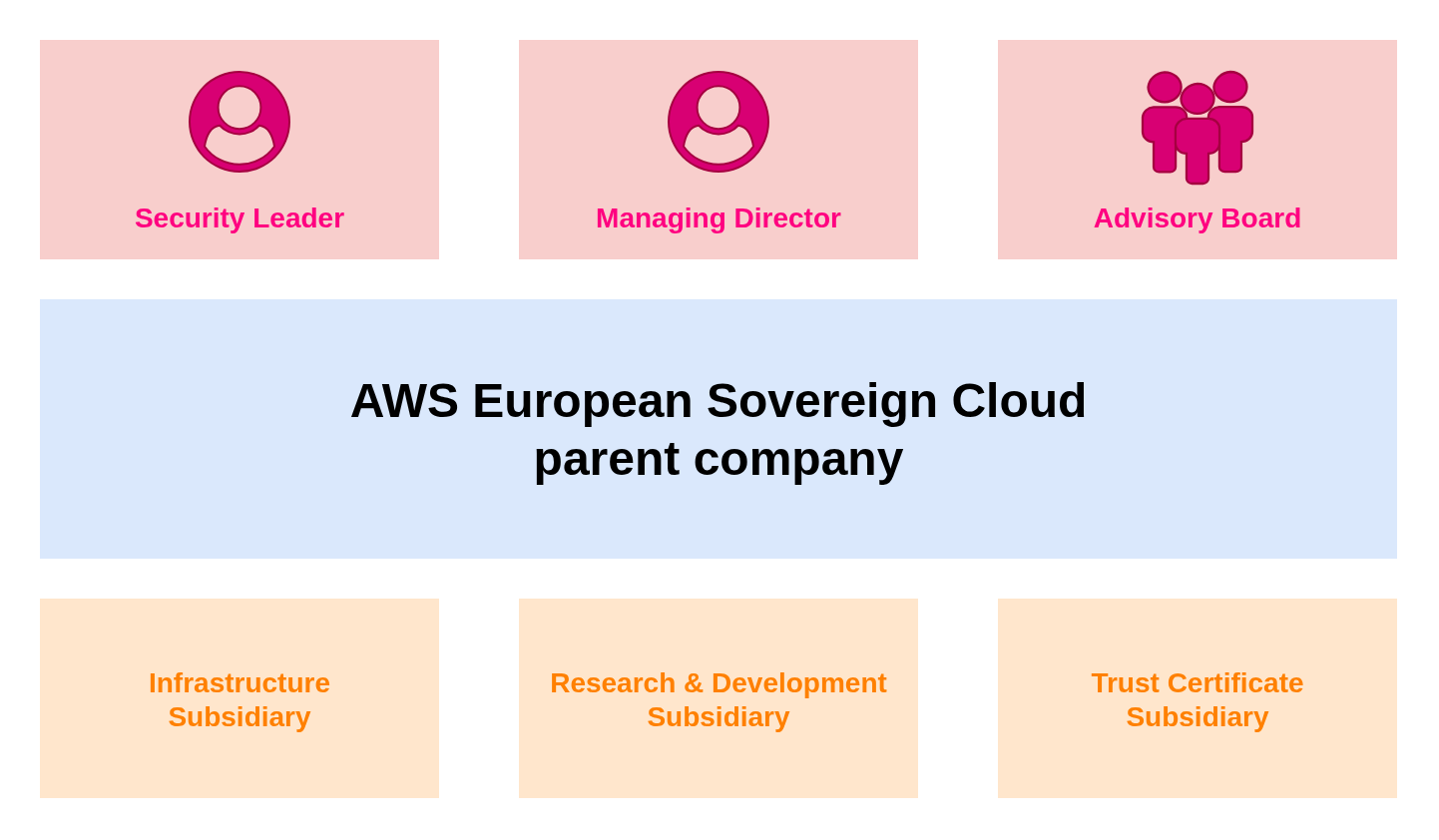
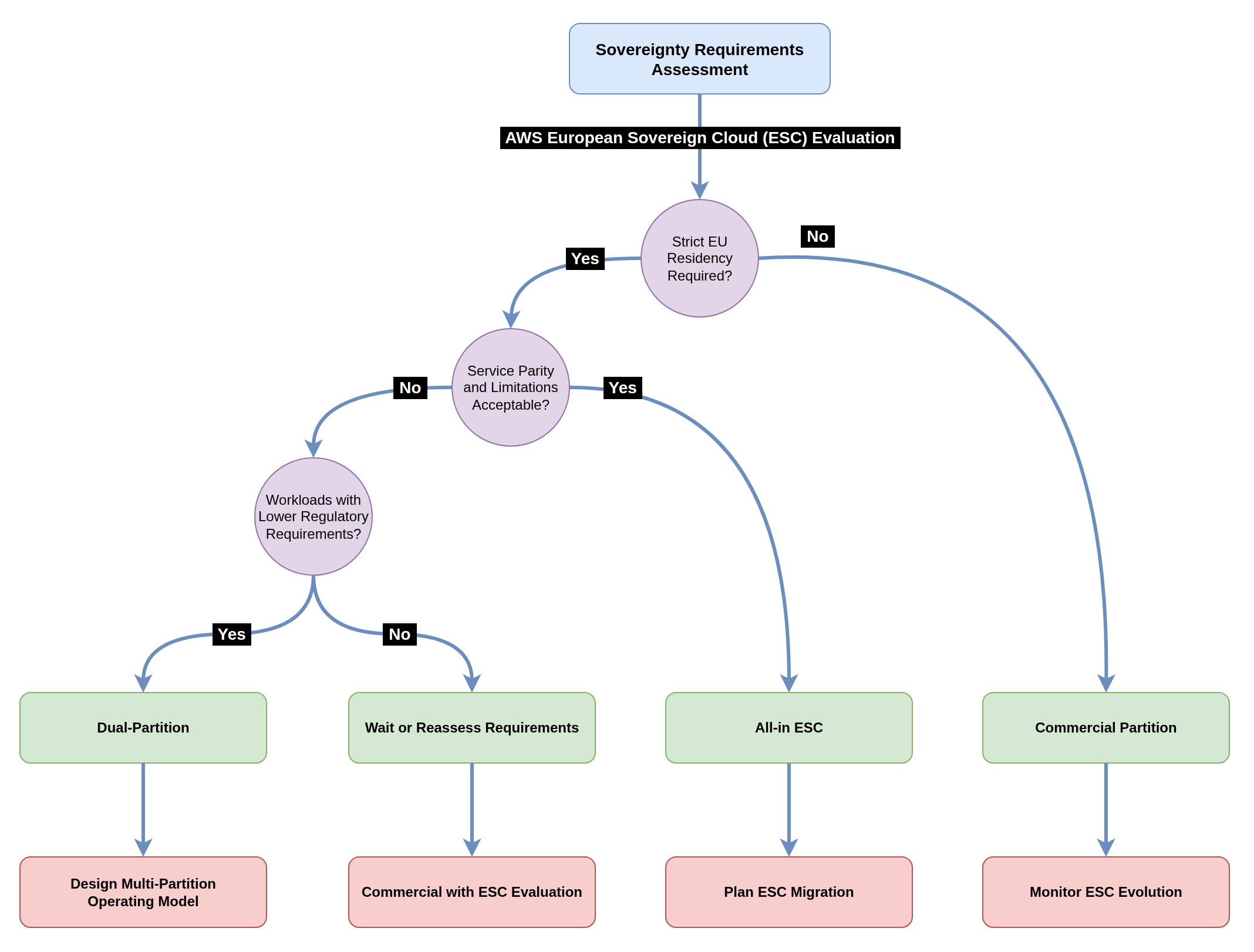
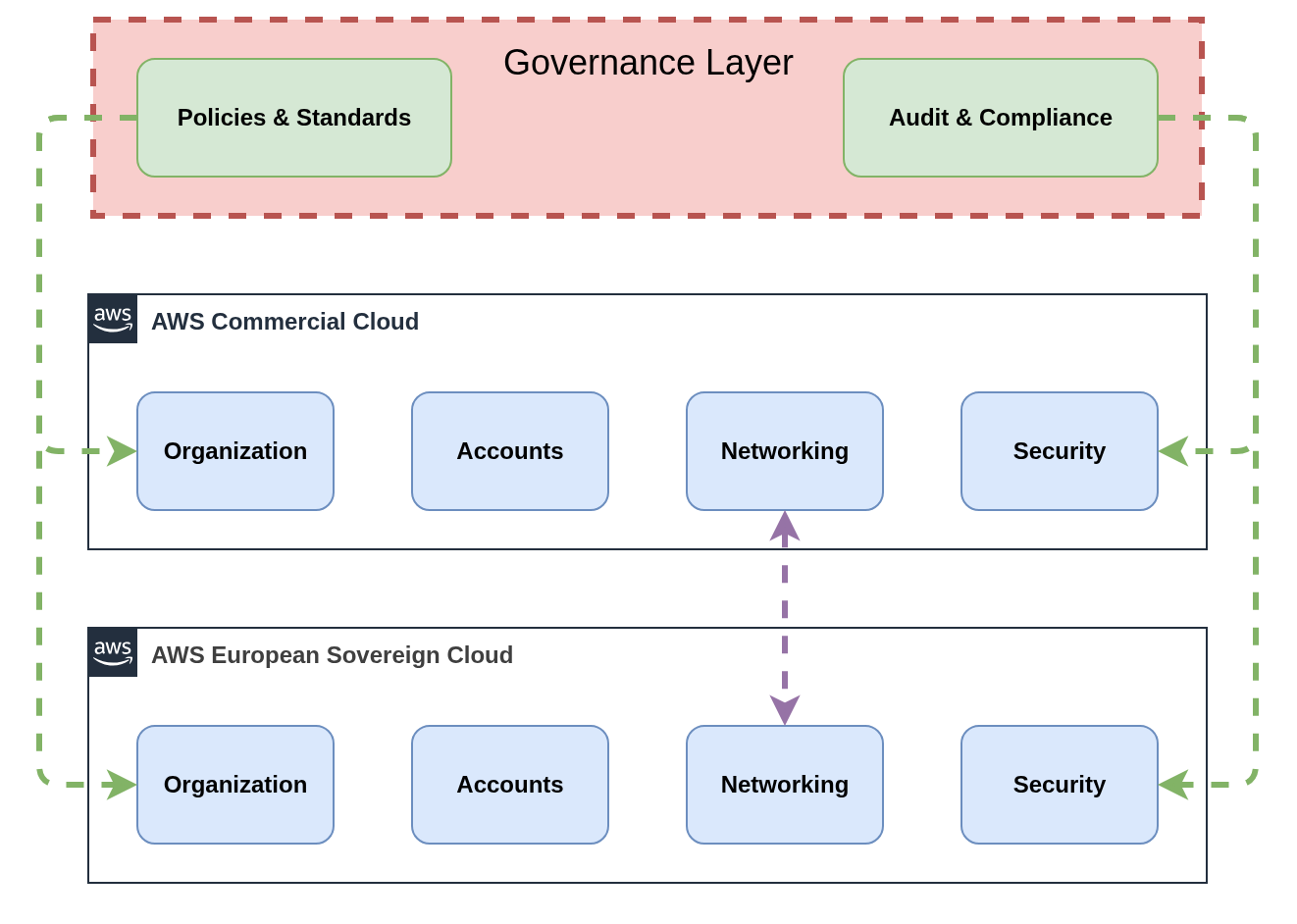
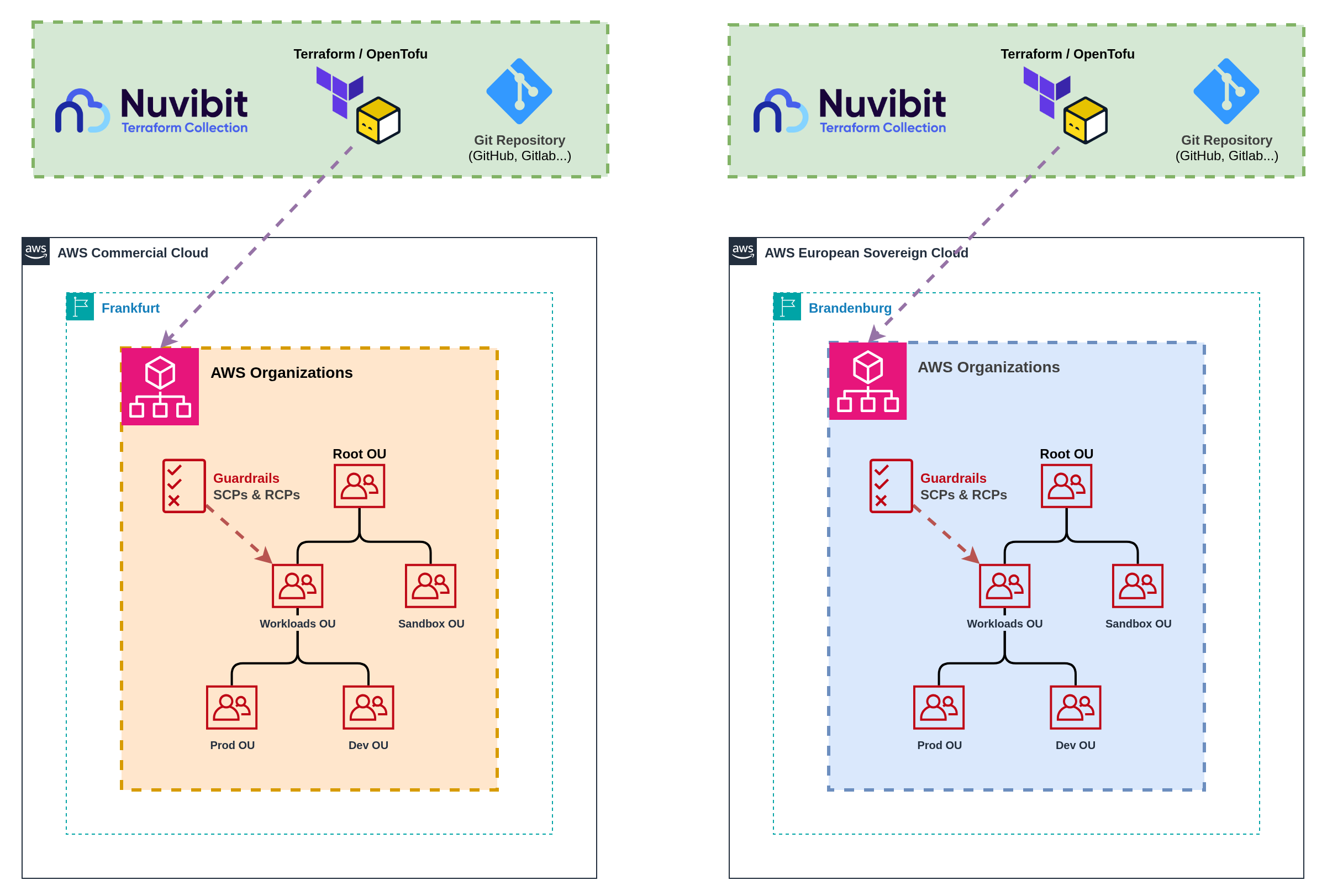
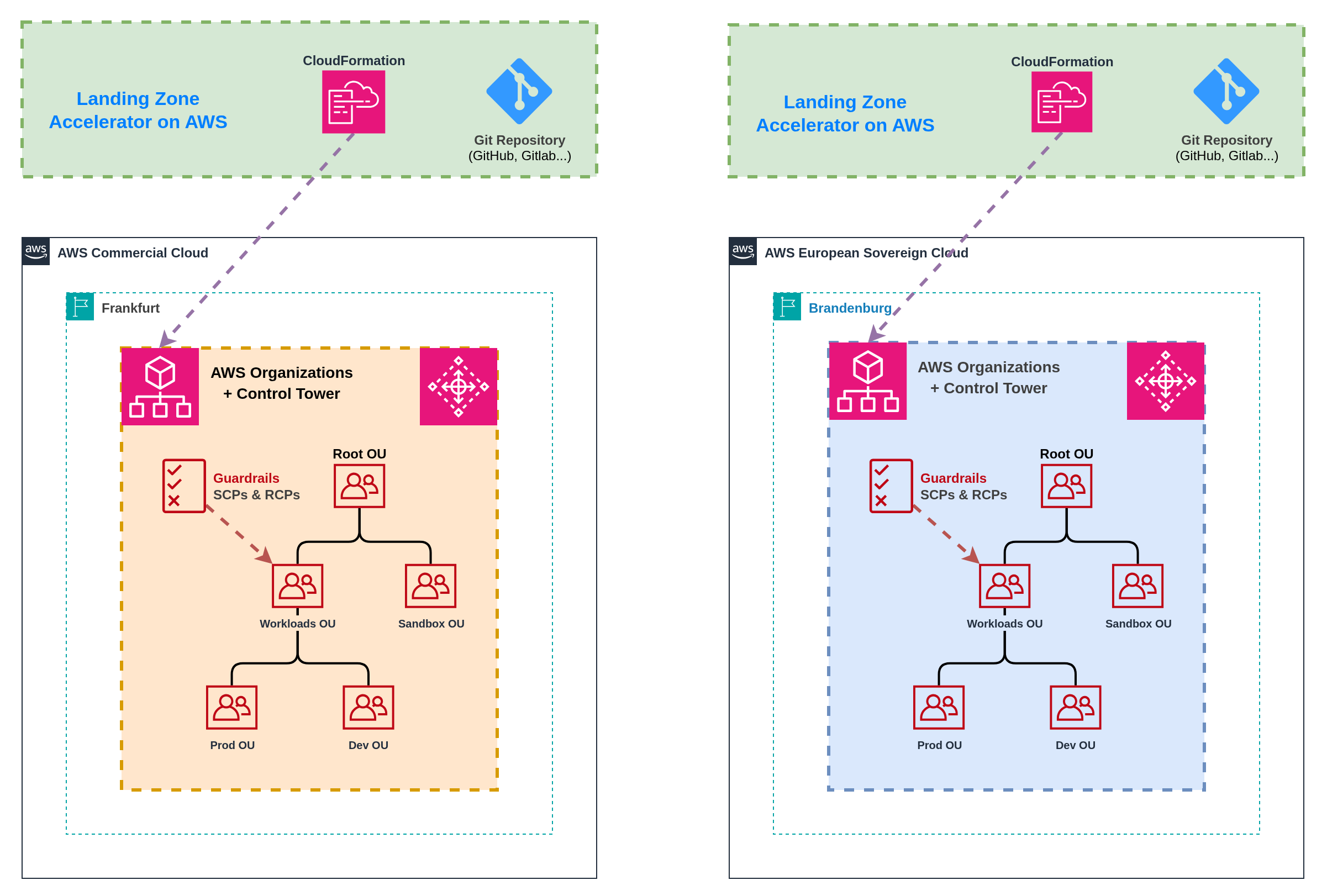
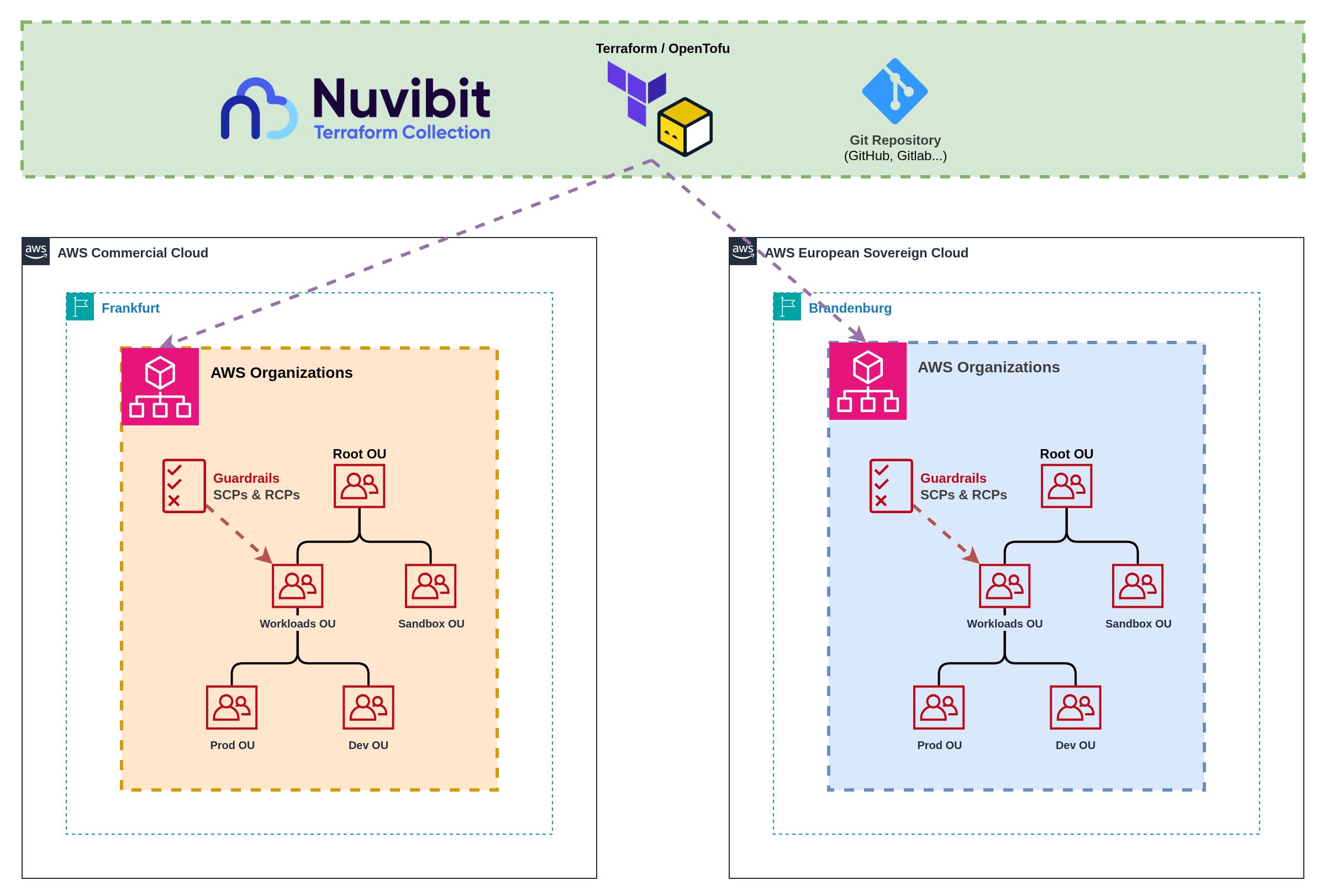
This pattern uses shared Infrastructure as Code configurations with unified deployment pipelines that target multiple partitions from a single source of truth. Shared templates and configurations minimize code duplication whilst maintaining partition isolation through provider aliasing and conditional logic. **Implementation:** Single Infrastructure as Code repository with partition-aware templates that deploy to multiple AWS Organizations simultaneously. Shared organizational unit structures, policy definitions, and baseline configurations adapt to partition-specific service availability through feature flags and conditional resource creation. **Account Vending:** Unified account vending interface abstracts partition complexity while routing requests to appropriate partition-specific provisioning logic. Single account request workflow with partition selection capability, shared approval processes, and consistent user experience across partitions. **Infrastructure as Code Approaches:** - **Nuvibit Terraform Collection (Terraform/OpenTofu):** `**Native support**` for multi-partition deployment through provider aliasing, shared module libraries, and conditional resource creation based on partition characteristics. - **Landing Zone Accelerator on AWS (CloudFormation):** `**Not supported**` Landing Zone Accelerator maps to a single AWS Organization and cannot deploy across multiple partitions. :::info Terraform/OpenTofu Advantages for Multi-Partition Deployment **Provider Aliasing:** Terraform/OpenTofu natively supports multiple AWS provider configurations in a single configuration, enabling deployment to multiple partitions simultaneously from shared templates. **Conditional Logic:** Rich conditional expressions and feature flags allow templates to adapt to partition-specific service availability without code duplication. **Module Reusability:** Shared module libraries with partition-aware parameters eliminate code duplication whilst maintaining consistency across partitions. **Cross-Partition Resources:** Single Terraform/OpenTofu configuration can manage resources across partitions, enabling unified account vending and baseline deployment workflows. ::: **Benefits:** Minimized code duplication through shared configurations reduces maintenance overhead, consistent organizational structures and policies across partitions, unified account vending provides superior user experience, and single source of truth for governance configurations. **Challenges:** Increased complexity in template design with partition-aware logic, dependency on Infrastructure as Code tooling that supports multi-partition deployment, potential for cascading failures affecting multiple partitions, and higher skill requirements for platform teams managing shared configurations. **Account Vending Workflow:** Users request accounts through a single interface with partition selection based on workload classification and data residency requirements. Conditional logic routes requests to appropriate partition-specific account factories whilst maintaining consistent baseline configurations and approval workflows. Any self-service portal can be easily integrated via GitOps workflows, where account requests trigger git push operations to update the account factory repository, enabling automated provisioning through Infrastructure as Code pipelines. ![Unified Account Vending](https://docs.nuvibit.com/illustrations/multi-account-vending-unified.png) \ *Figure 7: Self-service account vending implementation with multi-partition support* --- #### Landing Zone Pattern Comparison | **Pattern** | **Best For** | **Pros** | **Cons** | **Operational Model** | **Complexity** | **Governance** | |-------------|--------------|----------|----------|-----------------------|----------------|----------------| | **1. Independent Landing Zone Operations** | Organizations prioritizing maximum partition isolation, simple governance boundaries, Landing Zone Accelerator on AWS users | ✅ Maximum partition isolation
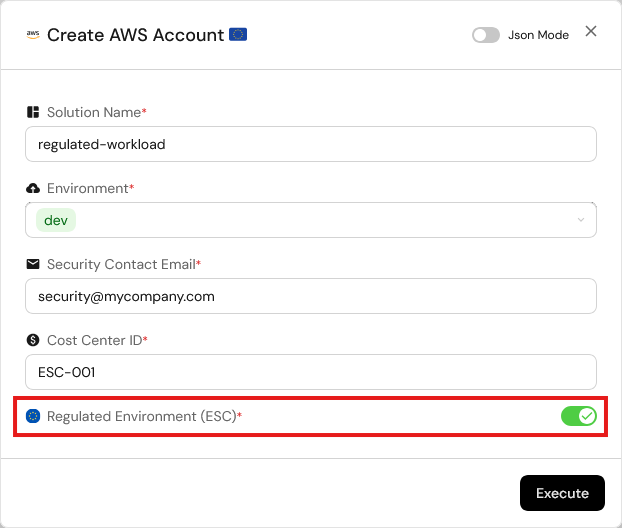
✅ Independent operational procedures
✅ Clear compliance boundaries
✅ No cross-partition failure risk
✅ Supports any IaC approach | ❌ Code duplication overhead
❌ Configuration drift risk
❌ Separate account vending processes
❌ Increased maintenance burden
❌ User experience friction | **Dual Operations**
Separate teams or procedures per partition | **Low-Medium**
Independent but duplicated | **Separated**
Independent governance per partition | | **2. Unified Landing Zone Operations** | Organizations with Terraform/OpenTofu expertise, unified operational preferences, emphasis on consistency | ✅ Minimized code duplication
✅ Consistent governance structures
✅ Unified account vending
✅ Single source of truth
✅ Reduced operational overhead | ❌ Increased template complexity
❌ Cross-partition failure risk
❌ Higher skill requirements
❌ Limited to Terraform/OpenTofu
❌ Potential cascading issues | **Unified Operations**
Single team managing both partitions | **Medium-High**
Shared configuration logic | **Unified**
Consistent policies across partitions | **Summary:** * Landing Zone management is the foundation of successful multi-partition operations * Infrastructure as Code is critical for maintaining consistency and preventing configuration drift * Pattern selection depends on organizational IaC maturity and governance preferences * Terraform/OpenTofu provides significant advantages over CloudFormation for multi-partition architectures * Account vending complexity varies significantly between separated and aggregated approaches --- ### 9.2 Infrastructure as Code and CI/CD Managing Infrastructure as Code across partitions requires partition‑aware templates, dynamic resource configuration, and careful handling of partition‑specific constraints. The primary challenge lies in creating reusable configurations that adapt to different partition characteristics without hardcoding partition‑specific values. **Infrastructure as Code: The Foundation for Multi-Partition Consistency** Infrastructure as Code is absolutely critical for managing consistent configurations across partitions whilst accommodating service availability differences and partition‑specific constraints. Manual configuration management becomes unsustainable when dealing with partition boundaries and service parity gaps. **Preventing Hardcoded Partition Dependencies:** Existing IaC code often contains hardcoded ARNs, service endpoints, or partition identifiers that break when deployed across different partitions. Templates must use dynamic resource references and partition‑aware logic to ensure portability. **Partition-Aware Resource Configuration:** IaC modules include partition detection logic that adapts resource configurations based on target partition characteristics. Feature flags handle service availability differences, disabling resources or substituting alternatives when services are unavailable in specific partitions. **Dynamic Service Discovery:** Rather than hardcoding service endpoints or ARNs, templates use data sources and dynamic references to discover partition‑appropriate resources and endpoints at deployment time. **Avoiding Hardcoded Partition Dependencies** Existing Infrastructure as Code often contains hardcoded references that break when deployed across different partitions. Common issues include hardcoded ARNs with partition identifiers, service endpoints using commercial AWS domains, and resource references that assume specific partition characteristics. **Terraform Example:** ```hcl # Use data source for dynamic discovery data "aws_caller_identity" "current" {} data "aws_partition" "current" {} locals { partition = data.aws_partition.current.partition account_id = data.aws_caller_identity.current.account_id } output "role_arn" { # Instead of hardcoded ARN (e.g. arn:aws:iam::123456789012:role/MyRole) value = "arn:${local.partition}:iam::${local.account_id}:role/MyRole" } ``` **CloudFormation Example:** ```yaml # Use pseudo parameters Outputs: RoleArn: # Instead of hardcoded ARN (e.g. arn:aws:iam::123456789012:role/MyRole) Value: !Sub arn:${AWS::Partition}:iam::${AWS::AccountId}:role/MyRole ``` :::warning ESC Service Endpoint Differences **Service Endpoints Use Different Domains:** AWS European Sovereign Cloud uses `*.amazonaws.eu` domain endpoints instead of the commercial `*.amazonaws.com` domains. This affects: - **API Endpoints:** Service APIs use ESC-specific endpoints - **S3 Bucket URLs:** S3 bucket access URLs use the ESC domain namespace - **CloudFormation Template URLs:** Template and artifact references must use appropriate domain endpoints - **Third-Party Tool Configuration:** External tools and integrations require ESC-specific endpoint configuration **Terraform AWS Provider Support:** The Terraform AWS provider is expected to support ESC from day one, with AWS SDKs already updated for ESC compatibility. Any unexpected behavior can be tracked via [GitHub Issue #44437](https://github.com/hashicorp/terraform-provider-aws/issues/44437). ::: :::danger Landing Zone Accelerator and Control Tower AFT Limitations **CodeBuild and CodePipeline Dependencies:** Landing Zone Accelerator on AWS (LZA) and Control Tower Account Factory for Terraform (AFT) requires AWS CodeBuild and CodePipeline services for its deployment automation and ongoing configuration management. **ESC Launch Service Gap:** CodeBuild and CodePipeline are **not currently included** in the initial AWS European Sovereign Cloud launch services, making the deployment of those solutions currently impossible in ESC. **Alternative Approach:** Terraform/OpenTofu-based solutions like Nuvibit Terraform Collection (NTC) can deploy to ESC immediately using available services and don't have a mandatory dependency on CodeBuild/CodePipeline. ::: --- #### `Pattern 1` Individual Pipelines per Partition **Nuvibit Terraform Collection (NTC)** ![Individual CI/CD pipelines per partition](https://docs.nuvibit.com/illustrations/multi-cicd-independent-ntc.png) *Figure 8a: Independent CI/CD pipelines with partition-specific deployment workflows* **Landing Zone Accelerator on AWS (LZA)** ![Individual CI/CD pipelines per partition](https://docs.nuvibit.com/illustrations/multi-cicd-independent-lza.png) *Figure 8b: Independent CI/CD pipelines with partition-specific deployment workflows* This pattern maintains completely separate CI/CD pipelines for each partition, providing maximum isolation and partition-specific optimisation whilst requiring careful coordination to maintain consistency across deployments. **Implementation:** Deploy separate CI/CD infrastructure in each partition or use external CI/CD platforms with partition-specific pipelines. Each pipeline handles source code checkout, testing, artifact creation, and deployment for its respective partition independently. Authentication, service endpoints, and deployment targets remain partition-specific throughout the pipeline execution. **Benefits:** Complete pipeline isolation with no cross-partition dependencies, partition-specific optimisation for testing and deployment strategies, clear operational boundaries aligned with compliance requirements, and independent failure domains preventing cascading issues across partitions. **Challenges:** Code duplication across pipeline configurations increases maintenance overhead, configuration drift risk between partition-specific pipelines, separate artifact management requiring manual synchronisation, and increased operational complexity for platform teams managing multiple pipeline infrastructures. **Coordination Mechanisms:** Version tagging strategies ensure consistent releases across partitions, shared configuration templates minimise pipeline code duplication, cross-partition promotion workflows enable testing in one partition before deploying to another, and unified monitoring provides visibility across all partition-specific pipelines. :::tip OIDC Authentication Best Practice **Use OpenID Connect (OIDC) for Authentication of External Pipelines:** CI/CD pipelines should use OIDC identity providers to authenticate with AWS instead of static access keys. OIDC provides temporary, scoped credentials that improve security and eliminate the need to manage long-lived access keys in pipeline configurations. **ESC OIDC Configuration:** For AWS European Sovereign Cloud, ensure your OIDC identity provider is configured with the ESC-specific STS endpoint: - **ESC STS Endpoint:** `sts.eusc-de-east-1.amazonaws.eu` (Brandenburg region) - **Commercial STS Endpoint:** `sts.amazonaws.com` (default) **Implementation:** Configure your CI/CD platform (GitHub Actions, GitLab CI, Azure DevOps, etc.) to assume IAM roles via OIDC rather than using stored AWS access keys. This provides automatic credential rotation, improved audit trails, and eliminates credential storage security risks. ::: --- #### `Pattern 2` Unified Pipelines for Multi-Partition Deployment **Nuvibit Terraform Collection (NTC)** ![Unified CI/CD pipeline for multi-partition deployment](https://docs.nuvibit.com/illustrations/multi-cicd-unified-ntc.png) *Figure 9a: Single pipeline with multi-partition deployment capabilities* **Landing Zone Accelerator on AWS (LZA)** :::warning Multi-Partition Limitation **Landing Zone Accelerator on AWS cannot be deployed in a unified pattern.** LZA maps to a single AWS Organization and requires complete duplication of configurations for multi-partition deployments. Each partition needs its own LZA setup with separate configuration files, organizational structures, and operational procedures. For unified multi-partition operations, consider Terraform/OpenTofu-based solutions like the Nuvibit Terraform Collection (NTC) that natively support provider aliasing and shared configuration templates. :::
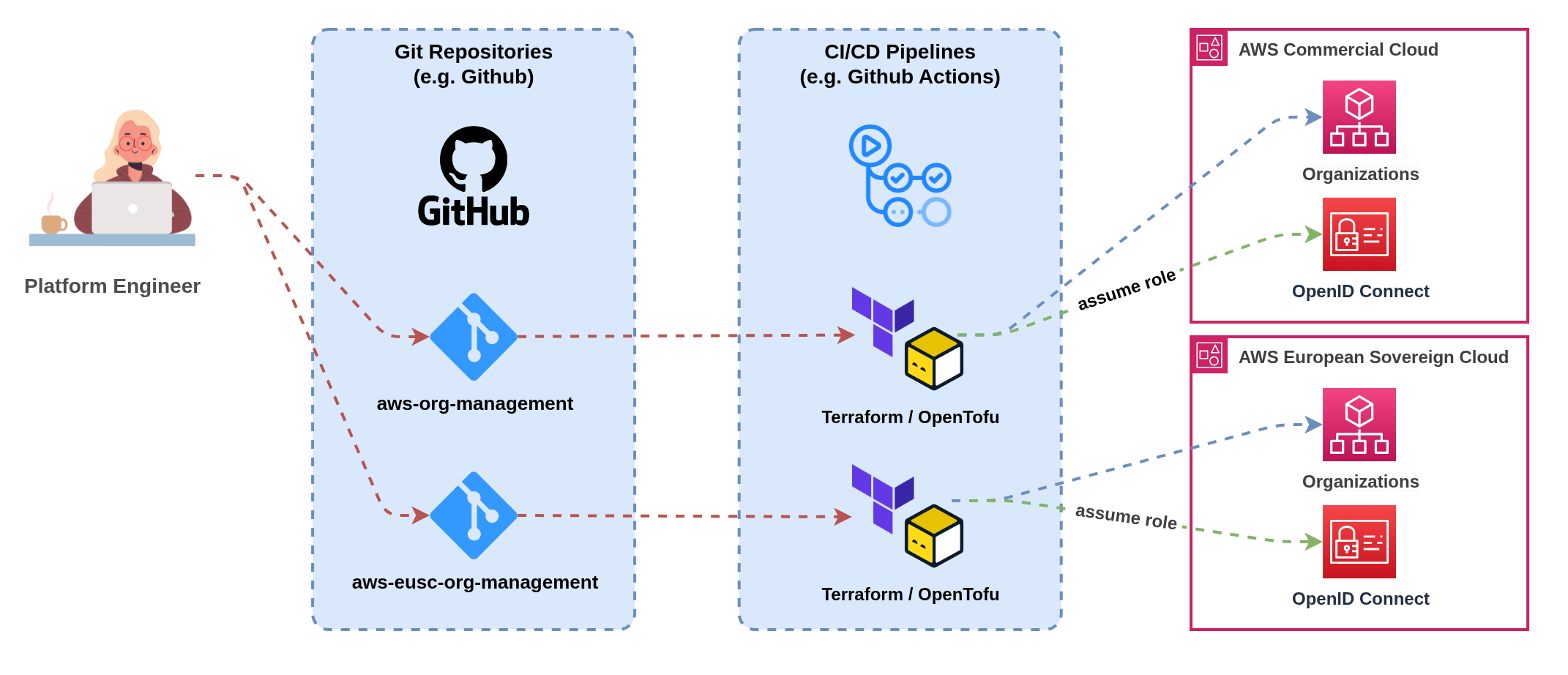
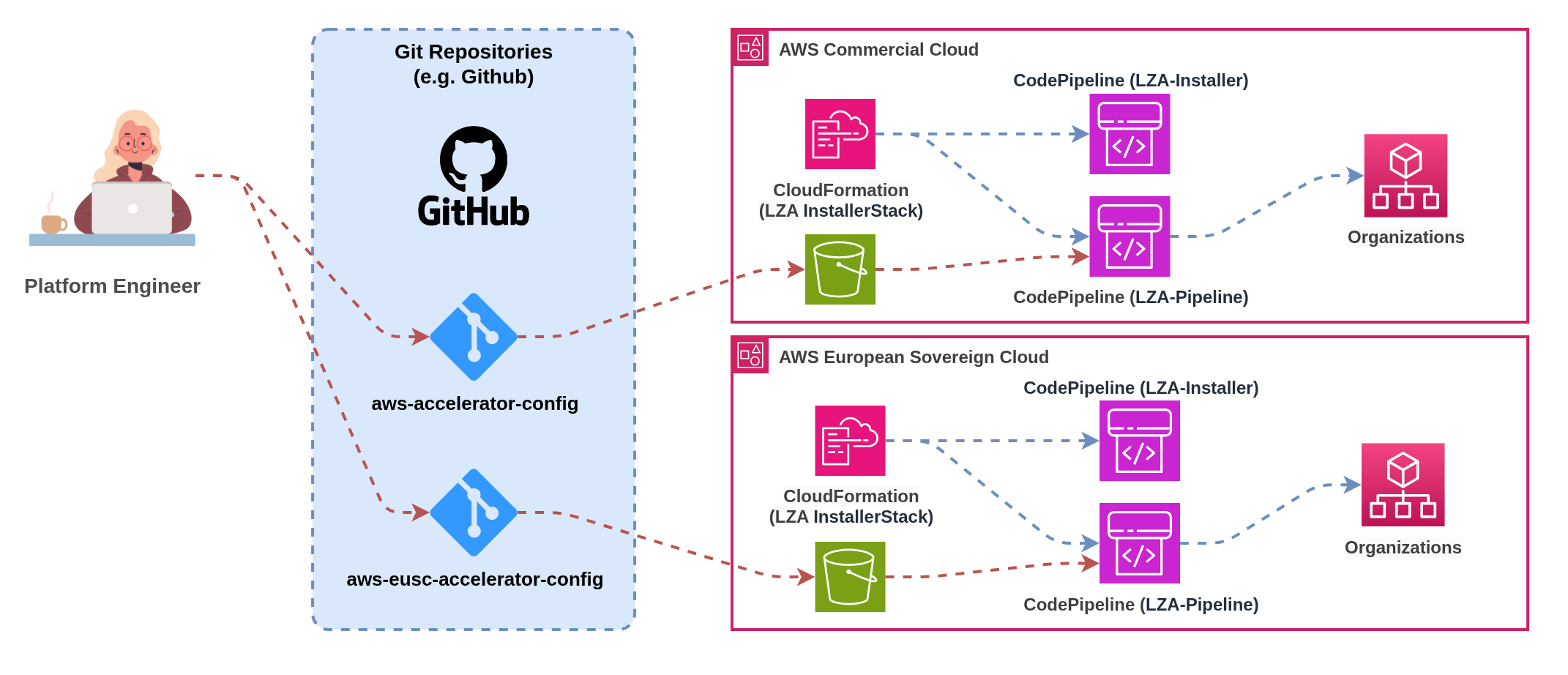
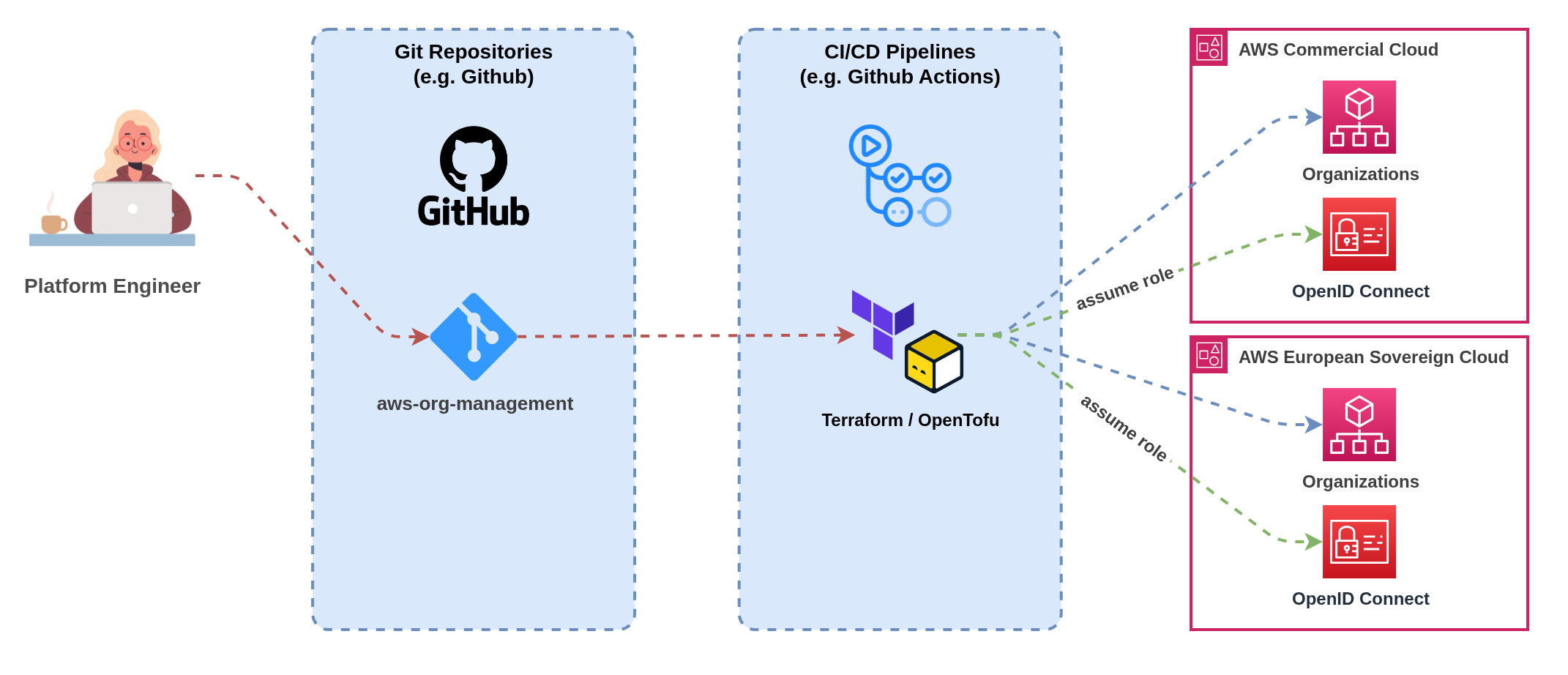
This pattern uses a single CI/CD pipeline that can deploy to multiple partitions from shared source configurations, providing operational efficiency and consistency whilst handling partition-specific deployment requirements through conditional logic and feature flags. **Implementation:** Single CI/CD pipeline with partition-aware deployment stages that can target multiple AWS partitions based on configuration parameters. Pipeline includes conditional logic to handle service availability differences, partition-specific authentication mechanisms, and environment-specific deployment parameters. **Benefits:** Single source of truth for deployment configurations reduces maintenance overhead, consistent deployment processes across all partitions, shared artifact management with unified promotion workflows, and reduced operational complexity through single pipeline management interface. **Challenges:** Increased pipeline complexity handling multiple partition scenarios, potential cascading failures affecting multiple partitions simultaneously, higher skill requirements for teams managing multi-partition pipeline logic, and dependency on CI/CD platforms supporting complex conditional deployment workflows. **Partition-Aware Features:** Dynamic endpoint configuration based on target partition, conditional resource deployment handling service availability gaps, partition-specific authentication and credential management, and environment-specific testing and validation strategies. **Example: Multi-Partition Configuration with Nuvibit Terraform Collection (NTC)** ```hcl # -------------------------------------------------------------------------------------------- # ¦ PROVIDER - MULTI-PARTITION # -------------------------------------------------------------------------------------------- provider "aws" { alias = "aws_frankfurt" region = "eu-central-1" # OpenID Connect (OIDC) integration assume_role_with_web_identity { role_arn = "arn:aws:iam::111111111111:role/oidc-role" session_name = "unified-pipeline" web_identity_token_file = "/tmp/web-identity-token" } } provider "aws" { alias = "aws_eusc_brandenburg" region = "eusc-de-east-1" # OpenID Connect (OIDC) integration assume_role_with_web_identity { role_arn = "arn:aws-eusc:iam::222222222222:role/oidc-role" session_name = "unified-pipeline" web_identity_token_file = "/tmp/web-identity-token" } } # -------------------------------------------------------------------------------------------- # ¦ LOCALS # -------------------------------------------------------------------------------------------- # Define shared configuration that will be deployed across multiple partitions locals { organizational_unit_paths = [ "/root/core", "/root/sandbox", "/root/suspended", "/root/transitional", "/root/workloads", "/root/workloads/prod", "/root/workloads/dev", "/root/workloads/test" ] } # -------------------------------------------------------------------------------------------- # ¦ NTC ORGANIZATIONS - COMMERCIAL # -------------------------------------------------------------------------------------------- module "ntc_organizations" { source = "github.com/nuvibit-terraform-collection/terraform-aws-ntc-organizations?ref=X.X.X" # list of nested (up to 5 levels) organizational units organizational_unit_paths = local.organizational_unit_paths # additional inputs... providers = { aws = aws.aws_frankfurt } } # -------------------------------------------------------------------------------------------- # ¦ NTC ORGANIZATIONS - ESC # -------------------------------------------------------------------------------------------- module "ntc_organizations_esc" { source = "github.com/nuvibit-terraform-collection/terraform-aws-ntc-organizations?ref=X.X.X" # list of nested (up to 5 levels) organizational units organizational_unit_paths = local.organizational_unit_paths # additional inputs... providers = { aws = aws.aws_eusc_brandenburg } } ``` --- #### Multi-Partition CI/CD Pattern Comparison | **Pattern** | **Best For** | **Pros** | **Cons** | **Operational Model** | **Complexity** | **Consistency** | |-------------|--------------|----------|----------|-----------------------|----------------|-----------------| | **1. Individual Pipelines per Partition** | Organizations prioritizing maximum partition isolation, partition-specific deployment requirements, strict compliance boundaries | ✅ Complete pipeline isolation
✅ Partition-specific optimisation
✅ Independent failure domains
✅ Clear operational boundaries
✅ Supports any CI/CD platform | ❌ Pipeline code duplication
❌ Configuration drift risk
❌ Separate artifact management
❌ Increased maintenance overhead
❌ Complex cross-partition coordination | **Separated Operations**
Independent pipeline teams or processes | **Medium**
Duplicated but isolated | **Manual**
Requires coordination mechanisms | | **2. Unified Pipelines for Multi-Partition** | Organizations with advanced CI/CD maturity, emphasis on consistency, unified operational preferences | ✅ Single source of truth
✅ Consistent deployment processes
✅ Shared artifact management
✅ Reduced operational overhead
✅ Unified promotion workflows | ❌ Increased pipeline complexity
❌ Cross-partition failure risk
❌ Higher skill requirements
❌ Platform dependency for multi-partition support
❌ Potential cascading issues | **Unified Operations**
Single team managing multi-partition pipeline | **High**
Complex conditional logic | **Automated**
Built-in consistency mechanisms | **Summary:** * Infrastructure as Code is essential for consistent multi-partition configuration management * Dynamic resource discovery prevents hardcoded partition dependencies * ESC introduces endpoint and service availability differences requiring careful handling * CI/CD pattern selection depends on organizational maturity and isolation requirements --- ### 9.3 Identity and Access Management (SSO) Managing identity and access across partitions requires careful consideration of authentication patterns, permission management, and operational complexity. Organizations face four primary approaches based on their identity infrastructure maturity and external system dependencies. **Infrastructure as Code: The Foundation for Multi-Partition Identity Management** Infrastructure as Code is absolutely critical for managing IAM Identity Center across multiple partitions without configuration drift. Manual console-based configuration of permission sets, account assignments, and user/group mappings quickly becomes operationally unsustainable and introduces significant security risks when scaled across partitions. **Preventing Configuration Drift:** IaC templates ensure identical identity configurations deploy across partitions, with version control tracking all permission set changes and automated drift detection identifying deviations between partitions. This eliminates the manual errors that commonly occur when administrators configure identity settings separately in each partition. **Permission Set Consistency:** Template-driven permission set deployments guarantee that access controls remain consistent across partitions, enabling security teams to verify permissions through code review rather than partition-by-partition inspection. Policy-as-code approaches embed access requirements directly into infrastructure definitions. **Account Assignment Automation:** Automated account assignment workflows ensure users receive consistent access across appropriate partitions based on their role and data classification requirements. Templates can deploy conditional assignments based on partition-specific service availability or compliance requirements. --- #### `Pattern 1` Independent Identity Centers Without External IdP ![Independent Identity Centers pattern](https://docs.nuvibit.com/illustrations/multi-identitycenter-independent.png) *Figure 10: Independent Identity Centers with separate user stores* Organizations without external identity providers such as Microsoft Entra ID or Okta must maintain separate IAM Identity Center instances with independent user stores across partitions. This approach provides maximum simplicity but introduces significant operational overhead and user experience challenges. **Implementation:** Deploy IAM Identity Center in each partition with separate user directories. Users must register separately in each partition, set independent passwords, and configure separate multi-factor authentication devices. Each partition provides distinct access portal URLs requiring separate bookmark management. **User Experience:** Users maintain separate credentials for each partition and must remember which applications reside in which partition. Password policies, MFA requirements, and account lifecycle management operate independently. **Operational Considerations:** Identity administrators must maintain separate user directories, duplicate password reset procedures, and manage independent MFA device registrations. User onboarding requires separate account creation workflows for each partition where access is required. **Security Implications:** Independent MFA devices reduce security correlation across partitions but provide stronger isolation if one partition is compromised. Password complexity and rotation policies can differ between partitions unless explicitly standardized through operational procedures. :::warning Operational Complexity Independent identity centers create significant operational challenges: **Duplicate User Management:** Every user requiring access to both partitions needs separate account creation, password management, and MFA configuration. This doubles administrative overhead and increases the likelihood of configuration inconsistencies. **Inconsistent Access Patterns:** Users may have different permission levels across partitions due to separate assignment processes, creating security risks and compliance challenges. Manual synchronization of access rights becomes error-prone at scale. **Support Fragmentation:** Password resets, account lockouts, and MFA issues require partition-specific support procedures. Help desk teams need training on multiple systems and access to separate administrative consoles. ::: --- #### `Pattern 2` Identity Centers with External IdP Integration ![External IdP integration pattern](https://docs.nuvibit.com/illustrations/multi-identitycenter-external-idp.png) *Figure 11: External IdP integration with SCIM synchronization* External identity providers such as Microsoft Entra ID or Okta serve as the authoritative source for user identities and group memberships across partitions. SCIM (System for Cross-domain Identity Management) protocols synchronize user and group information to IAM Identity Center instances in both partitions. **Implementation:** Configure SCIM provisioning from external IdP to IAM Identity Center instances in both partitions. Users and groups synchronize automatically, maintaining consistent identity representation whilst preserving partition isolation. External IdP provides centralized authentication with partition-specific authorization. **User Experience:** Users access a centralized application portal (such as myapps.microsoft.com, Okta dashboard, or corporate intranet) containing links to partition-specific AWS access portals. Single sign-on (SSO) provides seamless authentication to both partitions with partition-aware application tiles. **Permission Management:** Permission sets replicate across partitions with partition-specific adaptations for service availability differences. Attribute-based access control (ABAC) patterns use user attributes and group memberships to determine access rights across partitions. Role-based access control (RBAC) provides structured permission hierarchies that adapt to partition capabilities. **Group-Based Access Control:** External IdP groups control access to specific partitions and permission levels. Groups like "ESC-Developers" and "Commercial-Admins" provide granular control over who can access which partition with what permissions. Group membership changes in the external IdP automatically propagate to appropriate partitions via SCIM. --- #### `Pattern 3` External IdP with Just-in-Time Elevated Access ![JIT access with external IdP automation](https://docs.nuvibit.com/illustrations/multi-identitycenter-jit-external.png) *Figure 12: Just-in-time elevated access through external IdP automation* Organizations requiring temporary elevated permissions can implement just-in-time (JIT) access patterns through external IdP automation. This approach provides time-bound administrative access with appropriate approval workflows and audit trails across partitions. **Implementation:** Custom automation workflows temporarily add users to privileged groups in the external IdP, triggering SCIM synchronization to grant elevated permissions in target partitions. Approval workflows gate access requests with time-bound assignments that automatically expire. Integration with ticketing systems provides audit trails and business justification. **Workflow Process:** Users request elevated access through self-service portals or API integrations, specifying justification, duration, and target partition(s). Approval workflows route requests to appropriate managers or security teams. Upon approval, automation temporarily adds users to privileged IdP groups, enabling elevated access that automatically expires at the specified time. **Cross-Partition Coordination:** Automation workflows can grant elevated access across multiple partitions simultaneously or independently based on request requirements. Permission elevation in ESC may require separate approval workflows due to sovereignty requirements, whilst commercial partition access follows standard procedures. **Audit and Compliance:** All elevation requests, approvals, and access grants generate comprehensive audit logs across external IdP and AWS CloudTrail. Time-bound access ensures privileged permissions don't persist beyond business requirements, reducing security exposure and simplifying compliance reporting. :::info AWS TEAM Limitation **AWS TEAM (Temporary Elevated Access Management)** is a custom AWS solution for just-in-time access management. However, AWS TEAM does not support multi-partition environments and must be deployed independently in each partition where elevated access is required. **Multi-Partition Implications:** Organizations using AWS TEAM must: - Deploy separate TEAM instances per partition with independent workflows - Maintain separate approval processes and audit trails - Train administrators on partition-specific TEAM operations - Accept operational overhead of managing multiple TEAM deployments **Alternative Approaches:** External IdP automation or third-party JIT solutions provide better multi-partition support with unified workflows and centralized audit trails. ::: --- #### `Pattern 4` Third-Party Just-in-Time Access Tools ![Third-party JIT access management](https://docs.nuvibit.com/illustrations/multi-identitycenter-jit-third-party.png) *Figure 13: Third-party just-in-time access management platform* Specialized third-party tools like Apono, CyberArk, Tenable, or Entitle provide advanced just-in-time access management with single entry points and sophisticated approval workflows. These platforms offer unified access request interfaces whilst handling partition-specific integration requirements. **Implementation:** Deploy third-party JIT platforms with custom integrations to each AWS partition. Platforms provide centralized request interfaces with approval workflows that can route to partition-specific approvers. Integration APIs handle permission elevation across multiple partitions through a single user interface. **Advanced Features:** Third-party tools often provide sophisticated features including risk-based access decisions, session recording, privileged account discovery, and automated access reviews. Integration with identity governance platforms enables comprehensive access certification and compliance reporting. **Single Pane of Glass:** Users submit access requests through unified interfaces without needing to understand partition boundaries. Administrative teams manage approval workflows, policies, and compliance reporting through centralized dashboards that span multiple AWS partitions and cloud providers. **Custom Integration Requirements:** Each third-party tool requires custom integration development to support multiple AWS partitions effectively. Integration complexity varies significantly between platforms, with some providing built-in multi-cloud support whilst others require extensive customization. :::warning Third-Party ESC Support **ESC Compatibility:** Third-party identity and access management tools are expected to support AWS European Sovereign Cloud following general availability, but support is not guaranteed from day zero. **Expected Challenges:** - **Integration Development:** Vendors need time to develop and test ESC-specific integrations - **API Compatibility:** ESC-specific endpoints and authentication patterns may require platform updates - **Feature Parity:** Initial ESC support may lack feature parity with commercial AWS integrations - **Certification Timelines:** Security certifications and compliance validations may delay ESC support **Planning Recommendations:** Organizations should engage with identity platform vendors early to understand ESC roadmaps and support timelines. Plan for potential delays or limitations in third-party tool support during ESC early adoption phases. ::: --- #### Multi-Partition Identity Pattern Comparison | **Pattern** | **Best For** | **Pros** | **Cons** | **User Experience** | **Complexity** | **Cost Profile** | |-------------|--------------|----------|----------|---------------------|----------------|------------------| | **1. Independent Identity Centers** | Small organizations without external IdP infrastructure, maximum partition isolation requirements | ✅ Maximum partition isolation
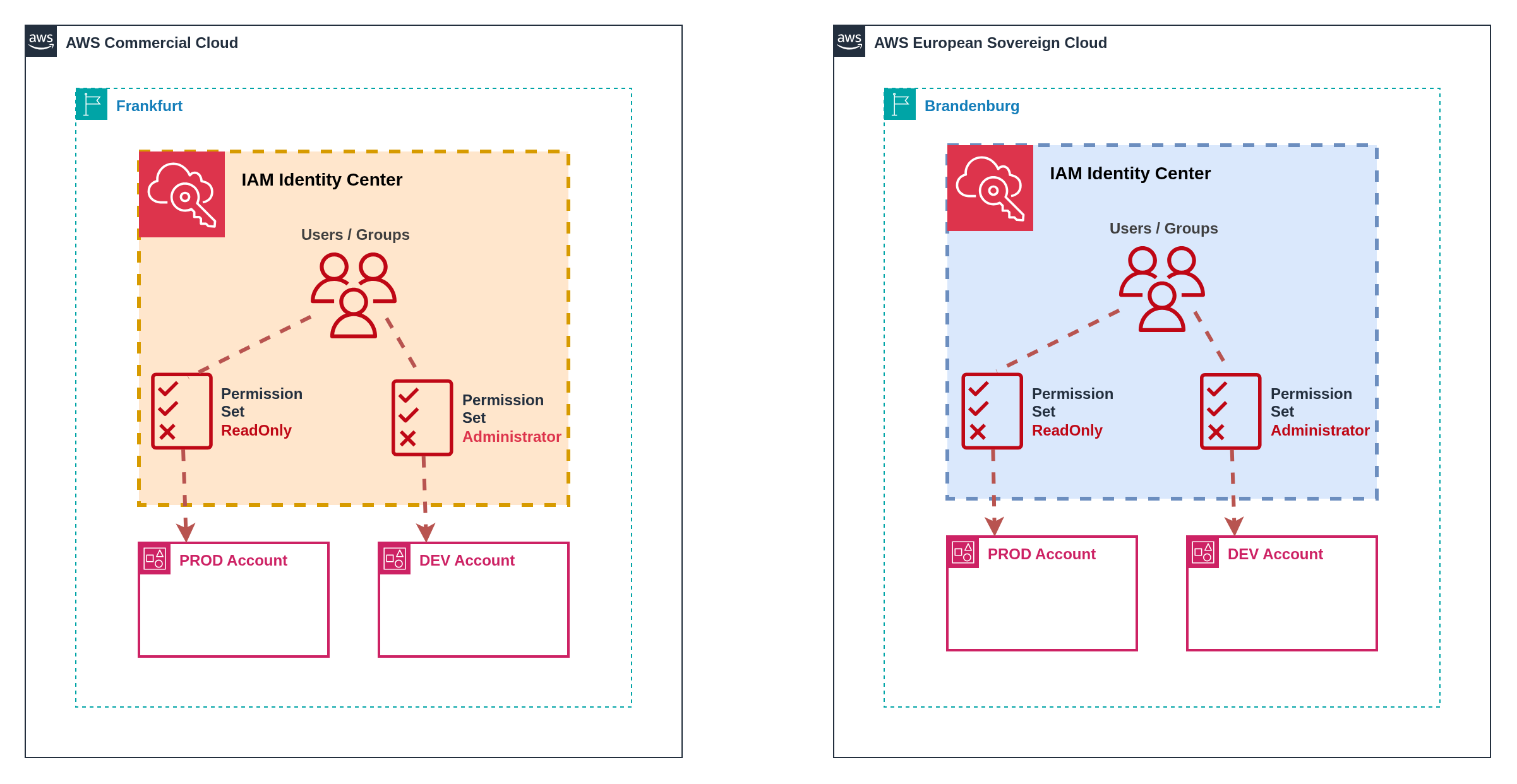
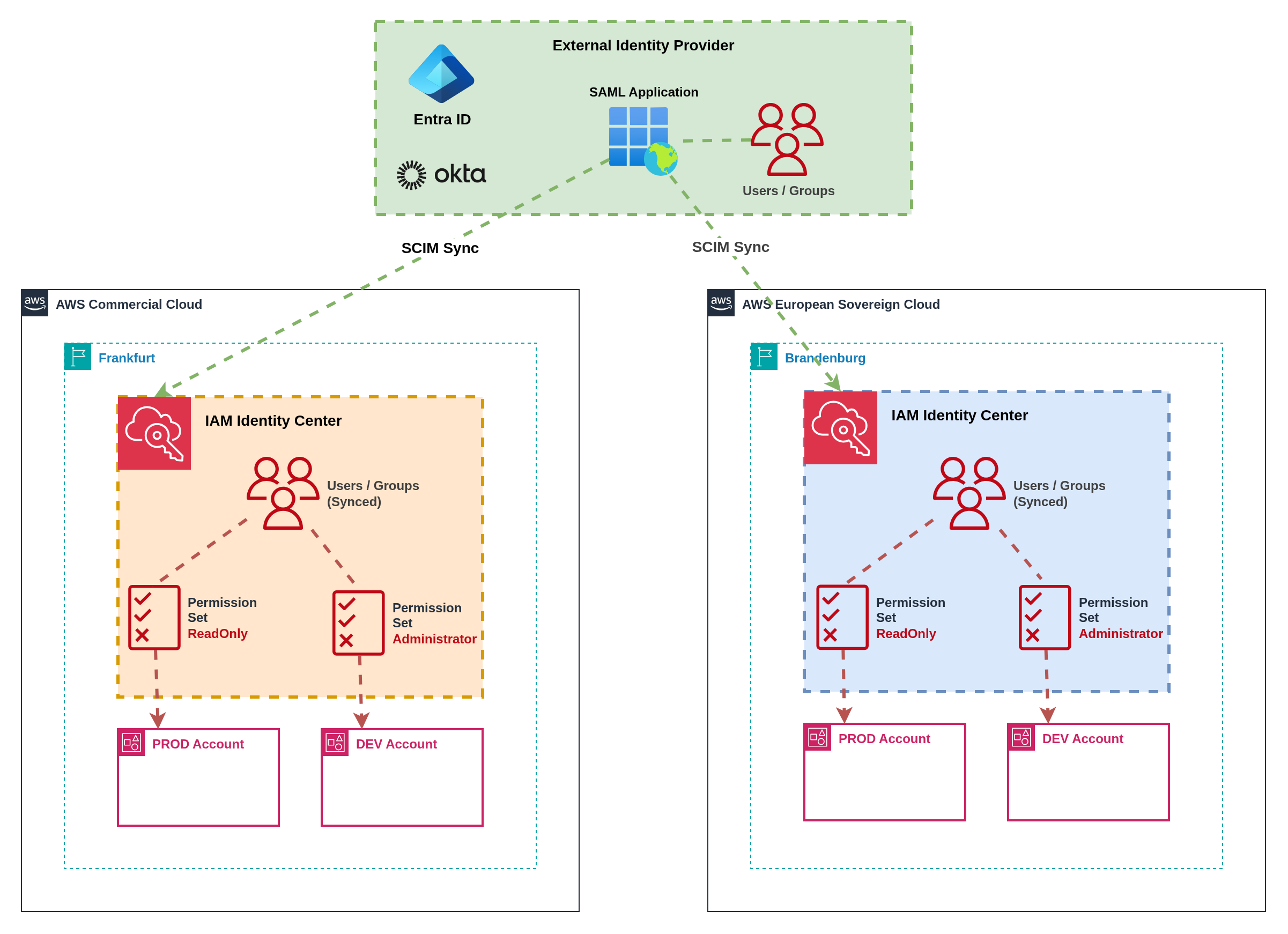
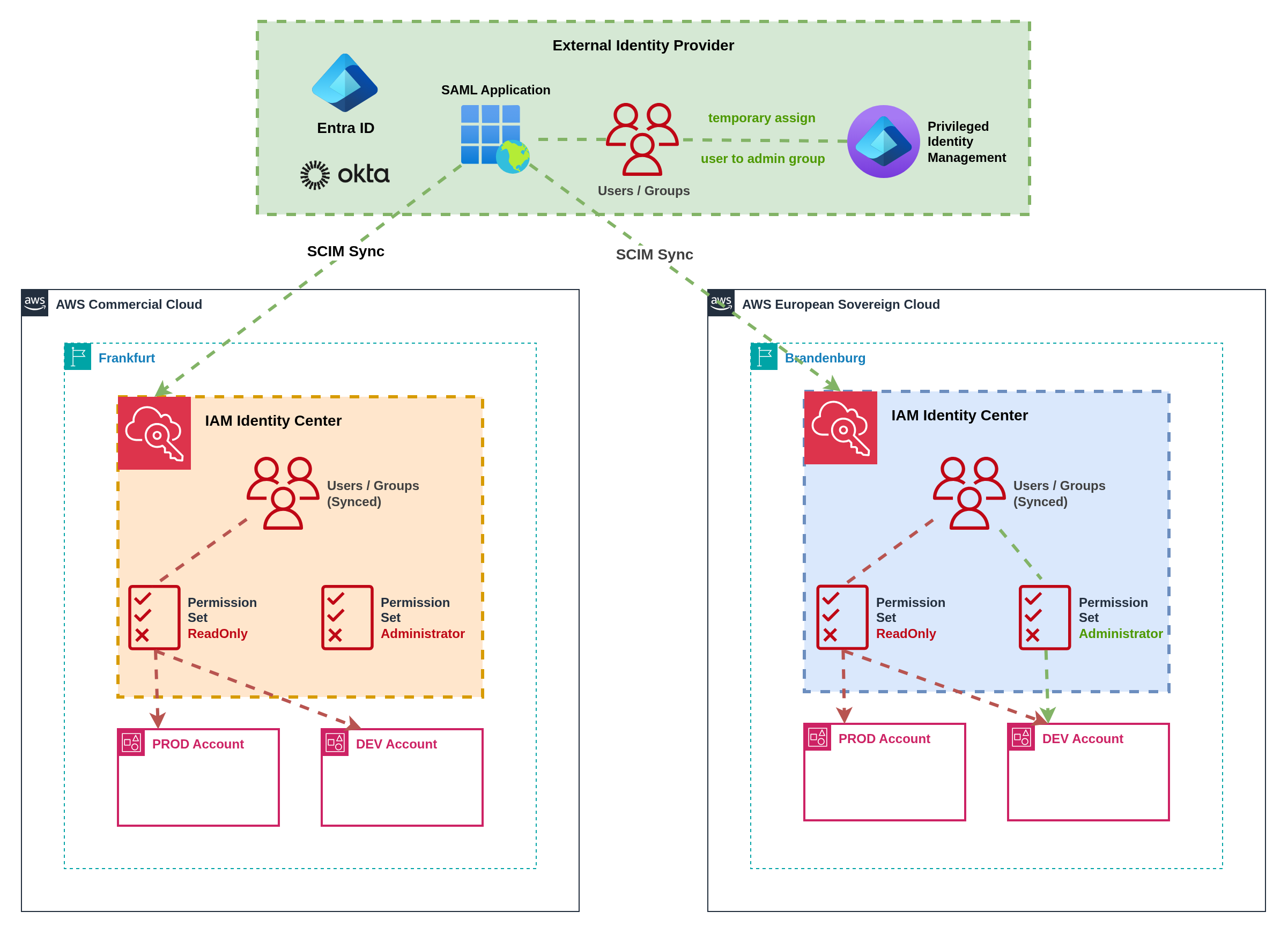
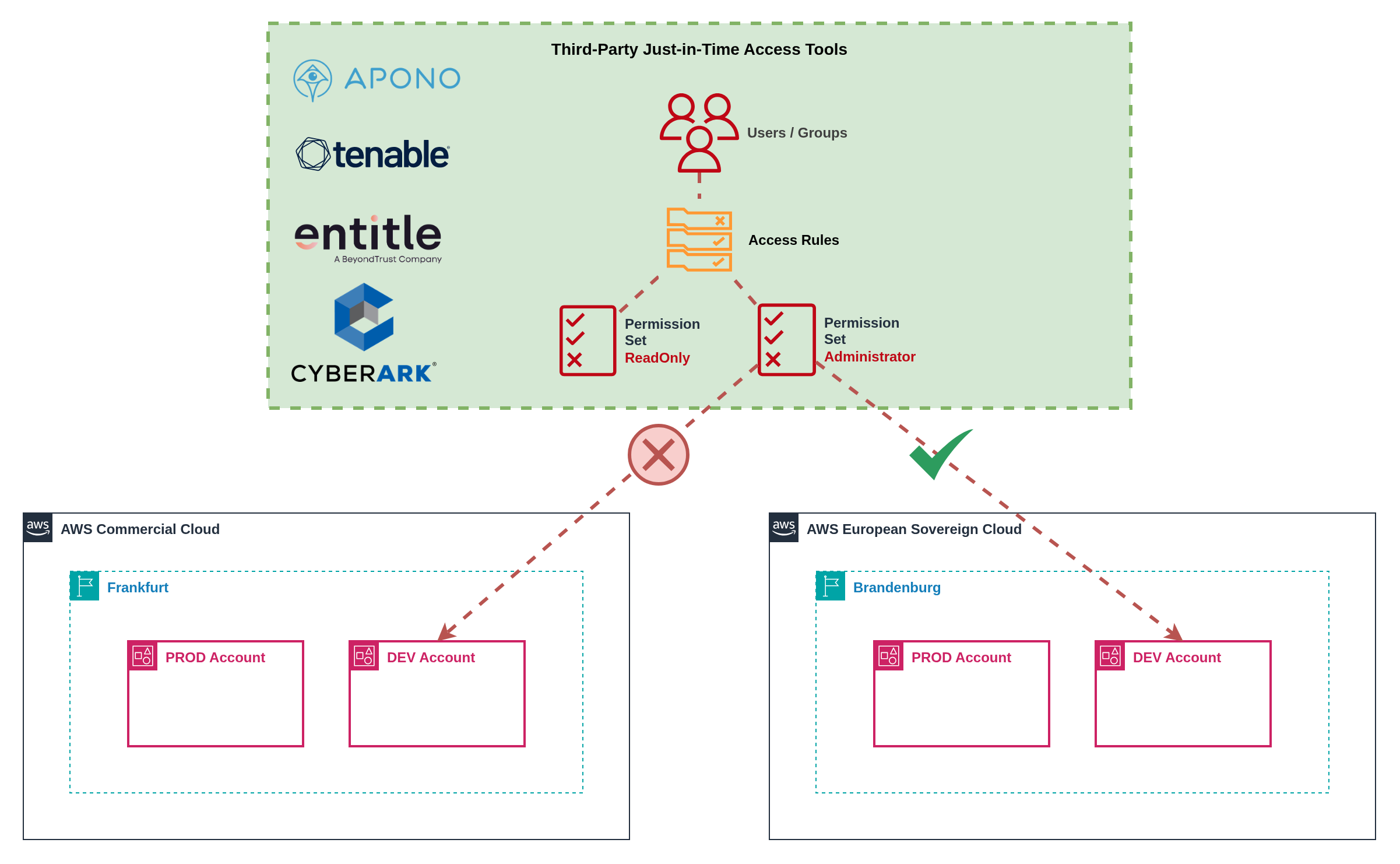
✅ No external dependencies
✅ Simple initial setup
✅ AWS-native authentication
✅ No additional licensing | ❌ Duplicate user management overhead
❌ Inconsistent access patterns
❌ Multiple credential sets per user
❌ Fragmented support procedures
❌ Manual synchronization required | **Poor**
Multiple logins, passwords, MFA devices | **Medium**
Dual administration | **Low**
No additional licensing costs;
High operational overhead | | **2. External IdP Integration** | Organizations with existing IdP infrastructure, need for consistent identity management, SCIM provisioning capabilities | ✅ Centralized identity management
✅ Automatic user/group synchronization
✅ Consistent permission models
✅ Single authentication source
✅ Familiar user experience | ❌ External IdP dependency
❌ SCIM configuration complexity
❌ Potential sync delays
❌ Additional licensing costs
❌ Permission set replication overhead | **Good**
Centralized portal with partition links | **Medium**
SCIM configuration & maintenance | **Medium**
External IdP licensing;
SCIM provisioning costs | | **3. External IdP JIT Access** | Organizations requiring temporary elevated permissions, strong audit requirements, time-bound administrative access | ✅ Time-bound elevated access
✅ Comprehensive audit trails
✅ Automated approval workflows
✅ Centralized request interface
✅ Cross-partition coordination | ❌ Custom automation development
❌ Complex approval workflow design
❌ External IdP dependency
❌ Potential sync delays for elevation
❌ Limited to IdP group-based permissions | **Good**
Self-service elevation requests | **High**
Custom automation & workflows | **Medium-High**
External IdP licensing;
Custom development costs | | **4. Third-Party JIT Tools** | Large enterprises with complex access requirements, advanced audit needs, multi-cloud environments | ✅ Advanced JIT capabilities
✅ Unified access request interface
✅ Sophisticated approval workflows
✅ Session recording & monitoring
✅ Multi-cloud platform support | ❌ Additional platform licensing
❌ Custom integration development
❌ Vendor dependency
❌ Potential ESC support delays
❌ Complex platform management | **Excellent**
Single interface for all access requests | **High**
Platform integration & management | **High**
Third-party platform licensing;
Integration development costs | **Summary:** * Identity management complexity increases significantly across partitions without external IdP integration * External IdP integration provides the best balance of user experience and operational efficiency * Just-in-time access patterns require careful design but significantly improve security posture * Infrastructure as Code is essential for maintaining consistent identity configurations across partitions * Third-party tool support for ESC may be delayed, requiring fallback planning for early adoption --- ### 9.4 Security and Compliance Maintaining consistent security posture across partitions whilst respecting sovereignty boundaries requires partition‑aware security architectures and compliant telemetry handling. Organizations face three primary approaches based on their operational preferences, sovereignty requirements, and existing security infrastructure investments. **Infrastructure as Code: The Foundation for Multi-Partition Security Management** Infrastructure as Code is absolutely critical for achieving multi-partition security and compliance parity whilst preventing configuration drift. Without IaC, maintaining consistent security postures across partitions becomes operationally unsustainable and introduces significant compliance risks. **Preventing Configuration Drift:** IaC templates ensure identical security configurations deploy across partitions, with version control tracking all changes and automated drift detection identifying deviations. This eliminates the manual configuration errors that commonly occur when managing multiple environments through console-based administration. **Compliance Parity Assurance:** Template-driven deployments guarantee that compliance controls remain consistent across partitions, enabling auditors to verify control implementation through code review rather than environment-by-environment inspection. Policy-as-code approaches embed compliance requirements directly into infrastructure definitions. **Partition-Aware Templates:** Use conditional logic and feature flags to adapt to service availability differences between partitions. Templates can deploy alternative implementations based on the current partition, ensuring functional equivalence despite service parity gaps. **Guardrails Consistency:** Shared guardrails include fundamental security controls such as root account restrictions, encryption requirements, network access limitations, and audit logging mandates. Partition-specific guardrails adapt to service availability, implementing alternative controls when services are unavailable or configuring partition‑aware resource restrictions. ![Shared And Dedicated Guardrails](https://docs.nuvibit.com/illustrations/multi-security-guardrails.png) *Figure 14: Guardrails distribution across partitions* --- #### `Pattern 1` Separate Native AWS Security Operations ![Separate native AWS security operations per partition](https://docs.nuvibit.com/illustrations/multi-security-per-partition.png) *Figure 15: Independent security operations with partition-specific teams* Operating Security Hub independently in each partition provides native AWS integration whilst maintaining clear sovereignty boundaries. Each partition operates its own security dashboard with partition-specific alerting and response procedures, ensuring ESC security events remain within EU governance domains. **Implementation:** Deploy Security Hub, GuardDuty, Config, and other security services in both partitions with separate configuration and alerting. Security operations teams maintain partition-specific playbooks and escalation procedures, with alerts routing to appropriate regional or compliance-specific response teams. **Operational Model:** Dedicated security teams or team members focus on specific partitions, developing deep expertise in partition-specific service availability and operational constraints. Incident response procedures accommodate AWS operational differences between partitions, particularly ESC's EU-resident support model. **Benefits:** Complete sovereignty compliance with no cross-partition data movement, native AWS tooling integration without additional platform costs, clear operational boundaries aligned with compliance requirements, and simplified compliance auditing with partition-specific evidence trails. **Dashboard Management:** Separate CloudWatch dashboards, Security Hub findings, and compliance reports maintain clear partition boundaries whilst requiring security analysts to monitor multiple interfaces. Custom tagging strategies help maintain context when switching between partition-specific tools. --- #### `Pattern 2` Cross-Partition Security Hub Forwarding ![Cross-partition Security Hub findings forwarding](https://docs.nuvibit.com/illustrations/multi-security-centralized.png) *Figure 16: Centralised Security Hub with cross-partition finding forwarding* Designating one partition's Security Hub as the primary aggregation point enables centralised security operations whilst leveraging native AWS tooling. Lambda functions forward security findings from the secondary partition to the primary Security Hub, providing a single pane of glass within AWS native infrastructure. **Implementation:** Deploy Security Hub in both partitions but designate one as the primary aggregation point. Lambda functions in the secondary partition consume Security Hub findings and forward them to the primary partition via APIs. Custom tagging and metadata preserve finding origin and partition context. **Forwarding Architecture:** Event-driven Lambda functions trigger on Security Hub finding updates, transforming and enriching findings with partition context before forwarding via cross-partition API calls. Custom finding formats maintain traceability whilst enabling unified reporting and dashboards. **Benefits:** Native AWS tooling throughout the security stack, centralised security operations reducing operational overhead, familiar Security Hub interface for security analysts, and reduced third-party licensing costs compared to external platforms. **Data Residency Considerations:** Careful evaluation required when forwarding ESC security findings to commercial partition Security Hub, as this may violate sovereignty requirements depending on organisational compliance obligations. Consider implementing filtering to exclude sensitive ESC findings from cross-partition forwarding. --- #### `Pattern 3` Third-Party Security Aggregation Platforms ![Third-party security aggregation architecture](https://docs.nuvibit.com/illustrations/multi-security-third-party.png) *Figure 17: Third-party security aggregation with unified dashboards* External security platforms like Wiz.io, Splunk, QRadar, PagerDuty, and Datadog provide unified security dashboards by aggregating findings from both partitions into a single pane of glass. These platforms offer advanced correlation capabilities, custom alerting, and comprehensive reporting that spans partition boundaries. **Implementation:** Deploy security services (Security Hub, GuardDuty, Config) in both partitions with API integrations forwarding findings to external platforms. Configure data pipelines to aggregate security telemetry whilst maintaining appropriate metadata for partition identification and compliance tracking. **Benefits:** Unified security visibility across all environments, advanced correlation and threat hunting capabilities, custom dashboards tailored to organisational needs, and integration with existing security operations workflows. Many platforms provide pre-built connectors for AWS services and can normalise findings across different security tools. **Advanced Features:** Third-party platforms often provide sophisticated capabilities including machine learning-based anomaly detection, automated incident response workflows, cross-cloud security posture management, and integrated vulnerability assessment that spans multiple cloud providers and on-premises environments. **Data Residency Considerations:** Organizations must carefully evaluate data residency requirements, particularly for ESC-originated security telemetry. Assessment of whether external platforms can meet sovereignty requirements or if telemetry aggregation violates compliance obligations is essential for ESC adoption. :::warning ESC Support Disclaimer **ESC Compatibility:** Third-party security platform support for AWS European Sovereign Cloud (ESC) is expected but not yet guaranteed. Platform vendors are anticipated to develop ESC integrations following general availability, but support timelines, feature parity, and compliance certifications may vary. **Planning Recommendations:** Organizations should verify ESC compatibility with their chosen security platforms and plan for potential integration delays or feature limitations during ESC early adoption phases. ::: --- #### Multi-Partition Security Pattern Comparison | **Pattern** | **Best For** | **Pros** | **Cons** | **Sovereignty** | **Complexity** | **Cost Profile** | |-------------|--------------|----------|----------|-----------------|----------------|------------------| | **1. Separate Native AWS Operations** | Organizations with strict sovereignty requirements, simplified compliance auditing, partition-specific SOC teams | ✅ Complete sovereignty compliance
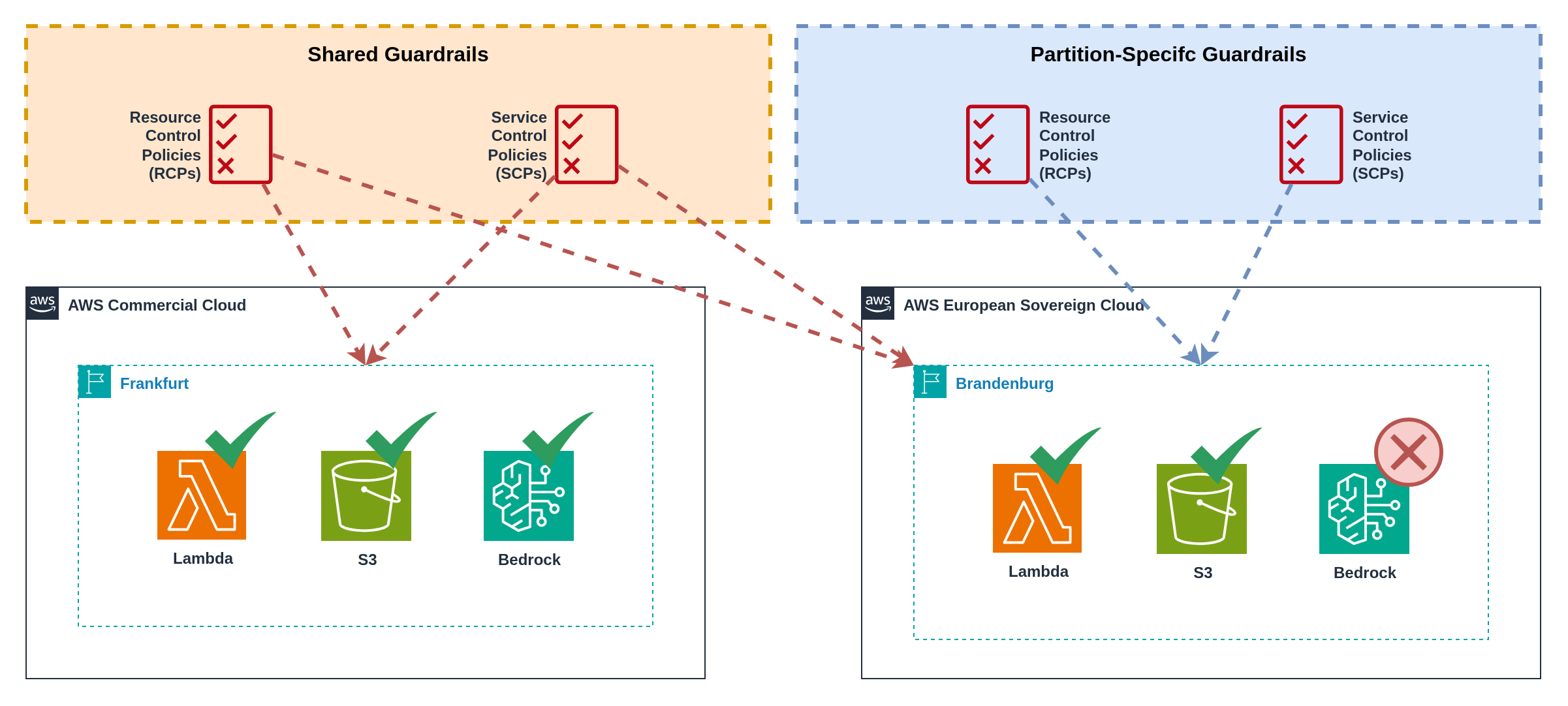
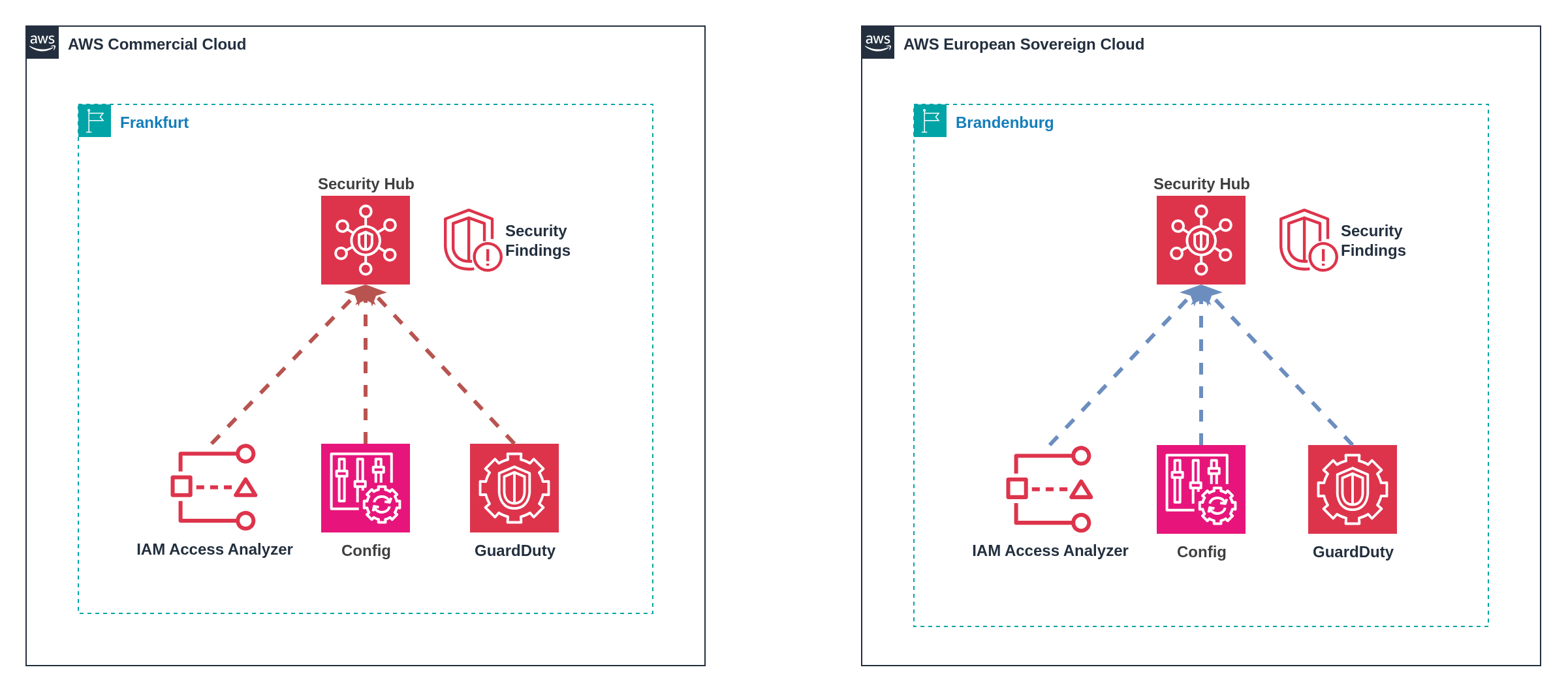
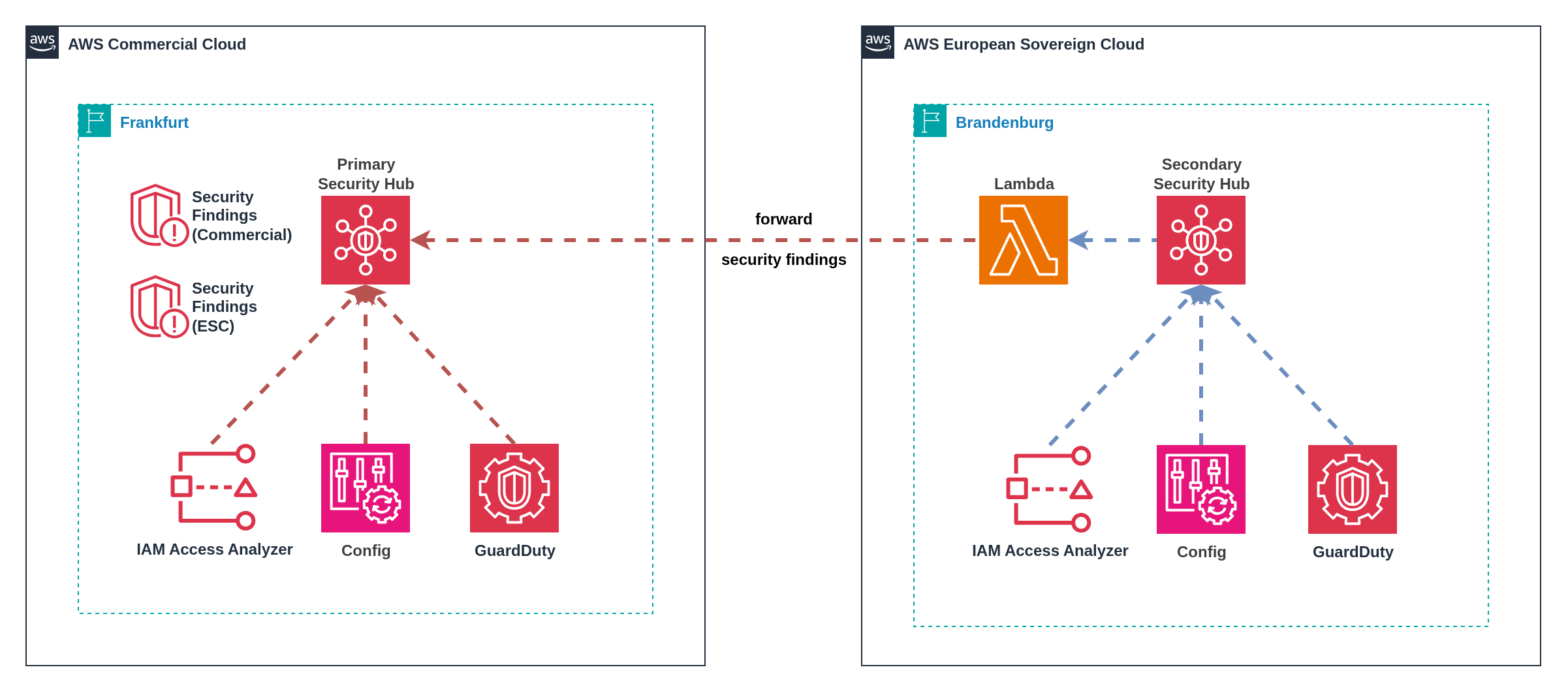
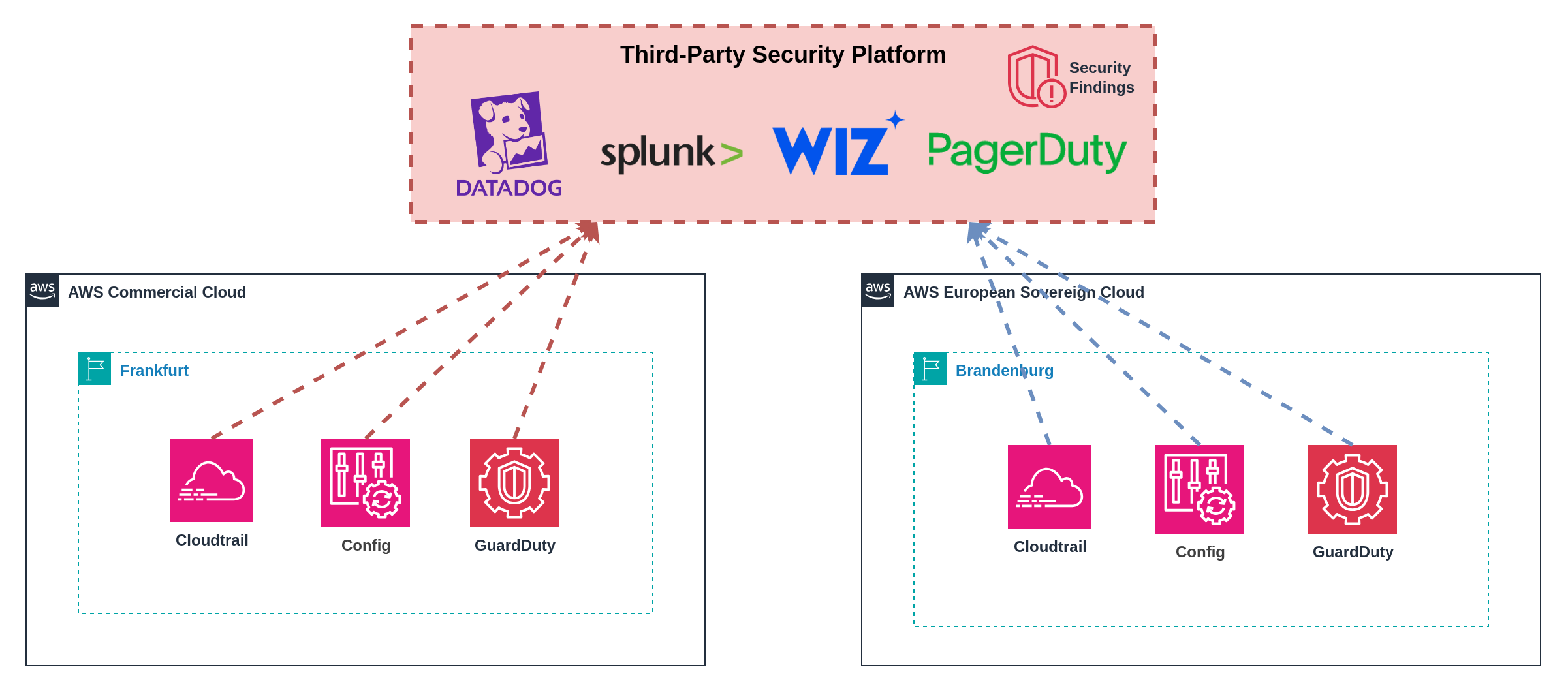
✅ No cross-partition data movement
✅ Native AWS tooling integration
✅ Clear operational boundaries
✅ Simplified compliance auditing | ❌ Operational overhead of dual dashboards
❌ Potential blind spots in attack correlation
❌ Duplicate security tool costs
❌ Increased training requirements
❌ No unified security view | **High**
Complete partition isolation | **Medium**
Dual operations model | **Medium**
Duplicate AWS security service costs;
No additional platform fees | | **2. Cross-Partition Security Hub Forwarding** | Organizations prioritizing centralized operations, cost optimization, AWS-native security stacks | ✅ Centralized security operations
✅ Native AWS tooling throughout
✅ Familiar Security Hub interface
✅ Reduced third-party costs
✅ Single pane of glass | ❌ Data residency concerns for ESC findings
❌ Lambda execution & API costs
❌ Non-seamless investigation experience
❌ Synchronization complexity
❌ Potential finding duplication | **Low-Medium**
ESC findings forwarded to commercial | **Medium**
Custom forwarding logic | **Low-Medium**
Lambda execution costs;
Cross-partition API calls;
Single AWS security service deployment | | **3. Third-Party Security Platforms** | Organizations with existing SIEM investments, advanced threat hunting requirements, complex multi-cloud environments | ✅ Unified security visibility
✅ Advanced correlation capabilities
✅ Custom dashboards & alerting
✅ Integration with existing SOC workflows
✅ Multi-cloud platform support | ❌ Additional licensing costs
❌ Data residency compliance risks
❌ External platform dependencies
❌ Integration complexity
❌ Potential vendor lock-in | **Medium**
May require careful ESC telemetry handling | **Medium-High**
Platform integration & management | **Medium-High**
Platform licensing scales with data volume;
API & log forwarding costs | **Summary:** * Security patterns range from complete partition separation to unified aggregation with varying sovereignty trade-offs * Infrastructure as Code is essential for maintaining consistent security configurations across partitions * Native AWS security operations provide sovereignty compliance but require separate management overhead * Third-party platforms provide advanced capabilities but require careful data residency evaluation --- ### 9.5 Connectivity Cross‑partition connectivity represents one of the most significant technical challenges, as AWS provides no native mechanisms for VPC peering, Transit Gateway connectivity, or PrivateLink between partitions. Traditional AWS networking patterns cannot span partition boundaries, forcing organizations to implement alternative connectivity approaches that balance security, performance, and operational complexity. The connectivity patterns for cross‑partition architectures mirror those used in multi‑cloud and hybrid on‑premises environments. Organizations with experience connecting AWS to other cloud providers (Azure, Google Cloud) or integrating cloud workloads with on‑premises data centres will find familiar architectural patterns and trade‑offs. The same considerations around latency, security, cost, and operational complexity that apply to multi‑cloud connectivity also apply to multi‑partition scenarios. Three viable patterns address cross‑partition connectivity requirements, each with distinct trade‑offs regarding security, performance, cost, and operational complexity. The selection depends on application requirements, existing infrastructure, security posture, and performance needs. :::info Traffic Routing Note **Backbone Network Architecture:** Traffic routing behavior varies by partition due to separate backbone infrastructures: - **Commercial ↔ GovCloud (US):** Traffic between these partitions remains on AWS's backbone network and does not traverse the public internet, as both partitions share the same global AWS backbone infrastructure. - **ESC ↔ Commercial/GovCloud:** ESC operates with a completely separate backbone infrastructure (similar to AWS China), meaning cross-partition traffic between ESC and other partitions **will traverse the public internet** rather than AWS's private backbone network. This separation reinforces ESC's sovereignty model but affects network performance and security considerations for cross-partition connectivity. - **China ↔ Any Partition:** AWS China operates with a separate backbone, so all traffic to/from China regions traverses the public internet. This backbone separation is fundamental to ESC's sovereignty architecture, ensuring complete infrastructure independence whilst requiring careful planning for cross-partition connectivity patterns. ::: --- #### `Pattern 1` Connectivity over the Internet using Native TLS Encryption ![TLS Encryption Pattern](https://docs.nuvibit.com/illustrations/multi-connectivity-pattern1.png) *Figure 18: TLS encryption at the application layer between partitions using Application Load Balancers (ALBs)* This pattern leverages application‑native TLS encryption for cross‑partition communication through managed AWS services that provide secure external endpoints. Rather than exposing backend services directly, this approach uses Application Load Balancers (ALBs) or API Gateways as secure intermediaries that handle TLS termination and traffic routing to private backend services. **Implementation:** Deploy backend services in private subnets within both partitions, configure Application Load Balancers or API Gateways with TLS certificates to provide secure public endpoints, and establish cross‑partition communication through these managed service endpoints. Backend services remain private and communicate only with the load balancers or API Gateways within their respective partitions. **Security Architecture:** Backend compute resources (EC2, ECS, EKS) operate in private subnets without direct internet access. ALBs or API Gateways serve as the only public‑facing components, handling TLS termination, authentication, and request routing. Security groups restrict backend access to only the load balancer or API Gateway security groups, ensuring no direct public exposure of application services. **Service Options:** - **Application Load Balancer (ALB):** Ideal for HTTP/HTTPS traffic with advanced routing capabilities, health checks, and integration with AWS Certificate Manager for automatic TLS certificate management - **API Gateway:** Optimal for REST APIs, providing built‑in authentication, throttling, caching, and request/response transformation capabilities - **Network Load Balancer (NLB):** Suitable for non‑HTTP protocols requiring high performance and low latency **Security Considerations:** Organizations remain responsible for ensuring encryption‑in‑transit modules and algorithms meet compliance requirements. Implement mutual TLS authentication where supported, use AWS Certificate Manager for certificate lifecycle management, and configure appropriate security group rules to restrict access to authorised cross‑partition communication only. :::warning Misconfiguration Risks Improper security group configuration or load balancer settings can inadvertently expose backend services directly to the public internet, allowing unintended public-facing traffic rather than the intended secure cross‑partition communication. Implement defence‑in‑depth controls including restrictive security groups that only allow traffic from load balancers, regular security audits of public‑facing endpoints, and automated compliance scanning to detect and alert on unintended public exposure. Use AWS Config rules and Security Hub findings to continuously monitor for compliance violations. ::: --- #### `Pattern 2` Connectivity using IPSec AWS Site‑to‑Site VPN over the Internet ![Site-to-Site VPN Pattern](https://docs.nuvibit.com/illustrations/multi-connectivity-pattern2.png) *Figure 19: Site‑to‑Site VPN between partitions using Transit Gateway and self‑managed EC2‑based appliances* AWS Site‑to‑Site VPN uses Internet Protocol Security (IPSec) to create encrypted tunnels between partitions, providing network‑layer encryption for applications that cannot support application‑layer encryption or require private connectivity without internet exposure. **Implementation:** Deploy third‑party virtual appliances (such as Cisco CSR, Palo Alto Networks VM‑Series, Fortinet FortiGate, or open‑source solutions like StrongSwan) in one or both partitions. Configure IPSec tunnels between appliances, with Transit Gateway providing connectivity within each partition. Virtual appliances handle tunnel establishment, encryption, routing, and can provide additional security services including deep packet inspection, intrusion detection/prevention, and application-layer filtering. **Security Enhancement:** Modern firewall appliances combine VPN capabilities with comprehensive traffic inspection, enabling organizations to implement unified security policies across partition boundaries. These appliances can perform application identification, threat detection, content filtering, and compliance logging whilst maintaining encrypted connectivity between partitions. **Performance:** Maximum bandwidth per VPN tunnel is 1.25 Gbps. Enable Equal‑Cost Multi‑Path (ECMP) routing to aggregate throughput across multiple VPN connections and scale beyond the default 1.25 Gbps limit. This approach can achieve higher aggregate bandwidth but introduces additional complexity. **Security Requirements:** Ensure IPSec implementations use NIST‑approved algorithms and FIPS‑validated cryptographic modules to meet compliance requirements. Configure strong authentication and encryption policies appropriate for your security posture. :::warning Operational Complexity Pattern 2 introduces operational challenges that require careful planning and ongoing management: **VPC CIDR Overlap Constraints:** VPC CIDR ranges cannot overlap across partitions when using VPN connectivity. This requires careful IP address space planning between partitions to prevent address conflicts. Consider implementing a centralized IPAM (IP Address Management) strategy to manage address allocation across both partitions. **Third-Party Appliance Dependencies:** VPN connectivity relies on third-party virtual appliances (EC2 instances) that introduce operational overhead including regular patching, security updates, monitoring, and high availability configuration. If these appliances fail or require maintenance, cross-partition connectivity is disrupted, potentially affecting critical business operations. **Single Points of Failure:** Without proper redundancy design, VPN appliances can become single points of failure for cross-partition communication. Implement active-passive or active-active clustering with health monitoring and automated failover to maintain connectivity during appliance failures or maintenance windows. ::: --- #### `Pattern 3` Connectivity through Direct Connect This hub‑and‑spoke model routes cross‑partition traffic through a customer gateway infrastructure connected via AWS Direct Connect, enabling centralised security controls and traffic inspection. The pattern accommodates two primary deployment scenarios based on existing infrastructure. **Option A: On‑Premises Datacenter Gateway** ![Direct Connect Gateway Pattern A](https://docs.nuvibit.com/illustrations/multi-connectivity-pattern3a.png) *Figure 20: Connectivity through on‑premises datacenter gateway infrastructure* For organizations with existing datacenter infrastructure, establish Direct Connect connections from both partitions to the on‑premises datacenter. Deploy firewall and routing appliances in the datacenter to control cross‑partition communication. - **Implementation:** Connect each partition to on‑premises datacenter using AWS Direct Connect transit virtual interfaces (VIFs) - **Gateway Infrastructure:** Customer‑managed routing and security appliances in physical datacenter - **Benefits:** Leverages existing datacenter investments and operational expertise - **Considerations:** Requires existing datacenter infrastructure and operational teams **Option B: Cloud Exchange Provider Gateway** ![Direct Connect Gateway Pattern B](https://docs.nuvibit.com/illustrations/multi-connectivity-pattern3b.png) *Figure 21: Connectivity through cloud exchange provider gateway infrastructure* For organizations without datacenter infrastructure, establish a customer gateway at cloud exchange providers (Equinix, Digital Realty, etc.) with Direct Connect connectivity to both partitions. - **Implementation:** Deploy virtual customer gateway infrastructure at cloud exchange facilities with Direct Connect connections - **Gateway Infrastructure:** Virtual appliances (firewalls, routers) hosted at provider facilities - **Benefits:** No datacenter infrastructure required, provider‑managed physical infrastructure - **Considerations:** Recurring costs for provider space, power, and connectivity **Direct Connect Architecture:** Direct Connect gateways are global constructs that enable connectivity to any AWS Region but do not enable BGP prefix propagation between associated Transit Gateways, preventing direct east‑west traffic. Communication occurs through advertised supernets that overlap with VPC address spaces. **Routing Behaviour:** VPCs can communicate through Direct Connect endpoints when supernets (such as 10.0.0.0/8) are advertised that encompass the VPC address ranges. This enables controlled inter‑VPC communication through customer gateway infrastructure. **Performance Impact:** Hair‑pinning traffic through customer gateway infrastructure introduces additional latency, data transfer out (DTO) costs, and Transit Gateway data transfer charges. Network performance depends on gateway infrastructure capacity and Direct Connect location proximity. :::info Direct Connect Locations **ESC Direct Connect Availability:** AWS European Sovereign Cloud will launch with Direct Connect support, but the specific Direct Connect locations have not yet been announced. **Impact on Cross-Partition Connectivity:** Organizations planning to connect ESC and commercial partitions via Direct Connect (Pattern 3) should anticipate: - **New Cross-Connect Requirements:** ESC may launch at different Direct Connect facilities than existing commercial AWS locations, requiring additional cross-connects between facilities - **Increased Infrastructure Costs:** Cross-connects between different Direct Connect locations typically incur monthly recurring charges and installation fees - **Extended Lead Times:** Establishing new cross-connects can take weeks or months depending on facility availability and carrier provisioning - **Geographic Considerations:** ESC Direct Connect locations may prioritize EU facilities, potentially affecting latency and routing optimization for global organizations **Planning Recommendations:** Organizations should budget for potential additional cross-connect costs and extended deployment timelines when designing Direct Connect-based cross-partition connectivity. Consider engaging AWS sales teams early to understand ESC Direct Connect location planning and availability timelines. ::: :::warning Infrastructure Dependencies Pattern 3 introduces infrastructure and operational dependencies that require careful consideration: **VPC CIDR Planning Constraints:** Direct Connect requires that VPC CIDR ranges do not overlap with on-premises networks (for Option A) and across partitions. This demands comprehensive IP address space planning between on-premises and partitions to prevent routing conflicts and ensure proper traffic flow. **Direct Connect Redundancy Requirements:** Achieving high availability requires redundant Direct Connect connections across multiple locations and diverse paths to avoid single points of failure. Organizations must establish multiple Direct Connect connections at different facilities, implement diverse network paths, and ensure proper BGP routing configurations. This significantly increases infrastructure complexity and costs, as organizations need multiple Direct Connect ports, cross-connects, and carrier relationships to achieve enterprise-grade redundancy. **Customer Gateway Management:** Success depends on properly configured, maintained, and managed customer gateway infrastructure (routers, firewalls). These gateways require regular firmware updates, security patching, configuration management, and 24/7 monitoring. Gateway failures directly impact cross-partition connectivity, making robust operational procedures and redundancy planning essential. ::: --- #### Security Considerations Across All Patterns All cross‑partition connectivity patterns require careful security implementation: - **Split‑horizon DNS:** Ensure appropriate name resolution per partition to prevent misrouted traffic - **Egress controls:** Implement strict egress filtering to prevent unintended cross‑partition communication - **TLS policy enforcement:** Mandate TLS encryption for all cross‑partition application traffic regardless of network‑layer encryption - **Network segmentation:** Use security groups and NACLs to restrict traffic to authorised flows only - **Monitoring and logging:** Implement comprehensive flow logging and traffic analysis for all cross‑partition communication - **Certificate management:** Establish robust PKI for TLS certificates and VPN authentication #### Performance and Cost Optimisation Optimise cross‑partition connectivity for performance and cost: - **Latency optimisation:** Select connectivity patterns and routing that minimise additional latency - **Bandwidth planning:** Size connections and appliances appropriately for expected traffic volumes - **Caching strategies:** Implement intelligent caching to reduce cross‑partition traffic - **Data transfer optimisation:** Use compression and efficient data formats to minimise bandwidth consumption - **Cost monitoring:** Track data transfer costs and optimise traffic patterns based on usage analysis --- #### Cross-Partition Connectivity Pattern Comparison | **Pattern** | **Best For** | **Pros** | **Cons** | **Performance** | **Complexity** | **Cost Profile** | |-------------|--------------|----------|----------|-----------------|----------------|------------------| | **1. TLS over Internet** | Modern applications with native TLS support, API-based integrations, microservices | ✅ Excellent performance
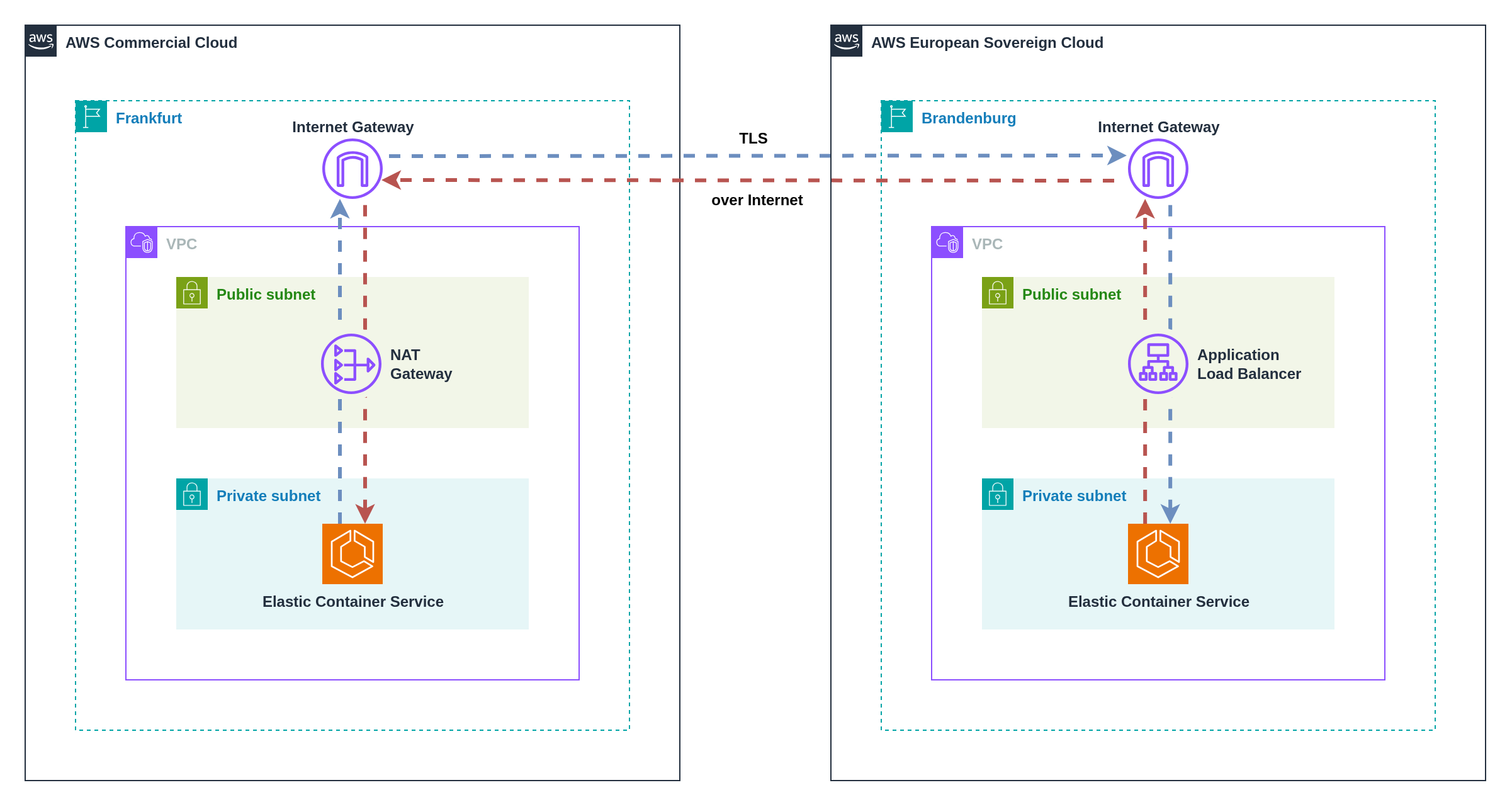
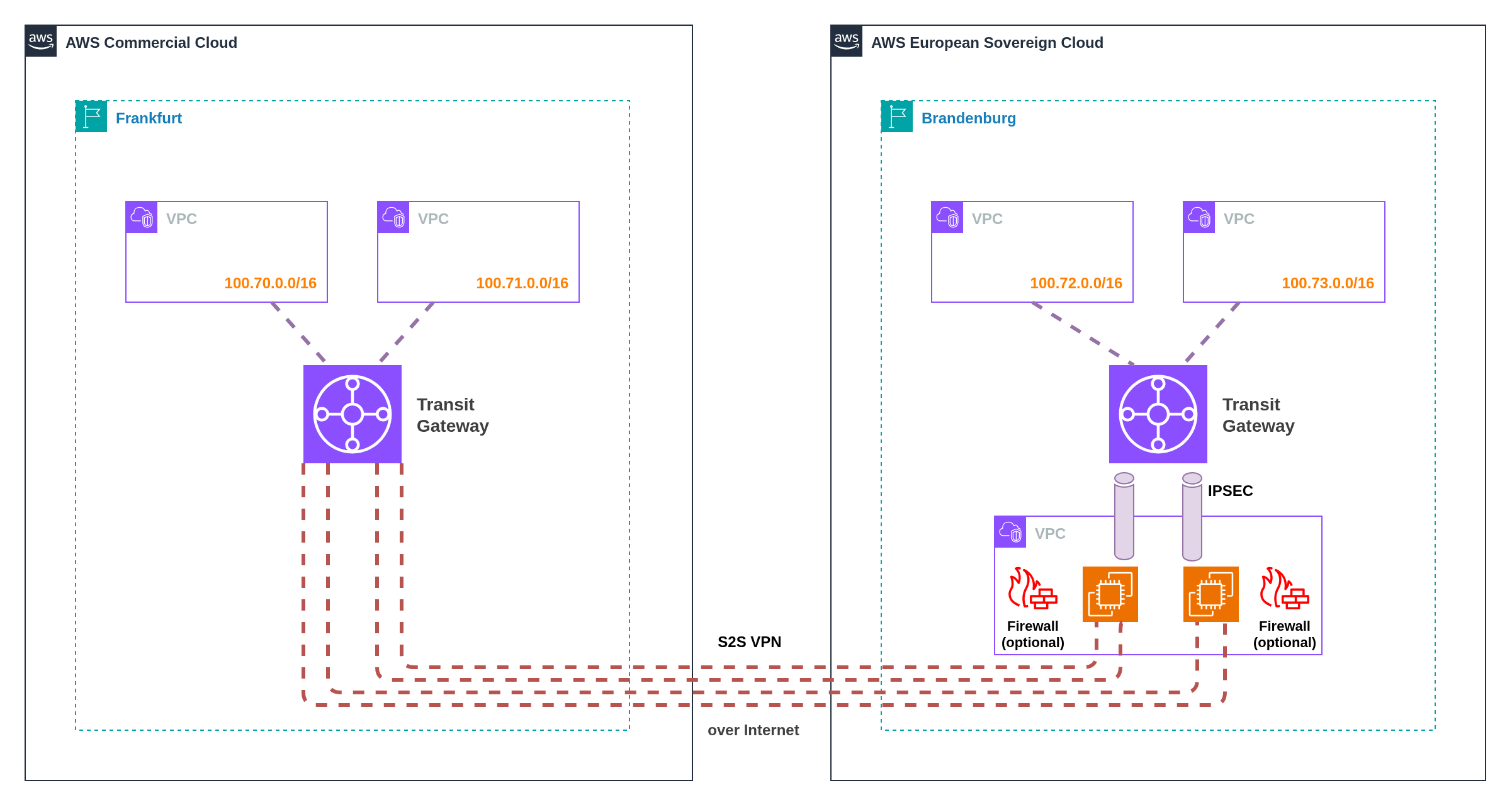
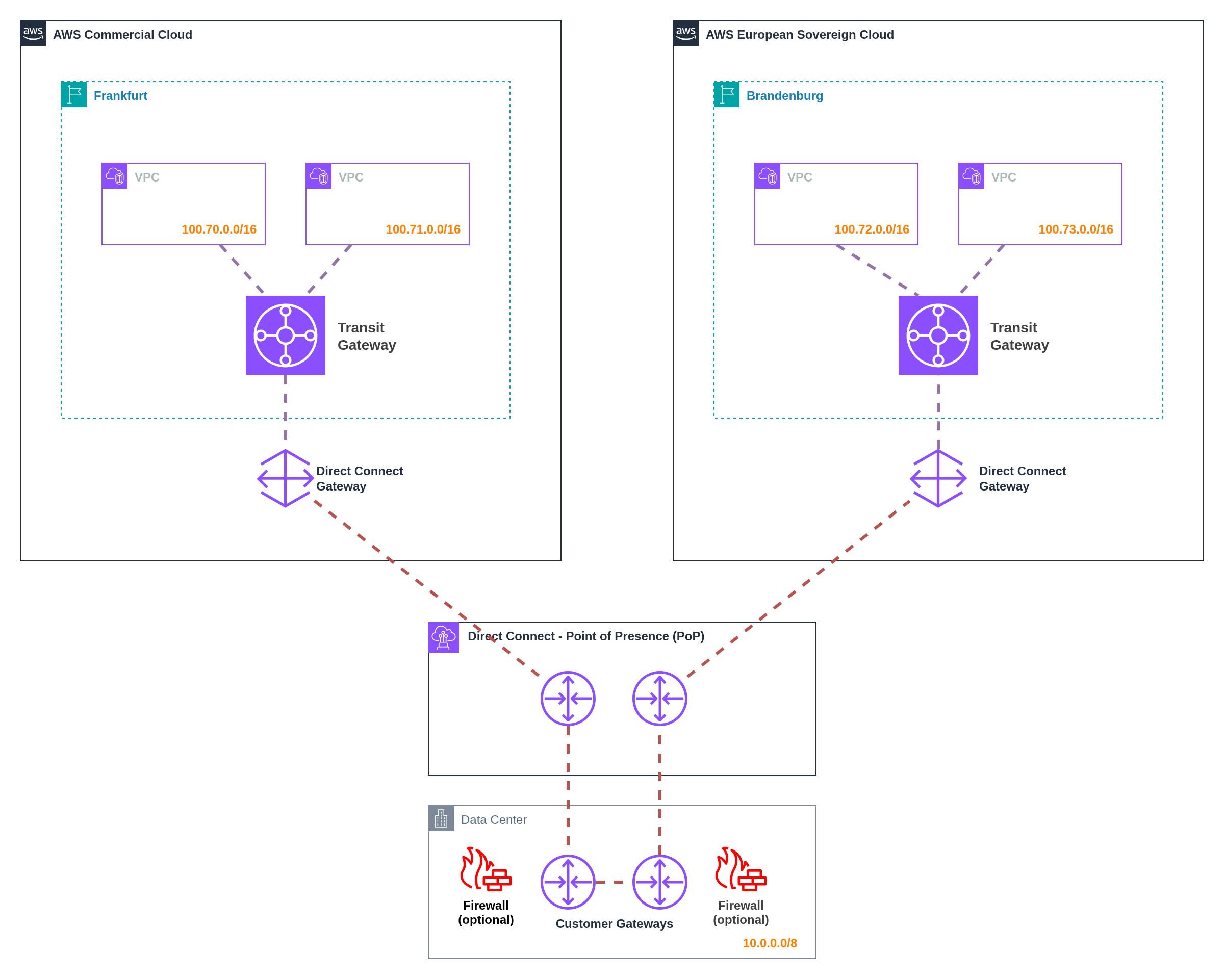
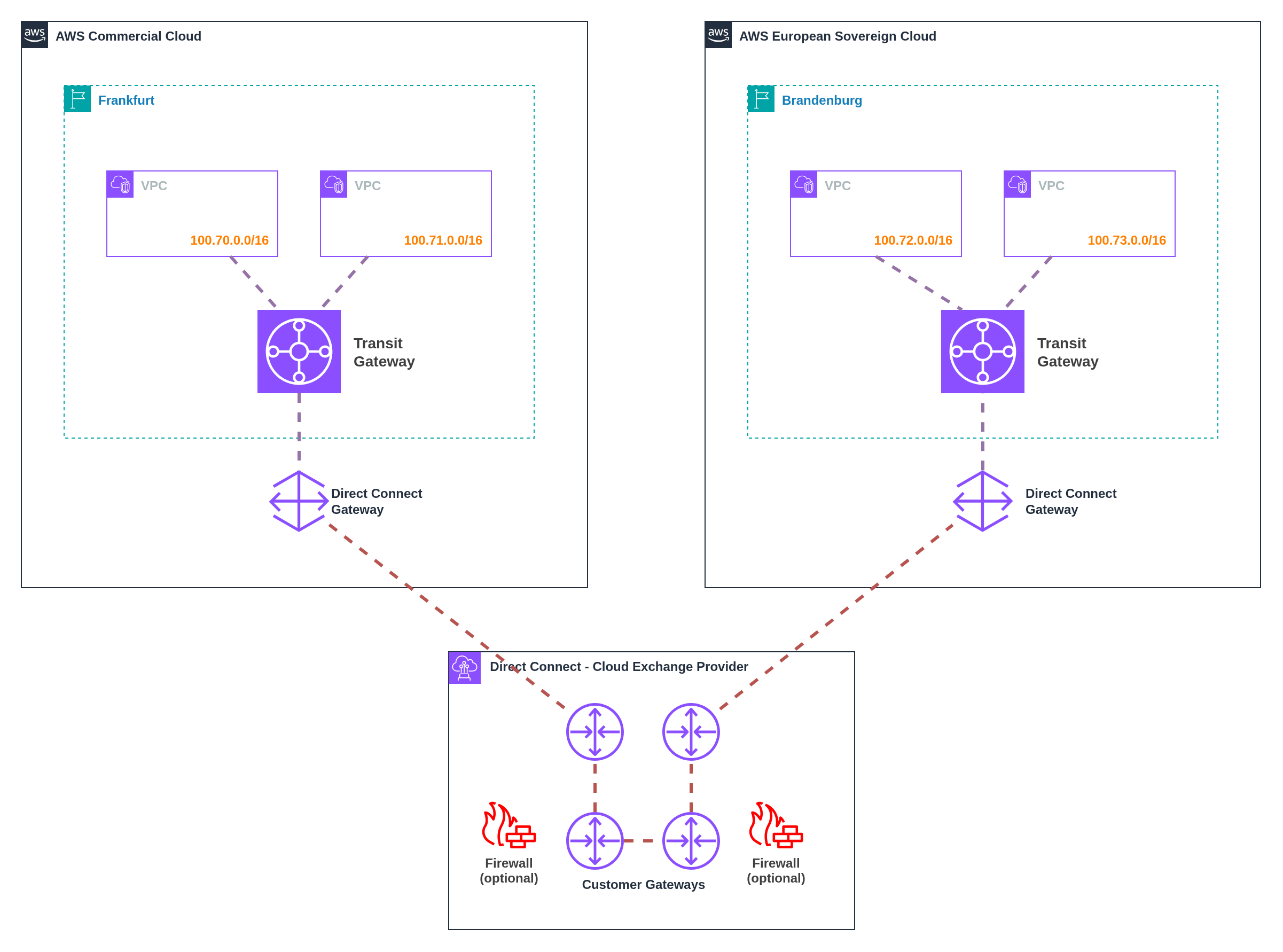
✅ AWS best practices
✅ Simple implementation
✅ No additional infrastructure | ❌ Requires application-level TLS
❌ Not suitable for legacy apps
❌ Public endpoint required
❌ No centralized traffic inspection | **High**
Minimal latency | **Low**
Standard ALB/API Gateway | **Low-Medium**
ALB/API Gateway + NAT Gateway fees;
Internet data transfer rates | | **2. IPSec VPN** | Legacy applications, network-layer encryption requirements, centralized security policies within AWS partitions | ✅ Works with any application
✅ Network-layer encryption
✅ Centralized security at VPN appliances
✅ Predictable performance
✅ Familiar VPN patterns | ❌ 1.25 Gbps per tunnel limit
❌ Higher latency
❌ Appliance management overhead
❌ Costs scale with bandwidth | **Medium**
VPN tunnel overhead | **Medium**
Virtual appliance management | **Medium-High**
VPN connection fees scale linearly;
Virtual appliance costs;
Higher data transfer rates | | **3. Direct Connect** | Centralized security controls at customer premises, highest bandwidth requirements, existing datacenter integration | ✅ Centralized security at customer gateway
✅ Highest bandwidth potential
✅ Works with/without datacenters
✅ Predictable performance
✅ Long-term data transfer savings | ❌ Higher latency (hair-pinning)
❌ High initial investment
❌ Gateway infrastructure dependency
❌ Complex redundancy requirements | **Medium**
Varies by infrastructure | **High**
Gateway infrastructure + redundancy | **High initial, Low ongoing**
Direct Connect port fees;
Gateway infrastructure costs;
Lower data transfer rates at scale | **Summary:** - Three distinct patterns address cross‑partition connectivity with different trade‑offs - Application‑layer TLS provides optimal performance but requires native encryption support - IPSec VPN enables network‑layer encryption for legacy applications at performance cost - Direct Connect routing centralises security controls but introduces latency and complexity --- ### 9.6 Observability and Operations Unified observability across partitions whilst maintaining compliant data residency requires careful consideration of telemetry collection, cross‑partition correlation, and partition‑aware incident response workflows. Organizations must balance operational visibility requirements with sovereignty constraints and data residency regulations. The fundamental challenge lies in providing unified operational views whilst respecting partition boundaries and service availability differences. CloudWatch, X‑Ray, and other observability services operate independently within each partition, requiring coordination mechanisms to achieve comprehensive monitoring and alerting across multi‑partition environments. Customer incident response playbooks require adaptation to ESC's operational model whilst maintaining consistent service level objectives across partitions. --- #### `Pattern 1` Independent Observability per Partition ![Independent observability architecture](https://docs.nuvibit.com/illustrations/multi-observability-independent.png) *Figure 22: Independent observability with partition-specific operational procedures* This pattern maintains completely separate observability stacks in each partition, providing maximum data residency compliance and partition isolation whilst requiring manual coordination for cross‑partition operational visibility and incident correlation. **Implementation:** Deploy independent CloudWatch, X‑Ray, and monitoring infrastructure in each partition with separate dashboards, alerting configurations, and operational procedures. Each partition operates its own observability stack without cross‑partition data sharing or automated correlation. **Data Residency:** Telemetry data never leaves its originating partition, ensuring complete compliance with data residency requirements. Metrics, logs, traces, and operational data remain within appropriate sovereignty boundaries throughout their lifecycle. **Operational Model:** Platform teams maintain separate monitoring dashboards and alerting systems for each partition. Incident response procedures operate independently per partition, with manual coordination required for issues affecting multiple partitions simultaneously. **Benefits:** Maximum data residency compliance with no cross‑partition data movement, complete partition isolation eliminating cross‑partition failure scenarios, simplified compliance boundaries with clear data provenance, and independent operational procedures that can accommodate partition‑specific constraints. **Challenges:** Manual correlation required for cross‑partition issues, duplicate dashboard and alert configuration maintenance, separate operational procedures increasing response complexity, and potential blind spots for issues spanning multiple partitions. **Use Cases:** Organizations with strict data residency requirements, regulatory frameworks prohibiting cross‑border telemetry data, maximum partition isolation priorities, and acceptance of manual cross‑partition correlation overhead. --- #### `Pattern 2` Centralized Observability with Log Forwarding ![Centralized observability with log forwarding](https://docs.nuvibit.com/illustrations/multi-observability-centralized.png) *Figure 23: Log forwarding to main partition for centralized analysis* This pattern forwards telemetry data from distributed partitions to a centralized observability stack in a designated "main" partition, providing unified operational views whilst requiring careful consideration of data residency implications and cross‑partition connectivity requirements. **Implementation:** Configure log forwarding from ESC partition to commercial partition (or vice versa) using Kinesis Data Firehose with HTTP endpoint delivery to Lambda function URLs, API Gateway endpoints, or other HTTP-accessible services in the target partition. Centralized partition aggregates telemetry data for unified analysis, alerting, and operational dashboards. **Data Flow Architecture:** ESC partition forwards logs, metrics, and traces to the commercial partition over the internet through secure HTTPS endpoints. Kinesis Data Firehose delivers log streams to Lambda function URLs or API Gateway endpoints in the target partition, which then process and store the data in centralized CloudWatch, OpenSearch, or other analysis tools providing unified operational views with data from both partitions. **Compliance Considerations:** Log forwarding may conflict with data residency requirements depending on regulatory interpretation and data classification. Organizations must evaluate whether telemetry forwarding violates sovereignty constraints or compliance obligations. **Benefits:** Unified operational dashboards providing complete cross‑partition visibility, centralized alerting with correlation across partitions, single operational interface reducing complexity for platform teams, and shared observability infrastructure reducing maintenance overhead. **Challenges:** Potential data residency compliance violations requiring legal evaluation, cross‑partition connectivity dependencies affecting reliability, network egress costs for telemetry forwarding, and potential data loss during connectivity disruptions. **Use Cases:** Organizations with acceptable data residency implications for telemetry data, established cross‑partition connectivity infrastructure, unified operational team preferences, and tolerance for compliance complexity in observability data handling. :::warning Data Residency Implications **Regulatory Compliance Risk:** Forwarding telemetry data across partitions may violate data residency requirements depending on regulatory interpretation and data classification schemes. **Legal Evaluation Required:** Organizations must engage legal and compliance teams to evaluate whether operational telemetry forwarding conflicts with sovereignty obligations, particularly for: - **Personal Data in Logs:** Application logs may contain customer identifiers or personal information subject to GDPR residency requirements - **Business Data Correlation:** Aggregated telemetry patterns may reveal business-sensitive information requiring specific jurisdictional protection - **Regulatory Interpretation:** Different regulatory frameworks may classify operational telemetry differently regarding cross-border transfer restrictions **Mitigation Strategies:** Implement data classification and filtering at forwarding points, anonymize or pseudonymize telemetry data before cross‑partition transfer, maintain parallel independent observability as fallback, and document compliance rationale for regulatory examination. ::: --- #### `Pattern 3` External Third‑Party Observability Platform ![Third-party observability platform](https://docs.nuvibit.com/illustrations/multi-observability-third-party.png) *Figure 24: Third-party observability platform aggregating telemetry from multiple partitions* This pattern uses external third‑party observability platforms to aggregate telemetry data from multiple partitions, providing unified operational views whilst maintaining clear data provenance and potentially addressing data residency concerns through platform jurisdiction selection. **Implementation:** Deploy observability agents or configure native integrations to forward telemetry data from both partitions to external platforms such as Datadog, New Relic, Splunk, or Dynatrace. External platforms provide unified dashboards, alerting, and analysis capabilities across partitions. **Platform Selection:** Choose observability platforms with appropriate jurisdictional presence to align with data residency requirements. EU‑based observability platforms or platforms with EU data centers may provide better alignment with ESC sovereignty objectives. **Integration Architecture:** Use native AWS integrations, observability agents, or API‑based forwarding to send telemetry data to external platforms. Maintain consistent data classification and filtering across partitions to ensure appropriate data handling. **Benefits:** Unified cross‑partition observability without AWS‑specific limitations, advanced analytics and correlation capabilities beyond native AWS services, potential data residency alignment through platform jurisdiction selection, and vendor expertise in multi‑cloud observability scenarios. **Challenges:** Additional vendor relationships and licensing costs, external dependency for critical operational visibility, potential data residency complications depending on platform architecture, and vendor lock‑in risks for observability infrastructure. **Advanced Features:** Third‑party platforms often provide sophisticated capabilities including anomaly detection, predictive analytics, automated incident correlation, and integration with incident management workflows that span multiple cloud providers and partitions. **Use Cases:** Organizations with existing third‑party observability investments, requirements for advanced analytics beyond native AWS capabilities, acceptable external dependencies for operational visibility, and budget for additional observability platform licensing. :::info Third‑Party Platform Considerations **Jurisdiction Alignment:** Select observability platforms with data processing and storage aligned to your sovereignty requirements: - **EU‑Based Platforms:** European observability vendors or EU data centers for ESC alignment - **Jurisdictional Flexibility:** Platforms offering data residency controls and regional deployment options - **Compliance Certifications:** Platforms with relevant compliance certifications (ISO 27001, SOC 2, etc.) **ESC Integration Support:** Third‑party observability platforms may require time to develop ESC‑specific integrations: - **Early Adoption Risk:** Limited platform support during ESC early adoption phases - **Integration Development:** Vendors need time to develop and test ESC‑specific connectors - **Feature Parity:** Initial ESC support may lack feature parity with commercial AWS integrations **Planning Recommendations:** Engage with observability platform vendors early to understand ESC roadmaps and integration timelines. Plan for potential delays or limitations in platform support during ESC adoption. ::: --- #### Multi‑Partition Observability Pattern Comparison | **Pattern** | **Best For** | **Pros** | **Cons** | **Data Handling** | **Operational Model** | **Compliance** | |-------------|--------------|----------|----------|-------------------|-----------------------|----------------| | **1. Independent Observability per Partition** | Organizations with strict data residency requirements, maximum partition isolation priorities | ✅ Maximum data residency compliance
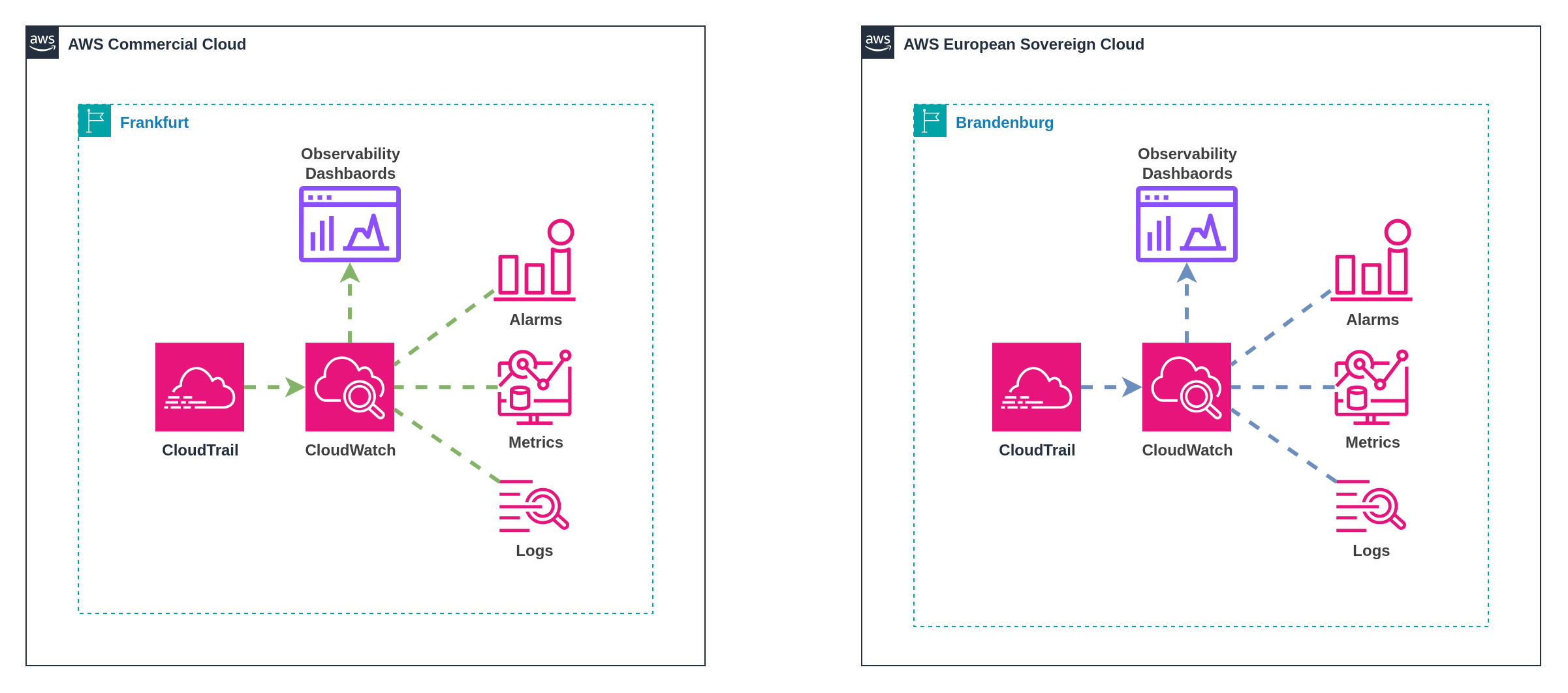
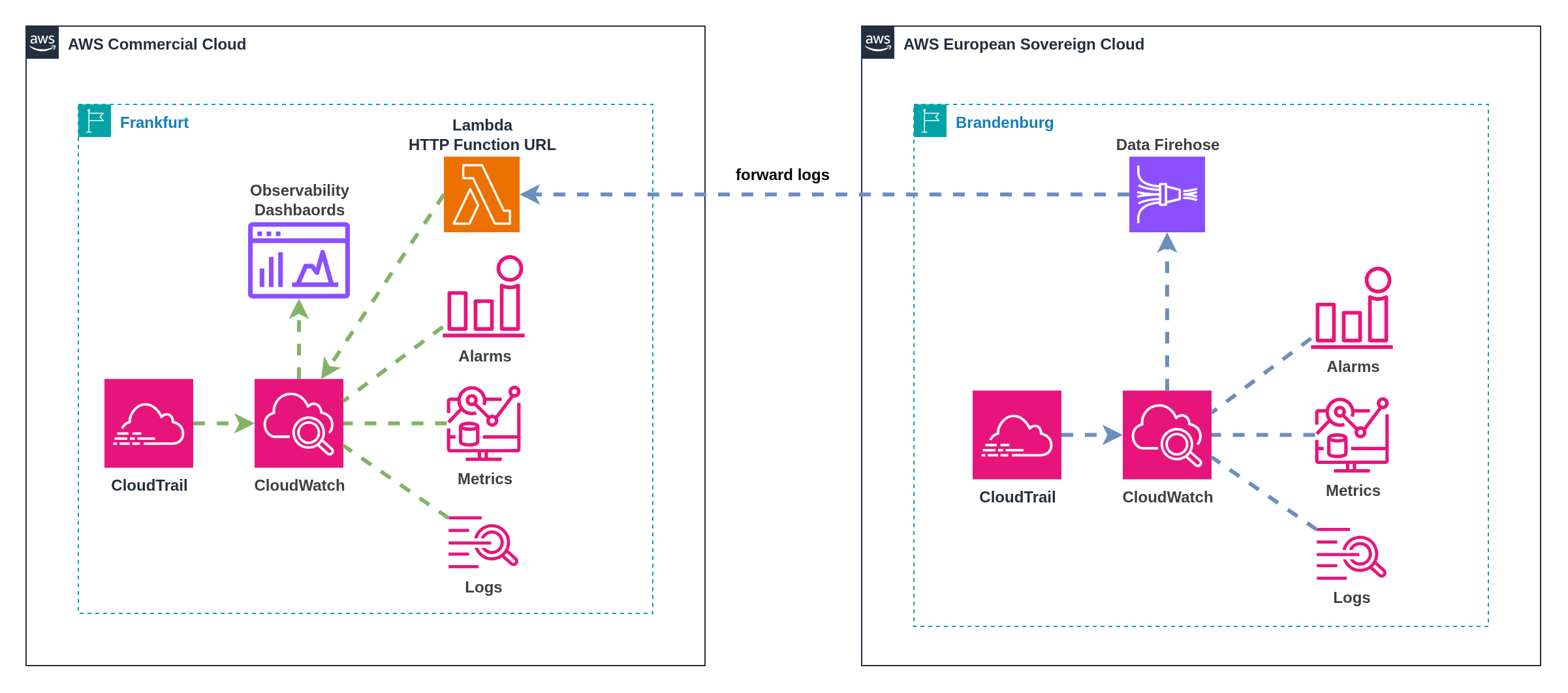
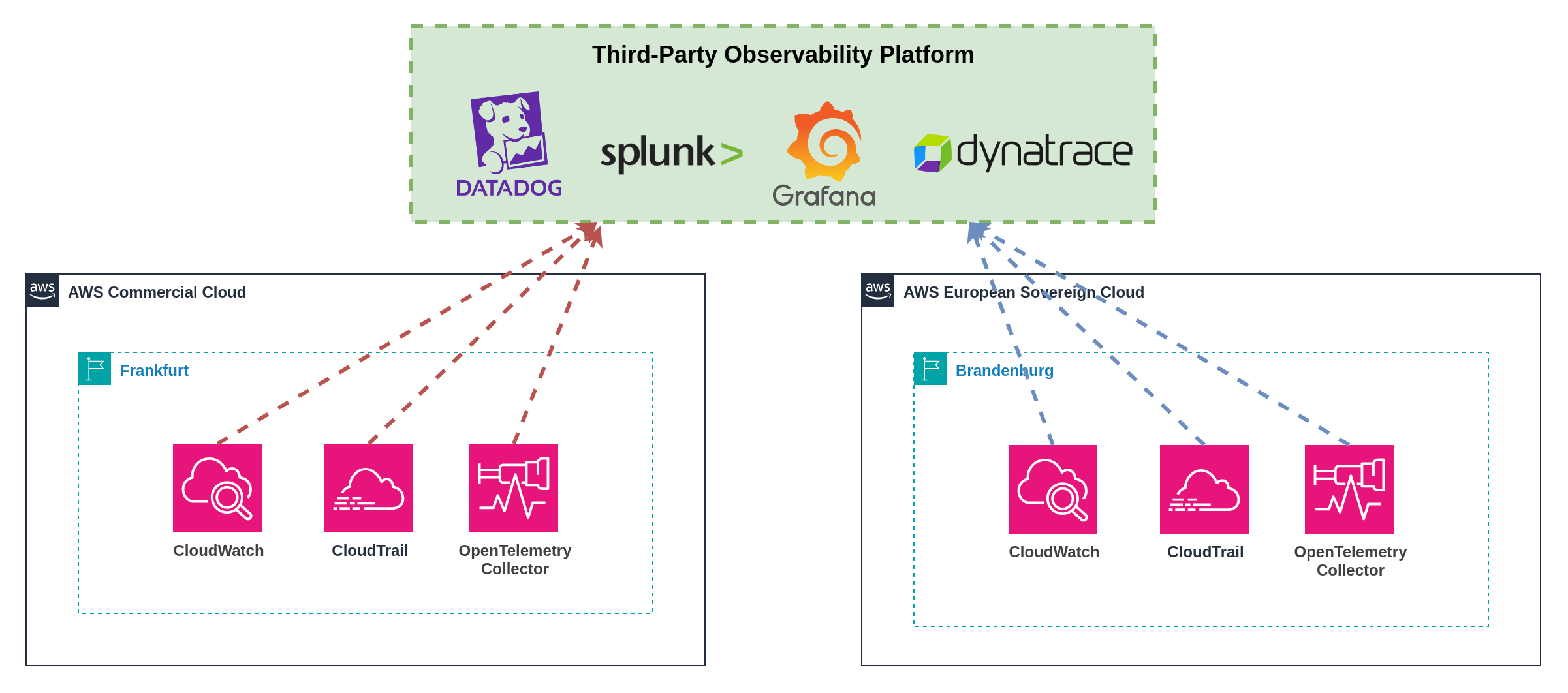
✅ Complete partition isolation
✅ Simplified compliance boundaries
✅ No cross‑partition dependencies
✅ Partition‑specific operational procedures | ❌ Manual cross‑partition correlation
❌ Duplicate configuration maintenance
❌ Separate operational procedures
❌ Potential blind spots
❌ Increased operational complexity | **Isolated**
Data never leaves partition | **Separated**
Independent procedures per partition | **Maximum**
Clear compliance boundaries | | **2. Centralized Observability with Log Forwarding** | Organizations with unified operational preferences, acceptable data residency implications for telemetry | ✅ Unified operational dashboards
✅ Centralized alerting and correlation
✅ Single operational interface
✅ Reduced infrastructure overhead
✅ Complete cross‑partition visibility | ❌ Potential compliance violations
❌ Cross‑partition connectivity dependency
❌ Network egress costs
❌ Data loss risk during outages
❌ Complexity in data classification | **Centralized**
Forwarded to main partition | **Unified**
Single operational interface | **Complex**
Requires legal evaluation | | **3. External Third‑Party Observability Platform** | Organizations with existing platform investments, requirements for advanced analytics, acceptable external dependencies | ✅ Advanced analytics capabilities
✅ Unified multi‑partition visibility
✅ Vendor expertise and features
✅ Potential jurisdiction alignment
✅ Multi‑cloud support | ❌ Additional licensing costs
❌ External dependency for operations
❌ Potential vendor lock‑in
❌ Platform‑specific data residency
❌ ESC integration development delays | **External**
Forwarded to third‑party platform | **Vendor‑Managed**
Platform‑specific interfaces | **Platform‑Dependent**
Varies by vendor jurisdiction | **Summary:** * Observability patterns balance operational visibility with sovereignty and compliance requirements * Independent observability provides maximum compliance but requires manual correlation overhead * Centralized patterns improve operational efficiency but introduce compliance complexity * Third‑party platforms offer advanced capabilities but introduce external dependencies and costs * Pattern selection should consider data classification, regulatory requirements, and operational maturity --- ### 9.7 Backup and Recovery Multi‑partition backup and recovery introduces significant complexity beyond traditional single‑partition operations. Organizations must navigate cross‑partition data movement constraints, service availability differences, and sovereignty requirements whilst maintaining comprehensive data protection and recovery capabilities across distributed environments. **The Multi-Partition Backup Challenge** Traditional AWS backup strategies assume unified control planes and cross‑region replication capabilities within a single partition. Multi‑partition environments break these assumptions, requiring alternative approaches for data protection, disaster recovery, and business continuity across partition boundaries. **Service Availability Gaps:** AWS Backup availability may differ between partitions, with ESC potentially launching with limited backup service capabilities compared to the mature commercial partition. Organizations must plan for service parity evolution and implement alternative solutions for missing capabilities. **Single Region Limitations:** ESC launches with a single region (Brandenburg, `eusc-de-east-1`), eliminating traditional cross‑region backup patterns within the ESC partition. Organizations cannot leverage multiple ESC regions for geographic backup redundancy until additional ESC regions become available, creating dependency on alternative backup strategies for disaster recovery. **Cross-Partition Replication Constraints:** Native AWS backup services cannot replicate data directly between partitions, eliminating traditional cross‑region backup patterns. Data protection requires alternative replication mechanisms that respect partition boundaries whilst providing comprehensive coverage. **Sovereignty and Compliance Implications:** Backup data movement across partitions may violate data residency requirements depending on regulatory interpretation and data classification. Organizations must carefully evaluate whether cross‑partition backup storage conflicts with sovereignty obligations. **Recovery Time and Point Objectives:** Multi‑partition recovery scenarios may introduce additional complexity and latency compared to single‑partition recovery operations. Organizations must reassess Recovery Time Objectives (RTO) and Recovery Point Objectives (RPO) to account for partition‑specific constraints and cross‑partition coordination requirements. **Operational Complexity:** Managing backup policies, retention schedules, and recovery procedures across multiple partitions increases operational overhead and requires partition‑aware automation to maintain consistency and prevent configuration drift. :::warning AWS Backup Partition Boundaries **AWS Backup is Partition-Bound:** AWS Backup operates exclusively within partition boundaries and cannot export backup data to other partitions or offsite. This creates fundamental limitations for cross-partition backup strategies: **Cross-Partition Limitations:** - ❌ **Cross-Partition Export:** AWS Backup cannot export or replicate backup data to different AWS partitions - ❌ **Cross-Partition Sharing:** Backup vaults cannot be shared across partition boundaries - ❌ **Cross-Partition Recovery:** Direct recovery from AWS Backup to a different partition is not supported **Implications:** Organizations requiring cross-partition backup capabilities must implement alternative solutions such as application-level backup tools, third-party backup platforms, or custom backup orchestration using S3 replication and external storage systems. ::: Three primary patterns address multi‑partition backup and recovery requirements, each with distinct trade‑offs regarding sovereignty compliance, operational complexity, and recovery capabilities. --- #### `Pattern 1` Independent Backup Operations per Partition ![Independent backup operations per partition](https://docs.nuvibit.com/illustrations/multi-backup-independent.png) *Figure 25: AWS Backup deployed independently in each partition with isolated data protection* This pattern deploys separate AWS Backup infrastructure in each partition, providing maximum sovereignty compliance by ensuring backup data never crosses partition boundaries. Each partition operates independent backup policies, retention schedules, and recovery procedures without cross‑partition coordination or data sharing. **Implementation:** Deploy AWS Backup in both partitions with partition‑specific backup vaults, policies, and schedules. Configure backup jobs to protect resources within each partition independently, with recovery operations constrained to the same partition where backup data resides. **Backup Vault Configuration:** Create separate backup vaults in each partition with appropriate encryption keys, access policies, and retention configurations. **Policy Management:** Implement consistent backup policies across partitions using Infrastructure as Code templates with partition‑aware configurations. Shared policy definitions adapt to service availability differences between partitions whilst maintaining equivalent data protection coverage. **Benefits:** Maximum sovereignty compliance with backup data never leaving originating partition, simplified compliance boundaries with clear data provenance, independent recovery operations eliminating cross‑partition dependencies, and familiar AWS‑native backup tooling and procedures. **Challenges:** No cross‑partition disaster recovery capabilities without additional solutions, duplicate backup infrastructure increasing costs and operational overhead, separate recovery procedures requiring partition‑specific operational knowledge, and potential backup storage optimization limitations due to partition isolation. **Recovery Scenarios:** Point‑in‑time recovery operates within each partition independently. Geographic disaster recovery within ESC is not possible due to single region availability, making cross‑partition or external backup solutions necessary for comprehensive disaster recovery capabilities. Cross‑partition disaster recovery requires alternative mechanisms such as application‑level replication, database clustering, or external backup solutions that can operate across partition boundaries. **Use Cases:** Organizations with strict data residency requirements prohibiting cross‑partition data movement, regulatory frameworks requiring complete data sovereignty for backup operations, maximum compliance simplicity priorities, and acceptance of partition‑isolated recovery capabilities. :::warning AWS Backup Service Availability **ESC Launch Considerations:** AWS Backup availability in AWS European Sovereign Cloud may be limited during initial launch phases. Organizations should verify AWS Backup service availability and feature parity before implementing partition‑specific backup strategies. **Single Region Impact:** ESC's single region deployment (Brandenburg) eliminates cross‑region backup capabilities within the ESC partition. Organizations cannot use AWS Backup's cross‑region backup features for geographic redundancy until additional ESC regions become available. **Mitigation Planning:** Organizations should plan alternative backup approaches for ESC environments until full AWS Backup feature parity is achieved, including manual backup procedures, application‑level backup solutions, cross‑partition backup strategies, or third‑party backup tools for geographic redundancy. ::: --- #### `Pattern 2` Cross-Partition Backup via Offsite Storage ![Cross-partition backup via offsite storage](https://docs.nuvibit.com/illustrations/multi-backup-offsite.png) *Figure 26: Cross‑partition backup coordination through offsite storage infrastructure* This pattern uses offsite storage infrastructure as an intermediary for cross‑partition backup coordination, enabling disaster recovery capabilities whilst maintaining control over data movement and residency through customer‑managed infrastructure. Offsite storage options include on‑premises datacenters, other cloud providers, or even the alternate AWS partition depending on sovereignty requirements and operational preferences. **Implementation:** Configure application‑level backup tools (pg_dump, MySQL backup, application exports) to create backup artifacts that are stored in Amazon S3 within each partition. Use AWS DataSync, S3 replication, or custom automation to copy backup artifacts to offsite storage infrastructure for centralized backup management and cross‑partition recovery coordination. **Application-Level Backup Tools:** - **Database Backups:** Use native database backup tools (pg_dump, mysqldump, Oracle RMAN) to create portable backup artifacts - **Application Data:** Implement application‑specific export procedures for business data, configuration, and state information - **File System Backups:** Use file‑level backup tools for persistent storage volumes and application data directories **Data Flow Architecture:** Backup jobs create artifacts within each partition's S3 storage, then copy data to offsite storage via Direct Connect, VPN, or internet connectivity. Offsite storage provides centralized backup management with the ability to restore data to either partition based on recovery requirements. **Offsite Storage Options:** - **On‑Premises Datacenters:** Traditional datacenter infrastructure with customer‑controlled storage systems - **Other Cloud Providers:** Azure Blob Storage, Google Cloud Storage, or other cloud provider storage services - **Alternate AWS Partition:** Commercial partition for ESC backups, or ESC partition for commercial backups (subject to sovereignty evaluation) - **Cloud Storage Gateways:** Hybrid storage solutions that bridge on‑premises and cloud storage environments **Benefits:** Cross‑partition disaster recovery capabilities through centralized backup storage, customer control over backup data movement and residency decisions, flexible recovery options with ability to restore to either partition, and leverage existing backup infrastructure investments across various storage platforms. **Challenges:** Requires offsite storage infrastructure and operational expertise, network bandwidth constraints for backup data transfer, increased backup storage costs across multiple locations, and complex recovery coordination procedures across partitions and external storage systems. **Recovery Procedures:** Standard recovery restores data within the same partition from local S3 backup artifacts. Cross‑partition disaster recovery retrieves backup data from offsite storage and restores to the target partition, potentially requiring data format conversion or application reconfiguration. **Data Sovereignty Considerations:** Customer‑controlled offsite storage enables organizations to maintain data residency control throughout the backup lifecycle. Organizations can implement geographic restrictions, encryption standards, and access controls that align with specific sovereignty requirements. Storage location selection (on‑premises, specific cloud regions, or alternative partitions) must align with regulatory obligations and compliance frameworks. **Use Cases:** Organizations with existing backup infrastructure (on‑premises, multi‑cloud, or cross‑partition), requirements for cross‑partition disaster recovery capabilities, need for geographic redundancy beyond ESC's single region deployment, acceptable operational complexity for customer‑managed backup coordination, and tolerance for increased backup storage and network costs. :::info Offsite Storage Requirements **Infrastructure Considerations:** Successfully implementing Pattern 2 requires robust offsite storage infrastructure with sufficient capacity, performance, and redundancy to handle backup data from multiple partitions. **Storage Platform Selection:** - **On‑Premises:** Requires physical infrastructure, operational expertise, and capital investment - **Other Cloud Providers:** May offer cost advantages but introduces additional vendor relationships and data egress charges - **Alternate AWS Partition:** Simplifies operational procedures but may conflict with sovereignty requirements - **Hybrid Solutions:** Storage gateways provide flexibility but add architectural complexity **Capacity Planning:** Calculate total backup storage requirements across all partitions, including retention periods, backup frequency, and data growth projections. Factor in additional storage for backup retention policies and disaster recovery scenarios. **Network Bandwidth:** Ensure adequate network connectivity between partitions and offsite storage for backup data transfer. Consider backup windows, data transfer costs, and network performance impact during backup operations. **Security and Encryption:** Implement appropriate encryption for backup data in transit and at rest within offsite storage systems. Maintain consistent encryption standards across partition boundaries to ensure data protection compliance. ::: --- #### `Pattern 3` Third‑Party Backup Solutions ![Third-party backup solutions for multi-partition environments](https://docs.nuvibit.com/illustrations/multi-backup-third-party.png) *Figure 27: Third‑party backup platforms providing unified backup management across partitions* This pattern uses specialized third‑party backup solutions designed for multi‑cloud and hybrid environments to provide unified backup management, advanced features, and cross‑partition recovery capabilities through external backup platforms. **Implementation:** Deploy third‑party backup agents or configure API integrations with platforms such as N2WS (N2W Software), Veeam Backup for AWS, Druva Cloud Platform, or Rubrik Cloud Data Management. These platforms provide centralized backup management with cross‑partition visibility and recovery coordination. **Platform Capabilities:** - **N2WS (N2W Software):** Enterprise AWS backup with cross‑region replication, disaster recovery orchestration, and compliance reporting capabilities - **Veeam Backup for AWS:** Native AWS backup with advanced recovery options, application‑aware backup, and cloud‑native integration - **Druva Phoenix:** SaaS‑based backup platform with multi‑cloud support, automated backup policies, and ransomware protection - **Rubrik Polaris:** Cloud data management platform with unified backup, disaster recovery, and data governance across multiple cloud providers **Advanced Features:** Third‑party platforms often provide sophisticated capabilities including automated backup policy management, application‑aware backup and recovery, advanced compression and deduplication, ransomware detection and recovery, compliance reporting and audit trails, and cross‑cloud disaster recovery orchestration. **Cross‑Partition Coordination:** External backup platforms can orchestrate backup and recovery operations across multiple partitions through unified interfaces, providing centralized policy management, cross‑partition disaster recovery capabilities, and consistent backup standards regardless of underlying partition constraints. **Benefits:** Unified backup management across partitions through single interface, advanced backup features beyond native AWS capabilities, cross‑partition disaster recovery coordination, vendor expertise in multi‑cloud backup scenarios, and potential cost optimization through backup deduplication and compression. **Challenges:** Additional vendor relationships and licensing costs, external dependency for critical backup operations, potential data residency implications depending on platform architecture, and vendor‑specific operational procedures and skill requirements. **Data Residency Control:** Evaluate third‑party platform data handling, storage locations, and data processing capabilities to ensure alignment with sovereignty requirements. Some platforms offer regional deployment options or customer‑controlled data residency configurations. **Use Cases:** Organizations with existing third‑party backup platform investments, requirements for advanced backup features beyond native AWS capabilities, acceptable external dependencies for backup operations, and budget for specialized backup platform licensing and operational expertise. :::warning Third‑Party ESC Support Timeline **ESC Integration Development:** Third‑party backup platforms will require time to develop and test ESC‑specific integrations following general availability. Support timelines vary significantly between vendors based on development priorities and customer demand. **Expected Challenges:** - **API Integration:** Platforms need time to develop ESC‑specific API integrations and endpoint configurations - **Agent Deployment:** Backup agents may require updates for ESC‑specific networking and authentication patterns - **Feature Parity:** Initial ESC support may lack feature parity with commercial AWS integrations - **Certification Requirements:** Security certifications and compliance validations may delay ESC support availability **Planning Recommendations:** Engage with backup platform vendors early to understand ESC roadmaps and support timelines. Plan for potential delays or manual backup procedures during ESC early adoption phases. Consider fallback approaches (Pattern 1 or Pattern 2) until third‑party platform support is fully available. ::: --- #### Multi‑Partition Backup Pattern Comparison | **Pattern** | **Best For** | **Pros** | **Cons** | **Cross‑Partition Recovery** | **Complexity** | **Cost Profile** | |-------------|--------------|----------|----------|------------------------------|----------------|------------------| | **1. Independent Backup Operations per Partition** | Organizations with strict data residency requirements, maximum sovereignty compliance, simple backup operations | ✅ Maximum sovereignty compliance
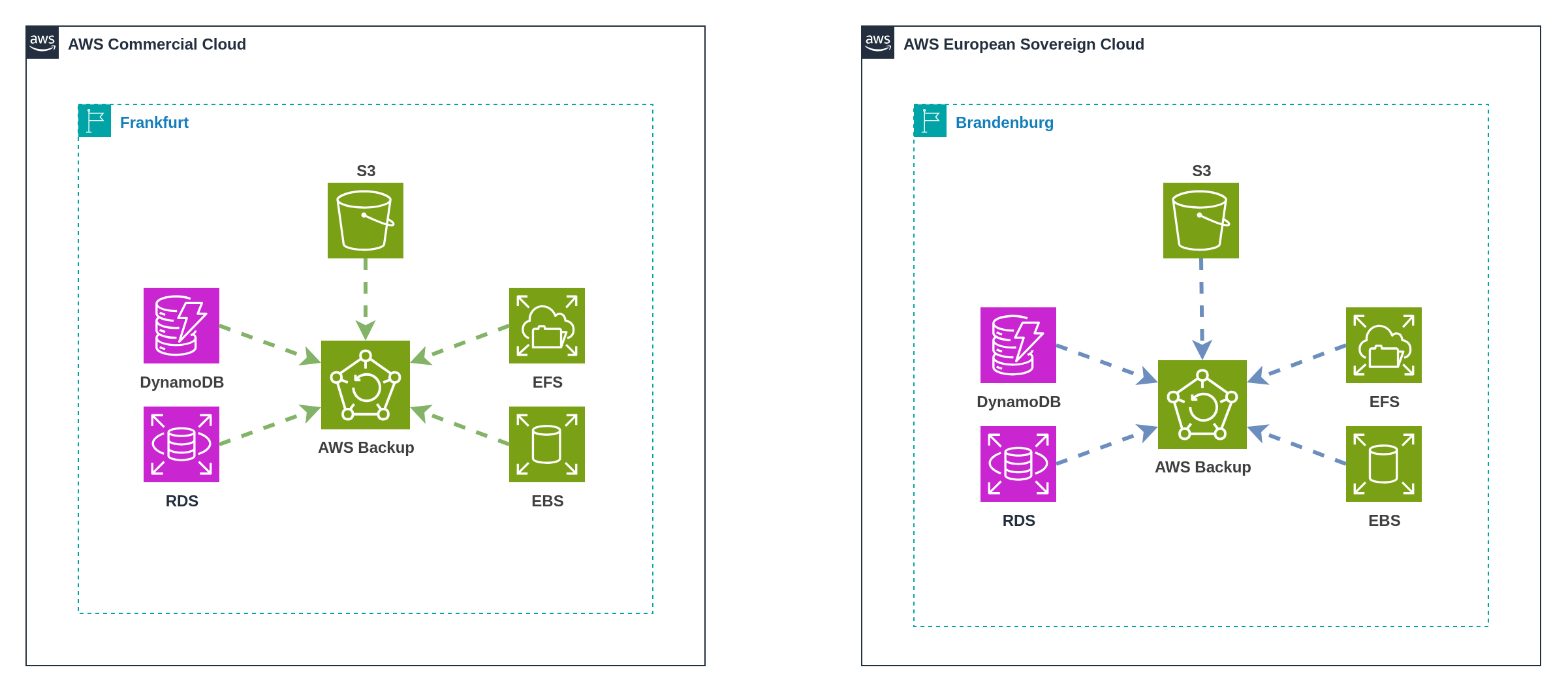
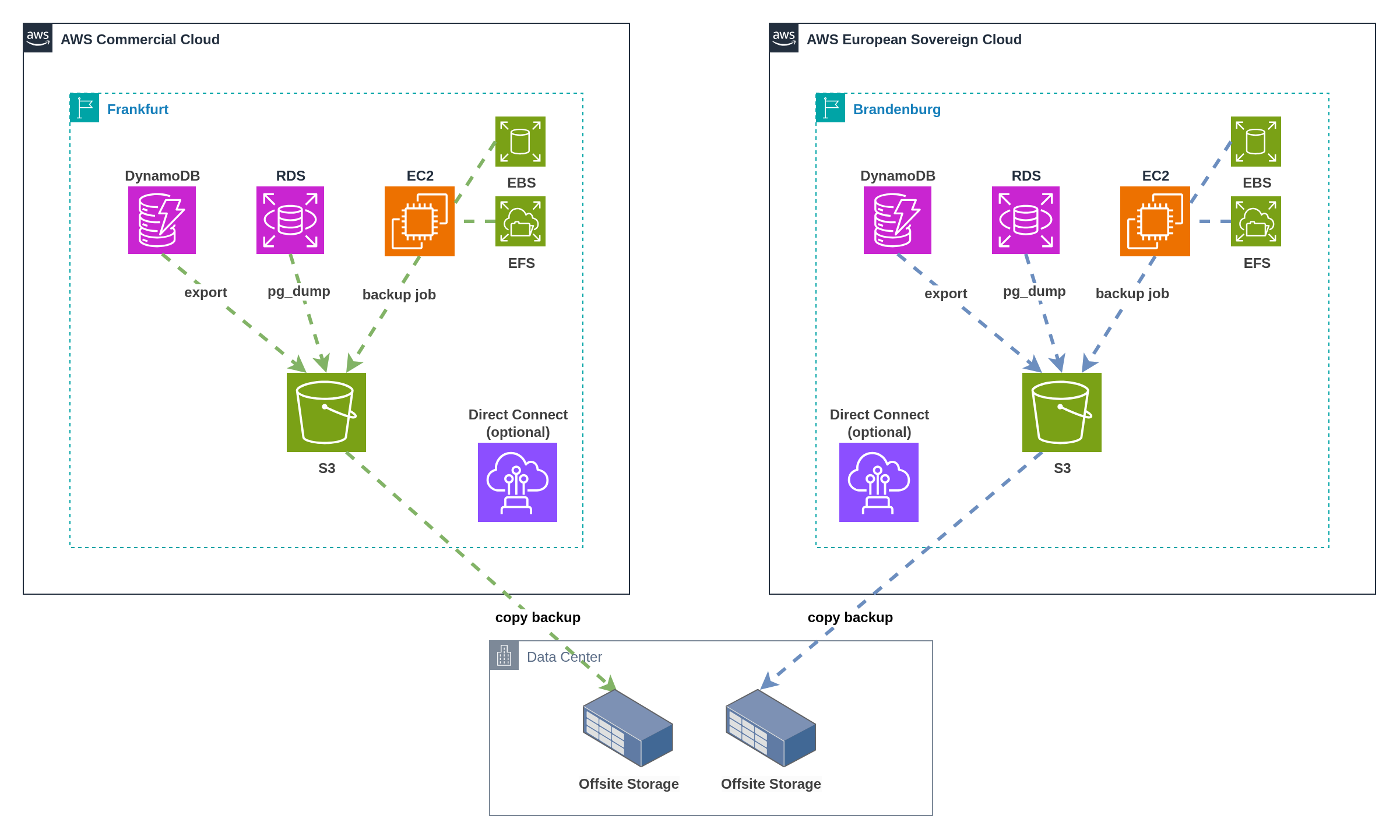
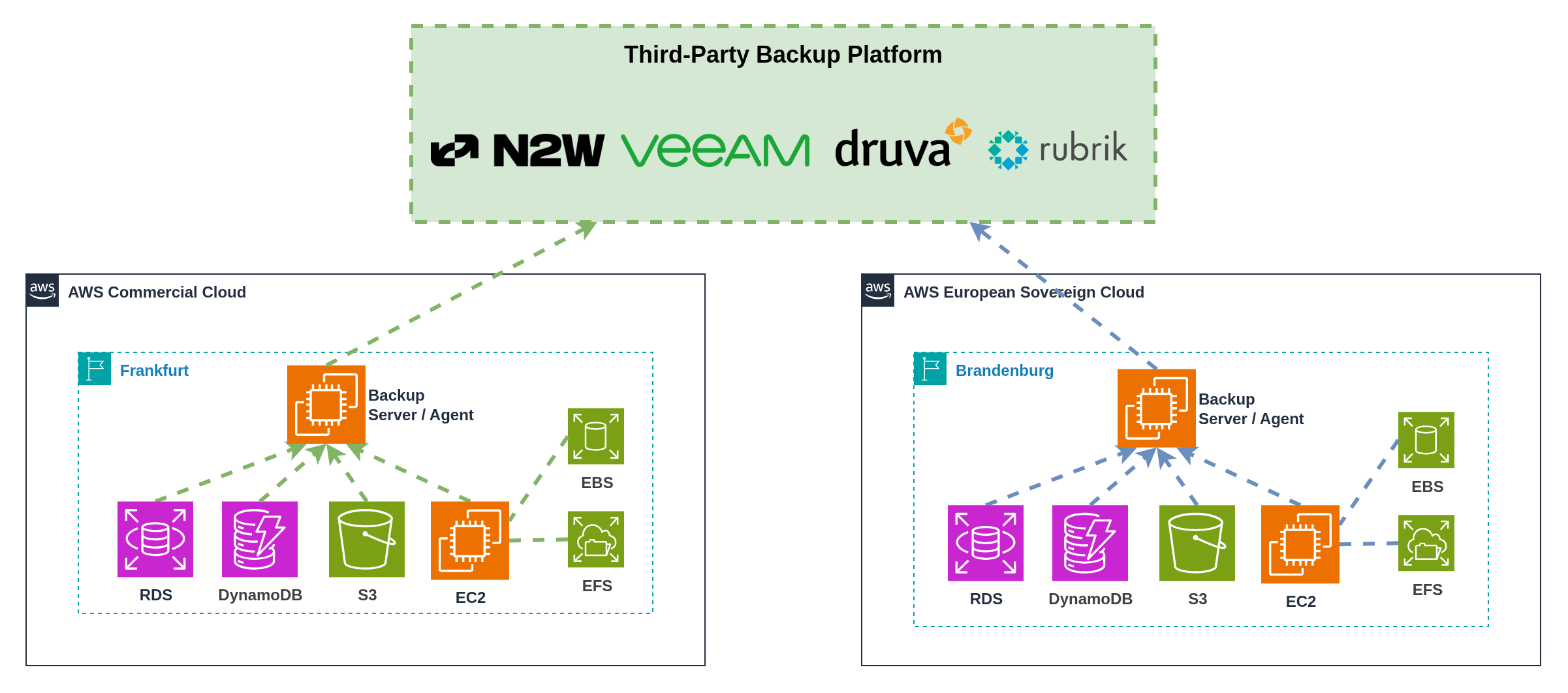
✅ Familiar AWS‑native tooling
✅ Simple compliance boundaries
✅ Independent partition operations
✅ No external dependencies | ❌ No cross‑partition disaster recovery
❌ Duplicate backup infrastructure
❌ Separate operational procedures
❌ Potential service availability gaps
❌ Limited backup optimization | **Not Supported**
Partition‑isolated recovery only | **Low**
Standard AWS Backup | **Medium**
Duplicate AWS Backup costs;
Separate backup storage | | **2. Cross‑Partition Backup via Offsite Storage** | Organizations with existing backup infrastructure, cross‑partition disaster recovery requirements, customer‑controlled data movement | ✅ Cross‑partition disaster recovery
✅ Customer‑controlled data residency
✅ Leverages existing infrastructure
✅ Flexible recovery options
✅ Multiple storage platform options | ❌ Offsite infrastructure required
❌ Network bandwidth constraints
❌ Complex recovery procedures
❌ Increased operational overhead
❌ Multiple backup storage locations | **Supported**
Via offsite coordination | **High**
Multi‑location coordination | **High**
Offsite storage costs;
Network transfer fees;
Operational overhead | | **3. Third‑Party Backup Solutions** | Organizations with advanced backup requirements, existing platform investments, unified operational preferences | ✅ Advanced backup features
✅ Unified management interface
✅ Cross‑partition recovery coordination
✅ Vendor expertise and support
✅ Multi‑cloud platform support | ❌ Additional platform licensing
❌ External operational dependency
❌ Potential ESC support delays
❌ Vendor‑specific procedures
❌ Data residency platform dependency | **Supported**
Platform‑coordinated recovery | **Medium**
Platform‑managed operations | **High**
Third‑party licensing;
Platform operational costs | **Summary:** * Multi‑partition backup requires careful consideration of sovereignty, recovery, and operational requirements * ESC's single region deployment eliminates geographic redundancy within the partition, making cross‑partition or external backup strategies necessary for comprehensive disaster recovery * Independent backup operations provide maximum compliance but limit disaster recovery capabilities * Offsite coordination enables cross‑partition recovery with customer‑controlled data movement across various storage platforms * Third‑party solutions offer advanced features but introduce external dependencies and potential ESC support delays * Pattern selection should balance compliance requirements, recovery capabilities, and operational complexity whilst addressing single‑region limitations --- ## 10. Nuvibit Multi-Partition Reference Architecture **The Challenge:** Organizations face months of complex implementation work to deploy multi-partition AWS architectures while maintaining security, compliance, and operational excellence. Traditional approaches using AWS Control Tower or Landing Zone Accelerator cannot span partition boundaries, forcing manual duplication and creating significant configuration drift risks. Each partition requires separate organizational structures, identity systems, and networking infrastructure, multiplying operational overhead whilst introducing security vulnerabilities through inconsistent configurations. **The Solution:** Nuvibit's Multi-Partition Reference Architecture, built on the battle-tested Nuvibit AWS Reference Architecture (NARA) and powered by the Nuvibit Terraform Collection (NTC), provides day-zero ESC support with partition-aware Infrastructure as Code that deploys consistently across AWS partitions using provider aliasing. This approach eliminates configuration drift, reduces implementation timelines from months to weeks, and enables organizations to adopt ESC the moment it becomes available (Q4 2025) with proven architectural patterns and operational procedures. ### 10.1 Architectural Framework Options Three foundational architectural patterns serve as starting points for multi-partition implementation planning, each addressing different organisational priorities and regulatory requirements: **Pattern A: Regulated Core in ESC, Innovation Edge in Commercial** optimises for compliance whilst preserving innovation velocity through workload-based data classification. Regulated workloads handling sensitive data (customer PII, financial records, healthcare data, government information) operate in ESC for sovereignty compliance. Non-regulated workloads requiring advanced services (AI/ML experimentation, analytics platforms, content delivery, developer tooling, third-party integrations) leverage commercial AWS service breadth and innovation capabilities. **Pattern B: All-in ESC with External Integration** maximises sovereignty compliance by operating entirely within ESC whilst maintaining essential business connectivity. Highly regulated entities adopt this pattern, using secure API gateways and approved external connectivity patterns for SaaS integrations and business partner connectivity. **Pattern C: Commercial Core with Sovereign Offering** positions commercial AWS as the primary platform whilst ESC serves as a fully isolated sovereign offering for specific customers or markets. ISVs and enterprise software providers operate their main SaaS platforms in commercial AWS for global reach and service breadth, then deploy specialized sovereign instances (such as SAP Sovereign Cloud) in ESC for customers requiring data residency compliance. This pattern enables dual-market strategies with complete partition isolation. #### Selecting Your Architectural Pattern | **Pattern** | **Best For** | **Primary Driver** | **Key Trade-off** | |-------------|--------------|--------------------|-------------------| | **A: Regulated Core in ESC, Innovation Edge in Commercial** | Organizations with mixed workload sensitivity requiring both sovereignty and innovation | Data classification & service breadth | Operational complexity vs innovation velocity | | **B: All-in ESC with External Integration** | Highly regulated public sector entities with strict sovereignty mandates | Maximum sovereignty compliance | Service limitations vs regulatory assurance | | **C: Commercial Core with Sovereign Offering** | ISVs and SaaS providers serving distinct customer segments | Dual-market strategy | Infrastructure duplication vs market reach | **Decision Questions:** 1. **Workload Classification:** Do all your workloads require EU sovereignty, or can you classify by data sensitivity? 2. **Service Requirements:** Can your applications accept ESC's initial service limitations, or do you need commercial AWS service breadth? 3. **Customer Segmentation:** Are you serving distinct customer segments with different sovereignty requirements? 4. **Operational Tolerance:** What's your tolerance for multi-partition operational complexity and coordination overhead? 5. **Innovation Velocity:** How critical is access to the latest AWS services and features for your competitive advantage? **Pattern Selection Guide:** - **Choose Pattern A** if you need sovereignty for regulated data whilst maintaining innovation capabilities for development and analytics workloads - **Choose Pattern B** if regulatory requirements mandate complete EU sovereignty with no exceptions for external services - **Choose Pattern C** if you operate a SaaS platform requiring both global commercial reach and specialized sovereign offerings --- ### 10.2 Nuvibit's Implementation Approach #### Foundation: Nuvibit AWS Reference Architecture per Partition The **[Nuvibit AWS Reference Architecture (NARA)](https://docs.nuvibit.com/whitepapers/nuvibit-aws-reference-architecture)** serves as the proven, battle-tested foundation for enterprise and regulated industries. This secure and compliant AWS foundation provides the essential building blocks that can be adapted to support any of the multi-partition architectural patterns outlined above. ![Nuvibit AWS Reference Architecture](https://docs.nuvibit.com/illustrations/ntc-reference-architecture.png "Nuvibit AWS Reference Architecture") NARA's core components, including Organization Management, Security Tooling, Log Archive, Connectivity, and dedicated Workload Accounts, form the single-partition backbone that gets either replicated with partition isolation or extended with cross-partition integration based on your chosen architectural pattern. The modular design ensures that whether you implement Pattern A, Pattern B, or Pattern C, you maintain the same level of governance, security, and operational excellence. #### Multi-Partition Implementation Strategy The **Nuvibit Terraform Collection (NTC) will support all multi-partition architectural patterns** outlined in this whitepaper, providing Infrastructure as Code blueprints that adapt to customer requirements. NTC streamlines deployment across any pattern whilst preventing configuration drift and delivering the best possible user experience through unified, partition-aware automation. **Key Implementation Areas:** - **Account Management:** Unified account factory with partition-aware provisioning workflows - **Identity Management:** External IdP federation, SCIM provisioning, break-glass procedures - **Security:** Cross-partition security tooling, audit logging, compliance controls - **Connectivity:** VPC architecture, Transit Gateway, Network Firewall, centralized connectivity patterns - **Observability:** Independent monitoring, log forwarding, third-party platform integration - **Backup & Recovery:** Partition-isolated, cross-partition, and third-party backup strategies --- #### Terraform/OpenTofu-Based Multi-Partition Blueprints NTC is designed with partition awareness from the ground up, enabling single Terraform/OpenTofu configurations to deploy resources across multiple AWS partitions whilst maintaining operational continuity. Provider aliasing enables seamless multi-partition deployments when ESC becomes available. **Why Unified Terraform/OpenTofu Deployment Matters:** Traditional AWS Landing Zone solutions require complete duplication of configurations across partitions. This creates: - ❌ **Configuration Drift:** Manual synchronization of OUs, policies, and baselines across partitions - ❌ **Maintenance Overhead:** Changes must be applied twice with partition-specific modifications - ❌ **Testing Complexity:** Separate validation required for each partition deployment - ❌ **Human Error Risk:** Manual processes introduce inconsistencies and security vulnerabilities The NTC approach uses Terraform/OpenTofu provider aliasing to deploy identical configurations to multiple partitions from a single source of truth: - ✅ **Single Configuration:** One OU structure, one set of policies, one deployment workflow - ✅ **Automatic Consistency:** Changes apply to both partitions simultaneously - ✅ **Reduced Overhead:** Maintain one codebase instead of two separate configurations - ✅ **Version Control:** Unified change tracking and audit trail across partitions The following code snippets demonstrate how to implement NTC in a unified multi-partition pattern, where a single Terraform/OpenTofu configuration deploys shared configurations across both commercial AWS and ESC partitions using provider aliasing. ```hcl title="providers.tf" # -------------------------------------------------------------------------------------------- # ¦ PROVIDER - MULTI-PARTITION # -------------------------------------------------------------------------------------------- provider "aws" { alias = "aws_frankfurt" region = "eu-central-1" # OpenID Connect (OIDC) integration assume_role_with_web_identity { role_arn = "arn:aws:iam::111111111111:role/oidc-role" session_name = "unified-pipeline" web_identity_token_file = "/tmp/web-identity-token" } } provider "aws" { alias = "aws_eusc_brandenburg" region = "eusc-de-east-1" # OpenID Connect (OIDC) integration assume_role_with_web_identity { role_arn = "arn:aws-eusc:iam::222222222222:role/oidc-role" session_name = "unified-pipeline" web_identity_token_file = "/tmp/web-identity-token" } } ``` **NTC Organizations** ```hcl title="ntc_organizations.tf" # -------------------------------------------------------------------------------------------- # ¦ LOCALS # -------------------------------------------------------------------------------------------- locals { # shared OU structure across partitions organizational_unit_paths = [ "/root/core", "/root/sandbox", "/root/suspended", "/root/transitional", "/root/workloads", "/root/workloads/prod", "/root/workloads/dev", "/root/workloads/test" ] } # -------------------------------------------------------------------------------------------- # ¦ NTC ORGANIZATIONS - COMMERCIAL # -------------------------------------------------------------------------------------------- module "ntc_organizations" { source = "github.com/nuvibit-terraform-collection/terraform-aws-ntc-organizations?ref=X.X.X" # list of nested (up to 5 levels) organizational units organizational_unit_paths = local.organizational_unit_paths # additional inputs... providers = { aws = aws.aws_frankfurt } } # -------------------------------------------------------------------------------------------- # ¦ NTC ORGANIZATIONS - ESC # -------------------------------------------------------------------------------------------- module "ntc_organizations_esc" { source = "github.com/nuvibit-terraform-collection/terraform-aws-ntc-organizations?ref=X.X.X" # list of nested (up to 5 levels) organizational units organizational_unit_paths = local.organizational_unit_paths # additional inputs... providers = { aws = aws.aws_eusc_brandenburg } } ``` **NTC Identity Center** ```hcl title="ntc_identity_center.tf" # -------------------------------------------------------------------------------------------- # ¦ LOCALS # -------------------------------------------------------------------------------------------- locals { # permission sets can be a combination of aws and customer managed policies # https://docs.aws.amazon.com/singlesignon/latest/userguide/permissionsetcustom.html permission_sets = [ { name : "AdministratorAccess" description : "This permission set grants administrator access" session_duration : 2 inline_policy_json : "" managed_policies : [ { managed_by : "aws" policy_name : "AdministratorAccess" policy_path : "/" } ] boundary_policy : {} }, { name : "Billing+ViewOnlyAccess" description : "This permission set grants billing and read-only access" session_duration : 10 inline_policy_json : "" managed_policies : [ { managed_by : "aws" policy_name : "Billing" policy_path : "/job-function/" }, { managed_by : "aws" policy_name : "ViewOnlyAccess" policy_path : "/job-function/" } ] boundary_policy : {} }, { name : "SupportUser+ReadOnlyAccess" description : "This permission set grants support and read-only access" session_duration : 10 inline_policy_json : "" managed_policies : [ { managed_by : "aws" policy_name : "SupportUser" policy_path : "/job-function/" }, { managed_by : "aws" policy_name : "ReadOnlyAccess" policy_path : "/" } ] boundary_policy : {} } ] } # -------------------------------------------------------------------------------------------- # ¦ NTC IDENTITIY CENTER - COMMERCIAL # -------------------------------------------------------------------------------------------- module "ntc_identity_center" { source = "github.com/nuvibit-terraform-collection/terraform-aws-ntc-identity-center?ref=X.X.X" # automatic provisioning (synchronization) of users and groups from external identity provider # using the System for Cross-domain Identity Management (SCIM) v2.0 protocol is_automatic_provisioning_enabled = true permission_sets = local.permission_sets # additional inputs... providers = { aws = aws.aws_frankfurt } } # -------------------------------------------------------------------------------------------- # ¦ NTC IDENTITIY CENTER - ESC # -------------------------------------------------------------------------------------------- module "ntc_identity_center_esc" { source = "github.com/nuvibit-terraform-collection/terraform-aws-ntc-identity-center?ref=X.X.X" # automatic provisioning (synchronization) of users and groups from external identity provider # using the System for Cross-domain Identity Management (SCIM) v2.0 protocol is_automatic_provisioning_enabled = true permission_sets = local.permission_sets # additional inputs... providers = { aws = aws.aws_eusc_brandenburg } } ``` **NTC Core Network** ```hcl title="ntc_core_networking.tf" # -------------------------------------------------------------------------------------------- # ¦ LOCALS # -------------------------------------------------------------------------------------------- locals { transit_gateway_route_tables = [ "tgw-core-rtb-hub", "tgw-core-rtb-spoke-prod", "tgw-core-rtb-spoke-dev", "tgw-core-rtb-spoke-int", "tgw-core-rtb-onprem", ] } # -------------------------------------------------------------------------------------------- # ¦ NTC CORE NETWORK - FRANKFURT - COMMERCIAL # -------------------------------------------------------------------------------------------- module "ntc_core_network" { source = "github.com/nuvibit-terraform-collection/terraform-aws-ntc-core-network?ref=X.X.X" transit_gateway = { name = "tgw-core-frankfurt" description = "core network in frankfurt" amazon_side_asn = 64512 default_route_table_association = false default_route_table_propagation = false dns_support = true multicast_support = false vpn_ecmp_support = true security_group_referencing_support = true cidr_blocks = [] route_table_names = local.transit_gateway_route_tables # (optional) share Transit Gateway with Organizations, OUs or Accounts auto_accept_shared_attachments = true ram_share_principals = [ local.ntc_parameters["mgmt-organizations"]["ou_ids"]["/root/workloads"] ] ram_share_allow_external_principals = false } # additional inputs... providers = { aws = aws.aws_frankfurt } } # -------------------------------------------------------------------------------------------- # ¦ NTC CORE NETWORK - BRANDENBURG - ESC # -------------------------------------------------------------------------------------------- module "ntc_core_network_esc" { source = "github.com/nuvibit-terraform-collection/terraform-aws-ntc-core-network?ref=X.X.X" transit_gateway = { name = "tgw-core-brandenburg" description = "core network in brandenburg" amazon_side_asn = 64512 default_route_table_association = false default_route_table_propagation = false dns_support = true multicast_support = false vpn_ecmp_support = true security_group_referencing_support = true route_table_names = local.transit_gateway_route_tables # (optional) share Transit Gateway with Organizations, OUs or Accounts auto_accept_shared_attachments = true ram_share_principals = [ local.ntc_parameters["mgmt-organizations"]["ou_ids"]["/root/workloads"] ] ram_share_allow_external_principals = false } # additional inputs... providers = { aws = aws.aws_eusc_brandenburg } } ``` --- #### Account Factory with Partition Awareness The account factory implementation uses a GitOps-driven approach with a single repository containing shared configuration that deploys to both partitions through unified pipelines. Account requests are captured through flexible interfaces, with user partition selection determining the deployment target while maintaining consistent configuration and operational procedures. A partition-isolated approach is also possible with individual repositories for each partition. **Implementation Options:** - **Self-Service Portals:** Integrate with platforms like Port, Backstage, ServiceNow, or custom portals that can push account details to the repository (unified or partition-specific) - **API Integration:** Direct API calls that create account definition files in the appropriate repository based on selected approach - **Direct Git Workflow:** Users create Pull Requests directly in the chosen repository structure (unified or partition-isolated) - **Hybrid Approaches:** Combination of portals, APIs, and direct Git access based on user preferences and organizational workflows **Unified Deployment** ![Nuvibit Multi-Partition Account Factory](https://docs.nuvibit.com/illustrations/multi-partition-ntc-account-factory-unified.png) \ *Figure 28a: Nuvibit's partition-aware account factory implementation* :::note Unified Repository Architecture 1. **Single Source of Truth:** One repository contains shared account templates, policies, and configuration for both partitions 2. **Partition Selection:** User chooses target partition (commercial or ESC) during account request process 3. **Unified Pipeline:** Single CI/CD pipeline deploys accounts to the selected partition using provider aliasing 4. **Shared Configuration:** Consistent account standards, security policies, and operational procedures across partitions 5. **Partition-Aware Deployment:** Pipeline logic routes deployment to appropriate partition based on user selection ::: **Partition-Isolated Deployment** ![Nuvibit Multi-Partition Account Factory](https://docs.nuvibit.com/illustrations/multi-partition-ntc-account-factory-independent.png) \ *Figure 28b: Partition-isolated account factory with separate repositories and pipelines* :::note Partition-Isolated Repository Architecture 1. **Separate Repositories:** Independent repositories for commercial and ESC partition account factory configurations 2. **Partition-Specific Routing:** User interface directs account requests to the appropriate repository based on partition selection 3. **Independent Pipelines:** Each repository has its own CI/CD pipeline deploying exclusively to its target partition 4. **Duplicate Configuration:** Account templates and policies maintained separately in each repository for maximum isolation 5. **Compliance Boundaries:** Clear separation ensures no cross-partition data or configuration sharing ::: **Architecture Selection Considerations:** - **Unified Deployment:** Choose for operational efficiency, reduced configuration drift, and simplified maintenance - **Partition-Isolated Deployment:** Choose for maximum compliance separation, clear audit boundaries, and regulatory requirements demanding complete partition isolation --- #### Modular Repository and CI/CD Pipeline Architecture The Nuvibit approach leverages a modular repository structure with dedicated CI/CD pipelines for each functional area, providing superior operational flexibility and risk management compared to monolithic implementations. **Unified Multi-Partition Pipelines** ![Unified Multi-Partition CI/CD Architecture](https://docs.nuvibit.com/illustrations/multi-partition-ntc-cicd-unified.png) \ *Figure 29a: Unified CI/CD pipelines deploying to multiple partitions using provider aliasing* :::note Architecture Characteristics - Single CI/CD pipeline per functional area with multi-partition deployment logic - Provider aliasing enables deployment to both commercial and ESC partitions - Shared pipeline configuration with partition-specific conditional logic - Unified artifact management and promotion workflows - Single pipeline monitoring and operational interface ::: **Partition-Isolated Pipelines** ![Partition-Isolated CI/CD Architecture](https://docs.nuvibit.com/illustrations/multi-partition-ntc-cicd-isolated.png) \ *Figure 29b: Partition-isolated CI/CD pipelines with separate deployment workflows* :::note Architecture Characteristics - Dedicated CI/CD pipeline per functional area per partition - Complete isolation between commercial and ESC deployment workflows - Separate pipeline configurations, credentials, and monitoring - Independent artifact management and promotion per partition - Partition-specific operational procedures and troubleshooting ::: :::info Tooling Flexibility This architecture can be implemented with a wide selection of tools based on organizational preferences and existing infrastructure: **Repository Platforms:** GitHub, GitLab, Bitbucket, AWS CodeCommit (deprecated), Azure Repos **Generic CI/CD Tooling:** GitHub Actions, GitLab CI/CD, Jenkins, AWS CodePipeline, Azure DevOps Pipelines **Specialized IaC Platforms:** Spacelift, HCP Terraform, env0, Scalr, Atlantis The modular repository and pipeline approach works consistently across all platforms, enabling organizations to leverage existing tooling investments whilst maintaining the architectural benefits of segregation of duty, smaller blast radius, and team independence. Choose the tools that best align with your operational preferences and compliance requirements. ::: **Repository Structure:** - **Organizations Repository:** Organizational structure, organizational policies (guardrails), organizational cloudtrail - **Account Factory Repository:** Account vending and lifecycle, baseline configurations - **Identity Management Repository:** IAM Identity Center, permission sets, user/group provisioning - **Log Archive Repository:** Audit relevant log archive - **Security Repository:** Security tooling, compliance controls - **Connectivity Repository:** Transit Gateway, Direct Connect, VPN configurations, network routing - **Observability Repository:** Monitoring, logging, alerting, dashboard configurations - **Backup Repository:** Backup policies, disaster recovery Each repository operates with its own dedicated CI/CD pipeline that can deploy to either single partitions or multiple partitions based on the chosen architectural pattern. **Key Advantages:** 🎯 **Smaller Blast Radius** - Pipeline failures are isolated to specific functional areas - Broken connectivity pipeline doesn't block security deployments - Failed observability updates don't impact account provisioning - Infrastructure changes can be deployed incrementally with controlled risk ⚡ **Segregation of Duty** - Different teams can own and operate separate repositories and pipelines - Network team manages connectivity repository independently - Security team controls security tooling without dependencies - Platform team handles account factory with clear ownership boundaries - Role-based access controls align with organizational responsibilities 🔧 **Flexibility and Efficiency** - Use only the building blocks needed for your specific requirements - Expand with additional Terraform/OpenTofu modules as requirements evolve - Upgrade individual components without impacting other areas - Run deployments only when changes are needed in specific functional areas - Scale team responsibilities based on organizational structure **Operational Workflow:** 1. **Incremental Development:** Teams work on functional areas independently without coordination overhead 2. **Selective Deployment:** Deploy only changed components, reducing deployment time and risk 3. **Parallel Operations:** Multiple teams can deploy simultaneously to different functional areas 4. **Targeted Rollbacks:** Rollback specific functional areas without affecting other components 5. **Scaling Teams:** Add new teams and repositories as organizational requirements grow This modular approach enables organizations to start with essential components and gradually expand their multi-partition infrastructure as capabilities and team maturity evolve, while maintaining operational excellence and clear ownership boundaries throughout the journey. --- ### 10.3 Multi-Partition Migration Path Organizations with existing AWS commercial partition infrastructure must balance ESC adoption with operational continuity. A phased, risk-mitigated approach establishes ESC capabilities in parallel with existing infrastructure before progressively migrating workloads based on sovereignty requirements. #### Phased Migration Approach **Phase 1: Foundation Deployment (Months 1-2)** - Deploy NTC in ESC partition using proven architectural patterns - Establish organizational structure, identity federation, and security baselines - Configure cross-partition connectivity if required (e.g. Direct Connect, VPN) - Maintain complete operational independence of existing commercial infrastructure - Validate ESC patterns with non-production pilot workloads **Key Activities:** - Set up AWS Organizations structure in ESC partition - Configure IAM Identity Center with external IdP federation - Deploy core networking (Transit Gateway, VPC architecture) - Establish security tooling and audit logging - Configure cross-partition connectivity based on architectural pattern requirements - Document operational procedures and runbooks **Success Criteria:** - ESC foundation operational with complete security baseline - Cross-partition connectivity validated and documented (if required) - Pilot workload successfully deployed and operational - Team trained on ESC-specific operational procedures --- **Phase 2: Progressive Workload Migration (Months 3-6)** - Classify existing workloads by data sensitivity and sovereignty requirements - Migrate regulated workloads handling sensitive data to ESC partition - Maintain innovation and development workloads in commercial partition - Establish operational procedures for dual-partition management - Implement cross-partition observability and cost management **Migration Priorities:** 1. **High Sovereignty Requirements:** Customer PII, financial records, healthcare data, government information 2. **Medium Sovereignty Requirements:** Internal business data, employee information, operational systems 3. **Low Sovereignty Requirements:** Development environments, analytics platforms, third-party integrations **Migration Methodology:** - **Lift and Shift:** Recreate infrastructure in ESC for stateless workloads - **Database Migration:** Use AWS DMS or native tools for database transfers - **Application Refactoring:** Adapt applications for ESC service availability - **Data Synchronization:** Establish temporary cross-partition data flows during transition **Risk Mitigation:** - Maintain parallel operations during migration - Test thoroughly in ESC before commercial decommissioning - Implement rollback procedures for critical workloads - Document lessons learned and update procedures iteratively --- **Phase 3: Operational Optimization (Month 6+)** - Consolidate monitoring and observability across both partitions - Optimize cross-partition connectivity patterns and costs - Refine account factory and vending procedures based on operational experience - Implement advanced automation for multi-partition operations - Document comprehensive operational playbooks and disaster recovery procedures **Optimization Focus Areas:** - **Cost Management:** Rightsize resources, eliminate redundancy, optimize data transfer - **Operational Efficiency:** Automate repetitive tasks, streamline workflows, reduce manual intervention - **Security Posture:** Continuous compliance monitoring, automated remediation, regular audits - **Team Training:** Build expertise in multi-partition operations, document tribal knowledge **Continuous Improvement:** - Regular architecture reviews and pattern refinement - Stay current with ESC service launches and capability updates - Adapt procedures as organizational requirements evolve - Share learnings across teams and improve documentation --- #### NTC Advantage for Migration **Non-Disruptive Adoption:** Organizations can deploy NTC in ESC alongside existing infrastructure without replacement, enabling gradual adoption and risk mitigation. Existing commercial infrastructure remains untouched during ESC foundation deployment. **Proven Patterns:** Nuvibit's reference architecture in ESC mirrors commercial best practices, reducing operational learning curves and enabling consistent management procedures across both partitions. **Unified Operations:** Once both partitions run NTC-based infrastructure, unified Terraform/OpenTofu configurations enable consistent policy management, security controls, and operational procedures with reduced overhead. **Flexible Timeline:** Organizations control migration pace based on business priorities, resource availability, and risk tolerance. No forced cutover dates or all-or-nothing decisions. --- **Summary:** * Nuvibit's reference architecture provides a comprehensive framework for multi-partition deployment * Terraform/OpenTofu foundation with provider aliasing enables seamless multi-partition operations * Modular repository structure delivers operational flexibility with controlled blast radius * Clear team ownership boundaries support organizational scaling and responsibility distribution * **NTC accelerate ESC adoption from months to weeks** --- ## 11. Conclusion The AWS European Sovereign Cloud (ESC) represents a significant advancement for organizations requiring EU sovereignty whilst leveraging cloud computing capabilities. The decision framework presented in this paper requires careful consideration of sovereignty requirements, service dependencies, operational complexity, and cost implications. All‑in ESC adoption maximises sovereignty assurance but accepts service parity limitations and operational constraints. Commercial partition retention preserves full service availability but may not satisfy regulatory requirements. Dual‑partition strategies enable targeted sovereignty whilst retaining innovation velocity, though at the cost of operational complexity. Success in multi‑partition environments requires deliberate operating models that address identity federation, connectivity patterns, compliance mapping, and cost management. The integration patterns and reference architectures presented provide proven approaches for managing these complexities whilst maintaining operational excellence. Organizations must approach ESC adoption incrementally, starting with comprehensive assessment of sovereignty requirements and service dependencies. Pilot implementations validate architectural patterns and operational procedures before broader rollout. The lessons learned from multi‑region compliance strategies provide valuable foundation knowledge, though partition‑specific patterns require additional consideration. Multi‑partition strategies will become increasingly important as organizations balance sovereignty requirements with innovation velocity in the evolving EU cloud landscape. Success depends on operational excellence, robust architectural patterns, and continuous evolution as ESC service parity and geographic redundancy mature. **Final Recommendations:** * Assess sovereignty requirements comprehensively before making partition decisions * Invest early in partition‑aware tooling and operational procedures * Start with pilot implementations to validate patterns before production adoption * Maintain flexibility as ESC service parity and capabilities evolve * Focus on operational excellence and incremental improvement over time --- ## Ready to Navigate Your ESC Journey? As an **AWS European Sovereign Cloud (ESC) Launch Partner**, Nuvibit brings deep expertise in AWS Landing Zone architectures and sovereign cloud operations to help organizations navigate their ESC adoption journey. The **Nuvibit Terraform Collection (NTC) will support ESC from day zero**, accelerating your ESC deployment from months to weeks with battle-tested, enterprise-grade Infrastructure as Code building blocks that adapt seamlessly to multi-partition AWS environments. Through our **strategic partnerships with leading system integrators in Germany**, we provide comprehensive ESC implementation support that combines cloud-native expertise with local regulatory knowledge and enterprise integration capabilities. :::tip Get Expert ESC Guidance - 🎯 **[Schedule your ESC strategy session](https://calendly.com/stefano-franco-nuvibit/aws-esc-session)** - Book a free 30-minute meeting with our specialists - 📧 **Contact our experts directly**: [**aws-esc@nuvibit.com**](mailto:aws-esc@nuvibit.com?subject=AWS%20ESC%20Consultation&body=Hi%20Nuvibit%20team%2C%0A%0AI%20read%20your%20AWS%20European%20Sovereign%20Cloud%20multi-partition%20whitepaper%20and%20would%20like%20to%20discuss%20how%20these%20patterns%20might%20apply%20to%20our%20organization.%0A%0A%5BList%20any%20specific%20questions%20about%20the%20patterns%20or%20implementation%5D%0A%0ABest%20regards%2C%0A%5BYour%20name%5D) ::: **What You'll Get:** - ESC readiness assessment for your specific requirements - Custom multi-partition architecture recommendations - NTC implementation roadmap tailored to your timeline - Regulatory compliance strategy aligned with your industry --- ## References [1] [About Amazon EU - ESC Governance, EU Operations, Trust and DNS/Direct Connect Notes](https://www.aboutamazon.eu/news/aws/built-operated-controlled-and-secured-in-europe-aws-unveils-new-sovereign-controls-and-governance-structure-for-the-aws-european-sovereign-cloud) [2] [AWS Security Blog - Initial Services Available in the AWS European Sovereign Cloud](https://aws.amazon.com/blogs/security/announcing-initial-services-available-in-the-aws-european-sovereign-cloud-backed-by-the-full-power-of-aws/) [3] [AWS Security Blog - EU Trust Service Provider and EU CA](https://aws.amazon.com/blogs/security/establishing-a-european-trust-service-provider-for-the-aws-european-sovereign-cloud/) [4] [AWS Security Blog - €7.8B Investment and Brandenburg Region Timeline](https://aws.amazon.com/blogs/security/aws-plans-to-invest-e7-8b-into-the-aws-european-sovereign-cloud-set-to-launch-by-the-end-of-2025/) [5] [AWS Digital Sovereignty Pledge and Independent ESC](https://aws.amazon.com/blogs/security/aws-digital-sovereignty-pledge-announcing-a-new-independent-sovereign-cloud-in-europe/) Source: https://docs.nuvibit.com/whitepapers/aws-multi-partition-strategies --- # CI/CD Pipelines for Infrastructure-as-Code Delivery ## Introduction Infrastructure as Code (IaC) revolutionizes the way cloud environments are built, managed, and maintained. To achieve scalable, secure, and efficient IaC deployments, **Continuous Integration/Continuous Deployment (CI/CD) pipelines** play a critical role. This whitepaper explores how to set up CI/CD pipelines tailored for IaC delivery, highlighting best practices, recommended tools, and strategies to streamline the deployment process. --- ## Why Use CI/CD Pipelines for IaC? CI/CD pipelines are essential for delivering Infrastructure as Code (IaC) efficiently, securely, and reliably. By automating the provisioning, updating, and maintenance of cloud infrastructure, pipelines create a structured and consistent deployment process. ### **Advantages of CI/CD Pipelines** 1. **Security**: - CI/CD pipelines securely handle credentials and sensitive data, integrating with tools like AWS Secrets Manager, HashiCorp Vault, or OpenID Connect (OIDC). - Centralized deployment ensures that sensitive information is not exposed during manual processes or stored locally. Pipelines also enforce best practices like role-based access control (RBAC). 2. **Reliability**: - Pipelines automate deployments, ensuring consistent execution and reducing the risk of human error. - Built-in stages like `terraform plan` and validation steps catch issues before they are deployed to production environments. 3. **Traceability**: - CI/CD pipelines provide a clear audit trail for every change, detailing who initiated a deployment, what was changed, and when. - This is invaluable for compliance, debugging, and understanding the history of infrastructure changes. 4. **Compliance**: - Pipelines can enforce organizational and regulatory compliance by integrating tools like Open Policy Agent (OPA) or Sentinel. - They automatically validate infrastructure against predefined policies, such as enforcing encryption, tagging standards, and network restrictions, ensuring consistent adherence to governance requirements. - This reduces the risk of deploying non-compliant infrastructure and simplifies audits. 5. **Single Source of Truth**: - With CI/CD pipelines, the IaC configuration stored in version control (e.g. Git repositories) becomes the **single source of truth**. - All changes are deployed through the pipeline, ensuring consistency between the IaC configuration and the deployed infrastructure. This eliminates discrepancies caused by ad-hoc manual changes. 6. **Drift Prevention**: - Automated pipelines ensure that the infrastructure state remains consistent with the IaC configuration. - This prevents configuration drift, where the deployed environment deviates from the defined codebase due to unauthorized or manual changes. 7. **Consistency Across Teams**: - Pipelines enforce standardized workflows, ensuring that teams follow the same process regardless of the environment or team member involved. - This standardization simplifies onboarding and collaboration across multiple teams. 8. **Scalability**: - CI/CD pipelines simplify the management of complex, multi-account, and multi-region environments. - Modular workflows allow for incremental deployments, scaling with your organization’s growth. 9. **Automation of Testing and Validation**: - Pipelines integrate testing stages to validate IaC changes before they are deployed. - Examples include static code analysis, compliance checks, and `terraform validate` to catch errors early in the process. 10. **Faster Rollbacks**: - Pipelines enable automated rollbacks in case of deployment failures. - Version control integration ensures that you can revert to a previous, stable version of your IaC configuration seamlessly. ### **Why It Matters** By adopting CI/CD pipelines, organizations establish a secure, automated, and traceable framework for deploying IaC. This approach not only increases operational efficiency but also ensures that infrastructure remains aligned with the IaC configuration, reducing risk and simplifying management. Whether you're building a small-scale project or managing a multi-account enterprise environment, CI/CD pipelines provide the foundation for scalable, secure, and compliant infrastructure delivery. --- ## Generic CI/CD Tools or Purpose-Built CI/CD Tools for IaC? When setting up CI/CD pipelines for Infrastructure as Code (IaC), one of the first decisions to make is whether to use generic CI/CD tools or tools specifically built for infrastructure management. Both options have their advantages, but purpose-built tools often provide features that streamline and enhance IaC workflows. --- ### **Generic CI/CD Tools** ![CI/CD Pipeline Generic - Github Actions](https://docs.nuvibit.com/illustrations/ntc-pipeline-github-actions.png "CI/CD Pipeline Generic - Github Actions") Generic CI/CD tools, such as **[GitHub Actions](https://github.com/features/actions)**, **[GitLab CI/CD](https://about.gitlab.com/solutions/continuous-integration/)**, **[Jenkins](https://www.jenkins.io/)**, and **[CircleCI](https://circleci.com/)**, are versatile platforms designed to automate various software development tasks, including testing, building, and deploying applications. While they are not specifically designed for IaC, they can be adapted for this purpose with custom scripting and configurations. #### **Advantages of Generic Tools** - **Familiarity**: Often already used within organizations for application delivery, making adoption straightforward. - **Flexibility**: Can be customized to handle a variety of workflows beyond IaC. - **Ecosystem Integration**: Extensive plugins and integrations for non-IaC use cases. For example: - **Jenkins**: Large library of plugins, including Terraform-specific integrations. - **GitHub Actions**: Pre-built actions for IaC tools like Terraform and Pulumi. - **CircleCI**: A developer-friendly platform designed to handle IaC pipelines efficiently. #### **Challenges with Generic Tools** - **Complex Configuration**: Setting up state management, drift detection, and IaC-specific workflows often requires custom scripting. - **Lack of Native Features**: Generic tools don’t natively handle IaC requirements like Terraform state management or policy enforcement. - **Limited Visibility**: Debugging IaC-specific issues can be more challenging without dedicated dashboards or workflows. --- ### **Purpose-Built CI/CD Tools for IaC** ![CI/CD Pipeline Purpose-built - Spacelift](https://docs.nuvibit.com/illustrations/ntc-pipeline-spacelift.png "CI/CD Pipeline Purpose-built - Spacelift") Tools like Spacelift, Terraform Cloud, Terramate, Scalr, and Env0 are designed specifically to cater to IaC workflows. These platforms include built-in features that address the unique challenges of infrastructure management. #### **Advantages of Purpose-Built Tools** 1. **State Management**: - Native support for managing Terraform state files, including encryption and locking, eliminates the need for additional configuration. 2. **Drift Detection**: - Automatically monitors for changes made outside of IaC pipelines, helping ensure consistency between your code and deployed infrastructure. 3. **Policy Enforcement**: - Tools like Spacelift, Terraform Cloud, and Scalr integrate with policy-as-code frameworks (e.g. Open Policy Agent, Sentinel) to enforce compliance standards during deployments. 4. **IaC-Specific Dashboards**: - Purpose-built tools provide intuitive dashboards for tracking plans, applies, and runs, simplifying debugging and auditing. 5. **Seamless Authentication**: - Native support for secure authentication methods like OpenID Connect (OIDC), reducing the need to manage long-lived credentials. 6. **Collaboration and Workflows**: - Features like role-based access controls (RBAC), workspace isolation, and detailed logging simplify team collaboration on IaC projects. #### **Examples of Purpose-Built Tools** - **[Spacelift](https://spacelift.io/)**: Offers features like drift detection, policy-as-code integration, and built-in state management. - **[Terraform Cloud](https://www.hashicorp.com/products/terraform)**: Provides a native experience for Terraform users, with remote state management, team collaboration, and cost estimation. - **[Terramate](https://terramate.io/)**: Enhances Terraform workflows with automation features like stack orchestration, dependency management, and code generation, enabling efficient and scalable multi-stack IaC management. - **[Scalr](https://www.scalr.com/)**: Enterprise-grade features for IaC governance, including hierarchical policy management and multi-cloud support. - **[Env0](https://www.env0.com/)**: Focuses on collaborative IaC deployments, with support for multiple frameworks and cost management. --- ### **Combination of Generic and Purpose-Built CI/CD Tools** Organizations often face the decision of choosing between generic and purpose-built CI/CD tools. However, these two approaches are not mutually exclusive. A hybrid approach combining both types of pipelines can offer the best of both worlds, leveraging the flexibility of generic tools alongside the specialized features of purpose-built platforms. Below are two effective combination strategies: #### **1. Infrastructure Deployment with Purpose-Built Pipelines, Workload Deployment with Generic Pipelines** ![CI/CD Pipeline Combined App Infra](https://docs.nuvibit.com/illustrations/ntc-pipeline-combined-app-infra.png "CI/CD Pipeline Combined App Infra") In this approach, purpose-built CI/CD pipelines (e.g. Spacelift, Terraform Cloud) are used to manage infrastructure deployments, ensuring robust state management, policy enforcement, and drift detection. Meanwhile, generic CI/CD pipelines (e.g. GitHub Actions, Jenkins) handle application or workload deployments. - **Advantages**: - Ensures infrastructure and workloads are managed with tools tailored to their specific requirements. - Segregates responsibilities, reducing complexity and potential conflicts between infrastructure and application workflows. - **Use Case**: - Ideal for environments where infrastructure and workload changes are handled by different teams or require distinct deployment processes. #### **2. Code Validation with Generic Pipelines, Deployment with Purpose-Built Pipelines** ![CI/CD Pipeline Combined](https://docs.nuvibit.com/illustrations/ntc-pipeline-combined.png "CI/CD Pipeline Combined") This method utilizes generic CI/CD tools for pre-deployment validation tasks, such as code formatting, linting, and security checks, before handing over the deployment to purpose-built pipelines. - **Advantages**: - Leverages the extensive ecosystem of generic tools for validation and testing. - Ensures deployments benefit from the advanced state management and policy enforcement of purpose-built tools. - **Use Case**: - Suitable for organizations that prioritize rigorous pre-deployment validation or need to standardize validation workflows across both infrastructure and application pipelines. :::tip For effective pre-deployment validation, consider integrating the following tools into your Terraform workflow: - **[TFLint](https://github.com/terraform-linters/tflint)**: A Terraform linter to catch syntax issues and enforce best practices. - **[Trivy](https://aquasecurity.github.io/trivy/)**: A security scanner for IaC configurations to detect vulnerabilities and misconfigurations. - **[Terraform-Docs](https://terraform-docs.io/)**: Automatically generates and validates documentation for Terraform modules. - **[Open Policy Agent (OPA)](https://www.openpolicyagent.org/)**: A policy-as-code engine for validating compliance and enforcing organizational policies. - **[Infracost](https://www.infracost.io/)**: Shows cloud cost estimates and FinOps best practices for Terraform. These tools ensure code quality, security, and maintainability, creating a seamless handoff for deployment. ::: --- ### **Key Benefits of Combining CI/CD Tools** - **Enhanced Flexibility**: Combines the versatility of generic tools with the IaC-specific capabilities of purpose-built platforms. - **Optimized Workflows**: Ensures that the right tool is used for the right task, maximizing efficiency and effectiveness. - **Streamlined Collaboration**: Allows teams to adopt tools best suited to their roles, improving collaboration between infrastructure and application teams. - **Reduced Costs**: Avoids overloading purpose-built tools with tasks better suited to generic platforms, optimizing resource utilization. By adopting a hybrid approach, organizations can build CI/CD workflows that are tailored to their specific needs while maintaining consistency, security, and scalability. :::tip Many Git providers, such as **GitHub** and **GitLab**, already include integrated CI/CD tools. These can be leveraged for tasks like code checks, linting, and security validation. By combining these built-in tools with a purpose-built IaC platform (e.g. Spacelift), you can create powerful and cost-efficient pipelines tailored to your organization's needs. ::: --- ### **Which Should You Choose?** The decision depends on your organization’s needs: - **Generic CI/CD Tools Are Ideal When**: - You’re already using them for application deployments and want a unified platform. - Your IaC requirements are simple and don’t need features like drift detection or policy enforcement. - Your team has the expertise to script and configure custom workflows for IaC. - **Purpose-Built Tools Are Best When**: - You manage complex, multi-account environments that require robust state management and compliance checks. - Your team wants to minimize custom configurations and leverage built-in IaC workflows. - You have a central team (e.g. platform engineering team) responsible for infrastructure deployments. - **Combination of Tools Is Optimal When**: - You want to split responsibilities, using purpose-built tools for infrastructure deployment and generic tools for workload deployments. - You need a streamlined workflow where generic tools handle pre-deployment tasks (e.g. code checks, linting, and validation) while purpose-built tools manage the actual deployment. - Your organization spans multiple teams with distinct responsibilities, requiring specialized tools tailored to their needs.
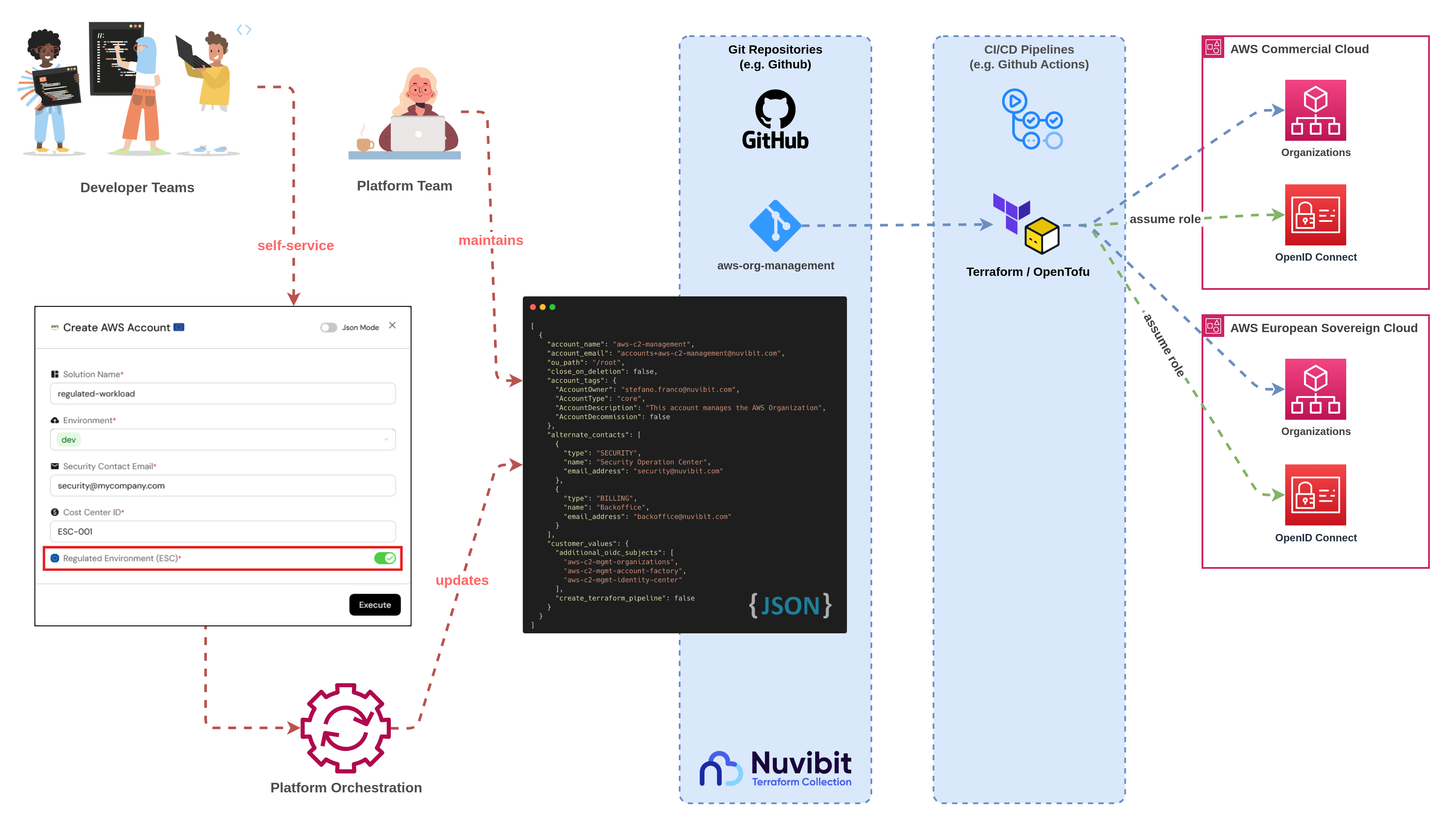
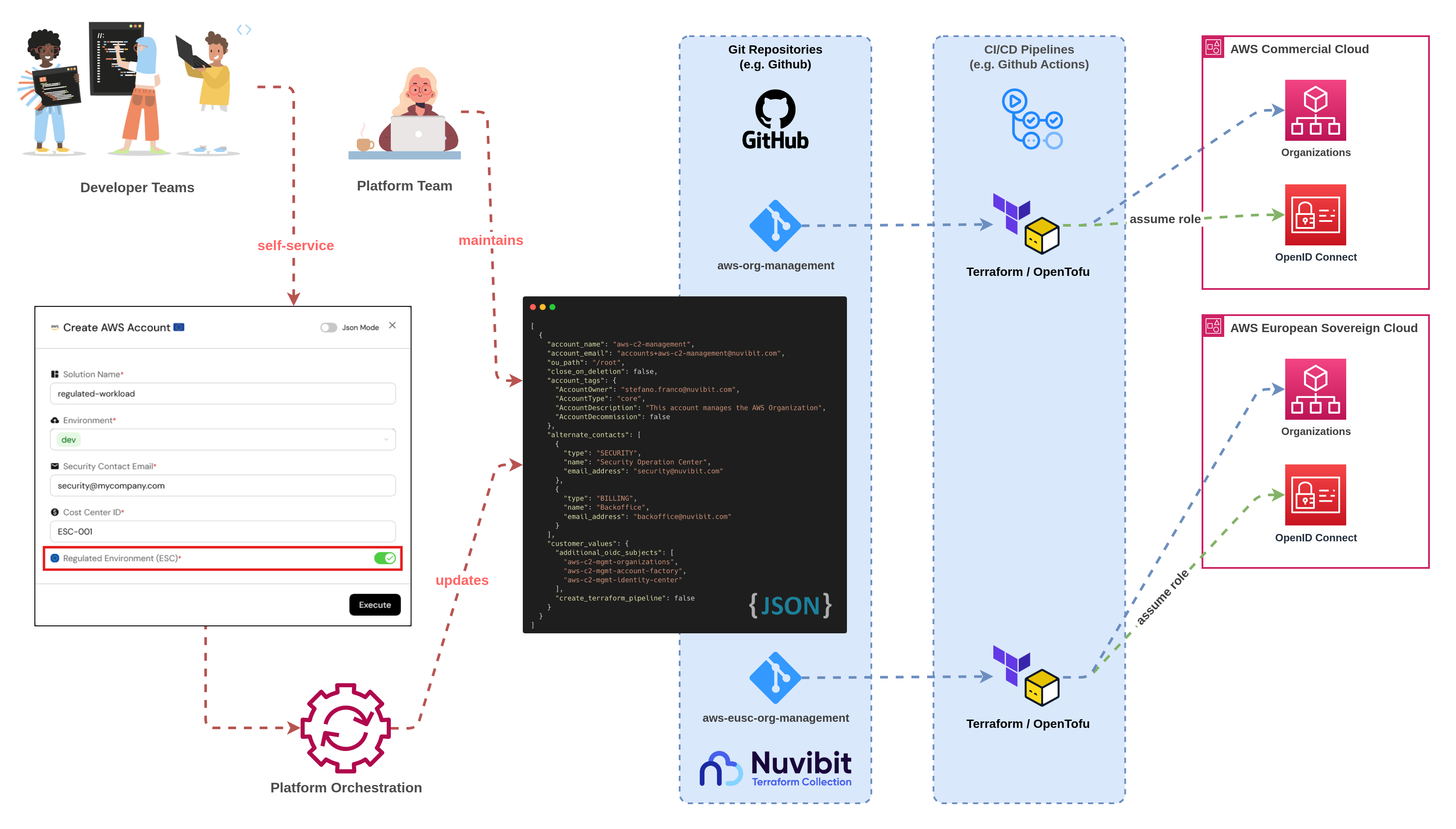
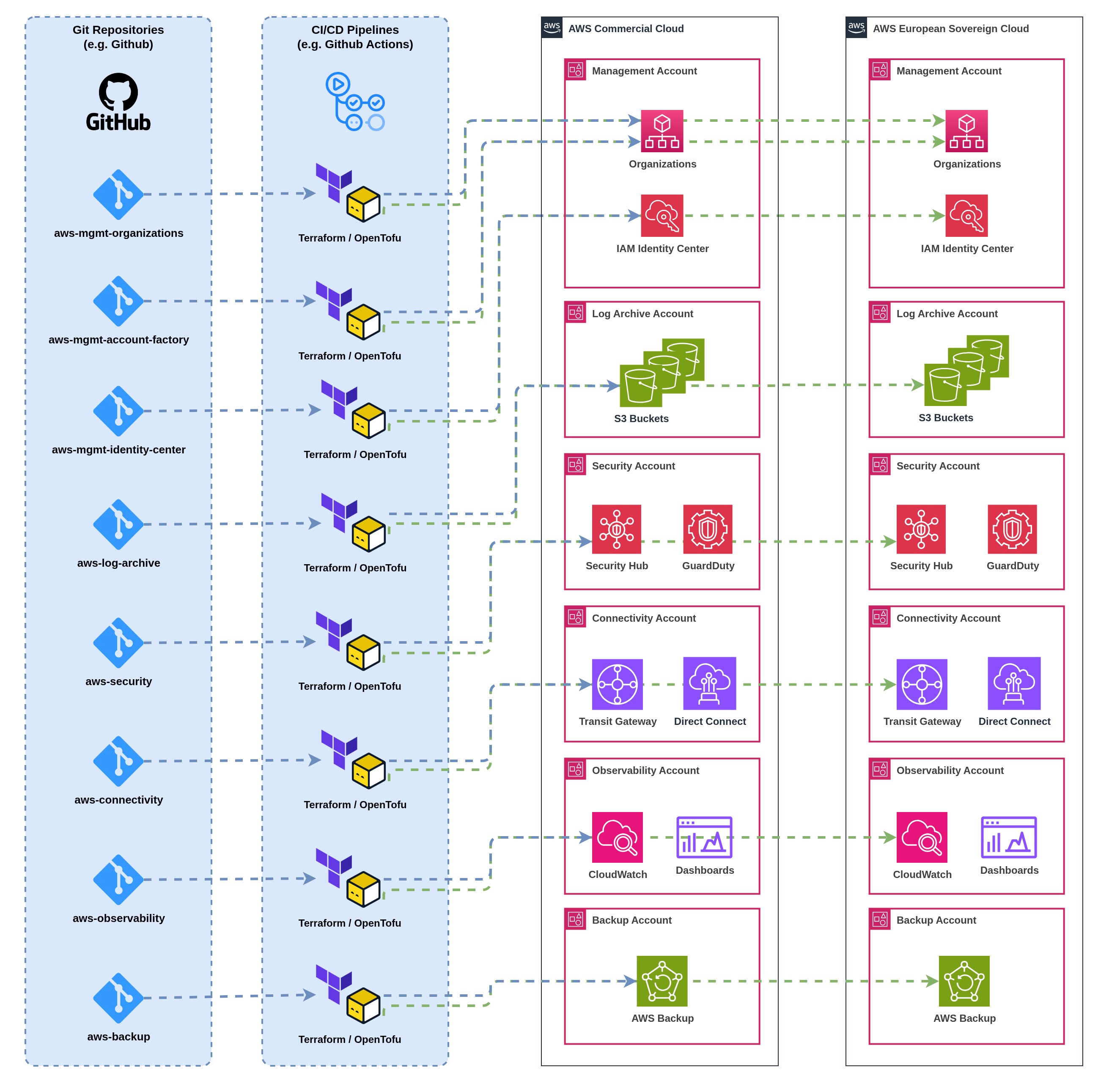
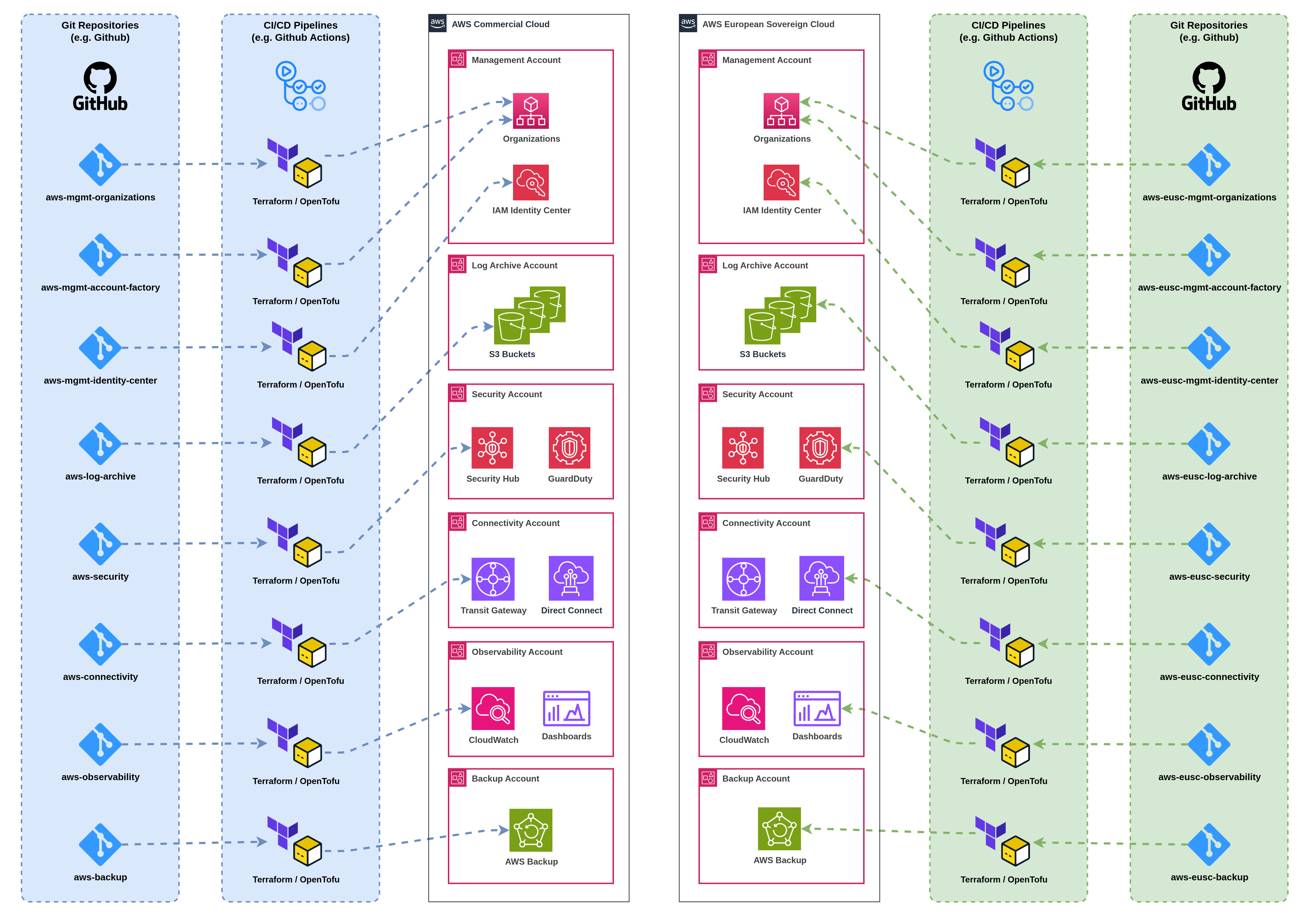
:::tip When choosing a CI/CD tool, consider whether the tool itself can be managed with Infrastructure as Code (IaC). This ensures your pipeline configurations are version-controlled, easily reproducible, and aligned with your infrastructure management strategy. ::: --- ### **Recommendation** For most IaC-heavy workflows, purpose-built CI/CD tools offer significant advantages, reducing complexity while enhancing security and reliability. We at Nuvibit love Spacelift's unrivaled flexibility and advanced features tailored to infrastructure management. Here’s why Spacelift stands out for us: - **Flexibility Across IaC Tools**: Spacelift supports a wide range of IaC frameworks, including Terraform, OpenTofu, Pulumi, and more, making it ideal for diverse environments. - **Native OPA Integration**: With built-in support for Open Policy Agent (OPA), Spacelift simplifies policy enforcement, ensuring compliance and governance from day one. - **Streamlined Workflows**: Spacelift excels in managing complex workflows, such as multi-account AWS environments or intricate state management, reducing operational overhead. - **Seamless Integration with NTC**: Spacelift provides amazing synergies with **Nuvibit Terraform Collection (NTC)**, enabling you to build robust, compliant, and secure AWS platforms effortlessly. For organizations aiming to unlock the full potential of AWS, the combination of Spacelift and NTC provides the ultimate solution.
:::note Due to Spacelift's exceptional value and perfect alignment with NTC, **Nuvibit has partnered with Spacelift to maximize and enhance our synergies**. As a certified partner with deep expertise in complex Spacelift implementations, Nuvibit is uniquely positioned to deliver best-in-class solutions. ::: :::tip NTC also offers a **[Spacelift administration](https://docs.nuvibit.com/ntc-building-blocks/operations/ntc-administration-spacelift/)** building block, making it extremely easy to set up and manage Spacelift environments alongside your AWS infrastructure. This integration reduces setup time and streamlines day-to-day operations. ::: --- ## Authentication Strategies for CI/CD Pipelines Proper authentication is critical for securely deploying IaC. Two primary methods are widely used: ### **1. OpenID Connect (OIDC)** OIDC provides short-lived tokens for pipeline authentication, eliminating the need for static credentials. AWS supports OIDC for CI/CD tools like GitHub Actions, GitLab, and Spacelift. - **Advantages**: - Secure, short-lived tokens reduce credential exposure. - Simplifies credential management by linking directly to the identity provider. - **Configuration**: - Set up an OIDC identity provider in AWS. - Assign roles with specific permissions to pipelines. - Link pipelines to OIDC for secure authentication. - [Learn more about AWS OIDC setup](https://docs.aws.amazon.com/IAM/latest/UserGuide/id_roles_providers_create_oidc.html). ### **2. IAM Access Keys (Legacy Alternative)** Static IAM access keys can be used but are less secure and require regular rotation. - **Recommendations**: - Limit permissions attached to the IAM user. - Use dedicated users for each pipeline to maintain accountability. - Rotate keys frequently and automate key expiration. --- ## Types of CI/CD Pipelines for IaC Delivery Choosing the right pipeline architecture depends on the size and complexity of your infrastructure. Below are three recommended approaches: ### **1. Single Pipeline Deploying into a Single AWS Account (Default Approach)** ![CI/CD Pipeline - 1:1](https://docs.nuvibit.com/illustrations/ntc-pipelines-1-1.png "CI/CD Pipeline - 1:1") - **Description**: A dedicated pipeline for each AWS account, typically linked to a specific IaC repository. - **Advantages**: - Minimizes blast radius; changes affect only one account. - Easier state management with reduced dependency conflicts. - Simplifies troubleshooting and accountability. - **Use Case**: This approach should be the standard way to deploy infrastructure, as it minimizes the blast radius between accounts and stages. ### **2. Multiple Pipelines Deploying into a Single AWS Account** ![CI/CD Pipeline - n:1](https://docs.nuvibit.com/illustrations/ntc-pipelines-n-1.png "CI/CD Pipeline - n:1") - **Description**: Splits IaC deployment into multiple pipelines for the same account, separating infrastructure by logical components (e.g. networking, security, compute). - **Advantages**: - Isolates Terraform state files, reducing dependency conflicts. - Facilitates incremental deployments and parallel workflows. - **Use Case**: Useful for large, complex accounts with many distinct IaC resources to minimizes the blast radius in the account. ### **3. Single Pipeline Deploying into Multiple AWS Accounts** ![CI/CD Pipeline - 1:n](https://docs.nuvibit.com/illustrations/ntc-pipelines-1-n.png "CI/CD Pipeline - 1:n") - **Description**: A single pipeline manages deployments across multiple AWS accounts. - **Advantages**: - Centralized management for small-scale environments. - **Disadvantages**: - Increases blast radius; changes can inadvertently affect multiple accounts. - More complex to maintain and troubleshoot. - **Use Case**: Use only for uncritical infrastructure. Cross-account deployments have the biggest blast radius and risk. --- ## Naming Strategy Recommendations Adopting a consistent naming convention simplifies pipeline management, provides clarity, and enhances traceability across infrastructure and application deployments. A thoughtful naming strategy becomes even more critical in environments with multiple AWS accounts and complex CI/CD workflows. ### **Separate Infrastructure and Application Deployments** It is highly recommended to separate infrastructure and application deployments into distinct pipelines and repositories. This separation offers several advantages: 1. **Improved Governance**: Different teams or roles can manage infrastructure and application independently, reducing cross-impact risks. 2. **Simplified Maintenance**: Updates to infrastructure components, such as networking or IAM configurations, are isolated from application deployments, minimizing potential disruptions. 3. **Enhanced Security**: Permissions can be tailored to the specific needs of infrastructure or application pipelines, reducing the attack surface. 4. **Different Workflows**: Infrastructure and application deployments usually require different pipeline workflows, allowing for optimized processes tailored to each domain. :::tip For applications, maintain a single repository and pipeline across environments while linking to infrastructure pipelines that handle environment-specific resources. ::: ### **AWS Account Naming** Account names should reflect their purpose, environment, or stage to ensure clarity and traceability. - **Format**: `{prefix}-{application}-{environment}` or `{prefix}-{core-account-name}` - **Examples**: - `aws-webshop-prod` (AWS Production environment for Webshop App) - `aws-webshop-dev` (AWS Development environment for Webshop App) - `aws-log-archive` (AWS Centralized logging and audit account) - `aws-connectivity` (AWS Centralized networking account) ### **Pipeline Naming** Pipelines should clearly indicate whether they handle **infrastructure** or **application** deployment and align with the associated AWS account. This separation ensures better organization, minimizes confusion, and allows for more granular access controls. - **Infrastructure Repository Format**: `{prefix}-{account-name}` - Use a prefix like `infra-` for infrastructure pipelines for easy differentiation between infrastructure and application pipelines. - **Application Repository Format**: `{prefix}-{application}` - **Examples**: - `infra-aws-webshop-prod` (Pipeline for provisioning infrastructure in the production environment of Webshop App) - `app-webshop` (Pipeline for deploying application code, typically tied to the application repository) ### **Repository Naming** Repository names should match the pipeline or resource they represent, maintaining alignment with the account and purpose. Since applications often have a single repository, while infrastructure is split across stages or environments, the naming convention reflects this: - **Infrastructure Repository Format**: `{prefix}-{application}-{environment}` or `{prefix}-{core-account-name}` - **Application Repository Format**: `{application}` - **Examples**: - `infra-aws-connectivity` (IaC repository for the centralized networking account) - `infra-aws-webshop-prod` (IaC repository for the production environment) - `infra-aws-webshop-dev` (IaC repository for the development environment) - `webshop` (Single repository for application code, independent of the environment) By aligning AWS accounts, pipelines, and repositories with a consistent naming strategy, organizations can streamline CI/CD workflows, simplify onboarding for new team members, and improve operational efficiency. --- ## Best Practices for CI/CD Pipelines with IaC 1. **Implement Least Privilege**: - Limit pipeline permissions to only those necessary for the deployment. - Use separate roles for production and non-production environments. 2. **Automate State Management**: - Use state backends like AWS S3 with DynamoDB locking or native state management from Spacelift or Terraform Cloud. - Protect state files with encryption and access controls. 3. **Enable Drift Detection**: - Monitor for changes made outside the pipeline to prevent configuration mismatches. 4. **Implement Testing**: - Incorporate plan checks, linting, and unit tests to catch issues before deployment. 5. **Secure Secrets**: - Store sensitive information (e.g. keys, tokens) securely using tools like AWS Secrets Manager or HashiCorp Vault. --- ## Conclusion Setting up CI/CD pipelines for IaC deployments ensures a secure, scalable, and efficient infrastructure delivery process. Purpose-built CI/CD tools like Spacelift and Terraform Cloud enhance workflows, while proper authentication strategies such as OIDC minimize security risks. By adhering to best practices and adopting a modular pipeline architecture, you can significantly improve the reliability, security, and traceability of your IaC deployments. For additional resources, explore the [Nuvibit Building Blocks](https://nuvibit.com/ntc-building-blocks) and start optimizing your AWS infrastructure today. Source: https://docs.nuvibit.com/whitepapers/cicd-pipelines-iac-delivery --- # Nuvibit AWS Reference Architecture ## Introduction The **Nuvibit AWS Reference Architecture (NARA)** is the result of years of experience in building best-in-class AWS foundations and landing zones. Refined and optimized through numerous iterations in real-world projects, this battle-tested framework now provides a reliable, scalable and secure solution for managing enterprise-grade AWS environments. Tailored to meet the needs of modern organizations, NARA addresses critical challenges such as cloud governance, operational efficiency, and regulatory compliance. By focusing on scalability, reliability, and security, it empowers organizations to unlock the full potential of AWS while safeguarding sensitive workloads and maintaining governance. ![Nuvibit AWS Reference Architecture](https://docs.nuvibit.com/illustrations/ntc-reference-architecture.png "Nuvibit AWS Reference Architecture") At the core of this architecture lies the **Nuvibit Terraform Collection (NTC)**, a suite of modular, enterprise-grade building blocks. These building blocks streamline the implementation of the reference architecture, automating complex tasks such as account provisioning, connectivity, security tooling, and compliance management. With **NARA** and **NTC**, organizations can confidently rely on a proven framework designed to accelerate cloud adoption, enforce best practices, and enable long-term operational excellence. --- ## Core Principles ### **Scalability** The Nuvibit AWS Reference Architecture (NARA) ensures scalability by organizing the AWS environment into a structured multi-account framework. This approach allows organizations to scale horizontally by adding new accounts for specific workloads, environments, or teams, and vertically by expanding resources within individual accounts as needed. With integrated automation for provisioning, lifecycle management, and account baselining, organizations can seamlessly adjust their infrastructure to meet evolving business demands while maintaining control and efficiency. ### **Enterprise-Grade** Enterprise-grade reliability lies at the core of the NARA design. This is achieved through the deliberate segregation of critical functionalities into dedicated accounts, ensuring operational isolation and minimizing risk. By compartmentalizing workloads, connectivity, and security operations, the architecture ensures that issues, such as misconfigurations or failures in one account, do not cascade across the entire organization. This isolation strategy is bolstered by centralized logging, monitoring, and security tooling, providing comprehensive visibility and control. The result is a robust and resilient foundation that safeguards the stability and availability of critical services, supporting uninterrupted operations and rapid issue resolution. ### **Compliance** Designed for highly regulated industries, NARA integrates governance, customizable guardrails, and automated compliance features to meet stringent industry standards such as ISO 27001, GDPR, and HIPAA. Centralized security tooling, log archiving, and fine-grained access controls ensure consistent enforcement of policies across all accounts. By aligning with AWS best practices and providing built-in compliance capabilities, NARA enables organizations to confidently operate within regulatory frameworks while maintaining full sovereignty over their data. ### **Accelerated Cloud Adoption** With pre-configured building blocks provided by the Nuvibit Terraform Collection (NTC), NARA removes the complexities and delays of manual configurations. These modular building blocks automate key tasks like account provisioning, networking setup, and compliance enforcement, enabling organizations to quickly establish a secure and scalable AWS foundation. By streamlining cloud adoption, NARA empowers teams to focus on innovation and deliver value at a faster pace. --- ## Core Accounts Core accounts are the cornerstone of a multi-account AWS environment, supporting governance, security, and operational efficiency. These accounts are essential for creating a scalable, secure, and well-governed AWS organization. Some accounts are highly recommended, while others can be implemented based on specific organizational requirements. ### **Organization Management Account** ![Organization Management Account](https://docs.nuvibit.com/illustrations/nara-org-management.png "Organization Management Account") The Organization Management Account serves as the operational backbone for managing and governing all AWS accounts within the organization. It enables the configuration of **AWS Organizations**, which allows defining a hierarchical structure of accounts and the enforcement of guardrails for consistent and centralized governance. Example of an AWS organizational structure: ![Organization Structure](https://docs.nuvibit.com/illustrations/ntc-organizations.png "AWS Organization Structure") This centralized management streamlines tasks such as configuring account baselines (e.g. setting up foundational infrastructure, defining budget alerts) and implementing account lifecycle customizations (e.g. removing default VPCs, enabling opt-in regions). Optional integration with **AWS Control Tower** adds further governance by providing pre-configured guardrails and best practices for multi-account setups. The Nuvibit Terraform Collection (NTC) complements AWS Control Tower by filling gaps, such as advanced security tooling, automated identity management, and multi-account connectivity, ensuring a comprehensive and seamless solution. This account is crucial for maintaining consistency, simplifying administration, and ensuring effective governance across the organization. By centralizing these governance capabilities, the Organization Management Account simplifies administrative overhead, enforces consistency, and ensures robust governance across the entire AWS environment. :::tip NTC Building Blocks to streamline the deployment and management of the **Organization Management Account**: - [NTC Organizations](https://docs.nuvibit.com/ntc-building-blocks/management/ntc-organizations/) - [NTC Parameters](https://docs.nuvibit.com/ntc-building-blocks/management/ntc-parameters/) - [NTC Account Factory](https://docs.nuvibit.com/ntc-building-blocks/management/ntc-account-factory/) - [NTC Identity Center](https://docs.nuvibit.com/ntc-building-blocks/management/ntc-identity-center/) ::: ### **Log Archive Account** ![Log Archive Account](https://docs.nuvibit.com/illustrations/nara-log-archive.png "Log Archive Account") The Log Archive Account provides centralized S3 buckets for securely storing logging and audit data generated across all AWS accounts in the organization. Services such as **CloudTrail**, **VPC Flow Logs**, **GuardDuty** and **AWS Config** can be configured to forward their logs to this account, ensuring a centralized and comprehensive audit trail for compliance, troubleshooting, and monitoring purposes. Audit logs are encrypted using **AWS KMS** to maintain their confidentiality and integrity. By consolidating logs from multiple accounts, this account plays a vital role in achieving regulatory compliance requirements, and in facilitating detailed forensic analysis in the event of a security incident. Its role in maintaining a centralized and secure log repository makes it indispensable for ensuring operational transparency and regulatory adherence. :::tip NTC Building Blocks to streamline the deployment and management of the **Log Archive Account**: - [NTC Log Archive](https://docs.nuvibit.com/ntc-building-blocks/security/ntc-log-archive/) - [NTC Organizations](https://docs.nuvibit.com/ntc-building-blocks/management/ntc-organizations/) (organization trail) ::: ### **Security Tooling Account** ![Security Tooling Account](https://docs.nuvibit.com/illustrations/nara-security-tooling.png "Security Tooling Account") The **Security Tooling Account** is a dedicated environment to centralize and manage security services across the AWS organization. It acts as a focal point for compliance monitoring, analyzing, and enforcing security policies, providing a robust foundation for identifying and mitigating threats. This account aggregates security findings in **AWS Security Hub**, offering a unified view of the organization’s security posture. By integrating with tools such as **AWS Config** for resource compliance, **GuardDuty** for threat detection, and **Inspector** for vulnerability management, it ensures comprehensive coverage of potential security risks. Additionally, **IAM Access Analyzer** helps identify overly permissive roles and policies, enabling administrators to address access-related vulnerabilities proactively. The **Security Tooling Account** is essential for protecting sensitive data, maintaining compliance, and strengthening the organization’s defense against an ever-evolving threat landscape. Its central role ensures that security services and policies operate seamlessly across all accounts, contributing to a secure and resilient AWS environment. :::tip NTC Building Blocks to streamline the deployment and management of the **Security Tooling Account**: - [NTC Security Tooling](https://docs.nuvibit.com/ntc-building-blocks/security/ntc-security-tooling/) - [NTC Organizations](https://docs.nuvibit.com/ntc-building-blocks/management/ntc-organizations/) (admin delegations) ::: ### **Connectivity Account** ![Connectivity Account](https://docs.nuvibit.com/illustrations/nara-connectivity.png "Connectivity Account") The Connectivity Account is dedicated to managing the organization’s central networking infrastructure, ensuring secure and reliable connectivity between AWS accounts, regions, and on-premises environments. Key components of the Connectivity Account include **AWS Transit Gateway** for interconnecting VPCs and regions, **AWS Direct Connect** or **AWS VPN** for secure access to on-premises environments, **Amazon Route 53** for DNS configurations, and **AWS Network Firewall** for centralized traffic inspection and filtering. While centralizing network management simplifies governance and reduces operational complexity, not all networking components need to be centralized. The Connectivity Account can work in conjunction with decentralized networking elements, such as VPC-specific configurations managed directly within workload accounts. This hybrid approach allows for greater flexibility, enabling teams to expand and customize their network infrastructure while maintaining core security and connectivity standards. This approach ensures that traffic is routed securely and efficiently, supporting both single-region and multi-region deployments. The Connectivity Account plays a critical role in maintaining a robust, adaptable, and scalable network infrastructure for the organization. :::tip NTC Building Blocks to streamline the deployment and management of the **Connectivity Account**: - [NTC IP Address Management (IPAM)](https://docs.nuvibit.com/ntc-building-blocks/connectivity/ntc-ipam/) - [NTC Core Networking](https://docs.nuvibit.com/ntc-building-blocks/connectivity/ntc-core-network/) - [NTC VPC](https://docs.nuvibit.com/ntc-building-blocks/connectivity/ntc-vpc/) - [NTC Route53](https://docs.nuvibit.com/ntc-building-blocks/connectivity/ntc-route53/) ::: ### **Monitoring Account (optional)** ![Monitoring Account](https://docs.nuvibit.com/illustrations/nara-monitoring.png "Monitoring Account") The Monitoring Account serves as a centralized hub for monitoring and observability within the AWS environment. It is particularly useful for consolidating application metrics, logs, and traces generated across multiple accounts into a unified view. Services such as **Amazon CloudWatch**, **AWS X-Ray**, and third-party integrations for tools like **Prometheus** and **Grafana** can be deployed in this account to manage monitoring at scale. By separating monitoring into a dedicated account, organizations can isolate monitoring-related permissions and ensure that observability data is securely managed. This account becomes especially important for organizations that rely on AWS-native tools for monitoring or require a single-pane-of-glass view of their infrastructure's health and performance. However, if external tools like Splunk or Datadog are preferred, this account may not be necessary. :::info NTC Building Blocks to streamline the deployment and management of the **Monitoring Account**: - NTC Observability (planned) ::: ### **Backup Account (optional)** ![Backup Account](https://docs.nuvibit.com/illustrations/nara-backup.png "Backup Account") The Backup Account is a dedicated environment for managing and securing backups of critical data and resources. It provides a centralized location for **AWS Backup** services to orchestrate and automate the backup of data across all AWS accounts, ensuring compliance with recovery objectives and minimizing data loss in case of failure. This account can host encrypted backups of services such as Amazon S3, EBS volumes, and Databases, creating an additional layer of data protection. By isolating backup management in its own account, organizations can implement robust security policies, limit access to sensitive backup data, and reduce the risk of accidental deletion or modification. For organizations using external backup tools such as Veeam or Cohesity, this account might not be required. However, for those relying on AWS-native solutions, a Backup Account is an essential part of a resilient disaster recovery strategy. :::tip NTC Building Blocks to streamline the deployment and management of the **Backup Account**: - [NTC Backup](https://docs.nuvibit.com/ntc-building-blocks/operations/ntc-backup/) ::: --- ## Workload Accounts: Dedicated Accounts for Each Stage ![Workload Accounts](https://docs.nuvibit.com/illustrations/nara-workloads.png "Workload Accounts") The Nuvibit AWS Reference Architecture emphasizes the importance of separating workloads and workload stages into dedicated AWS accounts. This approach enhances security, operational efficiency, and governance while aligning with AWS’s best practices. ### **Security and Isolation** By isolating workloads into separate accounts, the architecture ensures that incidents or configuration errors in one account do not affect others. For example, critical production workloads are isolated from development and sandbox environments, minimizing the risk of accidental disruptions. ### **Customizable Guardrails** Guardrails (e.g. Service Control Policies) can be tailored to each account type. Production accounts typically have stricter guardrails to enforce compliance and prevent risky actions, while development accounts allow more flexibility for experimentation. Sandbox accounts provide the freedom to test new AWS services and rapid prototyping without risks, making them ideal for research and innovation. ### **Cost and Resource Management** Separating workloads by stage simplifies cost tracking and allocation. Each account can have its own budget and quotas, ensuring that resources are used efficiently and within defined limits. As a result, this enables fine-grained billing without having to implement complex tagging policies for cost allocation. ### **Scalability and Lifecycle Management** Dedicated accounts make it easier to scale workloads independently and manage their lifecycle. For example, sandbox accounts can be easily decommissioned when no longer needed, while production accounts can scale vertically or horizontally without impacting other environments. ### **Account Baseline** Establishing a consistent account baseline ensures that all newly created accounts adhere to organizational governance standards. This includes pre-configured security settings, connectivity configurations, and log forwarding. An account baseline simplifies onboarding and ensures compliance even as the number of accounts grows into the hundreds. --- ## Customizing the Architecture The Nuvibit AWS Reference Architecture (NARA) is designed with scalability, security, and compliance at its core, making it an ideal choice for enterprises in regulated sectors (e.g. governments). However, its flexibility allows it to be tailored to meet the unique needs of various industries and organizations through customizations. ### **Scalability for Growing Startups** Rapidly growing startups can leverage this architecture to establish a resilient foundation that scales effortlessly with their evolving needs. Its modular design ensures that as teams and workloads expand, the infrastructure remains manageable and robust. Dedicated workload accounts simplify scaling while maintaining strong security and governance. ### **Segmentation for ISVs** Independent Software Vendors (ISVs) and managed service providers benefit from the architecture’s ability to segment customer environments into dedicated accounts. This approach ensures strict data separation, reduces cross-environment risks, and simplifies resource tracking. It also supports contractual and regulatory requirements for customer data isolation. ### **Compliance and Security for Financial Institutions** For financial institutions in regulated industries, the architecture offers comprehensive compliance and security features. Centralized logging, robust guardrails, and automated security tooling address key regulatory requirements. With targeted customization, organizations can meet finance-specific standards such as FINMA or GDPR by closing any remaining compliance gaps. ### **Adaptability Across Industries** Although initially designed for regulated sectors, the architecture is highly adaptable to different industries such as healthcare, manufacturing, and utilities. Organizations can extend or modify configurations to align with their specific operational and compliance needs while maintaining scalability and security. ### **Tailored to Your Needs** Nuvibit’s expertise ensures that this architecture can be customized to precisely meet your organization’s requirements. Whether you are scaling a startup, isolating customer environments, or achieving compliance with industry-specific regulations, Nuvibit delivers a cloud platform tailored to your operational goals. The Nuvibit Terraform Collection (NTC) Building Blocks are designed for flexibility, enabling you to design and implement an architecture that aligns perfectly with your needs. --- ## Benefits of the Nuvibit AWS Reference Architecture The Nuvibit AWS Reference Architecture (NARA) simplifies cloud management by centralizing governance and automating repetitive tasks. By leveraging AWS Organizations combined with guardrails, administrators can enforce compliance policies across all accounts with minimal effort. This reduces the administrative burden and ensures that the entire environment operates within those predefined guardrails. With security as a top priority, the architecture isolates workloads into dedicated accounts and implements robust protections such as automated baselines, centralized logging, and integrated security tooling. These features provide strong defenses against potential threats while maintaining visibility and control. Operational efficiency is another key benefit of this architecture. Pre-configured modules and automated workflows streamline the deployment and management of resources, enabling organizations to focus on innovation rather than infrastructure maintenance. Finally, the architecture’s compliance and sovereignty features ensure that organizations can meet regulatory requirements without sacrificing agility. Centralized log storage, customizable guardrails, and AWS KMS encryption provide the tools needed to maintain data sovereignty and align with industry standards. --- ## Conclusion The **Nuvibit AWS Reference Architecture (NARA)** represents a transformative approach to cloud management, combining scalability, reliability, and compliance into a cohesive framework. By leveraging the Nuvibit Terraform Collection (NTC), organizations can confidently accelerate their AWS cloud adoption while ensuring governance, scalability, and compliance for the future of their digital transformation. :::tip For a step-by-step guide to implementing this architecture, refer to the **[Quickstart Guide](https://docs.nuvibit.com/getting-started/quickstart)** and kickstart your cloud journey with the **Nuvibit Terraform Collection (NTC)**. ::: Source: https://docs.nuvibit.com/whitepapers/nuvibit-aws-reference-architecture