Starting with NTC Account Baseline Templates v4, the unified multi-region baseline is the only supported mode. The legacy per-region baseline templates have been removed. If you are still using legacy per-region templates, see the Migration Guide for step-by-step instructions.
Account Baseline
The Account Baseline feature in NTC Account Factory allows you to establish and maintain consistent configurations, guardrails, and security controls across multiple AWS accounts through comprehensive infrastructure as code.
Overview
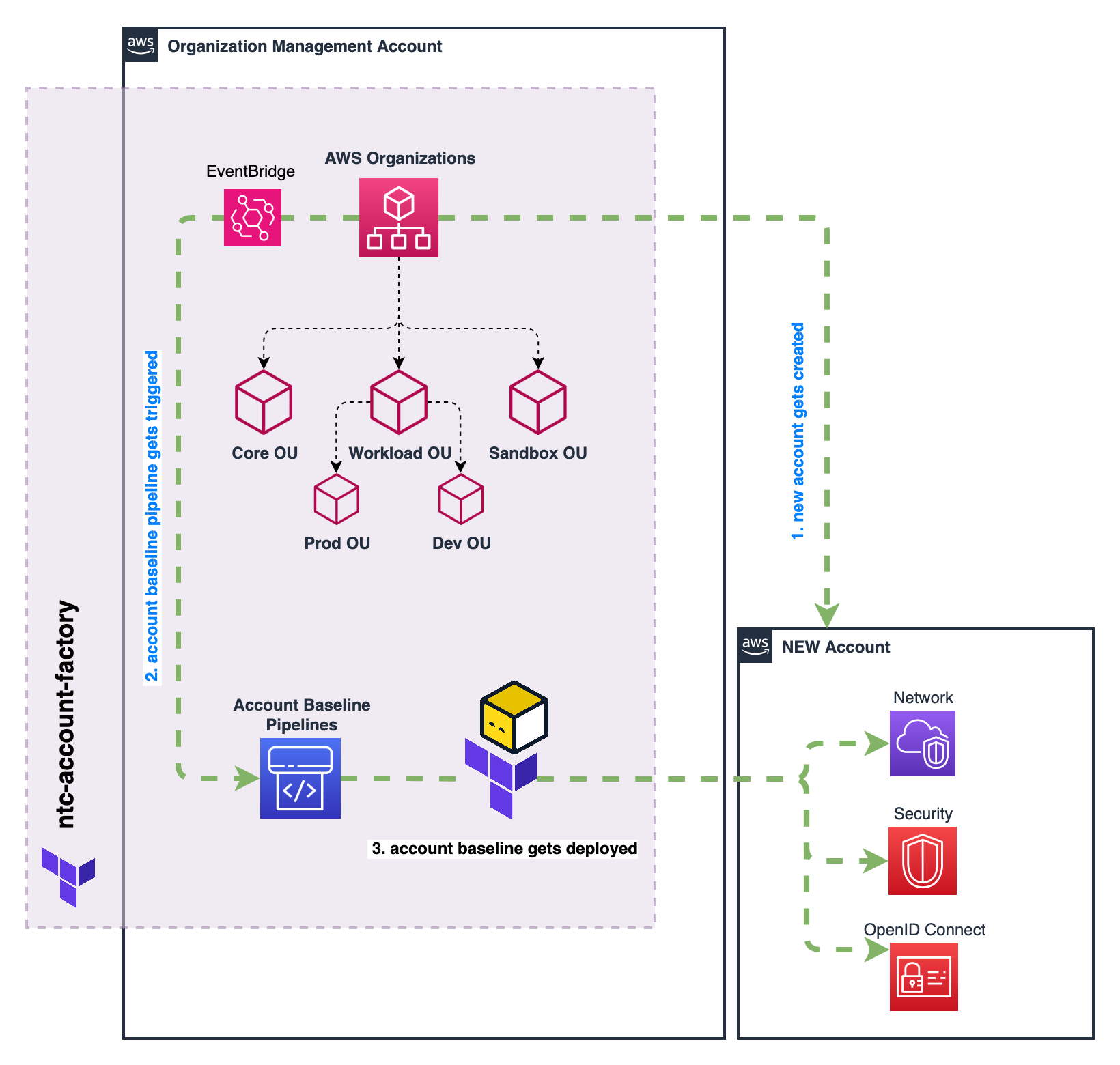
Account Baselines ensure that all AWS accounts in your organization follow a consistent set of standards and configurations. Unlike the event-driven Account Lifecycle Management, baselines provide ongoing governance through CI/CD pipelines that apply Terraform code to maintain the desired state of your accounts.
How It Works
- Terraform code defines the desired configuration for accounts
- S3 buckets store the Terraform code and state files
- An execution engine orchestrates the deployment process (see Deployment Modes below)
- The execution engine runs Terraform to apply the configuration in each target account
- DynamoDB tables protect against accidental deletion
Deployment Modes
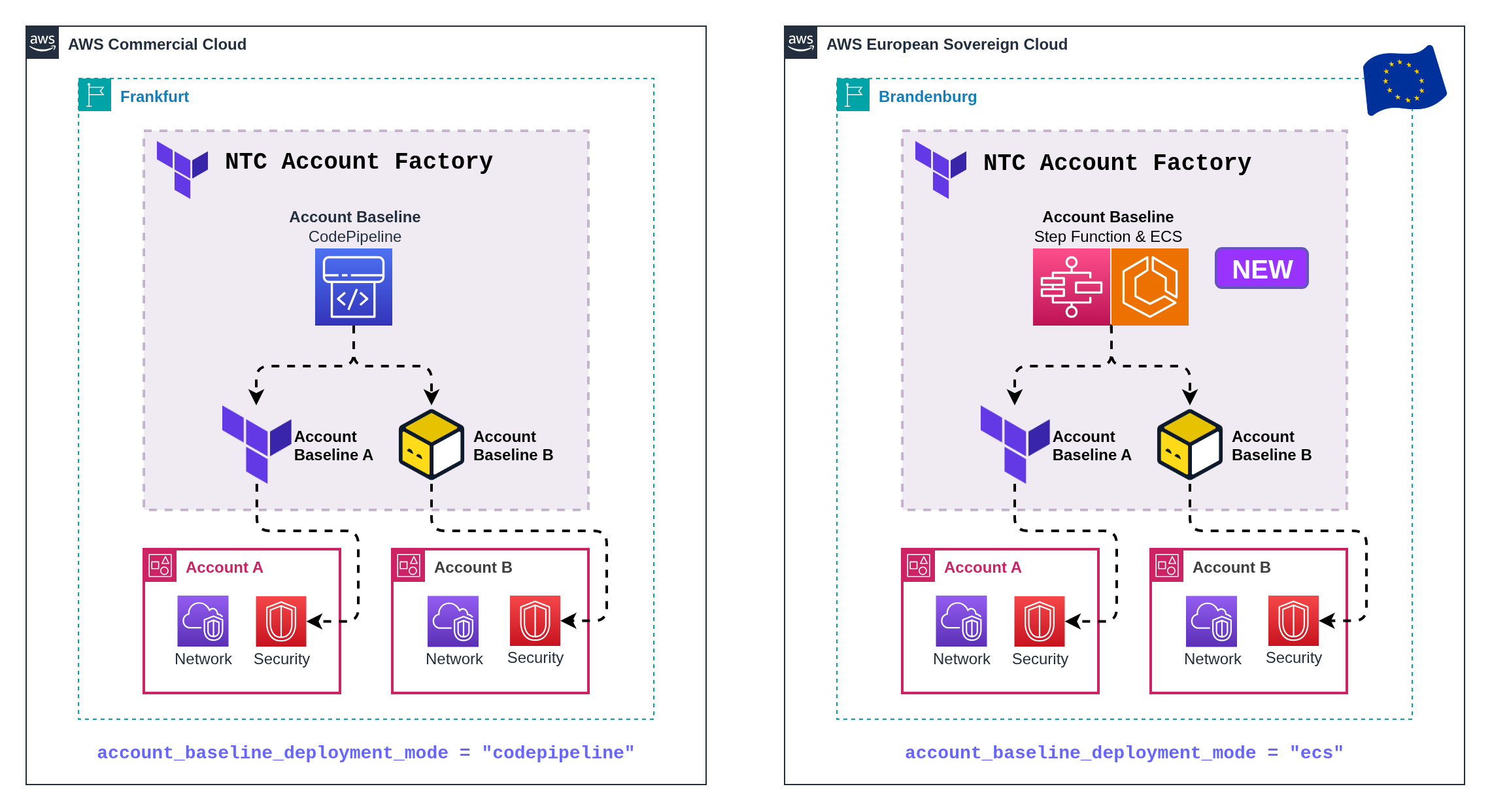
The execution engine that runs the baseline is selectable via the account_baseline_deployment_mode variable. Both modes provide the same baseline functionality (plan, apply, drift remediation, scheduling, scoping) and accept identical configuration. The only difference is the AWS services used to execute the Terraform runs.
module "ntc_account_factory" {
  source = "github.com/nuvibit-terraform-collection/terraform-aws-ntc-account-factory?ref=X.X.X"

  # "codepipeline" (default) for standard AWS partitions
  # "ecs" for AWS European Sovereign Cloud and other partitions where CodePipeline/CodeBuild are unavailable
  account_baseline_deployment_mode = "codepipeline"

  # ...other configuration
}
| Aspect | codepipeline (default) | ecs |
|---|---|---|
| Orchestration | AWS CodePipeline | AWS Step Functions |
| Compute | AWS CodeBuild | Amazon ECS on AWS Fargate |
| Trigger source | S3 EventBridge → CodePipeline | S3 EventBridge → Step Functions (via dispatcher Lambda) |
| Logs | CodeBuild logs + CloudWatch Logs | CloudWatch Logs (ECS task and Step Functions) |
| When to use | Standard AWS commercial regions, GovCloud, and China where CodePipeline/CodeBuild are available | AWS European Sovereign Cloud (ESC) and any partition where CodePipeline/CodeBuild are not available |
AWS European Sovereign Cloud (ESC) does not offer CodePipeline or CodeBuild. Set account_baseline_deployment_mode = "ecs" to deploy the Account Factory in ESC. No other configuration changes are required: scopes, templates, parameters, imports, moves, and cross-account orchestration all work identically.
Switching account_baseline_deployment_mode on an existing deployment tears down the previous engine's resources and provisions the new engine. The baseline content, S3 buckets, and DynamoDB delete-protection tables are not affected. Existing CodeBuild/CodePipeline-based deployments stay on codepipeline by default and require no migration steps.
Key Features
| Feature | Description | Benefits |
|---|---|---|
| Scoped Deployment | Apply different baselines to specific accounts based on OU paths, names, or tags | Target configurations to the right environments |
| Multi-Region Support | Execute the same baseline content across multiple AWS regions with region-aware context | Maintain consistency across global infrastructure while respecting regional differences and main region concepts |
| Modular Design | Build baselines from reusable templates or custom code | Reduce duplication and maintenance overhead |
| Cross-Account Orchestration | Configure resources that require access to multiple accounts | Simplify complex cross-account dependencies |
| Scheduled Updates | Automatically reapply baselines at scheduled intervals | Enforce compliance and correct drift |
| State Management | Maintain Terraform state to detect and correct configuration drift | Ensure resources stay properly configured |
NTC Account Baseline Templates
The NTC Account Baseline Templates module provides a set of pre-built, reusable templates for common account configurations. These templates can be easily integrated into your Account Factory configuration to standardize governance across accounts.
Available Templates
The following templates are available in the NTC Account Baseline Templates module:
| Template | Description | When to Use |
|---|---|---|
iam_role | Creates a standardized IAM role with configurable trust policy, principal access, and permission settings | When you need consistent IAM roles across accounts for cross-account access, service roles, or EC2 instance profiles |
aws_config | Sets up AWS Config recorders and rules | For continuous compliance monitoring |
openid_connect | Configures OIDC integration for identity providers | For setting up an OpenID Connect (OIDC) identity provider in IAM with assumable role and permissions for CI/CD systems like GitHub Actions, GitLab CI, or Spacelift |
tfstate_backend | Creates secure Terraform state management infrastructure with S3 backend, KMS encryption, and configurable locking | For establishing centralized state storage across accounts with automated CI/CD integration, cost-effective locking options, and fine-grained access control |
backup | Creates a per-region local AWS Backup vault and KMS key, plus separate operator and restorer IAM roles, in the account it's applied to | Required in every member account that NTC Backup should be able to copy backups from - the vault name and operator role name must match what the central backup account expects |
The backup template's local vault (ntc-local-backup-vault-<region>) and member_account_backup_role_name-matching operator role are prerequisites for NTC Backup's cross-account copy. See Backup Policies for how resource selection and the copy itself work once both sides are in place.
Implementation
The NTC Account Baseline Templates can be implemented in your NTC Account Factory configuration through a few simple steps:
- Include the Templates Module
First, include the NTC Account Baseline Templates module in your Terraform configuration:
- Reference Templates in Account Factory Configuration
After defining the templates, reference them in your NTC Account Factory configuration:
module "ntc_account_factory" {
  source = "github.com/nuvibit-terraform-collection/terraform-aws-ntc-account-factory?ref=X.X.X"

  account_factory_baseline_bucket_name = "ntc-account-factory-baseline"

  # Other account factory configuration...

  account_baseline_scopes = [
    {
      scope_name = "workloads"
      terraform_binary = "opentofu"
      terraform_version = "1.10.7"
      aws_provider_version = "6.25.0"

      provider_default_tags = {
        ManagedBy = "ntc-account-factory",
        BaselineScope = "workloads",
        BaselineVersion = "2.0"
      }

      baseline_execution_role_name = "OrganizationAccountAccessRole"

      # Reference pre-defined unified templates
      baseline_terraform_files = [
        module.account_baseline_templates.account_baseline_terraform_files["iam_monitoring_reader"],
        module.account_baseline_templates.account_baseline_terraform_files["iam_instance_profile"],
        module.account_baseline_templates.account_baseline_terraform_files["aws_config"],
        module.account_baseline_templates.account_baseline_terraform_files["oidc_github"],
        module.account_baseline_templates.account_baseline_terraform_files["tfstate_backend"],
      ]

      baseline_regions = ["us-east-1", "eu-central-1"]
      baseline_main_region = "eu-central-1"

      # Pass additional parameters to baseline templates (available as var.baseline_parameters)
      baseline_parameters_json = jsonencode({
        org_id = "o-1234567890"
        connectivity_account = "123456789012"
        budget_limit = "1000"
        ipam_pool_ids = {
          us_east_1 = "ipam-121412512341234"
          eu_central_1 = "ipam-121412512341234"
        }
      })

      # Import existing resources into baseline management
      baseline_import_resources = [
        {
          import_to = "module.baseline_unified[0].aws_iam_role.legacy_role"
          import_id = "ExistingLegacyRole"
          import_condition_account_names = ["prod-account-001"]
        }
      ]

      # Target specific accounts
      include_accounts_all = false
      include_accounts_by_ou_paths = [
        "/root/workloads/prod",
        "/root/workloads/dev"
      ]
    }
  ]
}
- Testing and Monitoring
Once your baseline configuration is deployed, you can monitor its status through:
- AWS CodePipeline console (in
codepipelinemode) or AWS Step Functions console (inecsmode) to track deployment - CloudWatch Logs for detailed execution information: CodeBuild log streams in
codepipelinemode, ECS task logs inecsmode - Account-level resources to verify proper configuration
Advanced Configuration
Baseline Parameters
The baseline_parameters_json feature allows you to pass custom configuration data to your baseline templates, making them more dynamic and environment-specific. Parameters are passed as a JSON-encoded string and become available in templates as var.baseline_parameters.
Use Cases for Baseline Parameters
- Organization Configuration: Pass organization ID, management account details, and organizational settings
- Networking Information: Share IPAM pool IDs, VPC configurations, and connectivity details
- Environment-Specific Settings: Configure different values for development, staging, and production environments
- Budget and Cost Controls: Set account-specific budget limits and cost allocation tags
- Security and Compliance: Pass security baselines, compliance requirements, and audit configurations
Example Configuration
baseline_parameters_json = jsonencode({
  # Organization details
  org_id = "o-1234567890"
  management_account_id = "123456789012"

  # Networking configuration
  connectivity_account = "123456789012"
  ipam_pool_ids = {
    us_east_1    = "ipam-121412512341234"
    eu_central_1 = "ipam-121412512341234"
  }
  transit_gateway_ids = {
    us_east_1    = "tgw-0a1b2c3d4e5f6g7h8"
    eu_central_1 = "tgw-1b2c3d4e5f6g7h8i9"
  }

  # Environment-specific settings
  environment = "production"
  budget_limit = "5000"
  backup_retention_days = 30

  # Security configuration
  security_account = "234567890123"
  log_archive_account = "345678901234"
  audit_roles = [
    "arn:aws:iam::234567890123:role/SecurityAuditRole",
    "arn:aws:iam::345678901234:role/ComplianceRole"
  ]
})
Using Parameters in Templates
Templates can access these parameters through the injected var.baseline_parameters variable:
# Example: Create VPC with IPAM integration (unified baseline)
resource "aws_vpc" "main" {
  for_each            = toset(var.baseline_regions)
  region              = each.value
  ipv4_ipam_pool_id   = var.baseline_parameters["ipam_pool_ids"][each.value]
  ipv4_netmask_length = 24
}

# Example: Environment-aware resource configuration
locals {
  is_production = var.baseline_parameters["environment"] == "production"
  backup_config = {
    retention_days = local.is_production ? var.baseline_parameters["backup_retention_days"] : 7
    frequency      = local.is_production ? "daily" : "weekly"
  }
}

# Example: Cross-account role assumption
data "aws_iam_policy_document" "cross_account_access" {
  statement {
    principals {
      type        = "AWS"
      identifiers = var.baseline_parameters["audit_roles"]
    }
    actions = ["sts:AssumeRole"]
  }
}
Maintenance Mode (Plan Only)
The baseline_maintenance_plan_only feature enables you to run terraform plan instead of terraform apply in the baseline pipeline. This is useful for safely previewing baseline changes before applying them to member accounts.
Configuration
baseline_maintenance_plan_only = true
Recommended Workflow
- Enable maintenance mode: Set
baseline_maintenance_plan_only = true - Update baseline configuration: Make your desired changes (templates, parameters, etc.)
- Apply Account Factory: This switches the execution engine to run
planinstead ofapply(CodeBuild buildspec incodepipelinemode, ECS task entrypoint inecsmode) - Review plan output: Check the CloudWatch logs for each account to verify expected changes
- Disable maintenance mode: Set
baseline_maintenance_plan_only = false - Trigger pipeline: Update baseline tags/parameters or trigger manually to apply the changes
Toggling baseline_maintenance_plan_only changes the execution command but does not change the baseline zip itself. After disabling maintenance mode, you need to trigger a new run (e.g., by updating baseline tags/parameters or triggering manually) to actually apply the changes.
Use Cases
- Change Validation: Preview the impact of baseline template updates across all accounts before applying
- Compliance Auditing: Run plan-only to detect drift without remediating it
- Risk Mitigation: Safely test major baseline changes (e.g., new templates, provider upgrades) in a controlled manner
- Team Review: Share plan output with stakeholders for approval before applying
Resource Import Management
The baseline_import_resources feature enables you to import existing AWS resources into baseline management without recreating them. This is particularly useful when migrating from manual configurations to baseline-managed infrastructure.
Import Configuration
baseline_import_resources = [
  {
    # Terraform resource address where the resource should be imported
    import_to = "module.baseline_unified[0].aws_iam_role.legacy_role"
    # AWS resource identifier (e.g., role name, instance ID, etc.)
    import_id = "ExistingLegacyRole"
    # Optional: limit import to specific accounts (default: all accounts in scope)
    import_condition_account_names = ["prod-account-001", "staging-account-002"]
  },
  {
    import_to = "module.baseline_unified[0].aws_s3_bucket.existing_logs"
    import_id = "existing-log-bucket-12345"
    # Import only in production accounts
    import_condition_account_names = ["prod-account-001"]
  }
]
Import Use Cases
- Legacy Infrastructure: Import manually created resources into baseline management
- Gradual Migration: Incrementally move existing resources under baseline control
- Shared Resources: Import resources that exist across multiple accounts with different identifiers
- Compliance Remediation: Bring non-compliant resources under standardized management
Best Practices for Resource Imports
- Plan Carefully: Test imports in non-production environments first
- State Validation: Verify that imported resources match your Terraform configuration exactly
- Gradual Rollout: Import resources incrementally rather than all at once
- Backup State: Always backup Terraform state before performing imports
- Account Targeting: Use
import_condition_account_namesto control which accounts are affected
Resource Address Format
The Account Factory uses the unified multi-region baseline mode, which executes a single template that handles all regions internally. The baseline runs inside module.baseline_unified[0], so all resource addresses use this module prefix.
# Configuration example
baseline_regions = ["us-east-1", "eu-central-1", "eu-central-2"]
baseline_main_region = "us-east-1"

# This generates a SINGLE baseline execution
# Your template uses var.baseline_regions to deploy resources across regions
Key Architecture Concepts:
- Single Execution: One template execution handles all regions
- Region Iteration: Use
for_each = toset(var.baseline_regions)withregion = each.valuefor regional resources - Global Resources: Deploy global resources without the
regionargument orfor_each - Global Service Region Provider: Use
provider = aws.global_service_regionfor resources that must be created in a global service region (e.g.,us-east-1) but don't support theregionattribute - Simpler State: All resources in a single state file under
module.baseline_unified[0]
Example Unified Baseline Template:
# Global resource (created once, no region argument needed)
resource "aws_iam_account_password_policy" "strict" {
  minimum_password_length        = 14
  require_lowercase_characters   = true
  require_uppercase_characters   = true
  require_numbers                = true
  require_symbols                = true
  allow_users_to_change_password = true
  max_password_age               = 90
  password_reuse_prevention      = 24
}

# Global resource with explicit global service region
resource "aws_s3_account_public_access_block" "block_public" {
  block_public_acls       = true
  block_public_policy     = true
  ignore_public_acls      = true
  restrict_public_buckets = true
}

# Global resource that requires the global service region (e.g. us-east-1)
# Use the aws.global_service_region provider alias for resources that don't support
# the 'region' attribute but must be created in the global service region
resource "aws_shield_subscription" "advanced" {
  # WARNING: This resource creates a subscription to AWS Shield Advanced, which requires a 1 year subscription commitment with a monthly fee
  # remove 'count = 0' to enable the resource and create the subscription
  count      = 0
  auto_renew = "ENABLED"
  provider   = aws.global_service_region
}

# Regional resource (created in each baseline region)
resource "aws_ebs_encryption_by_default" "enabled" {
  for_each = toset(var.baseline_regions)
  region   = each.value
  enabled  = true
}

# Regional resource with region-specific configuration
resource "aws_ec2_instance_metadata_defaults" "imdsv2" {
  for_each                         = toset(var.baseline_regions)
  region                           = each.value
  http_tokens                      = "required"
  http_put_response_hop_limit      = 2
  instance_metadata_tags           = "disabled"
  http_endpoint                    = "enabled"
}
Resource Address Patterns for Imports:
# Global resources: module.baseline_unified[0].resource_type.resource_name
baseline_import_resources = [
  {
    import_to = "module.baseline_unified[0].aws_iam_account_password_policy.strict"
    import_id = "iam-account-password-policy"
  }
]

# Regional resources: module.baseline_unified[0].resource_type.resource_name["region"]
baseline_import_resources = [
  {
    import_to = "module.baseline_unified[0].aws_ebs_encryption_by_default.enabled[\"eu-central-1\"]"
    import_id = "default@eu-central-1"
  }
]
Resource Move Management
The baseline_moved_resources feature allows you to move resources within the account baseline Terraform state without destroying and recreating them. This is essential when migrating from the legacy per-region baseline to the unified baseline, or when refactoring baseline templates that change resource addresses.
Move Configuration
baseline_moved_resources = [
  # Global resource: IAM role moved from legacy per-region module to unified module
  # Note: [0] count index removed in unified baseline (no more count guard)
  {
    moved_from = "module.baseline_eu_central_1[0].aws_iam_role.ntc_config[0]"
    moved_to   = "module.baseline_unified[0].aws_iam_role.ntc_config"
  },
  # Regional resource: Config recorder moved with region key added
  {
    moved_from = "module.baseline_eu_central_1[0].aws_config_configuration_recorder.ntc_config"
    moved_to   = "module.baseline_unified[0].aws_config_configuration_recorder.ntc_config[\"eu-central-1\"]"
  },
  {
    moved_from = "module.baseline_us_east_1[0].aws_config_configuration_recorder.ntc_config"
    moved_to   = "module.baseline_unified[0].aws_config_configuration_recorder.ntc_config[\"us-east-1\"]"
  },
  # Optional: limit moved statement to specific accounts
  {
    moved_from                    = "module.baseline_eu_central_1[0].aws_iam_openid_connect_provider.ntc_oidc__example[0]"
    moved_to                      = "module.baseline_unified[0].aws_iam_openid_connect_provider.ntc_oidc__example"
    moved_condition_account_names = ["my-org-management"]
  },
]
State Address Translation Reference
When migrating from legacy to unified baseline, use this table to translate resource addresses:
| Resource Type | Legacy Address | Unified Address |
|---|---|---|
| Global (IAM) | module.baseline_<main_region>[0].<resource>[0] | module.baseline_unified[0].<resource> |
| Regional | module.baseline_<region>[0].<resource> | module.baseline_unified[0].<resource>["<region>"] |
Key differences:
- Module name:
module.baseline_<region>[0]→module.baseline_unified[0] - Global resources:
[0]count index removed (no morecountguard in unified templates) - Regional resources: No
[0]index, but gains["<region>"]key (fromfor_each)
Move Use Cases
- Unified Baseline Migration: Migrate resource state from legacy per-region modules to the unified module (see Migration Guide)
- Template Refactoring: Move resources when renaming or restructuring baseline templates
- Resource Reorganization: Consolidate or split resources across different template files
Best Practices for Resource Moves
- Validate addresses: Check the exact resource addresses in your current state via the baseline execution logs (state is listed at the end of each baseline execution in both
codepipelineandecsmodes) - Test first: Apply moved blocks to a non-production baseline scope before migrating production
- Clean up after migration: Remove
baseline_moved_resourcesentries after all baseline pipelines have executed successfully - Account targeting: Use
moved_condition_account_nameswhen moved blocks only apply to specific accounts (e.g., accounts with previously imported resources)
If moved_from addresses don't match the actual state, Terraform will destroy existing resources and recreate them — potentially breaking all accounts in the baseline scope simultaneously. Always validate addresses against the actual state before applying.
Resource Removal Management
The baseline_removed_resources feature allows you to remove resources from the baseline Terraform state without destroying them in the AWS account. This uses the Terraform/OpenTofu removed block with lifecycle { destroy = false } to safely detach resources from baseline management.
Requires Terraform >= 1.7 or OpenTofu >= 1.7 in the baseline pipeline.
Removal Configuration
baseline_removed_resources = [
  {
    # Resource address to remove from state
    removed_from = "module.baseline_unified[0].aws_iam_role.legacy_role"
    # Optional: limit removal to specific accounts (default: all accounts in scope)
    removed_condition_account_names = []
  },
  {
    # Remove a regional resource from specific accounts only
    removed_from = "module.baseline_unified[0].aws_ebs_encryption_by_default.enabled[\"eu-central-1\"]"
    removed_condition_account_names = ["sandbox-account-001"]
  },
]
Removal Use Cases
- Scope Reduction: Remove an account from a baseline scope without deleting the resources the baseline previously provisioned
- Template Cleanup: Stop managing a resource via baseline while keeping it in the account (e.g., handing ownership to the account team)
- Migration Between Scopes: Move resource management from one baseline scope to another without downtime
- Decommission Transition: Gradually remove baseline management before fully offboarding an account
Best Practices for Resource Removals
- Verify scope: Double-check the resource addresses and account targeting before applying
- Plan review: Monitor the baseline execution logs to confirm resources show as
removed(notdestroyed) - Clean up after: Remove
baseline_removed_resourcesentries after all baseline pipelines have executed successfully - Document ownership: When removing resources from baseline management, document who is now responsible for managing them
Custom Baseline Templates
Injected Variables
The NTC Account Factory automatically injects several predefined variables into your baseline Terraform templates, providing essential account and deployment context information. These variables are injected by the active execution engine (CodeBuild in codepipeline mode, the ECS task in ecs mode) and are available in all baseline templates without any additional configuration.
| Variable | Type | Description |
|---|---|---|
var.aws_partition | string | The AWS partition where the account resides (e.g., "aws", "aws-cn", "aws-us-gov") |
var.aws_partition_dns_suffix | string | The AWS partition DNS suffix (e.g., "amazonaws.com") |
var.main_region | string | The primary region designated for the account baseline |
var.baseline_regions | list(string) | List of all regions where the baseline should be deployed (unified multi-region baseline) |
var.current_account_id | string | The AWS account ID where the baseline is being applied |
var.current_account_name | string | The name of the AWS account |
var.current_account_email | string | The email address associated with the AWS account |
var.current_account_ou_path | string | The organizational unit path where the account is located |
var.current_account_tags | map | Key-value pairs of tags assigned to the account |
var.current_account_alternate_contacts | list | List of alternate contact information for the account |
var.current_account_customer_values | any | Custom values provided during account creation or configuration |
var.baseline_scope_name | string | Name of the baseline scope being executed |
var.baseline_parameters | any | Configuration parameters specific to the baseline scope |
var.baseline_terraform_version | string | Terraform/OpenTofu version used for the baseline |
var.baseline_terraform_binary | string | Binary used: terraform or opentofu |
var.baseline_aws_provider_version | string | AWS provider version used for the baseline |
var.baseline_execution_role_name | string | IAM role name used to execute the baseline in member accounts |
The var.aws_partition variable is particularly useful when working with AWS partitions other than the standard AWS commercial partition. It allows your baseline templates to construct proper ARNs for different AWS environments:
- aws: Standard AWS commercial partition
- aws-cn: AWS China partition
- aws-us-gov: AWS GovCloud partition
While the pre-built templates cover many common scenarios, you may need to create custom baseline templates for unique requirements. The injected variables provide powerful capabilities for creating dynamic, account-aware configurations that adapt based on the deployment context.
Leveraging Injected Variables in Custom Templates
The injected variables enable you to create sophisticated baseline templates that automatically adapt to different accounts, regions, and organizational contexts.
# Example: Regional resource with account-aware naming
resource "aws_s3_bucket" "logs" {
  for_each = toset(var.baseline_regions)
  region   = each.value
  bucket   = "${var.current_account_id}-${each.value}-audit-logs"
}

# Example: Global resource (no for_each/region needed)
resource "aws_iam_role" "cross_account_role" {
  name = "${var.current_account_name}-CrossAccountRole"
  # IAM is global - deploy once per account, available in all regions

  assume_role_policy = jsonencode({
    Version = "2012-10-17"
    Statement = [{
      Effect    = "Allow"
      Principal = { AWS = "arn:${var.aws_partition}:iam::123456789012:root" }
      Action    = "sts:AssumeRole"
    }]
  })
}

# Example: Partition-aware ARN construction
locals {
  environment = can(regex("/prod", var.current_account_ou_path)) ? "production" : "non-production"

  # Different settings based on environment
  backup_retention_days = local.environment == "production" ? 30 : 7
  monitoring_enabled    = local.environment == "production" ? true : false

  # Use customer values for additional customization
  custom_budget_limit = try(var.current_account_customer_values.budget_limit, "100")

  # Partition-aware ARN construction for cross-partition compatibility
  admin_role_arn = "arn:${var.aws_partition}:iam::${var.current_account_id}:role/AdministratorRole"
}
Simple Account Budget Template
For straightforward budget management, here's a simple template that uses injected variables for basic account-aware budgeting:
# files/simple_account_budget.tf

# Budgets is a global service — no for_each/region needed
resource "aws_budgets_budget" "account_budget" {
  name              = "${var.current_account_name}-monthly-budget"
  budget_type       = "COST"
  limit_amount      = var.baseline_parameters["budget_limit"]
  limit_unit        = "USD"
  time_unit         = "MONTHLY"
  time_period_start = "2024-01-01_00:00"

  # 80% threshold notification
  notification {
    comparison_operator        = "GREATER_THAN"
    threshold                  = 80
    threshold_type             = "PERCENTAGE"
    notification_type          = "ACTUAL"
    subscriber_email_addresses = [var.current_account_email]
  }

  # 100% threshold notification
  notification {
    comparison_operator        = "GREATER_THAN"
    threshold                  = 100
    threshold_type             = "PERCENTAGE"
    notification_type          = "ACTUAL"
    subscriber_email_addresses = [var.current_account_email]
  }
}
This simple template:
- Uses
var.current_account_namefor unique budget naming - Gets budget limit from
var.baseline_parameters["budget_limit"] - Sends notifications to
var.current_account_email - Deploys once per account (AWS Budgets is a global service)
- Merges account tags using
var.current_account_tags
You can configure different budget limits per scope in your Account Factory configuration:
account_baseline_scopes = [
  {
    scope_name = "production_accounts"

    baseline_parameters = {
      budget_limit = "1000"
    }

    baseline_terraform_files = [
      {
        file_name = "simple_account_budget.tf"
        content   = file("${path.module}/files/simple_account_budget.tf")
      }
    ]

    include_accounts_by_ou_paths = ["/root/workloads/prod"]
  },
  {
    scope_name = "development_accounts"

    baseline_parameters = {
      budget_limit = "200"
    }

    baseline_terraform_files = [
      {
        file_name = "simple_account_budget.tf"
        content   = file("${path.module}/files/simple_account_budget.tf")
      }
    ]

    include_accounts_by_ou_paths = ["/root/workloads/dev"]
  }
]
Account Budget Template with Dynamic Configuration
Here's an enhanced budget template that leverages injected variables for dynamic configuration based on account context:
-
Create the Enhanced Terraform File
# files/account_budget_dynamic.tflocals {# Determine environment from OU pathenvironment = can(regex("/prod", var.current_account_ou_path)) ? "production" : (can(regex("/dev", var.current_account_ou_path)) ? "development" : "sandbox")# Set budget limits based on environment and custom valuesdefault_budget_limits = {production = "1000"development = "200"sandbox = "50"}# Allow override via customer values, fallback to environment defaultsbudget_limit = try(var.current_account_customer_values.budget_limit,local.default_budget_limits[local.environment],"100")# Environment-specific notification settingsnotification_emails = {production = ["finance-prod@company.com", "team-lead@company.com"]development = ["finance-dev@company.com"]sandbox = ["admin@company.com"]}# Use account email as fallback if environment-specific emails not definedbudget_emails = try(var.current_account_customer_values.budget_notification_emails,local.notification_emails[local.environment],[var.current_account_email])}resource "aws_budgets_budget" "account_budget" {# Budgets is a global service — no for_each/region neededname = "${var.current_account_name}-monthly-budget"budget_type = "COST"limit_amount = local.budget_limitlimit_unit = "USD"time_unit = "MONTHLY"time_period_start = "2024-01-01_00:00"# 80% threshold notificationnotification {comparison_operator = "GREATER_THAN"threshold = 80threshold_type = "PERCENTAGE"notification_type = "ACTUAL"subscriber_email_addresses = local.budget_emails}# 100% threshold notificationnotification {comparison_operator = "GREATER_THAN"threshold = 100threshold_type = "PERCENTAGE"notification_type = "ACTUAL"subscriber_email_addresses = local.budget_emails}# Forecasted 100% thresholdnotification {comparison_operator = "GREATER_THAN"threshold = 100threshold_type = "PERCENTAGE"notification_type = "FORECASTED"subscriber_email_addresses = local.budget_emails}}# Optional: Create CloudWatch alarm for budget exceeded# Billing metrics are only available in us-east-1 — use region argumentresource "aws_cloudwatch_metric_alarm" "budget_alarm" {region = "us-east-1"alarm_name = "${var.current_account_name}-budget-exceeded"comparison_operator = "GreaterThanThreshold"evaluation_periods = "1"metric_name = "ActualSpend"namespace = "AWS/Billing"period = "86400"statistic = "Maximum"threshold = local.budget_limitalarm_description = "Budget exceeded for account ${var.current_account_name}"dimensions = {Currency = "USD"}} -
Use in Account Factory Configuration
account_baseline_scopes = [{scope_name = "all_workloads"baseline_terraform_files = [{file_name = "account_budget_dynamic.tf"content = file("${path.module}/files/account_budget_dynamic.tf")}]# Apply to all workload accountsinclude_accounts_by_ou_paths = ["/root/workloads/prod","/root/workloads/dev","/root/workloads/sandbox"]baseline_regions = ["us-east-1", "eu-central-1"]baseline_main_region = "eu-central-1"}]
Multi-Region Resource Template
This template demonstrates how to develop region-aware baseline content. A single template handles all regions using for_each = toset(var.baseline_regions) with the region argument on regional resources:
# files/multi_region_resources.tf
# Single baseline execution handles all regions

# Global resources (IAM is global - no for_each/region needed, deploy once per account)
resource "aws_iam_account_password_policy" "strict" {
  minimum_password_length        = 14
  require_lowercase_characters   = true
  require_uppercase_characters   = true
  require_numbers                = true
  require_symbols                = true
  allow_users_to_change_password = true
  max_password_age               = 90
  password_reuse_prevention      = 24
}

# Global resource - block all public S3 access at account level
resource "aws_s3_account_public_access_block" "block_public" {
  block_public_acls       = true
  block_public_policy     = true
  ignore_public_acls      = true
  restrict_public_buckets = true
}

# Global resource that requires the global service region (e.g. us-east-1)
# Use aws.global_service_region for resources that don't support the 'region' attribute
resource "aws_shield_subscription" "advanced" {
  # WARNING: This resource creates a subscription to AWS Shield Advanced, which requires a 1 year subscription commitment with a monthly fee
  # remove 'count = 0' to enable the resource and create the subscription
  count      = 0
  auto_renew = "ENABLED"
  provider   = aws.global_service_region
}

# Regional resource - enable EBS encryption by default in every baseline region
resource "aws_ebs_encryption_by_default" "enabled" {
  for_each = toset(var.baseline_regions)
  region   = each.value
  enabled  = true
}

# Regional resource - enforce IMDSv2 for all new EC2 instances
resource "aws_ec2_instance_metadata_defaults" "imdsv2" {
  for_each = toset(var.baseline_regions)
  region   = each.value

  http_tokens                 = "required"
  http_put_response_hop_limit = 2
  instance_metadata_tags      = "disabled"
  http_endpoint               = "enabled"
}

# Regional resource - SNS alerting topic in every region
resource "aws_sns_topic" "baseline_alerts" {
  for_each = toset(var.baseline_regions)
  region   = each.value
  name     = "${var.current_account_name}-baseline-alerts"
}

# Regional resource - CloudWatch log group in every region
resource "aws_cloudwatch_log_group" "baseline" {
  for_each          = toset(var.baseline_regions)
  region            = each.value
  name              = "/baseline/${var.current_account_name}"
  retention_in_days = 365
}
Key concepts:
- Global resources are written normally without any
for_eachorregionargument - Global service region resources use
provider = aws.global_service_regionfor resources that must be created in the global service region (e.g.,us-east-1) but don't support theregionattribute - Regional resources use
for_each = toset(var.baseline_regions)withregion = each.value - All resources live in a single state under
module.baseline_unified[0] - Resource addresses are straightforward:
aws_ebs_encryption_by_default.enabled["eu-central-1"]
Cross-Account Orchestration
Account Baseline supports configuring resources that require access to multiple accounts. This is particularly useful when your baseline needs to manage networking resources (like Transit Gateway attachments) or DNS delegations that are centrally managed in dedicated accounts.
baseline_assume_role_providers = [
  {
    configuration_alias = "connectivity"
    role_arn            = "REPLACE_WITH_CROSS_ACCOUNT_ROLE_ARN" # local.ntc_parameters["connectivity"]["baseline_assume_role_arn"]
    session_name        = "ntc-account-factory"
  }
]
This configuration creates additional AWS provider aliases that can be used in your baseline Terraform code. For example, you might use the connectivity provider to:
- Attach VPCs to Transit Gateways: Automatically connect new account VPCs to your central networking infrastructure
- Create DNS subdomain delegations: Set up Route53 hosted zones and delegate subdomains from a central DNS account
- Configure cross-account security group rules: Allow traffic between accounts through centrally managed security groups
Setting Up Cross-Account Access
To use cross-account orchestration, you need to create a role in the target account (e.g., connectivity account) that can be assumed by the baseline pipeline:
- Create the cross-account role in the target account:
# In your connectivity account
resource "aws_iam_role" "ntc_baseline" {
  name               = "ntc-baseline-role"
  assume_role_policy = data.aws_iam_policy_document.ntc_baseline_trust.json
}

data "aws_iam_policy_document" "ntc_baseline_trust" {
  statement {
    effect = "Allow"
    principals {
      type        = "AWS"
      identifiers = ["ACCOUNT_FACTORY_BASELINE_ROLE_ARN"] # local.ntc_parameters["mgmt-account-factory"]["baseline_role_arns"]
    }
    actions = ["sts:AssumeRole"]
  }
}

# Grant specific permissions needed for baseline operations
resource "aws_iam_role_policy" "ntc_baseline" {
  name   = "ntc-baseline-permissions"
  role   = aws_iam_role.ntc_baseline.id
  policy = data.aws_iam_policy_document.ntc_baseline_permissions.json
}

data "aws_iam_policy_document" "ntc_baseline_permissions" {
  # permission required to manage transit gateway attachments
  statement {
    sid = "ManageTransitGatewayAttachments"
    effect = "Allow"
    actions = [
      "ec2:CreateTags",
      "ec2:DescribeTransitGatewayAttachments",
      "ec2:AssociateTransitGatewayRouteTable",
      "ec2:EnableTransitGatewayRouteTablePropagation",
      "ec2:GetTransitGatewayAttachmentPropagations",
    ]
    resources = [
      module.ntc_core_network_frankfurt.transit_gateway_arn,
      module.ntc_core_network_zurich.transit_gateway_arn
    ]
  }
  # permissions required to manage subdomain delegations
  statement {
    sid = "ManageRoute53SubdomainDelegations"
    effect = "Allow"
    actions = [
      "route53:ChangeResourceRecordSets",
      "route53:ListResourceRecordSets",
      "route53:ListTagsForResource",
      "route53:GetHostedZone",
    ]
    resources = ["*"] # Use "*" to allow access to all Route53 hosted zones, or specify specific ARNs if needed like module.ntc_route53_dev.zone_arn
  }
  statement {
    effect = "Allow"
    actions = [
      "route53:ListHostedZones",
      "route53:GetChange",
    ]
    resources = ["*"]
  }

  # add additional permissions as needed
}
- Use the provider in your baseline templates:
# Example: Attach new account VPC to Transit Gateway
resource "aws_ec2_transit_gateway_vpc_attachment" "workload_attachment" {
  subnet_ids         = [aws_subnet.workload_subnet.id]
  transit_gateway_id = var.transit_gateway_id
  vpc_id             = aws_vpc.workload_vpc.id

  tags = {
    Name = "${var.current_account_name}-attachment"
  }

  provider = aws.connectivity
}

# Example: Create subdomain delegation
resource "aws_route53_record" "subdomain_delegation" {
  zone_id  = var.parent_zone_id
  name     = "${var.current_account_name}.example.com"
  type     = "NS"
  ttl      = 300
  records  = aws_route53_zone.account_zone.name_servers

  provider = aws.connectivity
}
Account Scoping
You can precisely target which accounts receive specific baselines using several scoping mechanisms:
-
Include by OU Path
include_accounts_by_ou_paths = ["/root/workloads/prod","/root/workloads/dev"] -
Include by Account Name
include_accounts_by_names = ["exclusive-account"] -
Include by Tags
include_accounts_by_tags = [{key = "AccountType"value = "workload"}] -
Exclusion Options
exclude_accounts_by_ou_paths = ["/root/workloads/sandbox"]exclude_accounts_by_names = ["test-account"]exclude_accounts_by_tags = [{key = "ExcludeFromBaseline"value = "true"}]
Scheduled Updates
To ensure your baselines remain consistently applied, you can schedule automatic reapplication:
schedule_rerun_every_x_hours = 24 # Rerun daily
This feature is particularly useful for:
- Correcting manual changes that cause drift
- Ensuring new resources meet compliance requirements
- Applying updates to resources that might be modified by other processes
Decommissioning
When you need to remove resources created by a baseline:
decommission_accounts_all = false
decommission_accounts_by_tags = [
  {
    key = "AccountDecommission"
    value = true
  }
]
Pipeline Delay Options
To handle dependencies and ensure resources are available before applying the baseline:
pipeline_delay_options = {
  wait_for_seconds = 120            # Sets a fixed delay before starting baseline deployment, useful for allowing AWS operations to propagate
  wait_retry_count = 5              # Number of times to retry dependency checks before failing, combined with wait_for_seconds can wait up to 10 minutes
  wait_for_execution_role = true    # Ensures the IAM execution role exists and is accessible in target accounts before proceeding
  wait_for_regions = false          # If true, checks that all AWS regions specified in baseline_regions are enabled in the account
}
Differences from Account Lifecycle Management
While Account Lifecycle Management provides event-driven, reactive automation for specific moments, Account Baseline is focused on:
| Account Baseline | Account Lifecycle Management |
|---|---|
| Deployment Method | CI/CD pipeline-based execution (CodePipeline + CodeBuild, or Step Functions + ECS Fargate in ESC) |
| Operational Mode | Comprehensive, ongoing governance |
| State Management | State-based approach that maintains and reconciles desired state |
| Execution Timing | Scheduled or on-demand execution |
| Account Targeting | Precision targeting based on OU paths, tags, or account names |
| Typical Use Cases | Standardized security controls, compliance requirements, organizational policies |
Best Practices
- Start Simple: Begin with a few essential resources and gradually expand
- Test Thoroughly: Test baseline changes in a development environment first
- Version Control: Store baseline templates in version control
- Modular Design: Break down complex baselines into modular components
- Documentation: Document the purpose and requirements of each baseline component
- Tagging Strategy: Develop a consistent tagging strategy for resources
- Error Handling: Include proper error handling in your baseline code
- Idempotency: Ensure your Terraform code is idempotent to avoid issues with repeated applications
- Scoping: Use precise account targeting to avoid applying baselines to the wrong accounts
- Dependency Management: Consider dependencies between resources and baseline components
- Partition Awareness: Use the
var.aws_partitionvariable when constructing ARNs to ensure cross-partition compatibility
FAQ
How do Account Baselines differ from traditional Terraform deployments?
Account Baselines provide several advantages over traditional Terraform deployments:
- Centralized management through a single point of configuration
- Multiple account targeting without managing separate state files for each account
- Automated deployment pipelines that eliminate manual terraform apply steps
- Consistent provider configuration across all targeted accounts
- Scheduled reapplication to maintain compliance and prevent drift
- Coordinated multi-region deployments from a single baseline definition
Can I use both pre-defined and custom templates together?
Yes, you can combine pre-defined templates from the NTC Account Baseline Templates module with your custom templates in the same baseline. This allows you to leverage existing solutions for common tasks while still implementing custom logic for your specific requirements.
How do I handle secrets in my baseline templates?
For handling secrets in your baseline templates, you have several options:
- AWS Secrets Manager: Store secrets in Secrets Manager and retrieve them at runtime
- AWS Parameter Store: Use Parameter Store for configuration values, especially with SecureString parameters
- IAM Role Assumption: Use IAM roles with specific permissions rather than hardcoded credentials
- Environment Variables: Pass sensitive values as environment variables to the baseline execution (CodeBuild jobs in
codepipelinemode, ECS tasks inecsmode)
Never hardcode secrets in your Terraform files. Instead, use:
data "aws_secretsmanager_secret_version" "example" {
  secret_id = "arn:${var.aws_partition}:secretsmanager:region:account:secret:name"
}

locals {
  secret_value = jsondecode(data.aws_secretsmanager_secret_version.example.secret_string)
}
How do I debug issues with my baseline deployment?
When troubleshooting baseline deployment issues:
- Check the execution logs for detailed error messages: CodeBuild log streams in
codepipelinemode, ECS task logs inecsmode (both surfaced in CloudWatch Logs) - In
ecsmode, also check the Step Functions execution history to see which state failed - Verify that the execution role has the necessary permissions
- Inspect the Terraform plan output for expected changes
- Check for timeouts or connectivity issues in cross-account operations
- Verify that the resources defined in your baseline are valid for all targeted regions
- Test your Terraform templates locally before adding them to your baseline
Can I use OpenTofu instead of Terraform for my baselines?
Yes, NTC Account Factory supports both Terraform and OpenTofu. To use OpenTofu:
account_baseline_scopes = [
  {
    scope_name = "workloads"
    terraform_binary = "opentofu"  # Specify OpenTofu instead of Terraform
    terraform_version = "1.10.7"   # Specify OpenTofu version
    # ...other configuration...
  }
]
What is the var.aws_partition variable and when should I use it?
The var.aws_partition variable represents the AWS partition where your account resides. AWS has different partitions for different environments:
- aws: Standard AWS commercial partition (most common)
- aws-cn: AWS China partition
- aws-us-gov: AWS GovCloud partition
You should use var.aws_partition when constructing ARNs in your baseline templates to ensure they work correctly across different AWS partitions:
# Instead of hardcoding "aws"
role_arn = "arn:aws:iam::${var.current_account_id}:role/MyRole"

# Use the partition variable
role_arn = "arn:${var.aws_partition}:iam::${var.current_account_id}:role/MyRole"
This is especially important if your organization operates in multiple AWS partitions or if you're designing templates that need to work across different AWS environments.
How do I choose between S3 and DynamoDB locking for the tfstate_backend template?
The choice between S3 and DynamoDB locking depends on your specific requirements:
Use S3 locking when:
- You're using Terraform/OpenTofu 1.10.0 or later
Use DynamoDB locking when:
- You need compatibility with older Terraform/OpenTofu versions
DynamoDB-based locking is deprecated and will be removed in a future release
The template automatically creates the appropriate locking mechanism based on your state_locking_mechanism setting. Both options provide the same level of state protection and concurrent access prevention.
How do I use baseline_parameters_json to pass custom data to my templates?
The baseline_parameters_json feature allows you to pass custom configuration data to your baseline templates. Parameters are JSON-encoded and become available as var.baseline_parameters in your templates:
# In your Account Factory configuration
baseline_parameters_json = jsonencode({
  environment = "production"
  budget_limit = "5000"
  vpc_cidr = "10.0.0.0/16"
})

# In your baseline templates
resource "aws_budgets_budget" "account_budget" {
  name         = "${var.current_account_name}-budget"
  limit_amount = var.baseline_parameters["budget_limit"]
  # ... other configuration
}
This is particularly useful for:
- Environment-specific configurations
- Organization-wide settings (IPAM pools, Transit Gateway IDs)
- Account-specific customizations (budget limits, backup policies)
- Cross-account resource references
When should I use baseline_import_resources?
Use baseline_import_resources when you need to bring existing AWS resources under baseline management without recreating them:
Common scenarios:
- Legacy Migration: Import manually created resources into baseline control
- Gradual Adoption: Incrementally move existing infrastructure to baseline management
- Compliance Remediation: Standardize non-compliant resources without downtime
- Shared Resources: Manage resources that exist with different configurations across accounts
Example:
baseline_import_resources = [
  {
    import_to = "module.baseline_unified[0].aws_iam_role.legacy_admin"
    import_id = "LegacyAdminRole"
    import_condition_account_names = ["prod-account-001"]
  }
]
Important considerations:
- Test imports in non-production environments first
- Ensure your Terraform configuration exactly matches the existing resource
- Use
import_condition_account_namesto control which accounts are affected - Always backup your Terraform state before performing imports